


A text from 34804 mentions a diabetes support program you do not remember joining. The message looks routine, but you were not expecting it.
Looking up the number can help you find the organization. It cannot tell you whether the message was meant for you or whether its request is safe.
Overview
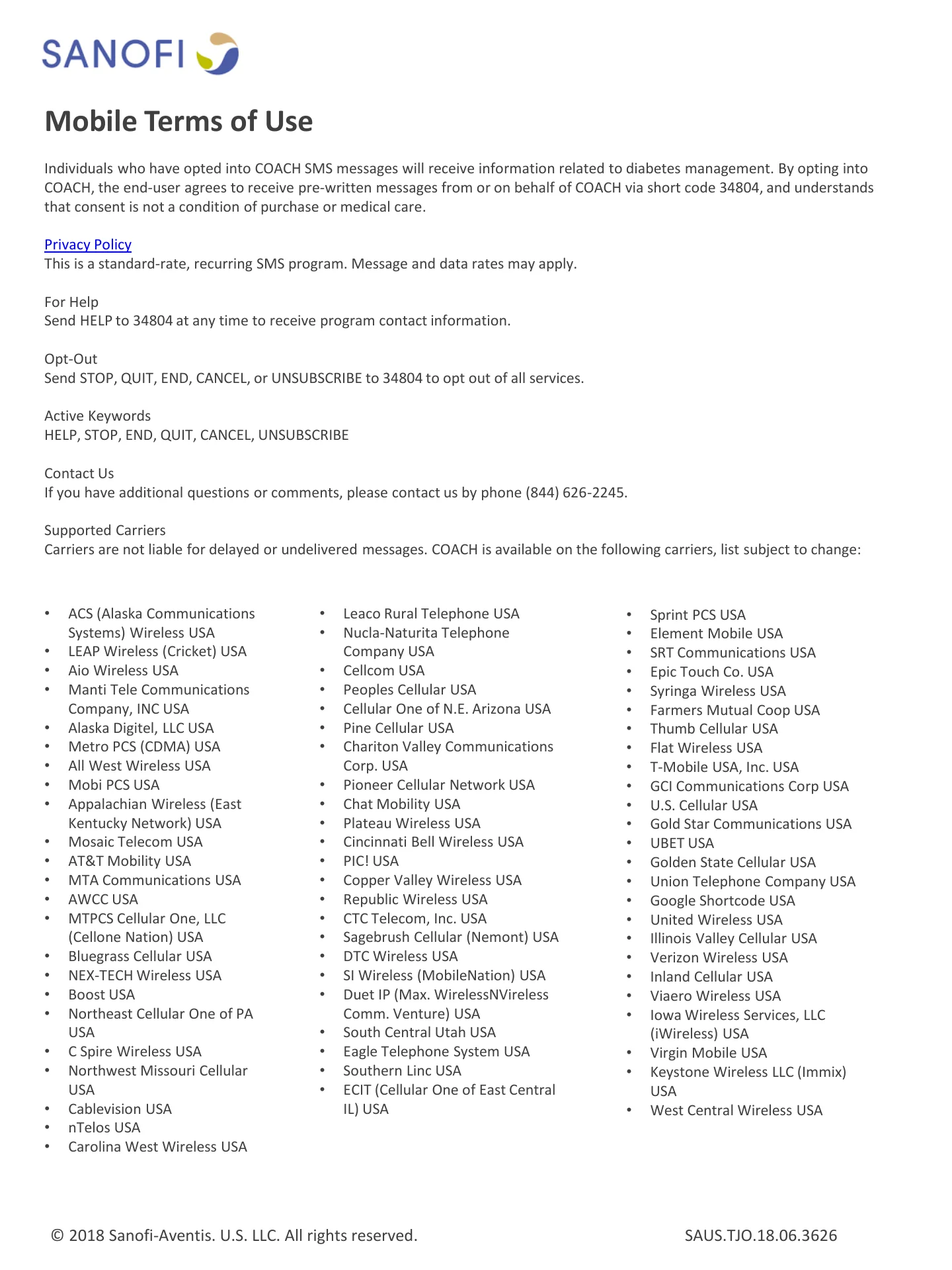
Sanofi documents 34804 for its COACH text program
Sanofi’s mobile terms list 34804 for people who opted into COACH, a diabetes support program. The document describes recurring texts and explains how to stop them.
The terms date to 2018, and Sanofi still hosts them. Its current website also lists separate COACH unsubscribe choices, but neither page can verify a text in your inbox.
An unexpected reminder can be a contact mistake
Someone may have mistyped a number, or an old enrollment may still point to a reassigned number. The text by itself does not establish either explanation.
If you recognize the program, confirm through a contact you already trust.
If the message identifies somebody else, keep their information private and ask the verified sender to correct its records.
Unsubscribing and reporting phishing are different actions
Sanofi lists STOP for its verified program. The FCC says not to reply to suspicious messages, even when they claim a STOP response will end the texts.
- Use Sanofi’s official contact page if you cannot match the thread to an enrollment you recognize.
- Leave an unexpected payment request, login link or code request alone while you verify it.
- Report an apparent phishing text through your carrier rather than using the contact details it supplies.
What a Text From 34804 Can Tell You
A five-digit sender is an SMS short code. That describes the address used to deliver a text, not the purpose or authenticity of every message that appears under it.
The published Sanofi mobile terms name the program, the number and the options for help and opt-out. The image above shows the original terms, not somebody’s received text.
In those terms, opting into COACH allows prewritten diabetes-related messages from or on behalf of the program. SMS participation is voluntary and not a requirement for care or a purchase.
That matters if an unfamiliar message claims your care will stop unless you follow a link immediately.
The published text program does not make accepting its messages a condition of treatment.
The document describes standard messaging rates and warns that the carrier list can change. It does not confirm which carriers are currently available or guarantee a response to an opt-out.
Sanofi lists multiple patient communications programs. An enrollment, opt-out or reminder for one program does not automatically tell you how messages from every Sanofi program are handled.
Use the number to identify the company. Never send a password, medication history or payment information in response to an unverified text.
Checking a real company’s terms does not require opening a text link. Start from a page you found independently or have already used for the service.
Match the program name before relying on the document
Read the complete sender digits in the message details. A similar-looking short code, a longer number or an email address is a different sender identifier.
Next, compare the program named in the text with the name in the terms. A short code lookup for COACH does not validate a message describing an unrelated rewards program.
Finally, check what the message asks you to do. Verify a reminder independently rather than opening its link, especially when it concerns personal information.
A link in a legitimate message might point to a program resource. If you do not recognize it, locate the same resource from the official program website instead.
Sanofi’s opt-out page and its SMS terms address different parts of the problem. The first helps locate communications preferences, while the second describes an SMS command.
Why an Unexpected COACH Reminder Might Reach You
The thread matches a program you remember joining
Start with the enrollment you can identify. A recent signup, a welcome message you already recognized or a description from your healthcare team can help place the reminder in context.
You may also have signed up long ago and forgotten.
Before blocking all short codes on your phone, check whether you still want other legitimate reminders from that number or program.
Keep appointment and program communication choices separate. If you want to stop a text program, ask the program about messaging rather than assuming that you need to change your care.
You recently started using this phone number
A phone number does not always stay assigned to the same person. The FCC describes why it established a reassigned numbers database to help prevent wrong-recipient contact.
Consider when you first began receiving other texts that seem meant for a stranger.
The timing is useful for support but does not prove how COACH obtained your number.
Give Sanofi the number receiving the messages once you reach them through an official channel. You do not need to identify the former owner or ask to see their account.
You have used the same number for years
Reassignment is not the only possible explanation. Someone could have entered a digit incorrectly, or a program could still have an outdated contact number for a person who changed theirs.
Do not assume a named patient gave your number deliberately. When you contact the program, describe what arrived and when, then ask staff to remove or correct the destination.
If you received a verification code you did not request, leave it unused.
You do not need to finish someone else’s enrollment or send them the code to resolve the mistake.
How to Tell a Wrong Number From a Suspicious Request
Read the request before deciding how to handle it. An unwelcome reminder is different from a message asking you to sign in, make a payment or send a one-time code.
A text can accurately name a program while still containing a suspicious request. Compare the action it asks you to take with any enrollment or conversation you initiated.
Do not use spelling, a logo or the sender label as your deciding test. A message can look polished without coming from the organization whose name it displays.
If a message describes an insurance, billing or prescription problem, contact the provider or pharmacy you normally use. Do not send information to an unverified service.
A follow-up caller who asks for numbers from your text is a separate concern. End the call and contact the organization using details you found independently.
The FCC advises against replying to suspicious texts, including messages that invite you to answer with an opt-out command.
An opt-out command is useful only for the legitimate sender that supports it.
What to Do With an Unexpected 34804 Text
-
Keep the text long enough to note the sender, time and exact request. Avoid opening its links, calling any embedded number or sending information while you verify it.
-
If it looks like a familiar reminder, confirm the program through Sanofi’s official contact page. Ask whether the program sent it and how to opt out.
-
If a confirmed COACH thread is yours to stop, open it and check that the recipient is 34804. Send only STOP, the command documented in the program’s terms.
-
If the text asks for money, credentials or a code, do not reply with STOP. Use your messaging app’s spam reporting feature or your carrier’s 7726 reporting option where available.
-
If you shared a password, code or payment information, contact the service involved through its official app or website. Tell them exactly what you shared and when.
If you never enrolled, ask for a targeted correction
Tell the official support team that the number is yours and the program messages appear misdirected. Ask them to find the affected subscription without disclosing any other person’s information.
Ask whether they need only the receiving number and the date of the message. Do not volunteer a diagnosis, date of birth or payment information to establish a wrong number.
You can identify the date, short code and type of reminder without sending a full screenshot. If a screenshot is needed, keep the original private and redact unrelated details first.
Sanofi’s unsubscribe listing presents separate COACH entries for several products. Do not choose a product at random just because it appears in someone else’s message.
If you cannot tell which entry applies, start with official support. A narrow correction is better than removing communications you actually want from a different program.
When you speak with support, ask whether they can suppress delivery without changing an enrollment you still need. Record the name of the program they identify.
If a representative cannot locate the number, that does not tell you who sent the message. Ask whether the organization has a channel for reviewing suspected impersonation.
Keep the opt-out request separate from any carrier billing question. If charges appear on your phone bill, ask the carrier to explain them using the statement entry.
If texts continue, distinguish blocking from an opt-out
Blocking a sender on your phone can hide incoming messages. It does not necessarily remove your number from the organization’s records or stop attempts to deliver future messages.
If you receive a confirmation after a verified opt-out, keep it. If reminders continue, note when they arrived and take that record back to official support.
When several household members share a phone or number, check whether someone actually wants those reminders before opting out. Remove only the communication that is unwanted or misdirected.
If the phone is your only reminder channel and the texts really are yours, arrange another reminder before ending them. Leaving a messaging program does not change your care instructions.
Check whether the later text really comes from the same number and concerns the same program.
An opt-out for COACH does not tell you why a new sender is contacting you.
The terms do not specify a removal time you can apply to every case.
Avoid relying on a promise that an unwanted history or message will disappear within a fixed period.
If the text contains somebody else’s health details
Do not post the message publicly to ask whose it is. Names, medication references and contact information can expose someone even when each detail looks ordinary on its own.
Tell the verified program that its communication reached the wrong number and ask how to report misdirected information. Keep any screenshot private while you wait for instructions.
Do not use the message to infer whether you or someone you know has a diagnosis. It is a communication that needs verification, not a clinical record.
Report a message directing you to an unfamiliar payment or login page. In the United States, the FCC handles complaints about unwanted texts.
If you already interacted with the message
Opening a link and entering information are different events. Write down what you did so the provider can distinguish a page visit from a password or payment exposure.
If you entered an account password, open that account through the app or address you already trust. Change the password there, then inspect sign-ins and security changes.
If you passed along a verification code, contact the service named in that code. Tell support which action the code purported to approve, rather than assuming it concerned COACH.
If you provided card details or paid, contact your issuer using its app or the number on your card. Keep the transaction record and ask what protections apply.
For carrier reporting, follow the instructions for forwarding the message and identifying its sender. Keep the submission or complaint number if the provider gives you one.
An FCC report can inform the agency’s enforcement work, but the agency says it does not resolve individual unwanted-text complaints. Contact your carrier if the texts continue.
Frequently Asked Questions
Who does Sanofi say uses short code 34804?
Its mobile terms list that number for COACH, a diabetes support SMS program. They do not authenticate any specific message or prove that the recipient enrolled.
Is every unexpected text from 34804 a scam?
No conclusion follows from the number alone. Verify an ordinary reminder through Sanofi, and avoid interacting with any unverified text that asks for payment, credentials or a code.
Should I text STOP if I did not sign up?
Use STOP for the confirmed program if you want the messages to end. If the thread looks like phishing or you cannot verify it, contact Sanofi independently instead.
Does a wrong-number text prove someone used my identity?
A misdirected text does not establish that a person opened an account in your name. A mistyped or reassigned number can also send messages to the wrong recipient.
Can I block the sender instead of contacting Sanofi?
You can block it to stop seeing the thread on your phone. Contact the verified program if you need the underlying phone number corrected or removed.
What if someone calls asking me to read out a code?
Keep the code private and end the call. Contact the organization through an independent support route if you believe someone tried to use your number.
The Bottom Line
Verify the program before replying to an unexpected 34804 text. Sanofi documents the code for COACH, but the number alone does not make the message yours or its request safe.
Use the published opt-out only for a verified reminder you want to stop. Report suspicious requests and contact the affected service directly if you already shared information.

Join the discussion
0 commentsShare your experience or ask a question about this article.
Community experiences
Did this happen to you?
Your experience could help someone recognize the same scam. Submit a private report for our team to review.
I experienced this tooReports are reviewed before publication. Sharing publicly is always your choice.
Discussion
Start the conversation
Have a question or something useful to share? Add the first comment.