

A wave of scam text messages is impersonating the 36th District Court in Wayne County and claiming recipients have a toll violation tied to a “Notice of Civil Infraction Hearing.” The messages pressure people to scan a QR code or visit a payment page to avoid penalties.
These notices are not legitimate. The QR code typically redirects to a fraudulent site that asks for a small payment, then captures credit card and personal information for theft.
Scam Overview
The 36th District Court County of Wayne toll violation scam texts are part of a larger wave of toll-related “smishing” attacks, scams delivered through SMS that impersonate official agencies to steal money and data.
What makes this version stand out is the use of court language and a hearing notice theme. Instead of a simple “you owe tolls” message, the scam adds a more intimidating frame:
- A court-styled notice titled “Notice of Civil Infraction Hearing”
- Allegations of a toll violation
- Threats about failure to appear, added fines, and enforcement action
- A QR code that routes victims to a payment portal
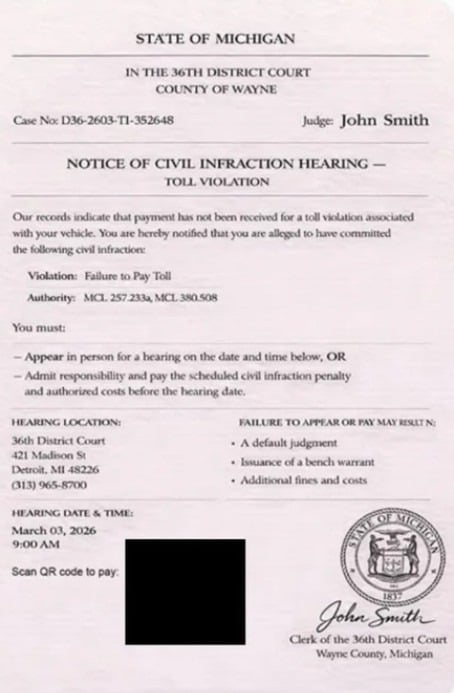
Michigan’s Attorney General has described this as a fraudulent text message with an image claiming to be a “Notice of Civil Infraction Hearing” about a toll violation from the 36th District Court in Wayne County.
Why scammers chose the 36th District Court name
If you live in Michigan, “36th District Court” and “Wayne County” sound real because they are real institutions. The scammers borrow legitimacy from a name people recognize, especially residents in and around Detroit.
If you do not live in Michigan, it can still sound plausible because toll scams are designed to hit huge lists of phone numbers. Scammers only need a small percentage of people to react.
This is a volume game.
The QR code trick: it feels official, so people comply
Many people are skeptical of links in text messages now. Scammers know that.
A QR code changes the psychology. It feels like something from a mailed notice, a parking ticket, or a municipal invoice. It feels procedural.
But scanning a QR code is simply opening a website. If the code points to a scam domain, you are walking directly into the attacker’s funnel.
The FCC warns consumers to avoid toll road scam texts by not clicking links, not responding, and verifying the claim through official channels you locate independently.
The small-dollar bait: why the fee looks “easy” to pay
In many versions of this scam, the payment page shows a small amount due, sometimes under $10.
This is not accidental.
A large fine triggers verification. A small amount triggers impatience.
Scammers want you thinking:
- “Maybe I forgot.”
- “It is not worth the hassle.”
- “I will just pay and move on.”
The FTC has repeatedly warned that toll scam texts push people to click and pay, and that paying can hand scammers your credit card number and personal details.
The real objective: card data and identity data
This scam is not primarily about the money you “owe” for tolls. The “amount due” is a conversion tool.
The real objective is to capture:
Credit card data
- Card number
- Expiration date
- CVV
- Billing ZIP code
- Billing address
Personal identity data
- Full name
- Phone number
- Email address
- Home address
- Sometimes license or vehicle-related details
Once scammers have your card details, they can attempt unauthorized charges, sell the card on criminal marketplaces, or run small test charges that turn into larger fraud later.
Once they have your personal information, they can target you with follow-up scams, attempt account takeovers, or use the data in identity theft attempts.
Why people fall for it, even smart people
This scam is engineered around predictable human reactions.
- Authority pressure
A court name signals consequences. - Time pressure
A deadline forces quick action. - Small payment pressure
A tiny amount lowers skepticism. - Cognitive overload
Legal language and official formatting make people stop thinking critically and start complying.
You are not “gullible” if you react. You are human.
The scam is built to catch people when they are busy, stressed, or distracted.
What Michigan authorities have said about this scam
Michigan’s Attorney General has warned residents about this specific scam impersonating the 36th District Court.
Reporting has also noted that these scam messages include a QR code and can appear to be associated with official Michigan departments, even though they are not.
That combination, court branding plus QR payment, is exactly what makes this wave dangerous.
It is not just Michigan, but Michigan is a current hotspot
Toll road scam texts are a nationwide problem. The FTC has described scammers pretending to be tolling agencies “from coast to coast.”
The 36th District Court variant is simply a localized wrapper around a broader pattern.
That matters because it explains why the same scam can show up with different labels:
- A Michigan court today
- A California toll agency tomorrow
- A generic “DMV citation” page the next day
The structure stays the same. The branding changes.
The most common red flags in the 36th District Court version
If you are trying to quickly spot this scam, look for these signals.
- You receive an unsolicited text about a toll violation or civil infraction hearing.
- The message pushes you to scan a QR code or pay through a link.
- The notice uses intimidating legal language to force urgency.
- The payment page shows an oddly small amount.
- The domain does not match a verified, official agency site.
- The message includes generic names, formatting inconsistencies, or weird “case number” patterns.
Even one of these is enough to pause.
Several together is a strong indicator you are dealing with a scam.
How The Scam Works
Below is the typical end-to-end flow of the Wayne County 36th District Court toll violation scam texts, with the key manipulation points called out in plain language.
Step 1: Scammers blast out text messages at scale
These campaigns are not targeted like a private investigator. They are broadcast operations.
Scammers use large lists of phone numbers obtained through:
- Data broker lists
- Leaked databases from unrelated breaches
- Randomized SMS sending to number ranges
- Old scam lead lists traded among criminal groups
This is why people receive the message even if they:
- Never drove on a toll road
- Do not live near Detroit
- Do not have a FasTrak, E-ZPass, or toll account
- Were not in Michigan at all
The scam is not proof of wrongdoing. It is proof your number was in a list.
Here is what the scam texts say:
STATE OF MICHIGAN
IN THE 36TH DISTRICT COURT
COUNTY OF WAYNECase No: D36-2603-T1-352648 Judge: John Smith
NOTICE OF CIVIL INFRACTION HEARING
TOLL VIOLATIONOur records indicate that payment has not been received for a toll violation associated with your vehicle. You are hereby notified that you are alleged to have committed the following civil infraction:
Violation: Failure to Pay Toll
Authority: MCL 257.233a, MCL 380.508You must:
- Appear in person for a hearing on the date and time below, OR
- Admit responsibility and pay the scheduled civil infraction penalty and authorized costs before the hearing date.
HEARING LOCATION:
36th District Court
421 Madison St
Detroit, MI 48226
(313) 965-8700FAILURE TO APPEAR OR PAY MAY RESULT IN:
- A default judgment
- Issuance of a bench warrant
- Additional fines and costs
HEARING DATE & TIME:
March 03, 2026
9:00 AMScan QR code to pay:
John Smith
Clerk of the 36th District Court
Wayne County, Michigan
Step 2: The message introduces a legal threat
The scam’s first job is to elevate your emotional state.
Instead of “you owe a toll,” it goes bigger:
- A “Notice of Civil Infraction Hearing”
- A court name
- A hearing date
- A statement that you must appear or pay
This framing triggers fear because it suggests a legal process is already underway.
It is designed to make verification feel “too slow.”
Step 3: The scam creates urgency with deadlines and consequences
Most versions include a short timeline.
The message suggests that if you fail to respond, you may face outcomes like:
- Added fines and fees
- A default judgment
- Enforcement action tied to your vehicle registration
These consequences are used as psychological leverage.
They are not proof that a legitimate enforcement action exists.
The FCC’s guidance on toll scam texts emphasizes not engaging, not clicking links, and verifying directly with official sources. (fcc.gov)
Step 4: The QR code is presented as the “official” payment method
Scammers know a raw link looks suspicious.
A QR code feels like it came from paperwork, not a spammer.
So the message may include:
- An image of a notice with a QR code
- A separate QR code attached as an image
- A link that says “scan to pay” or “pay now”
At this point, many victims move quickly, because the scam has created a sense of “act now or suffer consequences.”
Step 5: Scanning routes you to a fake payment portal
Once scanned, the QR code redirects to a web page that resembles an official payment system.
This page is usually polished enough to pass a quick glance:
- Government-like colors and layout
- “Citation” or “toll violation” labels
- A structured form with “citation number” and “violation details”
- A “Continue” or “Pay” button
Sometimes the page is inconsistent. For example:
- The initial message claims a toll violation.
- The portal calls it a “citation” or even a “parking citation.”
That mismatch happens because scammers reuse templates.
They rely on your stress to stop you from noticing.
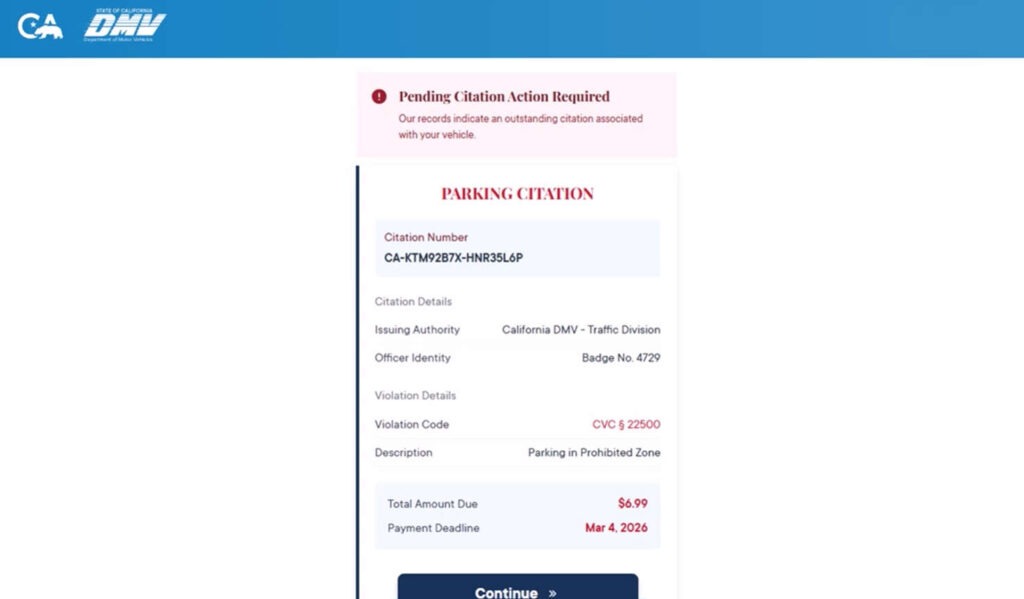
Here is what is says on the scam sites:
Pending Citation Action Required
Our records indicate an outstanding citation associated with your vehicle.PARKING CITATION
Citation Number
CA-KTM92B7X-HNR35L6PCitation Details
Issuing Authority: California DMV – Traffic DivisionOfficer Identity
Badge No. 4729Violation Details
Violation Code: CVC § 22500
Description: Parking in Prohibited ZoneTotal Amount Due: $6.99
Payment Deadline: Mar 4, 2026Continue »
Step 6: The page shows a small amount due
This is the conversion step.
You might see a low amount, such as:
- Under $10
- Under $20
The scam aims to make it feel like paying is the rational choice.
The FTC has warned that toll scam texts lead to phishing attacks where scammers try to take your personal information and credit card number. (Consumer Advice)
Step 7: The portal collects personal information first
Many scam portals ask for identity verification.
Common fields include:
- Full name
- Address
- ZIP code
- Phone number
- Sometimes vehicle information
This does two things:
- Makes the portal feel legitimate
- Collects identity data that can be used later
Even if you stop before payment, you may have already given away valuable information.
Step 8: The portal collects your credit card details
This is the point of no return.
Victims who proceed are asked for:
- Card number
- Expiration date
- CVV
- Billing address
The scammers capture the data.
The page may show a fake confirmation message, or it may show an error and ask you to try again.
If it errors, it can push victims to enter a second card, which increases the value of the scam.
Step 9: Fraud begins, sometimes immediately, sometimes later
Once card data is captured, scammers can:
- Run test charges to confirm the card works
- Attempt larger purchases later
- Sell the card data to other criminals
- Use your personal info for follow-up fraud
A common mistake victims make is assuming “it was only $7” so the damage is limited.
The real damage is not the $7. It is what happens after your card details are compromised.
Step 10: Follow-up scams target you again
If scammers believe you are responsive, you may receive:
- More toll notices from different “agencies”
- Fake bank fraud alerts
- “Court clerk” calls
- Refund scam attempts
- Collections-style threats
This is why quick action after exposure matters. It reduces the value of the stolen data.
How to spot the scam fast
If you want a practical filter you can apply in seconds, use this checklist.
Treat the message as suspicious if it includes any of the following
- A court name and a demand to pay through a QR code
- A “hearing notice” delivered by SMS
- Threats about immediate enforcement
- A shortened link or unknown domain
- A small “amount due” that feels designed to be painless
Assume it is a scam if you did not initiate the conversation
If you did not recently:
- Receive a mailed toll invoice
- Log into an official toll account and see a balance
- Receive a verified notice through an official portal
Then a random text demanding payment is not a normal workflow.
It is a social engineering tactic.
What To Do If You Have Fallen Victim to This Scam
If you scanned the QR code, entered information, or paid, focus on damage control. Fast action can prevent bigger losses.
1) If you entered credit card details, call your card issuer immediately
Use the number on the back of your card.
Explain clearly:
- You entered your card details on a fraudulent payment site linked from a text message.
- You want the card blocked and replaced.
- You want recent transactions reviewed for fraud.
Ask them to:
- Cancel the card number
- Issue a replacement card
- Block card-not-present transactions if possible
- Flag your account for additional verification
2) Review your transactions and dispute anything you do not recognize
Do not wait.
Look for:
- Small test charges
- Online purchases you did not make
- Subscription charges that appear after the incident
Dispute unauthorized transactions through your issuer.
3) Turn on real-time transaction alerts
Enable alerts for:
- Any purchase
- Online purchases
- Transactions over $1
- International transactions, if your bank supports it
This helps you catch fraud quickly, especially in the first 48 hours.
4) If you entered personal details, take identity protection steps
If you provided address, email, or other personal data:
- Monitor your credit reports
- Consider a credit freeze if you believe high-risk data was shared
- Watch for new account openings or credit inquiries you did not initiate
5) Change passwords if you shared any account credentials
Many versions do not request passwords.
But if you entered an email password or reused a password anywhere during the process:
- Change it immediately
- Enable 2-factor authentication
- Do not reuse that password across services
6) Save evidence before the scam site disappears
Take screenshots of:
- The text message
- The QR code
- The website pages
- Any payment confirmation or error screen
- The domain name
Scam domains rotate quickly.
Screenshots help if you need to dispute charges or file reports.
7) Report the scam text and the site
Reporting helps disrupt active waves.
Recommended actions:
- Mark the text as junk or spam in your messaging app
- Forward the text to 7726 (SPAM) if your carrier supports it
- Report the incident to the FTC through its official reporting channel
- If money was lost or sensitive data was shared, consider filing a report with the FBI’s IC3 portal
The FTC and FCC both advise not clicking links in these messages and verifying only through official channels. (fcc.gov)
8) Do not engage with follow-up messages
Scammers often escalate after initial contact.
If you get a call claiming to be your bank or a court, do not continue the conversation. Hang up and call the official number you trust, such as the one on the back of your card or the official agency website.
9) Verify your toll status the safe way
If you are still concerned you might owe tolls, verify without using the scam message.
- Find the official toll agency website yourself
- Use official contact info from that site
- Log into your legitimate account through a trusted entry point
Do not use:
- The QR code from the message
- The phone number on the notice image
- Any link sent through SMS
10) If you only scanned but did not enter information
If you scanned the QR code but did not submit any details:
- Close the page
- Do not return to it
- Monitor your messages for follow-up attempts
Your risk is lower, but scammers may still mark your number as “responsive.”
The Bottom Line
The 36th District Court County of Wayne toll violation scam texts are a high-pressure phishing campaign that uses court branding and a “civil infraction hearing” theme to force quick compliance.
The QR code is not a convenience feature. It is the delivery mechanism for a fake payment portal built to steal credit card details and personal information.
Michigan’s Attorney General has warned residents about this specific scam impersonating the 36th District Court.
If you receive one of these texts, do not scan, do not click, and do not pay. Verify any real toll issues only through official channels you access independently. If you already entered payment details, contact your card issuer immediately and treat the card as compromised.
FAQ
What is the 36th District Court Wayne County toll violation text scam?
It is a phishing scam where criminals send text messages that impersonate the 36th District Court in Wayne County and claim you have a toll violation tied to a “civil infraction hearing.” The message pushes a QR code or link to a fake payment portal designed to steal your credit card and personal information.
Are these toll violation texts actually from the 36th District Court?
No. The court name is being used to create credibility and urgency. Michigan’s Attorney General has warned about this specific scam impersonating the 36th District Court.
Why does the message mention a “Notice of Civil Infraction Hearing”?
Because “hearing” language triggers fear and compliance. Scammers want you thinking legal action is already in motion, so you pay quickly instead of verifying.
Why does the scam include a QR code?
QR codes feel official and convenient, so people are more likely to scan than click a suspicious link. Scanning still takes you to a website, and in this scam it routes you to a fraudulent payment page controlled by scammers.
The payment page shows a small amount due. Why?
Small amounts reduce skepticism. A low fee feels easier to pay “just in case,” and that fast payment behavior is what scammers rely on. The real objective is collecting your card details and identity information.
What information are scammers trying to steal?
Typically:
- Credit card number, expiration date, CVV
- Billing address and ZIP code
- Full name, phone number, email address
- Sometimes vehicle or plate details
That data can be used for unauthorized charges, sold to other criminals, or used in follow-up fraud.
I scanned the QR code but did not enter any information. What should I do?
Close the page and do not return to it. Your risk is much lower if you did not submit data, but watch for follow-up scam texts or calls since scammers may mark your number as responsive.
I entered my credit card details. What should I do right now?
- Call your card issuer using the number on the back of your card
- Report that you entered details on a fraudulent payment site
- Freeze/cancel the card and request a replacement number
- Review transactions and dispute any unauthorized charges
- Turn on real-time transaction alerts
Should I replace my card even if I do not see fraud yet?
Yes. Card details can be used later or sold. Replacing the card proactively is the safest move after a phishing incident.
Can scammers actually place a hold on my registration or suspend my license?
Not through a scam website. Those threats are pressure tactics. Only legitimate agencies following real administrative and legal procedures can apply enforcement actions.
How can I safely verify whether I owe anything?
Do not use the QR code, link, or phone number from the text. Instead, look up official toll agency contact info independently and verify through official portals you access directly (typed URL or official app).
How do I report this scam?
- Mark the text as spam/junk in your messaging app
- Forward it to 7726 (SPAM) if supported by your carrier
- If you lost money or shared sensitive info, file a report through official consumer fraud reporting channels and keep screenshots as evidence

Join the discussion
0 commentsShare your experience or ask a question about this article.
Discussion
Start the conversation
Have a question or something useful to share? Add the first comment.