

It starts like a lot of modern scams do: a single text message that feels urgent, official, and time-sensitive.
You are told you have a toll violation in California. The message hints at court action, rising penalties, and a deadline that is close enough to trigger panic. Then it pushes you toward one fast action: scan a QR code or tap a payment link.
What makes this scam especially effective is how “normal” it looks at a glance. The notice uses court-style language, government branding, and small-dollar amounts that feel easier to pay than to question.
This article breaks down how the California “Notice of Civil Infraction Hearing” toll scam works, why it is convincing, and exactly what to do if you already interacted with it.
Scam Overview
The State of California “Notice of Civil Infraction Hearing” toll scam is a text-based phishing campaign that impersonates courts, toll agencies, and sometimes DMV-style payment portals.
Its goal is not to collect a real toll. Its goal is to steal credit card details and personal information through a fake payment page.
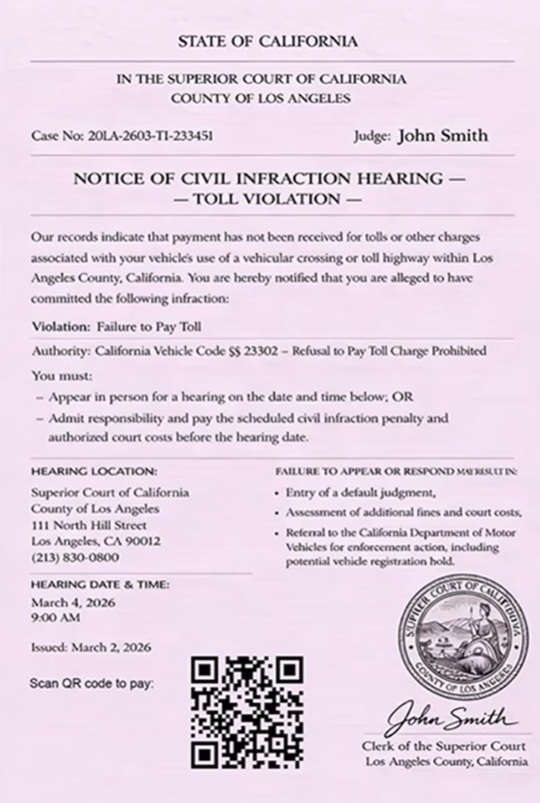
Scammers typically send a text message claiming the recipient has an unpaid toll violation associated with their vehicle. In many versions, the text is paired with an image designed to look like an official court notice titled “Notice of Civil Infraction Hearing” with “Toll Violation” language.
The scam has been widely reported in California alongside other toll-related phishing texts, often linked to FasTrak references, “The Toll Roads” language, or DMV-style threats. California agencies have publicly warned consumers about toll payment phishing texts and fake payment links.
What the scam looks like in California
In the California versions, the “notice” often uses official-sounding formatting:
- “STATE OF CALIFORNIA” header styling
- Court references that look realistic, such as “Superior Court of California, County of Los Angeles”
- A case number and a judge name
- A short section describing the alleged violation, such as “Failure to Pay Toll”
- A warning about consequences if you do not respond
Then it presents a fork in the road that is designed to scare you into the easiest option.
It claims you must either:
- Appear in person for a hearing, or
- Admit responsibility and pay a penalty before the hearing date
This framing is psychological pressure, not a legitimate legal process delivered by text message.
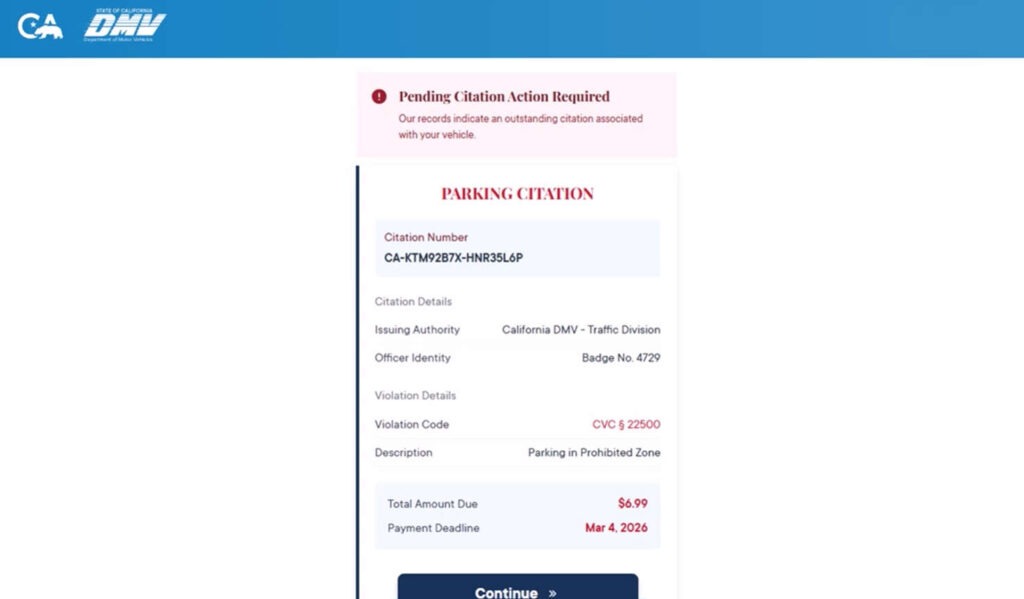
It is also common to see generic names, repeated templates, or inconsistencies across the “notice” and the payment portal. For example, the notice may talk about a toll violation, but the payment page may label it as a “parking citation” with a small amount due.
Those mismatches are a major clue you are looking at a template-based scam.
Why the QR code is the centerpiece
Scammers increasingly rely on QR codes because they bypass the instincts people have developed around suspicious links.
Many people have learned “do not click weird links in texts.” A QR code feels different. It feels like something you would see on a legitimate invoice, court paperwork, or municipal notice.
But scanning a QR code is just another way to open a website. If the QR code points to a scam domain, it takes you directly to the attacker’s page.
Federal consumer agencies have issued guidance warning about toll road payment scam texts and how they try to push victims into clicking or scanning.
The small amount due is not a comfort, it is bait
One reason this scam converts so well is the amount shown on the fake payment page.
Instead of demanding $250 or $500, many versions display a tiny “amount due,” sometimes as low as $6.99. That number is carefully chosen.
A small amount triggers thoughts like:
- “Maybe I forgot.”
- “It is not worth the hassle to fight it.”
- “I will just pay and move on.”
That is exactly what scammers want.
The payment is not the product. Your card details are the product.
Once victims enter payment information, scammers can attempt fraudulent charges, sell the card data, or use the personal information for identity theft and future scams.
California’s DMV has specifically warned about fraudulent text scams that look like DMV notices and lead to fake payment pages designed to steal financial information.
Why the scam uses California branding
California is a high-value target for toll themed scams for a few practical reasons:
- FasTrak is widely recognized across the state.
- Many drivers use express lanes, bridges, and toll roads.
- A toll-related message sounds plausible, even to someone who rarely drives.
- People may assume a toll violation could happen automatically, without a face-to-face interaction.
California Attorney General Rob Bonta’s office has warned about a surge in text-based toll scams that claim to be from FasTrak and direct victims to fraudulent sites.
The Toll Roads, which operates toll roads in Orange County through the Transportation Corridor Agencies, has also published advisories about nationwide text phishing scams and urges customers to avoid those fraudulent texts and verify notifications through official channels.
Los Angeles County and court-adjacent impersonation adds an extra layer of fear, because people are naturally more anxious when a message includes court language and a “hearing” date. The Superior Court of Los Angeles County has published a scam alert stating that spam texts claiming toll violations and requesting payment are not from the court and that the court does not request payment by text.
What scammers are really collecting
The fake portals are built to harvest two categories of data.
Payment data
- Card number
- Expiration date
- CVV
- Billing ZIP code
- Billing address
Personal identity data
- Full name
- Phone number
- Email address
- Home address
- Sometimes plate number, date of birth, or other “verification” fields
Even if a site only asks for your card details, it often captures additional information automatically, such as device fingerprinting, IP address, browser identifiers, and behavioral signals. That extra data can help scammers target you again.
Why these toll scams keep spreading
Toll smishing scams are efficient.
They are cheap to send at scale, easy to localize by swapping state and city names, and profitable even if only a small percentage of recipients fall for them. This pattern has been recognized nationwide, with consumer protection agencies warning that scammers impersonate tolling agencies “from coast to coast.”
And because scammers can register new domains quickly, shutting down one wave does not stop the next one.
They simply change:
- The sending number
- The wording of the text
- The “court” or “agency” name
- The payment domain behind the QR code
The template stays the same.
The California angle: toll notice plus “court hearing” pressure
Most toll scams stick to a simple story: unpaid toll, pay now, avoid late fee.
The “Notice of Civil Infraction Hearing” version adds an extra pressure layer: court language.
That change matters.
A toll invoice can feel negotiable. A “hearing notice” feels like a legal emergency. Scammers use that emotional spike to stop you from verifying the claim through official sources.
Recent reporting has described how these scam texts threaten legal action and push users to click phishing links, even targeting people who do not use FasTrak at all.
That broad targeting is important to understand. Receiving the text does not mean you did anything wrong. It often means your number was simply part of a mass list.
How The Scam Works
This scam has a predictable funnel. Once you know the steps, it becomes much easier to recognize, even when the wording changes.
Step 1: You get an unsolicited text about a toll violation
The first message is designed to feel official and urgent.
It often includes:
- “Notice of Civil Infraction Hearing”
- “Toll Violation”
- “Failure to Pay Toll”
- A deadline date
- A warning about penalties, late fees, or legal action
The text may include a QR code image, a link, or both.
Consumer agencies have warned that these unpaid toll texts are a common smishing pattern and that the safest move is to avoid clicking and verify directly with official sources.
Here is what it says:
“Notice of Civil Infraction Hearing” document text (California version)
STATE OF CALIFORNIA
IN THE SUPERIOR COURT OF CALIFORNIA
COUNTY OF LOS ANGELESCase No: 20LA-2603-T1-233451 Judge: John Smith
NOTICE OF CIVIL INFRACTION HEARING
TOLL VIOLATIONOur records indicate that payment has not been received for tolls or other charges associated with your vehicle’s use of a vehicular crossing or toll highway within Los Angeles County, California. You are hereby notified that you are alleged to have committed the following infraction:
Violation: Failure to Pay Toll
Authority: California Vehicle Code §§ 23302 – Refusal to Pay Toll Charge Prohibited
You must:
- Appear in person for a hearing on the date and time below, OR
- Admit responsibility and pay the scheduled civil infraction penalty and authorized court costs before the hearing date.
HEARING LOCATION:
Superior Court of California
County of Los Angeles
111 North Hill Street
Los Angeles, CA 90012
(213) 830-0800FAILURE TO APPEAR OR RESPOND MAY RESULT IN:
- Entry of a default judgment,
- Assessment of additional fines and court costs,
- Referral to the California Department of Motor Vehicles for enforcement action, including potential vehicle registration hold.
HEARING DATE & TIME:
March 4, 2026
9:00 AMIssued: March 2, 2026
Scan QR code to pay:
Clerk of the Superior Court
Los Angeles County, California
Step 2: The message creates a time crunch and a fear outcome
The scam rarely says “pay whenever you want.”
It uses pressure language such as:
- “Urgent action required”
- “Final notice”
- “Avoid additional fines”
- “Prevent legal action”
- “Registration hold”
That combination is deliberate. It pushes you into acting first and verifying later.
California’s Attorney General has described how scammers use urgent language and threats of late fees to pressure people into clicking.
Step 3: The scam uses court-style imagery to boost credibility
In the California “Notice of Civil Infraction Hearing” variant, the text is often paired with an image that resembles a court notice.
Common design choices include:
- A large state header
- Court name and county
- A case number line
- A judge name field
- A hearing location address
- A hearing date and time
- A QR code labeled “scan to pay”
These elements are meant to bypass your skepticism.
A lot of people do not know what a legitimate court notice should look like, so they rely on “vibes.” The scammers make the vibes feel official.
Step 4: You scan the QR code and land on a fake payment portal
This is the pivot point.
The QR code takes you to a website the scammers control.
Depending on the wave, that site may look like:
- A toll payment portal
- A court payment page
- A DMV-style citation system
- A generic “citation payment” flow
In California-themed versions, some pages use DMV-like headers, “Pending Citation Action Required” language, and a neat citation layout. California DMV has warned that scam texts can be made to look like DMV notices and direct victims to fake payment pages.
Step 5: The portal shows a small amount due and a deadline
This step is pure conversion optimization.
A typical page includes:
- “Total Amount Due: $6.99” or similarly small charge
- A deadline date highlighted in red
- A prominent “Continue” or “Pay Now” button
- A list of “payment methods” to look legitimate
- A warning box about consequences if you do not pay
The small amount reduces friction.
The scary warning increases urgency.
Together, they move people toward paying.
Here is what it says:
Pending Citation Action Required
Our records indicate an outstanding citation associated with your vehicle.PARKING CITATION
Citation Number
CA-KTM92B7X-HNR35L6PCitation Details
Issuing Authority: California DMV – Traffic DivisionOfficer Identity
Badge No. 4729Violation Details
Violation Code: CVC § 22500
Description: Parking in Prohibited ZoneTotal Amount Due: $6.99
Payment Deadline: Mar 4, 2026Payment Methods
- Online Payment Available
- Credit/Debit Card: Visa, MasterCard, AMEX, Discover
- By Mail: Check or Money Order
- In Person: Authorized Office
Appeal Information
Right to Contest: To appeal this citation, a formal Request for Hearing must be filed within 21 days of the issue date. You must provide the Citation Number and relevant evidence (e.g., photos, valid permits). Failure to respond will result in the forfeiture of the right to appeal.Warning
Failure to pay or appeal by the deadline may result in the imposition of late fees, a hold on vehicle registration (Registration Lien), or suspension of driving privileges under State Law.
Step 6: The site collects personal details “to confirm your citation”
Before payment, some portals ask for “verification.”
That might include:
- Name and address
- Email and phone
- Plate number or vehicle details
- ZIP code confirmation
This is not harmless form-filling. It is data collection.
If the scammers get both your identity information and your payment details, the fraud risk expands beyond a single card.
Step 7: You enter card details and the scammers capture everything
When you submit payment details, you hand over:
- Card number
- Expiration date
- CVV
- Billing address
Even if the site claims it is processing a one-time charge, scammers can keep the data.
They can also run small “test charges” to see if the card works, then attempt larger charges later.
Step 8: The scam may show a fake confirmation or a fake error
Scammers commonly use one of two endings:
Fake success
- A confirmation screen that makes you feel done
- Possibly a “receipt” page
- Sometimes an email confirmation prompt
Fake failure
- “Payment failed, try again”
- Pushes you to enter a second card
- Or re-enter the same card, which confirms the details
Both outcomes help the scammer.
Fake success prevents you from calling your bank quickly. Fake failure increases the odds you provide more cards.
Step 9: Follow-up scams and escalation attempts begin
If scammers have your information, they may target you again with:
- More toll notices
- Fake bank fraud alerts
- “Court clerk” calls
- “Collections” threats
- Refund scams pretending to reverse the charge
This is how victims can get pulled into multiple losses from one initial interaction.
What To Do If You Have Fallen Victim to This Scam
If you interacted with the scam, do not blame yourself. The design is meant to catch people off guard.
What matters now is reducing damage quickly and documenting what happened.
1) If you entered credit card details, contact your card issuer immediately
Call the number on the back of your card.
Tell them:
- You entered your card details on a fraudulent toll payment site
- You want to block the card and issue a replacement
- You want to review recent transactions for fraud
Ask about:
- A new card number
- Blocking card-not-present transactions temporarily
- Any pending authorizations you should dispute
2) Turn on transaction alerts right now
Enable alerts for:
- Any purchase
- Online purchases
- Card-not-present transactions
- Transactions over $1
This helps you catch test charges quickly.
3) Dispute unauthorized charges fast
If you see anything you do not recognize:
- Dispute it through your issuer
- Document the dispute reference number
- Save screenshots of the scam page and any confirmation screen
4) If you gave personal info, consider a credit freeze
If you entered more than card details, especially address and date of birth, consider freezing your credit.
A freeze can prevent new accounts from being opened in your name.
At minimum, monitor your credit reports and set fraud alerts.
5) Change passwords if you reused any credentials
Most of these scams do not ask for passwords.
But if you entered an email password anywhere, or if the scam page redirected you into any “account login,” assume compromise.
- Change the password immediately
- Enable 2-factor authentication
- Do not reuse that password elsewhere
6) Report the scam text using official reporting channels
Reporting helps carriers and agencies track active waves.
Common reporting steps include:
- Forward the text to 7726 (SPAM) if your carrier supports it
- Report as junk or spam inside your messaging app
- File a report with the FTC at its fraud reporting portal (search for the official FTC reporting page)
- If you lost money or shared sensitive info, file a report with the FBI’s IC3 portal (search for the official IC3 site)
Federal consumer guidance on toll scam texts encourages reporting and deleting these messages rather than engaging with them. (Federal Communications Commission)
7) Save evidence before the site disappears
Take screenshots of:
- The text message
- The QR code
- The website pages
- Any “receipt” or error messages
- The domain name shown in the browser
Scam domains often go offline quickly once reported.
8) Watch for follow-up contact pretending to “help”
Be cautious if you receive:
- Calls claiming to be your bank
- Messages claiming to be a court clerk
- Refund offers
- “Investigation” texts
If you are unsure, hang up and call the official number from your card issuer’s website or from the back of your card.
9) If you only scanned the QR code, but did not enter info
If you did not submit any data, the risk is much lower.
Still, do this:
- Close the page
- Do not return to the site
- Monitor your messages for follow-up scams
- Consider clearing your browser history and website data on mobile, especially if you interacted with popups
10) Verify real toll status through official channels only
If you want peace of mind, verify independently:
- Log into your official toll account by typing the known official site yourself
- Use official phone numbers from agency websites, not numbers on the scam notice
- If the notice claims to be from a court, verify using court contact details found through the court’s official site
For Los Angeles, the Superior Court has publicly stated that toll violation payment texts are not from the court, which can help you quickly rule out legitimacy.
The Bottom Line
The State of California “Notice of Civil Infraction Hearing” toll scam texts are designed to trigger fast compliance through fear and urgency.
The QR code is the delivery mechanism. The small amount due, such as $6.99, is the bait. The fake portal is the trap that collects your card details and personal information.
If you receive one of these messages, do not scan the code and do not pay through the link. Verify toll issues only through official agencies you access independently. And if you already entered your card details, treat it as compromised and contact your card issuer immediately.
FAQ
What is the “Notice of Civil Infraction Hearing” toll scam?
It is a text-based phishing scam that impersonates California courts or DMV-style systems and claims you have an unpaid toll violation. The message pushes you to scan a QR code or visit a payment page where scammers collect credit card details and personal information.
Why does the notice mention a court hearing?
Because “court hearing” language creates fear and urgency. Scammers use official-sounding phrases like “civil infraction hearing” and “failure to appear” to pressure people into paying fast instead of verifying.
Why does the payment page show a small amount like $6.99?
Small amounts reduce skepticism. Many people will pay $6.99 to avoid a hassle. The real goal is not the fee. It is your card number, CVV, billing address, and personal details.
Is it normal to receive a court notice by text message with a QR code?
No. Unsolicited texts with QR codes demanding payment are a major red flag. Legitimate court and government processes are typically delivered through official channels and verified portals you access independently.
The notice uses real court names and California branding. Does that prove it is legitimate?
No. Scammers routinely copy official names, seals, and formatting. Branding and legal language can be faked. Verification must be done through official websites or contact information you look up yourself.
Why does the “toll violation” sometimes turn into a “parking citation” on the payment page?
Because scammers reuse templates. They may mix “toll,” “citation,” and “parking” language in the same flow. That inconsistency is a common giveaway that the portal is not a real government system.
What information are scammers trying to steal?
Usually:
- Credit card number, expiration date, CVV
- Billing address and ZIP code
- Full name, phone number, email
- Sometimes vehicle details like plate number
I scanned the QR code but did not enter anything. Am I at risk?
Your risk is much lower if you did not submit information. Close the page and do not return to it. Watch for follow-up scam texts or calls that try to pressure you again.
I entered my card details. What should I do immediately?
- Call your card issuer and report you entered details on a fraudulent payment site
- Cancel or freeze the card and request a replacement number
- Review recent transactions and dispute anything you do not recognize
- Turn on real-time purchase alerts
Should I replace my card even if I do not see fraud yet?
Yes. Stolen card details can be used later or sold. Replacing the card proactively is safer than waiting for a larger fraudulent charge.
Can scammers place a hold on my registration or suspend my license?
Not through a scam site. Those threats are used to push you into paying. Only legitimate agencies following real procedures can apply holds or enforcement actions.
How can I verify if I actually owe a toll in California?
Do not use the QR code, link, or phone number from the message. Instead, go directly to the official toll agency or court websites by typing them yourself, then verify using official portals or official customer support contact info.
How do I report these scam toll texts?
- Mark the message as spam in your texting app
- Forward the text to 7726 (SPAM) if supported by your carrier
- If you lost money or provided sensitive info, file a fraud report through official consumer reporting channels and keep screenshots as evidence
Why am I getting these texts if I never drove on a toll road?
Scammers send messages in bulk to huge lists of phone numbers. They do not know who actually has a toll. They rely on volume and urgency to catch a small percentage of people.

Join the discussion
0 commentsShare your experience or ask a question about this article.
Discussion
Start the conversation
Have a question or something useful to share? Add the first comment.