


The buyer had already sent $500 for a used drum set with shipping included. The seller had agreed to use ordinary UPS Ground.
Then a different tracking site appeared, the package went “on hold,” and a new $255 payment was described as fully refundable.
Overview
The shipment changed after the money was sent
The buyer agreed to purchase a drum set from a seller in Houston for $500. Shipping was included, and both sides discussed using the least expensive UPS Ground option.
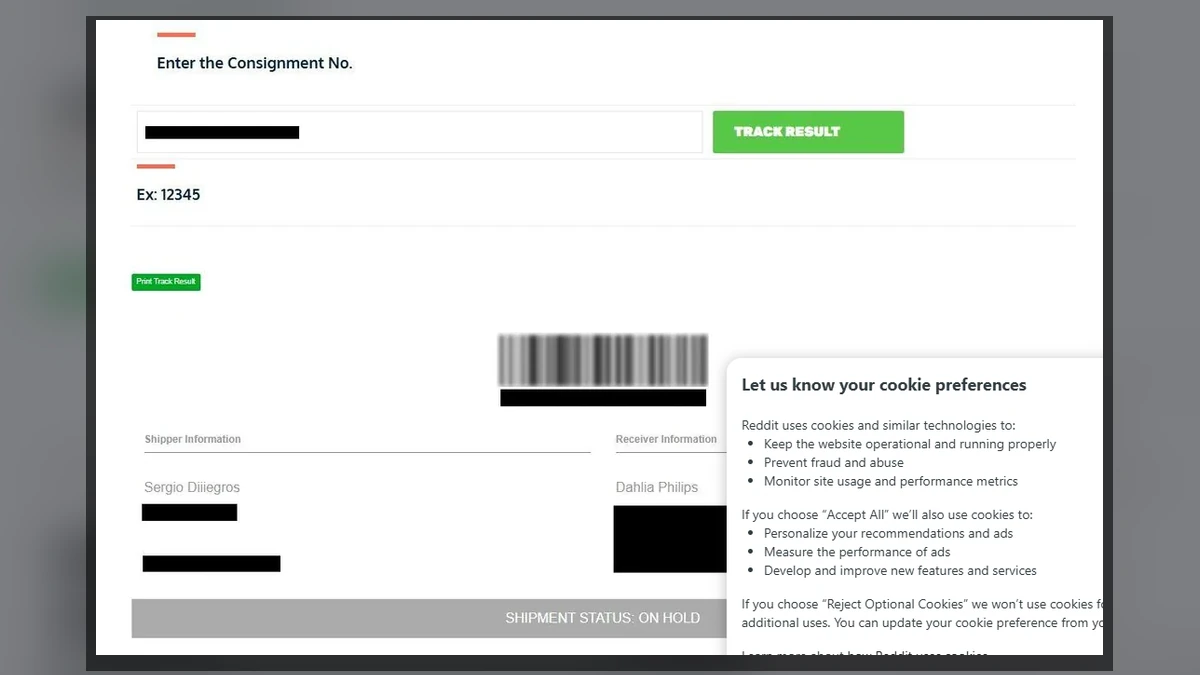
Payment went through Zelle. Instead of receiving a UPS number, the buyer was later sent to globalexpresslogistik.com and given a tracking code for that site.
That change is the core problem. The seller promised one carrier, then supplied “proof” from an unfamiliar system connected only to the seller’s story.
The tracking page created a refundable emergency
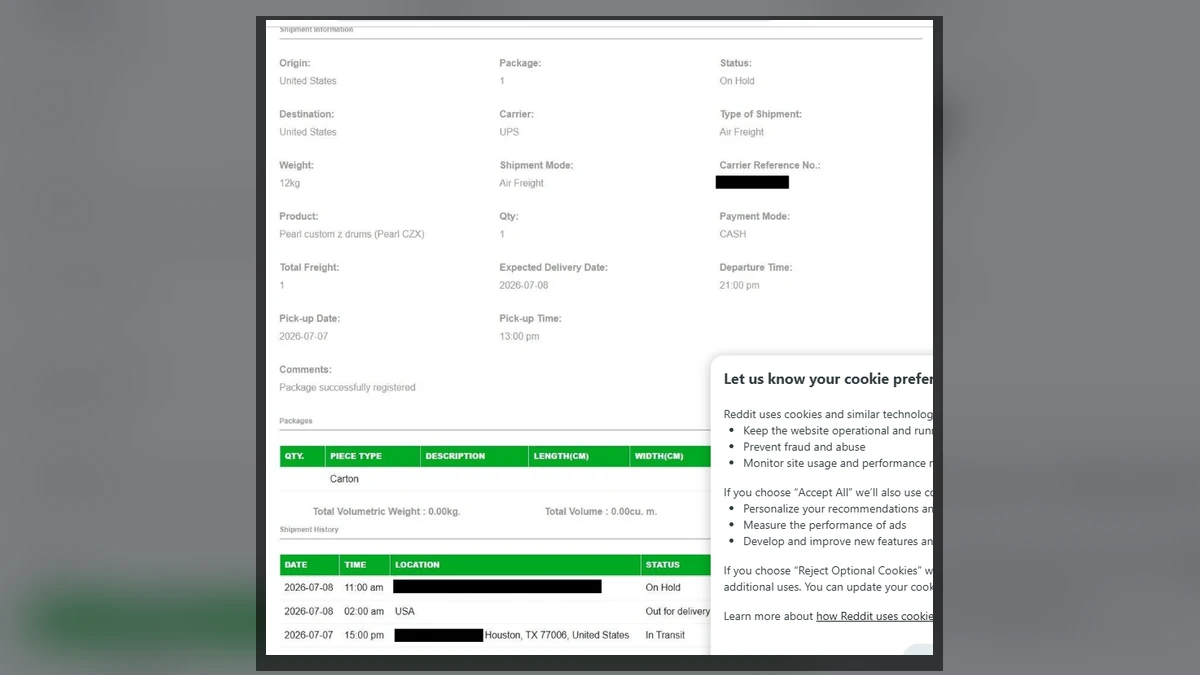
The page displayed details resembling the real sale, including the drum set and route from Houston. Then the shipment status changed to on hold.
An email called the package “VIP Cargo” and demanded $255 for refundable insurance. The fee had never appeared when the buyer agreed that $500 covered the item and shipping.
The word “refundable” made the charge sound temporary. Yet no independent insurer or escrow was shown to be responsible for returning the money.
The courier site undermined its own claims
At the time of review, Global Express Logistik displayed a Los Angeles address and broad claims about offices and operations around the world.
Its text also referred to unrelated names such as “Ascent Courier” and “One Time Shipping.” A cargo-insurance section discussed retiring old IT assets rather than insuring freight.
The warning signs were stronger than the tracking graphics:
- An unknown seller received $500 through Zelle.
- The agreed UPS Ground shipment became another courier.
- The new tracker contained details already known to the seller.
- “VIP Cargo” appeared without the buyer requesting an upgrade.
- A $255 insurance fee arrived only after the original payment.
- No accountable insurer, policy, or escrow supported the refund promise.
- The website mixed courier names and unrelated service descriptions.
- The seller, tracker, and fee demand were never shown to be independent.
A Detailed Tracker Can Be Completely Fictional
Tracking pages feel objective because they appear to sit between buyer and seller. Dates, cities, status changes, barcodes, and reference numbers resemble records produced by a logistics network.
The seller already knew the item, origin, destination, and buyer. Anyone controlling a basic website can enter those details and generate a convincing result.
No physical parcel is needed. The page only needs a sequence that leads to another payment: registered, collected, in transit, on hold, insurance required.
Even redacted details help the illusion. A familiar first name or city reassures the buyer, while black bars imply that the courier protects privacy.
Real tracking belongs on the carrier’s own domain, reached independently. If UPS was promised, the number should work through ups.com or official UPS support.
The FTC warning on fake shipping notifications recommends contacting the shipper through a known website rather than using the link in the message.
How the Fake $255 Shipping Fee Scam Works
Step 1: A desirable bulky item is listed
The seller offers a drum set, pet, furniture, equipment, or another item that is difficult to collect in person. The price is attractive without looking impossible.
Photos, serial numbers, and a plausible location can be copied from another listing. The seller answers enough questions to create a believable sale.
Step 2: Payment leaves protected checkout
The seller requests Zelle, Cash App, wire, crypto, or another person-to-person method. It is described as faster or necessary for the shipping arrangement.
Zelle’s security guidance says to send only to people you know and trust. Authorized payments generally do not carry ordinary purchase protection.
Step 3: A custom tracking record appears
After payment, the seller supplies a professional-looking courier page. The correct item and route appear because those facts came from the private conversation.
A tracking number proves only that a website generated a record. An independent carrier acceptance scan is what shows that a parcel entered a network.
Step 4: The package progresses and then stops
The page simulates pickup, transit, and arrival. Close to delivery, an issue appears that the buyer must solve before the item can continue.
The obstacle can be insurance, customs, a special crate, inspection, storage, temperature control, or a permit chosen to fit the product.
Step 5: The next payment is called temporary
The $255 is described as a deposit returned at delivery. No policy explains who holds it, what triggers the refund, or how a claim would work.
Money sent to a personal account or payment-app user is not escrow because an email calls it refundable.
Step 6: Each payment creates another hold
If the buyer pays, a new obstacle can appear: customs, warehouse rent, anti-money-laundering verification, city permits, or upgraded insurance.
The original $500 and every added fee increase the pressure to “save” the deal with one last payment.
Step 7: Seller and courier close the channel
When the buyer refuses, the seller blames the courier and the courier threatens disposal or storage charges. Eventually the accounts block the buyer.
The site may change domains or stop updating. A recovery scammer can then offer to trace the shipment or reverse Zelle for another fee.
The UPS Question Has a Simple Answer
The deciding issue is not whether UPS can transport a drum set. Carrier services and size limits vary, and bulky goods are not automatically impossible.
The contradiction is specific: buyer and seller agreed on UPS Ground, but the seller produced a Global Express Logistik tracker instead of a UPS number.
The unfamiliar page could list UPS in a field while presenting itself as the tracking authority. That label does not show a connection to UPS.
Call the real carrier through its published website and provide the exact number. Ask whether a label exists, whether the parcel received a physical scan, and who purchased the service.
Do not let the seller or custom tracker answer for UPS. Independent verification matters because every page supplied by the seller belongs to the same evidence chain.
A genuine carrier can explain insurance responsibility and payment procedures. It will not need the buyer to send a person-to-person transfer to a contact introduced in the sale.
What the Website Revealed
The site claimed a large international operation with hundreds of centers or offices across many cities and countries. Claims at that scale should leave substantial independent records.
Yet some road-transport text referred to “Ascent Courier,” while sea-freight and special-services passages mentioned “One Time Shipping.”
The cargo-insurance description discussed customers retiring outdated IT assets. That wording belongs to asset disposal, not protection for a drum shipment.
The site also claimed years of operation, bonded drivers, a global fleet, and round-the-clock offices. Those statements need company registrations, verifiable facilities, and independent business history.
Template mistakes alone do not prove every tracking entry false. Combined with the broken UPS agreement and surprise refundable charge, they make another payment indefensible.
ICANN’s registration lookup can help compare a domain’s public dates with claims of long operation. Privacy protection is common, but dates may still reveal conflicts.
Why Refundable Insurance Works So Well
Insurance sounds responsible. Buyers understand that valuable goods can be damaged, so protection appears more credible than a random shipping surcharge.
“Refundable” removes the apparent cost. The buyer is encouraged to view the $255 as a temporary hold that returns with the drum set.
Real insurance should identify the insurer, policy, coverage, exclusions, beneficiary, premium, claims process, and payment recipient.
The timing is another problem. Insurance appeared only after the seller had agreed that shipping was included and already controlled the $500.
The “VIP Cargo” label creates artificial status. It suggests special rules even though the buyer chose the cheapest ordinary service.
Pressure may include a delivery deadline, storage charge, or threat of confiscation. Those consequences exist only inside the same unverified tracker.
Our report on the additional shipping fees scam shows the same invented-delivery problem used to collect another payment.
A simple rule resolves the demand: when shipping was included, the seller should handle an unexpected carrier charge. The buyer did not make that contract.
How to Buy a Shipped Item More Safely
Keep payment inside a marketplace with buyer protection. A seller who insists on leaving also asks you to surrender the dispute process built for that sale.
Use a credit card or protected checkout instead of a person-to-person transfer. The FTC guide to buying on marketplaces explains safer payment choices.
Reverse-search listing images and exact description phrases. Request a new photo showing the item beside a handwritten date and a specific detail.
For bulky expensive goods, use live video, serial numbers, a written bill of sale, and a carrier chosen or confirmed by the buyer.
Check the tracking number on the carrier’s official site and wait for an acceptance scan. “Label created” does not prove the item was handed over.
Never pay a surprise insurance, customs, crate, or permit charge to a contact supplied only by the seller.
Our guide to Marketplace buyer and seller scams explains why leaving protected checkout gives the other party control over both payment and proof.
The One Call That Should Settle the Shipment
Find UPS through its official site and provide the tracking number exactly as received. Do not use any phone number printed on the unfamiliar tracker.
Ask whether the number belongs to UPS, whether a physical acceptance scan exists, and whether any insurance payment is due from the recipient.
If UPS cannot identify the shipment, do not let the seller replace verification with another screenshot or a call from supposed courier support.
Tell the seller that no extra money will move until the agreed carrier confirms the parcel. A real shipping problem can be resolved without secrecy.
Save the carrier’s case number and response. That independent record is much more useful to the bank and marketplace than repeated promises from the seller.
Company, Address, and Fulfillment Checks
The courier company identity was not verified
The site displayed a brand and sweeping operational claims, but its references to other courier names weakened confidence in one accountable company behind the page.
The Los Angeles address did not prove occupancy
The website listed 645 W 9th St #110, Los Angeles, CA 90015. Text on a page does not show that the operator leases, staffs, or receives freight there.
No insurer or policy supported the fee
The demand did not identify a policy number, coverage, insured party, refund basis, or accountable insurer. Public copy about obsolete IT assets made the gap worse.
No independent carrier scan proved shipment
The custom tracker displayed sale details, but no UPS number confirmed that a drum set was collected, weighed, scanned, or loaded for delivery.
What to Do if You Have Fallen Victim to This Scam
- Do not send the $255. Refuse every later insurance, storage, customs, or release fee.
- Contact the bank and Zelle immediately. Report the recipient, amount, date, and fraudulent sale; ask whether the receiving bank can be alerted.
- Preserve the transaction. Save the listing, profile, chats, payment confirmation, emails, tracking pages, headers, and instructions.
- Report the seller to the marketplace. Point out that the agreed carrier changed after payment.
- Report the domain and payment recipient. File with the FTC and IC3.
- Do not confront a listed address. Names and locations may belong to unrelated people or other victims.
- Change exposed credentials. Replace any password created on the tracker and secure the associated email.
- Run a complete Malwarebytes scan. Do this if a tracking app, attachment, or file was opened.
- Use AdGuard after cleanup. It can block many malicious follow-up pages, but it cannot reverse Zelle.
- Tell the bank the exact story. Explain that you authorized payment because the seller misrepresented the sale.
- Monitor follow-up contact. Fake courier staff, police, or recovery agents may know the item and amount.
- Ignore recovery guarantees. Work only with the bank, Zelle, marketplace, and law enforcement.
Frequently Asked Questions
Is the $255 insurance really refundable?
No independently verified insurer, policy, or escrow supported that promise. Treat “refundable” as part of the payment demand.
Does a working tracking number prove shipment?
No. A website operator can create a record using seller details. Verify the number with the carrier named in the original agreement.
Was it impossible for UPS to ship the drums?
No. Carrier capability is not decisive. The problem is that UPS Ground was promised, then replaced by an unrelated tracker and fee.
Can Zelle reverse the original $500?
Recovery is not guaranteed for an authorized payment. Report it immediately so the bank can review the recipient and any recall options.
Should the buyer pay because $500 is already at risk?
No. The first loss does not make the second demand safer. Sunk-cost pressure is how one payment becomes several.
What if the seller says the courier is independent?
Independence must be confirmed outside the seller’s contacts. A site and email supplied by the same person do not establish it.
The Bottom Line
The seller received $500, a custom tracker created a believable drum shipment, and “VIP Cargo” supplied the excuse for another $255.
The carrier changed, the fee was never agreed, and no independent scan or insurer supported it. Stop there, preserve the evidence, and report the first payment instead of funding the next invented hold.

Join the discussion
0 commentsShare your experience or ask a question about this article.
Discussion
Start the conversation
Have a question or something useful to share? Add the first comment.