

If your AVG Antivirus or AVG Internet Security has found a Trojan horse Generic34.BDPQ virus, then your computer is infected with a ZeroAccess rootkit.
![[Image: Trojan horse Generic34.BDPQ Virus]](http://malwaretips.com/blogs/wp-content/uploads/2013/09/trojan-horse-generic34-bdpq-virus.jpg "Trojan horse Generic34.BDPQ Virus")
The Trojan horse Generic34.BDPQ trojan is a dangerous threat that has been circulating for several years.
In the time that Trojan horse Generic34.BDPQ has been in the wild there have been a number of revisions, with modifications to its functionality, infection strategy and its persistence mechanisms on an infected machine. However, the core purpose has remained: to assume full control of the machine by adding it to the ZeroAccess botnet and to monetize the new asset by downloading additional malware.
Primarily, Trojan horse Generic34.BDPQ trojan is a kernel-mode rootkit, similar in ethos to the TDL family of rootkits. It uses advanced techniques to hide its presence, is capable of functioning on both 32 and 64-bit flavors of Windows from a single installer, contains aggressive self defense functionality and acts as a sophisticated delivery platform for other malware.
The Trojan horse Generic34.BDPQ virus remains hidden on an infected machine while downloading more visible components that generate revenue for the botnet owners. Currently the downloaded malware is mostly aimed at sending spam and carrying out click fraud, but previously the botnet has been instructed to download other malware and it is likely that this will be the case again in the future.
Trojan horse Generic34.BDPQ virus has been observed being distributed by exploits and programs that promote software-piracy, such as ‘keygens’ and ‘cracks’ (programs designed to bypass software licensing).
Trojan horse Generic34.BDPQ is a dangerous threat that uses advanced stealth techniques in order to hinder its detection and removal. As a consequence of being infected with this threat, you may need to repair and reconfigure some Windows security features.
Because the malware removal process for the Trojan horse Generic34.BDPQ trojan is very complex, we recommend that you backup your personal files and folders before starting to remove this infection.
Trojan horse Generic34.BDPQ – Virus Removal Guide
This page is a comprehensive guide, which will remove the Trojan horse Generic34.BDPQ infection from your your computer. Please perform all the steps in the correct order. If you have any questions or doubt at any point, STOP and ask for our assistance.
STEP 1: Remove Trojan horse Generic34.BDPQ Master Boot Record infection with Kaspersky TDSSKiller
STEP 2: Remove Trojan horse Generic34.BDPQ virus with Malwarebytes Anti-Malware Free
STEP 3: Remove Trojan horse Generic34.BDPQ trojan with RogueKiller
STEP 4: Remove Trojan horse Generic34.BDPQ infection with HitmanPro
STEP 5: Double check for any left over infections with Emsisoft Emergency Kit
STEP 1: Remove Trojan horse Generic34.BDPQ trojan with Kaspersky TDSSKiller
As part of its self defense mechanism, Trojan horse Generic34.BDPQ virus will install a ZeroAccess rootkit on the infected computer.In this first step, we will run a system scan with Kaspersky TDSSKiller to remove this rookit.
- Please download the latest official version of Kaspersky TDSSKiller.
KASPERSKY TDSSKILLER DOWNLOAD LINK(This link will automatically download Kaspersky TDSSKiller on your computer.) - Before you can run Kaspersky TDSSKiller, you first need to rename it so that
you can get it to run. To do this, right-click on the TDSSKiller.exe icon and select Rename.
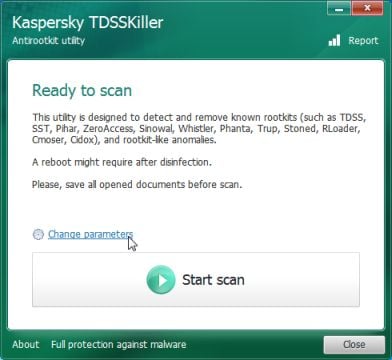
Edit the name of the file from TDSSKiller.exe to iexplore.exe, and then double-click on it to launch. - Kaspersky TDSSKiller will now start and display the welcome screen and we will need to click on Change Parameters.

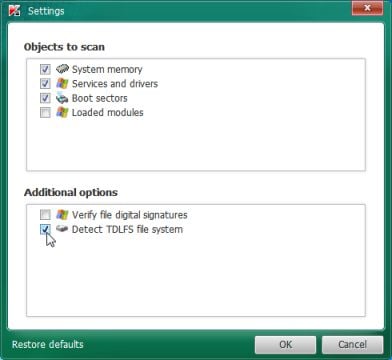
- In the new open window,we will need to enable Detect TDLFS file system, then click on OK.
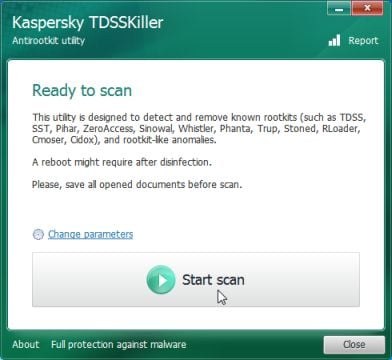
- Next,we will need to start a scan with Kaspersky, so you’ll need to press the Start Scan button.
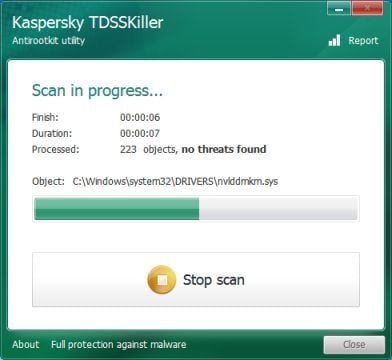
- Kaspersky TDSSKiller will now scan your computer for Trojan Trojan horse Generic34.BDPQ infection.
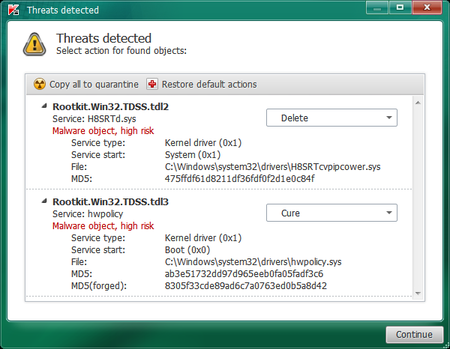
- When the scan has finished it will display a result screen stating whether or not the infection was found on your computer. If it was found it will display a screen similar to the one below.
- To remove the infection simply click on the Continue button and TDSSKiller will attempt to clean the infection.A reboot will be require to completely remove any infection from your system.
STEP 2: Remove Trojan horse Generic34.BDPQ virus with Malwarebytes Anti-Malware FREE
Malwarebytes Anti-Malware Free is a powerful on-demand scanner which will remove Trojan horse Generic34.BDPQ malicious files from your computer.
- You can download Malwarebytes Anti-Malware Free from the below link, then double-click on the icon named mbam-setup.exe to install this program.
MALWAREBYTES ANTI-MALWARE DOWNLOAD LINK(This link will open a download page in a new window from where you can download Malwarebytes Anti-Malware Free) - When the installation begins, keep following the prompts in order to continue with the setup process, then at the last screen click on the Finish button.
- On the Scanner tab, select Perform quick scan, and then click on the Scan button to start searching for the Trojan horse Generic34.BDPQ malicious files.
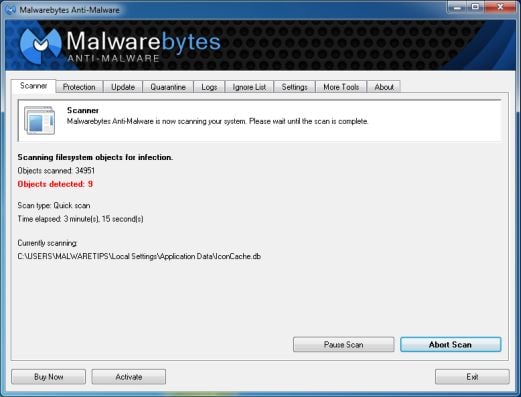
- Malwarebytes’ Anti-Malware will now start scanning your computer for Trojan horse Generic34.BDPQ virus as shown below.
- When the Malwarebytes Anti-Malware scan has finished, click on the Show Results button.
- You will now be presented with a screen showing you the computer infections that Malwarebytes Anti-Malware has detected. Make sure that everything is Checked (ticked), then click on the Remove Selected button.
- Once your computer will restart in Windows regular mode, open Malwarebytes Anti-Malware and perform a Full System scan to verify that there are no remaining threats.
![[Image: Malwarebytes Anti-Malware final installation screen]](http://malwaretips.com/blogs/wp-content/uploads/2013/01/malwarebytes-installation.jpg "Malwarebytes Anti-Malware installation screen")
![[Image: Malwarebytes Anti-Malware Quick Scan]](http://malwaretips.com/blogs/wp-content/uploads/2013/01/malwarebytes-quick-scan.jpg "Run a Quick Scan with Malwarebytes Anti-Malware")
![[Image: Malwarebytes Anti-Malware scan results]](http://malwaretips.com/blogs/wp-content/uploads/2013/01/malwarebytes-scan-results.jpg "Malwarebytes when the system scan has completed")
![[Image: Malwarebytes Anti-Malwar removing Trojan horse Generic34.BDPQ virus]](http://malwaretips.com/blogs/wp-content/uploads/2013/01/malwarebytes-virus-removal.jpg "Malwarebytes Anti-Malwar removing Trojan horse Generic34.BDPQ virus")
STEP 3: Remove Trojan horse Generic34.BDPQ rootkit with RogueKiller
RogueKiller is a utility that will scan for the Trojan horse Generic34.BDPQ rootkit, registry keys and any other malicious files on your computer.
- You can download the latest official version of RogueKiller from the below link.
ROGUEKILLER DOWNLOAD LINK (This link will automatically download RogueKiller on your computer) - Double click on RogueKiller.exe to start this utility and then wait for the Prescan to complete.This should take only a few seconds, then click on the Scan button to perform a system scan.
- After the scan has completed, press the Delete button to remove Trojan horse Generic34.BDPQ malicious registry keys or files.
![[Image: RogueKiller scaning for Trojan horse Generic34.BDPQ virus]](http://malwaretips.com/blogs/wp-content/uploads/2013/02/roguekiller-scan.jpg "Click on the Start button to perform a system scan")
![[Image: RogueKiller Detele button]](http://malwaretips.com/blogs/wp-content/uploads/2013/02/roguekiller-delete.jpg "Press Delete to remove Luhe.Sirefef.A")
STEP 4: Remove Trojan horse Generic34.BDPQ infection with HitmanPro
HitmanPro is a cloud on-demand scanner, which will scan your computer with 5 antivirus engines (Emsisoft, Bitdefender, Dr. Web, G-Data and Ikarus) for the Trojan horse Generic34.BDPQ infection.
- You can download HitmanPro from the below link:
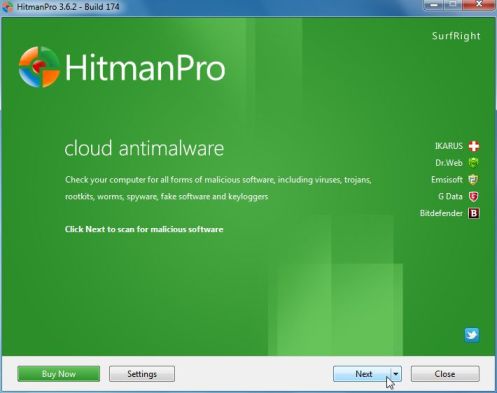
HITMANPRO DOWNLOAD LINK (This link will open a web page from where you can download HitmanPro) - Double-click on the file named HitmanPro.exe (for 32-bit versions of Windows) or HitmanPro_x64.exe (for 64-bit versions of Windows). When the program starts you will be presented with the start screen as shown below.
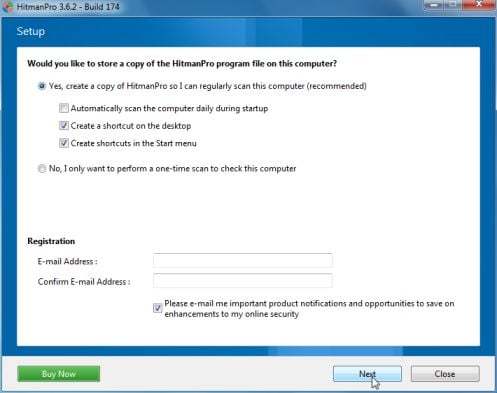
Click on the Next button, to install HitmanPro on your computer.
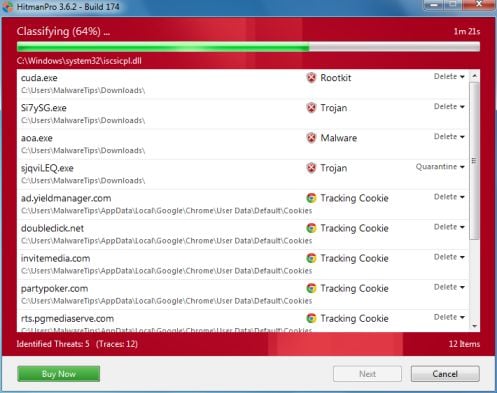
- HitmanPro will now begin to scan your computer for Trojan horse Generic34.BDPQ trojan.
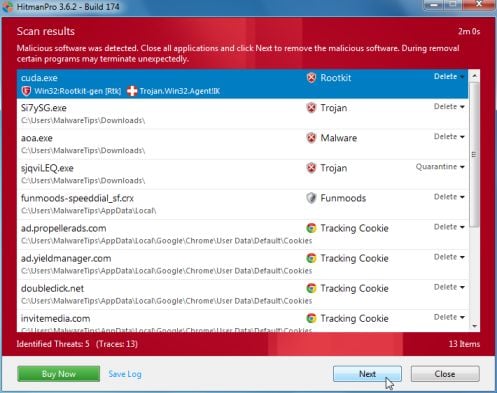
- When it has finished it will display a list of all the malware that the program found as shown in the image below. Click on the Next button, to remove Trojan horse Generic34.BDPQ virus.
- Click on the Activate free license button to begin the free 30 days trial, and remove all the malicious files from your computer.
![[Image: HitmanPro 30 days activation button]](http://malwaretips.com/blogs/wp-content/uploads/2012/11/hitmanpro-activation.jpg "HitmanPro free 30 days trial")
STEP 5: Double check for any left over infections with Emsisoft Emergency Kit
- You can download Emsisoft Emergency Kit from the below link,then extract it to a folder in a convenient location.
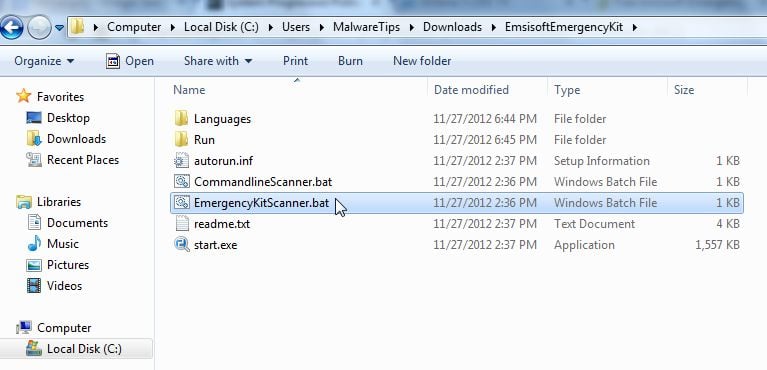
EMSISOFT EMERGENCY KIT DOWNLOAD LINK ((This link will open a new web page from where you can download Emsisoft Emergency Kit) - Open the Emsisoft Emergency Kit folder and double click EmergencyKitScanner.bat, then allow this program to update itself.
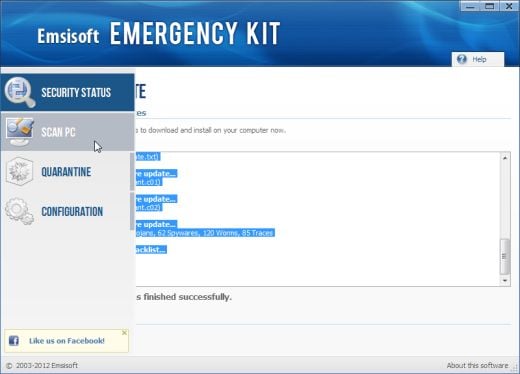
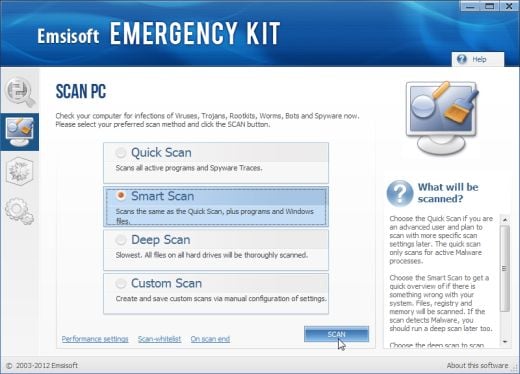
- After the Emsisoft Emergency Kit has update has completed,click on the Menu tab,then select Scan PC.
- Select Smart scan and click on the SCAN button to search for “Antivirus Security 2013” malicious files.
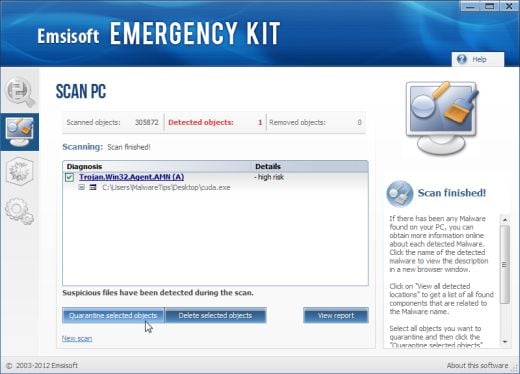
- When the scan will be completed,you will be presented with a screen reporting which malicious files has Emsisoft detected on your computer, and you’ll need to click on Quarantine selected objects to remove them.
Your computer should now be free of the Trojan horse Generic34.BDPQ infection. If your current anti-virus solution let this infection through, you may want to consider purchasing the PRO version of Malwarebytes Anti-Malware to protect against these types of threats in the future, and perform regular computer scans with HitmanPro.
If you are still experiencing problems while trying to remove Trojan horse Generic34.BDPQ from your machine, please start a new thread in our Malware Removal Assistance forum.









Just wanted to say thank you so much for this: it saved me a load of grief when Generic34 struck last month!
BTW, I couldn’t get the Emsisoft Emergency Kit link to work, but managed to download it from elsewhere.