

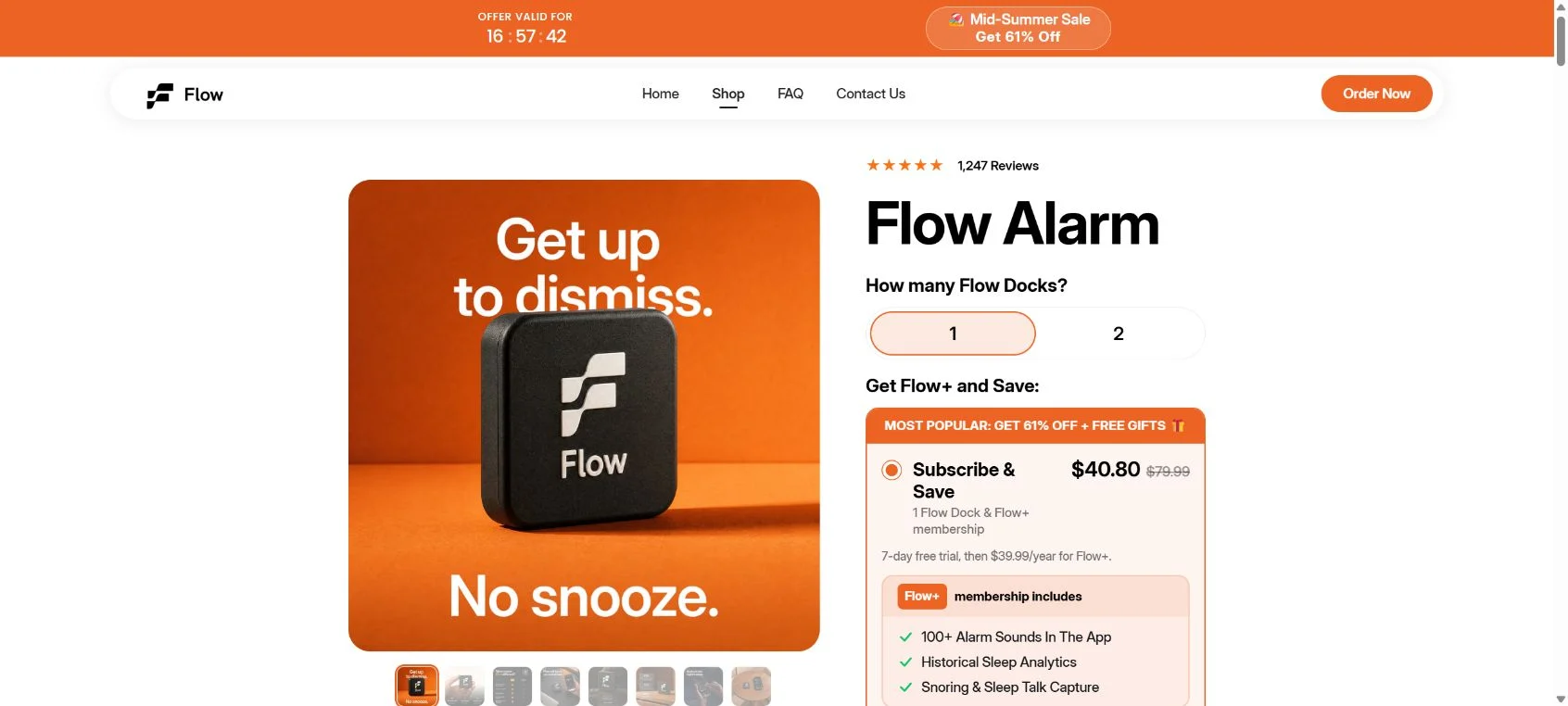
Flow Alarm Clock is a real NFC dock paired with a real mobile app, but it is not a clean, low-risk purchase. The site repeatedly says “no subscription needed,” while the cheaper and preselected Subscribe & Save option includes a 7-day Flow+ trial that renews at $39.99 per year.
Verified app-store reviews also describe docks that would not stop alarms, premium access that failed, unexpected alarm times, slow delivery, and subscription confusion. This is not the smooth $147 product experience the advertising suggests.
Overview
Flow Alarm Clock is sold as a cure for chronic snoozing. The customer places a small NFC tag—called the Flow Dock—away from the bed. When the phone alarm sounds, the user must get up, walk to the dock, and scan it before the alarm stops.
The idea is legitimate and technically simple. An NFC tag does not need charging, and alarm apps can require tasks such as scanning a tag, solving math problems, walking, or taking a photo. Flow’s apps are listed in the Google Play Store and Apple App Store under Flow Alarm, Inc.
The problem is the gap between the polished store claims and the evidence buyers can verify elsewhere. The product page displays 1,247 reviews and a 4.7 score, yet the Android app has only hundreds of downloads, dozens of reviews, and a much lower rating. Several verified reviewers describe core functions failing.
The website’s review presentation creates another credibility problem. Some reviewer portraits load from RandomUser.me, a service that supplies generated placeholder identities. That does not prove every comment is fabricated, but it means the on-site “real customer” presentation should not be treated as independent evidence.
The checkout is also easy to misunderstand. The page says the core product needs no subscription, but the lower-priced “Subscribe & Save” selection bundles a Flow+ membership with a 7-day free trial and then renews at $39.99 per year. A one-time-purchase option exists, but it is more expensive and does not include free shipping.
This does not make Flow a completely fake product. It makes it a high-risk purchase with aggressive subscription steering, inconsistent marketing, immature software, and a complaint history that buyers should understand before ordering.
What Flow actually includes
- A small NFC dock or tag that requires no battery.
- A mobile alarm app for iOS and Android.
- Alarm missions such as NFC scanning, math, steps, shaking, or photos.
- Sleep tracking and app-blocking features.
- An optional Flow+ subscription for premium sounds and additional tracking features.
How the Flow Alarm Clock Sales Funnel Works
Step 1: Social ads target people desperate to stop snoozing
The marketing speaks directly to heavy sleepers, students, parents, and workers who have tried multiple alarms. The promise feels behavioral rather than technical: place the dock across the room and make getting up unavoidable.
Step 2: An inflated reference price creates a huge discount
The site has displayed a $147 reference price for a single dock, then reduced it to around $49 or another sale amount. The physical dock is fundamentally an NFC tag in branded housing, so buyers should judge the total package by app reliability and support—not the size of the claimed markdown.
Step 3: “No subscription” messaging lowers resistance
The store repeatedly says no subscription is required for the core product. That statement can be technically true while still leaving customers confused about which checkout option they selected and which features require Flow+.
Step 4: Subscribe & Save is made cheaper than a one-time order
The discounted option includes Flow+ with a 7-day free trial, followed by a $39.99 annual charge. The one-time purchase costs more and can add shipping. This pricing structure nudges buyers toward the subscription even when they arrived expecting a one-off gadget.
Step 5: Software problems appear after delivery
Google Play reviewers describe scans that require multiple attempts, the dock failing to dismiss the alarm, alarms firing at the wrong time, premium access codes not working, and support messages going unanswered. A wake-up product cannot be considered reliable when its central alarm function is still unpredictable.
Step 6: Cancellation and refund become the customer’s next challenge
The company provides a Flow+ management portal and a 30-day product return policy. However, reports of delayed shipments, unexpected charges, and slow replies show why buyers must save checkout evidence and monitor statements instead of assuming the trial will manage itself.
The Biggest Red Flags We Found
The checkout mixes “no subscription” with a renewing trial
A shopper can use core functions without an ongoing plan, but the most attractive checkout price includes a renewal. The difference should be impossible to miss, not something customers discover in an email days later.
The on-site review count does not match the app footprint
The store claims more than a thousand current product reviews. The Android listing shows a small install base and only dozens of ratings. The company may sell to iPhone users and collect website reviews separately, but the scale mismatch makes the store’s review widget difficult to trust at face value.
Some testimonial identities use placeholder portraits
Images loaded from RandomUser.me are not proof of a real purchaser. Presenting placeholder identities beside enthusiastic customer stories makes the entire testimonial section less credible.
The published addresses are inconsistent
The contact page lists a Philadelphia suite, while the privacy policy and app-store developer records identify Flow Alarm, Inc. at an address in Coral Gables, Florida. Different business and mailing addresses can have innocent explanations, but the site should explain the relationship clearly.
Independent complaints describe non-delivery and unexpected charges
A BBB Scam Tracker report describes an order that did not arrive and conflicting addresses. A public review page includes a non-delivery complaint. Other buyers report Flow+ charges they did not expect or could not easily cancel. These reports are individual allegations, but they align with the checkout confusion visible on the site.
Is Flow Alarm Clock a Subscription Trap?
It has the ingredients of one, although a one-time purchase path and a subscription-management page do exist. The risk comes from steering customers toward a cheap trial bundle while emphasizing “no subscription needed” elsewhere.
The safe approach is to assume the trial will renew unless you deliberately choose the one-time option or cancel Flow+ through the official portal. Take a screenshot of the selected option, final price, renewal terms, and order confirmation before leaving checkout.
What to Check Before Ordering Flow
- Confirm whether the button says Subscribe & Save or One Time Purchase.
- Read the amount charged today and the $39.99 annual renewal separately.
- Check whether shipping changes when you remove Flow+.
- Read recent Google Play and App Store reviews for your phone platform.
- Make sure your phone supports NFC and the required operating-system version.
- Do not rely on the website’s review count as your only quality signal.
- Pay by credit card so you have a clear dispute process.
- Keep a normal backup alarm until the Flow app proves reliable on your device.
What to Do If You Already Bought Flow Alarm Clock
Check for a Flow+ renewal now
Search your confirmation email for “Flow+,” “membership,” “trial,” “Subscribe & Save,” and “$39.99/year.” Use the official Flow+ portal with the same email used at checkout. Save confirmation after cancellation.
If the dock or app does not work
- Record a video showing the failed NFC scan or incorrect alarm behavior.
- Save the phone model, operating-system version, app version, and error message.
- Contact support in writing and request a fix, replacement, or return.
- Do not depend on Flow as your only alarm while the fault continues.
- Start the return within 30 days of delivery if you do not trust the product.
If the order never arrived
Request tracking and a firm delivery date. If the merchant cannot provide proof of shipment or stops responding, open a merchandise-not-received dispute before your payment provider’s deadline.
If you received an unexpected charge
Cancel future renewals first, then request a refund review with the checkout email, charge date, and amount. If the company does not resolve a charge you did not knowingly authorize, contact your card issuer with the checkout screenshots and correspondence.
The Bottom Line
Flow Alarm Clock is not imaginary: the dock, company, and apps exist. But the product is sold through a confusing funnel that pairs “no subscription” language with a renewing Flow+ trial, while verified app reviews show that core functions remain unreliable for some buyers.
At this stage, we would not recommend paying a premium for Flow unless you are comfortable testing immature software, monitoring the subscription carefully, and using a backup alarm. You can reproduce the basic concept with established alarm apps and an inexpensive NFC tag without accepting the same sales pressure.

Reviews & discussion
0 commentsShare a firsthand experience, or ask a question.
Community reviews
Flow Alarm Clock
Moderated reader experiences, not an editorial verdict.
Start the conversation
Have a question or something useful to share? Add the first comment.