

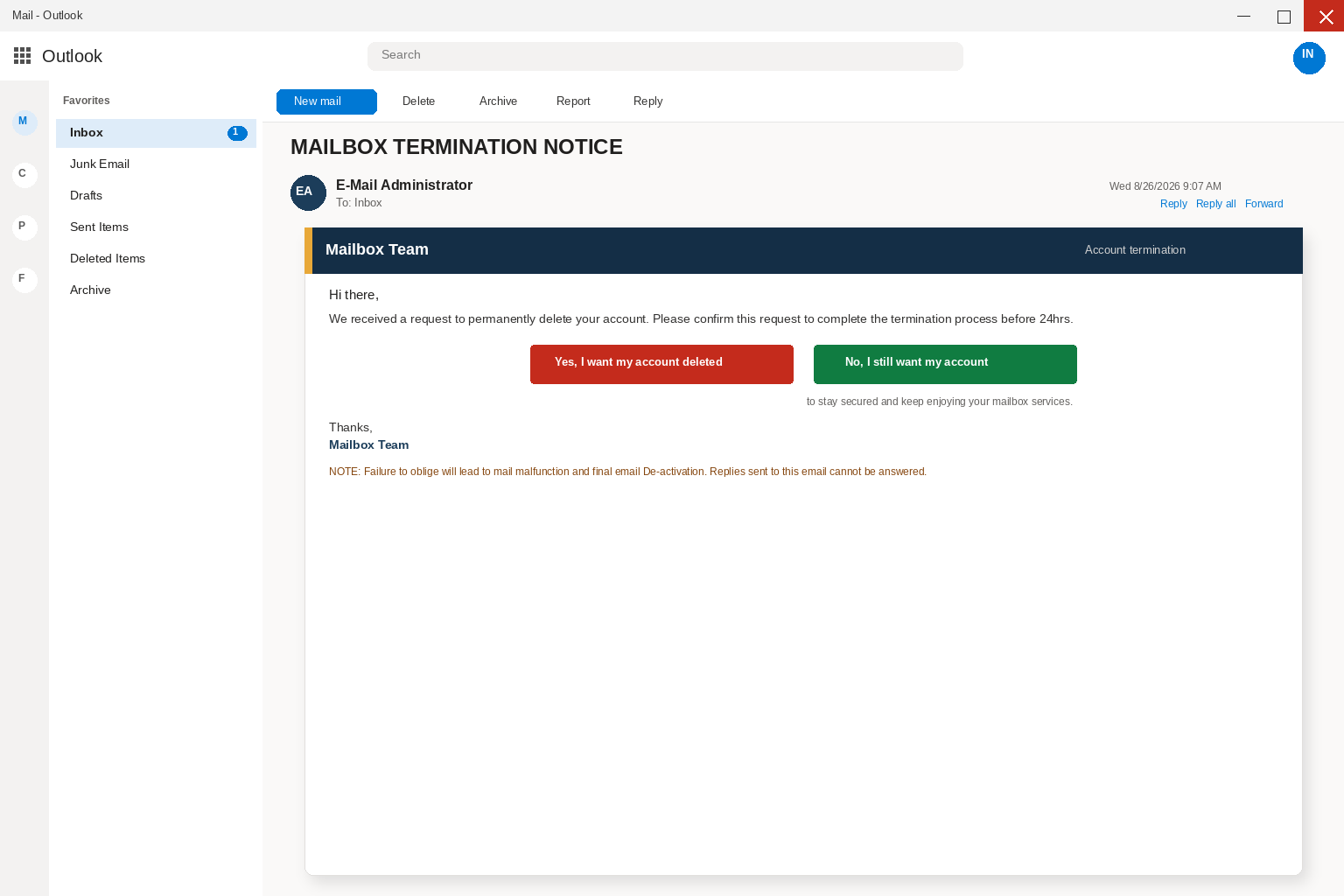
The subject lands in all caps the way a host writes when a mailbox is about to go away, because MAILBOX TERMINATION NOTICE is the kind of line people open before they finish the rest of the inbox. You open it because an address you have used for years is not a newsletter you can ignore until Friday, and a deletion that must be confirmed in twenty-four hours is the sort of chore people finish while the coffee is still warm.
The greeting comes from an E-Mail Administrator and a Mailbox Team, which is how bulk host mail talks when it wants to sound like the desk that already delivers your messages. It says a request to permanently delete your account has been received, and it asks you to confirm that request so the termination can finish before twenty-four hours have passed. The wording is clipped the way a daemon writes, with a first name that may match the mailbox and a second mention of the address, as if a ticket already sat in a queue you never opened.
Two controls sit under that request, one saying Yes, I want my account deleted, and the other saying No, I still want my account, with a promise that keeping it will leave the mailbox secured so you can keep enjoying the service. A note at the bottom warns that failure to oblige will lead to mail malfunction and final email de-activation, and a last line adds that replies sent to this email cannot be answered. You pick a button because leaving a termination ticket unanswered feels like letting the host pull the plug.
Overview
What the letter wants is not a deletion you confirm with a host you already pay. It wants you to treat a surprise termination notice as the only way to keep or kill a mailbox, and then to type the password on a page the letter chose for you, because that password is what an inbox is worth to the people who wrote the mail. There is no termination ticket waiting behind either button, and Keep is not a save so much as a door into a copied webmail login that harvests the sign-in.
Both Yes, I want my account deleted and No, I still want my account open the same kind of sign-in, dressed as the mail service your address already uses, and anything typed there is delivered to the sender rather than to a host. The page often shows a strip with an operating system, a browser, a date, and an approximate location, then asks for the account password to continue, which is how a careful person finishes a login they never meant to start. After that password lands, they can read the threads you already trust, reset other logins that use the address, and send the next scare from your name.
One lure sat on a Replit app host named businesszip–yasminscott873.replit.app, which is a disposable page someone published on a real app platform rather than a mailbox desk that platform itself is running, and that login is not sitting inside the mailbox you just left. App hosts of that kind move, get renamed, and disappear overnight, so copying the name later is not a useful errand, and treating the platform as the crook is the wrong lesson. The people who wrote the letter are using a throwaway app as a costume rack for a copied webmail door.
A real mailbox host does not collect a password through a surprise Keep or Delete control in a cold termination note. If you need to know whether anyone actually asked to close the address, open the mail service you already use the way you opened it yesterday, by typing the address you already know or by opening the app you already installed. Google, Microsoft, and other providers whose colors may appear on the next page are not the operators of this campaign, even when the fake login copies the look of Gmail, Outlook, or another webmail screen your hands already know.
The Federal Trade Commission writes the same rule in ordinary language in How To Recognize and Avoid Phishing Scams, where the FTC says scammers use email to steal passwords, account numbers, or Social Security numbers, and that a common story is a problem with an account that is not actually a problem. Another common story is that you must confirm personal information right now, which is the pressure this letter applies by claiming a deletion will finish in twenty-four hours unless you click. The Commission’s advice is to contact the company with a phone number or website you already know is real, not the information in the unexpected message, and both of those buttons are information in the unexpected message.
CISA says it from the systems side in two short places that are worth keeping. On Avoiding Social Engineering and Phishing Attacks, CISA tells people not to reveal personal or financial information in email, and not to follow links sent in email when a message asks for that information. On Teach Employees to Avoid Phishing, CISA tells staff that if a message feels off, they should verify it without using any phone number or link in the message, which means a number you already have and a site you already type rather than a Keep or Delete control the letter provided.
MAILBOX TERMINATION NOTICE is the costume
Read the subject the way a tired person reads it between two other alerts, because MAILBOX TERMINATION NOTICE does a lot of work before you reach the first sentence of the body. Termination sounds like a process that already started, notice sounds like a ticket a host already filed, and mailbox sounds like the address relatives still use, so together they make a cold letter feel like homework you are already late for. That stacking is the point of putting those words on one line, because the subject only has to survive the few seconds between the inbox list and the first button.
Please confirm to continue is not required in this subject, and the letter does not ask you to wire money or to download an attachment in the first line. It asks you to confirm a deletion request that it claims someone already filed, and that quieter request is harder to refuse than a prize, because it is dressed as maintenance rather than as a favor. People who keep a mailbox for a decade live on that kind of maintenance, because a missed termination notice sounds like a dark inbox, and a dark inbox sounds like missed bills, so the copy only has to last until you pick Keep or Delete.
The greeting helps the costume, even when it is only Hi and a first name, because a system that already holds your account can greet you with the name on the file. An E-Mail Administrator and a Mailbox Team are cheap titles, and anyone can put them on a From line, paste a dark header, and add a note that replies cannot be answered. Delivery only proves they knew the mailbox that received the mail, and it does not prove they sit inside the host, hold the address, or run a termination queue.
Twenty-four hours is the clock
A termination notice alone can still lose to a busy morning, which is why the letter puts twenty-four hours in the middle of the chore and then adds mail malfunction and final de-activation as what happens if you wait. A request that must be confirmed before 24hrs feels like a fuse that is already burning, and a fuse that is already burning feels like it grows while you hesitate, especially when the copy says the request has already been received rather than offered as an optional extra. Waiting is framed as the risky choice, and clicking is framed as the responsible one.
Almost everyone who keeps webmail has been asked, at some point, to confirm a change before a deadline, and that memory is what the letter is spending. When the body says please confirm this request to complete the termination process, it is repeating a true sentence about how some hosts close accounts, and then it is asking you to start that close through a link you did not request. The true sentence is the costume, and the unrequested buttons are the part that should stop the hand.
The wording stays usefully vague on purpose, because it does not name the person who asked for the deletion, the ticket number you could read back to a help desk, or the last time you signed in. Twenty-four hours could mean the host is about to drop the mailbox, a family member clicked something, or a leftover request from an old phone, and that blank space is the hook. Your brain fills it with the one address you cannot afford to lose, and both buttons start to look like a kindness instead of a request to leave the inbox.
Keep and Delete look like a choice
Yes, I want my account deleted sits next to No, I still want my account as if the letter were offering a real fork, which is why people press one of them, because a binary choice looks like control. Keep is dressed as the safe answer, with a promise that the mailbox will stay secured so you can keep enjoying the service, and Delete is dressed as the honest close, so even the person who wants the address gone still has a reason to click. Each label is the same handoff dressed as a preference, and neither one is a settings page you can keep, screenshot, or compare with last month’s host mail.
There is no honest reason for a mailbox termination to live on a surprise page you reached from an unexpected letter. If a host actually needed you to confirm a close, that work would already sit inside the webmail or the panel you open without help from a stranger’s button, or inside the app you already use to read mail. A pair of buttons that cannot finish a keep or a delete without carrying you somewhere else is a handoff from the inbox you trust to a site the sender controls, not a termination tool a real host would put in a surprise letter.
CISA is blunt about links in unexpected mail, and the rule is not that you open them to see whether they are real. You verify the claim on a path you already trust, which for a mailbox is the site you type, the app you already installed, or a phone number from a hosting invoice in the drawer rather than from the letter. The FTC says the same thing in consumer language, which is that a problem that can only be solved by the link in the email is usually not a problem so much as a request for you.
The page that copies webmail
After either button, the story changes, because the inbox promised a keep or a delete and the next screen promises a sign-in. It is built to look like the mail service you already use, so a Gmail address often sees a page dressed as Gmail, a Microsoft address often sees a page dressed as Outlook or a work portal, and other providers get the costume that matches their own mail. Your address may already be sitting in the box, the colors look familiar, and the language is the language you see every morning, which is how a careful person finishes a login they never meant to start.
A strip listing an operating system, a browser, a date, and an approximate location is there to make the page feel like a security check that already recognized the visit. Passing an identifier through a link is trivial and is not authentication, and showing you a city name does not mean a host is watching the account. The copy will be helpful, asking you to enter the account password to continue so the termination can finish or so the mailbox can stay secured, and each of those lines is the same request dressed as a keep or a delete.
A padlock in the browser does not fix that, because encryption only means the path is private and does not mean the person at the other end is your host, Google, or Microsoft. HTTPS can wrap a stolen password as neatly as a real one, and an accurate logo is not a certificate, so you trust the complete domain and the way you reached it rather than the artwork inside the page. Google’s advice on phishing in Gmail is blunt on this point, because Gmail will not ask you for your password over email, and if a termination click then presents a login you should not type it.
Do not finish that form to see whether Keep then restores the mailbox, and do not pick Delete as a test, because a fake login does not become safer when you only wanted to cancel a request. Open a new tab, type the mail service you already use or open the app you already installed, and look at the account from the inside. A mailbox that is truly yours will still be there, and a fake termination notice will not. If you already typed the password, treat it as burned even if the window now says the session cannot continue, because a dead tab is not proof the letter was harmless.
What they take after you type
What they take first is the password, and what they take next, if it arrives, is the extra code, the authenticator prompt, or the Are you trying to sign in tap that lands while you are still staring at a page that looks like webmail. If you approve that prompt because you think you are finishing a keep or a delete, you have handed them the second key. After that they want the inbox itself, because mail is where password resets arrive, where invoices sit, and where the please-pay-this-today thread lives. Once they can send mail as you, the next victim is the person who already trusts your name.
A mailbox is not a throwaway, because it is often the address printed on a domain invoice, the reset path for shopping accounts and tax software, and the one cloud folder that still holds family photos. That is why this variant does not bother with a long refund story or a one-dollar activation fee, because the inbox is what they want and everything else is downstream. Stolen accounts are also commonly sold to other criminals or used to send further phishing mail to everyone in the contact list, which is how a single password becomes a week of letters that look like you.
If the same password is reused on a hosting account, on a shopping site, or on a payment app, the damage can move without another email, which is why you change the mailbox password on a page you type yourself and then change the other places that shared it. Do not use the letter as a map for those other places, because the letter is not a help file. Microsoft’s own guide to spotting phishing tells you to treat mismatched senders as a warning and to slow down when a message wants an immediate click, and a footer that says replies cannot be answered is not a matching sender.
How The Scam Works
1. A termination notice lands
It arrives in the same inbox you already trust, with the subject MAILBOX TERMINATION NOTICE, and the body is dressed as a host warning rather than as a pitch from a stranger. There is an E-Mail Administrator greeting, a paragraph about a request to permanently delete the account, a sentence about confirming that request before twenty-four hours, and a pair of buttons that look like Keep and Delete. There is no long story and no demand for a wire in the first line, and the whole card fits on a phone screen, which is on purpose, because a short notice is easier to believe than a letter that asks for a routing number before you have had coffee.
If you are already signed in to Outlook on the web, the folders on the left and the search bar on the top make the fake card feel native, because you are not visiting a strange site yet and you are only reading mail. The costume only has to survive the few seconds between the subject and the first button, and CISA’s warning about surprise messages is aimed at exactly those seconds. Slow down before the card chooses the next page for you, and do not let a termination you did not ask for pick the site where you type a mailbox password.
2. The name copies the mailbox host
You do not get a novel so much as a voice people already associate with hosted mail, control panels, and the administrator who already delivers the inbox. E-Mail Administrator and Mailbox Team are enough to invent the rest of the morning, including a dark inbox you cannot afford, a missed bill, and a close request that someone in the family will ask about if you ignore it. People who would delete a prize letter will still press Keep for a host they already pay, or even for a host they have only heard of, because the administrator title does the work of a relationship.
The vagueness is useful here as well, because the notice does not name your ticket number, your last login, or the person who supposedly asked for the deletion. You supply the faces and the fear, which is how a blast becomes personal without the sender knowing anything except that the address might belong to someone who still needs the mailbox. Delivery proves they knew the mailbox, and it does not prove they sit on the account they named or that any real host wrote a word of it.
3. Twenty-four hours is the hurry
A notice alone can still lose to a busy session, so the letter puts twenty-four hours in the chore and then adds mail malfunction and final de-activation as work that will happen if you wait. You are completing a termination process, the copy says, and the request must be confirmed before 24hrs, which tells you something you own is already behind if you hesitate. That sequence is a push, because it claims the host already started a close you have not finished, and waiting is framed as the risky choice.
Work accounts and personal addresses are both tender here, because a person who pays a host hears termination and thinks of the domain invoice, while someone who only checks a family address now and then hears a lockout they do not want to test. The email never has to name those fears in detail, because you will name them yourself, and then the buttons feel like protecting the mailbox instead of gambling the password. The letter does not need to know which fear is yours, since twenty-four hours is a blank the reader completes and Keep or Delete is the way that blank gets spent.
4. Keep and Delete are the same handoff
You click Yes, I want my account deleted, or you click No, I still want my account, because that is what a termination notice is for. The click is the moment the costume can drop, because the next page is not a close form, is not a keep setting from inside the real host, and is not a ticket you already know. It is a request to prove you are you so a termination that does not exist can keep going, and so a stay-secured promise that does not exist can look official, which means there is no settings page waiting on the other side of the click, only a door the sender controls.
That request is the tell, because you already know how to reach a real mailbox, and a real keep or delete job would open in the tool you already use after you signed in the way you signed in yesterday. It would not need a cold pair of buttons to carry you somewhere else so the termination can continue. The FTC’s advice is to ignore that carry and use a path you already have. Leave both buttons alone, and if you need to know whether anyone actually asked to close the address, look from the inside of the account you type yourself.
5. The page copies webmail
The page that follows is dressed as the webmail you already use, with colors, layout, and the habit of typing an address and a password already sitting in your muscles. The page does not have to be perfect, because it only has to be familiar enough that you finish the form before you look at the address bar, and a lock icon does not save you here when encryption can wrap a stolen password just as neatly as a real one. A padlock means the trip is private, not that the destination is honest, which is a distinction phishing pages count on when they copy a mail login.
Do not finish that form to see if the keep is real, because a fake login does not become safer when you only wanted to cancel a deletion, or when you only wanted to stay secured the way the letter promised. Type the mail service you actually use in a new tab if you need to check the account, then leave the termination tab alone and close it, because the address in that tab is not a clue you need to collect. That address is a door you should stop using, and repeating it later only helps the next inbox get the same card.
6. They want the mailbox password
If you type the password, they have the first key, and if a text, an authenticator prompt, or an email code arrives while that tab is still open, they want the second key too. The story will be helpful in the same patient voice as the letter, asking you to confirm so the mailbox can stay, approve so the deletion can stop, or enter the code to finish the termination, and each of those lines is the same request. Access to the inbox is what the termination costume was built to collect, and the extra prompt is how they turn a stolen password into a live session.
Microsoft’s phishing page tells you to change the password on every affected account if you think you typed it on the wrong site, and to turn on multifactor authentication if it is not already on, which is still the right move after a copied webmail login. The FTC says the same thing in consumer language: treat the password as burned, and treat the code as burned, rather than reusing either one on the next page that promises to finish a keep or a delete. The mailbox was never waiting behind that form, because the form was waiting for the password, and the password is what pays for the rest of the theft.
7. A second crew sells recovery
The last move is often not even the same people, because stolen mailbox passwords get bundled and sold, and a second crew buys the access, or buys the address, and comes back as help. They may write as support, they may write as a Mailbox Team, and they may offer to restore the account, freeze the deletion, run a cleanup, or walk you through a refund for mail that never should have vanished. The subject is softer, but the form is the same, because they still want another password, another code, another remote session, or another fee to undo a theft they are still running.
That is why a quiet I already clicked, but I did not send anyone money is not the end of the story, because you may not have paid while the person who trusts your name might, and the crew that buys the login later might. Tell the people who send you money and the people who still answer when your address is on the From line, and tell the real host on a number you already have, not on a number that arrived after Keep or Delete. A short call from you is cheaper than a week of invoices that look like your week, and cheaper than a cleanup invoice from a stranger who already has the keys.
What To Do If You Have Fallen Victim to This Scam
If you only opened the email and closed it, you are not finished, but you are not doomed, and the next useful move is to delete it, report it, and refuse to go back to see whether the termination page still loads. If you pressed Keep or Delete and then typed, treat the account as touched and move in this order, because speed helps and panic does not. The FTC and CISA both want you to change the login on a page you type yourself, not on the page that asked for it, and they want that change before you spend an hour arguing with a letter that was never going to become a real keep setting.
- Write down what you typed, then stop using that tab. Note the time, the subject MAILBOX TERMINATION NOTICE, whether you entered an address and a password, and whether you approved a code or an app prompt, then close the termination page. Do not keep checking it to see if the mailbox reappears, and do not send the link to a friend so they can tell you if it looks real, because that is how the next inbox gets hit.
- Open the real mailbox yourself and change the password. Use a new browser tab and type the mail service you already use, or use the app you already trust, then pick a password you have not used on anything else. If you cannot sign in, use the official reset path, not a link from the termination letter, and if this is an address your workplace or family also uses, call the people who share it before you spend an hour guessing. They can watch new mail faster than you can, and the host’s own support path is the one that can dump sessions you did not start.
- Sign out everywhere and turn the extra lock back on. On the security page inside the real account, review recent activity and sign out of other sessions if that control is there, then confirm two-factor authentication is on through the method you already trust rather than through the letter. If you approved a prompt you did not start, assume that session is not yours until you kill it, and remove devices and apps you do not recognize. The extra lock is not optional after a copied webmail login, even though a fake termination was the excuse that got you to type.
- Look for forwarding, filters, and mail you did not send. Check sent items, trash, and any forwarding or filter rules you did not create, then delete or reverse what you did not add if the real mailbox still lets you. Search the inbox for other termination notices with the same MAILBOX TERMINATION NOTICE subject, and if money already moved from accounts that reset through this address, call the bank the same day rather than waiting to see whether it comes back. A forwarding rule is how they stay after you think you are done, so check that setting even when the inbox looks quiet.
- Change the other logins that share this address or this password. Start with banks, shopping, hosting, and work tools that send reset codes to the mailbox, then move through anything else that used the same password. A mailbox password is a key to those other doors, and a Keep click that only felt like cancelling a deletion can still have opened them. Do not use a reset link that arrived in the same hour as the termination letter unless you requested it from a page you typed yourself.
- Call the real host on a number you already have. Use a number from a hosting invoice in the drawer, a card you already saved, or the support path you reach after typing the official site yourself, and tell them a fake mailbox termination tried to take the login. Ask them to watch for a forwarding rule and for devices you did not add. Do not use a callback number that arrived inside the termination letter, and do not let a follow-up that claims to be a Mailbox Team walk you through a remote session.
- Report the email, then scan the device if you downloaded anything. In Outlook, use Report and then Report phishing, the path Microsoft publishes on its phishing help page. Forward a copy to the Anti-Phishing Working Group at reportphishing@apwg.org, and file at ReportFraud.ftc.gov. If a password, a mailbox, or a Social Security number went into that page, use IdentityTheft.gov for the next steps. You can also file with IC3 if money already moved or if the account is tied to work. If Keep or Delete saved a file or pushed a helper, run a full scan with Malwarebytes or the antivirus you already keep updated. The scan does not get a password back, because the password change on the real site is what does that.
If someone forwarded you the letter, send them this page instead of the Keep or Delete buttons, because these notices travel in office threads and family threads when they look like host work. That movement is part of how the letters spread, and a second crew may follow with a cleanup offer that you should treat as the same harvest with a softer subject line rather than as a chance to argue the details. You do not owe a stranger a debate about whether mailbox termination is real, because hosts do close accounts, and this termination letter is still not how a real host starts that close. A mailbox is not kept or deleted by typing a password into a page the letter chose for you.
The Bottom Line
A letter that says MAILBOX TERMINATION NOTICE, greets you as if an E-Mail Administrator already held the file, claims a deletion request must be confirmed in twenty-four hours, offers Keep and Delete, and then warns that mail will malfunction if you wait is a termination costume with a copied webmail login behind both buttons, not a close process from the desk that delivers the inbox. No honest host needs the password to your mailbox collected through a surprise Keep or Delete link in order to cancel a request you never made.
If you need to know whether a real deletion is waiting, open the mailbox the way you opened it yesterday, on a site you type or an app you already installed, and look at the account from the inside. If you already typed the password, change it on the real account page, kill the other sessions, and tell the people who still trust that address before the next invoice goes out as you. The termination was never the point of the letter, because what paid for the campaign was the login, and twenty-four hours was only the hurry that made the click feel like homework.








