

The email arrived inside a real business problem. A company owed a vendor about $25,000, the account had been on hold for months, and the sender appeared to know the order history well enough to negotiate.
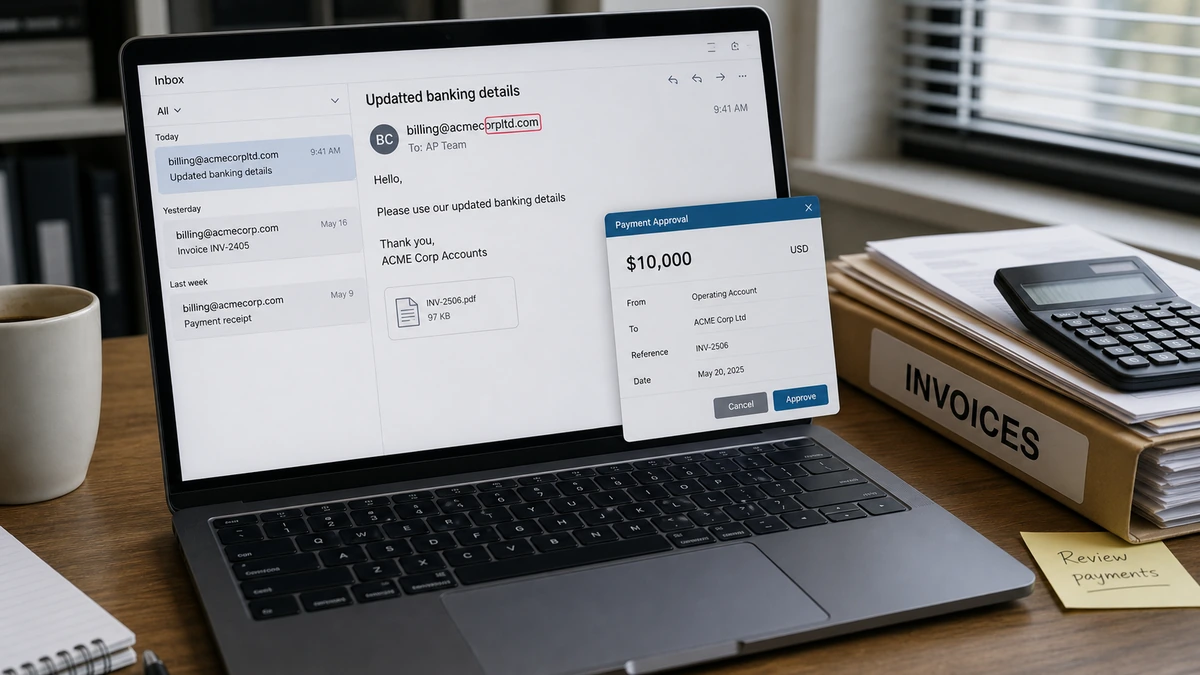
A quick $10,000 settlement looked like a practical way to reopen the account. One extra letter in the sender’s domain was the small detail standing between an ordinary payment and a very expensive mistake.
Overview
The message matched a real debt and real vendor relationship
This vendor invoice scam did not invent a random bill. The company genuinely owed money, the supplier relationship was strained, and the message reportedly contained convincing order and account details. That context made the request feel like a continuation of business rather than an intrusion.
The attacker built a near-perfect identity with tiny errors
The sender’s domain looked like the vendor’s domain but contained one extra letter. A phone number in the signature reportedly had its final two digits transposed. Both changes were easy to miss while the name, history, balance, and negotiation felt familiar.
A separate phone call broke the illusion
The payment was stopped because the company contacted the vendor through a known route instead of relying on the reply address and signature in the email. The real vendor confirmed that it had not sent the settlement request.
- The request concerned a real vendor and plausible outstanding balance.
- The sender offered a time-sensitive settlement that rewarded speed.
- The email domain differed by only one character.
- The phone number inside the message was not the vendor’s verified number.
- Independent verification prevented a $10,000 transfer to an impostor.
Why This Was More Dangerous Than a Fake Invoice
Obvious invoice spam usually fails because the recipient does not recognize the supplier, purchase, or amount. This case used facts that belonged to a real commercial relationship. A person reviewing the message could confirm several details and reasonably feel that due diligence had already been done.
The strongest deception was not the logo or writing style. It was the fit between the message and an unresolved accounting problem. The company wanted the vendor account restored, and a reduced settlement offered a neat solution. That made the request emotionally attractive as well as financially plausible.
The report does not establish how the attacker learned the order history. Possibilities include a compromised vendor mailbox, a compromised customer mailbox, leaked documents, forwarded invoices, exposed cloud files, or information collected during a previous exchange. Without email headers and incident-response evidence, it would be wrong to declare which system was breached.
How the Vendor Invoice Scam Works
Step 1: The attacker identifies a real payment relationship
The best business email compromise attempts are built around existing activity. The attacker may learn that one company buys from another, that an invoice is late, or that a dispute has delayed payment. Even a single authentic document can reveal names, email patterns, account numbers, amounts, and internal language.
Public sources can also help. Company websites identify finance staff and suppliers, professional profiles reveal job roles, and procurement announcements expose relationships. These fragments become more dangerous when combined with stolen email or invoice data.
Step 2: A lookalike domain is registered
The attacker creates an address that survives a quick glance. A letter may be added, removed, doubled, or replaced with a similar character. On a phone screen or narrow mail preview, the difference can disappear entirely.
A display name such as “Accounts Receivable” does not authenticate the domain behind it. Staff need to expand the full sender address and inspect every character, especially when money, bank details, or payment timing changes.
Step 3: Real history is woven into the message
The sender refers to legitimate orders, the amount owed, earlier discussions, or the status of the account. Correct facts lower suspicion, but they do not prove that the current sender is authorized. Stolen information can be accurate.
In the reported case, the apparent familiarity with the debt was a major reason the exchange continued. The attacker was not asking the CFO to believe a new story. The attacker was positioning a fraudulent payment instruction inside a story the CFO already knew was true.
Step 4: A favorable settlement creates momentum
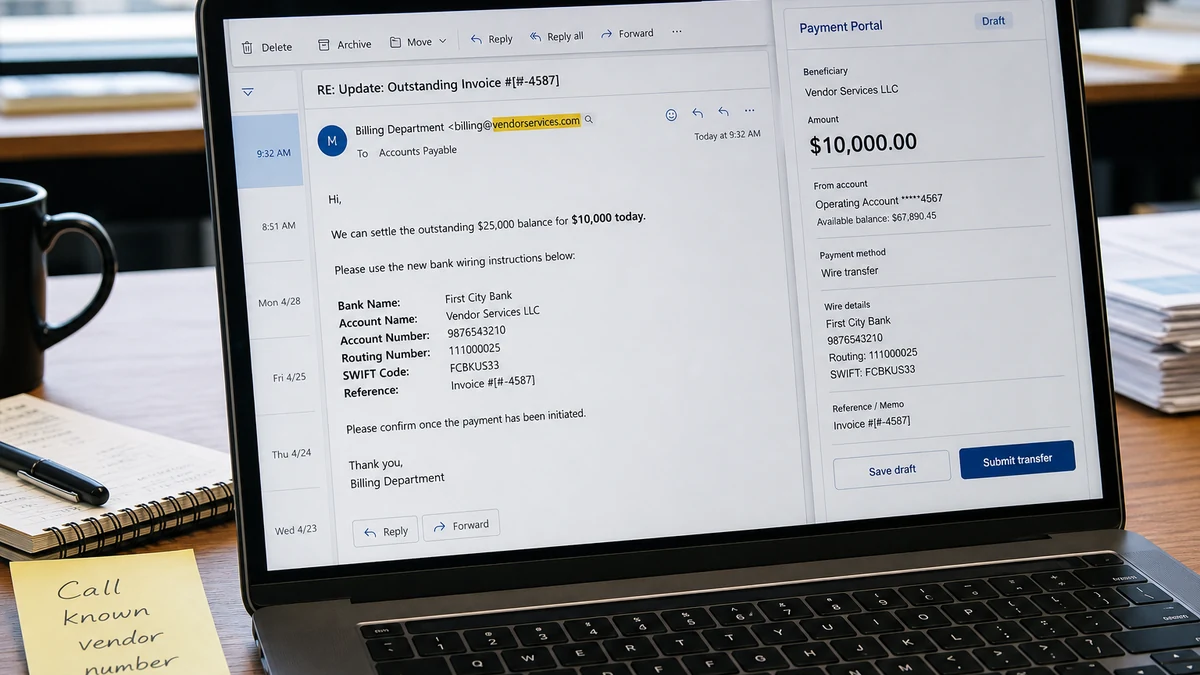
A proposal to settle roughly $25,000 for $10,000 gives the target a reason to move quickly. The company appears to save money, repair the vendor relationship, and solve an operational problem at once. Hesitation can feel like losing a valuable concession.
That is exactly when verification matters most. A surprising discount, urgent deadline, new beneficiary, or unusual payment route should trigger a pause even when the underlying debt is real.
Step 5: The attacker avoids live verification
When asked to speak, an impostor may delay, claim to be unavailable, redirect the call, or push the conversation back to email. A fake phone number in the signature can send the target to an accomplice or simply prevent contact.
Never verify a payment request using the contact details supplied in that request. Find the number in the approved vendor record, a prior verified contract, or the vendor’s independently located website. Then speak to a known person.
Step 6: The payment details are introduced
The final instructions route the funds to an account controlled by the attacker or a money mule. Sometimes the bank details arrive only after several harmless messages, making the conversation feel established before the risky change appears.
A reply chain is not a security control. If an account has been compromised, the attacker may be writing from a genuine mailbox. Verification must happen through a different channel and should include the beneficiary name, bank, account, amount, and reason for the change.
Step 7: The money is moved before the fraud is discovered
Business transfers can be split and moved quickly. By the time the real vendor asks why the debt remains unpaid, recovery may depend on how fast the sending bank, receiving bank, and authorities are notified.
The FBI’s Business Email Compromise guidance recommends contacting the originating financial institution immediately to request a recall or reversal and reporting the incident to IC3. Waiting for a full internal investigation can cost the recovery window.
Why One Extra Letter Was Easy to Miss
The extra letter in the domain was the clearest technical clue, but it was not the only one. The altered phone number and reluctance to speak created a pattern. Each discrepancy was small enough to rationalize by itself; together they showed that the identity could not be trusted.
Payment fraud often succeeds because organizations treat each clue as a separate inconvenience. The email looks right except for the domain. The number looks right except for two digits. The sender cannot talk today but keeps replying. A good process combines those clues and raises the verification level.
The settlement itself was another clue. Vendors sometimes negotiate, but a steep concession should be confirmed with someone already known at the vendor. The more financially attractive the change, the more valuable independent confirmation becomes.
Finally, knowledge of internal history should be treated as a potential sign of compromise, not automatic proof of legitimacy. After stopping the payment, both organizations should consider reviewing mailbox rules, login history, forwarding settings, cloud shares, recent password resets, and prior invoice exchanges.
The Breached-Context Problem
Organizations often teach staff to reject messages with generic greetings and vague invoices. Context-rich attacks invert that lesson. The names, orders, and amounts may all be correct because the attacker copied them from a real source.
A stolen thread can reveal who approves payments, how exceptions are worded, which employee is traveling, and when a vendor account is most urgent. That intelligence makes a simple lookalike domain far more effective.
The attack can also sit quietly inside a genuine mailbox. A hidden forwarding rule lets the operator observe a negotiation and intervene only when bank details or a settlement are discussed.
This is why the revised invoice email scam is not solved by checking whether an attachment looks professional. Payment instructions need authentication outside the email chain.
A near miss should therefore be treated as a possible security incident, not just an employee typo check. The private details in the message deserve an explanation even though no money left.
What Finance Teams Should Record
Document the exact sender address, reply-to address, return-path, domain creation clues, signature number, payment instructions, and every time the sender avoided a call. Small discrepancies become clearer when placed side by side.
Record which known vendor number was called and who confirmed the request was false. This protects the employee who stopped the transfer and gives investigators a clean timeline.
Search for related subjects, beneficiary accounts, and domains across the mail system. Another employee may have received a shorter version that seemed harmless at the time.
Review other payment confirmations as well. A fake SWIFT confirmation copy can be used after the initial approach to convince one side that a transfer is already moving.
Finally, feed the incident back into vendor controls. A prevented loss is most valuable when it improves the callback rule before the attacker returns with a different spelling.
Preserve the proposed beneficiary details even though no transfer occurred. The same account may appear in another employee’s inbox or another company’s fraud report.
Record the intended amount and deadline. Those fields help distinguish copies of the same campaign from unrelated spam that happens to impersonate the vendor.
Check whether the lookalike domain has valid mail records and when it first appeared, but do not visit unfamiliar pages from a production workstation. Domain age is a clue, not proof by itself.
Notify the real vendor before publishing internal screenshots or broad warnings. Shared evidence can contain invoice numbers, customer data, and account information that create a second exposure.
After containment, run a short tabletop exercise using the same request with a different typo. The aim is to test the callback process, not to test whether employees memorized one malicious domain.
Include accounts payable, procurement, treasury, and the business owner of the vendor relationship. A control that exists only inside the finance handbook can fail when an urgent request unexpectedly reaches someone through a different department.
A Safer Payment-Change Procedure
Organizations do not need to recognize every clever email if they make the payment process resistant to impersonation. The control should activate whenever the beneficiary, bank details, payment method, settlement amount, or communication route changes.
- Pause the transaction. An urgent deadline does not override verification.
- Compare the full domain character by character. Do not rely on the display name or an autocomplete contact.
- Call a known vendor contact. Use a number from the approved vendor master file or signed agreement, not the new email.
- Verify every changed field. Read back the beneficiary, bank, account, amount, and purpose.
- Require a second approver. The approver should review the verification record, not merely repeat the first person’s email review.
- Document the callback. Record who was reached, which known number was used, and what was confirmed.
- Escalate suspicious context. If the message contains real private information, notify security so the leak or mailbox compromise can be investigated.
These controls also help against altered PDFs and genuine-mailbox compromise. The goal is not only to detect misspelled domains. It is to prevent an email conversation from becoming the sole authority for moving money.
What the Correct Near-Miss Response Looks Like
Stopping the transfer is only the first step. Preserve the original email in a format that retains headers, not just as a screenshot. Notify the vendor using verified contact information and compare what each side can see in its mailboxes.
Security staff should check for suspicious sign-ins, new inbox rules, hidden forwarding, deleted messages, OAuth app grants, and password-reset activity. Finance staff should search recent conversations for other requests involving new bank details or unusual settlements.
The lookalike domain can be reported to its registrar, hosting provider, and relevant mail-security services. Add it to organizational blocks, but remember that the attacker can register another variation. Process controls remain essential.
Finally, alert employees who work with the affected vendor. A concise internal notice can prevent the same attacker from approaching another branch, buyer, or accounts-payable employee with the same stolen history.
Company, Address, and Fulfillment Checks
The real vendor relationship was legitimate
The underlying supplier and debt were real, which is why ordinary checks against the company name would not expose the impostor. The risk sat in the sender identity and payment instructions.
The address was not the deciding field
An attacker can copy a real vendor’s postal address from invoices or public records. A correct address in an email signature does not authenticate the mailbox or beneficiary account.
The contact information failed independent verification
The sender’s domain contained an extra letter, and the signature reportedly transposed the last two digits of the vendor’s phone number. Contact through a previously trusted route exposed the mismatch.
The promised fulfillment was restoration of the account
The impostor suggested that payment would settle the debt and restore business. Because the real vendor had not authorized the offer, the transfer could not fulfill that promise or reduce the legitimate balance.
What to Do if You Have Fallen Victim to This Scam
- Contact the sending bank immediately. Request a fraud recall, reversal, or hold and provide the transfer reference, beneficiary, amount, and time. Speed matters.
- Notify the receiving bank if advised. Your bank or law-enforcement contact may help route the notice. Do not negotiate with the beneficiary.
- Report the incident to the FBI’s IC3. Submit the complete payment and communication details through IC3.gov.
- Preserve the original emails. Export messages with full headers, attachments, and timestamps. Save invoices, call notes, and bank confirmations.
- Call the real vendor through a known number. Confirm what was compromised, warn them not to trust the fraudulent domain, and review other pending transactions.
- Secure affected accounts. Reset passwords, revoke sessions, review mailbox rules and OAuth access, and enable strong multi-factor authentication.
- Scan relevant devices. If anyone opened an attachment or entered credentials, use organizational endpoint tools and a reputable scanner such as Malwarebytes. A clean scan does not rule out a cloud-mailbox compromise.
- Block malicious advertising and pages where practical. A tool such as AdGuard can reduce exposure to some malicious links, but it cannot authenticate vendor emails or replace callback controls.
Do not wait to determine exactly which mailbox leaked the history before contacting the banks. Financial recovery and technical investigation should begin in parallel.
Frequently Asked Questions
Is a correct invoice amount proof that the sender is genuine?
No. Accurate amounts and order details can come from stolen email, leaked documents, exposed storage, or earlier reconnaissance. Verify the sender and payment change independently.
How can one extra letter in a domain be missed?
People read familiar words as shapes, especially under time pressure. Mobile previews and display names may hide the full address. Expand it and compare every character.
Can a message from the real vendor domain still be fraudulent?
Yes. A genuine mailbox can be compromised. That is why new bank details and unusual settlements require verification through a second, trusted channel.
Why would the scammer offer a large discount?
The discount makes speed feel profitable. The attacker would rather receive $10,000 quickly than pursue a fake claim for the full balance and invite more scrutiny.
What should we do if the transfer is still pending?
Call the bank’s fraud or wire department immediately and request that the payment be stopped. Do not rely only on an online cancellation button or email ticket.
Does this incident prove the vendor was hacked?
No. The report shows that the attacker had convincing context, but several sources are possible. Email headers, account logs, mailbox rules, and document access records are needed to determine the source.
The Bottom Line
This vendor invoice scam nearly turned a real $25,000 debt into a $10,000 payment to an impostor. The correct history, familiar name, and attractive settlement were camouflage for an extra letter in the domain and a phone number that did not verify.
Any change involving money deserves a callback through a known route. Trust the relationship, but authenticate the person giving the new instruction before the payment leaves.








