

A Facebook Marketplace sale should be simple: the buyer pays, the seller hands over the item, and both people move on.
In this case, a supposed Zelle payment opened the door to a much stranger chain of events, one that kept finding new reasons for the seller to send money.
Overview
The buyer made an ordinary sale feel safe
The conversation began with a person who appeared to want something listed on Facebook Marketplace. That matters because the seller was not looking for an investment, a prize, or a risky financial opportunity. The seller was simply expecting to be paid.
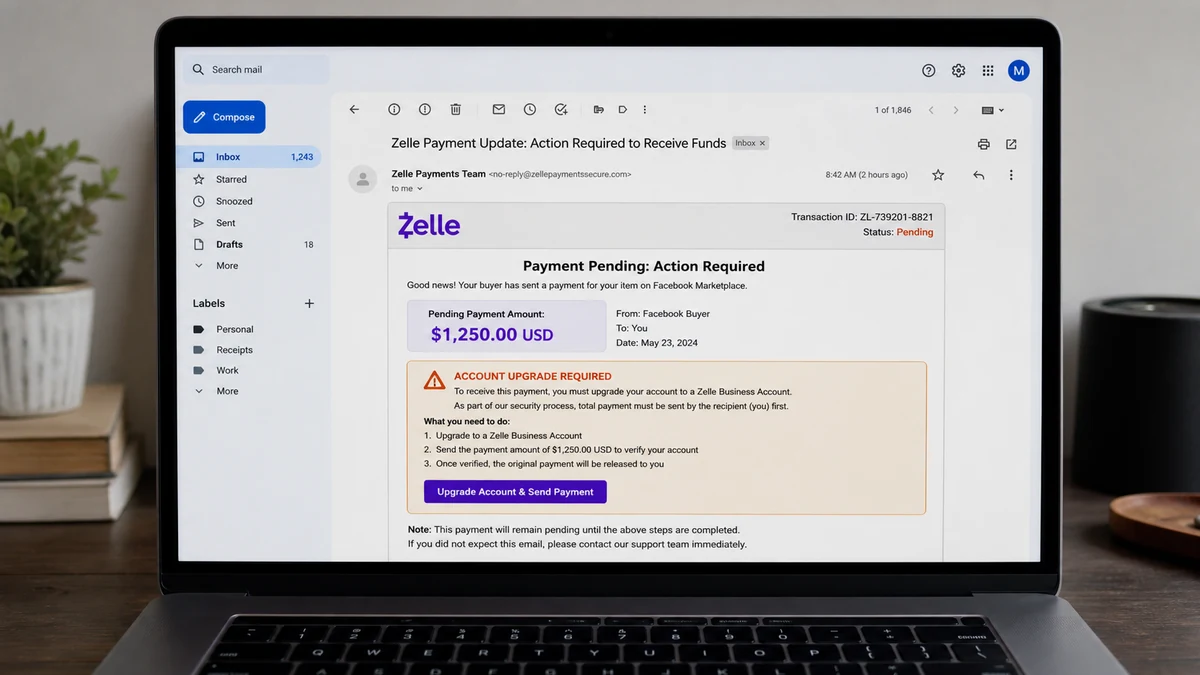
The buyer suggested Zelle and asked for the details needed to send money. Soon afterward, the seller received what looked like a payment notice. The message said the transaction could not be completed because the receiving account was not a business account.
That was the first reversal. Instead of the buyer solving a payment problem with their own bank, the seller was told to spend money to receive money. The item for sale became almost irrelevant once the fake upgrade story took over.
One invented fee became a tour of payment apps
The seller was reportedly guided into sending $513 through PayPal. The caller then moved the conversation to mobile checks, a $600 Bitcoin purchase, a $500 Chime transfer, and a request for $300 in DoorDash gift cards.
Those were not separate mistakes. They were parts of the same extraction. Each new payment was presented as the missing step that would release, return, verify, or combine the money already sent.
Switching services also helped the scammer work around warnings and limits. If one provider slowed the transaction, the caller could blame a technical error and introduce another method before the seller had time to reconsider the entire story.
Screen sharing gave the caller a front-row seat
The seller also shared the phone screen. Even when a caller cannot tap the screen directly, watching it can reveal balances, account names, verification codes, incoming alerts, and which payment options are still available.
It also lets the caller react instantly. If a bank displays a fraud warning, the scammer can explain it away. If an account has insufficient funds, another card or app can suddenly become the new solution.
The clearest warning signs in this case were:
- A buyer said the seller had to pay before an incoming Zelle payment could arrive.
- The alleged account upgrade appeared in an email or message, not in the bank’s official transaction history.
- The buyer or caller wanted to watch the seller’s phone screen.
- The instructions jumped between PayPal, checks, Bitcoin, Chime, and gift cards.
- Every failed payment produced a new fee rather than a cancellation.
- The amounts grew as the caller learned which accounts contained money.
- DoorDash gift cards were described as a financial solution.
- The buyer never produced a payment the seller could verify independently.
The Upgrade Does Not Exist
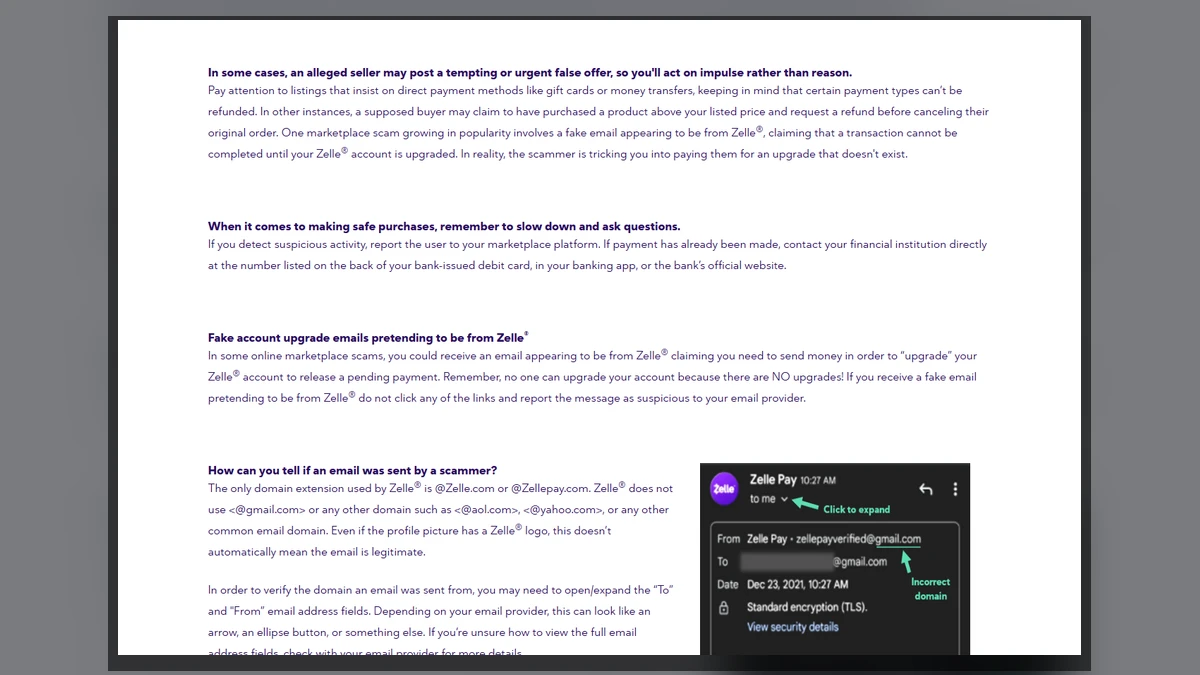
Zelle has addressed this marketplace script directly. Its online marketplace scam warning explains that scammers send fake notices claiming a recipient must upgrade an account before a payment can be completed.
There is no paid Zelle business upgrade that a buyer can trigger for a seller. There is no legitimate reason to reimburse a stranger for increasing a limit, either. If money was really sent, the participating bank or credit union can confirm it.
Do not use a button, phone number, or support address from the payment email. Open the bank’s app yourself or call the number printed on the bank-issued card. A familiar logo in an email is decoration, not proof.
A useful rule is to ignore every explanation for a moment and look only at the direction of the money. The seller was supposed to receive money. Once the seller was being asked to send it, the transaction no longer matched the sale.
How the Fake Zelle Business Upgrade Scam Works
Step 1: A fake buyer contacts a real seller
The scammer chooses an ordinary listing and often agrees to the price quickly. There may be a story about a relative collecting the item or a courier arriving later, which allows the buyer to avoid an in-person meeting.
At this point, the conversation may look completely normal. The scammer needs only enough cooperation to move the seller from the marketplace into email, text, or a phone call.
Step 2: Zelle becomes the proposed payment method
The buyer asks for an email address or phone number and claims to send the payment. Because the amount and item description came from the real listing, the notice that follows can contain convincing details.
The seller may see a transaction reference, a pending label, and Zelle branding. None of that matters if the payment is absent from the official bank account.
Step 3: A fake email invents a business-account problem
The message says the recipient has reached a limit or needs a business account. Some versions claim the buyer must send extra money and the seller must refund the difference. Others demand an upgrade fee directly.
No money has been placed on hold. The fake balance exists only in a message controlled by the scammer, so the supposed payment can be made larger or smaller whenever the story needs it.
Step 4: The caller offers to guide the seller
A helpful-sounding person calls to resolve the problem and may ask for screen sharing. The caller speaks as if the process is routine, using the seller’s own screen to make the instructions feel official.
This is where privacy begins to collapse. Notifications, balances, saved cards, one-time codes, and account relationships may all become visible to a stranger.
Step 5: The first real payment is called temporary
The seller sends money through a payment app because the caller promises it will return with the marketplace payment. The transaction may be described as a deposit, upgrade, verification, or refund.
In reality, it is an ordinary payment to a recipient selected by the scammer. The reassuring label exists only in the conversation and does not create escrow or a right to an automatic refund.
Step 6: New methods are introduced when resistance appears
If PayPal or the bank blocks a payment, the caller moves to a check, cryptocurrency, another app, or gift cards. A deposited check may briefly increase the displayed available balance even though it has not cleared.
The FTC’s fake-check guidance warns that banks can make funds available before discovering a check is fraudulent. When that happens, money spent against the deposit still belongs to the account holder.
Step 7: The scam continues until the seller breaks contact
Every successful transfer tells the scammer that another request may work. The caller may search for additional cards, linked accounts, borrowing options, or gift-card stores while promising that one final step will fix everything.
Afterward, a second group may offer to recover the loss for an upfront fee. Recovery scammers often know the original story because victim details are reused or sold.
Why the Changing Payment Methods Matter
A real Zelle issue would be handled by the seller’s bank. It would not require PayPal, Bitcoin, Chime, mobile checks, or restaurant-delivery gift cards. The growing list is not evidence of a complicated banking problem. It is evidence that the story is being improvised.
Each service also handles fraud differently. Card-funded payments may be reviewed one way, instant bank transfers another, and cryptocurrency another. Spreading the loss makes reporting harder and gives recipients more opportunities to move the funds.
Gift cards are especially revealing. DoorDash credit cannot upgrade Zelle or repair a bank transfer. The FTC’s gift-card scam advice is blunt: anyone who tells you to buy gift cards to pay them is a scammer.
When a caller starts switching payment methods, write down every amount already sent. Seeing $513, $600, $500, and another $300 request on one page can break the illusion that the caller is fixing a single transaction.
Screen Sharing Changes the Risk
Many people hear “screen share” and think the other person can only watch. Watching is already enough to cause harm. A verification code can appear in a notification, a banking app can reveal balances, and an email inbox can show password-reset messages.
If remote-control software was installed, the risk is greater. The caller may have been able to tap buttons, change settings, copy data, or create unattended access that survives the call.
Do not change passwords while the suspicious session is still visible. Disconnect the device from Wi-Fi and mobile data, end the session, and use a different trusted device to secure the main email and financial accounts.
Record the name of the remote app and its permissions before removing it. Then inspect accessibility access, device-administrator settings, notification access, browser extensions, and active login sessions.
The broader MalwareTips guide to fake Facebook Marketplace buyers shows why moving a sale into an off-platform payment conversation is so dangerous. Screen sharing lets the fake buyer control that conversation in real time.
A Safer Way to Handle Marketplace Payments
Decide which payment methods you will accept before posting the item. Keeping checkout inside a marketplace with documented seller protections makes it harder for a buyer to invent a private payment procedure.
Confirm incoming money only in the official app or bank ledger. Screenshots, emails, and messages from the buyer are not settlement records. Do not release an item because a courier is waiting or the buyer says a transfer is pending.
Never refund an overpayment until the payment provider confirms the original transaction is legitimate and final. A fake or reversible credit can disappear after the seller sends good money back.
If a buyer says the payment failed, let the buyer contact their own bank. The seller does not need to share a screen, install an app, disclose a verification code, or fund the buyer’s account.
Pause when a buyer becomes urgent. Another legitimate buyer can appear later. Money sent to solve a fake upgrade can move through several accounts before the seller has finished the call.
Preserve the profile and conversation before blocking. Screenshots of the listing, buyer account, email headers, payment recipients, wallet addresses, and gift-card receipts can connect events that otherwise look unrelated.
Most importantly, do not let money already lost decide whether to send more. The next payment should be judged on its own. If its only purpose is to recover a previous payment, stop and contact the providers independently.
Company, Address, and Fulfillment Checks
The buyer’s profile was not verified identity
A Facebook name, photo, and account history do not prove who controls the profile today. Marketplace accounts can be fabricated, copied, or taken over.
Keep the conversation on-platform and do not treat friendliness or a quick agreement as identity verification. Record the profile URL before reporting it.
The payment notice was not a bank record
The seller needed to see the payment inside the official bank account. A professional email does not become a financial record because it contains a transaction number.
Call the bank through a trusted number and ask whether any Zelle payment is pending. Do not call a number printed in the suspicious email.
The recipients did not match the sale
PayPal accounts, Chime recipients, Bitcoin wallets, and gift-card codes had no documented role in buying the listed item. They were payment destinations without a legitimate invoice.
Save each recipient name, username, email, phone number, wallet address, and merchant descriptor. Providers may be able to act on those details.
Nothing was fulfilled in return
The seller was promised an incoming payment but received no verified funds, upgrade, or protected checkout. The growing payment chain never fulfilled its stated purpose.
Do not hand over or ship the item until funds are independently confirmed. If money must leave the seller’s account first, the sale has already gone off course.
What to Do if You Have Fallen Victim to This Scam
- End the call and remote session. Disconnect the affected device from Wi-Fi and mobile data if screen control may still be active.
- Contact every payment provider immediately. Report PayPal, Zelle, Chime, bank, Bitcoin, and gift-card transactions separately, with exact amounts, recipients, and times.
- Call the bank through a trusted number. Ask about transfer recalls, holds, card replacement, fake-check exposure, and protection for linked accounts.
- Describe the authorization honestly. Explain that you approved transactions because a fake buyer and fake Zelle notice deceived you. That detail helps investigators classify the event correctly.
- Preserve evidence before blocking accounts. Save the listing, buyer profile, chats, email headers, call logs, receipts, wallet addresses, remote-app details, and gift-card numbers.
- Secure accounts from a clean device. Change the primary email and financial passwords, sign out unknown sessions, replace reused credentials, and enable strong multifactor authentication.
- Check the affected device. Remove unauthorized remote tools and run a full scan with Malwarebytes. Consider a reset if you cannot confirm that access is gone.
- Reduce exposure to malicious follow-ups. AdGuard can block many harmful pages and ads, although it cannot reverse an authorized transfer.
- Report the accounts and payment trail. Notify Facebook Marketplace, file a report with the FTC, and send significant online theft evidence to IC3.
- Ignore guaranteed recovery offers. A person asking for a fee, tax, or wallet deposit to recover the money may be starting a second scam.
Ask every company for a case number and build one timeline containing all payments. The scam crossed several services, so organized records can help one fraud team understand what happened on another platform.
Frequently Asked Questions
Does Zelle charge sellers to upgrade an account?
No. The paid upgrade described in this marketplace script does not exist. Do not send money to release an incoming Zelle payment.
Can a buyer send extra money to increase my limit?
A legitimate buyer does not need to overpay and request reimbursement to change your account. Verify the original payment with your bank and stop the sale.
Is a Zelle email enough to prove I was paid?
No. Check the official bank app or ledger. Sender names, logos, reference numbers, and screenshots can all be copied.
Is screen sharing safe if I never reveal my password?
No. The caller may still see balances, account names, codes, security prompts, and personal messages. Remote-control permissions create even more risk.
Will the bank refund every transfer?
Recovery depends on the payment method, timing, recipient activity, and investigation. Report quickly, but do not trust anyone who guarantees the outcome.
What if a deposited check appears in my balance?
Availability does not mean the check has cleared. The bank can remove the funds later if the check is fraudulent, leaving you responsible for money already spent.
The Bottom Line
The Fake Zelle Business Upgrade worked by making a seller forget the simplest fact in the transaction: the buyer was supposed to pay. The fake email created a problem, and the caller turned every attempted fix into another real payment.
No marketplace sale requires a tour through payment apps, Bitcoin, checks, and gift cards. Check the bank independently, end screen sharing, and stop the moment receiving money somehow requires sending it.








