

The warning looks personal: someone is trying to replace the phone number on your Cash App account, and you have only a few minutes to stop the change.
That message can make even a careful user reach for the link or support number. The Cash App phone number change scam is built around that reflex.
Overview
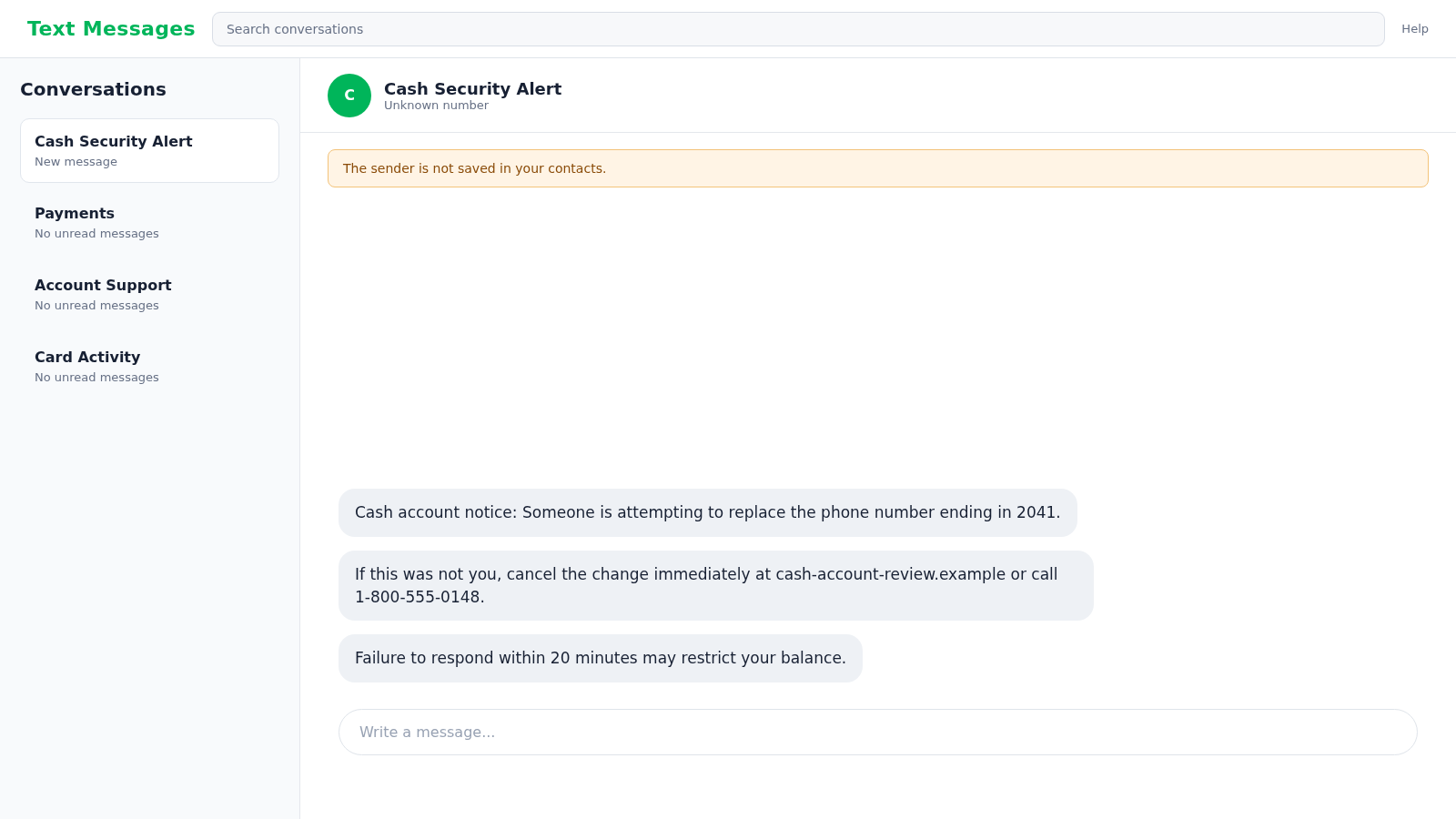
The alert describes a believable account-takeover event
Phone numbers are used for account access, notifications, and recovery. A message claiming that yours is being removed sounds like a direct threat to both the account and any balance inside it.
The scam text may say “someone is attempting to change your phone number,” “a new number was added,” or “your security information is pending replacement.” It then offers a link or telephone number to cancel the action.
The supposed rescue route is the trap. The link can open a fake sign-in page, while the phone number can connect to an impersonator who asks for a sign-in code, PIN, card details, or remote access.
The attacker wants the secret that completes a real login
Some Cash App sign-ins rely on a one-time code sent to a linked email address or phone number. A scammer who already knows your contact detail may trigger a real code, then call and ask you to read it back.
The code is not a cancellation number. It can authorize the attacker’s login or account change. Cash App states on its official security page that it will never ask for your sign-in code or PIN.
Other versions collect enough information to attempt access later. The phishing form may request:
- Your email address or mobile number
- Your $Cashtag
- Your Cash App PIN
- A one-time sign-in code
- Debit card details
- Bank account information
- Your Social Security number
- A photo of an identity document
A genuine security concern must be checked inside the real app
Cash App can send alerts about sign-ins and account-setting changes. That does not make every text using the same language genuine.
The safest response is to ignore the embedded route and open Cash App through the icon you already use. Review your profile, linked contact details, activity, and security settings there.
If you need help, start from the official in-app support channel or type cash.app into the browser yourself. Do not allow the suspicious message to choose the website or telephone number for you.
Why the Phone-Number Story Creates Panic
A fake payment alert can be checked by looking at transaction activity. A phone-number change sounds more fundamental because it suggests the attacker is about to remove your ability to sign in.
The message often combines three pressure points: an unfamiliar device, a pending contact change, and a short deadline. Each detail encourages immediate action before verification.
Scammers may include the last four digits of a real or invented number. They may also know your name or email from a data breach. Personal details make the warning more convincing but do not authenticate the sender.
Caller ID can be spoofed, and sender names can be forged. A text appearing in the same conversation as a legitimate brand alert is not always genuine because mobile-message routing and previous contact naming can be misleading.
The Fake Cancellation Page
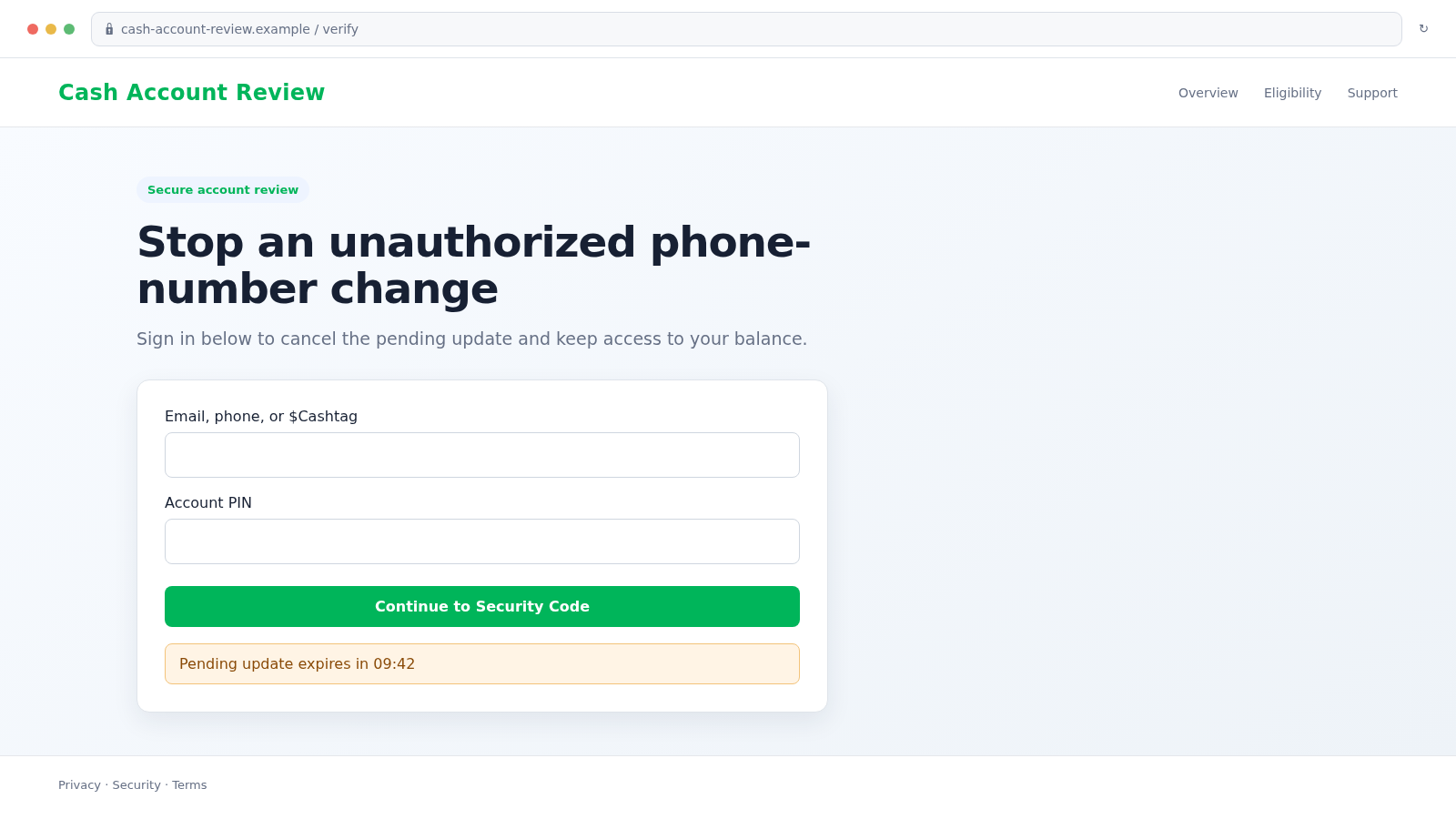
The link may open a page using green styling, payment language, and a countdown. It claims that signing in will cancel the pending phone-number replacement.
Look at the full domain, not the logo or page title. A name such as “cash-account-review,” “cash-security-center,” or “cashapp-verification” on an unrelated domain is not Cash App.
The first form may ask only for an email or phone number. The next page requests the PIN, card information, or code. Breaking the request into stages makes each step feel less alarming.
A fake page may deliberately display an error after the first entry. The attacker receives the information in the background while the victim assumes it was mistyped and enters a second password or code.
Never use the page to test whether a credential is correct. Close it, access the real app independently, and change any secret you entered.
How the Cash App Phone Number Change Scam Works
Step 1: A mass text claims an account change is underway
The attacker sends thousands of messages to random or leaked phone numbers. Enough recipients use Cash App that the warning will feel relevant to some of them.
The text may identify itself as “Cash Security,” “Fraud Prevention,” or “Account Support.” A display label costs the scammer nothing and is not proof of affiliation.
Step 2: A countdown makes the fake alert feel urgent
The recipient is told to respond within 10, 20, or 30 minutes. Another version warns that the balance will be frozen or transferred once the update finishes.
This artificial deadline is designed to prevent you from opening the app, searching the message, or asking someone else for a second opinion.
Step 3: The victim follows the attacker’s support route
A link opens a lookalike security page. A telephone number reaches a call center that answers with a convincing Cash App support script.
Both routes keep the victim inside information supplied by the scammer. Every instruction appears to confirm the original story.
Step 4: Credentials and codes are requested
The page or caller asks for the phone number, email, $Cashtag, PIN, or sign-in code needed to “locate” and “secure” the account.
A real code may arrive because the attacker is simultaneously attempting a login. The message attached to that code may explicitly say not to share it.
Step 5: The attacker signs in and changes recovery details
Once access is obtained, the criminal may add a new contact method, change the PIN, link a card, or send available funds to another account.
The attacker may also review transaction history and contacts, then impersonate the victim in requests to friends or family.
Step 6: A fake support agent demands additional action
The caller may claim the balance must be moved to a “safe account,” that a test payment is needed, or that gift cards must be purchased to verify funds.
Remote-access software may be presented as a security tool. Once installed, it can expose banking sessions, email, passwords, and other financial apps.
Step 7: The victim is locked out and approached again
After the account is taken, the original number may stop responding. Another person may later offer recovery for an upfront fee.
Recovery scammers often target people who posted publicly about the theft. They cannot guarantee account restoration and may be part of the same criminal network.
Company, Address, and Fulfillment Checks
The sender label is not Cash App
A text header such as “Cash Security Alert” is simply a label. Check the actual sender, but remember that even a familiar-looking number can be spoofed.
Cash App support will not ask you to reveal a PIN or sign-in code. That behavior outweighs the name displayed on the message.
The destination domain must be exact
Inspect every character before entering information. Extra words, hyphens, unfamiliar extensions, and redirect services are common in phishing links.
Do not trust a padlock by itself. HTTPS encrypts a connection to the site you opened, including a fraudulent site. It does not prove the site belongs to Cash App.
Support should be reached independently
Use the official app or Cash App website to obtain support. Never call a number contained only in an unexpected security message, sponsored search result, or pop-up.
A legitimate support representative should not ask you to move money, buy gift cards, install remote-access software, or read out a one-time code.
The transaction trail must exist inside the account
If the message refers to a payment or setting change, verify it in the real application. A screenshot, text, or caller statement is not a transaction record.
Cash App’s official controls include account alerts, Security Lock, card locking, and in-app reporting. Use those tools rather than a cancellation button on an unfamiliar page.
Warning Signs of the Fake Alert
- The text arrives from an unknown ordinary mobile number
- The message gives only minutes to respond
- A link uses an unrelated or lookalike domain
- The alert asks you to call a number not found through Cash App
- A caller requests your PIN or sign-in code
- You are told to move funds to protect them
- Support asks for gift cards, cryptocurrency, or a test payment
- A remote-access app is required for a refund or security check
- The caller discourages you from opening the real app
- The supposed account change does not appear in official settings
How to Check the Alert Without Taking the Bait
Do not tap the message. Open Cash App normally and review the phone number and email connected to your profile. Check for unknown transactions, cards, devices, or other changes.
Turn on Security Lock so a face, fingerprint, or PIN is required before payments. Make sure notifications remain enabled for sign-ins and account activity.
Secure the email account linked to Cash App because an email takeover can be used to intercept recovery messages. Use a unique password and multifactor authentication.
If a real change is visible, contact official support immediately from inside the app. Take screenshots of the setting and transaction history, but do not post sensitive details publicly.
Also review any linked debit card and bank account for small unfamiliar transfers. Criminals sometimes test access with a minor payment before attempting a larger withdrawal, so a low amount should not be dismissed as harmless.
Forward suspicious SMS messages to 7726, the spam-reporting short code used by many mobile carriers in the United States. Then block the sender.
What to Do if You Have Fallen Victim to This Scam
- Open the real Cash App immediately. Do not return through the text. Check linked phone numbers, email addresses, activity, cards, and security settings.
- Change the PIN and secure access. Use a known-clean device. Enable Security Lock and review whether any unknown contact detail or account was added.
- Contact official Cash App support. Report the scam in the app and identify every unauthorized payment or setting change. Cash App lists its official support options on cash.app.
- Notify your bank and card issuer. If linked financial information was exposed or money moved, contact the fraud department using the number on the card or statement. Ask about blocks, replacements, disputes, and transfer recovery.
- Protect the linked email account. Change its password, revoke unfamiliar sessions, remove unknown forwarding rules, and verify recovery phone numbers and addresses.
- Change reused credentials. If the same password or PIN was used anywhere else, replace it there as well. Prioritize banking, payment, shopping, and mobile-carrier accounts.
- Call your mobile carrier when SIM fraud is possible. Add or change the carrier account PIN and ask whether any SIM, eSIM, port, or forwarding request was made.
- Remove remote-access software. Disconnect the device from the internet if a caller controlled it. Run a complete scan with Malwarebytes and seek technical help before using it for banking again.
- Block the malicious page. Report the URL to the browser and hosting provider. A blocker such as AdGuard can reduce access to known phishing and malicious advertising domains.
- Document and report the fraud. Save the text, website, phone number, payment records, and support case. Report to the FTC and, for substantial internet fraud, the FBI’s IC3.
- Ignore recovery offers. Do not pay strangers who claim they can hack back the account or guarantee a refund. Continue only through Cash App, your financial institutions, and law enforcement.
Frequently Asked Questions
Does Cash App send phone-number change alerts?
Cash App can send account and security notifications. Verify any warning inside the official app rather than trusting the link, sender name, or number contained in an unexpected message.
Will Cash App support ask for my sign-in code?
No. Cash App states that it will never ask for your sign-in code or PIN. Anyone requesting either secret is not following legitimate support practice.
What if the text includes my real name or phone digits?
Personal details can come from breaches, marketing records, or previous scams. They make the message more convincing but do not prove that the sender has account access.
Is the link safe if it has a padlock?
No. A padlock means the connection is encrypted. Fraudulent sites can also use HTTPS. The exact domain and how you reached it remain critical.
What if I shared a code but no money is missing?
Act immediately. Change the PIN, review contact details and activity, secure linked email and carrier accounts, and report the exposure to official Cash App support before the attacker completes another step.
Can Cash App recover a scam payment?
Recovery depends on how the payment occurred and its status. Report it in the app and contact the linked bank or card issuer immediately. No outside recovery agent can guarantee reversal.
The Bottom Line
The Cash App phone number change scam invents an urgent account takeover, then directs the victim to the exact page or caller that can steal the credentials needed to make one real.
Never share a PIN or sign-in code. Open the official app independently, inspect the account, and reach support through Cash App’s verified channels. The fastest-looking response in the text is usually the one the scammer prepared.








