


A text arrives with the kind of news most people would love to believe: as much as $5,000 in tax relief may already be waiting, but the eligibility window is about to close.
The message sounds helpful, specific, and oddly urgent. That combination is exactly what makes the ReliefSignup.com tax relief offer worth examining before you enter a name, phone number, or financial detail.
Overview
The message borrows the language of real tax-relief programs
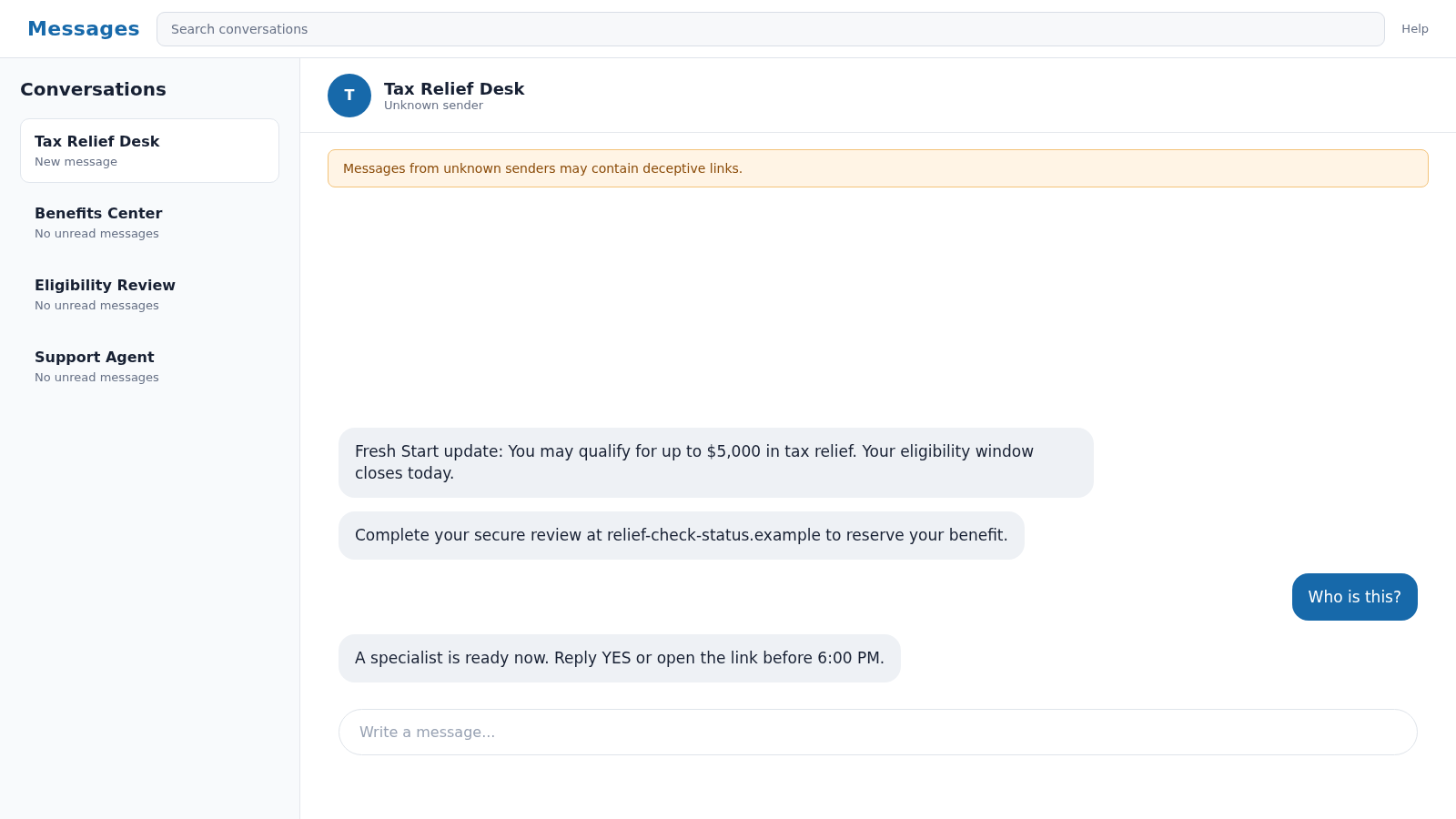
The ReliefSignup.com tax relief scam is promoted through unsolicited texts, calls, or online ads that mention a “Fresh Start” program, a pending relief amount, or a short eligibility review. Some versions claim that approximately $5,000 is available.
There are legitimate IRS payment plans, penalty-relief options, and offers in compromise. However, those real programs do not mean an unknown commercial website has located free money in your name.
The wording deliberately blurs three different ideas: resolving an existing tax debt, receiving government assistance, and collecting an unclaimed payment. A reader may recognize one phrase and assume the rest of the message must also be official.
The first goal may be collecting a qualified financial lead
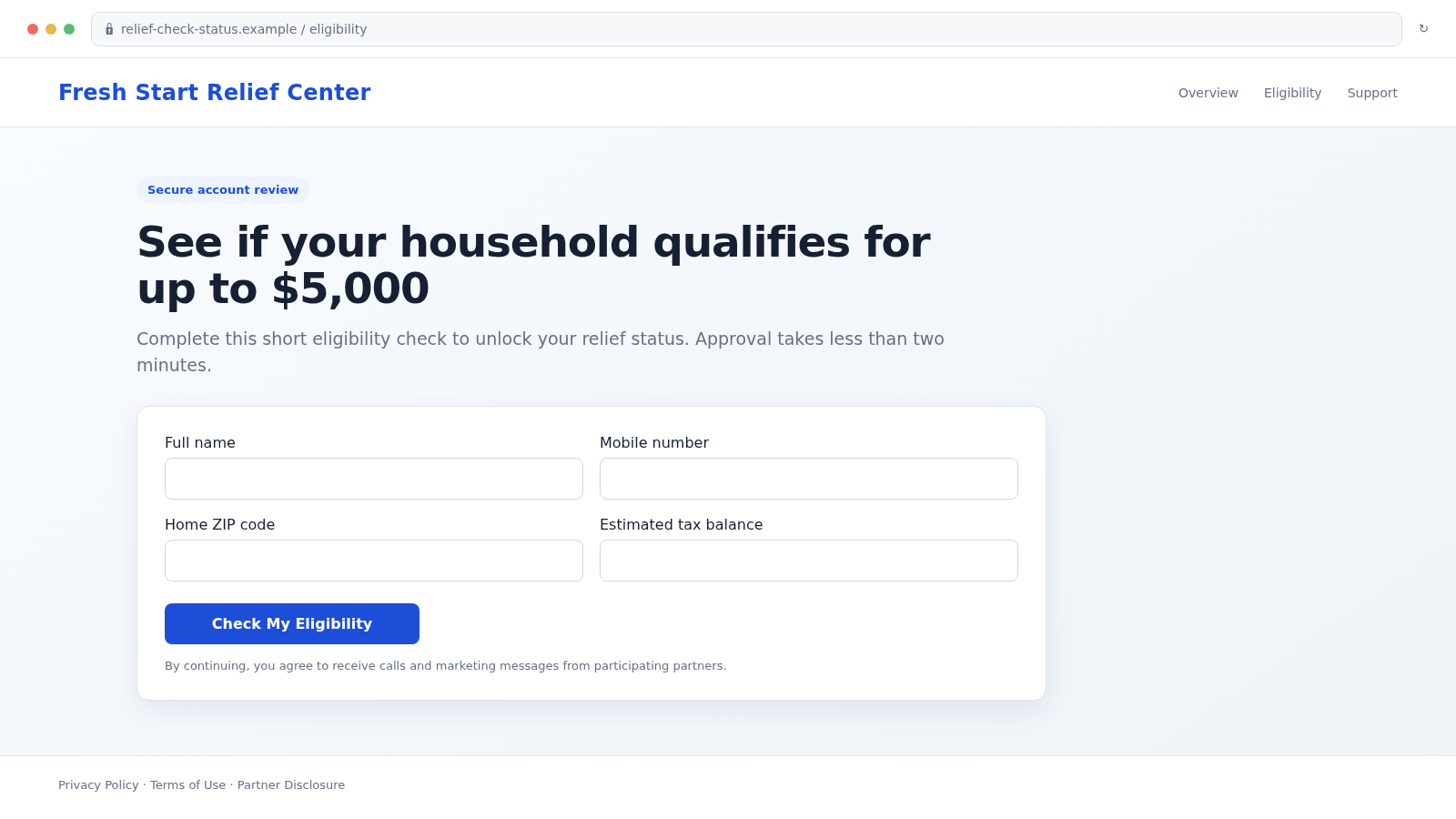
The landing page commonly begins with low-friction questions about your ZIP code, tax balance, income range, or household. It may then request your full name, email address, and mobile number.
That information has value even if no payment is taken. It identifies someone who may owe taxes, needs financial help, responds to urgent offers, and can be contacted by sales agents or other marketers.
Depending on the version, the journey may lead to:
- A tax-relief sales call
- Lead sharing with several marketing partners
- A fake government-grant questionnaire
- A request for a Social Security number
- An upfront “processing” or “release” fee
- A card form tied to a trial or recurring service
- Additional loan, debt, insurance, or benefits offers
A real IRS option is not proof that this solicitation is genuine
The IRS does offer an official tax-debt help portal. Eligible taxpayers may arrange payments, request certain relief, or apply for an offer in compromise directly with the agency.
The IRS also warns that some offer-in-compromise promoters charge substantial fees while encouraging applications from people who are unlikely to qualify. A commercial site should therefore be judged by its identity, disclosures, credentials, and written service terms, not by its use of authentic IRS vocabulary.
A page that promises relief before reviewing your actual tax situation is not making a meaningful eligibility decision. It is using the promise to keep you moving through the form.
Why the “Fresh Start” Pitch Sounds Official
“Fresh Start” feels like the name of a single government payout. In practice, tax resolution is more complicated. Your options depend on whether returns are filed, how much is owed, your income, assets, expenses, and ability to pay.
An offer in compromise is not free money. It is an agreement to settle qualifying tax debt for an amount the IRS determines is reasonable. Applying does not guarantee acceptance.
Scam messages remove those details and replace them with a clean number, a deadline, and a button. The result looks less like tax administration and more like a prize notification.
The Federal Trade Commission warns that fake government-grant offers often arrive unexpectedly and ask for personal or banking information. Real federal grants require an application and are not awarded out of the blue for ordinary personal expenses.
What the Eligibility Form May Really Be Doing
A short questionnaire can feel harmless because it does not immediately ask for a card number. Yet each answer helps classify and price the lead.
A person who reports more than $10,000 in tax debt may be routed to one company. Someone with a smaller balance may be sent to a loan, credit-repair, or debt-settlement offer instead. The page can change after every answer.
Read the text around the submit button carefully. Consent language may authorize calls, prerecorded messages, automated dialing, texts, or contact from “partners.” The list of partners may appear only through a small link.
Submitting a form can also confirm that your phone number works and that you respond to financial-pressure messages. That can increase follow-up spam and make later impersonation attempts more convincing.
The risk rises sharply if the form requests a Social Security number, IRS transcript, tax return, driver’s license, bank statement, or online tax-account credential. Those records contain enough information for identity theft and highly personalized fraud.
How the ReliefSignup.com Tax Relief Scam Works
Step 1: An unexpected message promises a specific benefit
The contact may say that a review found you eligible for $5,000, that a tax-relief window is closing, or that a payment has not been claimed. A precise amount makes a mass message feel individually calculated.
The sender normally provides no verifiable case number, tax year, balance, or agency contact. The message relies on the reader filling those gaps with hope.
Step 2: Urgency discourages independent verification
A deadline such as “today,” “before 6 PM,” or “final notice” is added to make a quick click feel safer than waiting. Some messages suggest that ignoring the link will permanently cancel the opportunity.
Real tax matters do have deadlines, but an authentic notice identifies the agency, tax period, response procedure, and official contact route. A vague countdown is pressure, not proof.
Step 3: The link opens a commercial eligibility funnel
The destination may use flags, seals, blue government-style colors, and terms such as “secure portal.” Its address, however, is not an IRS.gov or USA.gov domain.
The form starts with easy questions so that leaving later feels like wasting progress. This is a common conversion technique, not evidence of a government review.
Step 4: Personal details turn the visitor into a marketable lead
The page asks for contact information and a rough financial profile. A consent checkbox may permit calls from multiple companies even if the visitor thought they were contacting one program.
Once submitted, the data can be stored, transferred, combined with other records, or used for repeated sales attempts. You cannot assume it stays with the name displayed at the top of the page.
Step 5: A caller presents an urgent tax-resolution package
A sales agent may quickly call and describe the situation as severe but fixable. The script can include warnings about liens, garnishment, penalties, or collection action before the caller has reviewed official records.
The person may request an enrollment payment, signed authorization, tax transcript access, or extensive identity documents. High pressure is especially concerning when credentials and fees have not been explained in writing.
Step 6: Fees, redirects, or recurring offers appear
Some visitors may be redirected to unrelated marketing pages rather than tax help. Others may encounter a paid consultation, credit product, identity service, or subscription offer.
Never assume a “$1 verification,” “small processing charge,” or trial is the final cost. Read the full checkout, renewal terms, cancellation method, and merchant name before entering a card.
Step 7: The collected data supports future scams
A later caller may know your name, tax concern, ZIP code, and the amount you entered. That familiarity can make the second contact seem like a legitimate case follow-up.
Scammers may impersonate the IRS, a settlement specialist, a bank, or an identity-protection service. The original form has supplied the context needed to tell a more believable story.
Company, Address, and Fulfillment Checks
The program name is not the legal company
“Fresh Start Relief Center” or similar wording may be a campaign label rather than a registered business. Look for the legal entity in the privacy policy, terms, consent disclosure, invoice, and card statement.
If several different names appear, document each one. You need to know who received the data, who promised the service, and who would charge the card.
The website address must match the claimed authority
Federal tax services use IRS.gov. General government-benefit information is available through USA.gov. A commercial .com address does not become a government portal because it uses a flag or the words “federal program.”
Check when the domain appeared, whether the legal company is named, and whether the privacy contact uses the same domain. Missing identity details are more important than polished graphics.
Support should work before payment
A credible tax professional should explain credentials, pricing, refund rules, likely services, and realistic outcomes before collecting a large fee. You should be able to verify enrolled-agent, CPA, or attorney status independently.
Be cautious when every question is answered with another sales pitch, when documents are withheld until payment, or when cancellation is available only through a hard-to-reach call center.
The data and service trail must be traceable
For a lead-generation page, “fulfillment” means what actually happens after submission. Does the site provide tax representation, sell the lead, route it to partners, or simply redirect the visitor?
Save the consent language and partner list. They may explain why calls begin from companies you never recognized and help support requests to stop contact or delete data.
Warning Signs You Should Not Ignore
- You did not request tax help or apply for a benefit
- The message promises a fixed amount without reviewing your account
- The deadline is measured in minutes or hours
- The website is not on an official government domain
- The page mixes tax debt, grants, stimulus money, and unclaimed checks
- A form requests sensitive identity records before identifying the provider
- Consent language allows calls from many unnamed partners
- A caller guarantees settlement or promises that nearly all tax debt will disappear
- An upfront fee must be paid by gift card, cryptocurrency, wire, or payment app
- The company will not provide a written scope, cancellation policy, and legal name
How to Check a Tax-Relief Offer Safely
Do not begin with the link in the message. Sign in to your IRS account through a typed IRS.gov address or contact the agency using an official number to confirm what you owe and which options may apply.
Use the IRS offer-in-compromise pre-qualifier when that program is relevant. This provides a realistic starting point before a salesperson tells you that acceptance is almost guaranteed.
If you want professional help, independently locate an enrolled agent, CPA, or tax attorney. Verify credentials through official directories and professional licensing sources.
Ask for the total expected cost, which forms will be prepared, whether representation is included, what happens if you do not qualify, and how refunds work. Refusal to answer in writing is a reason to stop.
What to Do if You Have Fallen Victim to This Scam
- Stop further contact and do not pay another fee. Do not let a deadline or threat push you into sending more money. Save the number and message before blocking the sender.
- Preserve the full evidence. Keep screenshots, website addresses, consent text, emails, caller names, invoices, card descriptors, and any documents you uploaded. Write down what information you provided.
- Contact your bank or card issuer. If you paid or entered payment data, use the official number on the card or statement. Ask about blocking, replacement, unauthorized charges, disputes, and recurring billing.
- Protect your IRS account. Access IRS.gov directly, review account activity, and follow official identity-protection steps if tax information or credentials were exposed.
- Respond to Social Security number exposure. Visit IdentityTheft.gov for a recovery plan. Consider a free credit freeze with all three credit bureaus and monitor reports for unfamiliar accounts.
- Change reused passwords from a clean device. Start with email because it can reset other accounts. Turn on multifactor authentication and review recovery addresses, phone numbers, forwarding rules, and active sessions.
- Scan devices that opened downloads. If the page installed a file or browser extension, run a complete scan with Malwarebytes. Remove unknown remote-access software and seek professional help if the device was controlled.
- Reduce repeat exposure. A content blocker such as AdGuard can block many known malicious ad and scam destinations. It cannot undo submitted data, so combine it with account and credit protections.
- Revoke marketing consent. Send written opt-out and deletion requests to every identifiable company that received the lead. Keep delivery records and do not send additional sensitive documents.
- Report the scheme. File reports with the FTC, the IRS when tax impersonation is involved, your state attorney general, the messaging provider, and the domain host. Include the exact URL and payment route.
- Be alert for recovery scams. Anyone promising guaranteed refunds for another upfront fee may be targeting you because your information was shared or sold.
Frequently Asked Questions
Is the IRS Fresh Start Program real?
The IRS has real payment and tax-debt resolution options, but there is no automatic $5,000 payout simply because a text says “Fresh Start.” Check eligibility and balances directly through IRS.gov.
Does ReliefSignup.com belong to the IRS?
No commercial .com domain should be treated as an IRS website. An official federal tax service uses IRS.gov. Confirm the legal operator and data-sharing terms of any commercial form separately.
Why does the form ask how much tax I owe?
The answer may be used to route and price the lead, decide which sales script to use, or determine whether a tax-relief company wants to call you. It is not proof that the IRS reviewed your case.
Can a legitimate tax-relief company contact me?
Legitimate professionals advertise and accept inquiries, but an unexpected solicitation still requires verification. Check credentials, legal identity, written pricing, realistic eligibility, and cancellation terms before sharing records or paying.
What if I gave only my name and phone number?
The immediate financial risk is lower, but expect calls and messages. Save the consent page, opt out in writing, block suspicious contacts, and treat follow-up callers who know your tax concern with caution.
What if I uploaded a tax return or Social Security number?
Treat it as serious identity exposure. Follow an IdentityTheft.gov plan, freeze credit, secure email and IRS access, monitor financial accounts, and keep records of every document and website involved.
The Bottom Line
The ReliefSignup.com tax relief scam pitch turns real tax vocabulary into an urgent promise of up to $5,000. The clean number and closing deadline are designed to make a commercial data form feel like an official benefit notice.
Do not verify the offer through the link that delivered it. Check your tax situation directly with the IRS, identify every company before sharing data, and walk away from guaranteed outcomes or unexplained upfront fees.

Reviews & discussion
0 commentsShare a firsthand experience, or ask a question.
Community reviews
reliefsignup.com
Moderated reader experiences, not an editorial verdict.
Start the conversation
Have a question or something useful to share? Add the first comment.