

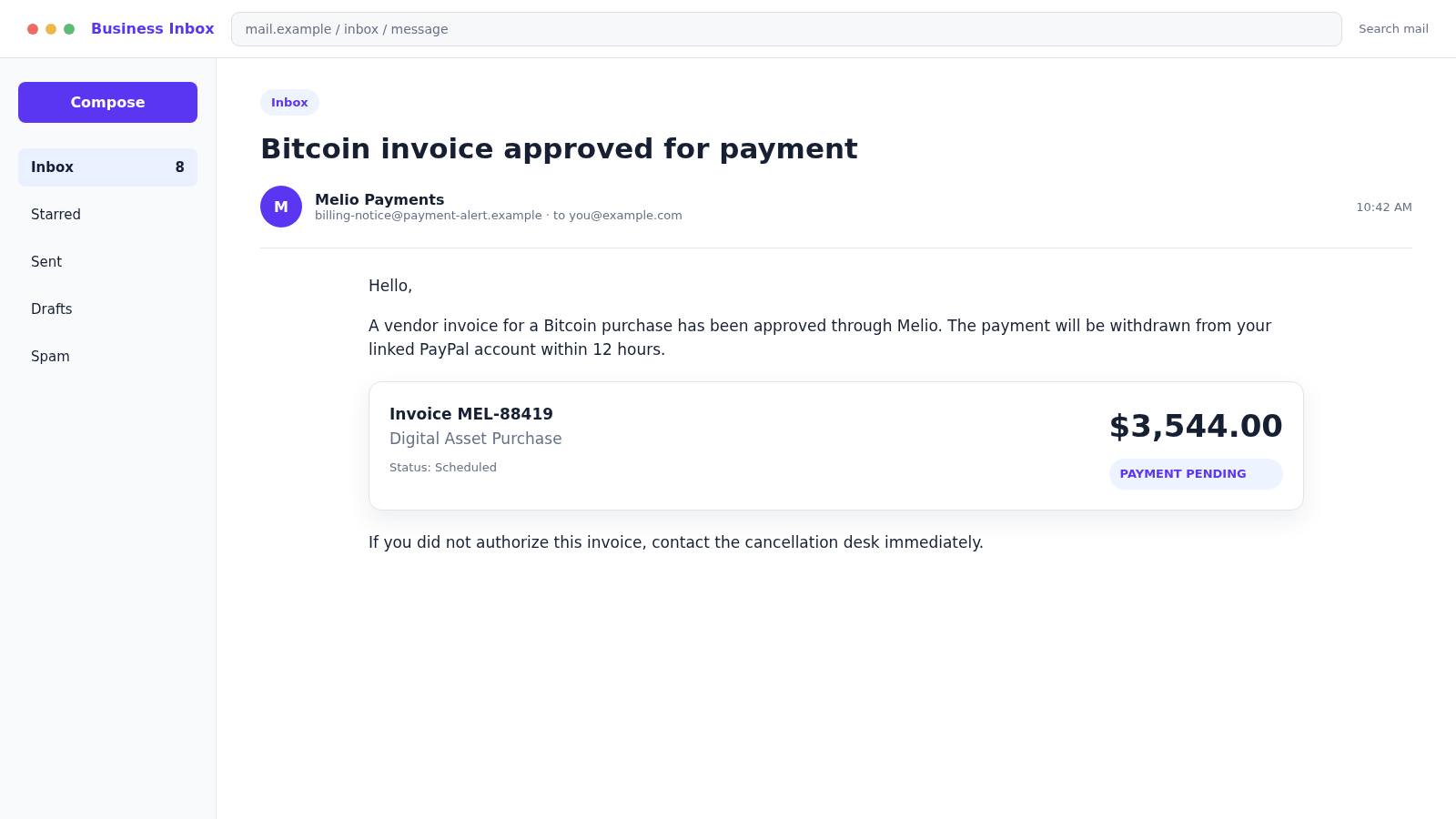
A business inbox receives an invoice for a $3,544 Bitcoin purchase. The email says Melio approved it and PayPal will withdraw the money within 12 hours unless the recipient contacts a cancellation desk.
There is no urgent payment to cancel. The alarming invoice is a lure that turns a confused recipient into a willing caller, a phishing-page visitor, or a source of valuable business credentials.
Overview
The scam impersonates a real business payment platform
Melio is a legitimate platform used by businesses to send and receive payments. The scam is not evidence that every message mentioning Melio is fraudulent.
Criminals borrow the name because invoices and vendor payments naturally belong in a business inbox. An accounts-payable employee may be less surprised by a payment notice than an ordinary consumer.
The message may use Melio colors, payment terminology, a vendor name, and an invoice reference. These visual details can be copied without any connection to the real company.
The Bitcoin purchase and PayPal withdrawal are deliberately confusing
The email may claim that Melio processed a Bitcoin invoice while PayPal will supply the funds. Combining recognizable payment brands creates uncertainty about where the transaction should appear.
That confusion encourages the recipient to use the support route in the message instead of checking each account independently.
A legitimate payment should have a consistent vendor, invoice, funding source, authorization trail, and account record. Brand names placed together in an email are not a transaction history.
The cancellation process is the real trap
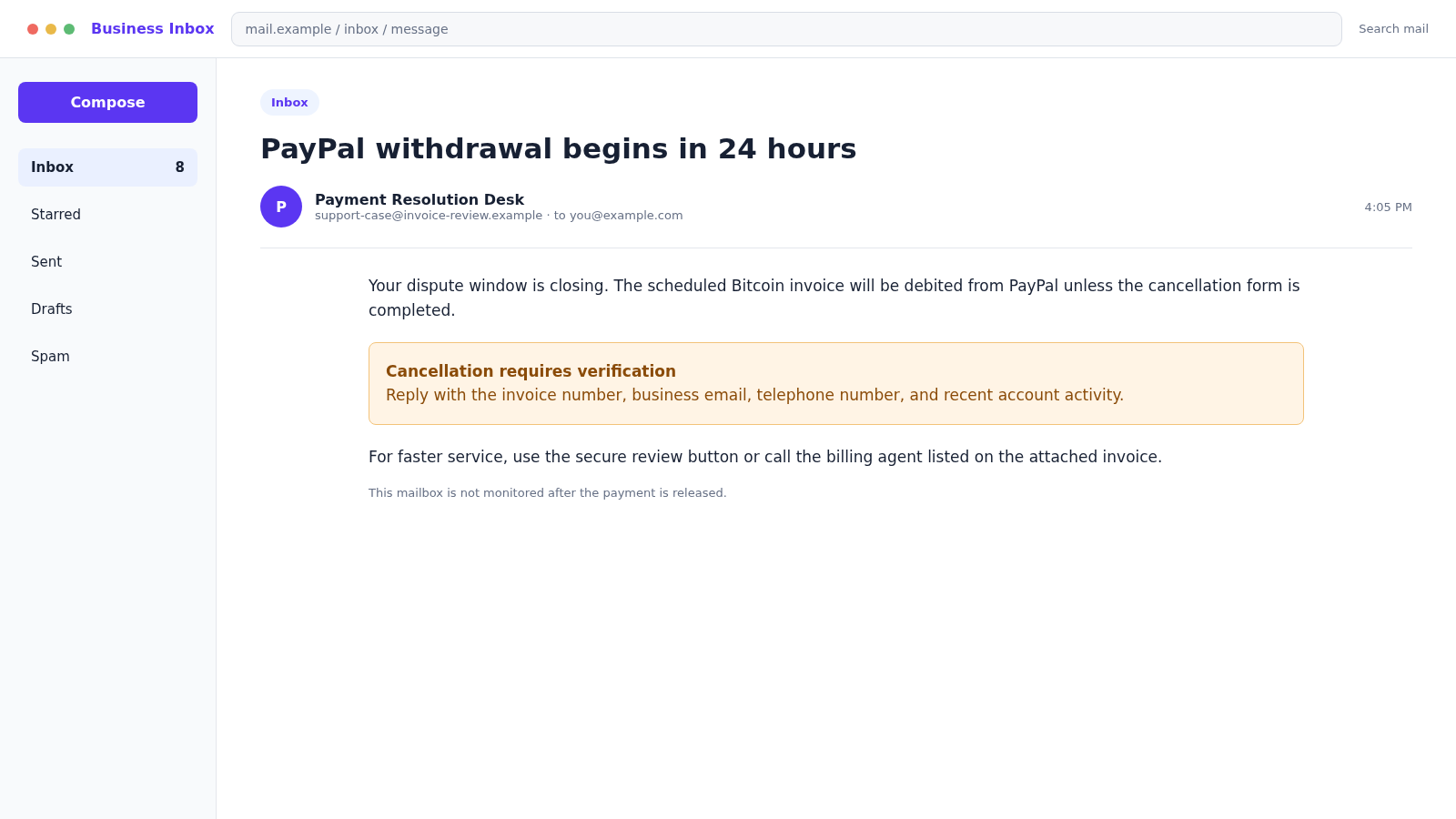
The notice warns that the withdrawal will occur within 12 or 24 hours. A button, phone number, reply address, or attached invoice promises immediate cancellation.
Following that route may lead to credential theft, remote access, malicious attachments, or a fake refund conversation. The scammer creates the billing emergency and then presents themselves as the only person who can solve it.
Common targets include:
- Melio, PayPal, email, or accounting credentials
- Business bank and card information
- One-time authentication codes
- Remote access to an employee’s computer
- Payment of a fake invoice or cancellation fee
- Vendor lists and authentic invoice templates
- Mailbox rules used to hide future fraud
- Company identity and tax information
What a Real Invoice Trail Should Contain
A valid business invoice begins with a real purchase, contract, or vendor relationship. The receiving company should be able to match it to a purchase order, delivery, approval, and known contact.
The vendor name and bank instructions should agree with existing records. A sudden change requires verification through a previously known channel.
The payment-platform account should show the same amount, recipient, status, and funding source. Do not accept a screenshot or email as a substitute for the authenticated account record.
Open Melio, PayPal, and the bank separately using saved bookmarks or typed addresses. If the invoice exists only in the email, there is no transaction to cancel through the sender.
If an unfamiliar request appears inside a real payment platform, do not approve it. Legitimate infrastructure can still carry a request created by a dishonest user.
Why Accounts-Payable Teams Are Attractive Targets
Finance employees routinely handle urgent messages, attachments, bank details, and large amounts. Their normal work resembles the actions a scammer wants to provoke.
An invoice arriving near a reporting deadline or busy payment run may receive only a quick glance. The attacker relies on routine and workload as much as fear.
A compromised vendor mailbox can make the message more convincing. The criminal may reply inside an existing thread, copy the writing style, and use a genuine invoice with only the bank account changed.
The FBI describes business email compromise as fraud targeting organizations and people who perform fund transfers. It recommends verifying account changes through a secondary channel.
Strong procedures should make verification normal, not an accusation. A short call to a known vendor number can prevent a payment from reaching an attacker-controlled account.
Company, Address, and Fulfillment Checks
Open Melio and PayPal from known addresses
Sign in through bookmarks or manually typed official addresses. If the invoice, withdrawal, vendor, or alert is absent from the authenticated account, the email should not be treated as proof of a pending payment.
Verify the vendor outside the email thread
Call a known contact using a number already stored in company records. Confirm the invoice number, amount, goods, destination account, and any switch to cryptocurrency before an employee approves or cancels anything.
Compare the sender with the real payment trail
Examine the actual sender and reply-to addresses, then compare them with prior legitimate notices. A familiar display name or logo cannot repair an unrelated domain, mismatched company identity, or missing transaction inside the real platform.
Keep cancellation inside the authenticated service
A legitimate dispute should not require remote access, gift cards, crypto transfers, or a callback to an unverified billing desk. Use the platform’s own activity, help, and dispute controls to investigate and report the alert.
How the Melio Payments Email Scam Works
Step 1: A fake payment alert enters the business inbox
The subject announces an approved Bitcoin invoice, pending withdrawal, or completed vendor payment. The sender display name uses Melio Payments or a billing-related phrase.
The actual address may belong to a free email provider, a lookalike domain, a compromised account, or an unrelated notification service.
Step 2: The amount and deadline create urgency
A charge of $500 or $5,000 is large enough to demand action. The recipient is told that PayPal will release it within 12 to 24 hours.
The deadline is not a real dispute limit. It is a social-engineering device designed to prevent review by another employee.
Step 3: Mixed branding makes independent verification harder
The invoice names Melio as processor, PayPal as funding source, and Bitcoin as the purchase. The recipient may not know which provider to contact first.
The message solves that confusion by supplying a convenient link or phone number controlled by the scammer.
Step 4: The victim opens a link, attachment, or callback
A PDF may display a telephone number and fake invoice details. A button may lead to a copied payment login page.
If the recipient calls, a fake billing agent asks for the invoice reference and appears to locate the transaction.
Step 5: Credentials or remote access are requested
The supposed agent says identity verification is required. The victim may be asked for a password, security code, card number, or remote-support session.
A remote tool lets the criminal view email, accounting software, saved passwords, and online banking. It can turn a fictional invoice into direct financial access.
Step 6: The story changes into a refund or secure-transfer problem
The caller may claim to cancel the invoice and issue a refund. A manipulated screen then appears to show too much money credited to the victim.
The victim is pressured to return the difference through wire transfer, gift cards, cash, or cryptocurrency. No excess refund actually reached the account.
Step 7: Mailbox access supports wider invoice fraud
If email credentials are stolen, the attacker studies vendor conversations and payment schedules. Hidden forwarding rules may copy future invoices to the criminal.
The attacker can then impersonate a real supplier, change banking details, and target larger transfers with accurate context.
Step 8: Follow-up fraud targets the company and its vendors
Contacts in the compromised mailbox may receive fake invoices from the victim’s account. The original company can appear to be the sender of a new scam.
Recovery specialists may also approach the business and promise to retrieve funds for an upfront fee. That is another advance-fee risk.
How to Verify the Message Without Using It
Do not reply, click, open the attachment, or call the listed number. Preserve the message and begin a separate verification path.
Sign in to Melio through the official site or app and inspect payment activity. Repeat that check in PayPal and the linked bank account.
Search internal records for the vendor, amount, purchase order, approver, and goods. Ask the named approver in person or through a known corporate channel.
Call the vendor using a number already stored in your accounting system or contract. Do not use a telephone number in the new invoice.
Inspect full email headers or ask the IT team to do so. Authentication results, sending servers, reply-to changes, and lookalike domains can reveal impersonation.
Melio’s own invoice-fraud guidance recommends checking sender addresses, unusual payment methods, changed bank details, unknown purchases, and documents that do not match the normal format.
Warning Signs in the Fake Melio Invoice
- No employee recognizes the Bitcoin purchase
- The invoice has no matching purchase order
- Melio and PayPal roles are unclear or contradictory
- The actual sender domain does not match the company
- A 12-hour cancellation deadline creates panic
- The main action is calling a number in the attachment
- The agent requests a password or one-time code
- Remote access is required to cancel the payment
- Banking details changed without prior verification
- The recipient is told not to involve another employee
What to Do if You Have Fallen Victim to This Scam
- Stop the interaction. End calls, close phishing pages, and disconnect remote-control sessions. Do not send a corrective transfer or cancellation fee.
- Contact the originating bank immediately. Ask for the fraud or wire team and request a recall, reversal, or hold. The FBI advises contacting the financial institution as soon as business email compromise is recognized.
- Notify Melio and PayPal through official channels. Report unfamiliar invoices, money requests, logins, and payments from inside the authenticated accounts.
- Secure the mailbox. Change the password from a clean device, reset multi-factor authentication if needed, revoke sessions, and inspect forwarding, deletion, and inbox rules.
- Protect accounting systems. Reset exposed credentials, review connected apps and API tokens, inspect vendor changes, and audit recent payments for unauthorized activity.
- Call affected vendors. Warn them that emails may have been intercepted or impersonated. Verify every pending invoice and bank-detail change using known contacts.
- Preserve business evidence. Save full headers, invoice files, call recordings if lawful, remote-session logs, payment details, bank instructions, and internal approvals.
- Inspect the device. Remove remote-access tools and suspicious downloads, then run a full scan with Malwarebytes. Consider rebuilding a heavily compromised finance workstation.
- Reduce malicious web exposure. Report phishing domains and use controls such as AdGuard where appropriate. Filtering supports users but does not replace payment verification.
- File reports promptly. Report business email compromise to the FBI’s IC3, the FTC, local law enforcement, and the organization’s cyber insurer when applicable.
- Review notification duties. If customer, employee, or vendor data was exposed, consult legal and incident-response professionals about contractual and regulatory obligations.
- Strengthen payment controls. Require two-person approval and out-of-band verification for new payees, changed bank instructions, crypto purchases, and unusual amounts.
How Businesses Can Prevent the Next Invoice Scam
Payment verification should not depend on the same email conversation that carries the invoice. If a request changes a bank account, payee, currency, or payment method, confirm it through a known telephone number or another independent channel.
Require two people to approve unusual payments. One employee can confirm the vendor and invoice, while another reviews the destination and amount. This small separation makes a rushed message less likely to become a completed transfer.
Finance teams should know what Melio, PayPal, and other services normally display. A shared procedure can identify unexpected crypto references, unfamiliar reply-to addresses, mismatched company names, and cancellation instructions that leave the authenticated platform.
Mailbox security deserves the same attention as banking access. A criminal who controls an accounts-payable inbox can study invoice cycles, hide warnings, impersonate employees, and wait for the most believable moment to redirect a payment.
- Use unique passwords and phishing-resistant multi-factor authentication
- Review forwarding rules and connected applications regularly
- Confirm new payees outside the email thread
- Set approval thresholds for urgent or unusual transfers
- Train employees to report mistakes without delay
- Keep bank and platform fraud contacts readily available
Run short exercises using realistic invoice scenarios. The goal is not to trick employees. It is to make stopping, checking, and escalating an unusual request feel normal even when a message appears to come from an executive or trusted vendor.
Finally, document the response path before an incident. When employees know who can freeze payments, preserve email evidence, contact vendors, and notify insurers, the business loses less time during the narrow window when recovery may still be possible.
Review vendor records after any mailbox compromise, even when the fake invoice itself was stopped. An attacker may have changed contact details, created hidden mail rules, or prepared a second request that appears more familiar than the first.
Encourage employees to report clicks and calls immediately. A quick report can protect the mailbox, cancel remote access, and alert the bank before money moves. Punitive reactions only teach people to conceal the next mistake.
Frequently Asked Questions
Is Melio Payments itself a scam?
No. Melio is a real business payment platform. This scam impersonates the company or misuses payment language to make a fraudulent invoice appear credible.
Was my PayPal account really scheduled for withdrawal?
Check directly inside PayPal, Melio, and the linked bank account. An email statement is not proof. If no matching authorization appears, do not create one through the sender’s link.
Is it safe to open the attached invoice PDF?
Treat unexpected attachments as risky. A PDF may contain deceptive links or exploit content. Ask your security team to inspect it without opening it on a finance workstation.
Why does the scam mention Bitcoin?
Bitcoin is unfamiliar to many recipients and difficult to reverse once sent. An unexpected crypto purchase also creates a strong emotional reason to seek immediate cancellation.
Should I call the number printed on the invoice?
No. Find the payment provider and vendor’s contact details independently. A number inside a suspicious invoice may lead directly to the fraudster who created it.
What if an employee gave the caller remote access?
Disconnect the device, notify IT and financial institutions, preserve logs, and begin incident response. Assume that anything displayed or stored on the workstation may have been exposed.
The Bottom Line
The Melio Payments email scam uses a fake Bitcoin invoice and a threatened PayPal withdrawal to manufacture an urgent accounting problem. The cancellation route is where the real theft begins.
Verify invoices inside official accounts and through known vendor contacts. A business should never release money, credentials, security codes, or remote access merely because an unexpected email starts a countdown.








