

The buyer sounds unusually easy to deal with. They agree to the price, skip the usual questions, and say the payment has already been sent through Venmo.
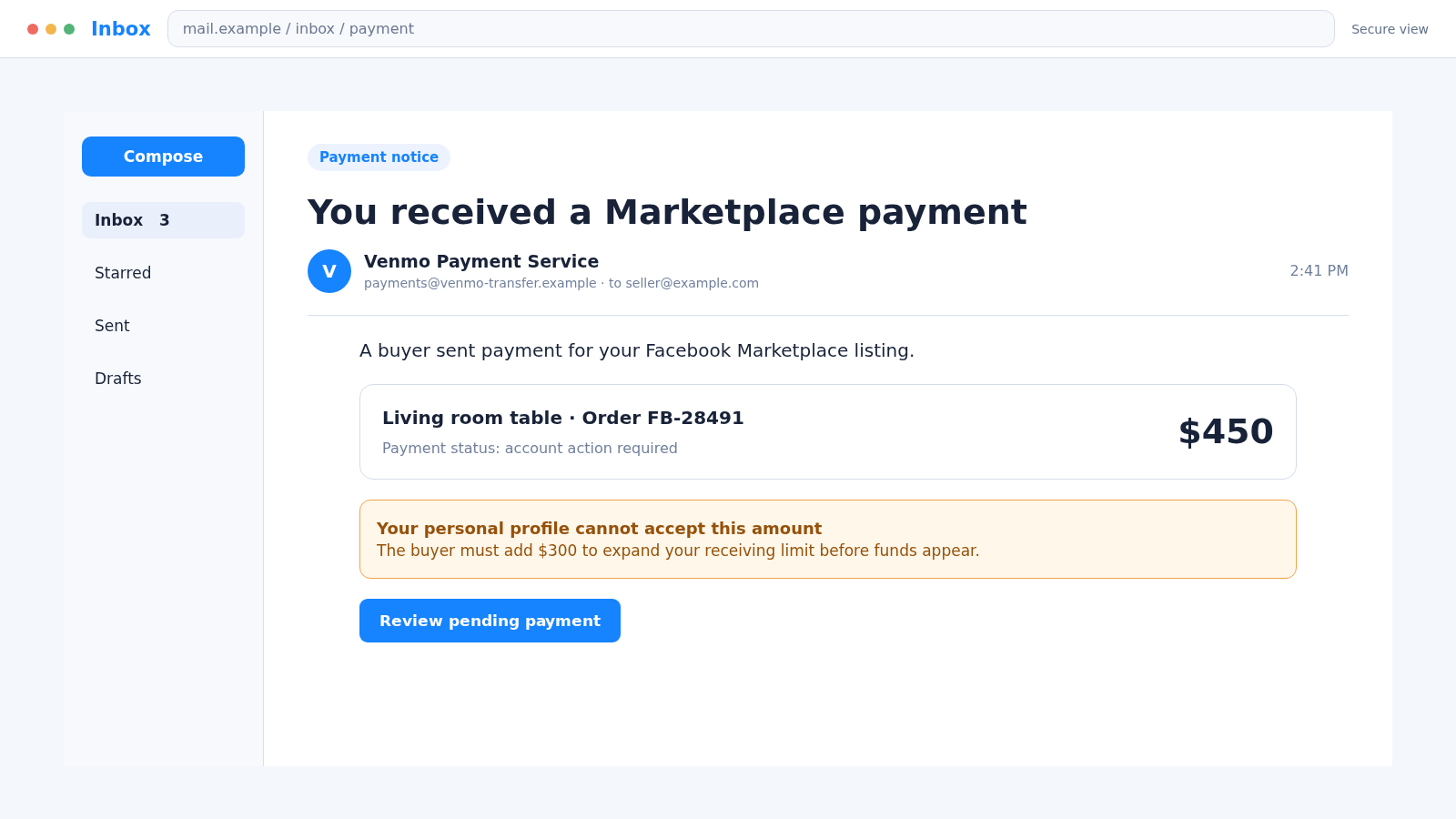
Then an official-looking email says the money is waiting, but one small problem must be fixed first. The Venmo Facebook Marketplace scam begins when that fake payment notice feels more trustworthy than the balance inside the real app.
Overview
The scam targets sellers who are ready to complete a simple sale
A criminal responds to a Facebook Marketplace listing and offers to pay with Venmo. The conversation may seem routine, but the supposed buyer is trying to make the seller trust an email, screenshot, or message instead of checking an actual payment.
The item may be furniture, electronics, tickets, a vehicle part, or almost anything that can be collected quickly. Expensive and easy-to-resell items are especially attractive because the scammer can turn them into cash.
A fake Venmo notice creates a problem that does not exist
The seller receives an email claiming the payment is pending, the account has a limit, or a business profile must be activated. Some messages say the buyer sent extra money to unlock the transaction and must now be reimbursed.
These claims are not confirmed by the seller’s real Venmo activity. The email is a prop designed to create the appearance of funds while directing the seller toward a separate payment.
The victim can lose money, the item, or both
The exact request changes, but the scam usually aims to obtain one or more of the following:
- A refund for money that was never received
- A fee supposedly required to upgrade or release a Venmo payment
- The listed item before a genuine payment clears
- A Venmo password, verification code, or recovery information
- Bank or card details entered on a fake payment page
- Personal information that can support later impersonation
Venmo warns that scammers may send fake emails or screenshots that appear to show payment. It also states that uploading shipping information is not a condition for receiving money from a buyer.
The Fake Payment Stories Sellers Commonly See
One version says the buyer paid the agreed price, but the seller has a personal account that cannot accept it. The email then claims a temporary upgrade is required before the balance can be released.
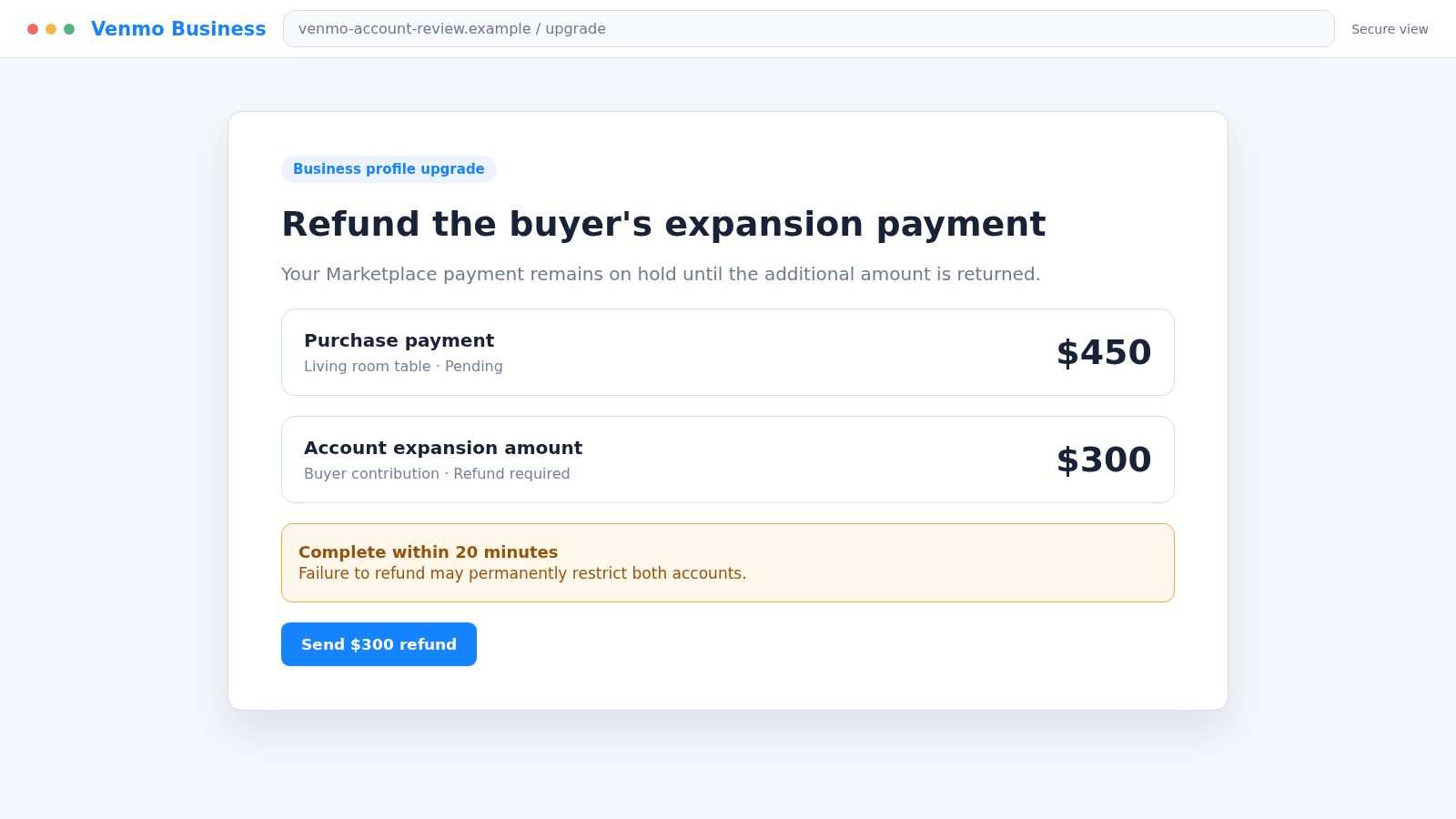
Another version says the buyer sent an additional amount to complete that upgrade. The scammer acts worried about the extra transfer and pressures the seller to return it immediately, even though neither payment exists.
A simpler version uses a fabricated payment confirmation. The buyer asks for the item, a tracking number, or proof of shipment while the seller assumes the email is equivalent to cleared funds.
Scammers may also send a real payment from a compromised card or bank account. A visible balance is better evidence than an email, but it does not guarantee that a suspicious transaction cannot later be challenged or reversed.
Why the Conversation Can Feel Believable
Marketplace sellers expect strangers to contact them. An unfamiliar name, a short conversation, and a request for pickup are ordinary parts of the platform, which gives the criminal a natural reason to begin talking.
The buyer may mention a child, spouse, courier, or relative who will collect the item. That detail explains why the payer’s name, pickup person, and account information do not match.
The fake email may copy Venmo colours, icons, support language, and transaction formatting. A display name such as “Venmo Payment Service” can hide the unrelated address that actually sent it.
Urgency arrives only after the seller has mentally completed the sale. The buyer says a driver is waiting, the extra payment came from rent money, or the refund must happen before their account is charged.
How the Venmo Facebook Marketplace Scam Works
Step 1: The scammer finds a fresh Marketplace listing
Fraudsters monitor new listings because sellers are most responsive while an item is still available. They may contact several people at once with nearly identical opening messages.
The account can be newly created, copied, or stolen from a real user. An older profile with photos is not proof that the person controlling it is genuine.
Step 2: The buyer accepts quickly and moves toward payment
The scammer often avoids negotiating and shows little interest in the item’s condition. Their goal is to reach the payment stage before the seller notices how few normal buying questions were asked.
They request the seller’s email address, phone number, or Venmo username. That information gives them a destination for the fake notice and may reveal whether a Venmo account exists.
Step 3: A fake confirmation arrives outside the real app
An email, text, or screenshot claims that the buyer sent the money. It may include a transaction ID, the listing description, the buyer’s name, and the correct sale amount.
The message does not represent an actual Venmo transaction. Scammers can create a realistic template in minutes and populate it with details taken directly from the listing.
Step 4: The message invents a hold or account limitation
The seller is told that a receiving limit, personal profile, incomplete verification, or security review is blocking the funds. A prominent instruction explains how to “expand” or “upgrade” the account.
This problem exists only in the fake message. Genuine account notices should also be visible after opening Venmo independently, without using the buyer’s links or instructions.
Step 5: The buyer pretends to send an extra payment
The scammer says Venmo required them to add $200, $300, or another amount. A second fabricated email may claim both the purchase and upgrade payment are now pending.
The buyer presents this as a favor and asks the seller to reimburse the extra amount. The invented generosity creates a sense that the seller now owes real money.
Step 6: Pressure turns the fake balance into a real transfer
The scammer requests a new Venmo payment, another payment app, a gift card, or a bank transfer. They may threaten to report the seller, contact police, or reverse the entire transaction.
If the seller sends the “refund,” their payment is real while the incoming funds remain fictional. The criminal may immediately move the money out of the receiving account.
Step 7: The item may be collected before the deception is discovered
A courier or supposed relative arrives while the seller is distracted by the payment issue. In other cases, the seller ships the item after being told tracking will release the balance.
The victim can therefore lose the refund and the merchandise. A false pickup story also reduces the chance that the person collecting the item can be connected easily to the online account.
Step 8: Follow-up messages seek more money or account access
Once a seller pays, another obstacle may appear: a tax, cancellation fee, reimbursement confirmation, or account restoration charge. Each new payment is presented as the final step.
A fake support agent may ask for a Venmo login or one-time code. That can turn a single Marketplace loss into account takeover and unauthorized transfers.
Company, Address, and Fulfillment Checks
The payment company must exist inside the real Venmo account
Open the Venmo app from its normal icon or type venmo.com yourself. A genuine completed, pending, or held transaction should be represented in the account, not only in an email supplied during a Marketplace conversation.
Do not search for a support number from the message. Use the help options inside the official app if the account activity is unclear.
The sender address matters more than the display name
Venmo says its emails come from addresses ending in venmo.com. A copied logo, blue header, copyright line, or sender label cannot turn a public mailbox or lookalike domain into Venmo.
Inspect the full address and any reply-to field. Forwarded messages and screenshots provide even less assurance because the visible sender information can be edited.
The pickup identity should match the agreed transaction
Be cautious when one person messages, another name supposedly pays, and a third person arrives. There may be an innocent explanation, but the mismatch removes several ways to verify who received the goods.
For local sales, choose a safe public exchange point and do not release the item until payment is confirmed through the agreed method. Keep the listing, conversation, and identifying pickup details permitted by local law.
The fulfillment request should not control payment release
Venmo specifically warns about claims that a seller must ship an item and upload tracking before money appears. A buyer’s email cannot create a legitimate fulfillment rule.
If a transaction involves shipping, follow the platform and payment service’s actual purchase-protection requirements. Do not accept a courier label, destination change, or delivery instruction simply because the buyer says it is required.
Warning Signs of a Fake Marketplace Payment
- The buyer agrees immediately without asking ordinary questions.
- They insist on Venmo and request an email address for payment.
- The supposed payment appears in an email but not in the Venmo app.
- The message says a personal account cannot receive the sale amount.
- You are told to pay before incoming funds can be released.
- The buyer claims to have sent extra money for a business upgrade.
- A refund is requested as a completely separate transaction.
- A courier or relative is already on the way to collect the item.
- The buyer threatens legal action when you pause to verify.
- A supposed support agent asks for a password or verification code.
One warning sign deserves caution; several together should end the transaction. A legitimate buyer can wait while the seller verifies payment in the actual service.
How to Sell Safely When a Buyer Wants to Use Venmo
Keep the conversation in Facebook Messenger so there is a platform record. Avoid moving immediately to text, WhatsApp, or email where account and reporting controls may be weaker.
Decide on the payment and pickup method before sharing extra contact information. If Venmo is used for an eligible purchase, follow Venmo’s current rules for authorized business profiles or purchase-tagged payments.
Never treat an email, buyer screenshot, or spoken claim as proof. Open the real app, review the sender and amount, and confirm the transaction status without using any link sent by the buyer.
Do not send money to receive money. Account upgrades, balance releases, payment reversals, and buyer reimbursements should not require a new transfer to a stranger.
For valuable local items, meet at a monitored public location and bring another person if possible. For shipped items, use traceable delivery and the protection process supported by the selling and payment platforms.
What to Do if You Have Fallen Victim to This Scam
- Stop the sale and all further payments. Do not send another refund, upgrade fee, cancellation charge, or verification payment. Tell any courier that the item will not be released.
- Check Venmo directly. Open the official app and review transactions, linked banks and cards, recent sign-ins, and account changes. Do not use a phone number or link from the conversation.
- Contact Venmo support. Use Me > Settings > Get Help > Chat With Us in the app and ask for an agent. Explain whether money was sent, a code was shared, or a suspicious payment appeared.
- Notify your bank or card issuer. If you funded a transfer or exposed payment details, call the number on the official card or statement. Ask about stopping, disputing, or monitoring the transaction.
- Secure exposed accounts. Change the Venmo password and any reused password from a clean device. Protect the connected email account, review recovery information, and enable multifactor authentication.
- Do not share a security code. If a code was provided, tell Venmo immediately. Venmo says its agents will never ask customers to read back the verification code sent to their phone.
- Report the Marketplace profile. Save the listing and conversation, then use Facebook’s reporting controls for the buyer and suspicious messages. Blocking should happen after evidence is preserved.
- Try to stop shipment or pickup. Contact the carrier if an item was shipped. If it was collected, preserve the time, location, vehicle information, camera footage, and any exchange-site records.
- Preserve the fake notice. Keep the original email with headers, screenshots, sender address, payment request, profile URL, phone number, and transaction identifiers. Forward suspicious Venmo emails as an attachment to phishing@venmo.com.
- Scan after suspicious downloads. If a link opened a file, extension, or app, run Malwarebytes. A scan can help identify malicious software that arrived with the payment lure.
- Reduce repeat exposure. AdGuard can block known malicious pages, deceptive ads, and trackers. It cannot confirm a Marketplace payment, so the real app must remain the final check.
- Report the financial fraud. File a report at ReportFraud.ftc.gov and with local police when money or property was stolen. Include evidence without overstating facts you cannot verify.
Frequently Asked Questions
Does Venmo require a fee to receive a Marketplace payment?
No legitimate incoming payment is unlocked by sending a separate fee or refund to a stranger. Check the real account and ask official Venmo support about any charge shown there.
Can a personal Venmo profile accept payment for an item?
Venmo’s rules allow goods and services payments only through approved methods, such as an authorized business profile or an eligible payment tagged as a purchase. Review the current rules in the official app.
What if the email contains the correct item and price?
The scammer can copy those details from the Marketplace listing and conversation. Accuracy proves they read the listing, not that a payment exists.
Is a payment screenshot enough proof?
No. Screenshots can be fabricated or altered. Use the transaction record visible after opening your own Venmo account independently.
What if money really appears and the buyer asks for it back?
Do not return an unexpected payment as a new transaction. Contact Venmo support so it can review and reverse the original payment through the correct process when appropriate.
Can I recover an item that a fake buyer collected?
Recovery is not guaranteed, but act quickly. Preserve evidence, notify the exchange location, make a police report, and provide any lawful video or vehicle details.
The Bottom Line
The Venmo Facebook Marketplace scam turns a normal sale into a fake accounting problem. The buyer’s message says money is waiting, but the real objective is to make the seller send funds or surrender an item first.
Trust the activity inside your independently opened Venmo account, not an email or screenshot. Never pay to receive a payment, and pause the exchange whenever the names, pickup plan, and transaction record do not match.








