Fake Shark Tank Diabetes Episode Exposed: Is the Miracle Honey Pitch Real?
Written by: Lapain Epuran
Published on:
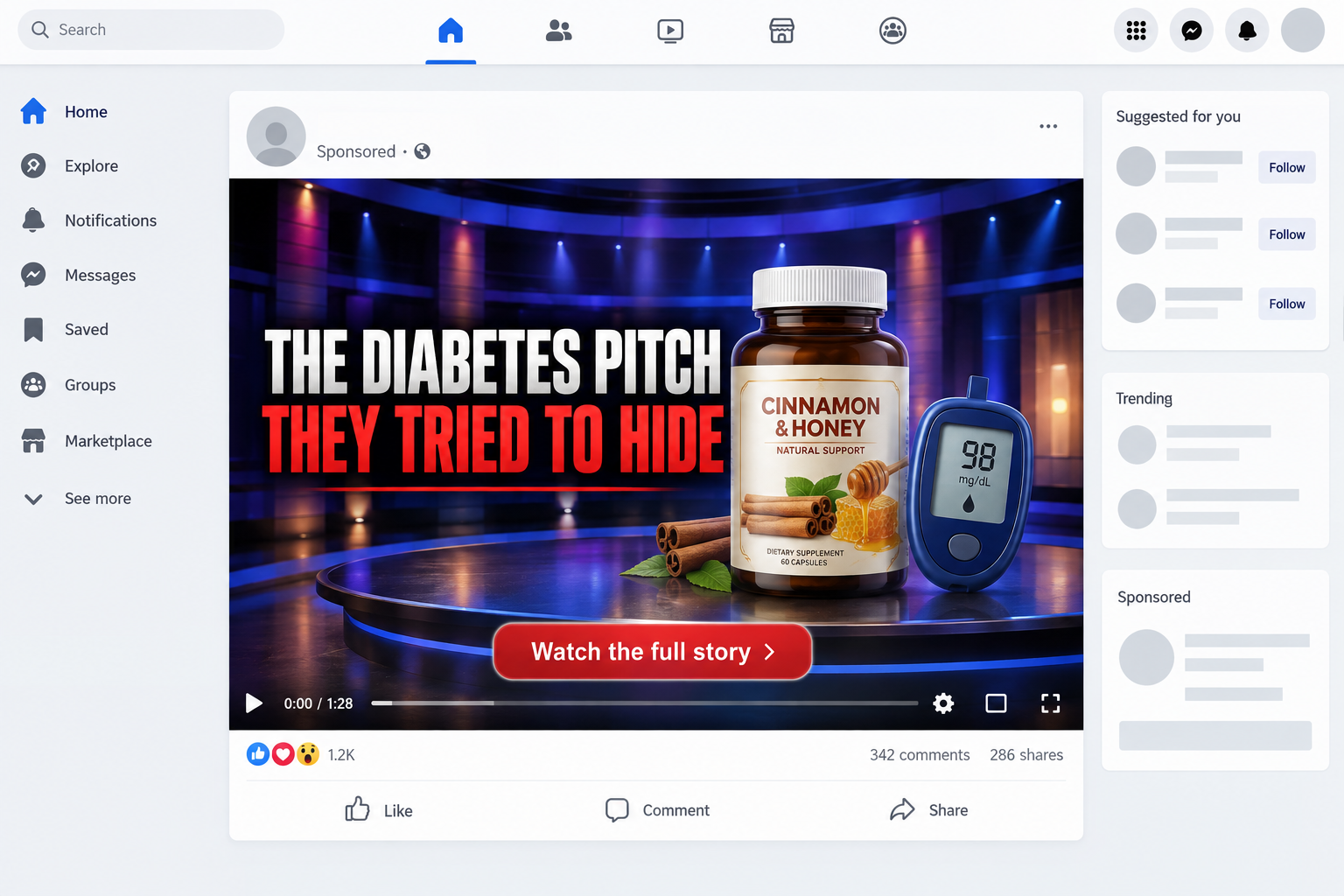
A dramatic television pitch is circulating online, and it appears to reveal a suppressed breakthrough for people living with type 2 diabetes.
The presentation feels urgent and familiar. Yet several details deserve close attention before anyone watches the sales video or enters payment information.
Overview
The verdict in plain language
The Shark Tank diabetes episode shown in these advertisements is not an authentic pitch for a diabetes remedy.
Scammers reused footage from a real EyeWris presentation, then added fabricated narration, altered dialogue, and unrelated medical claims.
The authentic entrepreneurs presented wearable reading glasses. They did not present CinnaShield, a honey recipe, or a product that reverses diabetes.
What the advertisement wants viewers to believe
The fake story says a diabetic father collapsed during a pitch and revealed a treatment so powerful that every investor wanted the company.
Later scenes invoke Dr. Phil, Dr. Mehmet Oz, Dr. Sanjay Gupta, and investor Lori Greiner to create borrowed authority.
Nothing in the advertisement provides a verifiable original broadcast, episode transcript, clinical trial, or authorized endorsement supporting that account.
The most important warning signs
The campaign combines an emotional television story with medical fear, conspiracy language, and a lengthy sales presentation.
The bottle name can change. The current funnel may mention CinnaShield, while another advertisement can substitute a different cinnamon, honey, or glucose supplement.
Warning signs include:
Real television footage paired with dialogue that was never spoken.
AI-generated voices attributed to recognizable public figures.
A secret recipe that becomes a packaged supplement.
Claims that ordinary diabetes care only protects pharmaceutical profits.
Invented multimillion investment offers.
Pressure to watch before the report supposedly disappears.
A checkout emphasizing bundles, countdowns, and recurring refills.
No original broadcast confirming the medical pitch.
The Real Shark Tank Pitch Was About EyeWris Reading Glasses
The source footage is important because it lets viewers compare the advertisement with a documented event.
Mark and Kenzo Singer appeared on Shark Tank during season 14 to present EyeWris, reading glasses that wrap around the wrist.
An official Shark Tank Global clip identifies EyeWris and describes the entrepreneurs seeking $25,000 for 5% of their business.
The genuine pitch involved eyewear design, convenience, manufacturing, and an investment discussion. It was not a medical presentation.
The fake advertisement preserves recognizable stage shots because authentic footage supplies lighting, reactions, and production quality that are difficult to reproduce.
New audio changes the meaning of those reactions. A surprised expression from the real pitch suddenly appears to respond to an invented diabetes claim.
That editing trick is more persuasive than a completely synthetic scene because many visual details remain genuine.
Viewers should search the episode, business name, and official network clips independently whenever an advertisement claims a famous show endorsed a health product.
How the Fake Shark Tank Diabetes Episode Scam Works
Step 1: A sponsored video interrupts the social feed
The campaign begins with a short video on Facebook, Instagram, TikTok, or another platform that sells targeted advertising.
Its first seconds often show a frightened entrepreneur, emotional investors, or a presenter asking why nobody is discussing the episode.
The opening is designed for people who already worry about glucose readings, medication costs, fatigue, or diabetes complications.
Captions keep the story understandable without sound, while an urgent headline makes scrolling past feel risky.
Step 2: Real footage receives a completely new script
The editor takes scenes from the EyeWris pitch and replaces the original conversation with synthetic or heavily manipulated audio.
Investors appear to offer extraordinary sums before the supposed diabetes product has even been explained.
The altered dialogue may sound smooth, but timing, emotion, and mouth movements can drift away from the words.
Because short clips move quickly, viewers rarely receive enough time to study those inconsistencies.
Step 3: Fake experts expand the conspiracy
The presentation then introduces a familiar doctor or television personality who supposedly investigated the secret treatment.
Dr. Phil may be depicted discussing his wife, while other versions can invoke Dr. Oz, Dr. Gupta, or a respected researcher.
These names are interchangeable credibility tools. The campaign provides no original interview where the person makes the advertised endorsement.
The FTC warns that doctored celebrity video and audio are used to sell products without authorization.
Step 4: A fake news page makes the video feel independently verified
The click may open a page styled like consumer reporting, health journalism, or a breaking television story.
A masthead, byline, comments, medical graphics, and familiar page layout create the appearance of editorial review.
In reality, links commonly keep visitors inside the same sales route. The publisher lacks a verifiable newsroom and transparent corrections process.
The report often repeats the advertisement’s script rather than checking the original episode, named study, or claimed endorsement.
Step 5: The free honey recipe becomes a bottle
People click expecting ingredients they can examine at home. The presentation delays the promised recipe while repeating fear and testimonial stories.
Near the end, the solution changes into a proprietary supplement. CinnaShield is one current example, not the permanent identity of the campaign.
The product name matters less than the funnel. Sellers can replace packaging while preserving the video, emotional hook, and checkout design.
Step 6: Bundle pricing increases the first charge
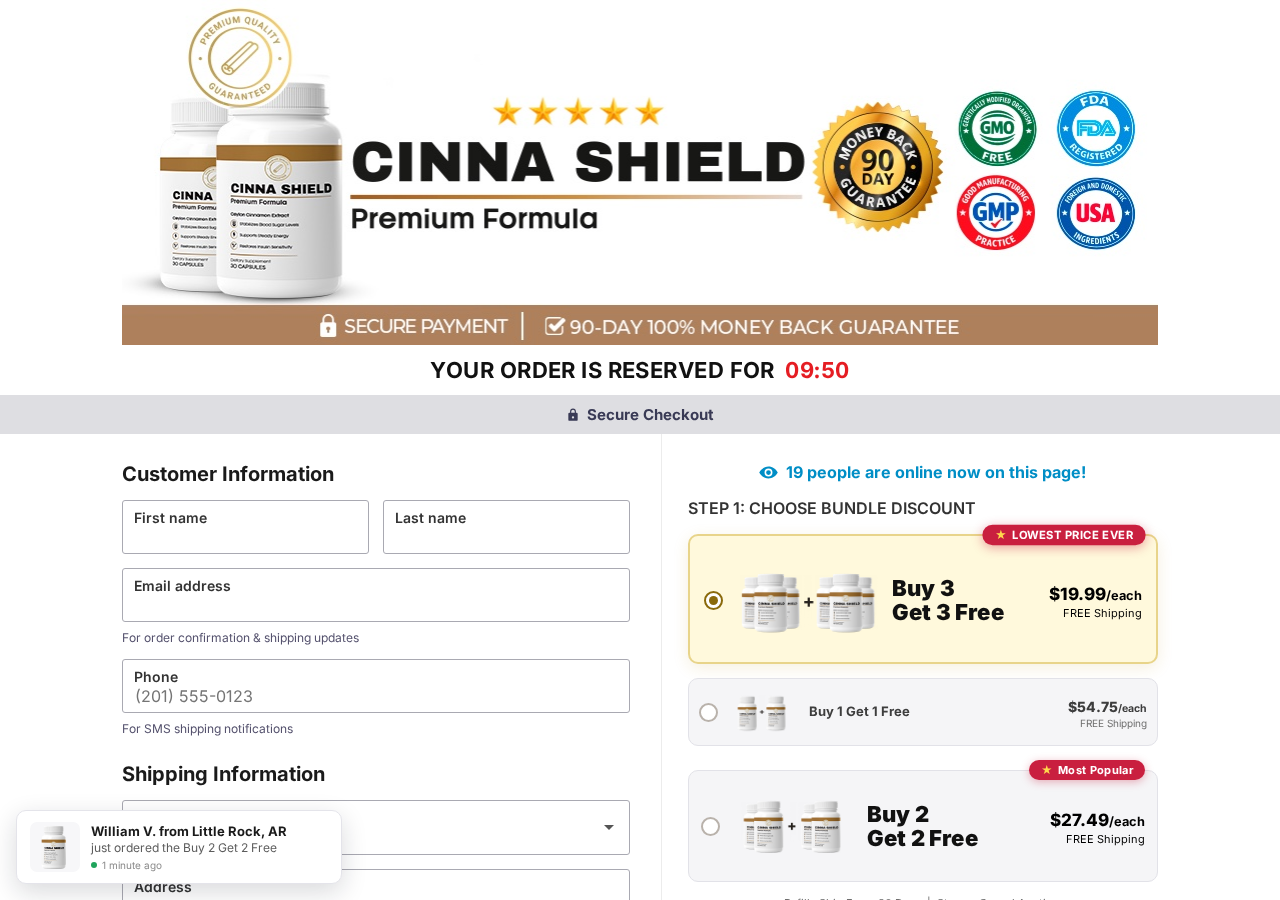
The CinnaShield checkout we reviewed selected a six-bottle package promoted as three bottles plus three free.
Its displayed price was $19.99 per bottle, with a $139.93 total shown in the page code for the selected order.
Other options displayed two and four bottles, although their marketing names described buy-one-get-one and buy-two-get-two arrangements.
Timers, purchase notifications, scarcity messages, and an allegedly reserved order push buyers toward the largest bundle.
Step 7: Recurring refills and follow-up offers can extend the loss
The payment page described monthly shipments and said customers could cancel future deliveries.
The landing page also described a subscription that locks in a discount, even though the initial sales message focused on a first-time offer.
That recurring commitment deserves separate, prominent consent. Buyers should not assume a bundle is automatically a one-time purchase.
Phone and email details collected during checkout can also support follow-up marketing and additional supplement offers.
Why the Medical Story Does Not Match Reliable Diabetes Guidance
Type 2 diabetes is a serious metabolic disease, not a condition proven to disappear through a secret television recipe.
The NIDDK explains that type 2 diabetes develops when the body struggles to use insulin and the pancreas cannot produce enough.
Appropriate care depends on the individual. It can include nutrition, physical activity, monitoring, prescribed medication, and regular medical follow-up.
Cinnamon has been studied, but that fact does not validate a particular bottle or guarantee the outcomes shown in an advertisement.
The NCCIH says cinnamon research has not established a clear health benefit, while diabetes findings remain difficult to interpret.
Its diabetes fact sheet describes limited evidence, varying formulas, small studies, and no reliable basis for replacing established treatment.
People taking diabetes medicines should discuss supplements with a clinician because combining products can affect glucose levels or create unwanted interactions.
A disclaimer near the footer cannot neutralize stronger promises that a capsule restores insulin sensitivity, stops spikes, or replaces drug dependency.
The FDA does not approve dietary supplements before sale as treatments for disease.
The agency has warned companies that products promoted to treat, cure, prevent, or mitigate diabetes may be unapproved drugs.
The CinnaShield Funnel Contains Its Own Contradictions
The landing page promised a 90-day money-back guarantee and repeatedly described refunds as simple, risk-free, and available without returning bottles.
The linked checkout policy offered only 60 days from shipping and required every bottle, empty or unopened, to be mailed back at the buyer’s expense.
It also required prior support contact, confirmation from an agent, and a tracking number.
Those differences are material. A shopper cannot confidently understand a guarantee when the sales page and legal page describe different deadlines and return requirements.
The landing site’s own refund page contained placeholder language saying the page was a draft and should match the checkout policy after legal review.
Its terms page likewise called itself an informational draft awaiting qualified legal review.
The separate checkout terms referred to American Health Daily, while the footer presented the business only as CinnaShield.
The final terms paragraph even said the wording was rephrased to fit the weight-loss niche, despite this product being marketed for blood sugar.
These copy remnants suggest a reusable sales system assembled from templates, not a carefully maintained consumer-health operation.
How to Verify a Shark Tank Health Pitch
A genuine television appearance leaves a trail that extends beyond one sponsored post.
Start with the network’s official episode guide. Match the season, episode number, founders, product, and original broadcast date.
The circulating diabetes clip borrows scenes from the EyeWris pitch, which concerned wrist-mounted reading glasses rather than blood sugar.
That mismatch is decisive. Editing can preserve the studio, judges, applause, and camera angles while replacing the meaning completely.
Next, search the product name together with each investor’s name on verified company pages and established business coverage.
A real investment normally produces interviews, corporate announcements, retailer records, or follow-up reporting that predates the advertisement.
Scam pages provide only their own looping proof. The ad cites the advertorial, the advertorial cites the video, and the video leads back to checkout.
Look closely at the speaker’s mouth and voice. Uneven lip movement, flattened emotion, and abruptly changing room sound can reveal synthetic narration.
However, visual defects are supporting clues, not the main test. Original-source verification remains more reliable as deepfake quality improves.
Why This Story Is Especially Risky for People With Diabetes
Diabetes decisions are not ordinary shopping choices. Changing medication or delaying medical care can have serious consequences.
The video’s emotional promise encourages viewers to see standard treatment as a conspiracy rather than an evidence-based plan.
That message can make routine monitoring feel unnecessary, particularly when the advertisement promises a permanent fix from a household ingredient.
Blood glucose may fluctuate because of food, illness, activity, stress, medication timing, and many other factors.
A favorable reading after starting a supplement does not prove the product caused it. It also cannot establish long-term safety.
Anyone considering cinnamon or another supplement should discuss the exact label and dose with a qualified clinician or pharmacist.
Supplements may interact with medicines, duplicate ingredients, or create risks for people with liver, kidney, bleeding, or allergy concerns.
Keep prescribed treatment unchanged unless the clinician managing the condition provides different instructions.
A trustworthy seller should never require a customer to reject medical care before its product can appear credible.
Company, Address, and Fulfillment Checks
The seller identity remains incomplete
The pages use CinnaShield as the company name, but they do not clearly identify a registered legal entity responsible for the order.
The terms mention American Health Daily without explaining its legal relationship to CinnaShield or the checkout operator.
A brand name, author name, or copyright notice is not the same as a legal merchant identity.
The domains were created shortly before the campaign
The landing domain, cinnashiield.com with two consecutive letters “i,” was registered on September 3, 2026.
The checkout domain, cinnashield.com, was registered on August 28, 2026.
Recent registration does not prove fraud, but it conflicts with the impression of an established product supported by thousands of reviews.
The address appears to be a returns location
Returns are directed to unit 100 at 19655 E 35th Drive in Aurora, Colorado.
A returns warehouse can receive parcels for many brands. It does not establish where a supplement was formulated, manufactured, tested, or managed.
The pages do not provide a named manufacturer or verifiable corporate headquarters tied to the merchant.
Support and policies should be tested before purchase
Customer support is presented mainly through support@cinnashield.com. We did not find a clearly published telephone number on the reviewed checkout pages.
Before ordering, ask support to confirm the legal seller, recurring price, cancellation method, return deadline, return address, and required packaging.
Save the reply. If support avoids straightforward questions before payment, resolving a later billing dispute may be considerably harder.
What to Do if You Have Fallen Victim to This Scam
Preserve the complete sales trail. Save the advertisement, landing-page address, checkout, order confirmation, invoice, package label, and every message from support.
Do not change prescribed diabetes care on your own. Contact your clinician promptly if the advertisement persuaded you to reduce medication or alter monitoring.
Write to the seller immediately. Request cancellation of the order and every recurring refill. State clearly that no future charge is authorized.
Ask for the merchant’s return authorization. Keep the written instructions, shipping receipt, tracking number, and photographs of the returned bottles.
Contact the card issuer. Explain the altered endorsements, contradictory guarantee, and any recurring billing you did not knowingly accept.
Watch future statements. Look for slightly different billing descriptors, smaller test charges, or renewed payments after cancellation.
Report deceptive health claims. File reports with the FTC and FDA, including screenshots and the exact domains used.
Secure exposed accounts. Change reused passwords, enable multifactor authentication, and scan the device if you downloaded anything from the funnel.
Check the device if the funnel triggered downloads. Run a Malwarebytes scan and use AdGuard to block malicious ads and tracking domains.
Is Your Device Infected? Run a Free Malware Scan
Slow performance, constant pop-ups, or strange behavior? These are classic signs of a malware infection. The fastest way to find out is to scan your device with Malwarebytes Anti-Malware Free — one of the most trusted malware removal tools available.
The free version detects and removes the most common threats, including:
Adware — the cause of those annoying pop-ups
Browser hijackers — unwanted redirects and changed homepages
Trojans and spyware — hidden programs stealing your data
Potentially unwanted programs (PUPs) — software you never asked for
👉 Select your device below — Windows, Mac, or Android — then follow the simple steps to download Malwarebytes, scan your system, and remove any threats it finds. The whole process takes about 5 minutes.
Malwarebytes for WindowsMalwarebytes for MacMalwarebytes for Android
Run a Malware Scan with Malwarebytes for Windows
Malwarebytes is one of the most popular and trusted anti-malware tools for Windows — and it’s completely free for removing infections. It catches threats that many antivirus programs miss, including adware, browser hijackers, and trojans. Follow the steps below to scan and clean your PC in just a few minutes.
Download Malwarebytes
Click the button below to download the latest version of Malwarebytes for Windows from the official source. The free version is all you need — it will scan your computer and remove adware, browser hijackers, and other malicious software at no cost.
(The link opens in a new page where your download will start)
Install Malwarebytes
When the download finishes, open your Downloads folder and double-click the MBSetup file. If Windows shows a User Account Control pop-up, click “Yes” to allow the installation.
Follow the On-Screen Prompts to Install Malwarebytes
The setup wizard will walk you through a few quick screens:
Choose where you’re installing the program — “Personal Computer” or “Work Computer” — then click Next.
Malwarebytes will now install on your device. This usually takes under a minute.
When installation is complete, the “Welcome to Malwarebytes” screen will open automatically.
On the final screen, click Open Malwarebytes to launch the program.
Enable “Scan for Rootkits”
Before scanning, turn on rootkit detection so Malwarebytes can find even the most hidden threats. Click the Settings gear icon on the left side of the screen.
In the settings menu, find “Scan for rootkits” and click the toggle so it turns blue.
Done? Click “Dashboard” in the left pane to return to the main screen.
Start the Scan
Click the blue Scan button. Malwarebytes will automatically update its virus database and start checking your computer for malware.
Wait for the Scan to Finish
The scan checks your entire system for browser hijackers and other malicious programs, so it can take several minutes. Feel free to do something else — just check back occasionally to see the progress.
Quarantine the Detected Threats
When the scan is done, you’ll see a list of everything Malwarebytes found — malware, adware, and potentially unwanted programs. Click the “Quarantine” button to remove all of them at once.
Malwarebytes will now remove the malicious files and registry entries and move them safely into quarantine.
Restart Your Computer
Some threats can only be fully removed after a reboot. If Malwarebytes asks you to restart, click Yes. Once you’re logged back in, your PC is clean and you can continue with the next steps in this guide.
When the scan finishes, click Quarantine to remove everything Malwarebytes found. That’s it — your Windows PC is now clean of trojans, adware, and other malware, and should be back to running smoothly.
If your current antivirus allowed this malicious program on your computer, you may want to consider purchasing Malwarebytes Premium to protect against these types of threats in the future. If you are still having problems with your computer after completing these instructions, then please follow one of the steps:
Malwarebytes for Mac is a free on-demand scanner that removes the malware other security software tends to miss — adware, browser hijackers, and unwanted programs included. Cleaning an infected Mac with Malwarebytes has always been completely free, and it’s our go-to recommendation. Follow the steps below to scan and clean your Mac in just a few minutes.
Download Malwarebytes for Mac
Click the button below to download the latest version of Malwarebytes for Mac.
When the download finishes, open your Downloads folder and double-click the setup file to begin the installation.
Follow the On-Screen Prompts to Install Malwarebytes
The Malwarebytes for Mac Installer will guide you through a few quick screens. Click “Continue” and keep following the prompts until the installation completes.
When the installation is complete, Malwarebytes opens to the Welcome to Malwarebytes screen. Click “Get started“.
Select “Personal Computer” or “Work Computer”
Malwarebytes will ask what type of computer you’re installing it on. Click either Personal Computer or Work Computer, whichever applies.
Start the Scan
Click the “Scan” button. Malwarebytes will automatically update its detection database and begin checking your Mac for malware.
Wait for the Scan to Finish
Malwarebytes will scan your Mac for adware, browser hijackers, and other malicious programs. This can take a few minutes, so feel free to do something else — just check back occasionally to see the progress.
Quarantine the Detected Threats
When the scan is done, you’ll see a list of everything Malwarebytes found. Click the “Quarantine” button to remove all the threats at once.
Restart Your Mac
Malwarebytes will now remove all the malicious files it found. Some threats can only be fully removed after a reboot — if Malwarebytes asks you to restart, allow it. Once you’re logged back in, your Mac is clean.
Once the scan is done, remove every threat it detected. Your Mac is now free of adware, rogue browser extensions, and other potentially harmful software.
If your current antivirus allowed a malicious program on your computer, you might want to consider purchasing the full-featured version of Malwarebytes Anti-Malware to protect against these types of threats in the future. If you are still experiencing problems while trying to remove a malicious program from your computer, please ask for help in our Mac Malware Removal Help & Support forum.
Run a Malware Scan with Malwarebytes for Android
Malwarebytes for Android automatically detects and removes dangerous threats like malware and ransomware so you don’t have to worry about your most-used device being compromised. Aggressive detection of adware and potentially unwanted programs keeps your Android phone or tablet running smooth.
Download Malwarebytes for Android.
You can download Malwarebytes for Android by clicking the link below.
In the Google Play Store, tap “Install” to install Malwarebytes for Android on your device.
When the installation process has finished, tap “Open” to begin using Malwarebytes for Android. You can also open Malwarebytes by tapping on its icon in your phone menu or home screen.
Follow the on-screen prompts to complete the setup process
When Malwarebytes will open, you will see the Malwarebytes Setup Wizard which will guide you through a series of permissions and other setup options. This is the first of two screens that explain the difference between the Premium and Free versions. Swipe this screen to continue. Tap on “Got it” to proceed to the next step. Malwarebytes for Android will now ask for a set of permissions that are required to scan your device and protect it from malware. Tap on “Give permission” to continue. Tap on “Allow” to permit Malwarebytes to access the files on your phone.
Update database and run a scan with Malwarebytes for Android
You will now be prompted to update the Malwarebytes database and run a full system scan.
Click on “Update database” to update the Malwarebytes for Android definitions to the latest version, then click on “Run full scan” to perform a system scan.
Wait for the Malwarebytes scan to complete.
Malwarebytes will now start scanning your phone for adware and other malicious apps. This process can take a few minutes, so we suggest you do something else and periodically check on the status of the scan to see when it is finished.
Click on “Remove Selected”.
When the scan has been completed, you will be presented with a screen showing the malware infections that Malwarebytes for Android has detected. To remove the malicious apps that Malwarebytes has found, tap on the “Remove Selected” button.
Restart your phone.
Malwarebytes for Android will now remove all the malicious apps that it has found. To complete the malware removal process, Malwarebytes may ask you to restart your device.
After the scan, tap Remove Selected to delete all detected threats. Your Android phone is now clean — no more malicious apps, adware, or browser redirects.
If your current antivirus allowed a malicious app on your phone, you may want to consider purchasing the full-featured version of Malwarebytes to protect against these types of threats in the future. If you are still having problems with your phone after completing these instructions, then please follow one of the steps:
Restore your phone to factory settings by going to Settings > General management > Reset > Factory data reset.
Now that your device is clean, keep it that way. Most infections start with a malicious ad or a fake download button — so blocking them at the source is your best defense.
We recommend AdGuard, which blocks malicious ads, phishing pages, and dangerous redirects before they can reach you.
No authentic episode supports the advertisement described here. The reused footage came from an EyeWris reading-glasses pitch.
Did the Shark Tank investors endorse CinnaShield?
We found no reliable evidence that the investors endorsed CinnaShield or the advertised honey and cinnamon diabetes story.
Is CinnaShield automatically fraudulent because it contains cinnamon?
No. Cinnamon is a real ingredient. The concern is the deceptive promotion, unsupported outcomes, unclear seller identity, and conflicting commercial terms.
Does the checkout enroll buyers in refills?
The reviewed payment flow described another shipment each month. Buyers should inspect the final summary and obtain written cancellation confirmation.
Can a supplement replace diabetes medication?
No supplement advertisement should determine medication changes. Discuss any product and glucose changes with the clinician managing your diabetes.
Why do these campaigns change product names?
A new name creates fresh search results and lets the same sales story continue after complaints accumulate around an older brand.
The Bottom Line
The fake Shark Tank diabetes episode is a manufactured endorsement built from real EyeWris footage, altered dialogue, medical fear, and a rotating supplement offer.
CinnaShield’s current pages add serious concerns, including recurring refills, contradictory refund promises, new domains, and incomplete company identification.
Do not treat a polished television clip as medical evidence. Verify the original broadcast, ask a clinician, and read the checkout terms before sharing payment details.
10 Rules to Avoid Online Scams
Here are 10 practical safety rules to help you avoid malware, online shopping scams, crypto scams, and other online fraud. Each tip includes a quick “if you already got hit” action.
Stop and verify before you click, log in, download, or pay.
Most scams win by creating urgency. Verify using a trusted method: type the website address yourself, use the official app, or call a known number (not the one in the message).
If you already clicked: close the page, do not enter passwords, and run a malware scan.
Keep your operating system, browser, and apps updated.
Updates patch security holes used by malware and malicious ads. Turn on automatic updates where possible.
If you saw a scary “update now” pop-up: close it and update only through your device settings or the official app store.
Use layered protection: antivirus plus an ad blocker.
Antivirus helps block malware. An ad blocker reduces scam redirects, phishing pages, and malvertising.
If your browser is acting weird: remove unknown extensions, reset the browser, then run a full scan.
Install apps, software, and extensions only from official sources.
Avoid cracked software, “keygens,” and random downloads. During installs, choose Custom/Advanced and decline bundled offers you do not recognize.
If you already installed something suspicious: uninstall it, restart, and scan again.
Treat links and attachments as untrusted by default.
Phishing often impersonates delivery services, banks, and popular brands. If it is unexpected, do not open attachments or log in through the message.
If you entered credentials: change the password immediately and enable 2FA.
Shop safely: research the store, then pay with protection.
Be cautious with brand-new stores, “closing sale” stories, and prices that make no sense. Prefer credit cards or PayPal for dispute options. Avoid wire transfers, gift cards, and crypto payments.
If you already paid: contact your card issuer or PayPal quickly to dispute the transaction.
Crypto rule: never pay a “fee” to withdraw or recover money.
Common patterns include fake profits, then “tax,” “gas,” or “verification” fees. Another is a “recovery agent” who demands upfront crypto.
If you already sent crypto: stop paying, save evidence (wallet addresses, TXIDs, chats), and report the scam to the platform used.
Secure your accounts with unique passwords and 2FA (start with email).
Use a password manager and unique passwords for every account. Enable 2FA using an authenticator app when possible.
If you suspect an account takeover: change passwords, sign out of all devices, and review recent logins and recovery settings.
Back up important files and keep one backup offline.
Backups protect you from ransomware and device failure. Keep at least one backup on an external drive that is not always connected.
If you suspect infection: do not connect backup drives until the system is clean.
If you think you are a victim: stop losses, document evidence, and escalate fast.
Move quickly. Speed matters for disputes, account recovery, and limiting damage.
Stop payments and contact: do not send more money or respond to the scammer.
Call your bank or card issuer: block transactions, replace the card if needed, and start a dispute or chargeback.
Secure your email first: change the email password, enable 2FA, and remove unfamiliar recovery options.
Secure other accounts: change passwords, enable 2FA, and log out of all sessions.
Scan your device: remove suspicious apps or extensions, then run a full malware scan.
Save evidence: screenshots, emails, order pages, tracking pages, wallet addresses, TXIDs, and chat logs.
Report it: to the payment provider, marketplace, social platform, exchange, or wallet service involved.
These rules are intentionally simple. Most online losses happen when decisions are rushed. Slow down, verify independently, and use payment methods and account controls that give you recourse.
Hello! I'm Lapain Epuran, your go-to source for detailed and honest product reviews. From tech gadgets to miracle cures, I provide insights to help you make informed choices. Join me as we discover what's truly worth your time and money.