

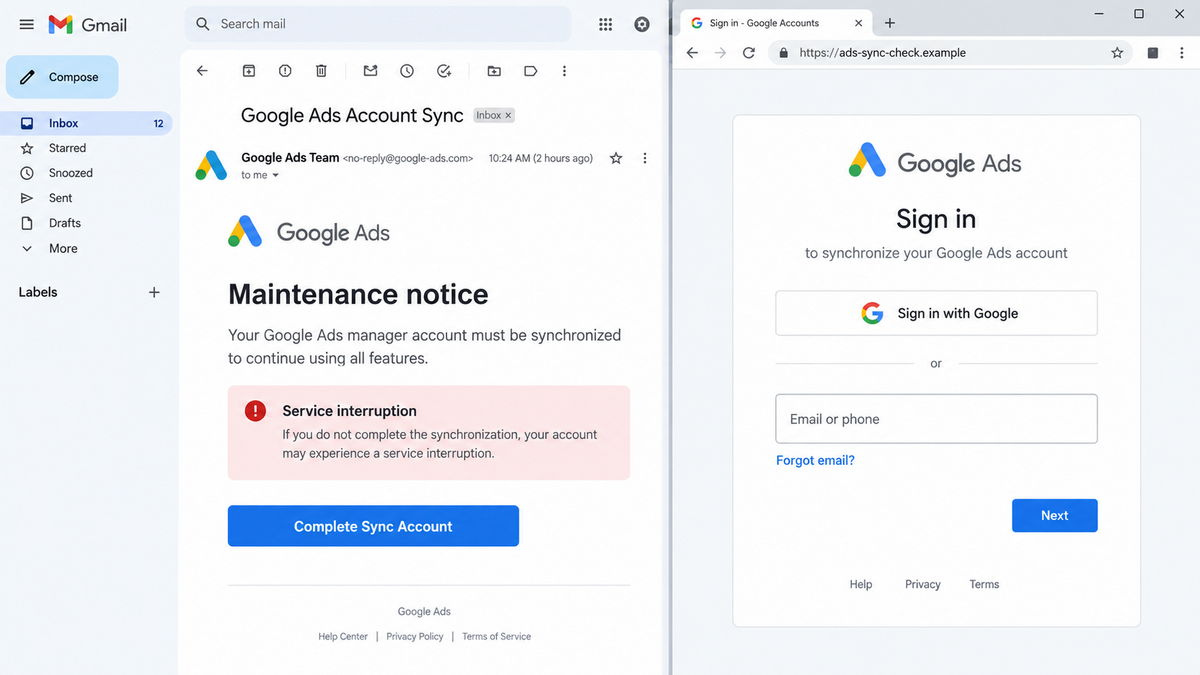
An email warns that a Google Ads manager account must be synchronized before a system upgrade. If the recipient does not act, campaigns may be limited or the service may be interrupted.
For an agency or business that depends on advertising, that threat feels expensive. The button appears to offer a quick fix, and the pages that follow use enough Google branding to make the process look routine.
The maintenance story is fabricated. The synchronization flow leads through a staged redirect to a copied sign-in form built to capture Google account credentials.
Overview
The email invents a required Google Ads upgrade
The fake Google Ads Sync email claims that a manager account, sometimes described as an MMC account, must be synchronized as part of maintenance or a system upgrade. The recipient is warned that failure to comply could cause account limitations or service disruption.
The message is aimed at people for whom advertising access matters. An account manager responsible for active campaigns may click quickly because even a short interruption could affect sales, leads, and client reporting.
The first page is only a trust-building redirect
The button does not immediately display a password form. In the documented campaign, it first opened a Blogspot page showing a Google Ads logo, a loading indicator, and a continue button.
That extra screen makes the route feel more controlled and helps hide the final phishing domain from a quick inspection of the email. It also gives the attacker another opportunity to repeat the brand before asking for credentials.
A copied sign-in window records the login
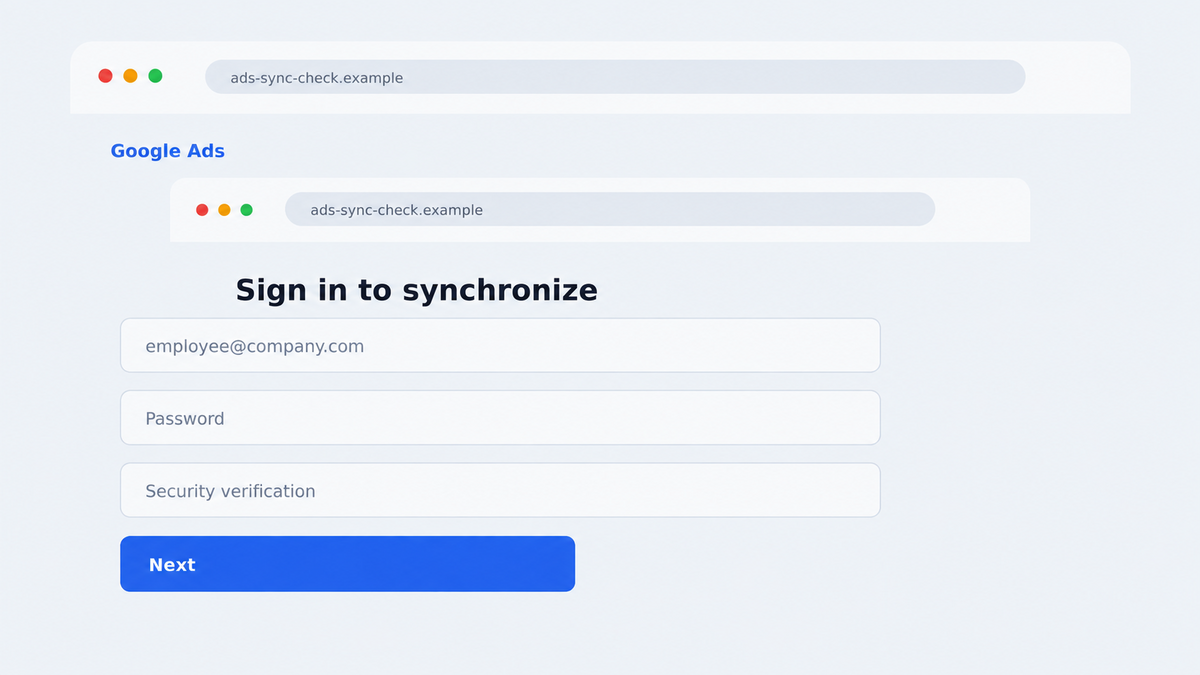
The final page used a newly created lookalike domain and displayed a Google sign-in control. Clicking it opened a JavaScript form designed to resemble the legitimate Google authentication experience.
The form was not Google’s sign-in service. Information typed into it could be captured by the attacker and used to access the victim’s Google account, advertising assets, email, cloud files, and connected business services.
- The lure is a fake Google Ads maintenance or synchronization notice.
- The sender domain does not belong to Google.
- The message threatens service interruption or account limits.
- The button first routes through a Blogspot page.
- The final domain imitates Google Ads wording but is unrelated to Google.
- A JavaScript form copies the appearance of a Google login.
- The campaign targets credentials rather than fixing an advertising problem.
- Google and Google Ads are being impersonated, not identified as compromised.
Why Advertisers Can Fall for the Sync Request
Google Ads accounts regularly contain campaigns, billing profiles, manager relationships, conversion settings, and access permissions. A notice about maintenance does not sound absurd in that environment.
The email also uses operational language rather than an extravagant promise. Terms such as sync, maintenance, system upgrade, and account limitation sound like routine administration, especially to someone who manages several platforms every day.
Urgency is tied to business loss. The recipient is not merely warned about an abstract security issue. They are led to believe that ads may stop running, accounts may become limited, or client work may be interrupted.
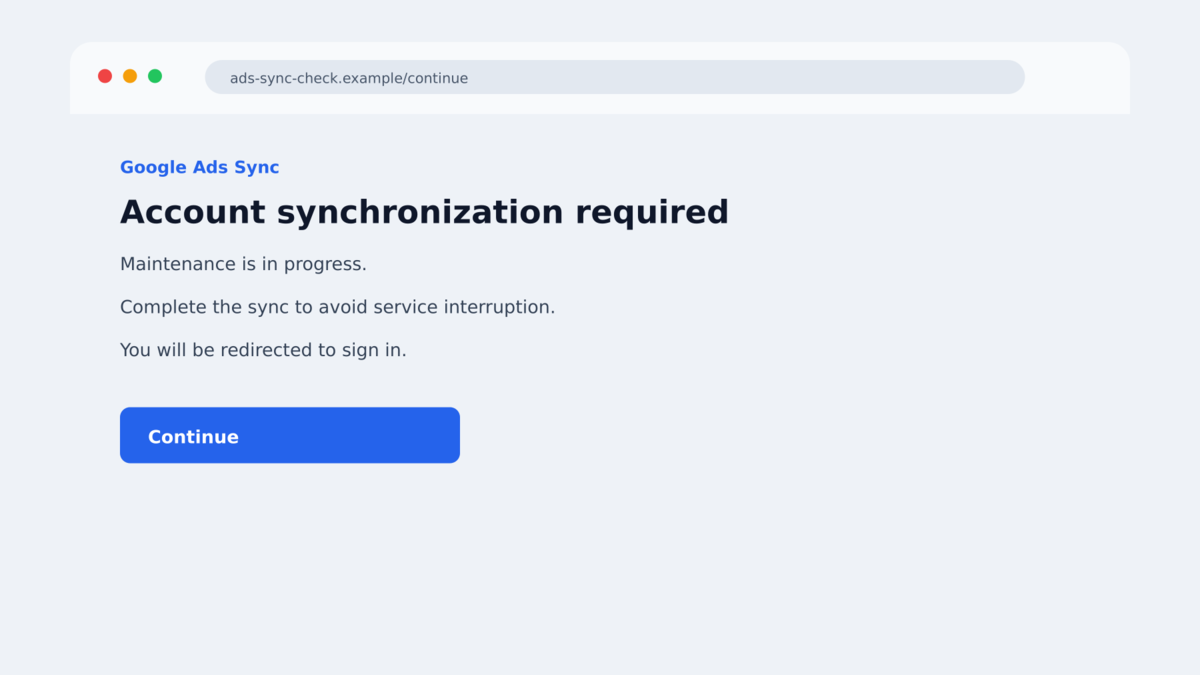
The multi-stage route lowers suspicion gradually. A direct jump from email to password form is familiar phishing behavior. A branded loading screen followed by a sign-in button can feel more like a normal application workflow.
The lookalike domain completes the effect. A hurried reader may see words such as MCC, sync, and ads without identifying which organization actually registered the address.
None of those visual details prove ownership. The decisive check is whether the final authentication request is hosted by Google’s real account infrastructure and was reached through a process initiated inside the official Google Ads account.
Company, Address, and Fulfillment Checks
The sender address is unrelated to Google
Cofense observed a message displayed as Google Ads MMC Sync while the sender address used the domain enavalenceart.com. The friendly name was the costume; the domain after the @ symbol showed who actually sent the message.
Expand the sender details and check the reply-to address too. A polished logo and official-sounding name can be inserted into any email template.
The redirect runs on Blogspot, not an account portal
The campaign used a Blogspot address as an intermediate page. Blogspot is a legitimate Google-owned publishing service, but an individual page there is not a Google Ads account setting.
Trusted hosting can be abused. The presence of a Google service somewhere in the link chain does not mean that Google created, reviewed, or approved the phishing content.
The final sign-in domain is a lookalike
The documented flow led to mcc-sync-ads.com, a newly created domain that was not owned by Google. Its wording was chosen to resemble the task described in the email.
A pop-up drawn inside a webpage can display any address or title the attacker wants. Check the browser’s real address bar and use a password manager, which should not autofill a Google password on an unrelated domain.
Independent analysis confirms credential phishing
Cofense documented the email, sender mismatch, Blogspot redirect, lookalike domain, and JavaScript sign-in form. The observed chain was built to collect credentials, not perform an account upgrade.
This evidence does not show that Google Ads was breached. It shows criminals borrowing the brand and familiar account language to obtain access through the victim.
How the Fake Google Ads Sync Scam Works
Step 1: The attacker identifies advertising users
Potential targets include agencies, ecommerce teams, marketing departments, freelancers, and people whose email addresses appear in public business records. The attacker does not need to know the exact account configuration.
A generic maintenance story applies to many recipients. People who do not use Google Ads will ignore it, while active advertisers may treat the message as relevant.
Step 2: A fake maintenance notice creates urgency
The message claims that a system upgrade requires manual synchronization. It warns about service interruption or account limitations and presents a large “Complete Sync Account” button.
The supposed deadline is not based on an actual notice inside Google Ads. It exists to move the recipient from concern to action before they check independently.
Step 3: The button opens a branded redirect page
The victim is sent to a Blogspot page that displays a Google Ads logo and loading animation. A continue button advances the process toward the credential page.
Using a familiar hosting domain may help the link pass a casual review. It also separates the email from the final phishing page, making the complete chain less obvious.
Step 4: The lookalike site displays a fake Google login
The final page resembles a Google Ads account portal and offers a Google sign-in button. The loaded form is produced by the phishing site rather than Google’s identity service.
Browser-in-the-browser designs can imitate a separate authentication window while remaining inside the malicious page. The drawn window cannot be trusted to show a real URL.
Step 5: Credentials are captured and tested
The victim enters an email address and password, believing the information is needed to synchronize the account. The form sends those details to the attackers.
If multi-factor authentication is enabled, a follow-up page or live operator may request the code or wait for the victim to approve a prompt. An unexpected approval request is a sign to stop immediately.
Step 6: The compromised account becomes a business foothold
Access to the Google account may expose Gmail, Drive, Ads, Analytics, billing information, saved passwords, and connected services. An attacker can also search email for invoices, reset links, and client communications.
A stolen advertising account can be used to run malicious campaigns, alter payment methods, invite new administrators, or target the account’s customers and coworkers with more convincing messages.
What a Compromised Google Ads Account Can Expose
The Google Ads account itself contains more than campaigns. It can reveal customer lists, conversion data, linked Merchant Center assets, billing profiles, account identifiers, and the names of agencies or clients.
The connected Google identity may be the larger prize. Gmail can provide password-reset messages and business conversations. Drive may contain contracts, tax records, creative assets, or exported customer data.
Manager accounts can reach several child accounts. A single compromised agency login may therefore give the attacker opportunities across multiple businesses, budgets, and billing relationships.
Attackers can also use a real mailbox to continue the scam. Messages sent from a familiar account are more likely to be trusted by coworkers and clients, especially when they refer to genuine campaigns or invoices found in the mailbox.
The change history can reveal what happened after the login was stolen. Look for new users, manager links, campaign launches, billing edits, conversion changes, and unusual access times. Export or screenshot the relevant entries before removing access so the evidence is not lost during cleanup.
Agencies should verify more than the individual mailbox. Review the manager hierarchy from a separate administrator account and ask each client to confirm expected users. A criminal who added another administrator may retain access even after the original password is changed.
Billing deserves its own review. Check every payment profile, recent charge, promotional credit, and invoice. Attackers may use a stolen advertising account to fund unrelated ads, and a small test campaign can precede a much larger spend.
Also review API access and automated tools connected to the account. A stolen token or newly approved integration can survive an ordinary password change, giving the attacker another route back after the visible sessions have been removed.
Warning Signs in a Google Ads Notice
- The sender domain is not google.com or another verified Google domain.
- The message threatens immediate ad interruption without account-specific evidence.
- The greeting does not identify the customer ID or manager account accurately.
- The button opens Blogspot, a URL shortener, or another publishing service.
- The final domain combines advertising words but is not owned by Google.
- A sign-in window appears to be drawn inside the page.
- Your password manager refuses to fill the Google credentials.
- The official Google Ads notification center shows no matching alert.
- You receive an unexpected multi-factor prompt after visiting the page.
- The message discourages contacting normal account support.
The fastest safe check is to close the message and open ads.google.com from a known bookmark. A genuine restriction should be visible inside the account.
What to Do if You Have Fallen Victim to This Scam
- Use a clean route to change the Google password. Open Google’s account security page independently. Do not return through the email or copied login.
- Revoke unfamiliar sessions. Review recent devices, locations, third-party access, app passwords, passkeys, and recovery methods. Remove anything you do not recognize.
- Check Gmail settings. Look for forwarding addresses, filters, delegates, blocked security mail, and sent messages that the attacker may have created.
- Audit Google Ads access. Review administrators, manager links, payment methods, campaigns, ads, budgets, conversion settings, and change history. Pause unauthorized activity.
- Secure linked accounts. Check Merchant Center, Analytics, Tag Manager, YouTube, Drive, and client accounts reachable through the same identity.
- Contact Google Ads support through the official portal. Report the suspected compromise and ask for help preserving billing and change-history evidence.
- Notify clients and coworkers. Warn them that messages sent from the account may be fraudulent. Ask administrators to revoke the compromised user’s access until recovery is complete.
- Preserve the phishing evidence. Save the email, full headers, redirect addresses, final domain, screenshots, and any multi-factor prompts without revisiting the live page.
- Scan the device if anything was downloaded. Malwarebytes can check for malicious files. AdGuard can block known phishing pages and malicious ads, but stolen credentials still require account recovery.
Frequently Asked Questions
Does Google Ads require account synchronization by email?
Do not rely on an unsolicited email for that claim. Open Google Ads independently and check notifications and account status there. The documented sync notice was phishing.
Is a Blogspot link safe because Google owns Blogspot?
No. Individuals can publish pages on legitimate hosting platforms. A trusted host can be an intermediate step in a malicious redirect chain.
Was Google Ads hacked in this campaign?
The documented evidence shows brand impersonation and credential theft on unrelated infrastructure. It does not demonstrate a breach of Google’s systems.
Can the fake window show a Google address?
Yes. A webpage can draw a convincing pop-up with a fake address bar. Only the browser’s real interface and final domain should be used for verification.
What if I use multi-factor authentication?
It helps, but do not approve unexpected prompts or enter a code into the phishing page. Attackers may try to capture the second factor immediately after the password.
Should I pause all campaigns after a compromise?
Pause anything unauthorized and follow the organization’s incident plan. Review change history and billing with another verified administrator before restoring normal access.
The Bottom Line
The fake Google Ads sync email turns fear of campaign interruption into a multi-stage credential trap. The Blogspot page and branded login are there to build confidence, not fix an account.
Open Google Ads independently whenever a message claims that maintenance is required. If the same warning is not visible inside the real account, do not continue.
If credentials were entered, treat the connected Google identity as compromised. Secure Gmail, Ads, linked business assets, sessions, and billing before the attackers can use that access.








