

A text says your Macquarie reward points are about to disappear. You weren’t planning to check them today, but losing a balance feels worth a quick look.
The Macquarie Rewards text scam works around that small interruption. Before following a redemption link, there is one important detail to understand about the message.
Overview
The expiry warning is invented
Macquarie’s August 2026 scam alert describes texts claiming reward points are expiring and directing recipients to a fake, bank-branded website.
The bank states that Macquarie Rewards do not expire and that it will not send a warning saying those points are about to expire.
That makes the message’s central deadline false. You do not need to rescue the points by signing in through the text.
This is impersonation of a real bank, not an accusation that Macquarie’s genuine rewards program is fraudulent.
The points story leads toward banking access
The lure is a rewards balance, but the destination asks for information useful beyond rewards. A copied login can expose access credentials.
The bank’s warning says details entered on the phishing website are used to make unauthorized payments. Treat a submitted login as an account-security issue.
Messages can reach customers and non-customers. Receiving one does not establish that the sender knows you hold a Macquarie account.
Likewise, it does not establish a bank data breach. A broad impersonation message can rely on recipients recognizing the brand and filling in the connection themselves.
Check the premise, the destination, and the action
You do not need to decide whether every character looks suspicious. These three questions give you a clearer route:
- Does the claimed rewards deadline agree with the bank’s actual guidance?
- Did you reach the account through your own app or a text-controlled link?
- Are you being asked for login details, security codes, or an unfamiliar approval?
- Does a real account record explain the action requested?
- Can you leave the message and contact the bank independently?
The sender’s name and the page’s familiar colors are weaker signals than those checks. The scam depends on appearance taking their place.
Why a Small Rewards Reminder Gets Attention
It feels like protecting something already earned
A rewards notice does not have to promise a fortune. It can be persuasive because the balance sounds like something you already own.
The message presents a small task with a larger consequence: act now, or lose the benefit. That makes clicking feel practical rather than adventurous.
Someone who ignores obvious investment pitches may still open this text. The appeal is routine account housekeeping, not a dramatic opportunity.
If you are uncertain about your actual points, opening your normal account is enough to start checking. The stranger’s shortcut is unnecessary.
A genuine brand reduces the apparent effort
Most readers know what a banking login looks like. A familiar heading, empty password field, and ordinary button can make the next step feel automatic.
The page does not have to prove ownership of the bank to imitate that experience. You supply the account details while it supplies the familiar appearance.
A web address containing the brand somewhere is not the same as the bank’s actual destination. Extra words and familiar-looking spelling can hide that difference.
Do not use a padlock as an identity check. Encryption can protect a connection to the wrong website just as it protects a legitimate connection.
A message thread can create false continuity
Macquarie warns that sender spoofing can make messages appear under a legitimate sender name or in an existing bank message thread.
That placement can make a new text feel like the next entry in a trusted conversation. Earlier genuine messages do not authenticate the latest one.
Read what the new message asks you to do. A false expiry warning remains false even if your inbox displays it beside an ordinary account notice.
How the Macquarie Rewards Text Scam Works
Step 1: A points-expiry message arrives unexpectedly
The text announces that reward points need urgent redemption. It may use a bank-like sender label and wording that sounds like a simple reminder.
A recipient who has not checked their rewards recently may accept the premise without asking whether this program actually has the stated expiry rule.
The threat is loss, not an immediate request for payment. That lowers resistance and gives the next link a seemingly helpful purpose.
Specific balances or deadlines, when a message includes them, should not be treated as independently verified account information. They can be invented.
The exact text can change. The recognizable feature is the demand to preserve Macquarie Rewards through an unsolicited expiry link.
Do not reply with your customer status or account details. You can check your own rewards without helping the sender learn whether its message reached a customer.
Step 2: The link opens a lookalike redemption or login page
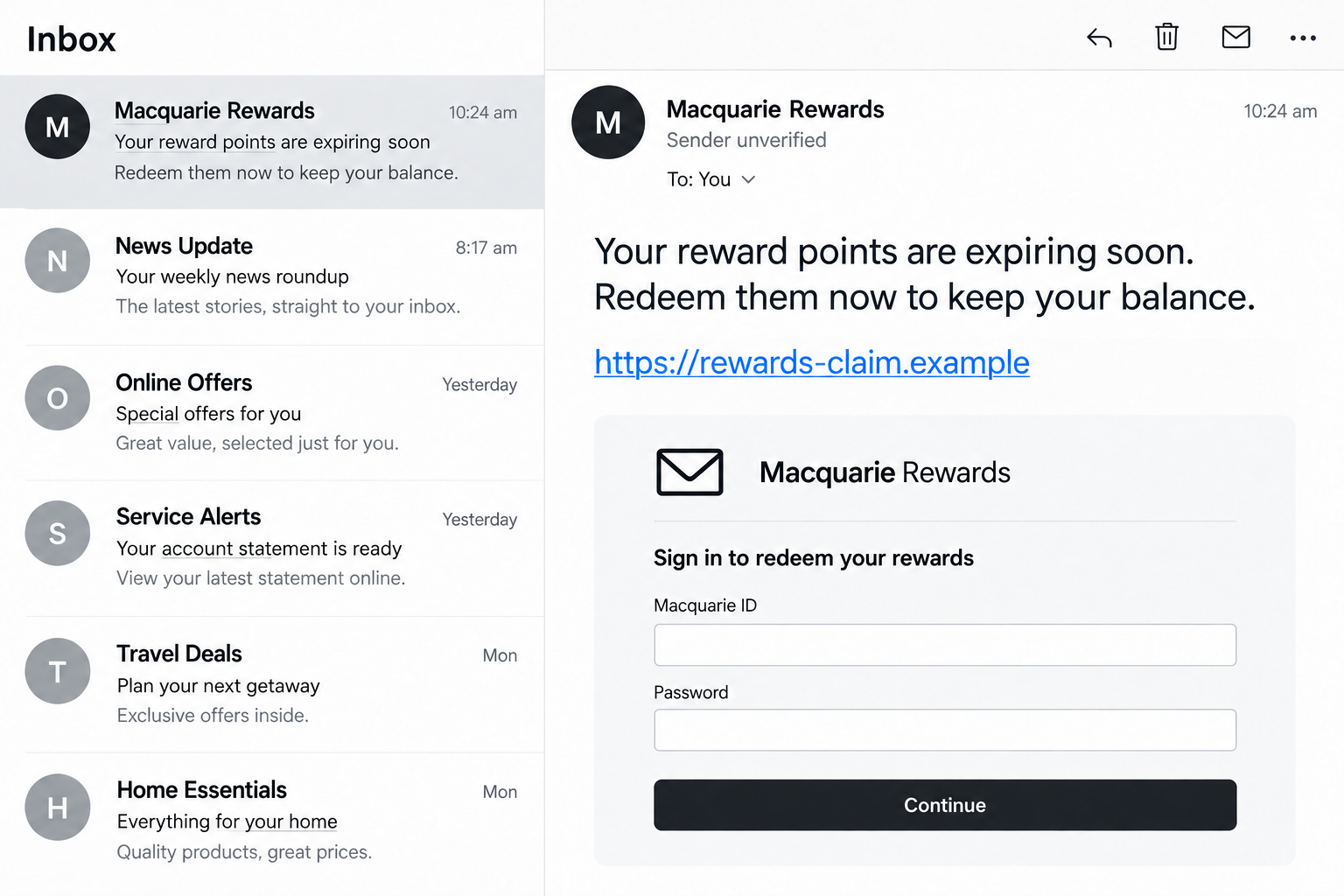
The link directs the recipient away from their usual banking route. The next screen can imitate a rewards page or present a bank-style sign-in.
The transition feels plausible because genuine rewards often sit inside an account. A request to sign in therefore seems like a normal administrative step.
That appearance hides the important change: the recipient is now interacting with a destination selected by an unverified message.
Do not continue because the page looks better than the text. The website and the message can be parts of the same deception.
The illustration above shows a nonfunctional example of this handoff. Its empty fields and fictional link do not record an actual customer session.
If you have opened such a page, stop before entering anything. Closing it and returning to your normal bank app is a useful interruption.
Step 3: The site captures information entered as a routine login
A fake form can ask for a Macquarie ID and password under the explanation that this identifies the rewards balance.
To the victim, the action is signing in. To the operator, the same form provides credentials that may be used against the genuine account.
A failed sign-in or spinning page does not mean the details were safely rejected. An error screen can appear after information has already been sent.
Nor should you assume nothing was exposed because you never reached a successful confirmation. Tell the bank exactly what you typed and whether you submitted it.
If you cannot remember pressing the button, explain that uncertainty. Some malicious forms can collect information before a normal-looking completion screen appears.
Do not return to the page to test what it accepts. Testing with your genuine credentials would create a new exposure, not answer the safety question.
Step 4: Codes or approvals can become a second request
After collecting credentials, an attacker may try to get past additional security. Another screen or contact can ask for a code or an account approval.
The story may still refer to points, verification, or correcting a problem. The actual bank notification can concern a different account action.
Read the notification’s purpose, recipient, and transaction details rather than accepting the explanation on the suspicious page. A payment is not a rewards check.
Macquarie’s Authenticator guidance describes controls for approving or denying account activity. An unfamiliar request deserves rejection, not automatic confirmation.
Additional verification helps only when you retain control of it. Handing over codes or approving something you did not initiate can undermine that protection.
Not every points text reaches this stage. If yours did, tell the bank which code, notification, or approval was involved rather than guessing its purpose.
Step 5: The stolen access is used beyond the supposed reward
The attacker’s objective can be an unauthorized payment or further account access. The rewards deadline has served its purpose once it gets the victim to cooperate.
That is why the response should not stop at checking whether points remain. A balance that looks normal says little about whether credentials were exposed.
The same applies to a denied transaction. Rejecting an approval is valuable, but it does not necessarily remove information already captured elsewhere.
If the suspicious page promises to restore access or fix a failed redemption, do not follow it into another round of verification.
Reach the bank through a separate trusted route. It can assess the account, payment attempts, and security changes without relying on the scammer’s explanation.
How to Check Your Rewards Safely
Open the account without the message
Use the banking app you already installed through a trusted source or navigate to the bank’s website yourself. Do not start with a redemption text.
A search result or sponsored ad is also a different route from your own bookmark. Avoid treating the first bank-looking result as automatically authentic.
Look for your actual rewards information once inside the genuine account. If you need help finding it, ask the bank through its established support channel.
You do not need to reproduce the expiry warning to verify a balance. A valid rewards account does not make the unsolicited warning valid.
Keep other rewards rules separate
The bank’s statement concerns Macquarie Rewards. It is not a rule that every airline voucher, promotion, or loyalty program lasts indefinitely.
If you have a different product or a question about account closure, consult its actual terms. Do not apply a scam text’s invented deadline to those questions.
This distinction helps avoid a second mistake: ignoring genuine terms elsewhere because this particular points-expiry message is false.
Report according to your exposure
A message you ignored and a login you submitted need different urgency. Keep those categories clear when deciding whom to contact.
Macquarie’s fraud support page directs people with a click, disclosure, or payment exposure to immediate help through its genuine banking channels.
It also distinguishes suspicious correspondence that has not been engaged with. Sending an ordinary report is not a substitute for urgent account containment after disclosure.
What to Do if You Have Fallen Victim to This Scam
-
Leave the text’s website and stop further cooperation. Do not submit another form, answer a follow-up caller, or approve unfamiliar account activity.
Save the text and visible web address without reopening the destination. Keep a note of when you acted and what information was entered.
-
Contact Macquarie immediately through the genuine app or website. Its fraud page says to type “Report a scam” in Q within authenticated banking.
If you cannot safely access that route, use current contact details found independently on the official bank website or your own card.
Explain whether you clicked, typed credentials, shared codes, approved a request, or sent funds. Ask which containment actions the bank recommends for that exposure.
-
Deal with login information separately from lost money. Change an exposed password through the real service, using a device you trust.
If you used the same password for other accounts, replace those passwords too. Do not send the new password to anyone claiming to finish the recovery.
Ask the bank about unfamiliar sessions, recovery changes, or authentication settings. A password change should not be assumed to resolve every other account action.
-
Review transaction evidence with the bank. Note unknown payments, attempted approvals, beneficiaries, and relevant times from the genuine account.
If you approved a payment while being misled, say so accurately. Do not describe it as unapproved merely because you now know the story was false.
Ask about stopping pending activity, disputing a transaction, or attempting a recall. Recovery depends on the circumstances and is not guaranteed.
-
Report an ignored message through the appropriate channel. The bank’s reporting guidance lists scams@macquarie.com for suspected scams you have not engaged with.
Keep sensitive passwords and codes out of ordinary email. After exposure, contact urgent support first rather than waiting for a message report to be reviewed.
Australian readers can also report scam patterns through Scamwatch. Reporting helps document the incident but does not freeze a bank transaction.
-
Check the device only when the interaction warrants it. A downloaded installer, unusual extension, or remote-access session requires more attention than a text you simply read.
Terminate unauthorized remote access. Malwarebytes can inspect for malicious or unwanted software if a download or installation was involved.
AdGuard can help reduce known malicious web and advertising exposure. Neither tool retrieves stolen credentials, confirms a rewards notice, or guarantees a refund.
A click alone does not prove the device was infected. Still, Macquarie asks people who engaged with suspicious links to contact its fraud support.
-
Keep watching the relevant account and follow official instructions. Retain the support reference and record any additional suspicious activity.
Do not accept an incoming “recovery” caller simply because they know you reported a scam. Reconnect through the verified channel when a request seems unusual.
Check account security after the incident, not just whether the rewards page displays the expected balance.
Frequently Asked Questions
Do Macquarie Rewards points expire as the text says?
Macquarie says its Rewards do not expire and it will not send a warning that they are about to expire. The text’s rescue deadline is false.
Why did I receive the message without a Macquarie account?
The bank’s warning includes non-customers. Receiving a broad phishing text does not establish that the sender knows your banking relationship.
Can a scam text appear in a genuine bank thread?
Yes. Sender spoofing can create that appearance. Judge the new message’s claim and requested action rather than borrowing trust from earlier entries.
What if the fake website rejected my password?
An error does not establish that nothing was captured. Tell the bank what you entered and change exposed credentials through the genuine service.
Is rejecting an Authenticator approval enough?
Rejecting an unfamiliar approval helps, but credentials may already have been exposed. Contact the bank and explain the full sequence.
Should I reply to ask whether the text is real?
No. Check rewards through your own account or contact the bank independently. A reply keeps the decision inside an unverified conversation.
The Bottom Line
Do not use an unsolicited expiry link to save Macquarie Rewards. The bank says those points do not expire; the message is steering you toward a fake login.
If you engaged with the link or shared information, reach genuine fraud support promptly. Protect the banking account, not just the balance mentioned in the text.








