

Ten premium flights at a surprisingly modest price would make a year’s travel plans look very different. It is an offer worth pausing over.
Before imagining the first trip, look closely at the subscription selling those flights. The important details aren’t limited to the cabin or advertised fare.
Overview
A copied airline identity supports an unusually flexible offer
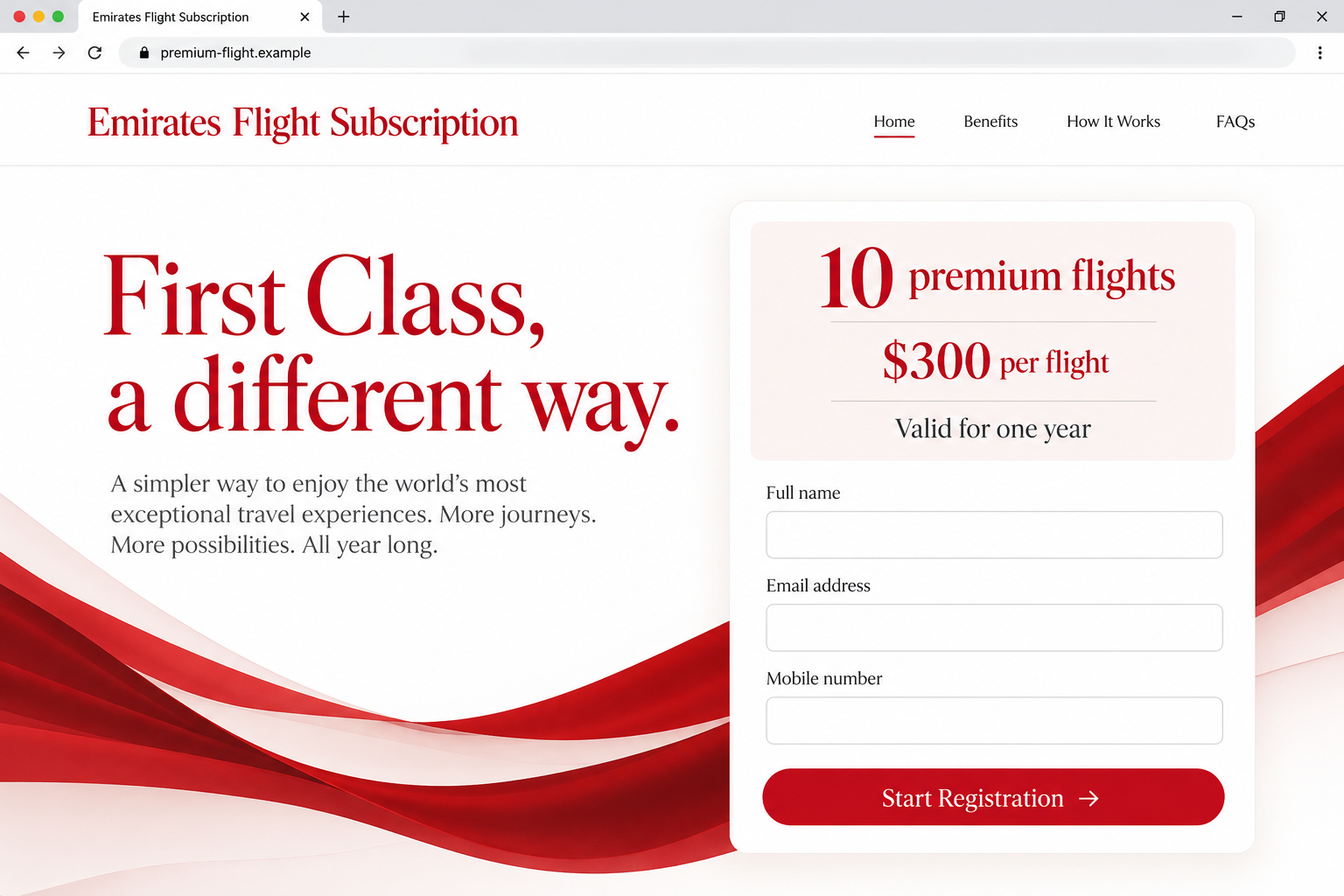
The Emirates first class subscription scam promotes a false premium-flight package through emirates-skyoffer[.]xyz. It is not an authorized Emirates offer.
The reported page advertises ten First or Business Class flights at $300 per flight, valid for a year. It claims unrestricted routes and departures.
Those terms are the pitch, not verified travel entitlements. No ticket issuance or genuine booking was established through that imitation.
Registration leads from contact details to card information
The described registration requests a name, mobile number, and email address, then payment-card details. That creates an immediate information-exposure risk.
There is no verified recurring billing schedule in the available report. Calling the offer a subscription does not prove a specific monthly debit or renewal interval.
The clearest danger is already in front of you: an unrelated page wants contact and card information under an airline’s name.
Check the seller before considering the itinerary
Emirates is a real airline whose identity is being misused. This case is not evidence that every discounted airfare or legitimate airline membership is fraudulent.
- Don’t register through the reported imitation address.
- Find Emirates independently to verify a claimed promotion.
- Don’t use a confirmation on the disputed page as proof of a ticket.
- Contact your issuer promptly if you supplied card information.
- Protect any real airline credentials separately if those were also disclosed.
Why This Offer Invites You to Plan Before You Verify
Travel offers are easy to visualize. You can imagine a family visit, a long-awaited holiday, or an upgrade that would otherwise feel difficult to justify.
The annual package encourages that thinking. Instead of evaluating one flight, you begin allocating several future trips against a headline price.
That is a poor moment to skip checking the seller. A familiar airline name doesn’t establish that the page can issue any of the travel it describes.
Check what that freedom actually includes. Could you choose your dates and routes, and would a seat be available? A broad promise doesn’t answer those questions.
If those conditions are missing or replaced by sweeping reassurance, don’t invent favorable terms yourself. Ask the genuine airline through its own service channels.
Multiplying ten advertised flights by $300 gives $3,000. That arithmetic is not a verified checkout total, payment requirement, or contractual price from this imitation.
Nor does the per-flight figure explain taxes, fees, eligibility, or availability. A neatly displayed number can leave the most important purchase questions unanswered.
You should not have to expose a payment card just to discover who is selling the offer. Verify the business relationship before entering the registration flow.
How the Emirates First Class Subscription Scam Works
Step 1: Premium travel becomes the reason to investigate an unfamiliar link
The headline draws attention by pairing an expensive experience with a comparatively low price. The airline name supplies immediate recognition.
A reader may focus on whether they can use the flights rather than whether the promotion belongs to the airline at all.
Don’t let an appealing destination answer that second question. The value of an offer depends first on who can actually deliver it.
If someone shared the link with you, ask where it originated. A trusted friend can pass along a false offer without knowing it is false.
Likewise, an advertisement’s presence on a familiar platform does not certify its advertiser. You still need to inspect the destination and claimed authorization.
No actual ad account or distribution route was tested for this report. Treat social sharing as a possible encounter route, not a confirmed origin.
Step 2: The branded destination makes the package feel official
The reported address uses the airline name alongside a promotional phrase. That combination can sound like a dedicated campaign website.
It is not enough to recognize a brand somewhere in a hostname. Compare the complete destination with information independently supplied by the genuine airline.
Page styling can reinforce the impression. Familiar colors and polished copy are presentation choices, not proof that the seller has authority to issue tickets.
An encrypted connection does not resolve that ownership question. It can protect a connection to a site without making the site an authorized airline partner.
If the offer claims a separate membership relationship, confirm that relationship outside its own terms. Self-written assurances cannot independently validate the business making them.
The imitation could not be captured during this review. An unavailable page is not evidence that card details previously entered were deleted or never collected.
Step 3: A simple registration starts collecting useful information
The initial request for contact details can feel routine. Names, email addresses, and mobile numbers are ordinary parts of many genuine travel bookings.
That familiarity can conceal the more important issue: whether this particular recipient should receive them. Routine fields are still sensitive in the wrong hands.
Contact information can enable a later approach that references your interest in premium flights. Such a message may feel more credible because it knows that context.
That is a possible follow-up risk, not proof a particular call occurred here. Record any later contact separately if it happens.
A completed first form also creates momentum. After beginning registration, abandoning it may feel less natural than continuing to the next screen.
There is no obligation to finish. Supplying an email address does not mean you should also provide a card, account password, or identity document.
Step 4: Card details are requested before the travel is independently confirmed
The reported flow proceeds to payment information. At that point, the exposure concerns a real financial instrument rather than an imagined future trip.
A payment page can display the right airline name while sending information elsewhere. Its appearance does not establish who receives the card details.
Don’t enter a card merely to test whether an offer accepts it. A failed or incomplete checkout is not proof the information wasn’t transmitted.
Similarly, a success screen doesn’t establish that a ticket exists. Confirm travel through the genuine airline, not another statement inside the disputed purchase flow.
If you supplied a one-time banking code, identify what the genuine issuer said it approved. The seller’s description may not match that action.
No specific debit or recurring arrangement is confirmed here. Your issuer should assess the actual exposure and any account activity, rather than an invented billing pattern.
Verify the Promotion and the Booking as Two Separate Questions
Start by reaching Emirates through a route you establish yourself. Don’t ask the suspicious page to provide a more official-looking support address.
Ask whether the exact subscription or package is authorized. Describe its name and terms without giving away payment details or an account password.
If the seller claims partner status, confirm that specific relationship. The existence of real airline partners does not validate every company claiming to be one.
Then check whether any actual reservation exists. A seller’s order number and an airline’s confirmed booking are not automatically the same record.
If a reference was supplied, use the airline’s genuine process to assess it. Don’t circulate a reference and passenger information publicly while asking strangers to check.
Keep the distinction between a reservation and a completed payment clear. A disputed card event should be handled with the issuer even while travel status is checked.
Do not book additional accommodation or onward travel because the imitation says your package is active. Establish the flight’s real status first.
If genuine travel is urgent, work directly with a trusted provider. A false bargain should not pressure you into another unverified seller’s replacement offer.
What Emirates Says About Phishing and Account Information
Emirates’ security information warns about impersonation seeking card details and Skywards information, including messages using copied airline branding.
The airline provides an abuse-reporting address on that page. Obtain it there rather than trusting a reporting destination printed inside the suspicious offer.
If reporting an email, preserve its original headers where available. Don’t include a full card number merely to demonstrate that you registered.
The guidance also distinguishes support from requests for a Skywards password. Don’t give an unexpected caller that password to validate or cancel a promotion.
An acknowledgement of an abuse report is not the same as a card dispute or completed account recovery. Contact each responsible provider for its own action.
If no Skywards credentials were entered, don’t claim the loyalty account was necessarily taken over. Report the precise information you supplied.
If credentials were entered, treat that as separate from the card issue. Fixing one does not automatically secure the other.
Be especially cautious of follow-up contact offering a refund. The caller may know details from the false registration without representing the airline or your bank.
What to Do if You Have Fallen Victim to This Scam
Leave the subscription flow. Stop entering information and don’t return through a replacement link. Save existing screenshots or messages without making another test purchase.
If registration was unfinished, record which fields you completed. Don’t assume that failing to press a final confirmation button kept every earlier field private.
Contact the card issuer after card disclosure. Use your banking app, card, or independently verified support route. Explain that the details went into an airline-impersonation site.
Ask what protective measures apply, including replacement where appropriate. The issuer can assess the account; the imitation cannot reliably tell you whether it retained your details.
Report any actual charge accurately. Record the amount, date, descriptor, and whether it is pending or posted. Explain what you intended to buy and what occurred.
Ask about the relevant dispute process and time limits. Don’t label an invented renewal schedule as fact, and don’t assume every authorized purchase qualifies for automatic reimbursement.
Secure an exposed airline or email login. Change affected passwords through genuine services and review unfamiliar account activity. Update any reused passwords in other accounts.
Keep multifactor protection enabled. If a code or approval was supplied, tell the relevant provider exactly what it concerned.
Confirm travel through Emirates independently. Ask whether the claimed package is real and whether any supplied booking reference corresponds to valid travel for you.
Do not rely on the imitation’s confirmation email when planning a departure. Keep genuine airline replies alongside your payment-dispute records.
Report the false offer and prepare for follow-up. Use the airline’s published security guidance and the appropriate fraud-reporting route for your location.
Be skeptical of calls asking for codes, remote access, or another payment to cancel. Knowing your registration details does not authenticate the caller.
Investigate the device only where exposure warrants it. If the offer led you to install software or an extension, use updated protection such as Malwarebytes to investigate.
AdGuard may reduce some advertising exposure. Neither a blocker nor a scan can cancel a card authorization, retrieve disclosed data, or verify an airline ticket.
Is Your Device Infected? Run a Free Malware Scan
Slow performance, constant pop-ups, or strange behavior? These are classic signs of a malware infection. The fastest way to find out is to scan your device with Malwarebytes Free — one of the most trusted malware removal tools available.
The free version detects and removes the most common threats, including:
- Adware — the cause of those annoying pop-ups
- Browser hijackers — unwanted redirects and changed homepages
- Trojans and spyware — hidden programs stealing your data
- Potentially unwanted programs (PUPs) — software you never asked for
👉 Select your device below — Windows, Mac, or Android — then follow the simple steps to download Malwarebytes, scan your system, and remove any threats it finds. The scan usually takes 5 to 20 minutes.
Run a Malware Scan with Malwarebytes for Windows
Malwarebytes is one of the most popular and trusted anti-malware tools for Windows — and it’s completely free for removing infections. It catches threats that many antivirus programs miss, including adware, browser hijackers, and trojans. Follow the steps below to scan and clean your PC in just a few minutes.
Download Malwarebytes
Click the button below to download the latest version of Malwarebytes for Windows from the official source. The free version is all you need — it will scan your computer and remove adware, browser hijackers, and other malicious software at no cost.
Download MalwarebytesOfficial installer for Windows 11 and 10. Your download starts right away.Want real-time protection? See Malwarebytes Premium Malwarebytes Free for WindowsScans and removes malware at no cost
-
Install Malwarebytes
When the download finishes, open your Downloads folder and double-click the MBSetup file. If Windows shows a User Account Control pop-up, click “Yes” to allow the installation.

Follow the On-Screen Prompts to Install Malwarebytes
The setup wizard will walk you through a few quick screens:
-
Choose where you’re installing the program — “Personal Computer” or “Work Computer” — then click Next.

-
Malwarebytes will now install on your device. This usually takes under a minute.

-
When installation is complete, the “Welcome to Malwarebytes” screen will open automatically.

-
On the final screen, click Open Malwarebytes to launch the program.

-
Enable “Scan for Rootkits”
Before scanning, turn on rootkit detection so Malwarebytes can find even the most hidden threats. Click the Settings gear icon on the left side of the screen.

In the settings menu, find “Scan for rootkits” and click the toggle so it turns blue.

Done? Click “Dashboard” in the left pane to return to the main screen.
Start the Scan
Click the blue Scan button. Malwarebytes will automatically update its virus database and start checking your computer for malware.

-
Wait for the Scan to Finish
The scan checks your entire system for browser hijackers and other malicious programs, so it can take 5 to 20 minutes depending on your computer. Feel free to do something else — just check back occasionally to see the progress.

-
Quarantine the Detected Threats
When the scan is done, you’ll see a list of everything Malwarebytes found — malware, adware, and potentially unwanted programs. Click the “Quarantine” button to remove all of them at once.

Malwarebytes will now remove the malicious files and registry entries and move them safely into quarantine.

-
Restart Your Computer
Some threats can only be fully removed after a reboot. If Malwarebytes asks you to restart, click Yes. Once you’re logged back in, Malwarebytes has finished removing the threats it found.

That’s it — your Windows PC is now clean of trojans, adware, and other malware, and should be back to running smoothly.
If you are still having problems with your computer after completing these instructions, then please follow one of the steps:
- Run a computer scan with ESET Online Scanner
- Ask for help in our Windows Malware Removal Help & Support forum.
Run a Malware Scan with Malwarebytes for Mac
Malwarebytes for Mac is a free on-demand scanner that removes the malware other security software tends to miss — adware, browser hijackers, and unwanted programs included. Cleaning an infected Mac with Malwarebytes has always been completely free, and it’s our go-to recommendation. Follow the steps below to scan and clean your Mac in just a few minutes.
-
Download Malwarebytes for Mac
Click the button below to download the latest version of Malwarebytes for Mac.
Download MalwarebytesOfficial installer for macOS. Your download starts right away.Want real-time protection? See Malwarebytes PremiumMalwarebytes Free for MacScans and removes malware at no cost -
Open the Malwarebytes setup file
When the download finishes, open your Downloads folder and double-click the setup file to begin the installation.

-
Follow the On-Screen Prompts to Install Malwarebytes
The Malwarebytes for Mac Installer will guide you through a few quick screens. Click “Continue” and keep following the prompts until the installation completes.



When the installation is complete, Malwarebytes opens to the Welcome to Malwarebytes screen. Click “Get started“.
-
Select “Personal Computer” or “Work Computer”
Malwarebytes will ask what type of computer you’re installing it on. Click either Personal Computer or Work Computer, whichever applies.

-
Start the Scan
Click the “Scan” button. Malwarebytes will automatically update its detection database and begin checking your Mac for malware.

-
Wait for the Scan to Finish
Malwarebytes will scan your Mac for adware, browser hijackers, and other malicious programs. This can take a few minutes, so feel free to do something else — just check back occasionally to see the progress.

-
Quarantine the Detected Threats
When the scan is done, you’ll see a list of everything Malwarebytes found. Click the “Quarantine” button to remove all the threats at once.

-
Restart Your Mac
Malwarebytes will now remove all the malicious files it found. Some threats can only be fully removed after a reboot — if Malwarebytes asks you to restart, allow it. Once you’re logged back in, your Mac is clean.

That’s it — your Mac is now free of adware, rogue browser extensions, and other potentially harmful software.
If you are still experiencing problems while trying to remove a malicious program from your computer, please ask for help in our Mac Malware Removal Help & Support forum.
Run a Malware Scan with Malwarebytes for Android
Malwarebytes for Android automatically detects and removes dangerous threats like malware and ransomware so you don’t have to worry about your most-used device being compromised. Aggressive detection of adware and potentially unwanted programs keeps your Android phone or tablet running smooth.
-
Download Malwarebytes for Android.
You can download Malwarebytes for Android by clicking the link below.
Get Malwarebytes for AndroidOpens Google Play in a new tab.Want real-time protection? See Malwarebytes Premium for AndroidMalwarebytes for AndroidScans your phone and removes malware at no cost -
Install Malwarebytes for Android on your phone.
In the Google Play Store, tap “Install” to install Malwarebytes for Android on your device.

When the installation process has finished, tap “Open” to begin using Malwarebytes for Android. You can also open Malwarebytes by tapping on its icon in your phone menu or home screen.

-
Follow the on-screen prompts to complete the setup process
When Malwarebytes will open, you will see the Malwarebytes Setup Wizard which will guide you through a series of permissions and other setup options.
This is the first of two screens that explain the difference between the Premium and Free versions. Swipe this screen to continue.
Tap on “Got it” to proceed to the next step.
Malwarebytes for Android will now ask for a set of permissions that are required to scan your device and protect it from malware. Tap on “Give permission” to continue.
Tap on “Allow” to permit Malwarebytes to access the files on your phone.
-
Update database and run a scan with Malwarebytes for Android
You will now be prompted to update the Malwarebytes database and run a full system scan.

Click on “Update database” to update the Malwarebytes for Android definitions to the latest version, then click on “Run full scan” to perform a system scan.

-
Wait for the Malwarebytes scan to complete.
Malwarebytes will now start scanning your phone for adware and other malicious apps. This process can take a few minutes, so we suggest you do something else and periodically check on the status of the scan to see when it is finished.

-
Click on “Remove Selected”.
When the scan has been completed, you will be presented with a screen showing the malware infections that Malwarebytes for Android has detected. To remove the malicious apps that Malwarebytes has found, tap on the “Remove Selected” button.

-
Restart your phone.
Malwarebytes for Android will now remove all the malicious apps that it has found. To complete the malware removal process, Malwarebytes may ask you to restart your device.
That’s it — your Android phone is now clean — no more malicious apps, adware, or browser redirects.
If you are still having problems with your phone after completing these instructions, then please follow one of the steps:
- Restore your phone to factory settings by going to Settings > General management > Reset > Factory data reset.
- Ask for help in our Mobile Malware Removal Help & Support forum.
Stay Protected: Block Ads and Malicious Sites
Now that your device is clean, keep it that way. Most infections start with a malicious ad or a fake download button — so blocking them at the source is your best defense.
We recommend AdGuard, which blocks malicious ads, phishing pages, and dangerous redirects before they can reach you.
👉 Download AdGuard and browse safely
What Not to Do While Trying to Cancel
Don’t give the disputed seller another card because the first cancellation supposedly failed. That expands the exposure without establishing a legitimate refund process.
Don’t install remote-support software so someone can remove a travel subscription. A caller does not need control of your computer to verify an airline promotion.
Don’t read out a banking code under a verbal promise that it cancels payment. Read the bank’s own message about the action being authorized.
If a real provider needs identity verification, follow its genuine process. Do not send identification through a channel supplied only by the suspicious offer.
Keep your explanation factual when seeking help. “I entered my card, but see no charge yet” is useful information, not a reason to delay contacting the issuer.
You can stop communicating with the imitation while pursuing a genuine dispute. Cooperation with its supposed cancellation desk is not a prerequisite for asking your bank for help.
Frequently Asked Questions
Is the $300 Emirates premium-flight subscription genuine?
The reported offer at the imitation domain is not an authorized Emirates package. Don’t register or supply payment information through it.
Verify any similarly named promotion directly with the airline before buying.
Does this prove Emirates subscriptions are always scams?
No. A false offer borrowing the airline’s identity does not make every genuine membership, promotion, or partner arrangement fraudulent.
The seller and exact package need independent verification.
Was the offer charging a recurring monthly payment?
A particular recurring amount or schedule was not established. The reported flow requested card details, which is already a serious exposure.
Check actual account activity with your issuer rather than relying on assumptions about the word subscription.
Should I wait for a charge before contacting my bank?
If you disclosed card details, tell the issuer promptly even if nothing has posted. Ask what preventive action is appropriate.
A lack of visible charges does not prove the submitted information was discarded.
Does an order confirmation mean I have a valid ticket?
No. A confirmation from the disputed seller does not independently establish travel. Check through Emirates’ genuine booking or support process.
Avoid additional travel commitments until the actual flight status is clear.
Can security software fix the payment problem?
Security software can investigate suspicious software if you installed something. Card exposure and disputed charges need the issuer’s separate attention.
An airline account may also need its own recovery steps if its credentials were disclosed.
The Bottom Line
The premium-flight promise is not a reason to trust an unrelated registration page. Avoid this Emirates imitation and check the exact promotion with the real airline.
If you already supplied a card, contact its issuer now. Handle genuine booking checks and any exposed login separately, without returning to the false offer.

Join the discussion
0 commentsShare your experience or ask a question about this article.
Discussion
Start the conversation
Have a question or something useful to share? Add the first comment.