


The withdrawal request looks like it came from a familiar client, and a second email appears to confirm approval. For the person releasing funds, the paperwork seems complete.
Before relying on that confirmation, check how it was obtained. A case involving two charities shows why agreement inside an email conversation can be dangerously misleading.
Overview
A charity’s investment funds were redirected through false requests
Olusegun Adejorin impersonated employees and obtained access to email accounts to induce fraudulent withdrawals. More than $7.5 million went to accounts outside the rightful client’s control.
The DOJ sentencing announcement identifies two charitable organizations: a Maryland organization providing investment services and a New York organization whose funds were held there.
Those charities were the victims of the scheme. This was not a finding that they were fraudulent fundraisers or had deliberately stolen donor money.
The deception concerned who had requested and approved financial transactions. The fact that the underlying investment relationship was genuine made the messages more persuasive.
Spoofed requests were reinforced by compromised confirmations
Adejorin registered spoofed domains to impersonate the New York charity’s employees. He used them to request withdrawals of that charity’s funds from the Maryland provider.
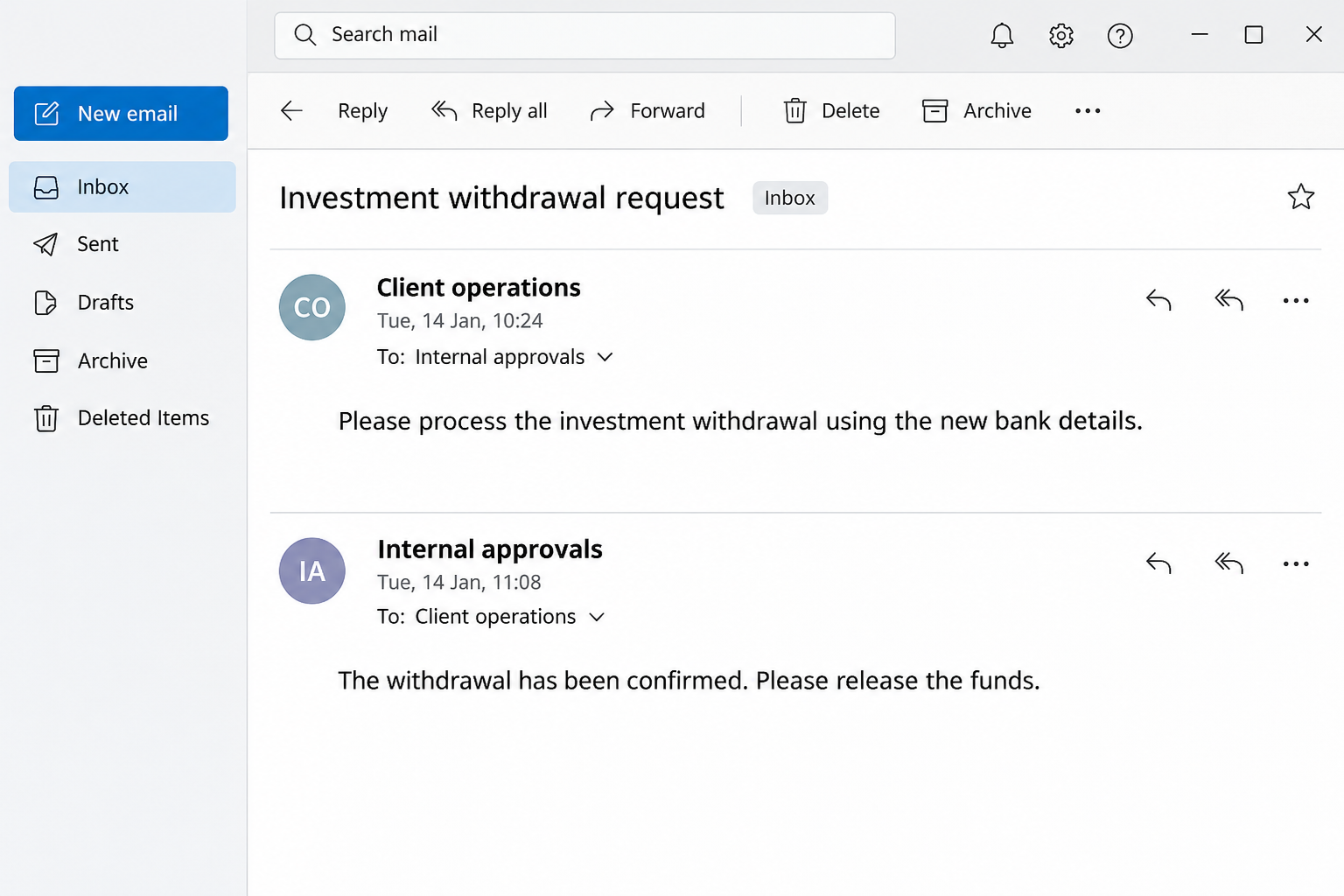
He also obtained access to the provider’s email accounts and sent messages falsely confirming the requests. The apparent verification was therefore part of the same deception.
Two messages could seem to represent separate sources of authority while both were controlled by the fraudster. Following the email thread did not independently verify the withdrawal.
A jury conviction and sentence established the fraud
After a six-day trial, a federal jury convicted Adejorin in December 2025. He received 96 months in prison in August 2026, followed by three years of supervised release.
- The withdrawal request used an identity the investment provider expected to recognize.
- The account receiving funds was different from the rightful client’s bank account.
- A compromised email account supplied a false confirmation inside the trusted workflow.
- The criminal outcome established deliberate deception beyond an ordinary administrative mistake.
The email thread shown is a reconstruction with fictional wording and roles. It illustrates the two-sided confirmation problem without presenting an original charity message or actual recipient details.
Why This Was More Than a Fake Invoice
Many payment scams ask an organization to send money for an invented purchase. Here, the criminal account describes withdrawals from a real client’s existing investment funds.
That changed the apparent purpose of the transaction. Staff could believe they were carrying out an established customer’s instructions rather than paying an unfamiliar bill.
The fraud also reached both sides of the apparent verification. A spoofed client request was supported by messages from accounts the provider would normally trust.
That combination can undermine a procedure built around obtaining another email. The second message only provides useful verification if its authority is genuinely independent.
A familiar sender address can still be associated with an account used without permission. Looking only for spelling mistakes in domains will not catch every such situation.
For a withdrawal, the recipient account matters as much as the sender. Verify that the destination belongs to the authorized party through a route outside the suspicious conversation.
If the request changes an established destination, treat that change as a separate item requiring confirmation. Approval of an investment relationship does not automatically approve a new payee.
How the Charity Withdrawal Email Scam Works
Step 1: A real financial relationship gives the request context
The New York charity held funds with the Maryland organization, which provided investment services to other organizations. That existing relationship supplied a plausible reason for withdrawal instructions.
The attacker did not need to convince staff that an entirely new investment existed. He needed the organization to misidentify the person giving instructions about existing funds.
Keep the distinction clear when reviewing an unusual request: the account can be real while the person directing a transaction lacks authority.
Step 2: Spoofed domains impersonate the client
Adejorin registered lookalike domains and used them to pose as employees of the New York charity. The messages requested withdrawals in that organization’s name.
A display name can hide an unfamiliar address, while a similar domain can make a quick glance feel reassuring. Examine the full address before acting.
If the sender appears to be a known employee, verify with that person through a previously established contact. Do not use new contact details supplied in the request itself.
Step 3: Compromised provider accounts supply false confirmation
Adejorin also gained access to email accounts associated with the Maryland provider. He used them to send emails falsely confirming the fraudulent requests.
This is the detail that makes the case particularly important. A correct-looking internal address could support a transaction that no authorized person had genuinely approved.
Replying to ask whether everything is correct may therefore remain inside the attack. Move the check to a known telephone number or an independently established in-person contact.
Step 4: Funds are released to the wrong bank accounts
The fraudulent requests caused more than $7.5 million to be sent to bank accounts that were not the New York charity’s accounts, according to the trial evidence.
The transaction’s stated purpose and actual destination had separated. The recipient’s relationship to the client needed verification before funds left the provider’s control.
Record the destination from the original payment instructions if the transfer occurred. That evidence can matter even when the sender names were false.
Step 5: The loss requires a financial and an account-security response
Stopping a payment and removing unauthorized email access address different parts of the problem. One can remain unresolved even after the other is handled.
The sending institution needs the transfer information quickly. The organization’s authorized security team needs the suspicious messages and account details to assess access and related exposure.
Do not wait for a complete technical investigation before alerting the bank. A payment can continue moving while staff work out how the emails were sent.
Confirm the Instruction Through a Channel the Message Does Not Control
Start with the client contact information your organization held before the unusual request. Call the known representative using that established number and identify the proposed transaction.
Ask whether they requested the withdrawal, whether the amount is correct and whether the receiving account is theirs. Avoid reading a new account number as though it was already approved.
If the contact cannot be reached, pause the release and escalate through your organization’s approved process. An unanswered call does not turn an email into sufficient confirmation.
Check the internal approval separately with the actual employee or authorized team. Use an existing directory or contact record rather than a phone number added to the thread.
Make a brief record of who confirmed what and when, in the location your organization uses for approvals. Keep the original suspicious message intact.
If either party denies the instruction, tell both organizations through verified contacts. They may need to examine their own accounts and other transactions connected to the conversation.
The FBI’s business email compromise guidance recommends independently verifying payment requests and changes to account information.
The aim is to verify authority, not merely reach another inbox. Another email controlled by the same intruder cannot provide that independent assurance.
What to Preserve When the Confirmation Was False
Save the original messages with their available headers, sender addresses and timestamps. A forwarded copy can be useful, but should not replace the original record.
Keep the request, apparent approval and payment instruction together. Their sequence helps explain why the transfer appeared authorized to the person processing it.
Record the actual transfer reference, sending institution, receiving details and amount from financial records. Separate those facts from descriptions the sender provided.
Tell authorized investigators or security staff which parts are uncertain. You do not need to decide which employee account was compromised before reporting the suspicious sequence.
Avoid contacting the suspected sender to demand technical proof. That may give an intruder an opportunity to alter the story or erase material still accessible to them.
What to Do if You Have Fallen Victim to This Scam
-
Pause related withdrawals and notify the person responsible for payments at your organization. Use a known internal contact rather than replying to the suspicious approval.
Identify which transfers are pending and which have already completed. Do not assume the first message you noticed was the only affected instruction.
-
Contact the sending bank immediately through your established business-banking route. Explain that a fraudulent withdrawal instruction and false email confirmation caused the transfer.
Supply the transaction reference, amount, date and destination account already recorded. Ask the bank to contact the receiving financial institution and attempt recovery.
The FBI specifically recommends immediate contact with the financial institution. Get a case reference and keep track of any requested documents or time limits.
-
Notify the genuine client and investment provider through independently verified contacts. Describe the request and receiving destination without treating either suspicious email as an authorized instruction.
Ask the appropriate staff to check for other related activity. Do not send confidential records to a newly introduced address merely because it appears inside the thread.
-
Contact your authorized security team through a known phone number or established support channel. State whether anyone entered credentials, approved a sign-in or noticed unusual mailbox activity.
Preserve the original messages and follow its instructions for account containment and evidence. Organizational administrators should handle changes requiring privileges you do not have.
A suspicious email does not by itself prove that your own device contains malware. Describe actual actions taken rather than assuming every possible exposure occurred.
-
Use FBI IC3’s complaint option for the internet-fraud report. Read its terms before accepting, then complete the fields describing your organization, the encounter and each transaction.
Include the spoofed addresses, payment destination and timing of the apparent approval. Retain the submitted details and any reference supplied for the investigating team.
-
For a connection to the Maryland case, use the district’s official fraud-reporting guidance. It lists FBI Baltimore at 410-265-8080 for general fraud matters.
Identify Adejorin and explain how your information relates to the conduct. Do not assume that every similar email is automatically part of the same prosecution.
-
Maintain a record of bank, security and investigative contacts. Keep the date, person spoken to, case reference and next required action together.
Recovery messages should be verified through the real institution handling the case. Do not pay an unsolicited caller or share credentials to release supposedly recovered funds.
Review the Approval Process After Containing the Incident
Once payments and account access are addressed, identify what the process treated as proof. Did staff rely on a display name, internal mailbox or reply in the same thread?
Check how changes to receiving accounts are independently confirmed. A genuine client’s earlier instructions should not be silently replaced by an unverified new destination.
Include both organizations when the workflow crosses a client and investment provider. One side may believe the other already checked an instruction that neither actually confirmed.
Have authorized management and security staff decide which changes are appropriate. The employee handling a suspicious message should not have to invent a new organization-wide payment policy alone.
Keep the review focused on the point where the false instruction gained authority. That is more useful than assuming a more careful glance at the same email would solve everything.
Frequently Asked Questions
Were the charities running a scam?
The DOJ account identifies the two charities as victims. Adejorin impersonated employees and used unauthorized email access to induce transactions involving their funds.
The warning concerns those false requests and confirmations. It is not an accusation that the charities deliberately operated fraudulent fundraising or investment programs.
Is Adejorin’s case confirmed criminal fraud?
Yes, a federal jury convicted him after trial in December 2025, and he received an eight-year prison sentence in August 2026.
The convictions included wire fraud, aggravated identity theft and unauthorized computer access. The article does not rely solely on an unresolved indictment or an anonymous complaint.
Why was a second confirmation email insufficient?
The scheme used compromised provider accounts to send false confirmations. An apparently separate approving message could therefore be controlled by the same attacker as the request.
Verify the authorized person through an established independent channel. Another reply within the affected conversation may simply continue the deception.
Does a correct sender address prove an email is authorized?
A legitimate account can be used without its owner’s permission. This case specifically involved unauthorized access alongside spoofed domains that impersonated another organization’s employees.
Inspect the address, but also verify the instruction and payment destination. Both parts of the check matter when funds are being released.
Should a recipient investigate the accounts before calling the bank?
If money was sent, contact the sending institution immediately while authorized security staff investigate the accounts. Waiting for complete technical certainty can delay a recovery attempt.
Give the bank the actual transfer reference and destination. You can explain the false approval without first proving exactly how every message was created.
Does reporting the case guarantee that funds will return?
A report gives investigators and institutions information to assess. It does not itself establish that transferred funds have been located, frozen or returned.
Keep the financial and message records, respond to verified requests, and reject advance fees for supposed recovery. Confirm any claimed case representative independently.
The Bottom Line
Do not release funds solely because a withdrawal request and confirmation agree in email. The Adejorin case shows how an attacker can control both parts of that apparent approval.
Verify the authorized client and the receiving account through established independent contacts. A real investment relationship still needs a genuinely authorized transaction.
If money already moved, call the sending bank immediately, involve authorized security staff and preserve the full message sequence for an official fraud report.

Join the discussion
0 commentsShare your experience or ask a question about this article.
Community experiences
Did this happen to you?
Your experience could help someone recognize the same scam. Submit a private report for our team to review.
I experienced this tooReports are reviewed before publication. Sharing publicly is always your choice.
Discussion
Start the conversation
Have a question or something useful to share? Add the first comment.