


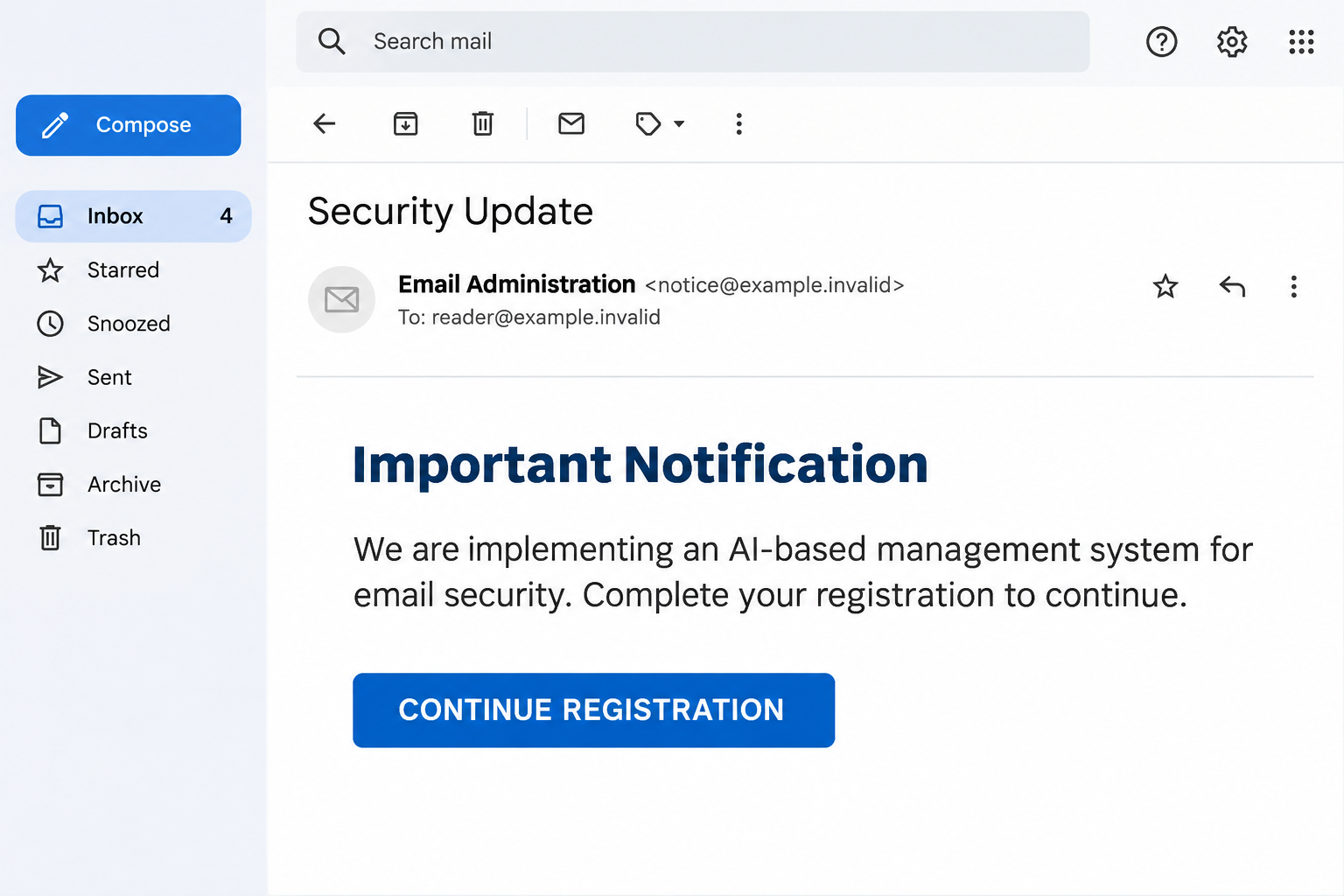
A Security Update email says your mailbox is moving to an AI-based management system. There is a registration button, and the request sounds like routine administration.
Before fitting another account task into your day, look at what this particular notice wants and where its instructions actually lead.
Overview
A security upgrade becomes a registration demand
The Implemented AI-Based Management System email scam borrows a familiar workplace experience: a service changes, and everyone receives instructions for completing the transition.
Its subject is Security Update. Inside, the message describes an important notification and says an AI-based system will improve protection across the email platform.
That broad promise gives the request a plausible setting. Plenty of services introduce new security features, and administrators sometimes need users to complete genuine enrollment tasks.
This notice goes further. It tells all users to register through its supplied button, without clearly identifying an accountable administrator or explaining the actual security setting.
The message ends with an instruction to act immediately. Readers are encouraged to finish the task before asking whether their provider announced it elsewhere.
The destination asks for the mailbox password
A documented destination used Oracle Cloud object storage to display a counterfeit mailbox sign-in. The captured example used Gmail branding and a prefilled recipient address.
Those details matter more than the AI language. The proposed security registration has become a request for the password that opens the recipient’s existing email account.
The page’s cloud-hosting address is not Google’s account sign-in domain. A recognizable infrastructure provider can host customer content without authenticating whatever that content claims.
This is credential phishing, not evidence that Google or Oracle introduced a joint registration requirement. Their names and services should not be confused with the impersonation.
What recipients should recognize
The email combines several ordinary-looking pieces. Taken together, they describe a specific trap rather than a useful explanation of a new security feature.
- A broad Security Update subject gives little information about the affected service.
- AI-based management is presented as something every user must join.
- The button moves the registration process to an unrelated hosted page.
- The supposed enrollment asks for an existing mailbox password.
- An already filled email address makes the form seem personalized.
Do not register through this notice. If you already entered a password, concentrate on the account first, not on deleting the email and hoping that ends it.
Why the AI Explanation Can Sound Believable
AI is now part of ordinary product announcements. A reader may remember seeing new writing tools or spam features and assume this message concerns the same rollout.
The email benefits from that familiarity without describing a real feature. It provides no useful explanation of what registration changes or which organization administers the platform.
There is a practical difference between activating a feature inside an account and surrendering that account’s password to a newly opened website.
Imagine a genuine update to your office door system. Your employer might ask you to enroll a badge, but an unexplained stranger should not collect your existing keys.
The same boundary applies here. A technical-sounding improvement does not make every sign-in request connected to it legitimate.
The notice also frames compliance as helping security. People who normally avoid risky links may feel they are being responsible by completing a mandatory protection step.
That inversion is the emotional hook. Refusing an unexpected registration can feel like neglecting the account, even though independent verification is the safer response.
How the AI-Based Management System Email Scam Works
Step 1: The message arrives as platform administration
The email presents a security announcement rather than an offer or prize. It expects the reader to recognize the category and accept the sender’s administrative authority.
A display name is not that authority. The label beside a message can say Administration, Security, or Support without establishing who controls the sending account.
At work, compare the notice with your organization’s normal communication channel. An unfamiliar external sender should not be allowed to introduce a mandatory account procedure alone.
Personal mailbox users have an even simpler question: which provider is announcing the change, and can that provider show the requirement inside the account?
Step 2: The AI rollout supplies a reason to act
The body says the platform is implementing an AI-based management system. It ties registration to successful deployment, making the reader’s cooperation sound necessary.
The explanation is vague enough to fit many providers. That flexibility helps the same pretext reach people using different email services and workplace systems.
A real administrator can explain a task in concrete terms. You should be able to identify the feature, the affected account, and the official place to complete it.
Here, the security promise mainly answers the question of why a button deserves attention. It does not authenticate the button or the form behind it.
Step 3: The registration button moves the reader elsewhere
Clicking continues the story outside the inbox. The reader is no longer dealing only with a message but with a website asking to become part of account administration.
The captured route used objectstorage.us-chicago-1.oraclecloud[.]com. Object storage normally serves files and web content belonging to individual customers.
That hostname identifies hosting infrastructure. It does not turn a customer-uploaded form into the official login for a different company’s mailbox.
The exact bucket or path can change. The durable warning is the mismatch between the account being protected and the site collecting its credentials.
Step 4: Familiar branding makes the password request look routine
The documented Gmail-themed page placed a password form over a Google-looking background. The recipient’s address was already present, leaving only the password to supply.
A prefilled address is not proof of access to your inbox. The sender already knows where the email went and can include that address in its link.
Similarly, a logo or copied sign-in layout is just page content. Anyone controlling a website can arrange familiar words and images around an input box.
Provider-matching versions have been reported, but not every possible variation has been independently tested. Judge the actual address and request you see, not an assumed universal design.
Step 5: Account information is collected under the enrollment story
The central risk begins when someone types a password into the counterfeit form. A later error, blank page, or redirect would not undo that disclosure.
A hostile page can capture typing before a final button is pressed. If you entered the password but stopped short of submitting, treat it as exposed.
Additional prompts might ask for a verification code or approval. Do not provide either merely because you started the registration process and want to finish.
If a new prompt appears, open the real account yourself. Do not let a registration story decide which security checks you approve.
Step 6: The mailbox can become a route to other accounts
Email contains more than conversations. It receives recovery messages, invoices, shared documents, and alerts that can help an intruder understand which accounts are valuable.
Someone who obtains usable access may attempt password resets elsewhere, impersonate the owner, or read ongoing correspondence for information that supports another fraud.
A work mailbox may reveal supplier contacts and payment discussions. A personal inbox may expose shopping, cloud-storage, or social-account recovery routes.
Those are potential consequences of account takeover, not confirmed outcomes for every recipient. Quick account protection can limit opportunities before more damage occurs.
The Address Bar Is More Useful Than the Logo
Look at the website address before considering its design. A form claiming to authenticate a Google account needs more than the word Gmail somewhere on the page.
Read the hostname as a hostname, not as a list of reassuring keywords. Words such as mail, security, or account can appear in attacker-controlled paths.
A padlock or HTTPS connection means traffic is encrypted between your browser and that website. It does not establish that the website represents your email provider.
Password managers can provide another useful clue. If a saved account normally fills automatically but will not fill on this page, pause rather than copying the password manually.
Autofill behavior is not a complete authenticity test. It is a reason to investigate a mismatch, particularly when the page appeared through unsolicited administration instructions.
Do not try to prove the page’s purpose by submitting invented credentials. That can lead to more interaction without improving your own account’s safety.
Check a Real Security Change Without Following the Notice
Start a separate visit using your established bookmark or the provider’s official app. Look for account notifications, security events, and any enrollment requirement there.
For Gmail, Google’s phishing guidance explains how to report suspicious messages and check a questionable security notice independently.
If the mailbox belongs to an employer or school, contact support through the internal directory. Do not use a new support address supplied by the suspicious message.
Ask whether an AI-management registration is actually being deployed. Send the original message using the organization’s reporting method so staff can inspect its headers and destination.
A forwarded screenshot can help recognition, but it loses technical details. Preserve the original email when your support team asks for it.
If colleagues received the same notice, that does not make it official. Bulk delivery is compatible with both legitimate announcements and phishing campaigns.
What to Do if You Have Fallen Victim to This Scam
-
Stop the registration attempt. Close the supplied page. Do not answer another verification prompt or follow a supposed support link to finish enrolling.
If you only read the notice, report it and remove it from your inbox. Receiving this message alone does not establish account access or a device infection.
-
Replace an exposed password through the real service. Use the official application or an independently opened account page, preferably on a device you trust.
Choose a new password that has not protected another account. Change reused copies separately, starting with services that handle money, identity, or account recovery.
-
Review access that may outlast the password. Inspect recognized devices, recent security activity, recovery contacts, and connected applications using the provider’s own controls.
Remove unfamiliar access and follow the provider’s sign-out instructions. For a managed mailbox, ask IT to invalidate suspicious sessions and investigate any unauthorized application permissions.
-
Check what the inbox may be doing quietly. Look for unfamiliar forwarding addresses, filters, inbox rules, sent messages, and deleted warnings.
A changed password does not explain away a forwarding rule added earlier. Keep a record of suspicious changes before removing them or asking support for help.
-
Strengthen the next sign-in. Enable the provider’s available multifactor protection. Consider a passkey or security key where supported, especially for important accounts.
Never approve a sign-in notification just to make it disappear. An unexpected approval request can be connected to someone trying the password elsewhere.
-
Contain any wider consequences. Tell workplace security if business mail was involved. Warn contacts through a separate channel if messages were sent using your identity.
Contact the relevant financial provider promptly if transactions or payment instructions changed. Keep this distinction clear: protecting an inbox and disputing a payment are separate tasks.
-
Match device checks to what happened. If you installed software, added an extension, or ran a downloaded file, stop using that device for sensitive recovery.
Seek a suitable cleanup guide or trusted technical help. A scan cannot revoke stolen account sessions, and a credential-only phish does not automatically require malware removal.
For a Work Account, Tell Support What You Actually Did
You do not need a perfect diagnosis before reporting. A short timeline is more helpful than waiting until you know whether the attacker signed in.
Explain whether you opened the page, typed a password, entered a code, approved a notification, or downloaded anything. Each answer changes the response priorities.
Include the time, device, browser, and address shown in the page if you still have that information. Do not send your password to support.
If a genuine password-reset email arrives afterward, use your normal account route to check it. Criminal activity and legitimate defensive alerts can appear close together.
Account recovery can feel embarrassing when the bait was about security. Reporting promptly helps the organization protect coworkers who received the same request.
Frequently Asked Questions
Is the AI-based management system registration email legitimate?
The specific Security Update campaign described here is phishing. Its registration story directs people to a counterfeit mailbox login rather than an authenticated provider enrollment.
A genuine AI-related product announcement is a separate matter. Verify any required action through the service or your administrator instead of this email’s button.
Does Oracle Cloud in the address make the form safe?
No. A cloud-storage address can serve content created by a customer. It does not authenticate the creator as Google, your employer, or your mailbox provider.
The relevant question is who is entitled to collect that account password, not whether the hosting company is a recognizable business.
How did the fake page know my email address?
The person sending the message already had the recipient address. It can be carried in a link and inserted into a page automatically.
That personalization does not show that the sender has read your messages or that a registration already exists in the real service.
What if I typed the password without pressing Sign In?
Change it anyway. A page can collect field contents during typing, so lack of a final submission is not a reliable boundary.
Review account activity afterward. Do not return to the page to experiment with its button or determine exactly when collection happened.
Will deleting the notice secure my account?
Deleting helps prevent another accidental visit. It does not change an exposed password, remove unfamiliar sessions, or undo settings an intruder may have altered.
Use Google’s compromised-account steps for a Google account, or the equivalent official recovery route for your provider.
Do I need to scan my computer after receiving it?
Not merely because it arrived or you read it. The demonstrated mechanism concerns a counterfeit sign-in, not an established software infection.
If you also ran a file or installed something, that additional exposure deserves its own device investigation alongside account recovery.
The Bottom Line
Do not complete the AI-based email management registration through this notice. Its security story leads toward an unrelated page collecting mailbox credentials.
Verify real changes independently. If you entered a password, replace it through the genuine service and review sessions, recovery settings, and mailbox rules immediately.

Join the discussion
0 commentsShare your experience or ask a question about this article.
Discussion
Start the conversation
Have a question or something useful to share? Add the first comment.