

If you received a notice about the Allina Pixel Settlement, you may be wondering whether it is real or just another phishing scam using a health care name to steal personal information.
The short answer: the Allina Pixel Settlement appears to be a real, court-authorized class action settlement, not a fake settlement scam. The official settlement website lists the case as Ahlers et al. v. Allina Health System, Case No. 24-CV-3674, in the United States District Court for the District of Minnesota. The site says the settlement concerns allegations that certain personal or health-related information may have been disclosed to third parties through tracking pixels on Allina Health System websites or webpages. Allina denies wrongdoing.
That said, scammers often copy real settlement names, create fake emails, or send lookalike links. So while the settlement itself is legitimate, you still need to make sure you are using the official website and not a phishing page.
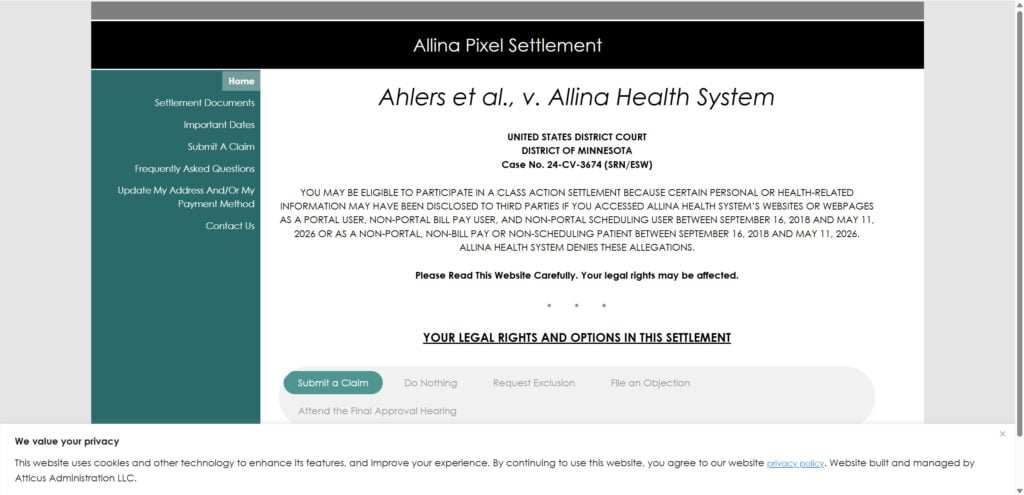
What Is The Allina Pixel Settlement?
The Allina Pixel Settlement is a proposed class action settlement involving Allina Health System and website tracking technology commonly known as “pixels.”
According to the official settlement FAQ, the lawsuit alleges that Allina used pixel tracking on its websites and webpages, and that this may have caused certain personal or health-related information of website visitors to be shared with third parties.
Allina has not admitted wrongdoing, and the court has not decided that Allina violated the law. The settlement is a way to resolve the lawsuit without continued litigation.
Is The Allina Pixel Settlement Legit Or A Scam?
The settlement itself appears to be legitimate.
Here are the main signs that it is real:
- It has an official settlement website:
allinapixelsettlement.com - It lists a federal court case: Ahlers et al. v. Allina Health System
- It identifies the court as the United States District Court for the District of Minnesota
- It gives a case number: 24-CV-3674
- It provides official deadlines, settlement documents, FAQs, and a claim form
- It names Atticus Administration as the settlement administrator
- The court entered preliminary approval on May 11, 2026
However, a real settlement can still attract fake messages. Be careful if you receive a text, email, or phone call that:
- Uses a different website address
- Asks for payment to receive your settlement money
- Requests your bank login, Social Security number, or passwords
- Pressures you to act immediately
- Sends you to a shortened or suspicious link
- Claims you must pay a processing fee or verification fee
A legitimate class action settlement should not require you to pay money upfront to claim your share.
Who Is Eligible For The Allina Pixel Settlement?
The official settlement FAQ says the settlement class includes two groups.
Group 1
Group 1 includes people who were:
- Portal users
- Non-portal bill pay users
- Non-portal scheduling users
The relevant time period is September 16, 2018 through May 11, 2026.
Group 2
Group 2 includes people who were:
- Non-portal patients
- Non-bill pay patients
- Non-scheduling patients
The same time period applies: September 16, 2018 through May 11, 2026.
In simpler terms, you may be eligible if you were an Allina patient or used certain Allina website features during the covered period.
The easiest way to know if you are likely included is whether you received an official notice with a Notice ID. The claim form page asks users to enter a Notice ID and last name to proceed.
How Much Is The Allina Pixel Settlement Payout?
There is no fixed payout amount listed yet.
Allina agreed to a total settlement amount of $12,500,000. According to the FAQ, that amount is split into:
- $10,303,098 for the Group 1 Settlement Fund
- $2,196,902 for the Group 2 Settlement Fund
After attorneys’ fees, expenses, service awards, and administration costs are deducted, the remaining money will be distributed pro rata to eligible class members who submit valid claims.
“Pro rata” means the final payment depends on how many valid claims are submitted. If many people file claims, each person may receive less. If fewer people file claims, the payment may be higher.
The FAQ also says class counsel may request attorneys’ fees of up to $4,166,666.67, which is approximately one-third of the settlement fund.
What Is The Claim Deadline?
The deadline to submit a claim is:
September 8, 2026
You must submit a valid claim by this date to be eligible for a payment. The official site says claim forms must be submitted by September 8, 2026.
Important Dates
Here are the key dates listed on the official settlement website:
- May 11, 2026 – Preliminary Approval Order entered
- August 10, 2026 – Deadline to opt out
- August 10, 2026 – Deadline to object
- September 8, 2026 – Claim deadline
- September 24, 2026 – Final Approval Hearing at 9:30 a.m.
How To File A Claim
To file a claim, go to the official settlement website and use the “Submit a Claim” section.
The claim form asks for your:
- Notice ID
- Last name
- Verification through the claim form process
If you already submitted a claim, the site also has an option to update your address or payment method.
You can also submit a claim by mail. The FAQ lists the mailing address as:
Allina Pixel Settlement
c/o Atticus Administration
PO Box 64053
St. Paul, MN 55164
Mailed claims must also meet the September 8, 2026 deadline.
What Happens If You Do Nothing?
If you do nothing, you will not receive a payment.
You will also remain part of the settlement class and give up your right to sue Allina separately over the claims resolved by the settlement, if the settlement receives final approval.
Should You Opt Out?
Opting out means you exclude yourself from the settlement.
If you opt out:
- You will not receive money from the settlement
- You keep your right to sue separately
- You must submit your exclusion request by August 10, 2026
Most people who simply want a settlement payment should not opt out. Opting out usually only makes sense if you want to preserve your right to bring your own legal claim.
Should You Object?
Objecting is different from opting out.
If you object, you are telling the court that you disagree with the settlement or part of it. You can still submit a claim and potentially receive payment if the settlement is approved.
The objection deadline is also August 10, 2026.
How To Avoid Allina Pixel Settlement Scams
Because this settlement involves health-related information, scammers may try to exploit it.
To stay safe:
- Use only the official settlement website
- Do not pay a fee to claim money
- Do not give your bank password or online banking login
- Do not trust random phone calls claiming to “verify” your payout
- Check that any notice matches the official case name and deadline
- Be suspicious of fake urgency, threats, or “final warning” messages
The official settlement administrator can be contacted through the information listed on the settlement website if you need confirmation.
Bottom Line
The Allina Pixel Settlement 2026 is real, based on the official court-authorized settlement website and case information. It is not automatically a scam just because you received a notice.
However, fake messages can still appear around real settlements. If you are eligible, file only through the official settlement website, never pay a fee, and do not provide sensitive login information.
The most important date is September 8, 2026, which is the deadline to submit a claim.
FAQ Section
Is the Allina Pixel Settlement real?
Yes. The Allina Pixel Settlement appears to be a real class action settlement connected to Ahlers et al. v. Allina Health System, Case No. 24-CV-3674, in the U.S. District Court for the District of Minnesota. However, scammers may still create fake emails, texts, or websites using the settlement name.
What is the Allina Pixel Settlement about?
The lawsuit claims that Allina Health System used tracking pixels on its websites and webpages, which may have shared certain personal or health-related information with third parties. Allina denies wrongdoing and agreed to settle the case without admitting liability.
Who qualifies for the Allina Pixel Settlement?
You may qualify if you were an Allina Health portal user, bill pay user, scheduling user, or patient between September 16, 2018 and May 11, 2026, depending on which settlement group applies to you.
What is the Allina Pixel Settlement claim deadline?
The deadline to submit a claim is September 8, 2026. If you miss the deadline, you may lose your chance to receive a payment.
How much money will I get from the Allina Pixel Settlement?
There is no fixed payment amount yet. The settlement fund is $12.5 million, but final payouts will depend on how many valid claims are submitted and how much is deducted for attorneys’ fees, administration costs, and other approved expenses.
Do I need a Notice ID to file a claim?
The online claim form asks for a Notice ID and last name. If you received an official notice by mail or email, it should include the Notice ID needed to start the claim process.
Is Allina admitting it did something wrong?
No. Allina denies the allegations. A settlement does not mean the court found that Allina broke the law. It means the parties agreed to resolve the lawsuit.
What happens if I do nothing?
If you do nothing, you will not receive a settlement payment. You may also give up your right to sue Allina separately over the claims covered by the settlement.
Can I opt out of the Allina Pixel Settlement?
Yes. The opt-out deadline is August 10, 2026. If you opt out, you will not receive money from the settlement, but you keep your right to sue separately.
How can I avoid Allina Pixel Settlement scams?
Only use the official settlement website, never pay a fee to claim money, and do not give out passwords, bank logins, or Social Security numbers to anyone who contacts you unexpectedly.








