


A page offers $750 in Apple Cash, and the first check takes only seconds. Your device appears eligible before you’ve had time to ask much.
Then comes the instruction that makes you pause: install another app to finish verification. Before following it, look at what that step actually accomplishes.
Overview
The reward page is borrowing Apple’s credibility
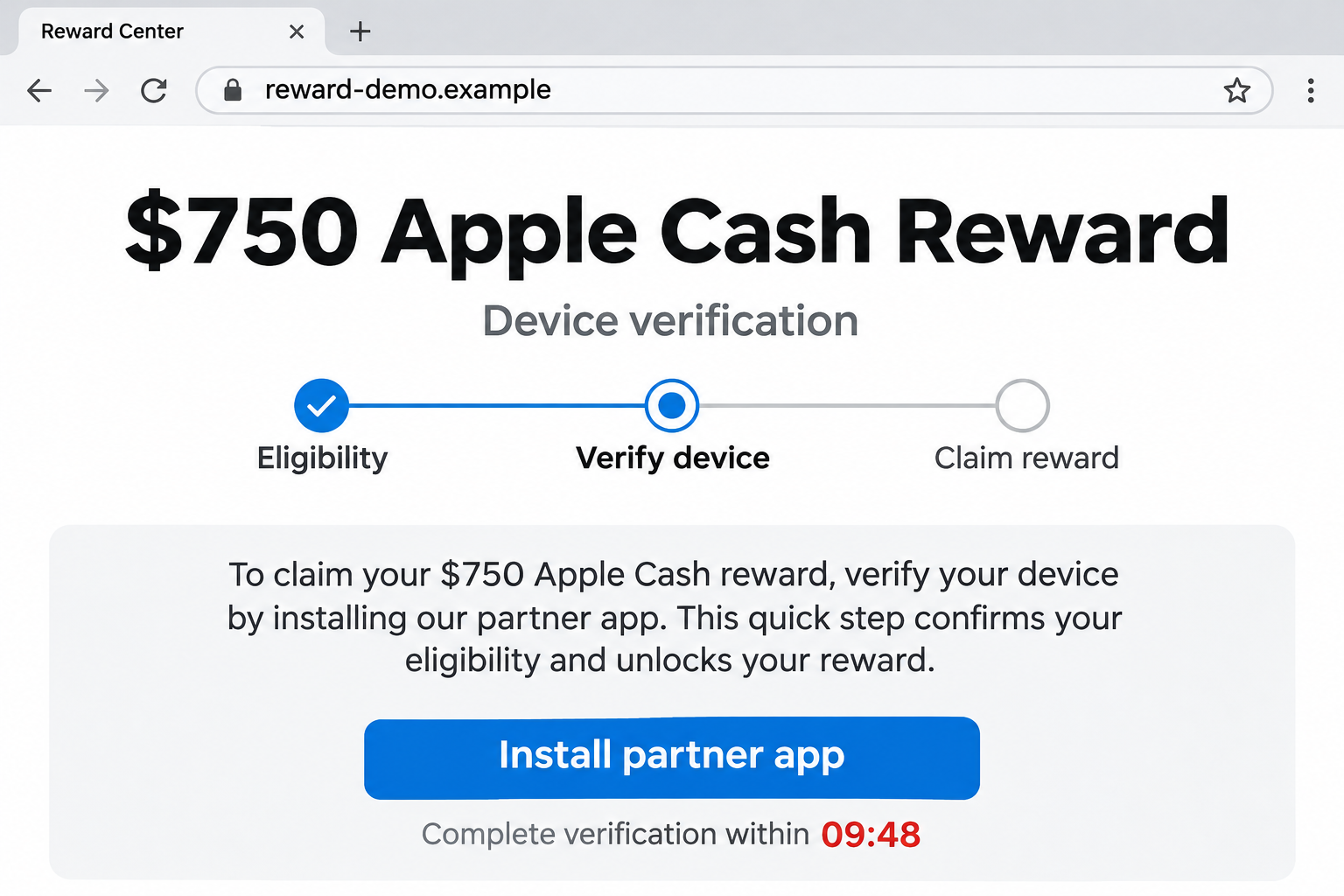
The $750 Apple Cash device-verification scam dresses an app-promotion journey as a payment from Apple. The reward is the reason to click, not a demonstrated transfer.
Apple Cash is a real service. That doesn’t make a webpage advertising Apple Cash an official promotion, an account check, or a source of money.
The opening image illustrates the sort of request involved using a fictional address. It isn’t a capture of a real Apple page or an actual payment.
Automated progress replaces meaningful verification
Malwarebytes researchers documented a page whose eligibility checks ran on timers. Its eventual success message appeared without confirming the promised installation or game activity.
The reported route involved Reco Social and affiliate tracking. Researchers did not establish that the app or its developer operated the deceptive reward page.
That separation matters. A misleading promoter can direct visitors toward a real app, leaving people to mistake a genuine store listing for proof of the earlier promise.
The useful question is what you’re being asked to authorize
- Are you opening Apple’s own account controls, or following an unrelated reward website?
- Does the next screen explain an actual payment, or ask for another registration?
- Are you agreeing to an app purchase or trial while expecting to receive money?
- Can you verify the claimed reward independently of the page offering it?
Do not install apps or spend money to unlock this offer. If you’ve already continued, identify the accounts, purchases, or information involved before taking recovery steps.
Apple Cash Verification Is Not an App-Installation Task
The word verification creates confusion because legitimate financial services really do ask customers to establish their identity. Scammers borrow that familiar requirement and change its purpose.
Apple’s identity-verification instructions direct Apple Cash users through Settings, Wallet & Apple Pay, their Apple Cash card, and Verify Identity when that option appears.
Those instructions concern access to a financial service. They aren’t a promotion that exchanges game activity for an unexpected $750 reward.
If you’re worried about your real account, open its controls yourself. Don’t let an advertising page become the starting point for checking sensitive account information.
Also keep Apple Cash separate from an Apple Gift Card. A cash balance, a gift-card code, and a promotional website’s displayed counter aren’t interchangeable evidence.
A page can print any amount beside a familiar name. What matters is whether the genuine service records a payment you can actually use.
How the $750 Apple Cash Device-Verification Scam Works
Step 1: An attractive amount gives you a reason to stay
The offer puts the reward ahead of the work. Once you’re imagining what $750 could cover, a few small requests can seem like a reasonable inconvenience.
This reverses the usual buying decision. Instead of asking whether an app is useful, you’re asking whether installing it will bring you closer to the reward.
Keep those decisions separate. An app should earn your interest through its own features, terms, and price, not through someone else’s unexplained promise of cash.
Step 2: A quick check makes acceptance feel personal
In the page Malwarebytes examined, eligibility labels lit up automatically. The reported checks did not genuinely establish the visitor’s device or location.
That apparent approval changes how the next request feels. You’re no longer considering a general advertisement. You’re supposedly finishing an opportunity already reserved for you.
But a checkmark is just something a webpage displays. Without a trustworthy connection to the organization making the offer, it doesn’t confirm eligibility for anything.
You don’t need to test the page with a different phone or location. Leaving an unverifiable offer is safer than spending more time trying to satisfy it.
Step 3: Verification becomes an unrelated app or game offer
The documented page sent visitors through an affiliate link rather than directly completing an Apple Cash operation. It asked for app registration and game activity.
Affiliate links can credit a referring promoter for certain activity. Their existence alone doesn’t prove an app is fraudulent or reveal exactly how that promoter gets paid.
The deception is the bridge between the two screens: an unrelated installation is presented as the necessary way to receive an Apple-branded reward.
Read the store listing as a separate offer. The developer, privacy information, in-app purchases, and subscription terms belong to that app, not to the reward promise.
Step 4: Waiting creates the impression that something is processing
Malwarebytes reported that the page moved to a verified state after ten minutes even without completing the advertised tasks. Its final claim button repeated the affiliate route.
The wait matters psychologically. After spending time following instructions, leaving can feel like abandoning something you’ve almost earned. That feeling isn’t evidence that payment is pending.
Nor does a success screen prove that an outside service approved anything. A webpage can update its own text without communicating with your wallet.
Step 5: Scarcity keeps the focus on finishing rather than checking
The same research described a remaining-spots counter that stopped at three and randomized claimed-payment notices. These were persuasion devices, not a verified list of recipients.
You may feel that checking the offer elsewhere will cost you your place. That is exactly when an independent check becomes most valuable.
Close the promotional tab before investigating any real subscription or account. A legitimate support process doesn’t need that countdown running beside you.
Why a Real App Store Listing Doesn’t Validate the Reward
It’s easy to think that reaching a familiar store means the journey was safe. In reality, you have reached a different organization with a different offer.
A store listing might accurately describe a game, while an outside promoter falsely claims playing it will earn Apple Cash. Both facts can exist at once.
Don’t leave an accusation on the developer’s page based only on the advertisement. Report the misleading promotion separately and describe the app’s actual behavior accurately.
If you want to keep an app, decide whether you’d still want it without the reward. Check what it charges and which permissions you’ve granted.
If the answer is no, stop using it. There’s no need to keep completing activities merely because the promotional page says you’re close.
Taking part in an offer can create several separate records: an app installation, a service account, a purchase, and perhaps a subscription. One action doesn’t cancel the others.
For example, removing an app is not the same request as canceling a paid plan. Keep a short list so you can deal with each record directly.
Check What You Actually Agreed To
A download is different from a purchase
Start with what you remember approving. Did you only tap a store’s download button, or did another screen show a price, trial, or recurring payment?
Look at the real purchase history and receipts rather than guessing from the reward website. Record the merchant or app name associated with any charge.
A free download doesn’t establish an unwanted subscription. Equally, a promotional page calling something free doesn’t override the terms on a separate purchase confirmation.
A service account can remain after an app is removed
If you registered, consider the information you supplied. A new email address, reused password, and social sign-in each create different account-management questions.
Use the service’s genuine account controls for deletion or privacy requests. Don’t provide more information through the reward page to make a supposed cancellation work.
If you reused a password, change it wherever else it protects an account. Prioritize the mailbox that receives password resets and financial notifications.
Cancel through the organization that bills you
Apple’s subscription guide explains cancellation through your Apple Account settings. A subscription billed by another company must be addressed with that company.
For an iPhone subscription billed by Apple, open Settings, tap your name, choose Subscriptions, and inspect the relevant entry. Follow its available cancellation controls.
Apple advises canceling an unwanted trial at least 24 hours before it ends. Save the expiration or cancellation confirmation rather than relying on memory.
If the charge isn’t listed there, examine the receipt and statement. Don’t conclude there’s nothing to cancel merely because one account shows no subscription.
What to Do If You Followed the Reward Offer
-
Stop the reward tasks. Don’t install another app, buy game credits, or invite friends because the page says doing more will finally release payment.
Save the offer’s address and any screenshots you already have. You don’t need to reopen it or submit more information to document what happened.
-
Make a brief activity list. Note each app installed, account created, purchase approved, and piece of information shared. Include approximate times where possible.
This helps you contact the right organization. A game developer can investigate its purchase, but cannot authenticate a stranger’s alleged Apple Cash giveaway.
-
Review paid plans and trials. Check the genuine account used for purchases, then cancel anything you don’t want through the billing provider’s own controls.
Keep the confirmation and next billing date. Cancellation stops a future renewal when successful, but doesn’t automatically refund money already charged.
-
Ask about an eligible purchase refund. For Apple-billed content, use Apple’s refund-request process and select the actual item charged.
Explain the misleading promotion honestly. Don’t report an authorized purchase as account theft simply because the promised reward failed to arrive. Approval isn’t guaranteed.
-
Protect any disclosed credentials. Replace a password you entered on an untrusted page or reused for a newly created account. Review unfamiliar sign-ins.
If you supplied Apple Account credentials, use genuine Apple support and account controls. Don’t buy recovery help from somebody replying to your complaint.
-
Contact your financial provider about a separate card exposure or suspicious charge. Use its app or your established contact number, not a reward-page support button.
Distinguish a subscription you accepted from a transaction you never authorized. The provider needs the actual sequence to explain available cancellation or dispute options.
-
Remove unwanted apps and review their accounts. Preserve purchase details first, then follow the relevant service’s deletion process if you no longer want the account.
There is no evidence here that every promoted app is malware. If you installed an unknown file outside the normal store, seek device-specific help separately.
-
Report the deceptive advertisement and page. Include the offer address, claimed reward, and route you followed, without attaching passwords or unredacted financial documents.
Apple’s scam guidance explains how to recognize deceptive promotions and reach genuine help without following the suspicious message’s instructions.
What Counts as Evidence of a Payment?
A promotional balance isn’t a financial record. Neither is a video of somebody else’s phone or a notification generated inside the advertising page.
Check your own genuine service, opened independently. If a promised transfer doesn’t appear there, don’t treat the website’s success screen as money you can spend.
Also resist a later processing-fee request. Sending money to collect a supposed reward changes the situation from wasted effort to a direct financial loss.
If someone claims a fee is refundable, ask why it must leave your account before you can receive anything. Don’t let that explanation replace independent verification.
A genuine purchase receipt can help you recover a charge. It doesn’t establish that the unrelated reward was legitimate, so preserve those records as separate matters.
If a friend sent the offer, tell them what happened without suggesting they deliberately misled you. People often pass along attractive promotions before trying them themselves.
Ask them to remove the link rather than encourage others to test it. Completing another installation doesn’t make the original claim more reliable.
When reporting, explain the promised outcome and the task demanded in exchange. That gives a platform more useful context than simply labeling every linked app a scam.
Frequently Asked Questions
Is the $750 Apple Cash device-verification offer real?
The documented offer is deceptive. Its app-installation route and automated progress do not establish an Apple payment or legitimate Apple Cash identity check.
Does installing Reco Social prove the reward is approved?
No. An app listing doesn’t authenticate an outside promoter. The research did not establish that Reco Social or its developer operated the fake reward page.
What if the page says my device was successfully verified?
A website can display that message without verifying anything. Use genuine Apple Cash controls for account questions, not the promotional page’s status.
Will deleting the app cancel a subscription?
Don’t rely on deletion. Inspect the subscription through the company billing you, cancel if needed, and keep its confirmation separately from removing the app.
Should I assume my phone has been infected?
No. This reward deception doesn’t establish infection. Your response depends on what you installed, entered, or authorized, rather than the reward page alone.
Can I recover money spent while pursuing the reward?
Ask the actual billing provider about the specific purchase. Refund eligibility varies, and canceling a plan doesn’t automatically reverse an earlier payment.
The Bottom Line
Don’t install apps, complete paid offers, or provide financial details to unlock the $750 Apple Cash device-verification reward. The promotional progress isn’t proof of payment.
Already followed it? Check real purchases and subscriptions, protect any credentials you shared, and handle each charge through the organization that actually billed you.

Join the discussion
0 commentsShare your experience or ask a question about this article.
Discussion
Start the conversation
Have a question or something useful to share? Add the first comment.