


A website says you need to verify your phone with Nigeria’s communications regulator. The logo looks familiar, and the page seems built for a routine check.
Then the form starts asking questions that have little to do with your device. Before completing it, take a closer look at who is collecting the answers.
Overview
A real device check becomes the cover story
The NCC device verification scam impersonates the Nigerian Communications Commission and its legitimate device checking service. Fraudulent websites borrow that service’s purpose to make intrusive requests seem necessary.
Someone expecting to check a handset may therefore arrive prepared to cooperate. The deception begins when that expectation is redirected toward an imitation portal.
The regulator identified an active phishing campaign
The NCC-CSIRT advisory identifies lookalike domains, copied branding, requests for banking information and one-time passwords, and payments for nonexistent services.
These are fraudulent sites impersonating the regulator. This warning concerns those portals and their requests, rather than a complaint about Nigeria’s genuine device verification program.
The requests that should stop the process
- A verification page asks for an OTP from your bank or another account.
- The form demands banking details unrelated to identifying a handset.
- A payment is presented as necessary for the supposed verification service.
- A familiar logo appears on an address different from the regulator’s published route.
- A deadline pressures you to finish before checking the instructions independently.
Why This Fake Verification Page Can Look Convincing
Device verification sounds like a task people might reasonably need to complete. It gives the page a specific purpose, rather than an obviously unrelated prize or offer.
The site can then introduce additional fields one at a time. Each request feels easier to accept once the visitor has decided the service is official.
The NCC describes copied logos and page designs. A visitor who recognizes the appearance may overlook the address and judge the form by its presentation.
HTTPS adds another misleading reassurance. The connection can be encrypted while the person receiving your information is an attacker.
Before paying, compare the request with the NCC’s own instructions. A browser’s connection indicator cannot establish that the regulator authorized the charge.
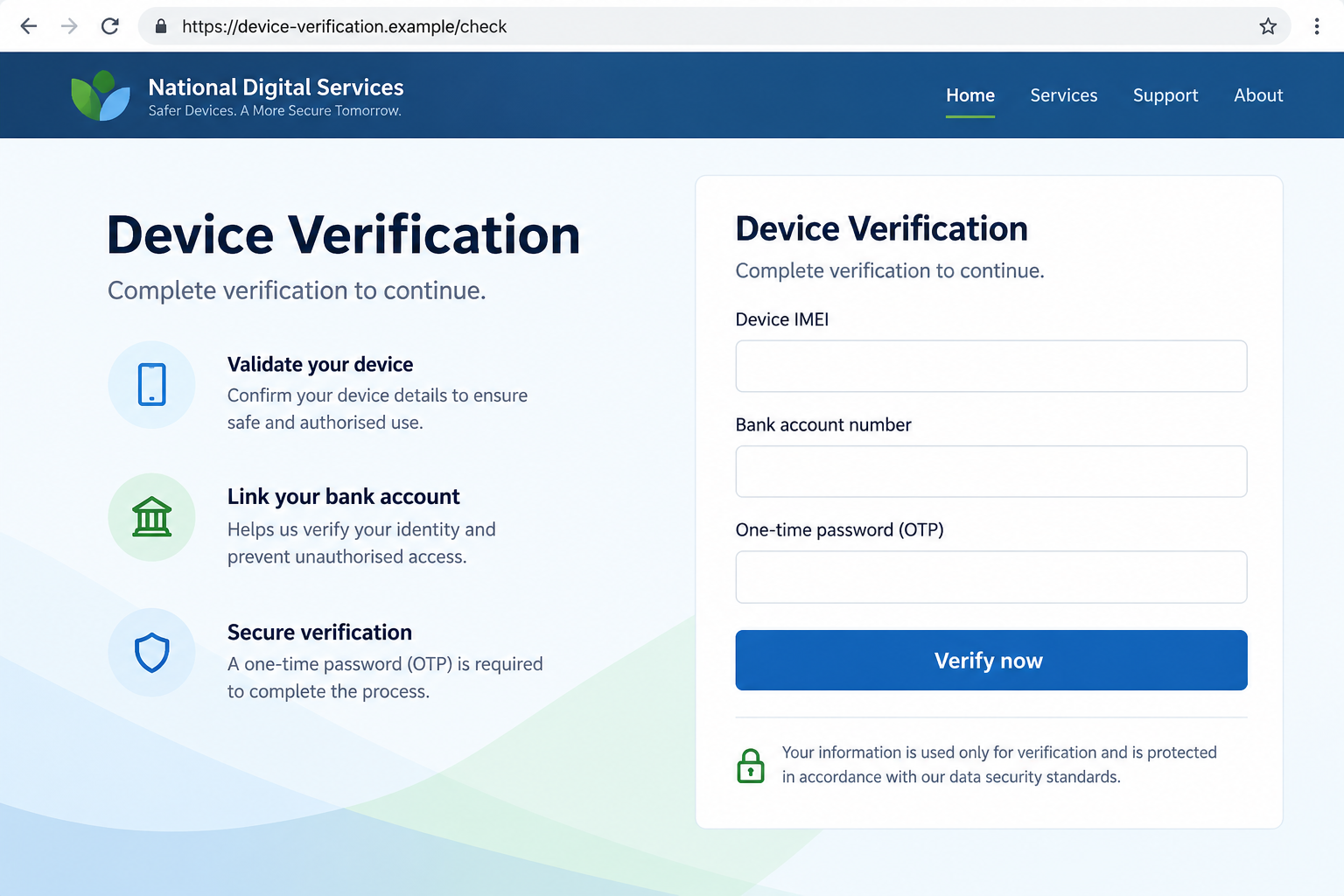
The illustration above shows a fictional verification form with banking and OTP fields. It explains the dangerous combination, rather than reproducing a captured NCC phishing page.
Real versions can change their layout or wording. Recognizing the demand for sensitive information matters more than memorizing one screen’s colors or button labels.
How the NCC Device Verification Scam Works
Step 1: A lookalike address introduces the supposed service
The campaign directs people toward domains that resemble a device verification service. Some include words such as secure, verify, device, or NCC.
Those terms help the address fit the task. They do not give the site authority to represent the regulator or collect financial information.
The advisory names the following addresses. They are written here in a disabled format so they cannot be opened accidentally.
- secure-verifymydevice[.]ng
- verifymydevice[.]com[.]ng
- embed-ncc[.]registrmydevice[.]ng
- verifymydevice[.]ng
The presence of a Nigerian domain ending does not itself prove fraud. The specific addresses and their imitation of the official service are what the advisory identifies.
Likewise, an unfamiliar domain should not be investigated by submitting a test OTP or making a small payment. Neither experiment safely establishes who operates it.
Step 2: Familiar branding encourages the visitor to continue
The fake portal copies the regulator’s appearance and presents verification as its reason for collecting information. This makes the first interaction feel administrative.
A phone identifier can seem relevant to that task. The risk grows when the page uses that reasonable starting point to normalize unrelated questions.
Urgent language can shorten the decision. Instead of asking why a device check needs banking information, the visitor concentrates on getting the process finished.
There is no need to argue with the page or prove its claims false while it is open. Leave it and check the official instructions separately.
Step 3: The form asks for information that can affect other accounts
The NCC warns about requests for OTPs, bank details, and other sensitive information. These requests change the situation from a device inquiry into an account security risk.
An OTP may authorize a login, a transaction, or an account change. Its purpose depends on the service that issued it and the accompanying message.
Typing a code into a fake verification page can therefore assist an action elsewhere. The device checking story does not make that code safe to share.
Read any genuine notification carefully. If it describes an action you did not start, stop rather than treating the code as another required field.
The advisory does not establish that every visitor suffered the same compromise. The information entered and the actions approved determine which accounts need attention.
Step 4: A supposed verification requirement becomes a payment demand
Some portals demand money for services that do not exist. The authority claim supplies the reason to pay, even though the payment is part of the fraud.
Do not infer that a charge becomes legitimate because the page has already accepted your device details. Completing earlier fields does not validate later requests.
A payment receipt from the recipient would not establish regulatory approval either. It would only record that money moved through the chosen payment route.
The warning does not publish a universal fee, a confirmed loss total, or one payment method used in every version. Avoid relying on an amount alone.
Step 5: The visitor leaves with uncertainty about what was completed
A submitted form may leave someone believing their handset is now verified. That belief can delay checking bank activity or reporting an unauthorized account action.
Return to the genuine service to establish your device’s actual status. Treat any exposed financial or account information as a separate problem requiring its own response.
The NCC also lists possible harmful redirects among the risks. That does not establish that every visit installs malware or that a particular payload reached your phone.
How to Reach the Genuine Device Checking Service
The NCC advisory directs users to verifymydevice.gov.ng and the device checker reached through the NCC’s own website, www.ncc.gov.ng/devicechecker.
Open the regulator’s site independently, rather than using the questionable message as your starting point. Compare the instructions before providing any information.
The advisory also lists the USSD code *315# and the NCC consumer contact number 622. Confirm these through the official site when you need assistance.
You can read the official instructions before starting a check. Do not submit a handset identifier to an unfamiliar page simply to see what happens next.
According to the NCC, legitimate verification does not require an OTP, banking details, or other sensitive information. A page demanding them deserves an immediate stop.
Check the complete address, including its ending, rather than searching for a familiar word inside it. Attackers can place convincing words in addresses they control.
For someone helping a relative, send the official regulator’s starting page and explain the suspicious request. Avoid forwarding the fraudulent link as though it were usable guidance.
What to Do if You Have Fallen Victim to This Scam
- Stop using the imitation portal. Close the page and refuse further requests for codes, payments, documents, or remote help.
- Record what you supplied. Note the address, time, fields completed, codes entered, and any payments. Preserve messages and receipts without returning to the form.
- Contact your financial provider quickly. Use its official app, your card, or a trusted statement. Explain precisely which bank or card details were exposed.
- Identify the purpose of any OTP. Tell the issuing provider that you entered its code on a fraudulent site. Ask it to check the associated action.
- Secure an affected account. Change an exposed password through the genuine service. Review access, recovery methods, and recent changes, with help from the provider where needed.
- Report the fake portal. Use the NCC’s official contact or CSIRT reporting route. Include the address and supporting evidence, with sensitive personal information protected.
- Check your device through the real service. A fake confirmation does not establish official verification. Ask the NCC for help if the genuine result is unclear.
- Watch for follow-up approaches. Refuse anyone asking for another payment or code to reverse the first problem. Verify every recovery contact independently.
If you paid the supposed verification fee
Ask the payment provider whether it can stop, recall, or dispute the transaction. Available options depend on how you paid and whether the money has moved.
Describe it as a payment induced by an impersonation website. Keep the recipient details and transaction reference, rather than relying only on a screenshot of the logo.
A report does not guarantee a refund. Prompt, accurate information still gives the provider a better chance to identify the transaction and explain the available route.
If you only entered device information
Tell the NCC what type of identifier you provided and ask whether further precautions are appropriate. Do not assume that a handset identifier alone permits a bank withdrawal.
Be alert to messages that repeat your device details to appear credible. Information copied from one form can make a later impersonation attempt feel more personal.
You do not need to replace every password simply because you saw the page. Focus on any credentials, codes, permissions, or financial details actually exposed.
If you installed something or granted access
Stop using that session for banking and seek trusted technical assistance. Explain exactly what you installed, approved, or allowed someone else to control.
The response should follow that additional exposure. Visiting a page, downloading a file, installing an application, and granting remote control are different events.
Do not pay an unsolicited helper who appears after the incident. A second person using the NCC name still needs independent verification.
A Practical Check Before You Submit Another Form
Ask what the service is supposed to establish. A device check has a clear subject: the handset and its status.
Then compare each request with that purpose. A bank login code authorizing a financial action does not become relevant because it appears beneath a device verification heading.
When a request seems out of place, stop at that point. You can restart through the regulator after confirming the process.
This is particularly useful on a small screen, where the address may be shortened. Scroll or inspect the full address before trusting a familiar page design.
Keep legitimate notifications visible while checking an account. Their wording can help your provider identify what a stolen code was used to authorize.
If you are unsure whether something completed, ask the genuine provider. Do not resolve that uncertainty by entering another code on the same suspicious page.
When someone else completed the form for you
Ask them to describe each field and approval without submitting anything again. They may remember a code or payment screen that you did not see.
Check whose bank account or phone received the notification. The person who owns that account should contact its provider, even if the handset being checked belongs to you.
Save the messages that arrived during the interaction. Their timestamps can help the provider connect a code with a particular account action.
If a shop or helper supplied the address, tell them about the NCC advisory. Do not assume they operated the fraudulent portal simply because they shared it.
Ask them to stop directing others there while they verify the route. Sharing the official notice is more useful than circulating the imitation page’s live link.
Finally, check whether they retained a copy of your details. Agree on a safe way to preserve evidence without spreading sensitive information to additional people.
This keeps the response focused on the actual exposure and gives each account holder a clear next step.
Frequently Asked Questions
Is the NCC device verification program itself a scam?
No. The warning concerns fraudulent portals impersonating the NCC’s genuine service. Use the regulator’s published route and check its current instructions independently.
Does a padlock mean the verification website is official?
No. HTTPS protects the connection to a site. It does not establish that the operator represents the NCC or has a legitimate reason to collect your information.
Should device verification require my bank OTP?
The NCC says legitimate verification does not require OTPs or banking details. Stop if a supposed verification page asks for them, and check with the regulator directly.
Are all websites ending in .ng fraudulent?
No. The domain ending alone is not a verdict. The advisory identifies particular imitation sites; compare the complete address with the official service.
Does opening the fake portal mean my phone has malware?
That conclusion is not established by the warning. Your next steps depend on whether you submitted information, approved an action, installed software, or granted access.
Can I recover a verification payment?
Contact the payment provider immediately and ask about stopping, recalling, or disputing it. Recovery depends on the transaction and cannot be guaranteed.
The Bottom Line
These portals borrow a legitimate device check to collect information or payments the service does not require. The NCC has identified the impersonation campaign.
Leave any form asking for banking details or an OTP. Start again through the genuine NCC route, and report any exposed account information to its actual provider.

Join the discussion
0 commentsShare your experience or ask a question about this article.
Discussion
Start the conversation
Have a question or something useful to share? Add the first comment.