

The text has welcome news: your vehicle tax was recalculated, and money is waiting. A link promises to put the refund on its way.
The DVLA tax refund scam can look like that small administrative win. Before claiming anything, check what the message is asking you to confirm.
Overview
The refund announcement is a route to your information
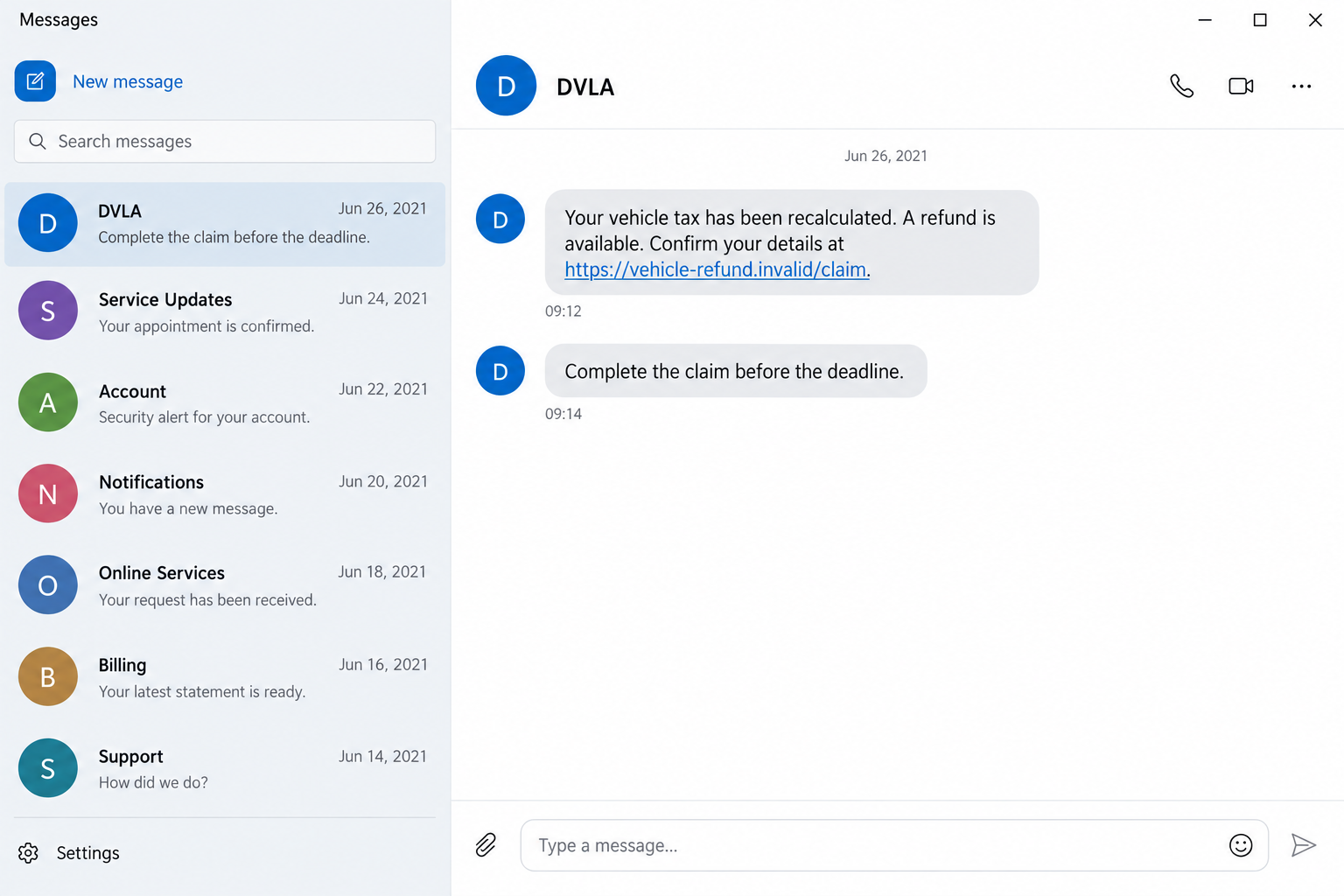
This scam impersonates the Driver and Vehicle Licensing Agency and claims that a vehicle-tax refund needs to be collected through a linked form.
The page may request identity information, card details, or another financial confirmation. Those requests serve the impersonator, not a verified refund process.
DVLA’s current scam guidance says vehicle-tax refunds are issued automatically, not through an email asking you to follow a claim link.
The historical overpaid-road-tax messages discussed here were documented in 2021. We are not presenting a newly intercepted text, current refund amount, or live deadline.
DVLA is a real agency. The false message and information-collection route are the fraud, not the existence of genuine vehicle-tax refunds.
Real DVLA contact still needs its proper context
DVLA’s warning includes an important qualification: it may ask you to confirm personal details by email or text when you have a live enquiry.
That does not validate a surprise refund form. It means you should check the particular contact rather than declare every DVLA email or text fake.
A real enquiry you initiated, a genuine tax cancellation, and an unsolicited refund announcement are different situations. Keep their records separate.
Likewise, DVLA is not HMRC or DVSA. A warning about general tax rebates or parking penalties does not establish this vehicle-tax message’s authenticity.
Start with your vehicle record, not the sender’s button
Open GOV.UK independently and locate the relevant DVLA service. Compare the claim with your own vehicle-tax history and any genuine enquiry you have made.
- Is there a real vehicle change or enquiry behind the message?
- Does the sender want bank, card, or payment confirmation?
- Are you being pushed onto a website chosen by the text?
- Does an artificial deadline discourage checking with DVLA?
- Can the refund question be resolved through the official service?
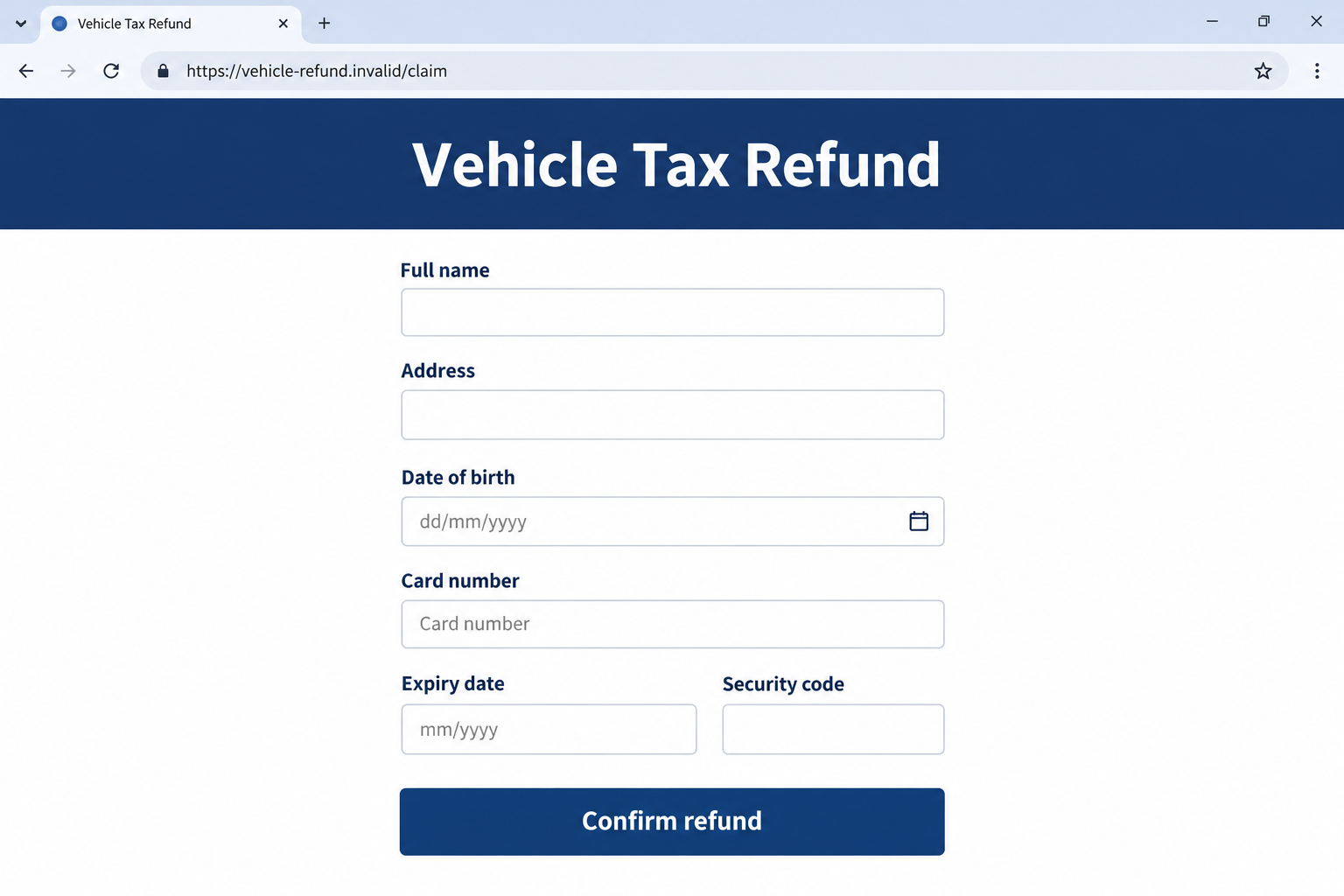
The two images are fictional interface examples. Their addresses are nonfunctional, and they do not establish a real refund entitlement or actual victim’s information.
Why an Overpaid-Tax Message Feels Plausible
Vehicle paperwork is easy to lose track of
A car sale, renewal, insurance issue, or change of address can create several pieces of correspondence. An unexpected refund can seem like another part of that paperwork.
You may not remember the exact amount paid or when a previous change was processed. The message uses that uncertainty rather than proving anything about your record.
A scammer does not need access to every vehicle detail to make a broad refund claim. The recipient may supply the missing connection themselves.
Ask which event supposedly created the refund. If you cannot identify one, do not fill in personal information merely to discover what the sender means.
Even a plausible event should be checked independently. Selling a vehicle does not authorize a stranger’s form to collect your card’s security code.
The offered money makes the click feel low risk
A request to pay an unfamiliar bill can provoke suspicion. An offer to return money often feels less threatening, particularly when the form looks routine.
The recipient may focus on the promised incoming amount and overlook the access being requested. A refund label does not limit what submitted information could expose.
A page asking for full card details deserves scrutiny even if it says those details are needed to receive money. Judge the actual request, not its friendly explanation.
Do not send a test payment or enter an old card number to investigate. You can reject an unverified process without making the form work.
How the DVLA Tax Refund Scam Works
Step 1: A message announces a refund you did not request
The text may describe recalculated road tax, an overpayment, or a refund awaiting confirmation. It presents an administrative conclusion before showing any authentic record.
A displayed sender name is not proof of agency origin. Familiar wording can be copied, and a message can appear alongside other ordinary notifications.
A precise amount would not establish entitlement either. Numbers make a story feel specific without proving that the sender knows your tax record.
The example image deliberately avoids an amount. A historical claim should not be mistaken for today’s fee, refund, or conversion into U.S. currency.
If you keep the message, note its date and claim. You do not need to follow its link to preserve useful evidence.
Step 2: A deadline turns the offer into a task
The message can say the claim must be completed soon. That shifts the decision from whether the offer is real to whether you might miss it.
A genuine entitlement should be investigated through the responsible agency. The sender’s insistence that only this link can preserve it is not independent evidence.
Do not let the deadline override your existing records. A text cannot create a refund simply by announcing that its claim window is closing.
Some versions may use cancellation language rather than a time limit. The same question applies: who established the entitlement, and how can you verify it?
Keep legitimate enquiry deadlines separate. This warning does not tell you to ignore a real matter that DVLA confirms through an independently reached channel.
Step 3: A copied page asks for details to release the money
The link opens a page presenting the refund as ready to claim. Familiar colors and a government-sounding heading can make the form feel official.
The actual destination matters more than words inside its address. A domain containing DVLA or refund is not necessarily controlled by the agency.
Look-alike addresses can also hide behind a button label. Open the official service separately instead of trying to authenticate a suspicious page while using it.
Identity and payment fields may appear together. That combination can expose more than one kind of information even when the first screen promised a simple refund.
The next image shows an invented claim form. It illustrates the collection request, not a real DVLA page or a form you should test.
Step 4: Submission can create exposure without paying a refund
The information goes to an unverified destination. A completed form or thank-you message does not prove that DVLA received anything or authorized a payment.
What happens next depends on what you supplied. A name and email differ from a card number, account password, or approved banking prompt.
If a security code or app approval is requested, do not assume it relates to an incoming refund. Read the actual transaction or access message carefully.
A legitimate provider’s code can accompany an action started by someone else. Its arrival does not authenticate the refund website or the person giving instructions.
These are possible escalation risks, not claims about every historical text. Record your own actions accurately when asking a provider to investigate.
Step 5: A follow-up can keep the false claim alive
A contact may say the refund failed, more verification is needed, or a small fee must be paid. Another request can extend the original exposure.
You do not need to remain available to the sender to recover. An untrusted refund adviser is not a safe source of account-security instructions.
Do not pay to correct a form you never should have completed. Resolve payment or access concerns through the relevant provider you contact yourself.
The original vehicle-tax question can still be checked separately. That prevents the scammer from controlling both the refund story and its supposed solution.
What the Real Vehicle-Tax Refund Route Looks Like
A genuine refund follows the relevant vehicle change
The official vehicle-tax cancellation and refund guidance describes notifying DVLA about qualifying changes, such as selling a vehicle or taking it off the road.
In that process, unused full months can be refunded automatically. The published guidance describes a refund cheque sent to the name and address on the log book.
Different circumstances can have specific instructions, including a stolen vehicle. Do not use a general scam article to determine your individual refund eligibility.
The important contrast is the route. A real administrative event is handled through DVLA, not an unsolicited page demanding card confirmation to unlock unexpected money.
An outstanding enquiry is not a payment-detail exception
If you have a live enquiry, compare the message with the case you started. Reach the agency using its published contact route if anything is unclear.
The allowance for personal-detail confirmation in that context should not be stretched into permission for an unexpected bank-detail request.
Save the enquiry reference and your own contact dates. They help you ask about the particular communication without forwarding private information to an unknown sender.
If you need to correct an address or investigate a missing cheque, follow the current official instructions. Do not borrow contact details from a fake message.
A third-party service is a separate transaction
Some websites charge to help with government-related services. A charge alone does not prove fraud, but the site must not misrepresent itself as DVLA.
Check what the business actually offers and who receives the fee. You should not discover that relationship only after entering payment information.
This article concerns false refund collection, not a verdict on every administrative-assistance business. Using GOV.UK directly avoids much of that uncertainty.
What to Do if You Have Fallen Victim to This Scam
-
Leave the refund link and stop replying. Do not submit another form, share another code, or accept a call offering to finish the claim.
Keep the message and visible website address if you can do so safely. Do not revisit the site just to collect a better screenshot.
-
Tell your bank or card issuer what was entered. Use its established app or the number printed on your card, not a number supplied by the message.
Explain whether card information was exposed, a banking login was used, or a transaction was approved. Those details help distinguish protection from a payment dispute.
Ask what immediate safeguards and review options apply. No article can guarantee a reversal or determine the provider’s decision from the text alone.
-
Secure any password you disclosed. Change it through the real service on a device you trust, and replace it wherever you reused it.
Review account recovery contacts and unusual activity. A card replacement does not itself resolve an exposed email or banking password.
If you cannot sign in, start recovery from the provider’s independently reached help page. Do not pay the refund sender to restore access.
-
Make a precise information-exposure record. List the fields you completed and when. Keep identity details private rather than publishing the full form online.
A submitted address and an approved financial transaction are different events. Record both without claiming that every possible consequence has already happened.
If a driving-license or log-book image was also shared, tell the relevant official support or reporting channel about that specific document.
-
Resolve the genuine DVLA question separately. Check your vehicle-tax history and any real enquiry through GOV.UK’s current process.
The scam message does not establish a refund, but rejecting it does not cancel legitimate administrative responsibilities. Follow instructions the agency independently confirms.
If you were expecting a real refund, consult the published missing-refund guidance rather than paying a new claim fee.
-
Check a device only when the interaction calls for it. A download, installed tool, new notification permission, or persistent redirect deserves a separate technical review.
Malwarebytes can help investigate questionable software. AdGuard can reduce malicious-ad exposure while browsing, but neither tool recovers a vehicle-tax payment or validates the notice.
Receiving the text alone does not mean your device is infected. If this happened on a work device, inform your IT team about the actual interaction.
-
Report the phishing and any loss through the right routes. The NCSC’s current guidance covers message reporting and exposure-specific response.
For financial fraud, Report Fraud serves England, Wales, and Northern Ireland; Police Scotland is the relevant route in Scotland. Keep reporting references with your payment-provider case.
Do not identify an innocent owner of a spoofed number as the criminal. Describe the message and conduct rather than assuming caller identity from its display.
-
Reject a second paid refund promise. Someone offering to recover the money after another fee may be using details from the first interaction.
Continue with the agency and provider you reached independently. A sympathetic tone is not evidence that an unsolicited recovery offer is genuine.
Frequently Asked Questions
Is every message from DVLA a scam?
No. Genuine contact can exist, including personal-detail confirmation during a live enquiry. Check the specific matter through an independently reached official route.
Does DVLA ask for card details to release a vehicle-tax refund?
Its warning rejects refund-claim links and payment-detail confirmation requests. Do not use an unsolicited form to unlock money that the message says is waiting.
Is this the same as an HMRC tax refund text?
The impersonated agencies and genuine processes differ. This case concerns DVLA vehicle tax, not HMRC’s broader tax administration or a DVSA parking-penalty notice.
Does the article confirm that I am owed a refund?
No. Your entitlement depends on the real vehicle-tax record and applicable process. A historical scam example cannot determine an individual refund or current amount.
What if I opened the page but entered nothing?
Close it and remain alert. Record any separate download or permission change. Merely viewing a page does not establish that your card details were stolen.
Can a security scan reverse a fraudulent transaction?
No. A scan addresses possible device threats. Your financial provider handles payment protection and disputes, while DVLA verifies the actual vehicle-tax matter.
The Bottom Line
The DVLA tax refund scam turns a pleasant refund claim into an unverified information request. A government-looking text cannot establish who controls its linked form.
Check the vehicle-tax matter through GOV.UK, not the claim button. If financial information was shared, contact the provider promptly and describe exactly what happened.

Join the discussion
0 commentsShare your experience or ask a question about this article.
Discussion
Start the conversation
Have a question or something useful to share? Add the first comment.