

A message about an Audius reward can sound plausible if you upload music, follow artists, or remember the platform’s earlier token distributions.
Before checking an allocation, take a moment to examine the invitation. An appealing community reward is worth verifying outside the page offering it.
Overview
A counterfeit airdrop borrows a music community’s identity
The Audius airdrop scam uses a supposed $AUDIO distribution to attract people to a website impersonating the genuine music platform.
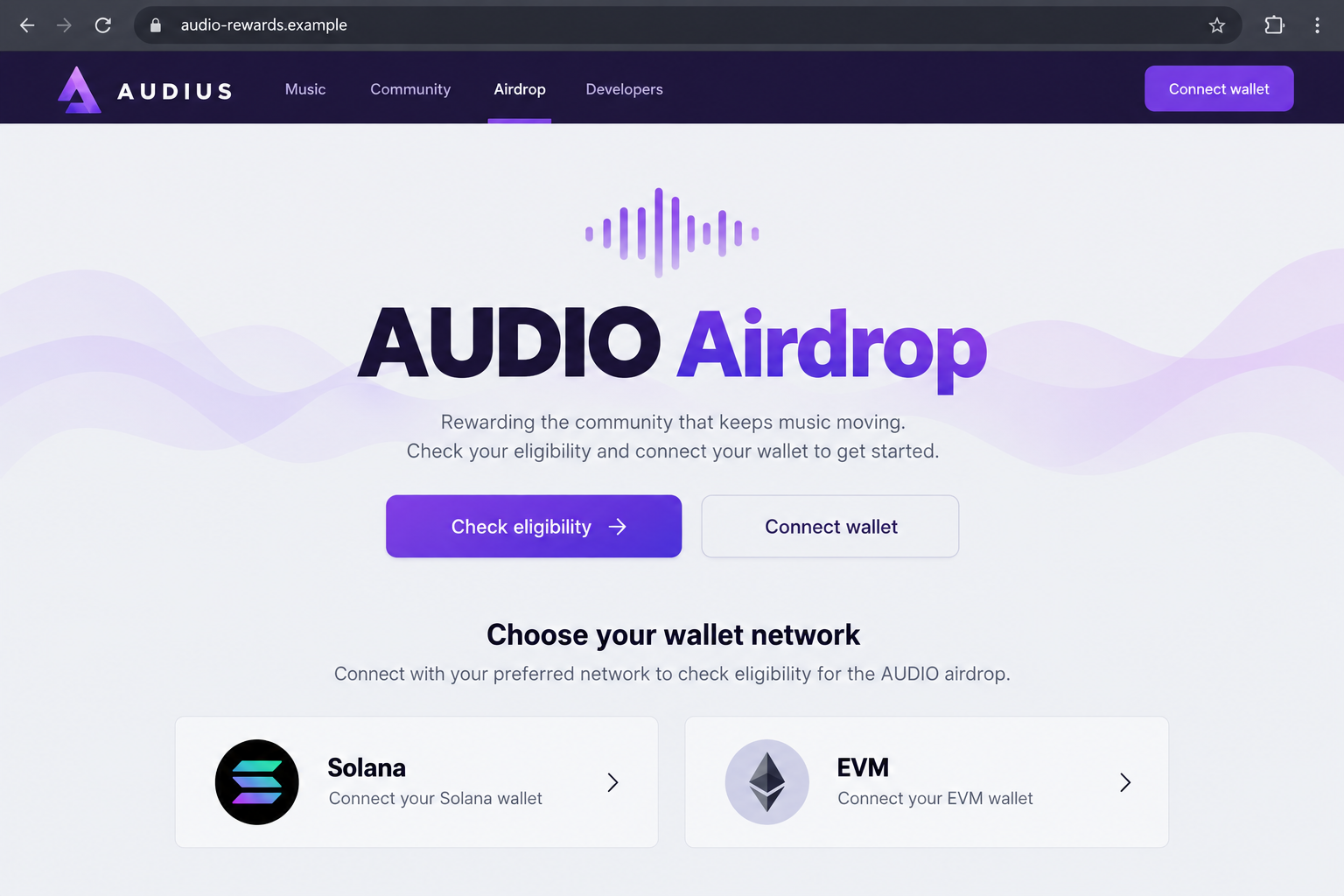
The documented lookalike is audius-eligibility[.]com. It advertises a retroactive token reward and presents external wallet options associated with Solana and EVM networks.
This warning is about that impersonation, not a finding that Audius or its legitimate token programs are fraudulent. The real platform has announced genuine artist rewards.
Real airdrops do not authenticate an unrelated claim page
Past distributions can make a false offer feel familiar. They do not establish that a new eligibility website belongs to the same organization.
For example, Audius’s February 2025 Artist Appreciation announcement described a specific account-based claim process without requiring an external wallet connection.
- Confirm which announcement actually describes the reward being offered.
- Compare the claim route with the official instructions for that distribution.
- Question unrelated external-wallet requests, even when the brand looks familiar.
- Do not supply recovery words to check eligibility or receive support.
The reported risk is wallet theft, with important limits
The lookalike was reported as a drainer lure. That describes its alleged purpose, not proof that visiting or connecting alone transfers cryptocurrency.
We did not submit a transaction or verify a malicious contract. A current capture attempt returned no usable page, so the lead image is an original illustration.
The exact signature or transaction matters if you interacted. A disconnected wallet, an approved allowance, and an exposed recovery phrase require different follow-up.
Why an Audius Reward Story Feels Believable
The invitation fits what artists already do
Artists routinely check audience statistics, collaborations, promotion opportunities, and platform payments. A reward notice can slide into that workflow without initially looking like a financial solicitation.
It may appeal to someone who has invested time rather than money. An allocation sounds like recognition for participation, not a risky purchase requiring a fresh decision.
Imagine finishing an upload and seeing a link shared in a music discussion. The surrounding conversation can make the link feel community-approved before anyone checks it.
That example illustrates the social context, not a verified delivery route for this particular page. A convincing setting cannot establish who controls the destination.
Historical facts can be repackaged into a false present
A genuine announcement might mention token rewards and eligible artists. A deceptive page can repeat those broad ideas while replacing the account process with its own wallet request.
The old announcement remains real, but it is being used to support a new claim it never made. Search results showing past airdrops can therefore mislead.
Check the announcement’s date, audience, and exact claim instructions together. An expired distribution does not become current because a new website says eligibility is open.
A copied logo or reposted announcement graphic is also insufficient. Those elements are visible to the public and can be placed on an unrelated domain.
How the Audius Airdrop Scam Works
Step 1: The offer makes a token allocation feel personally relevant
The pitch begins with a possible reward for the Audius community. “Retroactive” suggests that earlier activity may already have earned something, even if you never applied.
That framing invites curiosity: perhaps streams, uploads, or account participation counted. The visitor starts wondering about the amount before establishing whether the invitation is authentic.
Eligibility claims should be testable against a real distribution’s published rules. A page that declares you eligible is not independent evidence of an entitlement.
Do not let time spent using a platform become a reason to trust any reward carrying its name. Genuine participation can be used as persuasive context.
Step 2: The eligibility domain substitutes for official confirmation
The reported hostname places the brand beside an administrative word. Audius-eligibility[.]com sounds task-specific, but it is not authenticated merely by that wording.
Read the entire address. A project name followed by “rewards,” “claim,” or “eligibility” does not establish that the project owns the registered domain.
Reach Audius through an established bookmark or its independently verified site, then find the announcement from there. Do not use the suspicious page’s own verification links.
Likewise, a social account replying “confirmed” beneath the offer is not a substitute for project confirmation. Multiple accounts can repeat the same unsupported claim.
Step 3: Wallet choices make the page look technically complete
The reported counterfeit offers Solana and EVM wallet routes. Multiple choices can make a page appear developed, compatible, and familiar to people using different networks.
However, a list of wallet brands or network icons proves very little. A website can display those choices without being an authorized partner of the wallet providers.
Ask why an external wallet is needed for this particular reward. Compare that request with the real program, not with unrelated airdrops you have claimed elsewhere.
For the February 2025 Artist Appreciation distribution, the official explanation said an external wallet was unnecessary. Do not rewrite that historical instruction as a rule for every future program.
Step 4: A reward check becomes an authorization decision
The critical moment is the request shown by your wallet. A website can label its button “Check eligibility” while requesting a more consequential operation.
A connection normally gives the website an account relationship and a way to request interactions. It does not automatically reveal your recovery phrase or grant every spending permission.
Signing a transaction, granting an allowance, or approving another operation can expose assets. Read the wallet’s details rather than assuming the page’s label describes them accurately.
A rejected request is not the same as an approved one. If several prompts appeared, review each separately instead of remembering only the final success or error screen.
The exact harmful request from the historical page has not been independently reproduced here. We do not claim a particular token, contract, or theft amount was observed.
Step 5: The visitor may mistake a stalled claim for a harmless failure
A page that stops loading can leave someone unsure whether anything happened. The absence of a visible reward does not explain what an earlier wallet prompt authorized.
Check the wallet’s activity and the appropriate network explorer. A confirmed outgoing transaction deserves attention even if the browser still says a claim is processing.
On EVM networks, a token allowance may remain after the website connection is removed. On other networks, investigate the actual instruction rather than assuming identical permission behavior.
Do not keep clicking or switch to a more valuable wallet to troubleshoot an unverified offer. That can expand exposure while answering none of the authenticity questions.
How to Check an Artist Reward Without Following the Lure
Begin inside the genuine account
Open Audius independently and review the account or official reward information there. The platform’s Rewards & Perks page provides a genuine starting point.
Then find the announcement describing the particular distribution. Check who qualifies, what activity counts, which dates apply, and how the allocation is delivered.
Do not treat an older announcement as proof that a campaign is still open. Reward rules and interfaces can change, so match the instructions to the specific program.
If you manage several artist accounts, confirm which account is eligible. A stranger offering to combine accounts or manually unlock a reward deserves no recovery credentials.
For a label or shared artist project, establish who is authorized to handle rewards before anyone acts. A manager should not request another person’s wallet secrets.
Keep the original announcement with your account records. That gives collaborators one verified set of instructions instead of several forwarded claim links with uncertain origins.
Keep public portfolio information separate from proof of identity
Knowing your artist name, published tracks, or follower count does not show that a sender works for Audius. Those details may be publicly available.
A reward page that echoes your public profile can still be untrusted. Personal relevance is persuasive, but ownership of the destination must be established independently.
The same applies to wallet balances shown on a claim screen. Public-chain information can be retrieved without legitimate control over a reward program.
Do not send a private key as a way to prove that a public address is yours. It would hand over the secret protecting that address.
What to Do if You Fell Victim to This Scam
Start by separating the music account from the wallet interaction. Protect whichever was exposed, and avoid giving a supposed recovery agent access to the other.
Leave the claim page and record the entry point.
Keep the shared link or message, the destination address, and the time you interacted. Record which wallet, account, and network you used.
A screenshot can help explain the lure, but do not reopen the website or approve anything else to obtain one.
Check what your wallet actually accepted.
Review activity for requests, approvals, and outgoing transactions. Preserve transaction hashes and compare balances on the correct network.
If you only connected and rejected further prompts, disconnect the site through wallet settings. Do not assume a loss occurred solely because a connection was made.
Use network-appropriate permission guidance.
For an EVM token allowance, consult the wallet provider’s official approval instructions. Disconnecting the website does not necessarily remove an existing allowance.
For Solana or another chain, use that wallet’s guidance and the actual transaction details. Do not enter your phrase into a universal “revocation” form.
Replace compromised wallet secrets, not just the app password.
If you disclosed a recovery phrase or private key, treat the wallet as compromised. Use official provider guidance and an uncompromised device for a new wallet.
Phantom’s drained-wallet guidance explains why a shared recovery phrase cannot be made private again. Beware of automated theft before adding new funds.
Secure an Audius or email account if you entered its password.
Change the exposed credential through the authentic service, and replace reused passwords elsewhere. Review available account-security settings and contact genuine support if access changed.
A wallet incident does not automatically establish an Audius account takeover. Respond to what was shared rather than resetting unrelated accounts indiscriminately.
Escalate a real transfer quickly.
Notify any exchange involved and report the loss through official cybercrime channels. Supply transaction hashes, the blockchain, destination addresses, and supporting messages.
A blockchain record can document movement, but no support agent can promise a reversal. Reject anyone demanding a release fee or recovery phrase.
Assess software exposure and warn the community.
If you installed a wallet extension or file through the offer, stop using it for financial activity and check the device with trusted security software such as Malwarebytes.
AdGuard can help reduce some advertising exposure, not validate an airdrop. Report the original post and correct any recommendation you shared with other artists.
Is Your Device Infected? Run a Free Malware Scan
Slow performance, constant pop-ups, or strange behavior? These are classic signs of a malware infection. The fastest way to find out is to scan your device with Malwarebytes Free — one of the most trusted malware removal tools available.
The free version detects and removes the most common threats, including:
- Adware — the cause of those annoying pop-ups
- Browser hijackers — unwanted redirects and changed homepages
- Trojans and spyware — hidden programs stealing your data
- Potentially unwanted programs (PUPs) — software you never asked for
👉 Select your device below — Windows, Mac, or Android — then follow the simple steps to download Malwarebytes, scan your system, and remove any threats it finds. The scan usually takes 5 to 20 minutes.
Run a Malware Scan with Malwarebytes for Windows
Malwarebytes is one of the most popular and trusted anti-malware tools for Windows — and it’s completely free for removing infections. It catches threats that many antivirus programs miss, including adware, browser hijackers, and trojans. Follow the steps below to scan and clean your PC in just a few minutes.
Download Malwarebytes
Click the button below to download the latest version of Malwarebytes for Windows from the official source. The free version is all you need — it will scan your computer and remove adware, browser hijackers, and other malicious software at no cost.
Download MalwarebytesOfficial installer for Windows 11 and 10. Your download starts right away.Want real-time protection? See Malwarebytes Premium Malwarebytes Free for WindowsScans and removes malware at no cost
-
Install Malwarebytes
When the download finishes, open your Downloads folder and double-click the MBSetup file. If Windows shows a User Account Control pop-up, click “Yes” to allow the installation.

Follow the On-Screen Prompts to Install Malwarebytes
The setup wizard will walk you through a few quick screens:
-
Choose where you’re installing the program — “Personal Computer” or “Work Computer” — then click Next.

-
Malwarebytes will now install on your device. This usually takes under a minute.

-
When installation is complete, the “Welcome to Malwarebytes” screen will open automatically.

-
On the final screen, click Open Malwarebytes to launch the program.

-
Enable “Scan for Rootkits”
Before scanning, turn on rootkit detection so Malwarebytes can find even the most hidden threats. Click the Settings gear icon on the left side of the screen.

In the settings menu, find “Scan for rootkits” and click the toggle so it turns blue.

Done? Click “Dashboard” in the left pane to return to the main screen.
Start the Scan
Click the blue Scan button. Malwarebytes will automatically update its virus database and start checking your computer for malware.

-
Wait for the Scan to Finish
The scan checks your entire system for browser hijackers and other malicious programs, so it can take 5 to 20 minutes depending on your computer. Feel free to do something else — just check back occasionally to see the progress.

-
Quarantine the Detected Threats
When the scan is done, you’ll see a list of everything Malwarebytes found — malware, adware, and potentially unwanted programs. Click the “Quarantine” button to remove all of them at once.

Malwarebytes will now remove the malicious files and registry entries and move them safely into quarantine.

-
Restart Your Computer
Some threats can only be fully removed after a reboot. If Malwarebytes asks you to restart, click Yes. Once you’re logged back in, Malwarebytes has finished removing the threats it found.

That’s it — your Windows PC is now clean of trojans, adware, and other malware, and should be back to running smoothly.
If you are still having problems with your computer after completing these instructions, then please follow one of the steps:
- Run a computer scan with ESET Online Scanner
- Ask for help in our Windows Malware Removal Help & Support forum.
Run a Malware Scan with Malwarebytes for Mac
Malwarebytes for Mac is a free on-demand scanner that removes the malware other security software tends to miss — adware, browser hijackers, and unwanted programs included. Cleaning an infected Mac with Malwarebytes has always been completely free, and it’s our go-to recommendation. Follow the steps below to scan and clean your Mac in just a few minutes.
-
Download Malwarebytes for Mac
Click the button below to download the latest version of Malwarebytes for Mac.
Download MalwarebytesOfficial installer for macOS. Your download starts right away.Want real-time protection? See Malwarebytes PremiumMalwarebytes Free for MacScans and removes malware at no cost -
Open the Malwarebytes setup file
When the download finishes, open your Downloads folder and double-click the setup file to begin the installation.

-
Follow the On-Screen Prompts to Install Malwarebytes
The Malwarebytes for Mac Installer will guide you through a few quick screens. Click “Continue” and keep following the prompts until the installation completes.



When the installation is complete, Malwarebytes opens to the Welcome to Malwarebytes screen. Click “Get started“.
-
Select “Personal Computer” or “Work Computer”
Malwarebytes will ask what type of computer you’re installing it on. Click either Personal Computer or Work Computer, whichever applies.

-
Start the Scan
Click the “Scan” button. Malwarebytes will automatically update its detection database and begin checking your Mac for malware.

-
Wait for the Scan to Finish
Malwarebytes will scan your Mac for adware, browser hijackers, and other malicious programs. This can take a few minutes, so feel free to do something else — just check back occasionally to see the progress.

-
Quarantine the Detected Threats
When the scan is done, you’ll see a list of everything Malwarebytes found. Click the “Quarantine” button to remove all the threats at once.

-
Restart Your Mac
Malwarebytes will now remove all the malicious files it found. Some threats can only be fully removed after a reboot — if Malwarebytes asks you to restart, allow it. Once you’re logged back in, your Mac is clean.

That’s it — your Mac is now free of adware, rogue browser extensions, and other potentially harmful software.
If you are still experiencing problems while trying to remove a malicious program from your computer, please ask for help in our Mac Malware Removal Help & Support forum.
Run a Malware Scan with Malwarebytes for Android
Malwarebytes for Android automatically detects and removes dangerous threats like malware and ransomware so you don’t have to worry about your most-used device being compromised. Aggressive detection of adware and potentially unwanted programs keeps your Android phone or tablet running smooth.
-
Download Malwarebytes for Android.
You can download Malwarebytes for Android by clicking the link below.
Get Malwarebytes for AndroidOpens Google Play in a new tab.Want real-time protection? See Malwarebytes Premium for AndroidMalwarebytes for AndroidScans your phone and removes malware at no cost -
Install Malwarebytes for Android on your phone.
In the Google Play Store, tap “Install” to install Malwarebytes for Android on your device.

When the installation process has finished, tap “Open” to begin using Malwarebytes for Android. You can also open Malwarebytes by tapping on its icon in your phone menu or home screen.

-
Follow the on-screen prompts to complete the setup process
When Malwarebytes will open, you will see the Malwarebytes Setup Wizard which will guide you through a series of permissions and other setup options.
This is the first of two screens that explain the difference between the Premium and Free versions. Swipe this screen to continue.
Tap on “Got it” to proceed to the next step.
Malwarebytes for Android will now ask for a set of permissions that are required to scan your device and protect it from malware. Tap on “Give permission” to continue.
Tap on “Allow” to permit Malwarebytes to access the files on your phone.
-
Update database and run a scan with Malwarebytes for Android
You will now be prompted to update the Malwarebytes database and run a full system scan.

Click on “Update database” to update the Malwarebytes for Android definitions to the latest version, then click on “Run full scan” to perform a system scan.

-
Wait for the Malwarebytes scan to complete.
Malwarebytes will now start scanning your phone for adware and other malicious apps. This process can take a few minutes, so we suggest you do something else and periodically check on the status of the scan to see when it is finished.

-
Click on “Remove Selected”.
When the scan has been completed, you will be presented with a screen showing the malware infections that Malwarebytes for Android has detected. To remove the malicious apps that Malwarebytes has found, tap on the “Remove Selected” button.

-
Restart your phone.
Malwarebytes for Android will now remove all the malicious apps that it has found. To complete the malware removal process, Malwarebytes may ask you to restart your device.
That’s it — your Android phone is now clean — no more malicious apps, adware, or browser redirects.
If you are still having problems with your phone after completing these instructions, then please follow one of the steps:
- Restore your phone to factory settings by going to Settings > General management > Reset > Factory data reset.
- Ask for help in our Mobile Malware Removal Help & Support forum.
Stay Protected: Block Ads and Malicious Sites
Now that your device is clean, keep it that way. Most infections start with a malicious ad or a fake download button — so blocking them at the source is your best defense.
We recommend AdGuard, which blocks malicious ads, phishing pages, and dangerous redirects before they can reach you.
👉 Download AdGuard and browse safely
Frequently Asked Questions
Is every Audius airdrop fake?
No. Audius has published genuine reward announcements. The problem is an unrelated website using that history to justify its own unverified wallet request.
Match an offer to a specific official announcement and its claim route. A familiar name alone cannot establish eligibility or ownership of a website.
Is audius-eligibility[.]com an official rewards page?
It is the reported counterfeit covered here. Do not use it as a route to an Audius reward, even if a shared post presents it confidently.
Other impersonation domains may appear. Independent access to the real service is more reliable than checking only whether an address matches one known example.
Did the real Artist Appreciation airdrop require an external wallet?
The February 2025 announcement said it did not. It described receiving the reward within the Audius account through its stated claim process.
That is a historical comparison, not a guarantee about every later program. Check the official instructions for the distribution currently being offered.
Does a Solana or EVM logo make a claim page trustworthy?
No. Network labels indicate what a page wants to support or appear to support. They do not show who operates it or what a transaction will authorize.
Read the wallet prompt carefully and reject unexplained requests. A polished choice of wallet buttons is not a security review.
Should I scan after opening the page?
A visit alone does not prove a malware infection. Scanning becomes especially relevant if you downloaded software, installed an extension, or granted remote access.
A scan cannot revoke wallet permissions or retrieve transferred tokens. Handle account, blockchain, and device exposure as separate parts of the response.
Can Audius support recover cryptocurrency sent to a scammer?
Do not assume so. Contact genuine support about platform matters, and report blockchain losses with transaction details to the relevant exchange and authorities.
Someone claiming guaranteed recovery in a private message is not offering proof. Never surrender wallet secrets or send another payment to test that promise.
The Bottom Line
Do not connect through audius-eligibility[.]com to pursue a supposed $AUDIO allocation. Verify the exact program through Audius itself before accepting any reward instructions.
If you already interacted, review the wallet request and protect any credentials you disclosed. Genuine artist rewards do not make an unrelated claim page safe.

Join the discussion
0 commentsShare your experience or ask a question about this article.
Discussion
Start the conversation
Have a question or something useful to share? Add the first comment.