

You open your banking app, skim the latest payments and stop at an IDEATIONTEC charge. Nothing you remember buying immediately explains the unfamiliar name.
It’s tempting to search the name, grab the first support number and ask what happened. Before you do, take a moment to separate the clues.
Overview
An unfamiliar descriptor deserves an explanation
An IDEATIONTEC charge has prompted questions about unauthorized payments. The important answer is personal to your account: did you authorize the transaction behind that name?
A public consumer report describes unexpected charges and concern about possible card skimming. It does not establish that a skimmer caused the payments.
Neither the descriptor alone nor someone else’s experience proves that every IDEATIONTEC transaction is fraudulent. Equally, an unfamiliar charge shouldn’t be dismissed because a business website exists.
The IT business and your payment are separate questions
A website using the IDEATIONTEC name advertises software development, telecommunications services and other IT work. That provides business context, not authentication of your particular payment.
Your issuer can investigate transaction information that a search engine cannot. Ask it to identify the merchant and explain the payment route.
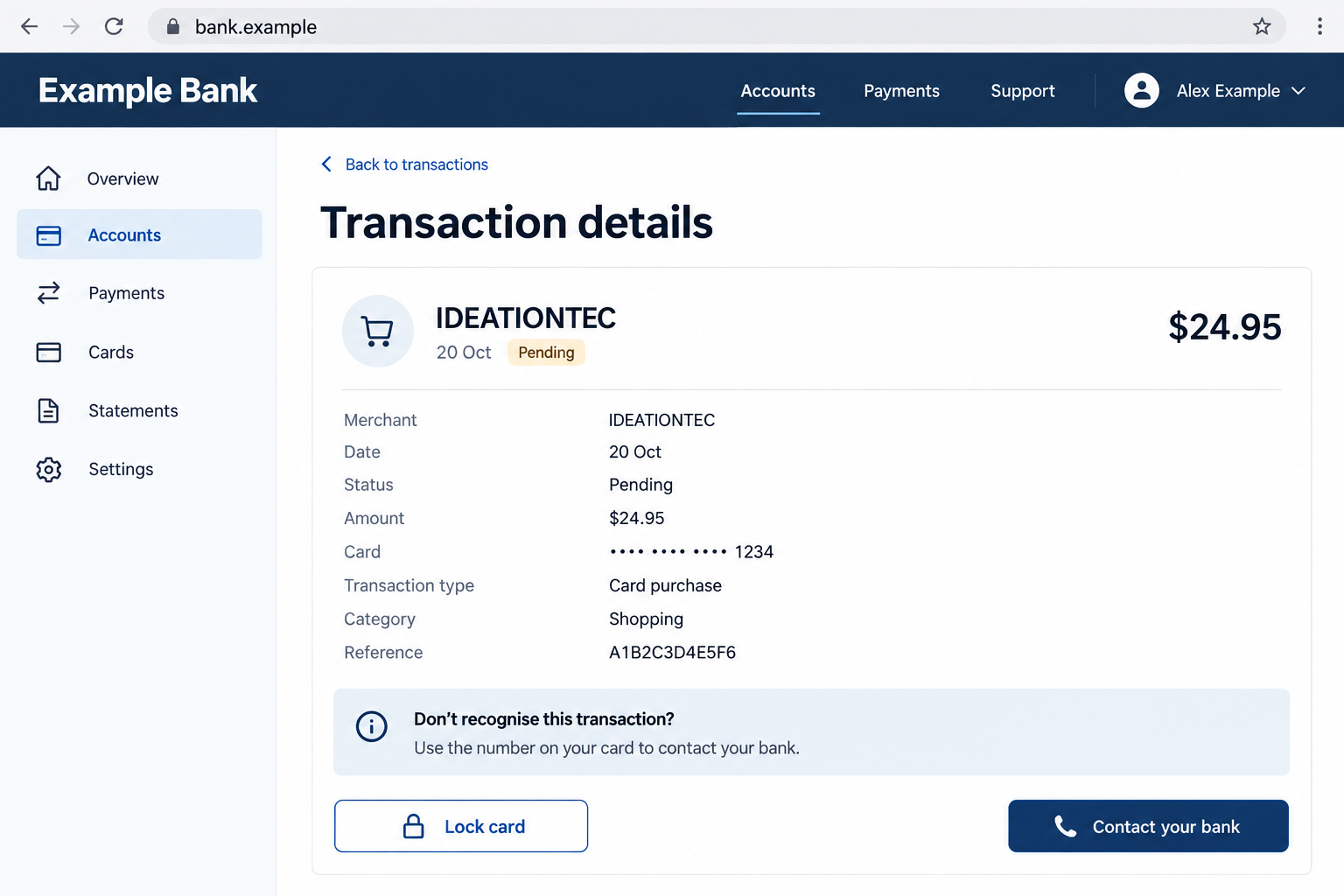
The banking screen above is a fictional illustration. Its $24.95 amount, customer details and account interface are examples, not an authenticated IDEATIONTEC statement.
The safest first move is through your bank
If the payment remains unexplained, contact the issuer through its app or the number printed on your card. Don’t use a number supplied by an unexpected caller.
- Confirm whether the entry appears inside your actual account, rather than only in an email or text.
- Record the amount, transaction date, descriptor and whether the entry is pending or completed.
- Ask other authorized cardholders whether they recognize the purchase.
- Report a genuinely unauthorized payment promptly, even if the amount looks small.
Why a Name on a Statement Can Be Confusing
The name on a bank statement isn’t always the storefront name you remember. A payment may display a legal trading name, service provider or shortened merchant identifier.
That can explain an unfamiliar entry, but it’s an explanation to test, not a reason to assume everything is fine.
Consider a simple example. You remember buying a service last week, but the statement uses an unfamiliar business name and the payment posts several days later.
Matching the receipt, amount and transaction reference may resolve the mystery. Matching only a vaguely similar business description does not.
Shared accounts add another wrinkle. An additional cardholder may recognize a charge that you don’t, while an old subscription may renew without a recent shopping session.
Take a short, focused look at those possibilities. Don’t spend days trying to solve the merchant identity while further payments leave the account.
An unfamiliar descriptor is therefore a warning to investigate, not a complete diagnosis. The evidence that matters is the actual payment record and your authorization.
How to Check an IDEATIONTEC Charge
Step 1: Open the account independently
Close the message or browser tab that brought the charge to your attention. Open your usual banking app or use a saved, trusted banking address.
If IDEATIONTEC appears only in an unsolicited alert, the first problem may be the alert itself. A claimed payment is not the same as a real debit.
Look at the correct account and card, including additional cards or digital wallets where relevant. Check both recent activity and the statement covering the reported date.
Do not enter banking credentials into a page reached through the warning. You don’t need to prove your identity to an unexpected message to inspect your own account.
Step 2: Save the transaction details before changing anything
Write down the exact descriptor, amount, currency, date and available reference. Preserve a private screenshot showing the entry and its status.
Keep that screenshot out of public comments. It can expose balances, account identifiers or other payments that have nothing to do with the disputed charge.
Check whether the amount changed between authorization and posting. Ask the issuer what each entry represents rather than assuming two entries always mean two completed purchases.
A pending payment may have different dispute options from a settled one. You can still alert the bank to suspected misuse and ask about preventing further transactions.
Step 3: Compare real receipts, not search results
Search your own email for the amount, payment date and possible order confirmations. Review recent trials, service purchases and subscriptions you knowingly started.
Ask authorized users a specific question: do they recognize this amount on this card? Don’t send the full card number around to help them remember.
If you find a possible match, compare the order number, total and merchant information. A similar price on an unrelated website isn’t enough.
Stop this check if another unauthorized charge appears or your account access changes. Those signs call for immediate bank assistance, not more browsing.
Step 4: Have the issuer trace what actually happened
Tell the bank that IDEATIONTEC is unfamiliar and explain what you have already checked. Ask what merchant details and transaction information it can disclose.
Useful questions include whether the payment was recurring, whether it used a stored payment credential and whether the record shows a location or merchant contact.
The issuer may not be able to explain everything instantly. Ask for a case reference and the next step instead of accepting an unexplained instruction to wait.
If you didn’t authorize the payment, say so clearly. A confusing descriptor, a forgotten legitimate renewal and stolen card details require different handling.
Step 5: Secure the affected payment method
Ask whether the card should be temporarily locked or replaced. Also ask what happens to stored merchant credentials and any recurring payment authority under investigation.
Replacing a card and canceling a merchant agreement are not identical tasks. Have the bank explain which protection it is applying to your situation.
If your online banking login was exposed, tell the bank separately. Changing only the plastic card may leave a compromised account login unaddressed.
Follow the issuer’s instructions for legitimate pending purchases and essential payments. An account lock can affect more than the disputed transaction.
Step 6: Put the dispute and follow-up in writing
Use the issuer’s official dispute procedure. Describe the disputed transaction accurately, attach relevant records and keep a copy of everything submitted.
Ask what deadlines apply to your account, payment type and location. Do not assume another person’s refund experience sets the rules for your case.
Check later statements for additional activity and for the final dispute outcome. A temporary credit may not be the same as a completed investigation.
If the bank requests more information, respond through the established case channel. Unexpected callers claiming to handle that case still need independent verification.
Don’t Let a Charge Search Become a Support Scam
Someone worried about a strange payment is an easy target for a convincing support pitch. A helpful-sounding caller can exploit the urgency without explaining the original charge.
This is a separate risk, not proof that an IDEATIONTEC payment came from a support scam. Keep the two questions distinct.
Be especially wary if a supposed representative asks you to install remote-control software, share a banking code or move money to protect it.
Another warning is a refund that requires you to make a new payment first. A demand for gift cards or cryptocurrency is not a normal card-dispute procedure.
A phone number appearing beside a search result doesn’t authenticate the person answering it. Nor does the caller knowing your name or the disputed amount.
End the conversation and return to your bank through a trusted channel. You don’t owe an unexpected caller a chance to keep explaining.
What the Available Information Doesn’t Tell You
The public report does not provide enough authenticated transaction evidence to identify who initiated every payment using this descriptor.
It also doesn’t establish the specific source of any stolen card details. Suspicion after using a local terminal is not confirmation that the terminal contained a skimmer.
There is no verified offending support number to publish here. Inventing one, or repeating an unverified number, could direct readers toward the wrong business or another trap.
For the same reason, a software company’s homepage cannot settle a chargeback. Your payment history and the issuer’s transaction records are the better evidence.
These limits don’t make the charge safe. They explain why the correct response is an issuer-led investigation instead of a blanket accusation or reassurance.
What to Do If You Were Charged
-
Report the unexplained payment to your card issuer now. Use the banking app or card number, and ask for a reference identifying your report.
State whether the card is missing, still in your possession or shared with an authorized user. These details help the bank choose the appropriate response.
-
Ask about a card lock, replacement and further payments from the same merchant. Explain whether you recognize any underlying subscription or gave authorization at any point.
If you bought something but dispute the amount, describe that accurately. Don’t label an authorized purchase as stolen-card fraud simply because the descriptor was confusing.
-
Preserve the full transaction record, relevant receipts and the dates you contacted support. Keep sensitive records private and submit them only through trusted dispute channels.
Make a short timeline while the details are fresh. Include what you noticed, what you checked and what the bank told you to do.
-
Follow up using the bank’s required written process. The FTC advises prompt reporting and written follow-up for unauthorized card activity.
Protections depend on the payment method and circumstances. Ask the issuer about your actual deadlines and responsibilities rather than relying on a universal refund promise.
-
Secure banking and email accounts if credentials were exposed. Use a clean device, change compromised passwords and review unfamiliar sessions or contact-detail changes.
If a caller had remote access, tell the bank before you resume banking on that computer. Remove the remote-access tool and have the device checked.
-
Use Malwarebytes if you installed suspicious software, and consider AdGuard to reduce exposure to malicious advertising. Neither tool disputes a payment or replaces bank security measures.
Simply seeing an unfamiliar descriptor does not mean your device is infected. Match the technical cleanup to what you actually clicked, downloaded or allowed.
-
Monitor subsequent statements and report new unauthorized entries. If personal information was stolen, use IdentityTheft.gov for a recovery plan appropriate to that exposure.
Ignore anyone offering a guaranteed recovery for an upfront fee. Keep working through your issuer and legitimate reporting channels instead.
Keep the Bank Conversation Focused
You don’t need to arrive with a theory about the entire business. A clear description of an unrecognized transaction is enough to start.
Try explaining it this way: you found an IDEATIONTEC entry, checked your receipts and authorized cardholders, and still cannot connect it to a purchase.
Then ask what the bank can do today to protect the account and investigate the payment. Request the next deadline and the reference for your records.
If the payment becomes recognizable, update the bank honestly. If it remains unauthorized, keep the issue moving through the dispute procedure.
Ask for an accessible explanation if the bank uses technical payment terminology. You need to understand what it has identified, what remains uncertain and what action follows.
Keep your own copy of the outcome as well as the original report. If a second payment appears, those records help distinguish a new incident from unresolved activity.
For shared accounts, tell other authorized users what security changes the bank requested. That avoids accidental confusion when a replaced card stops working for a legitimate payment.
This approach avoids two costly mistakes: treating every unfamiliar name as proven fraud, and doing nothing because an internet search found a functioning website.
Frequently Asked Questions
Is an IDEATIONTEC charge definitely a scam?
No. The descriptor alone cannot establish authorization or fraud. If you cannot match it to a purchase, have your issuer trace it promptly.
Does the IDEATIONTEC website prove my payment is legitimate?
No. A website describing IT services is separate from evidence that you authorized a specific payment. Match the transaction through receipts and your bank.
Should I call a support number I found online?
Start with the number printed on your card or your banking app. Don’t trust an unsolicited callback or search listing with sensitive banking information.
Can I report an IDEATIONTEC payment while it is pending?
Yes, you can alert the bank to suspected misuse. Ask whether a formal dispute must wait for posting and what immediate card protections are available.
Does an unknown charge mean a local card reader skimmed my card?
Not necessarily. Card skimming is one possible explanation for misuse, but the available report doesn’t establish it. Let the bank investigate the transaction evidence.
Will replacing my card automatically resolve everything?
It may help stop misuse, but ask separately about disputes, recurring payment authority and compromised logins. Those issues can require different action.
The Bottom Line
Don’t ignore an IDEATIONTEC charge you cannot explain, and don’t let a random support contact handle it. Go directly to your card issuer.
Ask the bank to identify the payment, protect the affected account and open the appropriate dispute if it was unauthorized. A descriptor is a clue, not a verdict.

Join the discussion
0 commentsShare your experience or ask a question about this article.
Discussion
Start the conversation
Have a question or something useful to share? Add the first comment.