

Receiving a PayPal notification that says DeLuca’s Fine Jewelry sent you $0.02 can be confusing, especially because the sender appears to be a real business.
But the tiny payment is just bait.
In this scam, fraudsters send $0.01 or $0.02 and add a note telling the recipient to call a supposed PayPal support number right away. The goal is to create panic and push victims into contacting fake support agents.
It is also important to be clear that DeLuca’s Fine Jewelry has nothing to do with this scam. Scammers often misuse the names of real businesses to make these payment notes look more credible.
This article explains how the scam works, why it looks so convincing, and what to do if you have interacted with it..
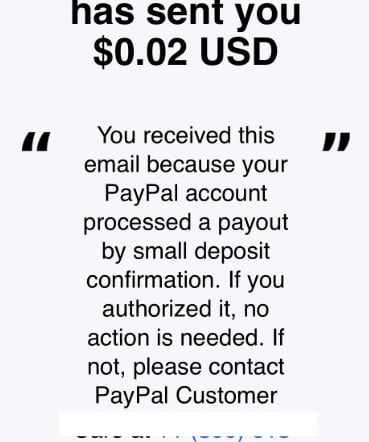
Scam Overview
The “DeLuca’s Fine Jewelry has sent you $0.02 USD” PayPal scam is a clear evolution of micro-payment fraud combined with fake tech support tactics.
It is more dangerous than traditional phishing because it leverages something real: a valid PayPal transaction.
Important Disclaimer
This scam uses the name of DeLuca’s Fine Jewelry to make the transaction appear legitimate. There is no evidence that the business itself is involved in or connected to this scam.
Scammers often misuse the names of real companies without their knowledge or permission. In this case, the payment note and phone number are controlled by the sender of the transaction, not by the business whose name appears.
Why This Scam Is Especially Convincing
In many cases, victims report:
- A real payment appearing in their PayPal account
- A notification email that appears legitimate
- A transaction note containing a warning and a phone number
Unlike typical scams, nothing looks obviously fake.
Even more concerning, the message may appear:
- Inside the PayPal interface
- Linked to a real transaction ID
- Sent from what looks like an official PayPal email address
This creates a powerful illusion of legitimacy.
The Role of a Real Business Name
Using a name like DeLuca’s Fine Jewelry adds another layer of trust.
Victims may assume:
- The company accidentally sent a payment
- There is a billing issue
- It is connected to a legitimate transaction
In reality:
- The business itself is often not involved in the scam
- Scammers may use the name without authorization
- Or exploit payment systems to attach misleading notes
Some businesses have even issued warnings confirming their name is being abused in scams.
The Hidden Weapon: The Transaction Note
The most dangerous part is the note attached to the payment.
It often includes:
- A warning about unauthorized activity
- A statement about account security
- A phone number presented as PayPal support
Example structure:
- “If you did not authorize this transaction, contact PayPal Customer Care immediately at [phone number]”
This is where the scam begins.
Why Seeing It Inside PayPal Changes Everything
Victims report a critical detail:
The message is visible inside their PayPal account, not just in email.
That leads to a dangerous assumption:
“If it’s inside PayPal, it must be safe.”
But transaction notes are user-controlled fields.
Anyone sending money can include any message they want.
PayPal processes the payment, not the message’s legitimacy.
Real User Reports Highlight the Pattern
Reports from users show consistent behavior:
- A $0.01 or $0.02 payment is received
- The note contains a phone number
- Calling the number leads to suspicious behavior
In some cases:
- The number redirects to unrelated businesses
- The line disconnects
- Or connects to fake support agents
On platforms like Reddit, users describe:
- Being asked to use a computer
- Being told their account was compromised
- Experiencing unprofessional or scripted responses
These are all classic signs of a tech support scam.
Why the Scam Works So Well
This tactic is effective because it combines three powerful elements:
- Legitimacy
- Real PayPal transaction
- Real-looking sender name
- Confusion
- Unexpected payment
- Vague explanation
- Urgency
- Immediate call to action
- Fear of account compromise
Together, these factors push people to act quickly without verifying.
The Phone Number Trap
Numbers like:
- +1 (800) 613-9844
- +1 888-834-8826
are not PayPal support.
They are entry points into scam call centers.
Once you call, the scam escalates rapidly.
How The Scam Works
Understanding the mechanics is key to avoiding it.
Step 1: The Micro-Payment Is Sent
The scam begins with a tiny payment.
You receive:
- A PayPal notification
- A visible transaction in your account
The amount is small enough to seem harmless, but unusual enough to grab your attention.
Step 2: The Message Creates Concern
Inside the transaction is a note.
It typically:
- Mentions unauthorized activity
- Suggests your account may be at risk
- Provides a phone number to call
This is designed to trigger immediate concern.
Step 3: The Victim Calls the Number
Believing it is legitimate support, the victim calls.
The person answering may:
- Claim to be from PayPal
- Speak in a calm, authoritative tone
- Use generic support language
At this stage, trust is being built.
Step 4: The Scenario Escalates
The scammer introduces urgency.
They may claim:
- Your account has been hacked
- Transactions are pending
- Your funds are at risk
This creates pressure to act quickly.
Step 5: Remote Access Is Requested
The victim is asked to:
- Use a computer
- Install remote software
Common tools include:
- AnyDesk
- TeamViewer
The explanation may be:
- “We need to secure your account”
- “We will process a refund”
This is the critical point where control is handed over.
Step 6: Device and Account Access
Once connected, scammers can:
- View your screen
- Access financial accounts
- Capture login credentials
They may:
- Open your PayPal or bank account
- Show fake transactions
- Pretend to fix issues
Step 7: Financial Manipulation
The scam shifts to extracting money.
Common tactics include:
- Fake refunds with “overpayment” tricks
- Requests to send money back
- Instructions to buy gift cards
Victims are told:
- “This is necessary to secure your account”
- “This completes the refund process”
Step 8: Data Theft and Exit
Before ending the interaction, scammers may:
- Collect personal information
- Save credentials
- Install additional access tools
Then they disappear.
The number may:
- Stop working
- Redirect elsewhere
- Appear disconnected
What To Do If You Have Fallen Victim to This Scam
If you engaged with this scam, take immediate action.
1. Disconnect and Secure Your Device
- Disconnect from the internet
- Close any remote sessions
- Restart your device
2. Remove Remote Access Software
Uninstall:
- AnyDesk
- TeamViewer
Then run a full security scan.
3. Contact PayPal Through Official Channels
Log in directly to PayPal and use the official support options.
Do not rely on phone numbers from transaction notes.
4. Change All Important Passwords
Immediately update:
- PayPal password
- Email password
- Banking credentials
Enable two-factor authentication where possible.
5. Contact Your Bank
If financial data was exposed:
- Report potential fraud
- Monitor transactions
- Request account protections
6. Check for Unauthorized Activity
Carefully review:
- PayPal history
- Bank statements
- Linked accounts
7. Report the Scam
Report:
- The transaction to PayPal
- The phone number to fraud authorities
- Your experience online to warn others
8. Stay Alert for Follow-Up Scams
Scammers may try again.
Be cautious of:
- Calls offering “recovery services”
- Emails claiming to fix the issue
The Bottom Line
The “DeLuca’s Fine Jewelry $0.02 PayPal” scam shows how far scammers have evolved.
They no longer rely on obvious fake emails. Instead, they use real payment systems to deliver their trap directly inside trusted platforms.
The key takeaway is simple:
- A real transaction does not mean the message is safe
- PayPal will not ask you to call a random number in a payment note
- Any request for remote access or urgent action should raise suspicion
If you receive a small payment with a warning message, ignore the instructions and verify everything through official channels.
That small $0.02 is not the problem. The phone call is.
FAQ
What is the “DeLuca’s Fine Jewelry Has Sent You $0.02 USD” PayPal scam?
This is a scam where fraudsters send a tiny PayPal payment, usually $0.01 or $0.02, and include a note telling you to call a supposed PayPal support number.
The payment is just bait. The real goal is to get you on the phone with fake support agents who will try to scare you, manipulate you, and steal money or account access.
Is DeLuca’s Fine Jewelry actually behind the scam?
NO. Scammers use the name of a real business to make the payment look more believable. That does not automatically mean the company itself is involved. Sometimes legitimate businesses discover their name is being misused and warn customers publicly.
Is the payment itself real?
Yes, often it is.
That is what makes the scam so convincing. The payment may really show up in your PayPal account, and the note may really appear inside the PayPal transaction details. But the message in the note is still fraudulent.
Why do scammers send only $0.02 or $0.01?
Because it is enough to get your attention without looking like normal theft.
A tiny payment feels strange and confusing. That confusion makes people more likely to read the note, worry about account fraud, and call the number without stopping to verify it first.
Why does the scam look so legitimate?
It looks legitimate because it uses real payment infrastructure.
Victims may see:
- A real PayPal email
- A real transaction in their PayPal account
- A realistic sender name
- A message that sounds like a security warning
That combination makes the scam feel much more believable than a typical phishing email.
If the note appears inside PayPal, does that mean it is safe?
No.
That is one of the most important things to understand. A payment note can be written by the sender. It is not the same as an official PayPal security message. Just because the note appears inside a real PayPal transaction does not mean the contents of the note are trustworthy.
Is the phone number in the note really PayPal customer service?
No.
The number is part of the scam. It is there to get you to call fake support agents. They may pretend to be from PayPal, but they are not legitimate.
Always contact PayPal through the official website or app, not through a number written in a payment note.
What happens if I call the number?
The scam usually shifts into a fake support or tech support scenario.
The caller may tell you:
- Your PayPal account is compromised
- Your device has been hacked
- Unauthorized payments are being processed
- You need urgent help to secure your account
From there, they may pressure you to use a computer, install remote access software, or follow instructions involving money.
Why do scammers ask you to use a computer?
Because it is easier for them to control the scam on a computer.
They often want victims on a larger screen so they can guide them through account pages, banking sites, or remote access software. Once the victim is on a computer, the scammer has more opportunities to manipulate what they see and do.
What is the danger of remote access software in this scam?
If you install remote access software like AnyDesk or TeamViewer, the scammer may be able to see your screen and control your device.
That can let them:
- View banking information
- Access email or PayPal accounts
- Change settings
- Download files
- Enter transactions
- Trick you into authorizing payments
This is why remote access is one of the biggest red flags in the entire scam.
Why do scammers sometimes hang up if you say you do not have a computer?
Because the scam becomes harder for them to run.
If they cannot guide you through remote access steps or visually manipulate what you are seeing, their chances of success drop. That is why some scammers become impatient, sound unprofessional, or abruptly end the call.
Can scammers steal money just by sending the $0.02 payment?
Not from the payment alone.
The small payment is usually only the opening move. The real risk comes if you call the number, share personal information, install software, log into accounts while they are watching, or send money based on their instructions.
Should I refund the $0.02 payment?
Do not rush into any action.
Do not call the number, do not reply to the note, and do not follow instructions written by the sender. Instead, log into PayPal directly through the official website or app and check the transaction there. If you are unsure, contact PayPal using verified support channels.
Does this scam only use DeLuca’s Fine Jewelry?
No.
Scammers can rotate names and use many different sender identities. DeLuca’s Fine Jewelry is just one example. The broader pattern is what matters:
- Tiny PayPal payment
- Scary or urgent message in the note
- Phone number to call
- Fake support scam after contact
What are the biggest red flags in this scam?
Some of the clearest warning signs are:
- An unexpected $0.01 or $0.02 PayPal payment
- A security warning written inside the transaction note
- A phone number telling you to call immediately
- Pressure to act fast
- A caller asking you to use a computer
- A request to install remote access software
- Instructions involving gift cards or unusual payments
Why do scammers ask for gift cards?
Because gift cards are difficult to trace and usually impossible to recover once the code is shared.
Scammers may claim that buying gift cards is necessary for verification, refunds, or account protection. That is false. Legitimate support teams do not solve account issues with gift cards.
Could this scam lead to identity theft?
Yes.
If you gave the scammers access to your device or shared personal details, they may have seen or collected sensitive information. That can lead to account takeover, unauthorized transactions, or identity-related fraud later.
What should I do if I already called the scam number?
If you only called and did not share information or install anything, stop contact immediately and monitor your accounts.
If you shared account details, installed remote software, or logged into sensitive accounts while on the call, take stronger action right away:
- Disconnect the device from the internet
- Uninstall remote access tools
- Change your PayPal, email, and banking passwords
- Enable two-factor authentication
- Contact PayPal through official channels
- Contact your bank or card provider
- Review your recent transactions closely









I meant to mention that the suspicious transaction was from “Lawrence M. DeLuca dba DeLuca’s Fine Jewelry”.
Thanks for adding the merchant name – that detail is useful, and it fits a pattern worth explaining.
A “dba” descriptor with a real-sounding personal name is exactly how these small unauthorised charges usually appear. Two things tend to be going on. Sometimes a legitimate small business’s payment account has been compromised and is being used to process other people’s fraudulent transactions, in which case the jeweller is a victim too and has no idea. Other times the name is simply invented to sit on a merchant account, chosen because a personal name attached to a specialist shop looks like something the cardholder might plausibly have forgotten.
Either way, the important part is that a tiny transaction is usually a test. Card numbers obtained in bulk are validated with a charge small enough to go unnoticed, and the accounts that pass get used for something much larger weeks later. So do not simply write off a couple of cents.
What to do: ring your card issuer, report the charge as unauthorised, and ask specifically for a new card number rather than just a reversal – that is what closes the door. Ask them to note it as card testing, which their fraud team will recognise. Then keep an eye on the next two statements. If the amount involved is trivial, some issuers will try to talk you out of a reissue; insist, because the cost of the test is not the point. Worth a report at reportfraud.ftc.gov too.
I received that exact $0.02 PayPal payment, which looked suspicious. Per PayPal’s instructions, I forwarded it to phishing@paypal.com, then deleted the original email notifying me of the transaction.
You did the right thing forwarding it, and the two-cent payment is worth explaining because the amount is what makes people dismiss it.
A tiny incoming payment is not a mistake and it is not generosity – it is a delivery mechanism. The message that accompanies it, or the invoice or note attached, carries the actual payload: a phone number to ring about “unauthorised activity”, or a link to a page that looks like PayPal and harvests your login. Because the notification genuinely comes from PayPal’s own systems, it passes every spam filter and every visual check, which is precisely why the technique is used. Some versions also exist to establish a transaction history for a stolen or laundered account.
Forwarding to their phishing address and deleting it was correct. Two additional things worth doing. First, never ring a number or click a link inside such a notification, however official the wrapper – open PayPal yourself by typing the address, and check Activity from there. Second, if you have not already, turn on two-step verification in your PayPal security settings and check the list of authorised devices and any linked automatic payments, since receiving one of these sometimes means your email address is on a list being worked through systematically.
One small caution: if a payment like that stays in your balance, do not send it back to the sender manually – a refund initiated by you can be reversed later in a way that leaves you short. Use PayPal’s own refund option on the transaction, or leave it and let their support handle it.