

If you received an email or postcard about the Pearson BIPA Test Settlement, you’re not alone — and yes, it’s real. Pearson Education, Inc. has agreed to an $18.2 million class action settlement over its alleged use of biometric data, including palm and facial scans, at test centers and online proctoring systems without proper consent.
This article breaks down everything you need to know about the BIPA Test Settlement 2025, from eligibility requirements to how to file a claim and key deadlines to remember.
What Is the BIPA Test Settlement?
The BIPA Test Settlement stems from a class action lawsuit against NCS Pearson, Inc., the company behind Pearson VUE test centers. The lawsuit alleges that Pearson violated Illinois’ Biometric Information Privacy Act (BIPA) by collecting biometric data — such as palm and facial scans — from test takers without following the proper legal procedures.
Under BIPA, companies must:
- Obtain written consent before collecting biometric data.
- Inform individuals how the data will be used.
- Disclose how long the data will be stored and when it will be destroyed.
Pearson has not admitted wrongdoing, but has agreed to settle the case to avoid the time and expense of ongoing litigation.
Who Is Eligible?
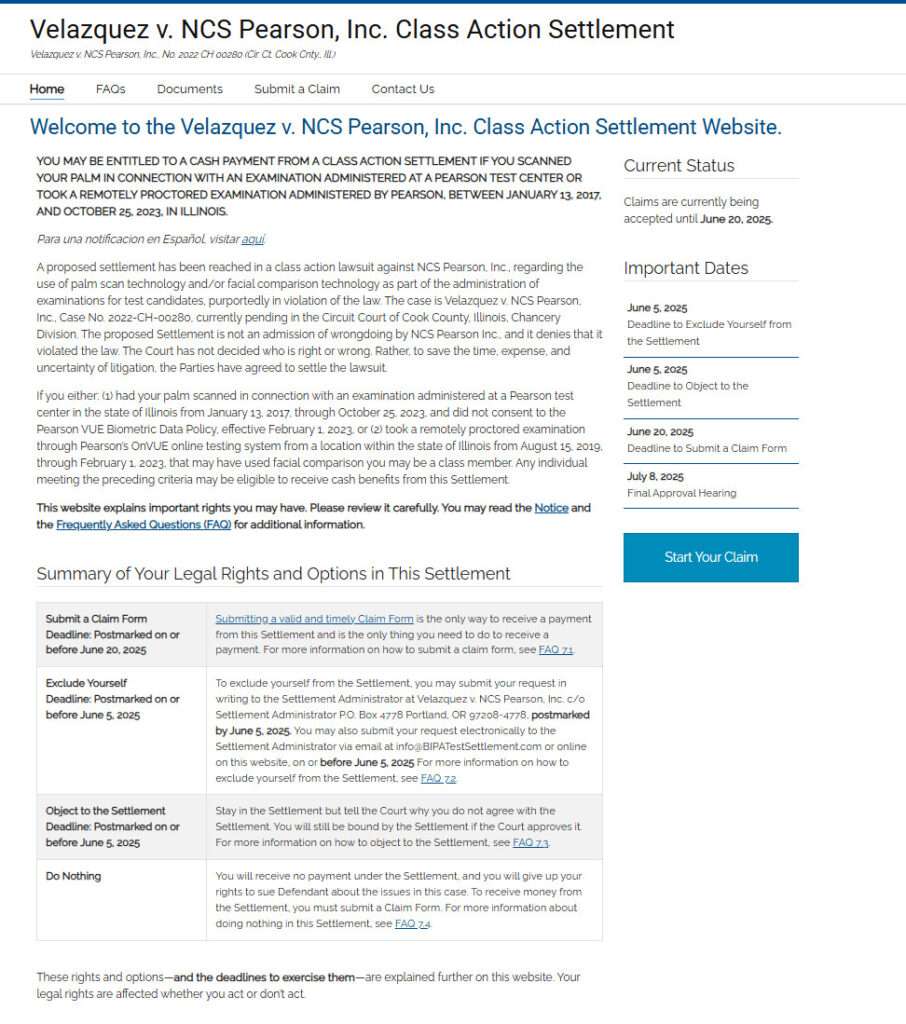
You may be eligible to receive a cash payment if you meet either of the following criteria:
1. Palm Scan at a Pearson Test Center
- Took place in Illinois.
- Occurred between January 13, 2017, and October 25, 2023.
- You did not consent in writing to the biometric scan.
2. Facial Recognition During Online Proctoring
- Used Pearson’s OnVUE remote proctoring system.
- Test was taken from within Illinois.
- Took place between August 15, 2019, and February 1, 2023.
- Facial comparison scans were performed without proper consent.
Even if you don’t remember the scan happening, if you took an exam during these windows, you might still qualify.
How Much Can You Expect to Receive?
The total settlement fund is $18.2 million. Payouts will depend on:
- How many valid claims are submitted.
- Deductions for legal fees, administrative costs, and incentive awards for lead plaintiffs.
While the exact amount per person is not yet determined, class members may receive a cash payment once the court gives final approval and if no appeals are filed.
Key Dates to Remember
Mark these deadlines on your calendar:
- June 5, 2025 – Deadline to Exclude Yourself or Object to the settlement.
- June 20, 2025 – Final deadline to Submit a Claim Form.
- July 8, 2025 – Final Approval Hearing in court.
Payments will likely be issued 30 to 60 days after the settlement is approved, unless an appeal delays the process.
How to File a Claim
To get your share of the settlement, you must submit a valid claim by June 20, 2025. Here’s how:
- Visit the official site: www.bipatestsettlement.com
- Click “Submit a Claim”.
- Enter your Unique ID found in the email or postcard.
- Complete the claim form and submit.
You can also print and mail the claim form to the address listed on the website if you prefer not to file online.
What If You Do Nothing?
If you do nothing:
- You’ll receive no payment.
- You’ll still be bound by the terms of the settlement.
- You give up your right to sue Pearson separately over the same issue.
If you want to exclude yourself, you must send a request postmarked by June 5, 2025.
Why This Settlement Matters
This lawsuit highlights a growing concern around biometric privacy. Biometric data — like your palm or facial scan — is unique to you and cannot be changed if stolen. Misuse or mishandling of this information poses serious privacy and security risks.
The BIPA law in Illinois is one of the most robust in the U.S. when it comes to protecting biometric data. This settlement serves as a reminder that companies must follow strict guidelines when handling sensitive personal information.
Final Thoughts
If you took a Pearson exam in Illinois and had your palm or face scanned, you may be entitled to compensation. Don’t miss your chance — the process is straightforward, and the deadline is approaching fast.
Visit the official settlement website, confirm your eligibility, and file your claim before June 20, 2025.
The legal landscape around biometric privacy is evolving — and this case could be a turning point in how companies collect and use sensitive data moving forward.
Frequently Asked Questions (FAQ) About the BIPA Test Settlement 2025
What is the BIPA Test Settlement about?
The settlement resolves a class action lawsuit claiming that Pearson Education, Inc. collected biometric data, such as palm and facial scans, from test takers in Illinois without proper consent as required by the Illinois Biometric Information Privacy Act (BIPA). Pearson denies any wrongdoing but agreed to a settlement to avoid further litigation.
Who is eligible to file a claim?
You may be eligible if:
- You had your palm scanned at a Pearson test center in Illinois between January 13, 2017, and October 25, 2023, and
- You did not sign a written consent form,
or - You took a remotely proctored exam via Pearson’s OnVUE system between August 15, 2019, and February 1, 2023, and a facial scan was used during the process while located in Illinois.
How much money can I receive?
The total settlement is $18.2 million. The final payout per person depends on how many valid claims are filed. The amount will be reduced by court-approved attorney fees, administrative costs, and incentive payments to the lead plaintiffs.
How do I file a claim?
Visit www.bipatestsettlement.com and click “Submit a Claim.” Use your Unique ID from the email or postcard you received to fill out the online form. You can also mail a printed form to the settlement administrator.
What is the deadline to file a claim?
The claim form must be submitted online or postmarked by June 20, 2025.
What happens if I do nothing?
You will not receive any payment and will lose the right to sue Pearson separately for the same issues. However, you will still be legally bound by the terms of the settlement.
Can I exclude myself from the settlement?
Yes. To opt out, you must submit a written exclusion request by June 5, 2025. This allows you to retain the right to sue Pearson on your own but makes you ineligible for settlement money.
Can I object to the settlement?
Yes. If you disagree with the terms, you can file an objection by June 5, 2025. You will remain a part of the settlement but can express your concerns to the court.
When will payments be issued?
If the court grants final approval at the hearing on July 8, 2025, and there are no appeals, payments are expected to be distributed within 30 to 60 days after that date.
Is the settlement legitimate?
Yes. This is a legally recognized class action settlement approved by the court. You can verify details and file your claim at the official website: www.bipatestsettlement.com.

Join the discussion
0 commentsShare your experience or ask a question about this article.
Discussion
Start the conversation
Have a question or something useful to share? Add the first comment.