


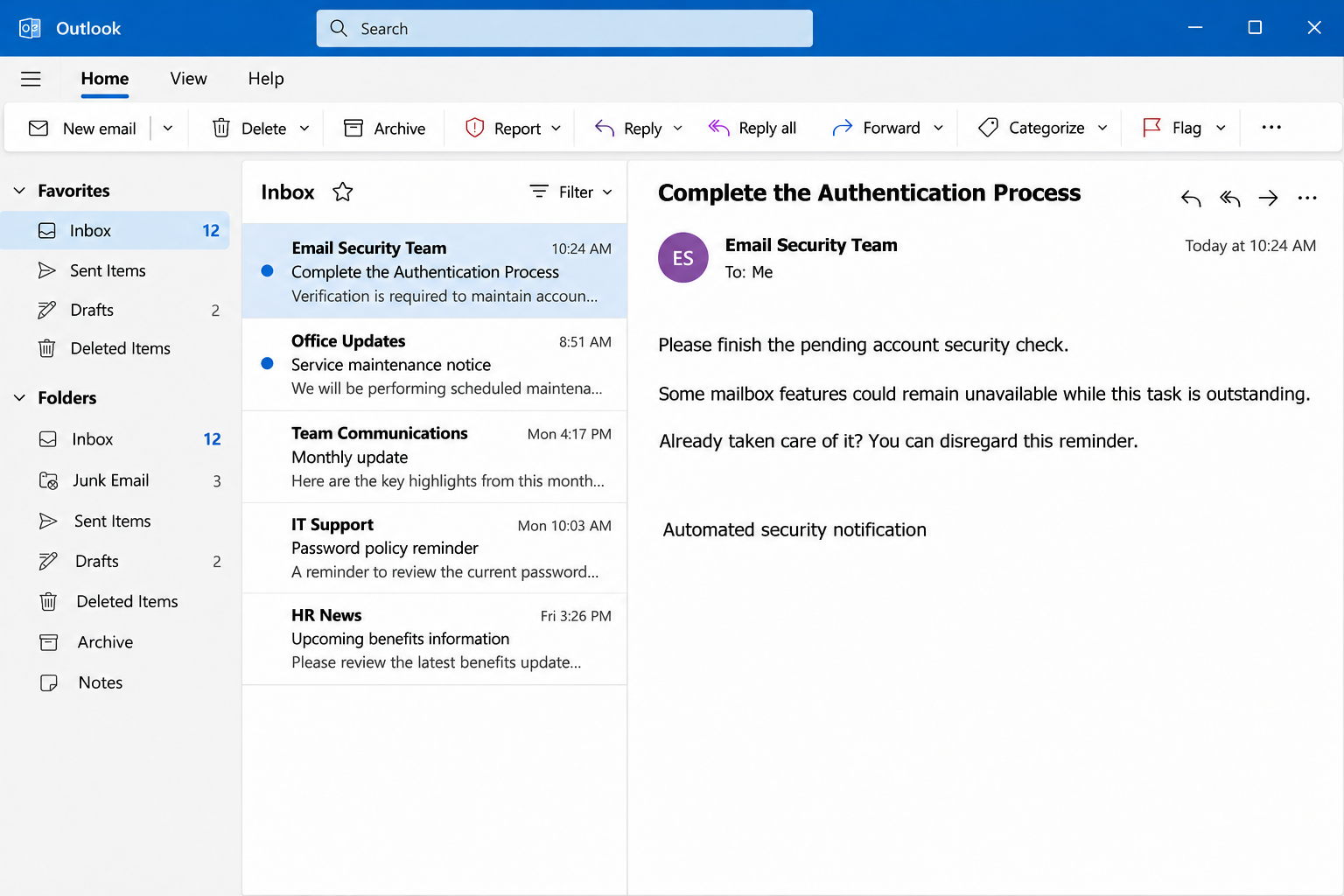
The message sounds like something the security team would send before changing account access. It asks you to finish a process and mentions restrictions if the task remains incomplete.
There is even a reassuring note for people who already handled it. Before accepting that familiar wording, look closely at where this authentication request is taking you.
Overview
A security task without an independently verified owner
The Complete The Authentication Process email scam presents itself as an automated notice from an email security team. It says verification is necessary to protect account integrity.
The message threatens restrictions on certain account functions until the recipient completes the process. It then offers a verification link as the route back to normal access.
In the documented campaign, that route leads to a counterfeit Webmail login. Its purpose is to collect credentials, not carry out an authorized account-security requirement.
No genuine email provider becomes fraudulent because its branding appears on that form. The deception is the sender’s attempt to borrow the authority of a familiar sign-in experience.
The calm wording is part of the approach
This notice does not need a dramatic countdown to create pressure. An incomplete security task can be enough, especially if you rely on email for work or account recovery.
Its instruction to disregard the notice if already completed also feels familiar. Real administrative emails use that wording, so readers may treat it as a sign of normality.
Here, the reassurance does not establish who sent the message or who controls the verification destination. It merely makes the request feel like a process already underway.
The recognizable features include several details worth checking together:
- An undefined security team rather than a support contact you independently recognize.
- A claim that account functions depend on completing an unexpected verification task.
- A message link that introduces another mailbox-password request outside your usual route.
- A generic automated footer offered as reassurance instead of independently confirmed account information.
Authentication is not the same as trusting the invitation
Authentication is a real part of using online accounts. A service may legitimately ask you to sign in again or confirm an action within an established account session.
That fact does not validate every email telling you to authenticate. Before entering any secret, you need to know which service is requesting it and where you arrived.
The decisive choice is therefore the route you take. Open your account independently and check for a real requirement rather than accepting the email’s destination as your starting point.
If there is no corresponding task in the actual account, ask official support through an existing channel. Do not keep following the message to make its claim become clear.
Why a Routine Reminder Can Work Better Than a Loud Threat
Many phishing warnings teach people to look for obvious panic. That is useful, but it can leave a quieter administrative email seeming safe simply because it avoids alarming language.
The authentication-process story exploits an ordinary desire to keep things working. You do not want to lose a mailbox feature because you ignored a small security requirement.
The threatened restriction is also imprecise. A reader might imagine blocked sending, unavailable documents, or an interrupted workday, even though the email has not established any actual change.
That uncertainty encourages action without forcing the sender to prove a particular outage. The verification link becomes the apparently easiest way to remove the uncertainty and continue working.
The footer adds a second layer of familiarity. Automated notices often say replies are not monitored, which can discourage the recipient from asking a question before proceeding.
A confidentiality statement can contribute to the same effect. It makes the message look administrative, but the person writing a deceptive email can include that wording just as easily.
These details are not proof of fraud when they appear in isolation. The problem is accepting their appearance as evidence that an unverified password request has legitimate authority.
A better check asks whether the request exists outside the email. Your provider’s own account interface or your organization’s service desk can establish that independently of the invitation.
How the Scam Works
Step 1: The notice presents verification as unfinished business
The email says a security process must be completed. It places the recipient inside an apparently existing administrative workflow rather than introducing a new and obviously unfamiliar service.
That framing can feel especially plausible after a software update or workplace policy change. The sender does not need to know that context if the recipient supplies it themselves.
The message claims that the task helps prevent unauthorized access. As a result, ignoring an unverified email can be made to feel less responsible than following its instructions.
The sensible response reverses that assumption. Protecting an account includes checking a security request before allowing it to choose where you reveal the password that protects the account.
Step 2: Possible feature restrictions create a reason to act
The warning mentions limited account functions if verification remains incomplete. It does not need to shut anything down, because the prospect of disruption can motivate the next click.
Someone about to send an important document may not want to risk finding out later. The requested process can therefore seem like preventive maintenance rather than a questionable intrusion.
However, a restriction described in an email is not a restriction demonstrated inside your account. Check the service itself before taking action to solve that alleged problem.
Do not test the threat by submitting credentials and seeing whether functions return. If the account was already working, normal operation afterward would prove nothing about the email’s legitimacy.
Step 3: A verification label hides the importance of the destination
The message supplies a link labeled as account verification. That label describes what the sender wants you to believe, not necessarily the function or owner of the destination.
The recipient may focus on completing the named task while overlooking a change in origin. A familiar-looking page can make that transition feel seamless enough to miss.
The reported case displayed a fake Webmail form. Other provider styling can be copied, so the absence of that exact design would not automatically make a similar request safe.
The useful distinction is ownership, not artistic accuracy. A page that resembles your provider still needs to be reached through a legitimate route before it receives account credentials.
Step 4: The login request turns reassurance into credential exposure
The counterfeit page asks for the information needed to access the actual mailbox. Once submitted, those details can leave your control even if the page later behaves strangely.
An error message might persuade someone to retry. A return to a normal-looking page might instead convince them the process is complete, although neither outcome reverses a disclosure.
If an additional screen requests a code or approval, stop rather than assuming it belongs to your account. Unexpected authentication prompts deserve their own independent verification through the provider.
The campaign’s documented purpose is credential theft. A browser displaying this form is not, by itself, evidence that a particular malware program was installed on the recipient’s device.
Step 5: Successful access can be used quietly
A stolen password may be tested against the real service. Whether access succeeds depends on protections such as additional authentication, account policies, and the state of the credential.
If access succeeds, the account may still look normal to its owner. Reading messages, changing forwarding, or examining reset emails does not necessarily create an obvious interruption.
An attacker can also use familiar conversations to approach other people. A later request from a genuinely compromised mailbox can appear more credible than the generic email that started everything.
This is why a response should examine actual account activity. Deleting the original verification notice is useful housekeeping, but it does not remove access already obtained through it.
A Genuine Security Check Should Survive Independent Verification
Imagine receiving a reminder about a company authentication rollout. Leaving the email and asking your established help desk should not prevent them from explaining the project and its approved steps.
Likewise, a personal account provider can show relevant security activity through its own settings. You can open that environment without asking an unsolicited email to supply the route.
There may be legitimate differences between company and personal sign-ins. An employer can use a centrally managed identity service, while a personal account may have entirely different support controls.
That is a reason to ask the actual administrator, not assume every unfamiliar business address is malicious. Context should come from an independently known source rather than the message itself.
For an employee, the right question is practical: which account is changing, who approved it, and where are the published instructions? Avoid sending passwords while asking for clarification.
For a personal account, look for alerts after signing in normally. Review the account’s security area, and use the provider’s established help if a confusing verification requirement still appears.
If the notice seems to refer to a different organization or account, do not follow it merely to discover the connection. Misaddressed messages and broad phishing campaigns can both occur.
Checking independently may take a little longer than pressing the offered button. It is still a much smaller task than recovering control of a mailbox after an avoidable credential disclosure.
What To Do If You Fell Victim
-
Leave the verification page and record the actions you took.
Note whether you simply opened the link or submitted a password, code, or approval. Do not revisit the form or supply another secret to confirm your recollection.
Preserve the original email and relevant times for reporting. A useful account of events describes what happened without publishing private account information or repeating exposed passwords.
-
Replace a disclosed password from the legitimate account interface.
Reach the service independently on a trusted device. Create a unique replacement, and change the old password on any other service where you reused that same secret.
If access has already been lost, use the provider’s recovery process. Do not accept help from strangers offering special recovery software or asking for payment through private messages.
-
Review sessions and security changes, not just the password.
Look for unfamiliar devices, recovery contacts, authentication methods, app passwords, or connected applications. Use the real account controls to remove access you did not authorize.
Your provider may have separate options for ending sessions and revoking permissions. Follow its guidance rather than assuming one password change automatically closes every possible route back in.
-
Check how the mailbox is handling messages.
Inspect forwarding destinations, filters, inbox rules, and recent sent mail. Investigate settings that hide security notices, redirect messages, or place important correspondence directly in deleted items.
Compare suspicious messages with conversations you actually had. If an attacker sent requests using your account, warn recipients through another channel before they open attachments or send money.
-
Notify the right security team for a managed account.
Contact your employer through the directory or support system you normally use. Describe the authentication-process notice and identify any information or approvals you supplied during the interaction.
Let administrators coordinate account restrictions, log review, and device checks. Do not disable company security tools or reset a managed computer independently to hide or resolve the mistake.
-
Separate device cleanup from the account-recovery task.
A fake sign-in does not establish a malware infection. If the interaction also persuaded you to run untrusted software, obtain appropriate device-removal help before performing sensitive account work.
A successful scan cannot reclaim a password already disclosed to a form. Equally, replacing a password does not remove an installed program, so address both exposures when applicable.
-
Report consequential misuse and keep watching important transactions.
Use your provider’s phishing-reporting option and retain the incident reference if available. Contact your bank promptly if someone used mailbox access to redirect a payment or expose financial details.
Review new account alerts and active business conversations during recovery. Treat unsolicited offers to finish the authentication or undo the incident as separate requests requiring independent verification.
Authentication Words That Should Not Blur Together
The message uses a broad security vocabulary, which can make several different concepts sound interchangeable. Understanding their roles helps you ask a better question when a notice appears.
Signing in proves something about the person trying to access an account. It does not prove that the page requesting the sign-in belongs to the service they intended to reach.
Email authentication checks, including SPF, DKIM, and DMARC, concern a message’s sending identity and handling. They are not the same thing as enabling additional protection on your mailbox login.
A message passing a sending check is not a promise that every request inside it is honest. Attackers can send authenticated messages from domains or accounts they legitimately control.
Multifactor authentication adds another requirement to an account login. Keep its codes and approvals within sign-ins you initiated, rather than sharing them because an email refers to account security.
For recovery after disclosure, consult your actual provider’s documentation. Google’s account-security recovery guidance is one example, but workplace controls may require administrator assistance instead.
The general principle is straightforward without being a shortcut: identify the real service first, then use its authentication process. Do not let a persuasive security label reverse that order.
Frequently Asked Questions
Is Complete The Authentication Process an official security notice?
The documented campaign is a phishing email that directs recipients to a fake login. Verify any real security requirement independently rather than accepting the message’s claimed team identity.
Does the note about ignoring a completed process prove anything?
No, because that sentence is ordinary administrative wording anyone can copy. It explains how the sender wants you to react, not whether the sender controls your account security.
Can providers legitimately ask users to verify an account?
Legitimate verification processes exist, including within authenticated account settings. The safe approach is to open the provider yourself and confirm the requirement without using an unexpected email link.
What if the page already knew my email address?
An address can be included in a link or obtained elsewhere. Seeing it on the page does not establish ownership of the site or authorize its request for your password.
Does enabling additional authentication solve an existing compromise?
It can improve future protection, but existing sessions, recovery changes, or app permissions may also need attention. Review those controls through the real service after replacing exposed credentials.
Should I install software to complete this email’s verification?
Do not install software at the direction of this notice. If your organization actually requires a security application, confirm its identity and deployment instructions through your established internal support team.
The Bottom Line
Do not complete account authentication through this email’s verification route. Open your actual account independently or ask your known administrator whether any genuine security task is pending.
If you already supplied credentials, stop treating this as unfinished maintenance. Secure the account, remove unauthorized access, and report the disclosure through the legitimate support process.

Join the discussion
0 commentsShare your experience or ask a question about this article.
Community experiences
Did this happen to you?
Your experience could help someone recognize the same scam. Submit a private report for our team to review.
I experienced this tooReports are reviewed before publication. Sharing publicly is always your choice.
Discussion
Start the conversation
Have a question or something useful to share? Add the first comment.