


A delivery-failure email says your message was too large. If you’ve just sent a proposal or a bundle of documents, that explanation can sound completely ordinary.
Then the notice offers a way to inspect the failure. Before following that invitation, check whether it helps you fix a message or asks for something else.
Overview
The notice borrows a believable delivery problem
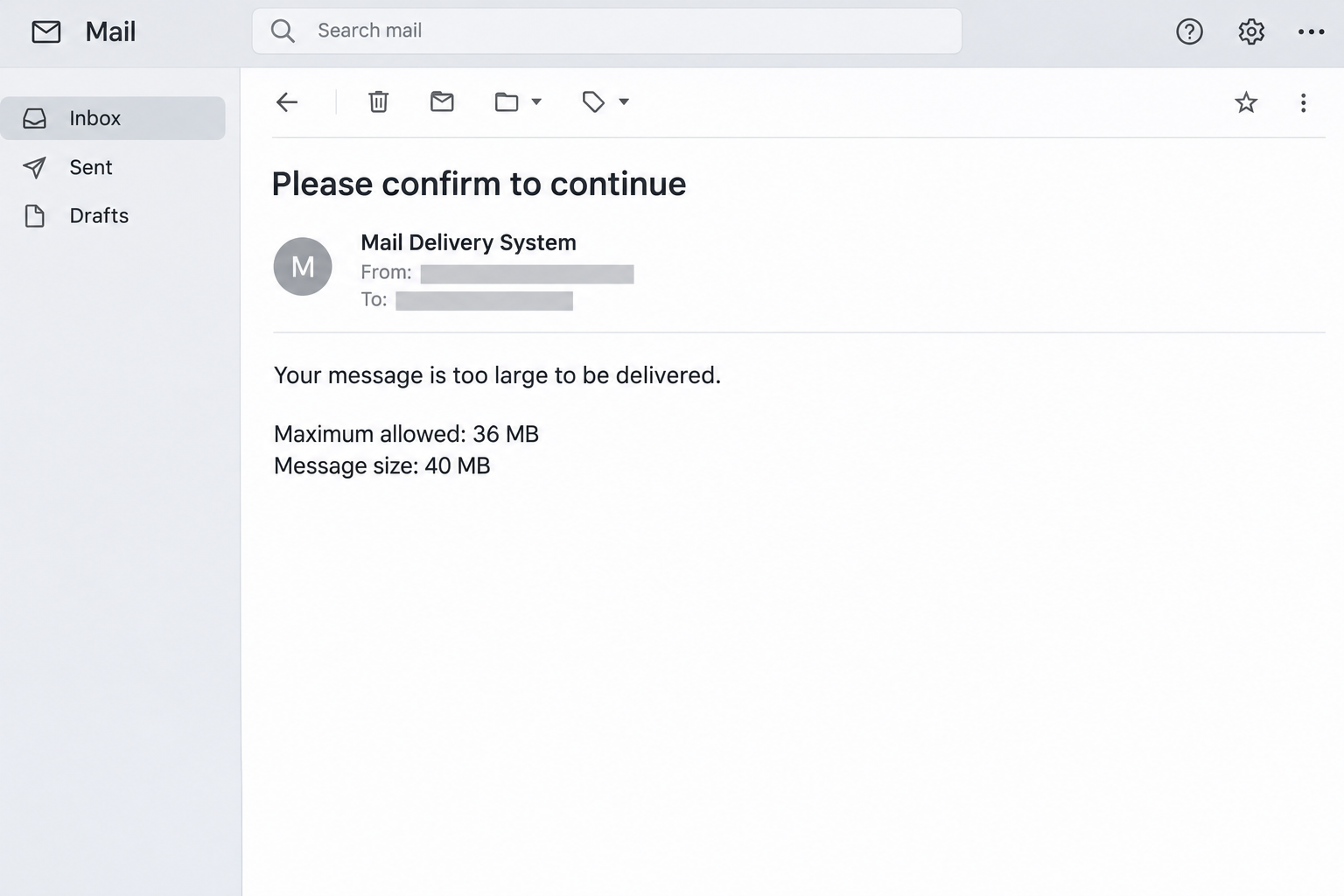
The Your Message Is Too Large To Be Delivered email scam imitates an automated bounce. It describes a 40 MB message exceeding a 36 MB limit.
The reported email adds diagnostic-looking details and offers a way to view the failed delivery. Those elements make the notice resemble a technical report.
Its purpose is different from an ordinary size rejection: the linked page imitates Roundcube and requests email credentials rather than helping reduce the original message.
The image is a simplified reconstruction of the delivery notice. It deliberately omits the original recipient details and any working link to the alleged report.
A hosted page is not an approved mail portal
The reported counterfeit login was hosted through Google Cloud Storage. Google supplies hosting infrastructure; that doesn’t make every customer-uploaded page a Google account service.
Roundcube is also being impersonated, not endorsing the request. A copied webmail interface cannot establish that the page belongs to your mailbox provider.
The central warning is the change in purpose. A message-size problem becomes a request to authenticate somewhere you didn’t independently choose.
What to compare before responding
You can investigate a real sending problem through your mail application or provider. The email’s own report link doesn’t need to be part of that check.
- Find the message the notice supposedly describes.
- Compare its recipient and sending time with your records.
- Check the size limit through your provider’s documentation.
- Use your established webmail address rather than the notice’s destination.
- Report a credential request that doesn’t fit that verified route.
Don’t assume the numerical values prove fraud by themselves. The same general type of delivery error can occur legitimately, and different systems set different limits.
Why an Oversized-Message Warning Can Be Convincing
Sending large files is a familiar source of email frustration. Most readers have encountered an attachment limit without understanding exactly where that limit comes from.
That uncertainty gives a technical-looking notification room to sound authoritative. A server name or an error code can make the writer seem better informed than the recipient.
It also creates an unfinished task. If an important message failed, you want to know quickly so a client, colleague, or family member isn’t left waiting.
The scam takes advantage of that practical concern, not merely fear. It presents an account action as a way to complete something you already intended to do.
However, a believable problem isn’t proof of a genuine notification. The right response is to check the sending record without surrendering control over your account.
If the message matters urgently, contact its intended recipient through another established channel. You can confirm delivery without involving the questionable notice at all.
How the Message Too Large Email Scam Works
Step 1: A delivery failure creates an apparent loose end
The email resembles a system-generated response to outgoing mail. It encourages you to connect its warning with something you recently sent, even before confirming a match.
That apparent connection may simply be coincidental. An attacker doesn’t need the contents of your actual outbox for a delivery-themed message to reach someone expecting email problems.
Look for a specific relationship between the notice and your records. A vague reference to a failed message should not replace a matching recipient and time.
If you didn’t send anything resembling the described message, don’t use the report link to investigate the discrepancy. Start with your own account history instead.
Step 2: Specific measurements make the explanation feel technical
The reported version compares a 40 MB message with a 36 MB maximum. That small difference makes a failed delivery sound plausible and easy to understand.
Numbers can be invented as easily as department names. Their value is something to compare with your provider’s actual limits, not a reason to skip verification.
Technical details can also be copied from genuine delivery failures. A familiar error format isn’t evidence that this particular notification came from the system it describes.
Keep the measurements separate from the proposed remedy. Even an accurate size calculation would not justify handing your password to an unrelated web page.
Step 3: A diagnostic link redirects the task
The reader expects more information about a failed message. The invitation therefore makes opening a report seem different from responding to an obvious password request.
But the destination can change what you are doing. Instead of inspecting the original email, you are asked to authenticate to a site controlled by someone else.
This is the point where the workflow deserves a pause. You can return to your normal mailbox and examine the sending problem independently.
Don’t accept the page’s existence as confirmation that the report is real. A linked page is still part of the same unverified request.
Step 4: A copied Roundcube screen asks for access
The reported destination copies Roundcube, requesting your email address alongside its password. That combination targets the account rather than the oversized attachment.
The hosting location can add another layer of confusion. A familiar infrastructure provider’s name in an address doesn’t identify the customer responsible for the page.
Google’s Cloud Storage documentation confirms that customers can serve website files from storage buckets. Hosting is not authentication of the page’s claim.
Your established mail provider should tell you its authorized access address. Don’t decide where to authenticate solely by recognizing the design on screen.
Step 5: Stolen credentials create a separate account problem
If you submit credentials to a counterfeit page, someone else can try using them against the real mailbox. Additional protections may affect whether that attempt succeeds.
Possible access could expose correspondence or support further impersonation. It doesn’t prove that every recipient lost access or that the device itself became infected.
The urgent task then changes again: protect the mailbox and check for unauthorized activity. Resending the original attachment won’t address a password exposure.
Likewise, an error message after submission doesn’t prove the password was rejected safely. Stop using the suspect page and recover through the genuine provider.
What a Real Message-Size Failure Does and Doesn’t Mean
Sending limits belong to particular services
A limit can apply at the sender’s system, the recipient’s system, or another part of delivery. Different mail providers and organizational settings can produce different outcomes.
Don’t treat the stated 36 MB threshold as a universal Roundcube rule. Roundcube is a webmail application, while the hosting environment determines important delivery settings.
Ask your provider what applies to your account and recipient. A number copied from an unsolicited email isn’t a substitute for that answer.
An attachment’s size isn’t the whole message
An email contains more than the file visible in your folder. Formatting and transfer encoding can add overhead, so the transmitted message can be larger.
That is why comparing a file’s displayed size with an email limit can be misleading. It doesn’t make the suspicious invitation’s login request necessary.
If a genuine limit is the problem, reduce the attachment or use your organization’s approved file-sharing method. Choose access permissions appropriate for the contents.
Diagnostic information can be real-looking and still copied
An error code may help a mail administrator troubleshoot when it comes from an authenticated record. The code alone cannot authenticate the email carrying it.
For cPanel-hosted mail, Track Delivery can show delivery results when the provider has enabled it and relevant records are retained.
Its absence isn’t proof that a message succeeded or failed. Ask the provider about the available logs instead of treating an empty report as a verdict.
A bounce isn’t automatically evidence of a hacked mailbox
Unexpected delivery notices deserve attention, but they don’t independently establish account takeover. Confirm the underlying sending activity before deciding what happened.
If your provider finds mail you didn’t send, account access needs investigation. If no matching activity appears, it can help assess the notice and any impersonation concerns.
Keep those possibilities separate from the counterfeit login itself. You can reject a suspicious destination without first proving how the original email reached you.
What to Do if You Have Fallen Victim to This Scam
-
Leave the diagnostic link and stop retrying authentication.
Close the suspicious page without testing more passwords. Note the mailbox involved and whether you submitted anything, rather than returning to reproduce the result.
Keep the original notice for your provider or security team. Share it privately, because delivery details can expose recipient addresses and business information.
-
Change the exposed mailbox password through its genuine portal.
Use your existing bookmark, hosting account, or documented provider address. Don’t let a follow-up message supply the route to the password change.
If you’re locked out, contact the hosting provider through established support. The organization operating your mailbox is better placed to restore access than an unsolicited helper.
-
Ask for an account-access review when credentials were submitted.
Tell support the approximate interaction time and the URL if you safely recorded it. Ask about unfamiliar sessions, recovery changes, and available access logs.
For workplace mail, let the responsible team coordinate session revocation and evidence preservation. Avoid changing administrative controls that you don’t normally manage.
-
Inspect whether incoming or outgoing mail was altered.
Check for unfamiliar forwarding, filters, sent items, and messages requesting payment changes. Your provider may need to inspect settings that aren’t visible in Roundcube.
If colleagues received suspicious correspondence from your account, warn them through an established alternative channel. Explain the specific request to avoid, rather than sharing the malicious link.
-
Replace reused credentials on other important services.
Choose separate passwords for accounts sharing the exposed one. Prioritize services where email access or reused credentials could authorize sensitive changes.
Maintain a private recovery checklist so you can distinguish completed changes from pending ones. Don’t store the replacement passwords inside the compromised mailbox.
-
Investigate the genuine sending task through normal records.
Locate the original message and check its actual recipient. If delivery still matters, contact that recipient or consult the provider’s retained delivery report.
Reduce files or use an approved sharing service only after establishing the real problem. You shouldn’t have to reopen the questionable notice to finish your work.
-
Report the counterfeit notification to the mail service.
Use the service’s phishing-report feature or the reporting method your organization specifies. Provide the original message when requested rather than only a cropped screenshot.
If money was sent because of later impersonation, contact the payment provider promptly. Ask about available recovery options without assuming an email-password reset reverses a payment.
-
Assess device exposure only when your actions warrant it.
Receiving a bounce-style email doesn’t establish malware infection. Mention any unexpected download, installed program, or granted permission separately when asking for help.
On a managed computer, follow your security team’s instructions before running cleanup tools. Account containment and device assessment may need to happen together.
If You Saw the Form but Stopped There
Stopping before submission is useful, and you don’t need to test whether the page would have accepted your details. Close it and report the invitation.
If a password manager filled the form automatically, note that detail. Explain what happened without assuming that an unsubmitted field could never have been observed.
Also consider whether you granted a permission or approved authentication elsewhere. A recovery assessment should follow all completed actions, not only whether you clicked a final button.
You can still finish a real delivery task independently. Return to your mail application, confirm the recipient, and ask the provider about any actual size restriction.
Frequently Asked Questions
Is a message-size bounce always fraudulent?
No, legitimate servers reject oversized messages routinely. This scam is identified by the deceptive report-to-login journey, not by the existence of a size limit.
Does Roundcube impose a universal 36 MB limit?
No, the reported email’s number should not be treated as a universal rule. Your hosting environment and the receiving system determine relevant delivery restrictions.
Why might a small attachment still exceed a limit?
The complete email includes formatting and transfer overhead beyond the original file. Ask the provider how its limit applies before drawing conclusions from the file size alone.
Does Google Cloud hosting mean Google approved the page?
No, customers can publish content through hosting services. A provider’s infrastructure doesn’t turn a customer-controlled login imitation into an authorized mailbox portal.
Can I fix delivery by signing in normally?
Your genuine mailbox can help you inspect the message and choose another sending method. Signing in does not itself shrink an oversized email or change recipient limits.
Who should help if the counterfeit form took my password?
Contact the organization that actually hosts your mailbox or your workplace security team. Use a previously known support route and explain the credential exposure clearly.
The Bottom Line
Treat the Your Message Is Too Large To Be Delivered email’s report link as untrusted. Check delivery through your normal account instead of its copied Roundcube page.
If you entered a password, protect the mailbox and report what happened. Fixing a real attachment problem can wait until account access is secure.

Join the discussion
0 commentsShare your experience or ask a question about this article.
Community experiences
Did this happen to you?
Your experience could help someone recognize the same scam. Submit a private report for our team to review.
I experienced this tooReports are reviewed before publication. Sharing publicly is always your choice.
Discussion
Start the conversation
Have a question or something useful to share? Add the first comment.