


A confidential message from HR can stop you mid-task. You wonder whether it concerns your compensation, an employment document, or something that needs a private response.
The email says the document is protected. Before treating that reassurance as permission to continue, check what it actually asks you to trust.
Overview
An HR notification borrows the language of protection
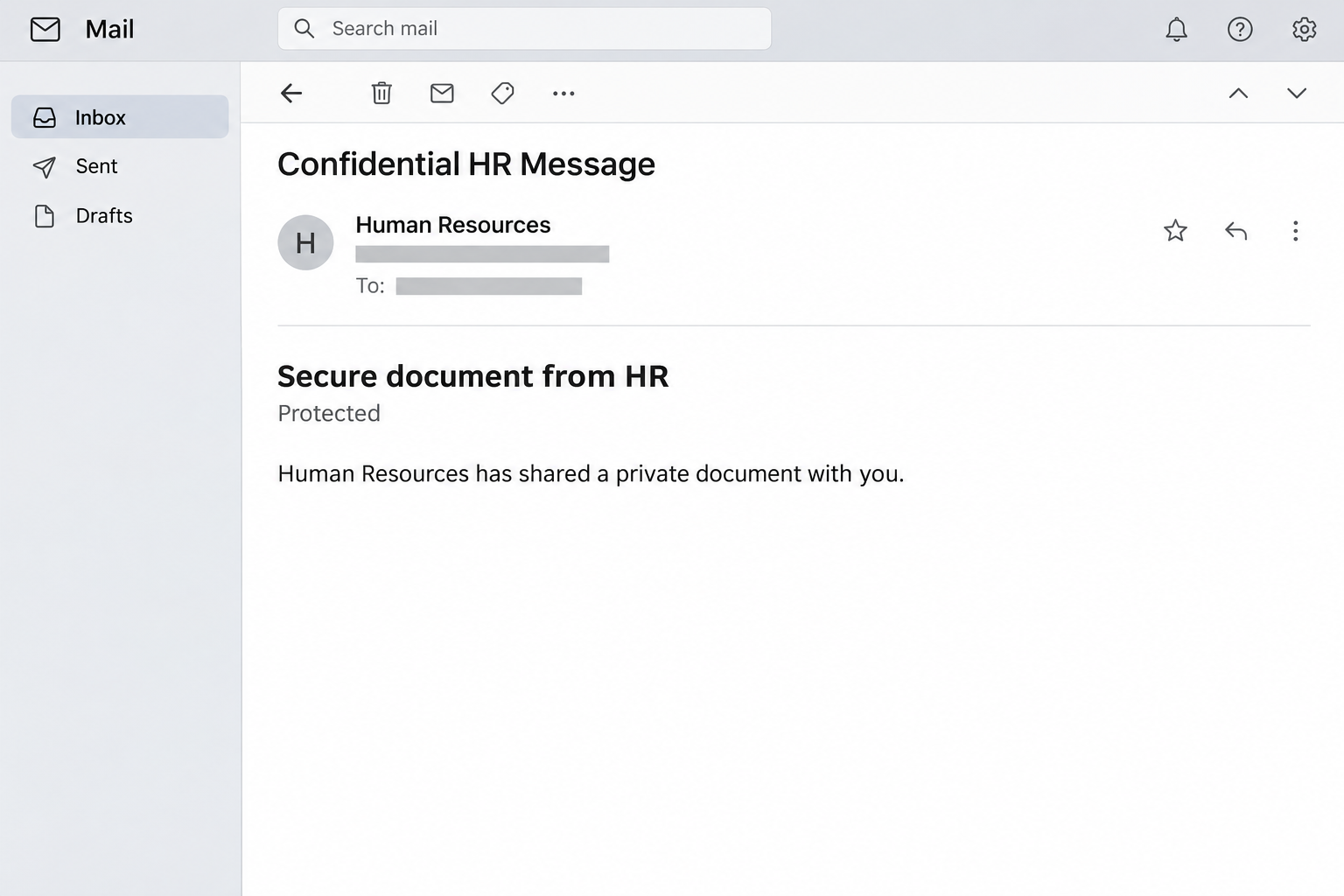
The Secure Document From HR email scam imitates an encrypted workplace message. References to Microsoft Purview make the request seem like a routine privacy measure.
In the reported sample, the recipient is offered a way to view a confidential document after verification. Microsoft-style footer details reinforce the apparent connection.
Another reported variation uses compensation-review language. Neither presentation establishes that your employer actually prepared a document or approved the email’s access instructions.
The illustration recreates the invitation’s general appearance without a working access control. It isn’t an original message or a captured Microsoft authentication screen.
The branding is not the verification
Microsoft Purview encryption is a real service, and legitimate protected mail can require additional steps. That is precisely why the impersonation can be convincing.
The available report describes a credential-stealing lure without documenting a recovered destination. Its branding alone can’t identify the exact form that would follow.
The warning concerns the deceptive invitation, not encrypted HR communications generally. Microsoft and the employer whose identity is copied should not be mistaken for the sender.
What to establish before doing anything else
The safest first question is whether HR sent this specific item. Confirm the document through a channel you already use, rather than through its own instructions.
- Check whether the named department expected to contact you.
- Compare the request with your organization’s normal document process.
- Verify the full sender address through trusted workplace records.
- Ask which account should legitimately receive the document.
- Stop when the authentication destination doesn’t match the expected service.
If you entered credentials, tell your security team promptly. A clear report about your actions helps them respond more effectively than guessing what the attackers accomplished.
Why Confidentiality Can Make a Bad Request Feel Sensible
Most people understand that employment records shouldn’t be freely accessible. A protected-message notice fits that expectation before you’ve examined who created it.
The attacker doesn’t have to explain why payroll information matters. Your relationship with your employer already gives the subject emotional weight and a reason for privacy.
You may also hesitate to ask a colleague about a compensation document. That hesitation can keep the request isolated from the person most able to verify it.
A secure process should not prevent you from confirming its existence. Asking HR whether it sent an item doesn’t require sharing the document’s sensitive contents.
Keep that distinction in mind when a message encourages discretion. Protecting personal information and quietly trusting an unknown authentication request are very different things.
The word encrypted describes a protection method when used correctly. Printed inside an email, it can also be nothing more than a claim.
How the Secure Document From HR Email Scam Works
Step 1: A sensitive work topic creates a reason to look
The invitation places HR at the center of the request. That department can plausibly communicate about benefits, employment terms, reviews, or compensation.
A reader may therefore supply a missing explanation without being told one. If you recently discussed a raise, for example, an unrelated email can feel connected.
Don’t treat a coincidental match as confirmation. The message still needs to come from a verified person or an approved service used for that task.
The same caution applies when a copied department name resembles your organization’s terminology. A recognizable label is easy to reproduce without access to internal systems.
Step 2: Security wording makes verification appear mandatory
The message describes the document as private and protected. It positions the next action as the responsible way to access sensitive information, not an unusual request.
That framing can reverse your instincts. Instead of questioning why authentication is needed, you may feel that declining it means failing to follow workplace security rules.
But the instruction hasn’t become trustworthy merely because it uses protective language. First establish whose process you’re following and whether the document belongs to your organization.
If the email arrived unexpectedly, a brief confirmation can prevent a long recovery process. You aren’t refusing a genuine task by checking its origin.
Step 3: Microsoft references lend borrowed authority
Purview branding, a corporate address, or a polished footer can make an ordinary email appear connected to a widely used business platform.
Those elements are visible content, not independent evidence of ownership. Copying a company’s contact information doesn’t give the sender control of that company’s authentication service.
Microsoft’s protected-message instructions show why a legitimate workflow can involve Outlook, another identity provider, or a single-use passcode.
That variety makes blanket rules unhelpful. The meaningful check is whether the expected sender and genuine service match the particular request you’re being asked to complete.
Step 4: The invitation moves attention from the file to your account
In a credential-theft attempt, a document is the reason given for requesting information that protects something much broader: your email and connected work resources.
Pause when the task changes from reading a file to typing an account password. Consider whether you reached that form through an independently verified route.
Don’t enter a disposable or deliberately incorrect password to investigate. Testing an untrusted form still engages with it and tells you little about its operator.
Describe the page you actually saw and the information you supplied. Support needs your interaction, not an assumed sequence of Microsoft login screens.
Step 5: A work-account exposure can affect other people
If an attacker gains access, the potential impact extends beyond the reader’s own messages. A familiar work account can make later requests seem more credible to colleagues.
Internal correspondence may also reveal payment discussions or confidential documents. The available information and access rights determine the risk, rather than the email’s subject alone.
This doesn’t mean every click produces an organizational breach. It means an exposed work credential belongs in the employer’s response process, even when you see no immediate damage.
Timely reporting allows the organization to check logs, contact affected staff, and decide whether additional protection is necessary. You don’t need to prove a takeover first.
Genuine Protected Messages Versus Copied Security Language
A real protection service still needs a real sender
Encrypted delivery can help protect contents from unintended readers. It does not make the person sending those contents automatically honest, authorized, or familiar to you.
Start with the business relationship before considering the protection label. HR should be able to confirm that the document was intended for your account.
A message from an external benefits administrator may also be legitimate. Your employer can usually explain the relationship without requiring you to trust an unfamiliar email first.
Extra steps can be legitimate without every step being safe
Some recipients can read protected messages directly in Outlook. Others encounter additional authentication or a passcode workflow, depending on their service and the protection applied.
That doesn’t mean you should follow an unexpected email automatically. Confirm the sender, then use the authorized access route recommended by your organization.
If you request a genuine passcode yourself, keep it inside that verified process. Don’t relay it to someone who calls or messages offering to help.
A confidentiality notice should not isolate you from support
You can ask for assistance without forwarding sensitive records around the office. Describe the subject, sender, and requested authentication to the appropriate support team.
Avoid posting the message publicly to ask whether it looks real. Even a fraudulent invitation can contain your email address, employer name, or other private details.
Use an internal report or a direct conversation instead. That preserves the information a responder needs without turning a confusing email into a public disclosure.
What to Do if You Have Fallen Victim to This Scam
-
Contact your employer’s security team through an established channel.
Say that an HR document invitation requested verification, then describe whether you clicked, typed credentials, approved a prompt, or supplied a code.
Include the approximate time and the account involved. Those details help the team find the relevant activity without depending on the email’s claimed sender.
-
Replace an exposed work password using the approved process.
Microsoft’s work-account recovery guidance explains that reset options depend on the organization’s configuration. Contact its administrator if self-service recovery isn’t available.
Don’t let the questionable message choose the reset page. Use your organization’s usual account portal or a help-desk route you have independently confirmed.
-
Review recent access without treating location alone as proof.
The My Sign-ins guide explains how to inspect recent activity. Compare the application, browser, device, result, and timing together.
Network routing can make a legitimate location look unfamiliar. Equally, a recognizable city doesn’t establish that every sign-in there belongs to you.
-
Ask the administrator to examine continuing access.
A password reset is important, but organizational responders may also need to review sessions, application access, mailbox changes, and unexpected security-method registrations.
Don’t change unfamiliar administrative settings yourself while trying to help. Describe the concern and let the team preserve useful records before making broader changes.
-
Check for messages or rules you didn’t create.
Tell the responder if messages disappeared, contacts received strange requests, or important correspondence stopped arriving. Avoid deleting evidence while trying to tidy the mailbox.
If a suspicious payment request came from your account, notify the relevant finance contact through another route. Explain the possible exposure without assuming money has moved.
-
Replace the same password wherever else you reused it.
Make each replacement distinct, especially for personal email or services that can reset other accounts. Keep work and personal recovery tasks separate.
If an employer manages a password for you, follow its instructions rather than improvising a workaround. A familiar reset page should not require an unsolicited helper.
-
Report the fraudulent invitation using the supported mail option.
Follow your organization’s reporting procedure so responders receive the original message details. A screenshot can help explain the appearance but isn’t a substitute for its headers.
Confirm whether HR needs to warn other employees. Let the responsible team coordinate that notice instead of forwarding the suspicious invitation as a demonstration.
-
Handle any software or file exposure separately.
If you downloaded and ran a program, tell the security team before restarting or attempting cleanup. A managed device may require evidence preservation.
Merely reading the invitation does not prove malware infection. Account recovery and device assessment solve different problems, so avoid treating either as an automatic substitute.
What If You Only Opened the Message?
Opening an email doesn’t mean you supplied the credentials its sender wanted. Start by separating what you saw from the actions you actually completed.
If you didn’t follow its access instructions, report it and wait for your organization’s guidance. You don’t need to open the link to strengthen the report.
If you followed a link but stopped at verification, mention that clearly. Record whether a download, permission request, or authentication approval occurred along the way.
Do not return to the page to check whether it still works. An unavailable page doesn’t make information previously entered there safe again.
Your employer may have its own response requirements even for a limited interaction. Following them is more useful than comparing your experience with an online stranger’s.
Questions to Ask HR Without Sharing Private Contents
Ask whether the department sent a protected message to your exact work address. Then ask which service and sender address were used for delivery.
If the reply confirms a real document, request its normal approved route. Avoid asking someone to copy confidential material into an unrelated personal inbox.
If HR didn’t send anything, stop treating the invitation as unfinished paperwork. Give the message to the security team and continue through legitimate workplace channels.
This approach also helps when a real message simply arrives at an unexpected time. Verification can resolve uncertainty without labeling every unfamiliar notification fraudulent.
The important boundary is control over your account. A document can wait for confirmation; credentials submitted to an impersonator may require immediate attention.
Frequently Asked Questions
Is Microsoft Purview encryption itself a scam?
No, Microsoft Purview encryption is a legitimate protection service. This article concerns a fraudulent HR invitation that borrows the service’s name and presentation.
Can genuine encrypted mail contain an access link?
Yes, some legitimate protected-message workflows involve a link or additional verification. Confirm the sender and authorized service rather than treating either feature as conclusive.
Does a Microsoft address in the footer authenticate the email?
No, visible corporate details can be copied. They don’t establish who sent the invitation or who controls the page receiving your authentication information.
Does this email prove Microsoft leaked my HR files?
No, the invitation doesn’t establish a Microsoft breach or that an HR file exists. It asks you to trust a protection claim without a confirmed sender.
Should I approve an Authenticator request to read the file?
Only approve authentication you initiated through a verified process and understand. An unexpected approval request following a suspicious invitation should be reported to your administrator.
Do I need to warn everyone immediately?
Notify the responsible security or help-desk team first. It can investigate the scope and coordinate a useful warning without spreading the suspicious message further.
The Bottom Line
Don’t let a protection label replace a sender check. Confirm the Secure Document From HR invitation with your employer before following its verification instructions.
If your work credentials were exposed, report the interaction and secure the account through your organization’s approved process. Real confidentiality should protect your information, not prevent verification.

Join the discussion
0 commentsShare your experience or ask a question about this article.
Community experiences
Did this happen to you?
Your experience could help someone recognize the same scam. Submit a private report for our team to review.
I experienced this tooReports are reviewed before publication. Sharing publicly is always your choice.
Discussion
Start the conversation
Have a question or something useful to share? Add the first comment.