

If you searched for CompleteSave.co.uk after spotting a strange charge on your bank statement, you are not alone.
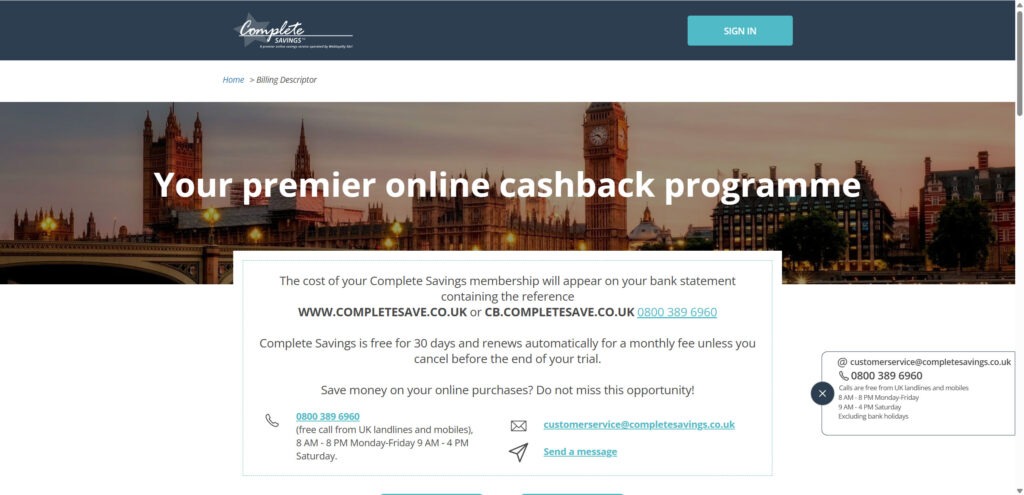
At first glance, the website does not look like a typical scam site. It is tied to a real cashback membership program called Complete Savings, it has published terms, and it lists customer service contact details. But that does not mean people trust it. In fact, a lot of shoppers end up researching it only after they notice recurring charges they do not remember agreeing to.
That is why this question keeps coming up:
Is CompleteSave.co.uk really a scam?
The most accurate answer is:
Not a fake website, but risky and widely viewed as misleading
CompleteSave.co.uk does not appear to be a classic fake-store or phishing operation. It is linked to a real paid cashback program run under the Complete Savings / Webloyalty brand. The site has membership terms, customer support, and billing information.
However, there is a major catch.
The UK Advertising Standards Authority upheld complaints against Webloyalty / Complete Savings in October 2024, finding that certain ads were misleading because they did not make it clear enough that consumers were entering a paid monthly subscription in order to get the advertised reward or cashback.
So while this is not a textbook fake scam site, it has strong scam-like warning signs from a consumer point of view.
What CompleteSave.co.uk actually is
CompleteSave.co.uk is connected to Complete Savings, a membership program that promises benefits such as:
- cashback on purchases
- monthly bonuses
- discounted gift cards
- offers at hundreds of retailers
The official site says members join by paying a monthly membership fee and accepting the program terms. The terms page also shows that the service is an active subscription product, not a one-time reward.
This matters because many people assume they are simply claiming a post-purchase reward, when in reality they may be signing up for an ongoing paid plan.
Why so many people think it is a scam
This is where most of the trouble starts.
Many complaints do not come from people who knowingly joined and later changed their minds. They come from people who say they:
- clicked an offer after buying something from another retailer
- thought they were just claiming cashback or a reward
- did not fully realize they were starting a subscription
- later found recurring charges on their statements
That exact type of confusion is what regulators focused on. The ASA said the ads did not make clear enough that users had to enter a paid monthly membership and actively claim the reward.
For ordinary shoppers, that distinction is huge.
A normal customer thinks, “I’m getting a reward connected to my order.”
What may actually be happening is, “I’m enrolling in a subscription service that will renew automatically unless I cancel.”
That mismatch is the reason the site has such a bad reputation online.
The recurring charges are the biggest red flag
The most common trigger for suspicion is the monthly fee.
According to Complete Savings’ own pages, the membership can start with a trial period and then renew automatically for a monthly fee unless canceled. The site also explains how the charge may appear on your bank statement, including descriptors like:
- WWW.COMPLETESAVE.CO.UK
- CB.COMPLETESAVE.CO.UK
- references containing completesave.co.uk
That means the company itself knows people often search those statement entries to understand where the charge came from.
For many readers, that is the heart of the issue.
A charge you clearly expected feels normal.
A charge you discover later, from a service you do not remember joining, feels like a scam even if the company has legal terms buried somewhere in the signup flow.
What regulators said
The strongest public warning sign is the ASA ruling from October 23, 2024.
The ASA upheld complaints about Complete Savings / Webloyalty advertising and said the ads were misleading. In plain English, the concern was that shoppers were not being told clearly enough that:
- the cashback or welcome reward was tied to a paid monthly subscription
- the reward was not simply a free bonus
- extra action was required to claim it
The ruling required that the ads not appear again in the same form.
That is not a minor detail.
It means this is not just internet gossip or a few angry reviews. There is a formal regulatory finding behind the criticism.
What consumer reports say
The reputation problem also shows up in consumer reporting.
MoneySavingExpert reported in May 2025 that one reader secured a £675 refund from Complete Savings after realizing he had been charged following a misleading signup flow. The same reporting said many similar cases were being reported after public warnings about the service’s ad practices. MSE had also reported earlier on a case involving a £975 refund tied to long-running monthly charges.
That does not prove every complaint is identical.
But it does show a pattern serious enough that large refunds have been granted in some cases.
Is it ever legitimate for some users?
Yes, and this is why the issue is more complicated than a simple yes-or-no answer.
There are recent Trustpilot reviews from people who say they use Complete Savings intentionally and get real value from it. Some say the cashback outweighs the monthly fee, especially if they shop online often or use the gift card discounts.
So the service itself is not purely fictional.
The bigger problem is how people get into it.
A service can be real and still be promoted in a way that many consumers find deceptive. That is exactly why this case has remained controversial.
Signs that your charge may be from CompleteSave.co.uk
If you are checking your statement, look for entries that include:
- completesave.co.uk
- WWW.COMPLETESAVE.CO.UK
- CB.COMPLETESAVE.CO.UK
- phone references tied to the service such as 0800 389 6960
The official FAQ and billing descriptor page both reference these kinds of statement entries.
What to do if you were charged
If you found a charge and do not remember knowingly signing up, take these steps:
1. Check your email
Search for:
- Complete Savings
- CompleteSave
- Webloyalty
Look for a welcome email, membership message, or cancellation notice.
2. Review your bank statements
See how long the charge has been appearing and how much you have paid in total.
3. Cancel immediately
The official service lists cancellation options through its website, email, and phone support. Its terms and pages reference customer support at 0800 389 6960, along with support and cancellation email channels.
4. Ask for a refund
Be clear and direct. State that:
- you did not knowingly intend to join a paid monthly membership
- you believed you were claiming a reward or cashback
- you want all unauthorized or misleading charges reviewed
5. Monitor future charges
Do not assume one cancellation fixes everything. Check your next statements carefully.
Final verdict
So, is CompleteSave.co.uk a scam?
My verdict: not a fake site, but still a serious consumer risk
CompleteSave.co.uk is tied to a real cashback membership program with real customer service and published terms. That means it does not fit the usual definition of a fake scam website.
But there is a very important second half to that answer.
The service has been tied to misleading advertising, recurring charge complaints, and high-profile refund cases. The UK advertising regulator formally upheld complaints against the company’s advertising, and consumer reporting shows that many people felt they had been enrolled without fully understanding what they were agreeing to.
So for most readers, the practical answer is:
- Not a classic fake scam
- Yes, it has real red flags
- Yes, many consumers reasonably experience it as scam-like
- Treat any charge from it with caution and verify it immediately

Join the discussion
6 commentsShare your experience or ask a question about this article.
Discussion
I think its a scam and i want out of it
In reply to e foster
You can get out of it, and it is simpler than the site will make it look. Do not bother with their cancellation page or their support email – those exist to slow you down, and a “cancellation” from them is not binding anyway.
Ring the number on the back of your card instead and say three things: revoke that merchant’s recurring authorisation, block them from billing again, and issue me a new card number. Ask for a new number even if they offer just to block the merchant, because card networks automatically pass updated card details to merchants holding a subscription. Then dispute any charges you did not knowingly agree to as not as described or unauthorised – you normally have up to 120 days.
If any more product arrives afterwards, it is legally yours to keep under the FTC’s unordered-merchandise rules; do not pay a restocking fee or return postage. And worth filing at reportfraud.ftc.gov once you are out.
In reply to Stelian
I ordered some items on Temu they talked about cash back and I thought this was connected to my order. What happened is Temu sent all my details to the above company who signed me up without my permission and took £18 a charge which would have been taken monthly. WARNING do not click cash back on Temu. I have contacted the company and hope that 1. My alleged subscription is cancelled and that
2 I will receive a £18 refund
In reply to Philip Manton
That is exactly how these cashback memberships recruit, Philip – the offer appears immediately after a genuine purchase, so it reads as part of the checkout you have just completed, and the monthly membership terms sit in small print under the claim button. Do not rely on their cancellation alone: ring your bank and instruct them to cancel the continuous payment authority to that merchant, which they are obliged to do, and ask them to reclaim the money under the chargeback or direct debit rules. Get written confirmation of the cancellation from the company as well. Thank you for saying where the offer appeared – that is the part other readers will recognise.