

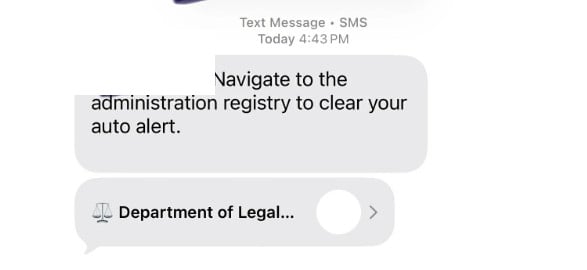
A text message appears out of the blue and tells you to “navigate to the administration registry to clear your auto alert.” It may show a contact card labeled “Department of Legal Compliance,” making it sound like a real government or legal authority.
It is not.
This is a growing text-based phishing scam designed to push people onto a fake website where they are asked to pay a small “fee” and enter personal details. The fee is bait. The real target is your credit card information and any identity data you type in.
Scam Overview
The “Department of Legal Compliance” text scam is a classic example of smishing, which is phishing delivered through SMS or messaging apps.
Instead of pretending to be your bank or a delivery company, this scam plays a different angle: legal authority. It uses formal language and vague compliance terminology to create unease, then offers a quick way to “resolve” the issue by visiting a link, scanning something, or following an “administration registry” prompt.
Reports describe the core hook as a short instruction like:
“Navigate to the administration registry to clear your auto alert”
…paired with a contact label such as “Department of Legal Compliance.”
That wording is carefully chosen.
It does not specify what the “auto alert” is, what you supposedly did, or what law you violated. That ambiguity is not an accident. It is part of the manipulation.
When a message is vague but serious-sounding, many people fill in the gaps themselves:
- “Did something get filed under my name?”
- “Is there a problem with my car registration?”
- “Is this connected to a ticket, toll, or court notice?”
- “Did I miss a payment?”
- “Is this about my job application, background check, or something official?”
Scammers rely on that uncertainty.
They want you to feel just uncomfortable enough to click, but not informed enough to verify through a proper channel.
Why scammers use a name like “Department of Legal Compliance”
“Department of Legal Compliance” sounds official, but it is broad enough that most people cannot easily place it.
That is the sweet spot for scams.
A real agency name is usually tied to a specific jurisdiction and has clear branding, clear contact channels, and a verified web presence. A made-up “department” can borrow authority without having to match a real organization’s exact rules.
It also gives scammers flexibility.
They can use the same text script in different contexts:
- unpaid toll or ticket scams
- “registration hold” threats
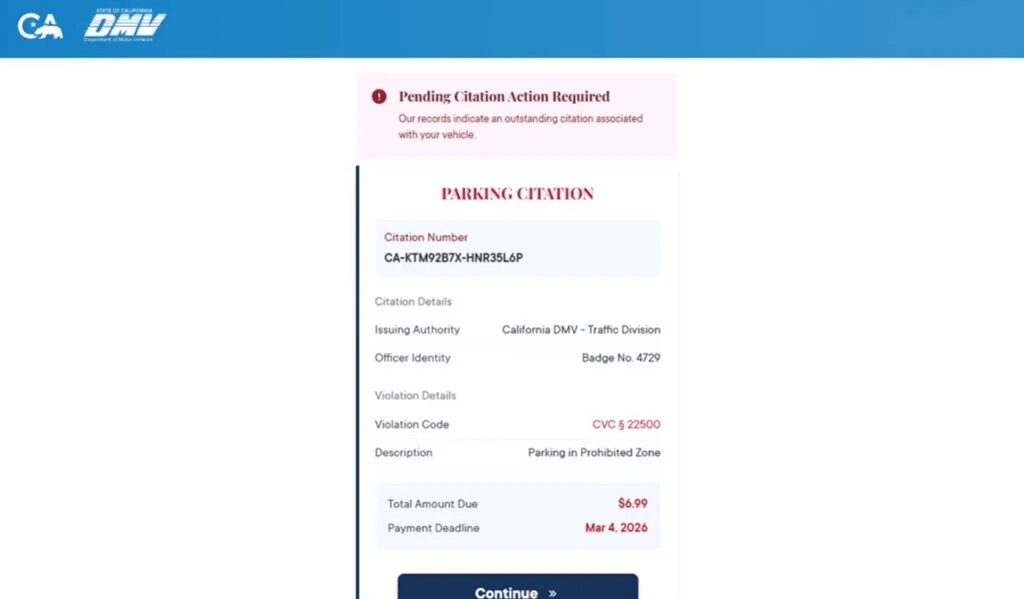
- “DMV citation” payment traps
- identity verification scams
- job application and data-harvesting campaigns
The label changes. The funnel stays the same.
The scam’s real structure is familiar
Even though the name is different, the mechanics closely match the wave of unpaid toll and citation smishing scams that consumer protection agencies have warned about.
The FTC has warned that scammers are sending texts demanding money and impersonating tolling agencies, with the goal of getting you to click and pay through fraudulent links.
The FCC’s guidance for toll road payment scam texts is also directly relevant because the tactics are the same: do not engage, do not click links, and verify independently using official sources.
In the “Department of Legal Compliance” version, the message usually does not mention tolls upfront. Instead, it uses the “auto alert” and “administration registry” language to hook a broader audience.
What happens after you click
The scam works because the next step feels like a routine administrative process.
Once you click the link or follow the prompt, you are typically routed to a fake website designed to look like a registry, compliance portal, citation clearing page, or “administration” tool.
From there, the site will usually do two things:
- Collect personal data “to verify your record”
- Request a small payment “to clear,” “release,” or “remove” the alert
The small payment is one of the most effective parts of the scam.
A demand for $300 triggers skepticism.
A demand for $6.99 or $9.99 triggers compliance.
Scammers know many victims will think:
“It is small. I will pay it and move on.”
That payment screen is where the real theft happens, because it captures:
- credit card number
- expiration date
- CVV
- billing address and ZIP code
Why the “small fee” tactic is so effective
Small fees reduce friction and increase conversion.
They also create a dangerous false sense of safety. People assume a small payment means small risk.
But the actual harm is not the fee. The harm is the data you hand over.
Once scammers have your card details, they can:
- attempt unauthorized purchases
- run test charges, then escalate
- sell the card data to other criminals
Once they have your personal information, they can:
- target you with follow-up scams
- attempt identity fraud
- attempt account takeovers using your email and phone number
This is why smishing is treated as a serious threat category, not just “spam.” CISA describes smishing as phishing via text messages designed to trick victims into clicking, downloading, or engaging, often to steal sensitive information.
The message is designed to defeat your instincts
Most people have learned not to click random links in texts.
Scammers get around that by making the message feel like an internal notification or an automated compliance alert, not a sales pitch.
These are the persuasion levers they use:
- Authority: “Department of Legal Compliance” implies a legal or regulatory power
- Ambiguity: “auto alert” is unclear, which triggers worry
- Urgency: the message implies something must be “cleared”
- Convenience: the “registry” sounds like a simple administrative step
The FBI’s general guidance on phishing and spoofing is blunt for a reason: do not click anything in unsolicited texts and look up contact information on your own instead of using what the sender provides.
That principle is the fastest way to break this scam.
What the “Department of Legal Compliance” text often looks like
Based on public reports, the scam text commonly includes wording like:
- “Navigate to the administration registry to clear your auto alert”
- A contact card or sender name that reads “Department of Legal Compliance”
In many phones, the message may show a link preview or a tappable contact card. That presentation can make the sender feel more legitimate than a random number.
It is still just a front.
Common red flags
If you want to give readers a fast checklist, these are the most consistent warning signs:
- The message is unsolicited and vague, but serious-sounding
- It claims you must “clear” an “auto alert” through a registry
- It uses a broad official-sounding name that is hard to verify
- It pushes you to click a link or follow a shortcut
- The site asks for personal information and a small payment
- The domain does not match an official government domain
- The page pressures you to act quickly instead of verifying
A legitimate agency does not need to hide behind ambiguity.
Scammers do.
How The Scam Works
This scam follows a predictable funnel. The details may change, but the structure is stable.
Step 1: Mass texting to a wide audience
Scammers send these messages in bulk.
They do not need to know anything about you. They rely on scale and probability.
Even if only a small percentage click, the scam can still be profitable.
People often receive these texts after their phone number is exposed through:
- data broker lists
- marketing databases
- public leaks
- job application forms and lead-gen sites
You do not have to do anything wrong to be targeted. You just need to exist on a list.
Step 2: The “compliance” hook creates discomfort
The message is short and intentionally unclear.
“Auto alert” is a perfect example of scam language because it sounds technical and official, but it is not something most people can confidently identify.
It triggers “What is this?” and “Is this about me?” without giving enough context for you to dismiss it quickly.
That moment of uncertainty is where scams win.
Step 3: A fake authority label is introduced
Instead of pretending to be a familiar brand, scammers invent authority:
“Department of Legal Compliance.”
In reports about this scam, the label appears alongside the “administration registry” message, creating an impression of an official workflow.
The purpose is not accuracy.
The purpose is psychological weight.
Step 4: The victim clicks and lands on a fake portal
If you click the link or follow the prompt, you are sent to a scam website.
That site is usually designed to look like one of the following:
- an administrative registry
- a compliance clearance portal
- a citation clearing system
- a payment gateway tied to a “legal department” workflow
To increase trust, the page may include:
- formal headings
- official-sounding terms like “registry,” “case,” “citation,” “clearance”
- a “record lookup” screen that always finds something
- a warning banner about consequences if you do not complete the process
This is theater.
The site is built to guide you toward the payment step.
Step 5: The site requests personal details “to verify”
Many scam portals collect data first because it increases the value of the victim profile.
Common fields include:
- full name
- address
- phone number
- email address
- ZIP code
Sometimes it will ask for vehicle-related information, depending on how the scam is framed.
This step also increases compliance because once a person enters data, they feel invested in finishing the process.
Step 6: The site introduces a small fee
After “verification,” the site reveals an amount due.
Often it is a small number that feels like a processing fee or administrative charge.
This is the key conversion tactic.
A small fee makes the victim think they are buying closure.
In reality, they are handing over their card details.
Step 7: Credit card theft occurs at the payment screen
When the victim enters payment information, the scammers capture:
- card number
- expiration date
- CVV
- billing address and ZIP
This is the real objective.
From there, scammers can attempt charges immediately or later.
In many smishing campaigns, criminals also store the personal details you provided and use them to run more convincing fraud attempts later.
Step 8: The scam ends with a fake confirmation or a fake error
Scammers often use one of two endings:
Fake confirmation
A “success” screen that makes you think the problem is resolved.
This can delay you from calling your bank quickly.
Fake error
A “payment failed” screen that pushes you to try again.
This can lead victims to enter multiple cards.
Both outcomes benefit the scammer.
Step 9: Follow-up scams begin
After interaction, victims often become targets for additional scams, including:
- “refund processing” messages
- fake fraud department calls
- identity verification scams
- recovery scams that promise to get your money back for a fee
If you publish this article, it is worth warning readers about recovery scams explicitly. People who get scammed once are frequently targeted again.
Step 10: The victim discovers fraud later
Because the initial fee is small, many victims do not connect the dots until they see:
- a suspicious charge
- multiple charges
- declined transactions
- bank fraud alerts
- new scam texts and calls
This is why fast action matters even if you only paid a small amount.
What To Do If You Have Fallen Victim to This Scam
If you clicked, entered information, or paid, use this checklist. The goal is to stop financial loss, reduce identity risk, and document what happened.
- If you entered card details, call your card issuer immediately
Use the number on the back of your card. Tell them you entered your card details on a fraudulent website linked from a text message. Ask to cancel the card and issue a replacement. Also ask them to review transactions and stop pending authorizations. - Turn on real-time transaction alerts
Enable alerts for every purchase and for online transactions. This helps you spot test charges quickly, which is common after card theft. - Check your recent transactions and dispute anything you do not recognize
Look for small “test” charges first. If you find fraud, dispute it right away and save the dispute reference number. - If you entered personal details, tighten identity protections
If you shared name, address, phone number, and other identifiers, consider placing a fraud alert or credit freeze, depending on your risk tolerance and local options. - Change passwords if you entered any credentials anywhere
If the scam site asked you to log in or reused any email or account password, change it immediately and enable 2-factor authentication. - Do not respond to follow-up texts or calls
Scammers often escalate. If someone calls claiming they can “fix” it, hang up. If you need help, contact your bank using official numbers you find yourself. The FBI specifically recommends not clicking unsolicited links and verifying independently. (Federal Bureau of Investigation) - Take screenshots and save evidence
Capture:
- the text message
- the sender information
- the link preview
- the website pages
- any payment confirmation or error screen
Scam sites rotate and disappear quickly.
- Report the text as spam and report the incident
Use your phone’s “report junk” feature if available, block the sender, and report the incident to relevant consumer protection agencies. The FCC’s guidance for scam payment texts recommends not engaging, blocking, and verifying through official channels. - Forward scam texts to 7726 (SPAM) if your carrier supports it
In the US, many carriers use 7726 to collect spam reports. It is an easy step that helps carriers improve filtering. - Watch for recovery scams
If you post online or tell others you were scammed, you may get messages from “recovery agents” or “refund experts.” They are often scammers too. Never pay someone to “recover” funds without verified legal channels. - If you are worried about malware, update your phone and run a reputable scan
Most versions of this scam are data-harvesting and payment theft, not malware installation. Still, update your OS and review any new apps or profiles if you installed anything. - Verify any real legal or administrative issue independently
If you are concerned the message could relate to a real matter, do not use the link in the text. Instead, look up the official agency or court contact info yourself and verify through an official website.
The Bottom Line
The “Department of Legal Compliance” text scam is a smishing campaign built on authority, ambiguity, and convenience.
The message pushes victims toward an “administration registry” flow, then funnels them into a small-fee payment screen where credit card and personal details are stolen. Public reports describe the core lure using the “auto alert” wording and the “Department of Legal Compliance” label.
If you receive a message like this, do not click, do not reply, and do not pay. Verify independently using official sources. If you already entered payment details, contact your card issuer immediately and treat the card as compromised.
FAQ
What is the “Department of Legal Compliance” text scam?
It is a smishing scam where criminals send text messages claiming to be from a “Department of Legal Compliance” and instruct you to visit an “administration registry” to clear an “auto alert.” The link leads to a fake site that asks for a small payment and captures your credit card and personal data.
Is “Department of Legal Compliance” a real government agency?
In this context, no. Scammers use generic, official-sounding names that are hard to verify quickly. The label is meant to create authority and pressure, not provide a legitimate point of contact.
What does “clear your auto alert” mean?
It is intentionally vague. Scammers use unclear phrases so you will worry and click to “fix” the problem. Legitimate agencies typically describe the issue clearly and provide verifiable ways to confirm it.
Why do they ask for a small fee?
Small fees like $6.99 to $19.99 reduce suspicion and increase compliance. The payment is bait. The real goal is stealing your card number, CVV, billing address, and other identity information.
What happens if I enter my credit card details on the scam site?
Scammers can use your card for unauthorized charges, run small test transactions, or sell the card details to other criminals. They may also reuse the personal information you entered for identity fraud or follow-up scams.
What personal information are they trying to collect?
Commonly:
- Full name
- Address and ZIP code
- Phone number and email
- Sometimes vehicle-related information
This data can be used to target you again or attempt identity-related fraud.
I clicked the link but did not enter anything. Am I safe?
Your risk is much lower if you did not submit information. Close the page, do not return to it, and watch for follow-up scam texts or calls.
I entered my card details. What should I do immediately?
- Call your card issuer and report you entered card details on a fraudulent site
- Cancel or freeze the card and request a replacement
- Review transactions and dispute anything you do not recognize
- Turn on real-time transaction alerts
Should I replace my card even if I do not see fraud yet?
Yes. Stolen card details are often used later or sold. Replacing the card proactively is the safest move after a phishing incident.
Can this scam lead to identity theft even if the charge was small?
Yes. The amount does not matter. If you entered personal details, scammers can use them for more convincing scams, account takeover attempts, or identity misuse.
How do I report the scam text?
- Mark the message as spam in your messaging app
- Block the sender
- Forward it to 7726 (SPAM) if your carrier supports it
- Report it through official consumer fraud reporting channels in your country
How can I avoid scams like this in the future?
- Do not click links in unexpected texts
- Do not trust “official” sender names by default
- Verify through official websites you find yourself, not through the message
- Treat any “small fee to clear an alert” request as suspicious until proven otherwise








