

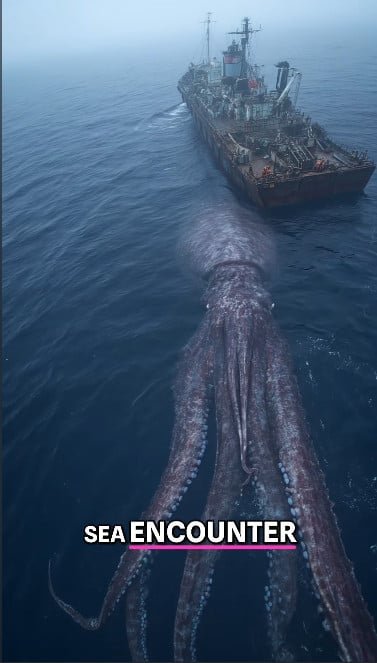
A massive 60-foot squid attacking a submarine near New Zealand? 🌊 It sounds like the plot of a science fiction thriller, but a viral video claims it actually happened. The clip shows a gigantic squid-like creature wrapping itself around a vessel at sea, leaving viewers wondering: Is this real evidence of a sea monster, or just another internet exaggeration?
In this article, we’ll break down the viral footage, compare it to real scientific evidence, and separate fact from fiction when it comes to giant squid encounters.
The Viral Video: What It Shows
The clip in question shows a colossal squid-like creature, said to measure around 60 feet long, attacking or swimming near a submarine off the coast of New Zealand.
It quickly gained traction on TikTok, YouTube, and Facebook, where captions like “Real Kraken Caught on Camera” and “Proof of Giant Squids” fueled speculation. Some users even suggested it was proof of undiscovered deep-sea monsters.
But as jaw-dropping as it looks, there are major problems with the claim.
Red Flags in the Video
- No Verified Reports
- No credible news outlets, marine research institutes, or government agencies have confirmed such an encounter.
- An attack of this magnitude would have made global headlines.
- Recycled Footage
- The video bears resemblance to older CGI ocean monster clips. Elements of the squid look digitally rendered rather than naturally textured.
- Size Exaggeration
- At 60 feet, this squid would dwarf every scientifically documented squid species on record.
- Source Credibility
- The accounts sharing this video specialize in viral “mystery” content, not verified marine biology.
The Science: What We Actually Know About Giant Squids
Despite the viral hype, giant squids are real — but not nearly 60 feet long.
Giant Squid (Architeuthis dux)
- Maximum Size: Around 40–43 feet (including tentacles).
- First Live Footage: Captured in 2012 by Japanese researchers.
- Habitat: Deep ocean waters worldwide, rarely seen alive.
Colossal Squid (Mesonychoteuthis hamiltoni)
- Maximum Size: Around 33–35 feet.
- Weight: Can exceed 1,000 pounds.
- Unique Feature: Heavier and bulkier than giant squids, with rotating hooks on tentacles.
Both species are awe-inspiring, but they fall far short of the mythical 60-foot squid portrayed in the viral video.
Real Famous Squid Footage
- Greenpeace (2007)
- Filmed Humboldt squids (about 6 feet long) interacting with a mini-submarine in the Bering Sea.
- Real, but nowhere near 60 feet.
- Japan (2012)
- First live footage of a giant squid, around 24 feet long.
- Documented with scientific precision, not viral hype.
- Colossal Squid (2007, New Zealand)
- A colossal squid was captured by New Zealand fishermen. It measured 33 feet and weighed nearly half a ton.
- Preserved at the Museum of New Zealand Te Papa Tongarewa.
These examples show that giant squids exist, but not at the impossible size claimed in the viral clip.
Why Fake Ocean Monster Videos Spread
- Fear + Wonder – People are naturally fascinated (and scared) by the unknown deep sea.
- AI and CGI Tools – Modern editing software can create ultra-realistic fake sea creatures.
- Algorithm Incentives – Social platforms reward shocking, shareable content.
- Mythical Legacy – Legends of the Kraken and sea monsters prime viewers to believe.
What’s Real vs. Clickbait
- Real: Giant and colossal squids exist, reaching lengths of 30–40 feet.
- Fake: The viral 60-foot squid attacking a submarine near New Zealand.
- Truth: While the ocean still hides mysteries, no scientific evidence supports a squid of that size.
Conclusion
So, did a 60-foot squid attack a submarine in New Zealand? The answer is a clear no.
The viral video is either recycled CGI footage or an AI-generated hoax meant to spark clicks and shares. In reality, the largest squids ever documented max out around 40 feet — still enormous, but nowhere near the exaggerated claims of internet folklore.
The truth is that giant squids remain one of the ocean’s most fascinating creatures, without the need for exaggeration. The Kraken of legend belongs in mythology and Hollywood, not in verified marine science.

Join the discussion
0 commentsShare your experience or ask a question about this article.
Discussion
Start the conversation
Have a question or something useful to share? Add the first comment.