


Drr.one dressed itself up as Roblox. It copied the site’s menu and Get Robux banner, asked for your username and flashed pop-ups of supposed 50,000 Robux winners.
If you’re searching for drr.one, drr.one Roblox or free Robux scam reports, here’s what the site was, what’s left of it now and how to protect a Roblox account.
Overview
What drr.one was
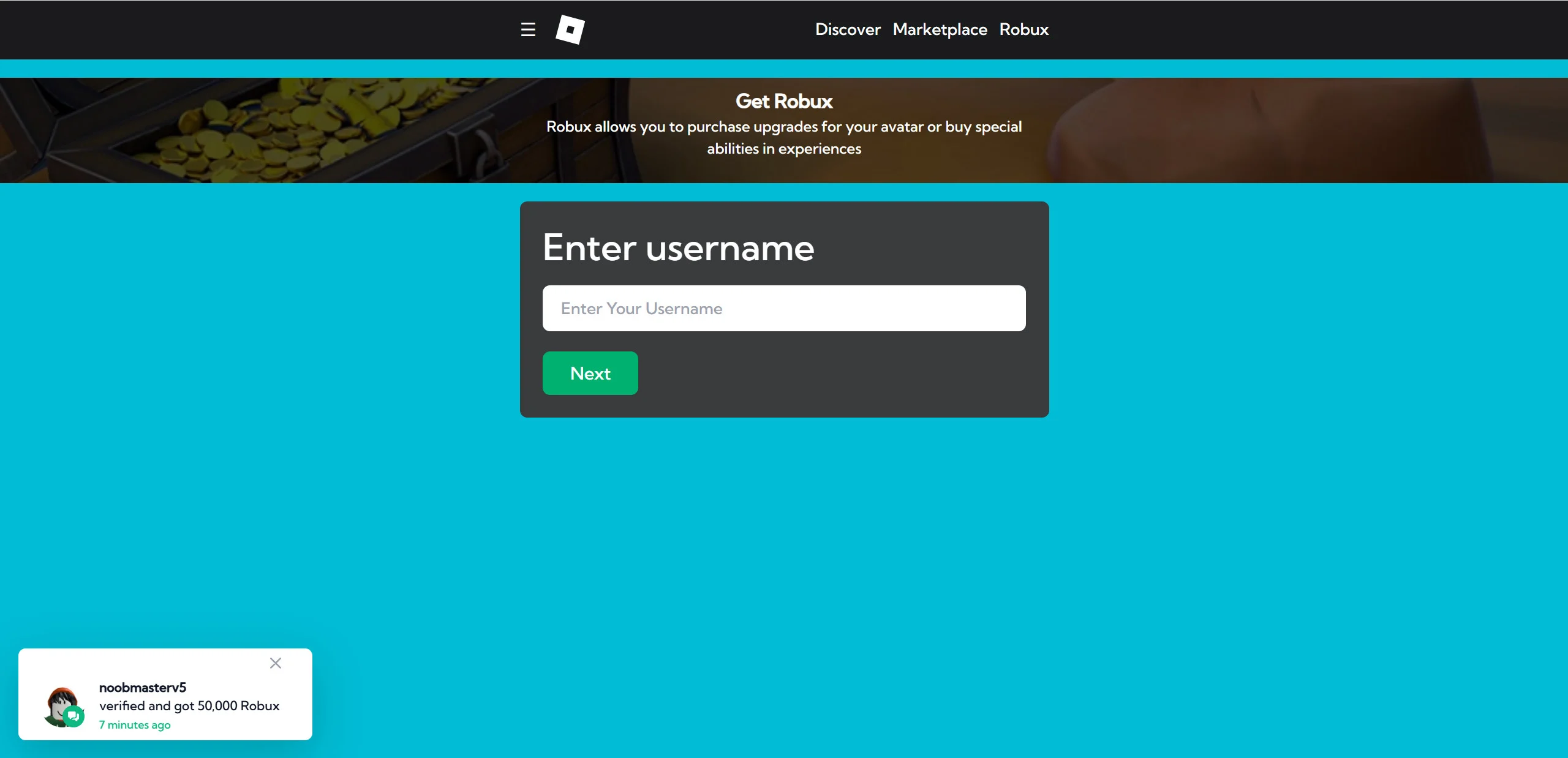
Drr.one was a free Robux page that we reported in June 2025. It imitated Roblox’s own Robux page, then asked visitors to enter their Roblox username and click Next.
A pop-up in the corner claimed another player had just verified and received 50,000 Robux, to make the offer look real.
What’s left of it now
The drr.one domain isn’t registered any more. The .one registry has no record of it, and the address doesn’t load.
That doesn’t end the risk. An unregistered name can be bought again by anyone, and the same page can return on a different short domain.
Our verdict on drr.one
Drr.one was a Roblox lookalike that offered something Roblox says doesn’t exist. Roblox’s own support pages state that any offer of free Robux is a scam.
If a page like this reaches you, keep these points in mind:
- There is no Robux generator, and Robux can only be bought from Roblox or earned on the platform.
- A page that looks like Roblox but isn’t on roblox.com is not Roblox.
- Winner pop-ups on these pages are part of the design, not real players.
- Never type your Roblox password anywhere except the real Roblox login page.
Drr.one Roblox Page: What It Copied
Our June 2025 screenshot shows how closely drr.one copied Roblox. The top bar had a Roblox-style logo and the Discover, Marketplace and Robux links from the real site.
Below it sat a banner reading Get Robux, with the line Robux allows you to purchase upgrades for your avatar or buy special abilities in experiences.
The only form on the page asked for a username. There was no password box at that stage, which makes the first step feel harmless.
A notification in the lower corner showed a Roblox avatar, the name noobmasterv5 and the message verified and got 50,000 Robux, 7 minutes ago.
Fake activity alerts like this rotate through invented names and amounts. They’re there to suggest that other people are succeeding right now.
The copied design matters most for younger players. Someone who knows Roblox’s look may not think to check the web address once the colors and menu feel familiar.
Why Free Robux Doesn’t Exist
Roblox is clear on this. Its support article on free Robux or subscription generators says any offer of free Robux, subscriptions or valuable items is a scam.
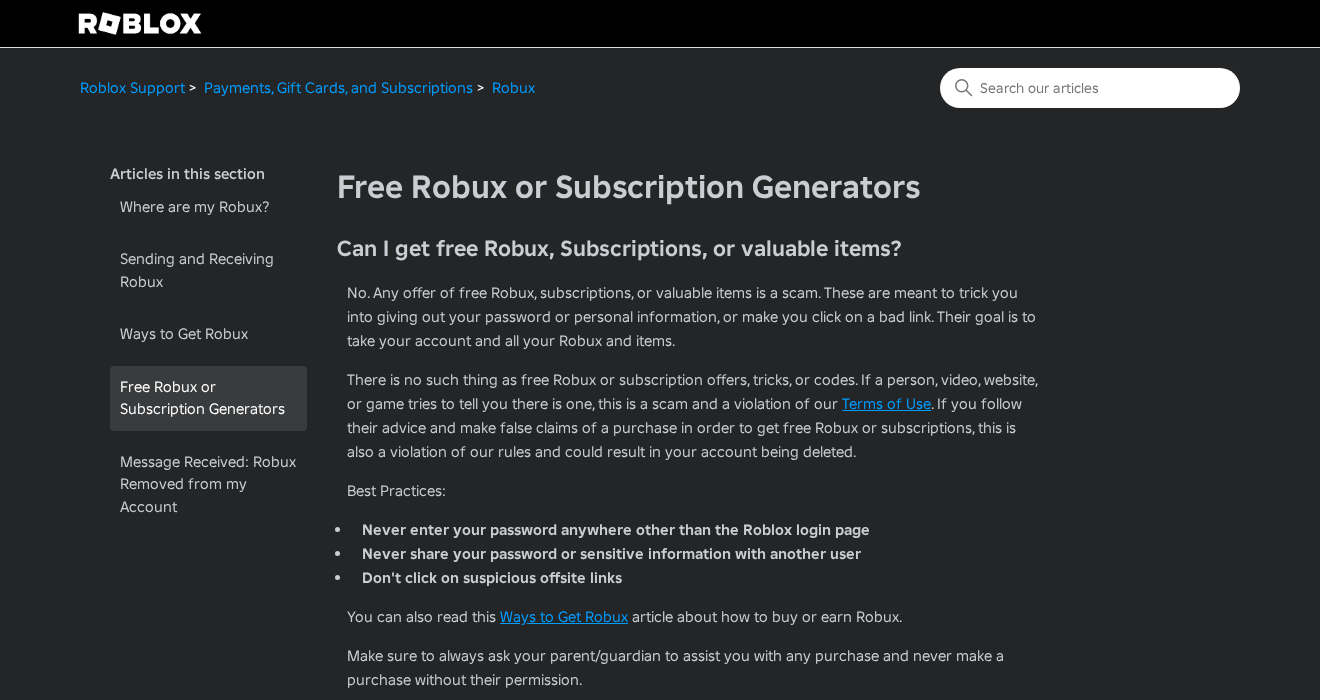
The same page says these offers aim to trick players into giving out passwords or personal details, or into clicking bad links.
The goal, Roblox says, is to take the account and all its Robux and items.
Roblox also warns that following such advice, for example by making false purchase claims, breaks its rules and could get an account deleted.
Its Ways to Get Robux article lists the real options. You can buy Robux in the Roblox apps, on the web or with gift cards.
You can also earn Robux by selling avatar items on the Marketplace or building experiences. Creators can exchange earned Robux for real money through the Developer Exchange program.
The same article answers the generator question directly. There is no such thing as a Robux generator, and any person, website or experience claiming otherwise should be reported.
How the Drr.one Free Robux Scam Worked
Step 1: A short link in an ad, post or comment
Posts promoting these pages often use titles that promise thousands of free Robux, aimed at players searching for quick ways to get currency.
Our 2025 report traced links like drr.one to social media posts, Discord servers, forum spam and comments under Roblox videos.
Short, unusual domains are easy to paste into chats and comments, and they don’t reveal what kind of site sits behind them.
Step 2: A page that looks like Roblox
The page copied Roblox’s menu and Robux banner. For a quick visitor on a phone, it looked like part of the real site.
Roblox’s account safety guide warns that the only links allowed on Roblox go to roblox.com or approved sites.
Step 3: Enter your username
The first request was just a username. Asking for something that feels public lowers a player’s guard and makes the next step feel like part of the same process.
The username also tells the operator which account to target if the player later hands over more details.
Step 4: A verification step
Generator pages usually move on to a human verification step, offering the Robux once the player completes surveys, installs apps or signs up for offers.
Those tasks pay the page’s operator through advertising and affiliate programs. The Robux never arrives, because the page has no way to give it.
Only Roblox can add Robux to an account, through a purchase, a creator payout or an official promotion.
Step 5: The page disappears
Sites like drr.one rarely last long. When complaints and blocklists catch up, the domain is dropped and the page moves to another address.
That’s what happened here. The domain that hosted the page is no longer registered at all.
Who Was Behind Drr.one?
Not Roblox
Drr.one had no connection to Roblox. It borrowed Roblox’s design to look official, which is exactly what Roblox warns players about.
Real Roblox promotions are announced through Roblox’s own blog, notifications and official channels, according to its account safety guide.
A domain with a short history
Archive records show drr.one sitting on a Porkbun parking page in 2023, with no site behind it. By June 2025 it hosted the fake Robux page.
Today the official .one registry returns no record for the name, which means its last registration has lapsed.
Earlier captures, from 2016 to 2019, show a different site that sent visitors to its own sign-in page. Short domains like this often change hands and purposes.
No owner, contact or terms
Our June 2025 screenshot shows no company name, contact address or terms link anywhere on the visible page.
A real service that handled player accounts would explain who runs it and how to reach them.
The lack of any identity is common to free Robux pages, which are built to be thrown away.
With the registration gone, the registry no longer shows who held the domain while the page was live. Throwaway scam domains often end this way.
That’s why the address bar matters more than the owner’s name. Checking for roblox.com takes seconds and works even when the operator is unknown.
Part of a much larger pattern
Drr.one was one of many interchangeable generator pages. We’ve covered others, from 5020.pro, which locked its fake generator behind offers, to 1030.pro.
Our guide to free Robux generator scams explains the wider tricks these sites share.
Newer pages often run on free blog and hosting platforms instead of their own domains, as with 10krobuxget.blogspot.com and asrgifts.netlify.app.
The look changes, but the request stays the same: a username, then tasks, then nothing.
Drr.one stood out for how closely it copied Roblox’s own Robux page, rather than using cartoon generator art like many others.
That makes it a useful example for teaching children to check the address bar, because the page itself gave few other clues.
Roblox’s Own Advice on Account Safety
Roblox’s Keep Your Account Safe guide says the most common way players lose accounts is by sharing their login details or filling out online surveys.
That’s exactly what free Robux pages ask for. The survey or verification step is often where an account starts to slip away.
The guide says never to share a password, browser cookies, 2-Step Verification codes or backup codes. It adds that Roblox employees will never ask for any of them.
It also warns about tricks that promise prizes or free Robux in exchange for account details, and says genuine promotions are announced through Roblox’s own channels.
Roblox’s guide shows scam messages that hide links with stars or spaces. It says not to trust any link with spaces, unusual characters or an unfamiliar site.
Roblox also advises logging out on shared computers, using a unique password and keeping only your own or a parent’s email address on the account.
Roblox’s advertising standards also ban ads that offer free Robux to attract players. An ad on Roblox promising free Robux breaks those rules.
Why a Username Is Worth Stealing
On Roblox, your username is your account’s unique identifier. Your display name is separate and can be changed for free, while changing the username itself costs Robux.
A page that collects usernames gets a list of real accounts tied to players who want free Robux. Those players are likely targets for follow-up messages.
Watch for friend requests, chats or emails that mention your free Robux, offer to finish the transfer or ask you to confirm a code. They’re follow-ups, not rewards.
An unexpected password reset email or a login alert you didn’t trigger is a sign someone is trying to get in.
Change your password on the real site if that happens, and check which devices are logged in to your account.
Roblox’s 2-Step Verification can use an authenticator app, an email code or a security key. The authenticator app is the option Roblox recommends.
How to Check a Link Before You Click
Most free Robux pages fall apart once you look at the address bar. These checks work on any device.
- Look at the web address before typing anything. Roblox pages end in roblox.com, with nothing extra after the dot.
- Be suspicious of short, unfamiliar domains such as drr.one, even if the page looks exactly like Roblox.
- Ignore pop-ups showing other players winning Robux. They’re part of the page, not real activity.
- Never complete surveys, install apps or sign up for offers to unlock a reward in a game.
- Check Roblox’s official help pages if you’re unsure whether an offer is real.
If you want more Robux for your money, Roblox says buying on the web, on a computer or with a gift card gives up to 25% more Robux.
Roblox also tells players to ask a parent or guardian to help with any purchase, and never to buy without permission.
Children are the main targets, so a short conversation helps. Explain that anything offering free Robux is a trick, however real it looks.
For parents, the Roblox app’s privacy settings let you limit who can message or chat with a child’s account, which cuts down on links sent by strangers.
What to Do If You Used Drr.one
What you need to do depends on what you entered or installed on the page.
- If you only entered a username, watch for messages asking for your password or a code, and don’t reply to them.
- If you entered your password, change it right away on the real Roblox site, and change it anywhere else you used the same password.
- If you can’t sign in, use Forgot Password or Username? on the Roblox login page, then contact Roblox Support right away.
- Turn on 2-Step Verification. Roblox recommends the authenticator app option, which stops someone logging in even if they have your password.
- Check your account email. Make sure only your own or a parent’s email address is linked, so password reset emails can’t go to someone else.
- Report the page or message. Use Roblox’s Report Abuse tools for any message, chat or experience that shared the link.
- Check for trials. If an offer took card or phone details, cancel unwanted trials with the seller, App Store or Google Play. Deleting an app won’t cancel them.
- Dispute charges you didn’t approve. Contact your card issuer or phone carrier soon. Card issuers often allow about 120 days, so don’t wait.
- Remove anything an offer added. If the verification step had you install an app, add an extension or allow notifications, remove it with the steps below.
How to Remove Anything a Drr.one Offer Installed
Typing a username into drr.one doesn’t install anything by itself. Each step below undoes one kind of change a verification offer can make, from notifications to installed apps.
Step 1: Revoke notification permission
Offer pages often ask to send notifications, then use them for fake prize and Robux alerts. Take that permission back first, especially on a child’s device.
In Chrome, open Settings, Privacy and security, Site settings, Notifications, and remove unfamiliar sites. In Edge, search its Settings page for Notifications.
In Firefox, open Settings, Privacy & Security, then Notifications under Permissions. On a Mac, Safari keeps the list under Settings, Websites, Notifications.
On Android, open Chrome, tap More, then Settings, Site settings, Notifications. Also check each app’s own notification switch in the phone’s Settings.
Step 2: Remove browser extensions you don’t recognize
In Chrome or Edge, open the Extensions page and remove anything added around the time of the Robux offer. Firefox lists extensions under Add-ons and themes.
In Safari on a Mac, open Settings, Extensions, select the extension and click Uninstall. If Safari says it came with an app, remove that app in Step 3.
Step 3: Uninstall apps the offers asked you to add
On Windows 11, open Settings, Apps, Installed apps, and uninstall anything added for the verification step. On a Mac, drag the app from Applications to the Trash.
On Android, open Settings, then Apps, select the app and tap Uninstall. On an iPhone, touch and hold the app icon, tap Remove App, then tap Delete App.
Step 4: Run an optional free Malwarebytes scan
If an offer installed something, a free on-demand scan can look for leftovers. It’s optional, and no scanner can promise a threat-free device.
- Windows: download the free Malwarebytes installer, run a scan and quarantine anything it flags.
- Mac: download the free Malwarebytes for Mac installer, open it and run a scan.
- Android: install Malwarebytes from Google Play or through our Malwarebytes for Android link, then run a scan.
Step 5: Add optional paid protection only if you want it
Paid real-time protection isn’t needed to recover from a Robux generator. If you want it anyway, Malwarebytes Premium is an optional paid product for Windows and Mac.
An ad blocker such as AdGuard can cut down on aggressive offer pages and pop-ups. Its apps are paid and optional, and they don’t remove anything already installed.
Step 6: Don’t reset a device because of a generator page
A factory reset erases your photos, files and settings, and visiting a Robux generator doesn’t call for one. If a reset ever seems necessary, back up everything first.
If problems continue after these steps, ask for free help in our Windows, Mac or mobile malware removal forums.
Frequently Asked Questions
Is drr.one legit?
No. Drr.one was a fake Roblox page offering free Robux, which Roblox says doesn’t exist. The domain is no longer registered and the page no longer loads.
If a page at that address reappears, treat it as a new and untrusted site.
Is drr.one connected to Roblox?
No. It copied Roblox’s menu and banner to look official, but it wasn’t on roblox.com and had no link to the company.
Can you really get free Robux?
No. Roblox says there’s no such thing as a Robux generator. Robux are bought from Roblox or earned by creators through the Marketplace and experiences.
Any person, video or website claiming otherwise is running a scam, according to Roblox’s support pages.
What happens if I entered my Roblox username on drr.one?
A username alone can’t unlock your account, but it tells scammers who to target. Watch for messages asking for your password or a security code.
Turning on 2-Step Verification now makes any later phishing attempt much less likely to succeed.
What should I do if I gave my password to a free Robux site?
Change your Roblox password on the real site immediately, turn on 2-Step Verification and check that only your own email address is linked to the account.
If you can’t sign in, use Forgot Password or Username? on the Roblox login page, then contact Roblox Support right away. Ignore anyone offering help in chat.
How do I report a free Robux scam?
Use the Report Abuse button in Roblox for messages, chats or experiences that share the link. You can also report the site to your browser’s safe browsing service.
Reporting helps Roblox’s moderators act against the accounts spreading the link, not just the page itself.
The Bottom Line
Don’t trust drr.one or any page offering free Robux, however much it looks like Roblox. The domain is gone, but the same page can return under a new name.
If you entered your password, change it on the real Roblox site now, turn on 2-Step Verification and contact Roblox Support if you’re locked out.
If an offer added apps, extensions or notifications, remove them with the steps above, and cancel any trial it started.

Join the discussion
0 commentsShare your experience or ask a question about this article.
Discussion
Start the conversation
Have a question or something useful to share? Add the first comment.