

The recent Enzo Biochem data breach settlement provides long-awaited relief for nearly 2.5 million victims. This massive cyberattack exposed highly sensitive personal and medical data. If you received a notice, understand your rights and options. This guide covers the breach background, settlement terms, how to file a claim, key deadlines, and steps to safeguard your data going forward.
Understanding the Enzo Data Breach
In April 2023, clinical laboratory giant Enzo Biochem fell prey to a crippling ransomware attack. Sophisticated hackers infiltrated their network and exfiltrated terabytes of confidential customer data. Breached information included:
- Full names
- Addresses
- Emails
- Phone numbers
- Clinical test results
- Medical history
- Insurance details
- Social Security numbers
For hundreds of thousands of people, their most sensitive medical and financial data is now in criminal hands. This poses severe risks like medical identity fraud and financial crimes.
Enzo failed to maintain adequate security despite being entrusted with such sensitive data. The company did not immediately notify affected individuals either, further jeopardizing victims. This attack was entirely preventable with proper cybersecurity protocols.
Overview of the $7.5 Million Settlement Agreement
After months of negotiations, Enzo agreed to establish a settlement fund topping $7.5 million. This provides important compensation to those adversely affected by their negligence. The terms of the agreement include:
- Payments up to $10,000 for proven financial losses related to the breach. This requires supporting documentation.
- Guaranteed minimum payment for all class members, even without documented damages. The amount depends on total claims.
- 2 years of free credit monitoring and identity theft protection services.
- 2 years of free healthcare data monitoring. Safeguards medical records from fraud.
- Reimbursement for breach-related losses like credit freezes and late fees.
While no amount of money can undo the damage from this devastating breach, the settlement aims to make victims whole again. Enzo has not formally accepted responsibility, but agreed to the terms to avoid further litigation.
Submitting a Claim by the Deadline
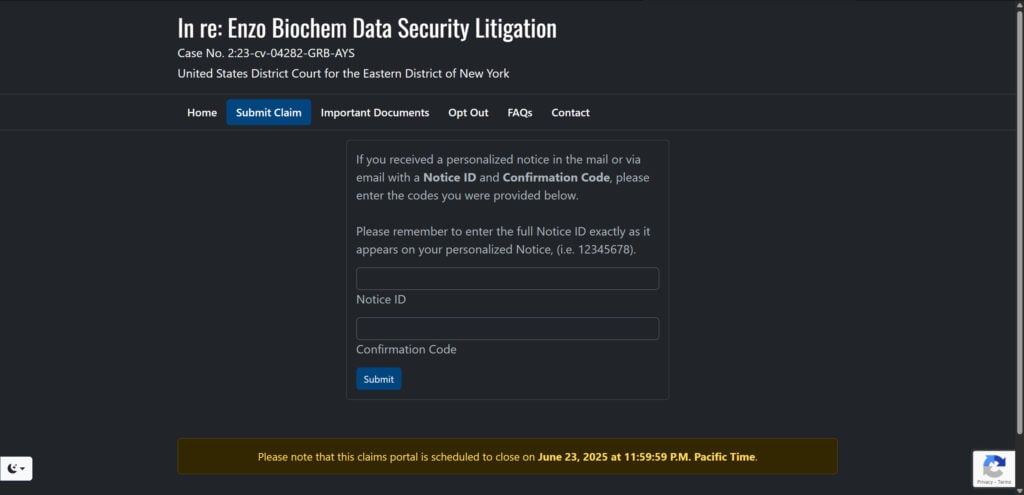
To receive your share of settlement funds, you must submit a claim by June 23, 2025. The simplest method is filing electronically through the official settlement website enzodatasettlement.com. Have your claim number and confirmation code handy when filing online.
You can also mail a completed claim form, available for download on the website. Make sure it’s postmarked by the deadline date. The detailed claim form gathers information needed to process your payment, including:
- Name and contact details
- Enzo account number if available
- Type of losses incurred from the breach
- Supporting documents for financial reimbursement claims
The court still must give final approval at a hearing on June 10, 2025. Payments can only be distributed after that, barring any appeals delaying the process.
Protecting Yourself After the Breach
While this settlement provides vital reparations, victims still face heightened risk of medical ID theft and financial fraud. Here are crucial steps everyone should take to safeguard their data in the wake of this breach:
- Freeze credit reports to block criminals from opening new accounts.
- Enable two-factor authentication on all accounts when possible.
- Change online account passwords, avoiding reused passwords.
- Watch closely for any suspicious financial or medical activity.
- Consider using a password manager to generate strong, unique passwords.
Additionally, continue monitoring your credit reports even after the free monitoring expires. Remain vigilant about reviewing medical records and statements as well to detect any anomalies.
No one should suffer harm from a company’s lax security standards. By filing your claim and taking proactive measures, you can secure the compensation you deserve and minimize risks following this disastrous data breach. Don’t let Enzo off the hook – submit your claim today.
Frequently Asked Questions
What is this lawsuit about?
This class action lawsuit was filed on behalf of individuals whose personal information was compromised in the April 2023 ransomware attack on Enzo Biochem’s network. The plaintiffs allege Enzo failed to adequately protect customer data. Enzo denies the claims but agreed to settle to avoid further litigation.
Who is included in the settlement?
The settlement class includes all U.S. residents whose personal information was potentially impacted in the Enzo Biochem data breach who were notified by the company.
What does the settlement provide?
The settlement establishes a $7.5 million fund to compensate affected individuals. It provides:
- Payments up to $10,000 for documented financial losses
- Guaranteed minimum payments to all class members
- 2 years of free credit monitoring and ID theft protection
- 2 years of free healthcare data monitoring
How do I file a claim?
You can file a claim online or by mail. The deadline to file is June 23, 2025. Have your notice ID and confirmation code when filing online at www.enzodatasettlement.com.
What is the claim deadline?
To receive benefits, you must submit your claim by June 23, 2025. This deadline applies whether filing online or by mail.
When will I get my payment?
Payments can only be distributed if the court gives final approval after a hearing on June 10, 2025. Checks will be mailed or electronic payments transferred after that, likely within 2-3 months.
What if I do nothing?
If you do nothing, you won’t receive any compensation or benefits from this settlement. You’ll also give up your rights to sue Enzo separately over this data breach.
Can I opt out of the settlement?
Yes, you can opt out by mailing a request postmarked by May 23, 2025. This is the only way to retain your rights to sue Enzo separately for claims related to this breach.
How do I object to the settlement?
You can object by mailing a notice to the settlement administrator by May 23, 2025. You must state reasons for your objection. You can also appear at the final approval hearing.
Who can I contact if I have more questions?
You can call the Settlement Administrator at [phone number] or email [email address] if you have any other questions not answered here.

Join the discussion
0 commentsShare your experience or ask a question about this article.
Discussion
Start the conversation
Have a question or something useful to share? Add the first comment.