

A sponsorship invitation lands just when your channel is starting to grow. The brand is familiar, and the opportunity looks surprisingly personal.
Before you open the campaign brief, take a moment. A polished invitation can ask for much more than your next video.
Overview
The fake partnership aimed at creators
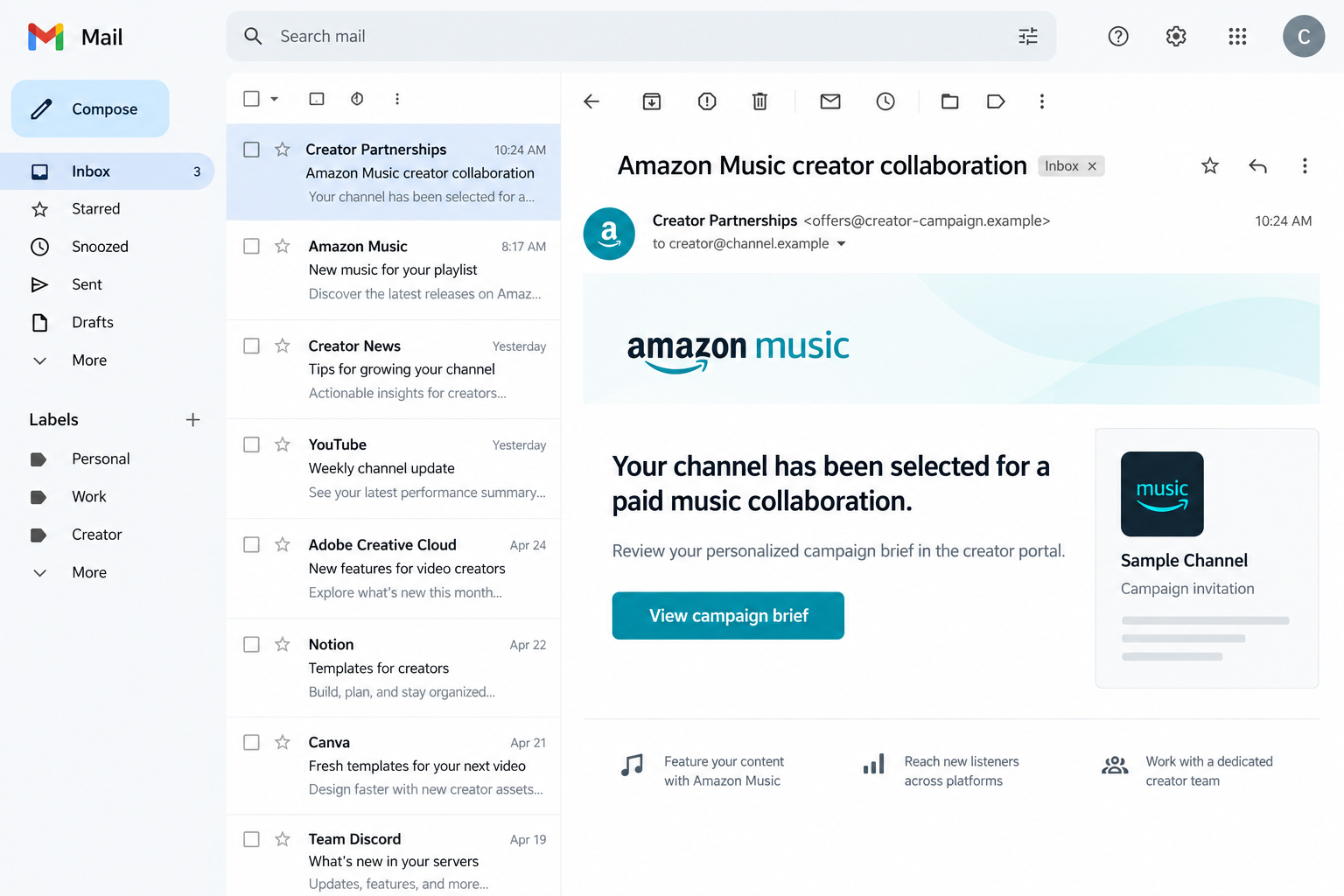
A Malwarebytes investigation documented an Amazon Music-themed creator portal at amazonyt[.]com. Its supposed Google sign-in led to credential theft, not a legitimate sponsorship agreement.
The illustration above uses fictional addresses to show an invitation’s appeal. It isn’t a recovered email or a screenshot of the attack website.
The important question is who receives your login, not how convincing the brand presentation looks. A recognizable logo cannot authorize somebody to collect your password.
What a creator stands to lose
The Google account behind a channel may also connect to email, business conversations, documents, and other services. Protecting it matters beyond a single upload.
- Don’t type a Google password into a sponsor’s own webpage.
- Don’t share a verification code to qualify for a campaign.
- Don’t approve a sign-in prompt you didn’t initiate through a trusted route.
- Don’t mistake a personalized dashboard for verified brand authorization.
A stolen password can enable attempts to access your account. Whether someone succeeded depends on the account’s protections and what information or approvals were handed over.
This isn’t a warning against every Amazon collaboration
Amazon and YouTube have genuine commercial programs. The deception concerns an impersonating portal and its login collection, not the existence of real creator opportunities.
The documented attack page couldn’t be reached through the normal capture route. Its present availability isn’t established, and readers shouldn’t visit it to investigate.
Even if the domain disappears, the lesson survives: sponsorship discussions must not become a reason to surrender control of the account running your business.
The Real Amazon and YouTube Program Is Different
Shopping links aren’t a secret music sponsorship
YouTube’s official Amazon Shopping announcement describes eligible creators tagging Amazon products in videos, Shorts, and livestreams.
That’s an affiliate-shopping arrangement. It isn’t a promise that an unsolicited music campaign will pay whatever amount an unfamiliar dashboard calculates.
The distinction matters because scammers can attach themselves to a genuine announcement. A real partnership between two companies doesn’t authenticate every email using their names.
If an invitation references an actual program, compare its description with official documentation reached independently. The existence of a related announcement is only the starting point.
Check the opportunity from inside your own account
YouTube’s Shopping help page explains account linking, eligibility, product tagging through Studio, and where performance information appears.
Open YouTube Studio yourself rather than through the invitation. Check the relevant official program area and follow its documentation if you choose to explore participation.
For an ordinary sponsorship outside that program, verify the business contact separately. Ask for a brief, deliverables, contract terms, and a contact you can authenticate.
A legitimate business discussion should tolerate that pause. You don’t need to complete a mystery verification screen just to ask who is offering the work.
How the Fake Amazon Music Sponsorship Scam Works
Step 1: A familiar brand makes the invitation worth opening
The lure presents a music collaboration for a YouTube creator. That framing fits a real commercial activity, so the recipient has a reason to look.
Unlike an obviously unrelated prize message, a sponsorship offer can arrive in the same inbox where a creator normally handles genuine advertising inquiries.
That’s why skepticism needs to focus on the requested action, not whether sponsorships exist. Plausibility makes a request worth checking, not safe to obey.
Step 2: Public channel information makes the portal feel private
The documented portal used public YouTube information to display channel details. Seeing your own material on a page can make it feel like an established connection.
But familiarity isn’t authorization. A website can display information you published openly without having a private relationship with your channel.
Ask what the page actually proves. A thumbnail proves someone can display a thumbnail, not that a brand has approved a contract or verified an invitation.
Step 3: A payout estimate gives you a reason to continue
The portal included a payout calculator. A displayed estimate is not a transfer, a signed agreement, or evidence that money has been reserved for you.
A number can create a sense that you’ve already progressed toward a deal. Closing the page then feels like abandoning something tangible.
Before valuing that number, establish the counterparty and terms. A sponsorship fee means little without a genuine agreement covering deliverables, approval, payment timing, and rights.
Step 4: The supposed Google connection becomes the theft point
The research identified a credential frame from youtubechannelverification[.]com behind the Google-style continuation. The surrounding browser still belonged to the impersonating portal.
This is where visual branding becomes dangerous. A copied form can resemble a familiar sign-in while sending the information somewhere entirely different.
Stop if the request doesn’t make sense in context. A sponsor doesn’t need your Google password or a security code to read a proposed video brief.
Step 5: A reassuring result can conceal what happened
The documented flow could return users to a reassuring dashboard after submission. That appearance didn’t establish genuine Google authentication or a valid campaign.
Don’t treat a pleasant final screen as a security check. The relevant question remains whether you gave sensitive information to an untrusted page.
If you did, respond based on that exposure. Waiting for the promised contract, payment, or next email gives the wrong process more time.
How to Check a Sponsorship Without Walking Back Into It
Read the real address, not a picture of one
A web address drawn inside a page is just page content. It isn’t the same thing as the browser’s address bar or an independently opened service.
Look at the browser interface you control. If a sign-in appears in a panel, don’t assume the panel’s styling tells you which organization receives the information.
Also remember that a secure connection protects transport to a website. It doesn’t establish that the website’s operator is the brand printed on the page.
For unfamiliar account connections, abandon the invitation’s route and start from the service yourself. You can always resume a genuine conversation after verifying it.
Verify the sender independently
A display name can say Creator Partnerships without identifying an employee. Read the complete sender address and the actual reply destination before responding.
Google’s phishing guidance recommends checking sender details and links, and going directly to the relevant account instead of entering passwords after a message link.
If you already know a brand representative, use the address or number from your existing records. Don’t substitute contact details supplied by the questionable invitation.
A copied signature or an impressive job title is not independent confirmation. The same applies to a link whose visible wording differs from its destination.
Separate collaboration access from account ownership
A sponsor can discuss creative work without taking over the account that publishes it. Never provide an account password as a substitute for a contract.
Google provides genuine ways to connect third-party services, but even an authentic permission request deserves inspection. Read which app is involved and what access it requests.
The Google linked-apps controls let account owners review connections and remove unwanted access. Removing a link doesn’t necessarily erase information already shared.
Don’t confuse revoking an app permission with changing a stolen password. Those actions address different problems, and either may be relevant depending on what happened.
Keep the channel team in the loop
A shared creator business may have an editor, manager, or agency handling inquiries. One person’s rushed response can affect everyone relying on the account.
Agree on a simple rule: no new sponsor gets account credentials, ownership access, or a security approval through an unsolicited conversation.
If someone has already replied, compare notes before another team member continues the thread. A handoff shouldn’t accidentally restart a conversation you’re trying to stop.
What to Do if You Have Fallen Victim to This Scam
-
Stop the interaction and establish what you shared. Close the portal, don’t supply another code, and don’t continue troubleshooting with the supposed campaign representative.
Write down whether you only opened a page, entered a password, approved a prompt, shared a code, granted access, or downloaded something.
These are different exposures. Merely viewing an invitation doesn’t demonstrate that your account was taken over, while submitting credentials deserves prompt action.
-
Open your Google account through a trusted route. Use your own bookmark, browser entry, or device settings, not another button inside the invitation.
If you can sign in, begin Google’s compromised-account process. Change an exposed password and review security events and signed-in devices.
If the same password protects another service, change it there too. Use a different password for each account rather than a slightly modified shared one.
-
Review recovery and sign-in settings. Check recovery contacts and authentication methods for unfamiliar changes. Remove access or settings you don’t recognize through the official account controls.
Don’t approve a fresh prompt simply because someone says it’s necessary to reverse the incident. A verification request still needs a sign-in you deliberately initiated.
Consider a passkey after securing the account. Google explains that passkeys provide stronger phishing resistance, but they don’t undo earlier account exposure.
-
Inspect connections separately from passwords. Open the official linked-apps list and review unfamiliar applications, what they can access, and whether you meant to connect them.
Remove unwanted access. If you only entered a password into a fake form, a clean app list doesn’t mean the password stayed private.
Likewise, changing the password isn’t a reason to ignore a suspicious connection. Check the relevant controls rather than assuming one button fixes every form of access.
-
Check email settings and business correspondence. Look for unfamiliar forwarding, filters, sent messages, or changes that could interfere with security notices and client conversations.
Keep suspicious messages as evidence. If someone used your account to approach a collaborator, notify that person through a reliable separate channel.
Explain the specific risk without spreading live attack links. People don’t need to open the same page to understand why they should stop replying.
-
Recover the channel through YouTube’s genuine process. The official hacked-channel guide starts with recovering the associated Google account, then addressing unauthorized channel changes.
Check your channel’s content and management access. Preserve useful records of changes, then follow the official cleanup guidance rather than leaving harmful uploads visible indefinitely.
Where relevant, use Creator Support reached from official help. Don’t pay a stranger who promises special access to recover the channel.
-
Ask every authorized manager to check their account. An overlooked team account can leave a route back into the channel after you secure your own login.
Review channel permissions and ownership roles together. Keep only intended access at the appropriate level, rather than sharing the main account password among collaborators.
For a managed business account, involve the organization’s administrator. Explain what was submitted and when so they can apply the right account protections.
-
Report the lure and preserve a compact incident record. Keep the email, headers where available, domains, approximate time, and a description of what you submitted.
In Gmail on a computer, use the message’s More menu and Report phishing. Don’t forward a live invitation casually to friends as a demonstration.
Record recovery case numbers and support replies. An organized timeline is more helpful than revisiting the portal to collect more screenshots.
If You Only Clicked, Keep the Response Proportionate
A frightening article can make every click feel catastrophic. Opening a page isn’t the same as typing a password, installing software, or approving access.
Close the page, avoid its further requests, and check account activity if you’re concerned. Don’t surrender credentials to someone offering to check whether you were hacked.
If you downloaded a file but didn’t open it, don’t open it now to identify it. Keep it away from shared work and obtain appropriate help.
If you installed software or a browser extension, that needs a separate device-security assessment. No malware payload was established for the specific campaign described here.
Security software cannot retract a password already sent to an attacker. Prioritize account recovery and access review when credentials or approvals were involved.
For future inquiries, keep a sponsorship checklist beside your normal workflow: verified contact, clear brief, independent program check, and no unnecessary account access.
The goal isn’t to stop accepting opportunities. It’s to keep a business conversation from quietly turning into a request for control of your identity.
Frequently Asked Questions
Is every Amazon Music sponsorship email a scam?
No. This warning concerns an impersonating portal that collected login information. Verify each opportunity independently rather than assuming all collaborations are genuine or all are fake.
Does seeing my videos in a portal mean Amazon verified it?
No. Publicly visible channel material can be displayed elsewhere. Recognition of your own content isn’t proof that the page has a legitimate private connection.
Should a sponsor ever ask for my Google password?
No. Don’t hand a sponsor your account password or security codes. If a service connection is genuinely needed, start from trusted documentation and inspect its permissions.
Can two-step verification protect me if I share a code?
It helps protect accounts, but a code or approval supplied during an attacker-controlled attempt can defeat that protection. Only approve activity you initiated and understand.
Should I delete my channel after entering the password?
No. Secure or recover the associated account and follow official channel-recovery instructions. Deleting your work doesn’t address unauthorized access and can create additional problems.
Can someone guarantee recovery for an upfront fee?
Don’t trust that promise. Use Google’s and YouTube’s official recovery routes, preserve your case records, and avoid anyone asking for another password or verification code.
The Bottom Line
Do not sign in through this fake sponsorship portal or give its operators a password, code, or approval. Verify real opportunities outside the invitation.
If you’ve already responded with account information, secure Google first, inspect access and channel changes, and use YouTube’s official recovery process immediately.

Join the discussion
0 commentsShare your experience or ask a question about this article.
Discussion
Start the conversation
Have a question or something useful to share? Add the first comment.