


A private AI preview lands in your work inbox. The invitation offers access to an Anthropic event, and the registration process looks like a familiar webinar signup.
For someone following new AI tools, it could seem worth a few minutes. The important question comes before you choose a sign-in button.
Overview
An exclusive event is the reason to sign in
The fake Anthropic AI preview scam invites employees to a private event, then directs them toward imitation account screens. The supposed preview provides the reason to register.
Cofense’s investigation documents the phishing chain. It distinguishes a Microsoft password-stealing branch from an observed Google version that collected usernames only.
Several familiar services appear along the way
The campaign abuses legitimate webinar and link-shortening services before presenting copied event and login screens. Familiar branding at one stage does not authenticate the next destination.
Anthropic, Google, Microsoft, and the other named platforms are being impersonated or misused. The research does not establish that their own systems were breached.
The details worth checking before registration
- An unexpected invitation offers private access to a new AI preview.
- The webinar branding changes as you move toward registration.
- A shortened link obscures the eventual account screen’s address.
- A CAPTCHA appears before the site asks you to sign in.
- A familiar account logo sits on an unrelated or misleading domain.
Why a Preview Invitation Can Catch a Busy Employee
A private event can feel relevant without seeming urgent. An employee considering AI tools might believe registration is a sensible part of keeping up with their work.
The promised access also supplies a reason to use a work account. A request that would seem intrusive on an unrelated website can feel routine during event registration.
That expectation deserves a pause. An invitation does not establish that an account provider is receiving your password, even when its button appears on the page.
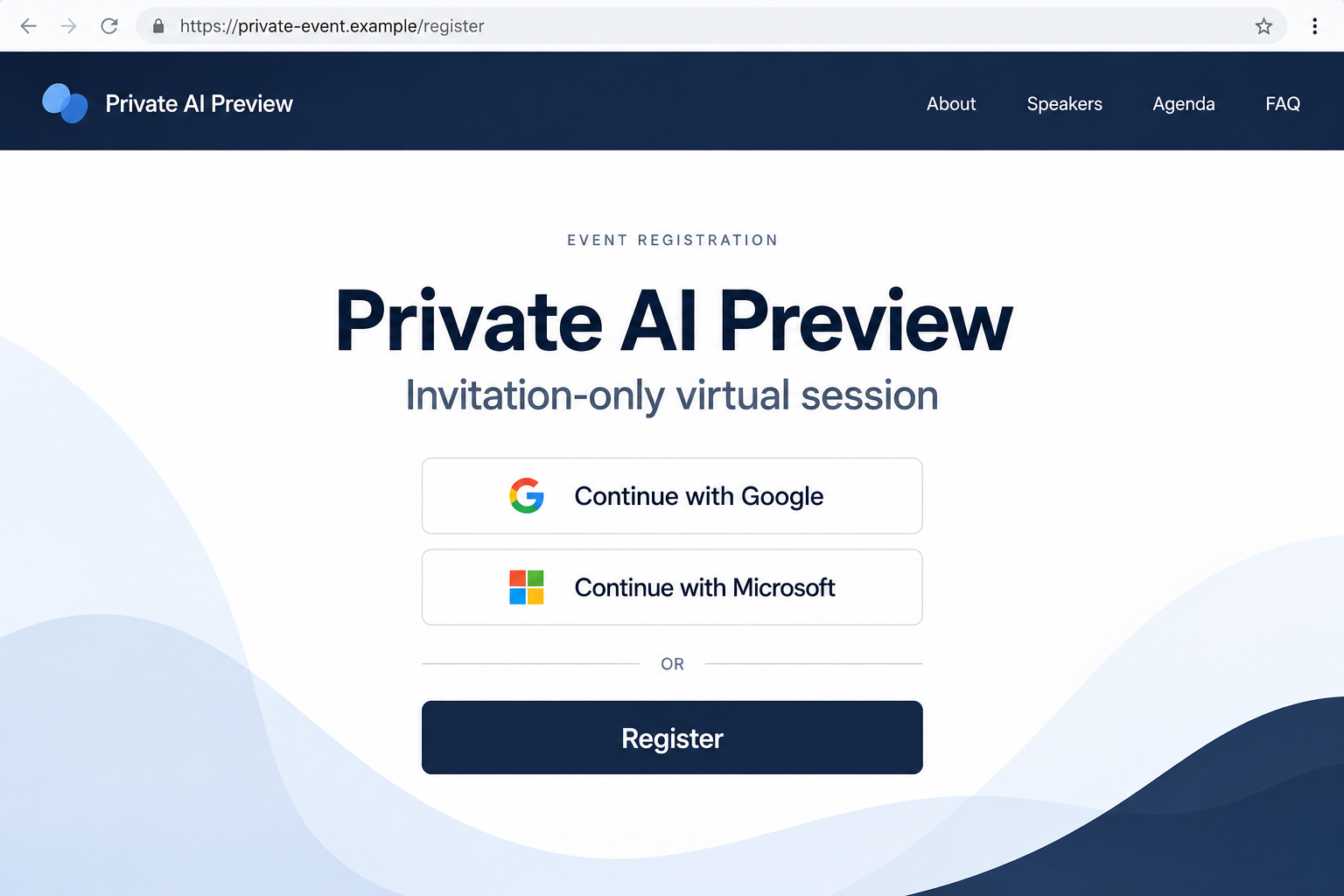
The illustration above is a fictional event screen. It demonstrates the registration choice rather than serving as a captured invitation or proof of a real Anthropic event.
A convincing design is easy to copy. What matters is whether the event exists, who invited you, and which site actually receives the next piece of information.
Think of each transition as a new decision. A message delivered through a recognizable platform can still contain a link chosen by someone running a fraudulent event.
How the Fake Anthropic AI Preview Scam Works
Step 1: A webinar invitation introduces the preview
The documented email appears to use GoTo Webinar and its customer care address. A small sender-name error reads “Austin from nthropic,” missing the initial letter.
A shortened link then moves the reader toward the event. That delivery method can make the invitation look less unusual than a plainly unrelated sender and address.
Check the claimed host separately before opening registration. A legitimate webinar service can carry content created by someone who is not authorized to represent the advertised company.
Step 2: A checkpoint leads to a different event design
The chain passes a Cloudflare Turnstile check and reaches a Zoom-style registration page. That change from the invitation’s webinar branding is a useful inconsistency.
A security-looking checkpoint is not an endorsement of the page behind it. Completing a human verification test does not verify the organizer’s identity.
Do not keep advancing just because a challenge worked normally. The browser can display a familiar test while the destination still belongs to an attacker.
Step 3: Account buttons turn registration into a login request
The imitation event offers Google and Microsoft options, followed by a sliding CAPTCHA. The next screen copies the selected account provider.
This is the point to inspect the full destination. A button’s label describes what it claims to do; it does not prove where its form sends information.
You do not need to solve either challenge to check the event safely. Leave and find the organizer through an independent company or contact route.
Step 4: The two observed login branches collect different information
Cofense found username collection on the Google branch and username plus password capture on the Microsoft branch. Neither produced a normal completion redirect in the documented flow.
That distinction matters for recovery. Entering an email address is not the same exposure as submitting a password, approving authentication, or authorizing an application.
A stalled form does not show that your information stayed private. Do not test another account; report the submission and use the genuine provider for recovery.
Read the Address Before Trusting the Login Screen
The documented lookalikes include goo[.]gle-access-eventregister[.]icu and office[.]com-access-sharepoint[.]com. They are disabled here and should not be visited.
The recognizable words are arranged to suggest familiar account providers. Reading only the first few characters can leave a different impression from reading the complete hostname.
For the first address, gle-access-eventregister[.]icu is the registered domain. Splitting “google” across address components does not turn it into Google’s account service.
The second likewise does not become Microsoft’s office.com because its beginning resembles that name. Its underlying registered domain is com-access-sharepoint[.]com.
These examples are useful for understanding the trick, but memorizing them is insufficient. Attackers can replace a domain while keeping the same registration story.
Open a service from a trusted bookmark or its official starting page when checking your account. Do not rely on a search advertisement offering urgent account recovery.
If an organization uses a company sign-in portal, ask IT which route is expected. A familiar logo is weaker evidence than a known authentication process.
What a CAPTCHA Does Not Prove
People encounter human verification checks on genuine websites. Seeing one can therefore make an unfamiliar page feel like part of a normal online service.
Its purpose is different from verifying the organization making an offer. Passing it does not show that Anthropic approved the event or that Microsoft receives the password.
Checks can also make automated inspection harder. That does not mean every email filter is defeated or that every visitor who passes the test loses an account.
Keep using your organization’s security controls. Report the invitation so defenders can inspect the message and destination through the tools available to them.
There is no benefit in testing the page with invented credentials from your work browser. You may expose information or encourage further interaction without establishing a safe result.
What to Do if You Have Fallen Victim to This Scam
- Leave the registration flow. Do not try another account, repeat a failed submission, or approve a new login notification connected to the invitation.
- Tell your workplace security team. Use a known contact or reporting button. Include the original invitation and a factual description of what you entered.
- Identify the affected provider. State whether you chose Google or Microsoft and whether the screen requested an email address, password, code, or additional approval.
- Change an exposed password at the genuine service. Use a trusted device and route. Change reused passwords elsewhere where the same secret could provide access.
- Have active sessions reviewed. Ask your administrator to revoke suspicious sessions and inspect account changes. A password reset alone may not address every form of existing access.
- Check recovery methods and authentication settings. Remove unfamiliar changes with provider or administrator help. Reject unexpected approval requests rather than accepting them to stop notifications.
- Review mailbox and application access. Ask about unauthorized forwarding, inbox rules, connected applications, and messages sent from the account.
- Preserve evidence and warn relevant contacts. Let IT coordinate notices if your account sent messages or exposed work information. Avoid forwarding live phishing links broadly.
If you entered only your email address
An address can support more targeted approaches, but it does not by itself establish that the attacker has your password or an authenticated session.
Report the interaction and watch for related login prompts or follow-up invitations. Do not claim a full account takeover unless there is evidence of access.
The documented Google branch was limited to usernames. If your experience included additional fields or permissions, report those details rather than assuming it matched that version.
If you submitted a Microsoft password
Treat it as exposed even if no confirmation appeared. A stalled page does not demonstrate that the form failed to send what you typed.
Microsoft’s response guidance covers password resets, session controls, and investigation of account changes. Workplace administrators should handle organizational access through their established process.
Tell them if you also approved a code or notification. That extra detail can affect the investigation and the steps needed to restore trusted access.
Continue monitoring for unfamiliar activity after recovery. A message sent during the exposure may cause another person to trust a follow-up request.
If you downloaded or installed something too
Describe that separately to technical support. This campaign’s documented login theft does not establish a malware installation on every recipient’s device.
Do not run a file again to identify it. Preserve its name and the time of the interaction, and let your security team decide how to inspect it.
Use a different trusted route for sensitive account recovery if someone gained remote control. The response should reflect the access actually granted.
How to Check a Genuine Private Event
Private events are not always publicly listed. The absence of a public announcement should lead to independent verification rather than an automatic accusation against the supposed host.
Contact an established company representative, your account manager, or the person at work who normally handles that relationship. Use contact details already known to you.
Ask whether the invitation, organizer, and registration address are genuine. Do not ask the questionable sender to supply their own proof through another link.
Check whether your organization expected you to attend. Someone responsible for vendor evaluation may already have an approved process for accessing previews or demonstrations.
If you cannot verify the offer, skip registration until you can. Missing a supposed preview is easier to resolve than recovering an exposed work account.
A colleague’s forwarded invitation also needs checking. They may have received the same deceptive message and passed it along with good intentions.
Make the Workday Response Easy to Follow
Employees should know where to report a suspicious event without being expected to investigate it themselves. A short, familiar reporting route reduces hesitation.
When reporting, describe actions in order. For example, distinguish opening the email from reaching a page, submitting a password, and approving an authentication request.
Include uncertainty honestly. “I entered my address, but no password field appeared” is more helpful than assuming a complete takeover or dismissing the incident entirely.
If someone used a shared account, notify its owner through a trusted channel. Do not send a replacement password into the same questionable email conversation.
Keep the invitation available for defenders while avoiding further interaction. They may need its headers and destination details, rather than only a cropped image.
Support a quick report even when the person feels embarrassed. A clear account of the exposure gives the team a better chance to contain the right problem.
For a personal account used at work, tell both the account owner and the relevant workplace contact. Business information may still need review even without an organizational login.
If you cannot access the account, use the provider’s official recovery process. A replacement link from the invitation sender is not a safe way back in.
Write down when you last had trusted access and which recovery options still work. Those details can help support distinguish your account history from unfamiliar changes.
Do not share a recovery code with someone claiming to fix the failed registration. Recovery information belongs in the genuine provider’s process.
Once access is restored, ask whether important contacts need a warning about messages sent during the exposure.
Frequently Asked Questions
Is the private Anthropic preview invitation genuine?
The campaign documented here is fraudulent. Verify any separate invitation through an established Anthropic or workplace contact before registering or entering account information.
Does a GoTo Webinar sender make the event safe?
No. A legitimate delivery platform can be misused. The sender’s service does not authenticate the advertised organizer or every destination linked in the message.
Did the Google version steal passwords?
The observed Google branch collected usernames only. Do not expand that finding into password theft, but report any additional information or access you supplied.
What did the Microsoft version request?
The documented Microsoft imitation collected usernames and passwords. If you submitted those details, use the real service and your administrator to secure the account promptly.
Does passing a CAPTCHA mean the login page is verified?
No. A human verification challenge does not authenticate the event organizer or account screen. Check the destination and verify the invitation independently.
Does this show that Anthropic or Microsoft was hacked?
No such breach is established by this campaign. The documented deception uses impersonation and abused services to direct recipients toward attacker-controlled screens.
The Bottom Line
A private AI preview is an appealing reason to register, but this invitation leads toward imitation account pages. The Microsoft branch steals passwords; the observed Google branch collects usernames.
Verify the event outside the email before signing in. If you already submitted information, tell your security team exactly what happened and secure the affected account through its real provider.

Join the discussion
0 commentsShare your experience or ask a question about this article.
Discussion
Start the conversation
Have a question or something useful to share? Add the first comment.