

A caller claiming to work for ewz says there’s something to sort out with your account. They offer to stay on the line and help.
A text arrives during the conversation, just as promised. Following its link can feel like the easiest way to get the matter finished.
Overview
The caller and website are working toward the same deception
The fake ewz refund scam combines a convincing phone conversation with an SMS link and counterfeit web pages.
According to the Swiss police warning about ewz impersonation, the route ultimately seeks information and a verification code for TWINT account takeover.
The real electricity provider, ewz, and the genuine TWINT service are being impersonated. Neither is the operator of the fraudulent call or linked website.
A refund is one story the caller may use
Police describe several pretexts, including overpayment refunds, customer-information updates, verification, and supposed security checks. The exact opening can change.
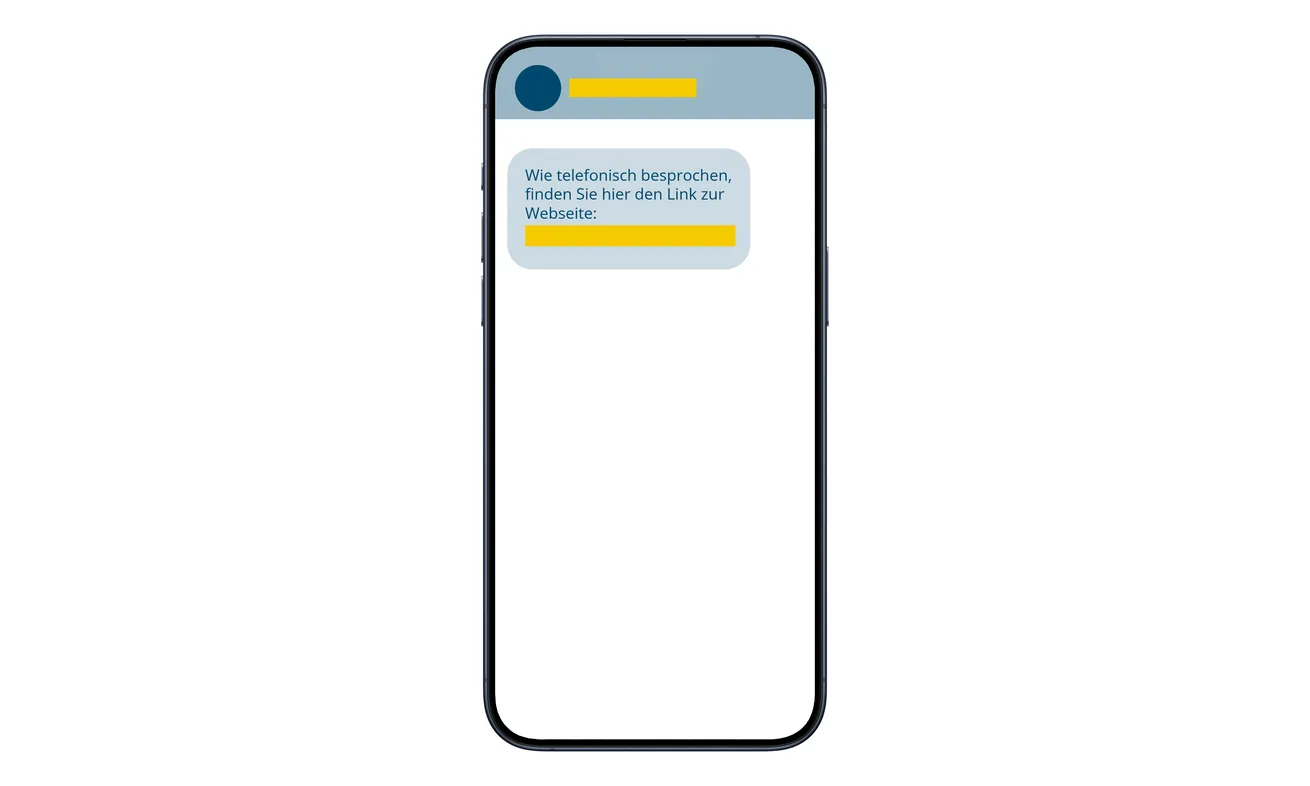
The text shown here is an original campaign message published by police. It refers to the phone conversation and supplies a link, with identifying details redacted.
The caller tells you to expect a text. When it arrives, the link can feel like official paperwork supporting the conversation you’ve just had.
A utility issue shouldn’t cost you control of a payment account
Pause when a conversation about electricity turns into a request for banking information or a TWINT authentication code.
- End the incoming call before checking the claim independently.
- Don’t use the caller’s SMS to reach an account login.
- Keep TWINT verification codes away from the caller and linked forms.
- Contact the provider of your actual TWINT app after a disclosure.
- Ask ewz separately about any genuine billing question.
Why a Text Sent During a Call Feels Different
An unsolicited link is easier to question when it arrives alone. During a conversation, someone has already explained why you’re supposedly receiving it.
The timing can feel like confirmation. They said a message would arrive, it did, and now they seem ready to help with the next screen.
But the same person can arrange both parts. Two connected communications don’t become independent evidence simply because one is spoken and the other is written.
A patient tone can also make the interaction comfortable. You may feel you’re dealing with an employee who understands a confusing administrative task.
You don’t need to decide whether the voice sounds professional. You need a separate way to establish who is requesting the action.
Tell the caller you’ll contact the provider yourself. A genuine issue can be checked through an official channel after the incoming conversation ends.
Don’t allow an objection to that pause to become your reason for staying. Your ability to verify a request matters more than the caller’s explanation of urgency.
How the Fake ewz Refund Scam Works
Step 1: A familiar-looking number supports the utility story
The callers impersonate ewz staff and can manipulate the displayed number. A Swiss-looking or apparently familiar caller ID therefore isn’t reliable identification.
The opening story creates a reason to cooperate. A refund makes help attractive; an update or security check makes delay seem unwise.
Either way, the caller is asking you to accept their explanation before you have reached the real utility independently.
Don’t disclose more information to help them prove who they are. Verification should not begin with supplying the account secrets you’re trying to protect.
Step 2: The SMS turns the conversation into a web session
The caller sends a link and offers guidance. Opening it keeps you within the process they introduced.
Once they’re describing buttons and screens, it can become awkward to pause. You may concentrate on following instructions correctly rather than evaluating the destination.
You can stop without finishing the screen. Don’t continue merely because the caller says leaving will interrupt a refund or lock an account.
Save the message if it’s already on your phone. It may help explain the incident later without requiring another visit to the page.
Step 3: A cloned utility page gives way to a false payment portal
The linked site resembles ewz, then presents a supposed transition to TWINT. Police say the route remains inside the fraudulent infrastructure.
A different logo or loading screen can make that transition seem like a handoff between legitimate organizations. It isn’t evidence that either organization accepted the session.
Watch the purpose of the task. An alleged electricity adjustment has now become a reason to interact with a payment-account page.
Don’t accept that change simply because the caller narrates it smoothly. Check the utility question and payment-account question through their respective genuine providers.
Step 4: Bank selection and personal questions make the portal seem specific
The false TWINT page asks for information associated with the account. Choosing a bank can make it feel tailored to your situation.
However, a menu of real banks doesn’t mean any of those banks controls the form. An impostor can list legitimate names.
Stop before adding more details to correct an apparent mismatch. You don’t need to identify the perfect selection for a page you haven’t authenticated.
If you’ve already answered, note which information was supplied. Describe the actual questions to genuine support rather than assuming they were harmless eligibility checks.
Step 5: The verification code puts account access at risk
The code is the critical access step. Police warn that the collected information can enable takeover and transactions in the account holder’s name.
A code arriving on your own phone doesn’t make the requesting page trustworthy. Another person may be trying to complete an operation involving your account.
Don’t read it aloud, paste it into the linked form, or send a replacement after the caller says it expired.
If you already supplied it, end the interaction and contact the appropriate TWINT provider promptly. Don’t wait for the caller to confirm that anything happened.
Check What TWINT Actually Says About Secret Codes
TWINT’s own security guidance tells users to keep SMS codes private and warns about impostors requesting sensitive information.
This is a practical boundary you can apply without judging the caller’s personality. Someone asking for access secrets is not entitled to them because they’re helpful.
It also prevents confusion about the word verification. A code can verify an operation for the service while being described to you as a routine customer check.
Read the original message for yourself. Don’t let a caller’s instructions replace the explanation displayed by the real financial service.
If a genuine app shows an operation, examine its purpose, recipient, and amount where applicable. Don’t approve an outgoing action as a way to collect money.
You can refuse the instruction and still investigate whether the utility owes a refund. Those decisions don’t need to happen inside the same conversation.
Contact the Right TWINT Provider After a Disclosure
Not every TWINT app has the same support route. Know whether you’re using a bank-issued app or TWINT Prepaid.
The official TWINT account-blocking guidance distinguishes Prepaid assistance from support provided for other TWINT apps.
Use the contact for your actual app. Sending a phishing report to a general inbox is not the same as requesting urgent protection for your account.
Explain the code disclosure clearly. Say that a utility impersonator guided you from a call through an SMS and a false TWINT page.
If you cannot use the app, find the provider through a trusted existing record or independently opened official website. Don’t reuse a number supplied by the caller.
Keep the support reference and any instructions given through the genuine route. This helps if you need to discuss unfamiliar transactions afterward.
A provider may legitimately contact you about a case you initiated. Verify unexpected follow-ups through that case rather than assuming every callback is either safe or fraudulent.
Resolve the Electricity Question Separately
If the call made you wonder about an overpayment, ask ewz through its genuine contact channel. Don’t use the caller’s claimed account balance as your starting fact.
Have a real bill or customer record available. You can explain the alleged problem without sharing banking authentication codes.
If you’re not an ewz customer, that is useful context to mention when reporting the impersonation. It isn’t a reason to investigate the false page yourself.
For someone managing a relative’s bills, explain the difference between the legitimate utility inquiry and the urgent payment-account protection.
Keep any disputed transaction on a separate list from ordinary electricity payments. The bank needs to identify actual activity, not reconstruct every household bill.
A clear split also reduces the chance that everyone assumes someone else handled the account. Agree who will contact the bank and who will check the utility.
If you’re helping someone after the call, first ask whether the caller is still connected. End that contact before discussing codes or opening genuine support.
Ask the person to explain the screens in their own words. Don’t fill in missing steps from assumptions about how every version must work.
Keep any remembered details, including a bank selected or an approval displayed. Tell support which parts are certain and which the person cannot recall.
Give the account holder room to speak with the financial provider. You can help organize records without taking their authentication secrets.
If another household member receives a similar call, warn them about the utility-to-payment-account switch. They don’t need to reproduce the process to recognize it.
After urgent protection is underway, keep the legitimate electricity paperwork together. That makes it easier to finish the real billing inquiry without revisiting the impostor’s instructions.
What to Do if You Have Fallen Victim to This Scam
-
End the incoming conversation. Stop screen-by-screen coaching, close the linked page, and don’t accept another text as a safer version of the same process.
Don’t tell the caller new security information while explaining why you’re leaving. You can check the claim without their permission or assistance.
-
Contact your TWINT app provider immediately after sharing a code. For a bank-issued app, use the relevant bank’s genuine support route.
If you use TWINT Prepaid, follow its official blocking and fraud-support instructions. Explain the actual data and verification information supplied.
Ask about securing access and checking transactions. A code exposure needs attention even when the account still appears available on your phone.
-
Report financial activity you don’t recognize. Give the provider the amounts, dates, and recipients from genuine account records.
Ask about available recovery or dispute steps and applicable time limits. Don’t approve a new transaction because someone claims it will reverse an earlier one.
If other banking or card information was disclosed, tell the institution responsible for it too. Protect the information actually exposed, not just the named app.
-
Keep the call and message evidence. Save the SMS, displayed caller number, time of contact, and existing screenshots or account alerts.
Remember that displayed numbers may be spoofed. Preserve them as evidence without assuming the innocent number’s owner organized the fraud.
Write down what the caller said and which fields you completed. Keep passwords, live codes, and full financial identifiers out of public posts.
-
Notify the impersonated utility through an independent route. Describe the claimed refund or account check and ask about any genuine billing issue separately.
Report the phishing destination to the appropriate service and consider a local police report, especially after a financial loss.
-
Address other account or device actions if needed. Change an exposed password through the real service and review any relevant unfamiliar access.
If the caller also persuaded you to install software, a Malwarebytes check can help assess it. AdGuard filters some risky sites, not compromised account access.
Neither tool can retrieve a shared code or reverse a payment. Keep device cleanup separate from the urgent contact with the financial provider.
-
Be cautious with promised recovery. Don’t pay an unexpected helper or provide another code to release the supposed utility refund.
Continue through the real support case you opened. Someone knowing the original story doesn’t establish that they represent your bank, TWINT, or ewz.
Frequently Asked Questions
Is this ewz-to-TWINT scheme confirmed?
Yes. Swiss police describe the caller, SMS, cloned pages, and verification-code theft. The genuine utility and payment service are being impersonated.
Does a Swiss caller number prove the call is genuine?
No. The documented scheme uses caller-ID manipulation. End the call and reach the claimed organization through a contact you obtained independently.
Why did the text arrive exactly when the caller said it would?
The caller can arrange that message. Matching timing shows coordination, not independent proof that the utility sent it.
Can this start with something other than a refund?
Yes. Police also describe customer updates, verification, and security-check pretexts. The account-code boundary stays important when the opening story changes.
Which provider should I contact about TWINT access?
Use support for your actual app. Bank-issued TWINT and TWINT Prepaid have different assistance routes; a general phishing report isn’t urgent account protection.
What if I only answered the call?
Receiving a call doesn’t prove takeover. Stop the interaction and assess whether you also opened a link, supplied information, shared codes, or approved anything.
The Bottom Line
Don’t follow an ewz impersonator’s text or provide a TWINT code to complete a supposed refund. The helpful call is part of the account-theft route.
If you shared verification information, contact your TWINT app provider immediately. Check the real utility account separately and report any unauthorized financial activity.

Join the discussion
0 commentsShare your experience or ask a question about this article.
Discussion
Start the conversation
Have a question or something useful to share? Add the first comment.