


The subject says congratulations. You don’t remember entering a contest or applying for money, but the email names a foundation and gives an amount down to the cent.
If a message says someone chose you for a donation worth millions, the first question isn’t how to collect it. It’s how the sender knows you.
Overview
The email says the money was already donated
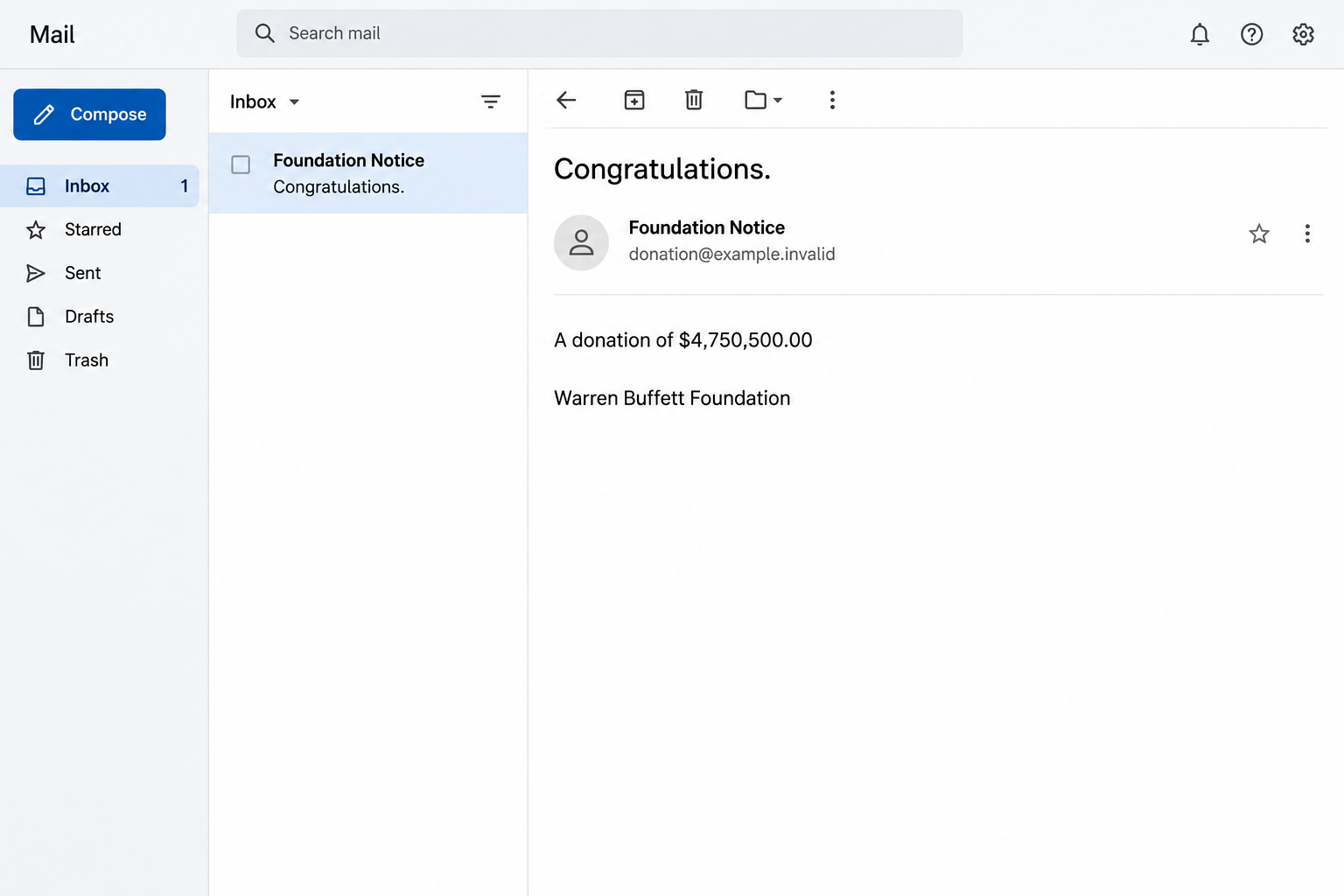
The fake foundation donation email promises $4,750,500.00 to the person reading it.
It says a donor has selected them and asks for a reply to confirm their address is valid.
The subject appears as “Re: Congratulations.” The prefix can make it look as if a conversation has already started, even if you never sent the first message.
There’s no need to follow a button in the recorded email. The request is to respond, after which the sender says they will explain how to claim the money.
The image above recreates the amount and one donor name. It isn’t evidence of a real foundation sending a grant or an offer tied to your identity.
The names change, but the amount and request stay the same
One recorded version uses Warren Buffett’s name and calls the sender the Warren Buffett Foundation. Another uses the name William James and a corresponding foundation label.
The amount and basic wording are the same in both. Changing the claimed donor without changing the award is a more useful clue than how famous either name sounds.
Berkshire Hathaway has published Warren Buffett’s actual charitable pledges. Those records describe gifts to named foundations, not a program handing that amount to people who answer this email.
The William James wording is not enough to identify a legal entity or a program. If an unrelated organization uses a similar name, that doesn’t authenticate this message.
The first reply matters because it starts a conversation
The email doesn’t make an upfront fee demand in the text that was recorded. The immediate request is a reply, not a specific payment.
This resembles an advance-fee setup: a large promised benefit makes later requests for personal information or money sound like minor steps. Those typical follow-ups aren’t confirmed for every recipient.
Before answering, look at what the sender hasn’t provided:
- A program you applied to, or a real explanation for how you were selected.
- A verified grant officer or organization that can confirm the award outside the email.
- Written terms that explain who can receive funds and what the program requires.
- Any independent record of a payment or application tied to you.
How the Fake Foundation Donation Scam Works
Step 1: The sender presents the message as good news, not a sales pitch
Ordinary scams can announce something frightening. This one gives you a reason to keep reading by making the situation feel lucky instead.
You’re told the donation has already been made to you. That shifts the question from whether the offer is real to what you have to do to receive it.
The word donation makes the money sound like something a wealthy person can give away without any formal application. There’s no investment plan for you to analyze first.
An unsolicited claim isn’t an award record. If you’ve never heard of the program, the absence of an application or prior contact is significant.
Step 2: An exact amount makes the story seem decided
The sender doesn’t promise “millions” in general terms. It gives a precise figure with cents attached, as though somebody has already completed the paperwork.
That precision is easy to mistake for evidence. No statement, verified receipt or actual transfer accompanies the figure in the message.
Compare the versions and a different pattern appears. The supposed benefactor changes, but the same improbable amount is assigned to another recipient in the same way.
When somebody says money is coming, look for a verifiable record rather than a well-formatted total. The number in this email appears only as a claim.
Step 3: The name lends the pitch credibility
A reader may know Warren Buffett is a philanthropist. The scam benefits if that true fact makes a separate, unverified promise feel plausible.
The genuine question isn’t whether a named person gives to charity. It’s whether a specific organization operates the program, selected you, and can confirm the award through independent contact.
The second donor name shows that fame isn’t essential. The word foundation can give a lesser-known identity enough formality for the first reply.
Suppose you find an actual foundation with overlapping words.
That lookup identifies an organization, not the person who sent the email. Don’t use a contact number the sender supplies to verify it.
Step 4: Confirming an email address feels like an easy first step
The message asks whether your address is valid. It doesn’t initially start with a demand for a passport, tax number or bank information.
That low-effort request can make it feel reasonable to reply just to see what happens. A reply can confirm that a person is reading and is interested in the offer.
If the sender follows up, they can refer to your own words and keep the discussion in a thread you now recognize.
That can feel more credible than the opening email.
Replying once doesn’t send your banking password or prove somebody has taken over your inbox. It does create another chance for the sender to ask for something more sensitive.
Step 5: Later requests can be presented as ordinary claim requirements
In advance-fee fraud, the next message may describe a legal form, a transfer expense or an administrative charge. The promised payout gives a small fee a misleading sense of proportion.
There can also be requests for documents. A copy of your ID, a signed form or bank information can cause harm even if you never send a fee.
The recorded opening doesn’t show which follow-up a particular person received. If you were contacted, judge your risk by what the sender actually asked you to provide.
A claim that new fees will be refunded later doesn’t protect you. Don’t send more to recover a previous payment or settle a problem that came from the same thread.
How to Check a Real Charitable Award
Start with an organization you can identify independently
If you recently applied for assistance, pull up your original application and acknowledgement. Verify the name and contact details through the organization you used at the time.
If you never applied, use the organization’s official site or an established charity regulator to look for the actual award program.
Don’t begin with an attachment sent by the supposed donor.
A real organization may publish grant eligibility, an application calendar or contact information for a named program. A generic promise and a request for a reply don’t replace those details.
Don’t hand over ID simply to see whether the sender can make the award sound more specific. If a genuine grant needs documentation, establish that independently first.
Break the connection between a famous name and the offer
Look for the actual person’s public statements or announcements where you would normally expect to find them. A foundation logo or a copied biography can appear in any email.
A real charitable pledge may be directed to an organization that then makes grants through its own process. That does not mean individuals can privately claim part of the pledge.
Check who pays whom. Someone offering money shouldn’t make you pay an unverified third party for a release, insurance, legal services or a tax certificate.
A real charity’s public contact can tell you which programs it runs. Ask about the exact name and amount the message uses, without sending private documents.
Don’t confuse a document with money you can spend
An image that looks like a payment statement isn’t proof a bank has sent or received funds. Your real bank can tell you what it sees.
If somebody sends a paper or electronic check and asks you to forward part of it, talk to the bank before touching the money. A visible balance can change.
A person who genuinely needs information for a verified process can explain the requirement through established contacts. You do not have to settle that question inside the suspicious thread.
If you feel embarrassed asking someone else to look, remember that large unexpected offers are designed to make you hesitate before seeking a second opinion.
Step away and compare notes privately.
Ignore changes in the way the offer is presented
The opening message might be followed by a contact who claims to handle verification or delivery. A second person repeating the award is not independent confirmation.
If the correspondent switches to a chat app, keep the original timeline. A new profile picture or different job title does not establish a separate, legitimate organization.
Do not share your screen to show what your bank displays. The point of checking independently is to keep your balance, credentials and payment decisions away from the sender.
If a purported award arrives while you are genuinely waiting for aid, call the organization you applied to. Use its existing application reference instead of the figure in the email.
What to Do If You Fell Victim
-
If the email is still waiting in your inbox, don’t answer it.
Flag it as phishing or spam. Keep a copy only if you need it for a report, and don’t forward the message informally with active contact details.
If you got several versions with different foundations, make a note of their subjects and amounts. Repetition is useful evidence, not several independent awards.
-
If you replied but shared nothing sensitive, end the exchange.
You don’t need to notify the sender that you have changed your mind. Stop answering and be alert to replies, texts or calls that refer to the proposed award.
If you supplied only an email address or a name, record that. Don’t assume the sender gained access to your mailbox merely because you had a conversation.
If you separately entered a password into any later page, change that password through the verified service and check active sessions.
-
If you shared personal or banking information, act on the specific details.
Contact your bank if you disclosed account, card or payment information. Use its app, a statement or a number you already verified.
Tell the bank exactly what the sender received, including any code or confirmation you provided. Ask what monitoring, replacement or restrictions fit that exposure.
If you handed over ID documents or a sensitive identifier, use IdentityTheft.gov in the U.S., or your local identity theft and document-issuer guidance.
-
If you paid a fee or forwarded funds, contact the payment provider quickly.
Keep messages, receipts, the receiving details and the timing. Explain that the transfer was made in response to a fraudulent award claim.
Ask whether the transaction can be stopped, recalled or disputed. Let the provider explain what is possible for that payment type; the result isn’t guaranteed.
Do not pay a second person who claims they can unlock the original money, refund the fee, or get it back through a special fund.
-
Report the fraud and preserve what you can verify.
Use the FTC’s fraud reporting site in the U.S., or your local fraud-reporting service elsewhere. Supply the relevant evidence through its official process.
If an impersonated organization has a verified reporting route, tell it which name and amount were used. Don’t send complete bank or identity documents to a general inbox.
If a new correspondent claims to be helping with your original report, check the case through the organization you contacted, not the number or address in that message.
Frequently Asked Questions
Is the $4,750,500.00 foundation donation real?
The recorded emails use the same amount under different donor names and ask you to reply. They do not establish a real award. Do not take the claim further.
Does Warren Buffett’s real philanthropy make the email genuine?
No. Public records of gifts to named organizations don’t authorize an unsolicited message promising a personal payout. Verify the exact program independently.
Why does the email ask if my address is valid?
It is a small request that can identify someone willing to continue the conversation. You don’t need to confirm the address to find out whether the claimed award exists.
What if the message uses the William James Foundation name instead?
That name appeared in a version with the same amount and reply request. A name variation doesn’t change what you should verify or make the payout safer.
Do I need to call the bank if I only replied?
A reply alone isn’t a bank disclosure. Call the bank if you sent financial information, gave out a banking code or paid anything. Watch for follow-ups in either case.
Can I get back money I sent to claim the donation?
Ask the payment provider promptly. Options vary by payment method, time and circumstances. Avoid anyone who guarantees a refund in exchange for another fee.
The Bottom Line
Don’t reply to claim the $4,750,500.00. The same offer appeared under different donor names, and the email supplies no reliable evidence of an award.
If you already wrote back, stop the conversation. Contact your bank or payment provider now if you handed over financial information or sent money.

Join the discussion
0 commentsShare your experience or ask a question about this article.
Discussion
Start the conversation
Have a question or something useful to share? Add the first comment.