


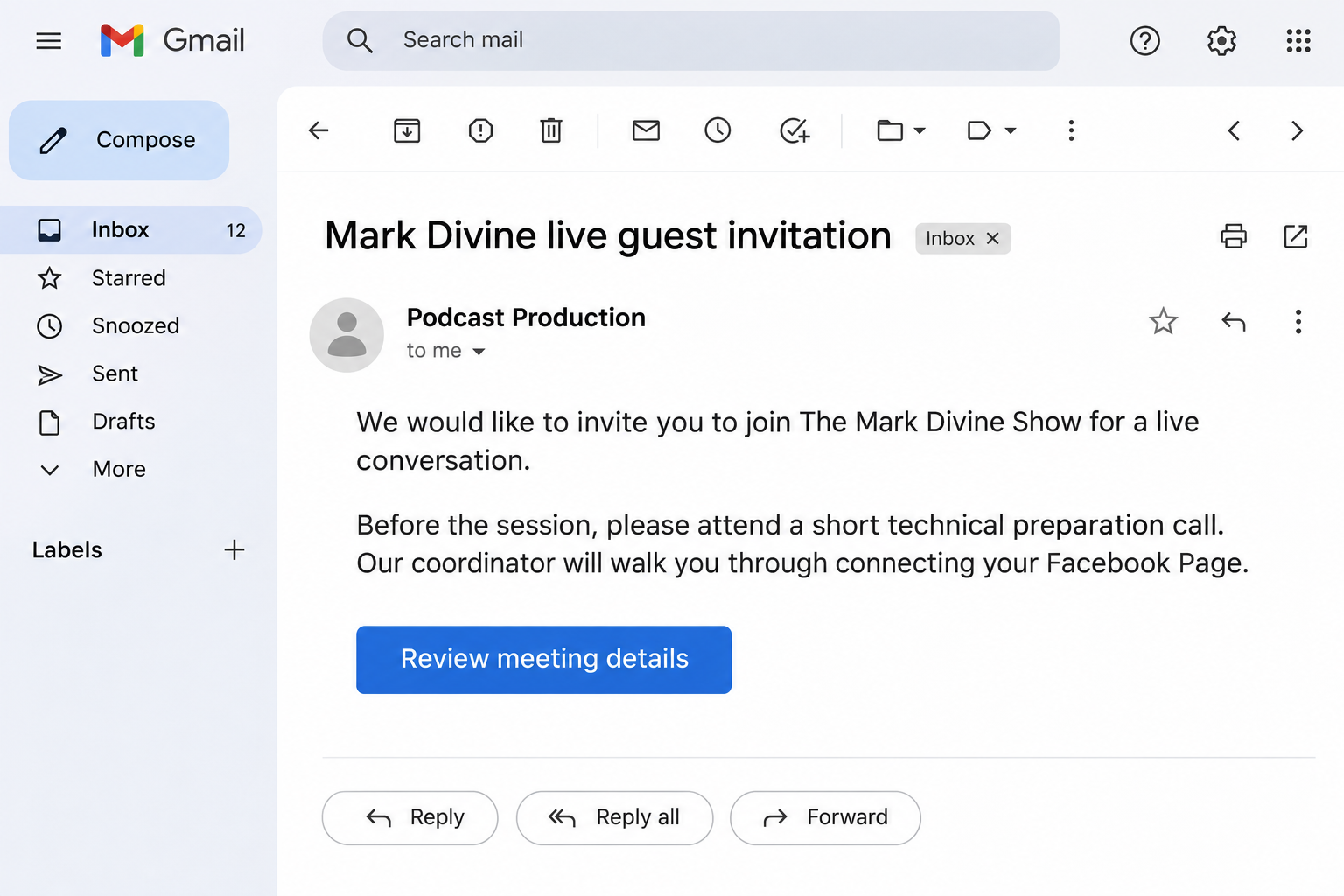
An email invites you to appear with Mark Divine, and a coordinator offers to help you prepare. The conversation sounds like a welcome opportunity.
Before the interview, there is a short call to connect your Facebook Page. What you are asked to change during that call deserves close attention.
Overview
The invitation borrows a real host’s identity
The fake Mark Divine podcast scam approaches creators with supposed live appearances. A person claiming to represent the host turns the invitation into a technical-preparation appointment.
Mark Divine has publicly warned that people are impersonating him and his team. He specifically rejects unsolicited Instagram Live invitations presented as coming from his staff.
The genuine host and show are being impersonated. A recognizable name in the invitation does not make the coordinator your authorized production contact.
The setup conversation moves into Facebook access
One creator described a Zoom call where the supposed assistant walked through Facebook event creation. Afterward, an unfamiliar person appeared in a business-portfolio notification.
The creator also reported an unfamiliar data-related entry they could not remove. That account does not identify the exact permission change or prove a particular technical exploit.
The practical risk is allowing an unverified person to direct account changes. A Page can look normal while an access arrangement still needs investigation.
Separate the invitation from anything you approved
- Only received the email: verify the invitation independently before joining the proposed preparation call.
- Followed account instructions: review the affected Page, business portfolio, permissions, and notifications with an authorized administrator.
- Shared a password or code: secure that login separately from reviewing delegated business access.
- Lost control or found unauthorized spending: preserve the records and use genuine platform and payment-support channels promptly.
Mark Divine Has Warned About These Impersonators
In his public warning, Divine says he does not conduct the Instagram Lives described by these invitations. He also identifies false representatives using his team’s identity.
His warning lists markdivine.com and unbeatablemind.com as official email domains. Compare the complete sender address, then confirm the actual invitation through an independently reached channel.
A matching display name is insufficient because the sender chooses that label. Finding the real podcast online only confirms that there is a show to impersonate.
The creator who reported the setup call initially received a message describing an assistant named Jeff. A familiar first name did not authenticate the production arrangement.
The repeated approach gives creators a recognizable warning: a supposed guest appearance should not become an unsolicited session inside their own business settings.
The opening email image illustrates the invitation stage using fictional correspondence. It is not a message sent by the real show or an authentic recovered email.
Why a Technical Rehearsal Makes the Next Request Seem Reasonable
Creators expect practical questions before appearing on a show. Microphone checks, a recording time, and a producer’s instructions can all be part of genuine preparation.
The impersonator uses that expectation to create a different job for the guest. Instead of checking audio, you begin changing the accounts that support your own business.
A helpful voice can make the process feel guided and professional. You may follow each instruction without stepping back to ask what the completed change permits.
The reported caller shared a desktop without appearing on camera. That detail alone cannot decide whether someone is legitimate, but it supplied no independent identity confirmation.
More useful questions concern the task itself. Why does an appearance on someone else’s show require changing who controls your Page or business portfolio?
If the caller cannot explain a permission in terms you understand, stop before approving it. An interview slot does not justify surrendering account administration.
How the Fake Mark Divine Podcast Scam Works
Step 1: A supposed assistant offers a live appearance
The contact uses the host’s name to make an unsolicited invitation seem professionally relevant. Someone with an online audience may welcome the promised exposure.
A specific recording date gives the exchange a practical next step. You start considering your availability before confirming whether the producer actually represents the show.
Keep the invitation and its complete sender address. Public details about your work can personalize a message without establishing any genuine production relationship.
Step 2: A preparation call becomes part of accepting the offer
The supposed coordinator asks for a preliminary Zoom meeting to help connect the guest. That makes the call feel like routine preparation rather than an account-access request.
The meeting platform can be genuine while the person arranging the meeting is an impersonator. Do not use the presence of a working call as identity verification.
Confirm the host and production contact before joining. During a call, close private account screens if someone begins directing you somewhere unrelated to the interview.
Step 3: The guest is guided into their own Facebook settings
The reported exchange moved into event creation on the creator’s Facebook Page. The caller supplied instructions while presenting the work as a connection requirement.
This is where the purpose of the interaction changes. You came to discuss an appearance, yet your own business tools become the subject of the session.
Read each request independently of the caller’s explanation. Creating an event, granting someone access, and changing a portfolio relationship can have different consequences.
Do not approve a change simply to keep the rehearsal moving. Stop and ask an administrator you already trust to review the request.
Step 4: A notification reveals an unfamiliar account relationship
After the call, the creator noticed a Facebook email about an unfamiliar person joining the business portfolio. That notice prompted a closer account review.
The creator did not find an obvious new administrator in the place they checked. That uncertainty is a reason to investigate the business relationship more carefully.
Save the original notification, including any portfolio identifier and the time of the change. It gives genuine support something more specific than an unexplained interview invitation.
Do not assume every unfamiliar label is malicious or delete everything in response. Identify which entry appeared, who authorized it, and what it can access.
Step 5: A normal-looking Page can create false reassurance
The creator changed passwords, added two-factor protection, and still saw the usual Page afterward. An unfamiliar data-related entry remained part of their concern.
A working login answers whether you can sign in. It does not answer every question about another person, business, or application having delegated access.
Review those relationships alongside login security. If an unfamiliar permission cannot be removed, preserve the details and use genuine business-support or account-recovery routes.
The report does not establish that every recipient lost a Page, money, or data. Match your response to the changes and exposures actually identified.
Business Permissions and Your Password Need Separate Attention
Meta’s business-access documentation describes granting and removing another business’s access to particular assets and tasks. That relationship differs from someone knowing your personal password.
A genuine agency can have permission to work on a Page or ad account. Review the approved organization, the assets involved, and the tasks it can perform.
If you granted access during the call, ask your administrator to identify and revoke that specific unauthorized relationship. Do not rely solely on resetting your login.
If a password or security code was also supplied, address that exposure separately. An access review is not a replacement for securing compromised credentials.
Keep real colleagues and existing service providers in the review. Removing the wrong authorized person can interrupt work or make recovering control more difficult.
An unfamiliar dataset or tracking label needs identification before action. Its name alone cannot establish a backdoor, a stolen session, or the exact cause of an account change.
Verify the Invitation Before Opening Your Business Settings
Start from Mark Divine’s genuine website or an established official channel. Ask about the specific proposed guest appearance and the person coordinating it.
Use the recording date and the original sender address in that inquiry. A clear description helps the real team distinguish your message from an ordinary event question.
Do not let the questionable coordinator provide a second account as their own reference. Independent confirmation must come from outside the communication chain they arranged.
Ask what a guest must actually do before recording. A legitimate explanation should identify the platform, guest role, and any necessary camera or microphone preparation.
Decline instructions that involve transferring control, revealing recovery codes, or adding unknown businesses to your accounts. You can verify the invitation without completing those changes.
When a genuine producer works through an outside service, confirm that arrangement with the show. An unfamiliar provider is a question to resolve, not automatic proof of fraud.
What to Do if You Have Fallen Victim to This Scam
-
End the setup call and stop further account changes. Preserve the invitation, meeting details, coordinator’s instructions, and any messages sent after the call.
Write down what you remember changing while the sequence is fresh. Separate an email you merely received from a button, permission, or confirmation you approved.
Do not invite the same person back to undo their work. Account cleanup should involve an administrator or support route whose identity you already know.
-
Review the affected Page and business portfolio. Open your usual business tools directly and identify the specific Page, portfolio, and account relationship involved.
Check the people, partner businesses, and asset permissions relevant to the notification. Ask an authorized administrator to help if the role or entry is unclear.
Record unfamiliar names, identifiers, access levels, and change times before requesting removal. Keep your own authorized access intact while addressing the suspected relationship.
If you cannot see or remove the entry, preserve the error or missing control. Explain that limitation to genuine support rather than improvising a transfer.
-
Secure exposed login credentials through the genuine service. Change any disclosed password and review unfamiliar sessions, recovery details, and relevant two-factor settings.
If an email password was also exposed, protect that mailbox because it can control further recovery. Replace reused credentials wherever they create another affected account.
Tell your administrator whether you supplied a code or approved a login request. Do not reduce a more complicated incident to simply having clicked an email.
-
Use genuine recovery channels if you lost control. Open Facebook’s account-recovery route independently for a compromised login, and the business tools’ support options for business-access problems.
Provide the affected Page or portfolio identifier, original notification, and timeline. Personal-profile recovery and a business-permission dispute may require different information.
Keep copies of genuine support replies and any reference number. Ignore private messages offering a guaranteed shortcut through an alleged platform employee.
-
Check advertising, payment, and publishing activity you can still access. Review unfamiliar campaigns, spending, scheduled posts, messages, and changes to the affected business assets.
If unauthorized spending appears, contact the relevant payment provider promptly with the actual transaction details. Continue the account-access investigation alongside the financial report.
Tell colleagues about the false production contact so they do not restart the setup. Confirm any urgent instruction through the communication channels your team normally uses.
-
Report the impersonation to the genuine host’s team and the relevant platform. Include the sender address, claimed representative, and proposed recording arrangement.
Describe the real host as the person being impersonated. Public warnings should redact account identifiers, private messages, and security information that another attacker could exploit.
Report online-fraud losses through the appropriate local authority or IC3 in the United States. Preserve the records needed for follow-up.
-
Record any additional device or identity exposure accurately. Tell your trusted support contact if you installed unfamiliar software, granted remote control, or supplied identity documents.
Those actions require their own assessment. Joining a genuine meeting platform or receiving an invitation alone does not establish that malware was installed.
Do not pay an unsolicited recovery contact for another technical session. The original scam already used apparently helpful setup assistance to obtain your cooperation.
Before Resuming Work With Your Page
Agree with your team which people and businesses should retain access. Document the relevant roles so a later unfamiliar notification has something concrete to compare against.
Keep the invitation incident separate from legitimate scheduled work. Cancel the false appearance without deleting unrelated events, approved integrations, or business assets.
If the Page sent unfamiliar messages or published unauthorized material, preserve the details before correcting it. Decide with your team whether affected contacts need a warning.
Future guest appearances should have one independently verified production contact. Ask that person about technical requirements before opening account administration during a live call.
Frequently Asked Questions
Has Mark Divine warned about fake invitations?
His public warnings describe people impersonating him and his team, including false live-appearance invitations. Confirm any approach through his genuine channels before engaging.
Does a working Zoom call prove the invitation is genuine?
The call can operate normally while its organizer misrepresents their identity. Verify the production relationship independently before following instructions involving your business accounts.
Why should I review permissions after changing my password?
Another business’s delegated asset access is a separate relationship from your personal login. Review any access you approved as well as credentials that were exposed.
Is an unfamiliar tracking entry proof of malware?
Its label alone cannot identify malware or explain how access changed. Preserve the entry details and ask an authorized administrator or genuine support to assess it.
Should I remove everyone from the business portfolio?
Identify the unauthorized relationship rather than deleting all access indiscriminately. Preserve your own control and coordinate changes with genuine colleagues who manage the same assets.
What if I only received the invitation?
Receiving the message does not grant the sender access. Do not join the proposed setup or approve account changes until the real team confirms the invitation.
The Bottom Line
Do not change Facebook or business-portfolio access for an unverified Mark Divine podcast invitation. His team has warned that these impersonating approaches are fraudulent.
If you followed the setup instructions, review the actual permissions and notifications with a trusted administrator. Secure exposed logins and report unauthorized access or spending promptly.

Join the discussion
0 commentsShare your experience or ask a question about this article.
Community experiences
Did this happen to you?
Your experience could help someone recognize the same scam. Submit a private report for our team to review.
I experienced this tooReports are reviewed before publication. Sharing publicly is always your choice.
Discussion
Start the conversation
Have a question or something useful to share? Add the first comment.