


An OpenChat rewards page tells regular users they might have tokens waiting. It mentions conversations, community participation, and a bonus for the people who use the service most.
That makes the offer sound personal without naming anything you actually did. Before looking up a balance, find out whose page is making the promise.
Overview
The offer talks about CHIT, not the app’s CHAT token
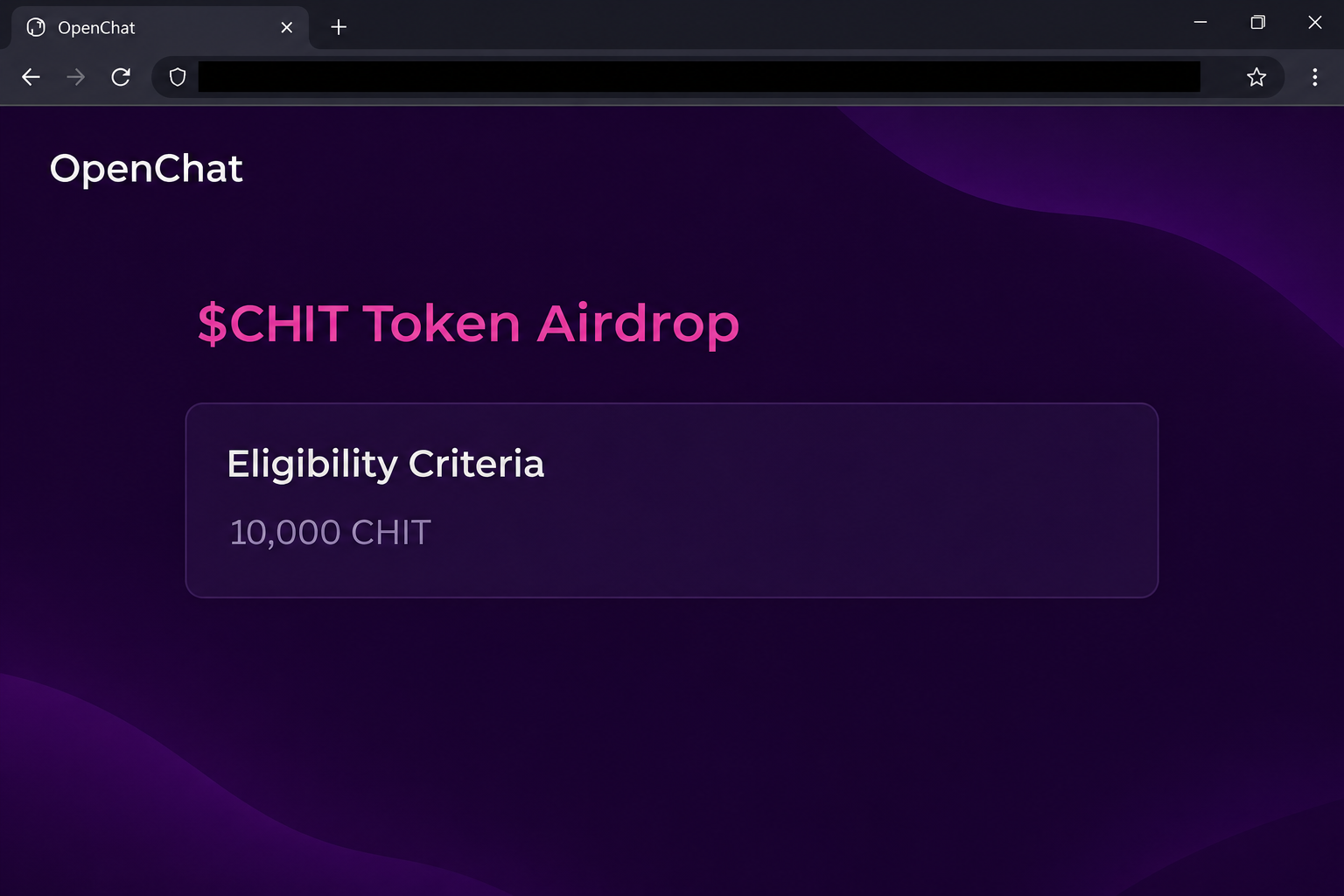
The fake OpenChat airdrop page advertises “$CHIT Token Airdrop.” It says active users can qualify and tells them to accumulate 10,000 CHIT before claiming.
It also offers a bonus for the top 10,000 participants. Those are two separate figures: one is a supposed token threshold, and the other describes a supposed ranking.
The image recreates the heading and threshold while leaving out the site’s connection buttons. Neither number is proof of a real balance or reward program.
The official OpenChat website identifies the platform’s own token as CHAT. This makes the lettering a useful clue, though neither the right spelling nor the wrong one settles authenticity.
It uses real features to sell a different wallet interaction
OpenChat does have crypto features, including a wallet and ways for people to send tokens in messages. That helps explain why a story about rewards for active users feels plausible.
The lookalike was reported on ocairdrop[.]app. Its claim area offers separate Solana and Ethereum wallet options and opens a list of third-party wallets.
The captured page shows a connection request, not a confirmed transaction that paid the reward or drained anybody’s wallet. Your own wallet activity matters if you interacted with it.
An authentic conversation, membership, or app wallet can exist without this offer. Closing the imitation does not affect any account you maintain through the actual chat service.
A claim about chat activity should be verifiable in the real service
If a page says your existing activity earns rewards, it should be possible to identify the announcement or qualifying action independently. Start from the service you already use.
Before treating the airdrop as real, look for evidence that isn’t supplied by the claim page:
- Check the token name against OpenChat’s own information rather than a graphic in a forwarded message.
- Look for a genuine program notice describing which account activity counts toward it.
- Check whether anything in the actual app confirms the threshold or the alleged bonus.
- Note which service claims to calculate the balance, and which network the wallet request concerns.
- Do not approve a wallet interaction merely to find out if the promise applies to you.
Why a Chat App Is a Convincing Disguise
A giveaway from a token nobody recognizes needs to establish a reason for existing. Using a community people already belong to supplies that reason before anybody checks the details.
The claim uses activities that sound like normal chat usage. Joining groups, participating in conversations, and being considered active resemble ordinary measures of involvement.
The offer makes those ordinary actions sound like a balance hidden inside the account. That’s persuasive to someone who has recently joined a community or exchanged tokens with another member.
A reward tied to specific activity still needs a record. It matters whether the official service recognized that activity, not whether a separate page lists it as an eligibility condition.
The genuine project’s description of CHAT and user rewards does not name this offer. That distinction helps you verify the offer without abandoning the real service.
How the Fake OpenChat Airdrop Scam Works
Step 1: A separate page looks like part of the community
The lookalike uses the OpenChat name and an apparent app navigation area. In the body, a community reward is presented as something regular members can claim.
If you land there from a group message, you might assume a moderator has already checked the link. The fact that a link appeared in a real group proves little.
A member can forward a promotion in good faith, and a real account can post suspicious content. Verify a new financial claim independently of the person who shared it.
Step 2: Eligibility is presented as a number you may already have reached
The page asks visitors to be active and reach 10,000 CHIT. It frames the amount as a balance that should already be visible somewhere.
That is different from a page demonstrating an allocation from the actual service. A rule can be written for anybody to see without checking whether any account qualifies.
The bonus for the most active participants adds a reason not to wait. It still doesn’t tell you who calculated the ranking or which real records it uses.
Step 3: The offer blends qualification and withdrawal
The imitation claims participants can withdraw all earned CHIT to a personal wallet. That wording makes connecting seem like a way to access something already yours.
In reality, you don’t need to accept a wallet request to verify that a promotion exists. Check the genuine service’s information before you decide anything about funds.
If the only person who can explain the balance is the one who supplied the link, keep it unverified. Don’t try to prove the amount by authorizing an action.
Step 4: The reader moves from a chat brand to an external wallet chooser
The page offers Solana and Ethereum options. The list that follows shows wallet names, but those names don’t identify the operator or prove the intended transaction is safe.
That is where the offer leaves the chat service behind. Your chat account and browser wallet may be entirely separate, even on the same device.
If you get a real wallet prompt, pay attention to the site and network named there. The OpenChat logo on the page cannot speak for the wallet.
Step 5: Anything you approved has to be investigated on its own
A connection can let a website see an address or request later actions. The permission or transaction you authorize afterward can carry additional consequences.
The screenshots don’t show precisely what every visitor would sign. If your wallet recorded something, identify it on the correct network rather than assuming the on-screen offer describes it.
If you reused your public wallet address in several services, activity may have more than one possible source. Record the time of the prompt and check what actually changed.
How to Handle the Link if It Reaches a Real Chat Group
Check the promotion without forwarding it again
Ask a moderator whether there is a first-party announcement and how to find it from the legitimate service. You don’t need to include a clickable version of the suspicious link.
Give them the key differences: the CHIT spelling, the exaggerated eligibility claim, and the external wallet choices. Those are useful even if the page changes its appearance later.
A moderator could have posted it by mistake. Focus on removing confusion and helping members check their exposure rather than blaming someone before the group knows what happened.
Keep the wallet question separate from chat access
One member may only have seen the post, while another may have approved a wallet prompt. They should not receive identical instructions about moving assets or changing chat credentials.
If you can still use OpenChat normally, that doesn’t tell you whether a third-party wallet granted a permission. Review that wallet separately if you used it on the imitation.
If you suspect somebody also took over a chat account, report the account concern to the real service. Bring dates and the affected messages rather than financial secrets.
A group warning can mention that the two token names differ. It should also explain that a corrected spelling would not make an unverified external wallet request any safer.
What to Do if You Have Fallen Victim to This Scam
-
If you only read the promotion, leave it alone. Check OpenChat’s real site or app if you want to learn about genuine token features.
If you can, report the message where it appeared. Avoid quoting full live links or wallet prompts that might draw other members to the same page.
-
If you opened an external wallet, identify the account and network involved. Use the wallet you normally open, not another copy of the page.
When you find the site in your connections list, remove it. That step does not by itself undo an approval or transfer you made after connecting.
-
If you signed or approved something, inspect the record. MetaMask’s guidance on approvals explains how they differ from connections on supported networks.
For a Solana wallet, use the instructions written for that wallet and network. Phantom’s scam-response guide is an example for Phantom users.
-
Treat any disclosed recovery phrase or private key as compromised. Follow the wallet maker’s guidance from a device you trust to protect remaining assets.
Do not put funds into the old wallet to see whether it is still under your control. Verify new receiving details before asking anyone to use them.
-
Document suspicious activity without exposing group members. Keep the time you saw the message, the wallet involved, and public transaction identifiers if any assets moved.
If you send a screenshot to a group moderator, remove unrelated names and chats. A private fraud report can include only the details the relevant investigator needs.
-
Turn down follow-up offers to release or recover CHIT. An unfamiliar person cannot prove ownership of a reward by repeating the threshold or naming your public address.
If the wallet changed unexpectedly, talk to verified support. A request for a release payment or your recovery words is a reason to stop.
What a Real OpenChat Balance Can Tell You
Find the account the offer claims to reward
An OpenChat username and an address in a browser wallet identify different things. If a promotion says you earned rewards in chat, ask where they should appear within your account.
Open the service from an address or app you trust. Check the actual account you use, especially if you switch between several logins or browser profiles.
A reward showing on a separate page is not an account record. The page cannot demonstrate that it knows your eligible activity just by showing a large number.
If you see a different balance inside OpenChat, don’t assume the site has temporarily hidden the rest. Compare what is displayed with any terms published through the project.
The right token name is only the first check
The misspelling is conspicuous in this case, but a future imitation could spell CHAT correctly. An exact name match would still leave you needing to verify the reward route.
A wallet provider’s name doesn’t prove that the connection has anything to do with OpenChat. Check who operates the page before even thinking about using the provider picker.
A valid wallet address can receive an unsolicited token without the recipient doing anything. Its sudden appearance is not permission to follow a link associated with that token.
If someone in a group is sharing an allocation, ask whether they verified it from inside the service. They may have mistaken a generic number for a personal balance.
Pay attention to advice from participants who haven’t tried it themselves. Repeating an offer in good faith is different from independently confirming that it exists.
If you warn the group, describe the unexpected CHIT spelling and the external wallet request. You can report the imitation without passing along a clickable claim link.
This is useful when everyone else in the chat seems convinced. A real record in your account makes a better starting point than a screenshot in the conversation.
If you manage the community, remove the clickable claim from pinned posts too. A copied warning that still links to the offer can send readers straight back to it.
Frequently Asked Questions
Does OpenChat have a real token?
Yes, OpenChat identifies its project token as CHAT. The warning is about a lookalike page offering CHIT and asking visitors to connect external wallets.
Do I need 10,000 CHIT to use OpenChat?
The threshold was shown on the fake reward page. It is not a condition established by OpenChat’s own description of its messaging service.
Are the two appearances of 10,000 the same claim?
The page uses one figure for a supposed token balance and another for the number of people eligible for a bonus. Neither screen proves that a real payout occurred.
Could the site be genuine if the token typo is fixed?
Changing CHIT to CHAT would remove one clue, not resolve who runs the site. Verify any program independently before letting it interact with a wallet.
Does opening the chat app confirm I approved a transfer?
No, opening or using the genuine chat app is a separate action. Check the account and network involved if you used a wallet on the lookalike.
What if I received a token I don’t recognize?
Don’t use a link attached to the token to investigate it. Ask the wallet provider how to identify, hide, or report an unfamiliar asset safely.
The Bottom Line
Skip the fake OpenChat airdrop and its claimed CHIT balance. Verify real CHAT features through OpenChat itself, without using the link or connecting a wallet to test it.
If you already interacted with the lookalike, check the wallet and network you chose. Remove the connection and review any actual approval or transfer separately.

Join the discussion
0 commentsShare your experience or ask a question about this article.
Community experiences
Did this happen to you?
Your experience could help someone recognize the same scam. Submit a private report for our team to review.
I experienced this tooReports are reviewed before publication. Sharing publicly is always your choice.
Discussion
Start the conversation
Have a question or something useful to share? Add the first comment.