


A recruiter says your experience makes you a good fit for Kraken. The conversation feels promising, and an interview is arranged before anything seems unusual.
Then the meeting develops a technical problem, or another requirement appears before hiring can continue. What you are asked to do next deserves a closer look.
Overview
Impostors use Kraken’s identity to approach job seekers
The Kraken recruiter scam involves people pretending to represent the company while pursuing money, sensitive information, or unsafe actions under the cover of recruitment.
Kraken’s own warning describes fake recruiters using employee photographs, copied job listings, lookalike email domains, and private messages. The warning concerns impersonators, rather than Kraken’s genuine hiring process.
A recognizable employer provides a convincing reason to discuss your experience. It also gives an unfamiliar person a name you can independently verify.
A plausible interview can introduce an unsafe technical request
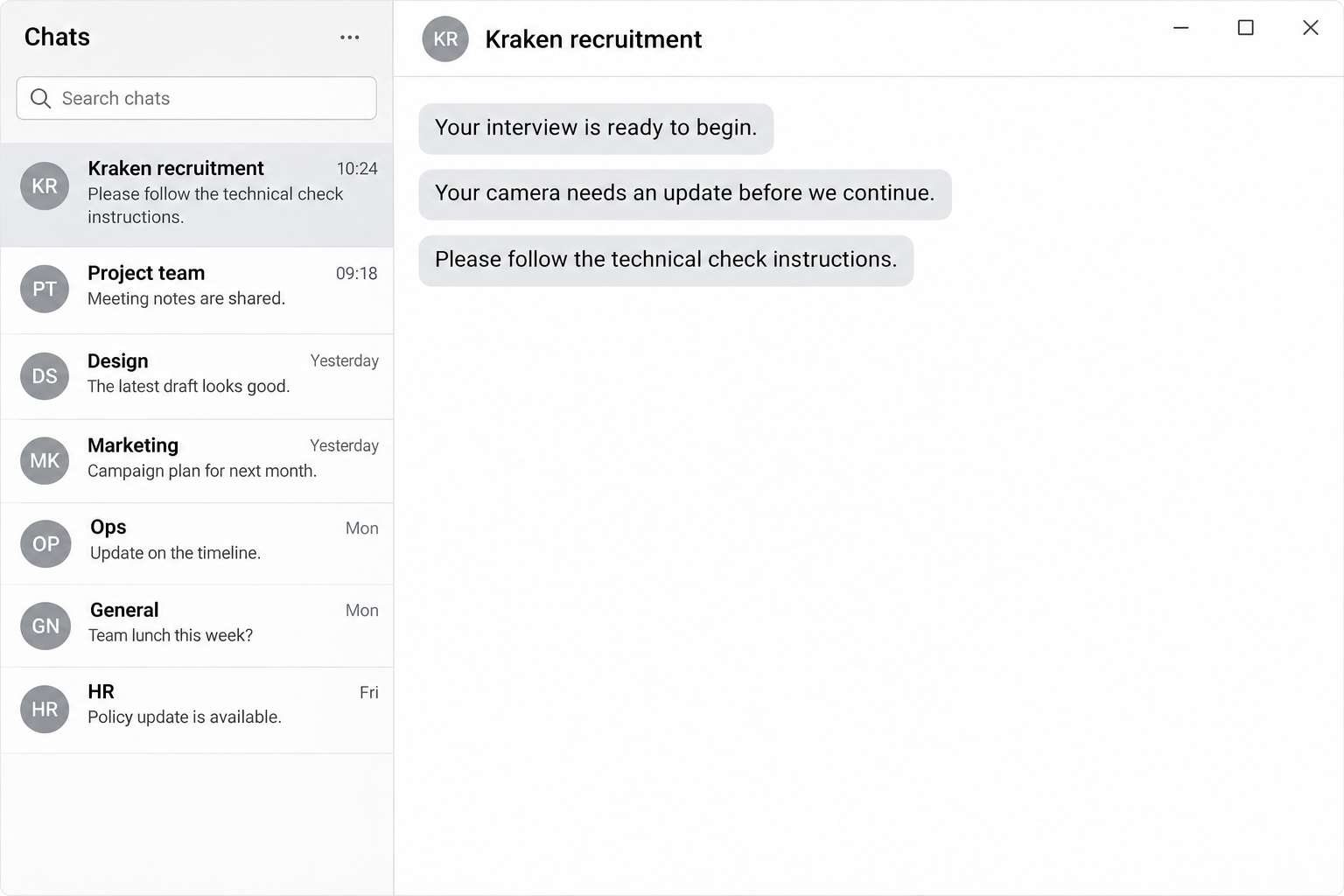
One recent public report described a supposed Kraken Financial recruiter arranging a meeting, then asking the candidate to paste a command because the camera needed updating.
The candidate reportedly refused, and the command was not provided for examination. That account does not identify an installed payload or establish a particular malware infection.
The broader technique is documented independently: a fake technical problem persuades someone to execute instructions. A webpage’s diagnosis should never replace checking who arranged the interview.
Verify the recruiter before supplying money or device access
- Find the role through Kraken’s official careers route rather than trusting a listing copied into a message.
- Check the sending address and recruiter through an independent company contact.
- Reject hiring fees and requests for wallet recovery phrases or private keys.
- Stop when an interview requires executing an unexplained command or accepting remote access.
The opening image is a fictional chat reconstruction with invented wording. It illustrates the approach without reproducing an actual employee’s account, meeting, or technical instructions.
A Real Employer Can Be Named in a Fake Message
Searching for Kraken will lead you to a real company. That answers whether the employer exists, but leaves a separate question: does this person represent it?
A scammer can copy a vacancy that genuinely matches your skills. Finding that same opening online therefore does not authenticate the private conversation.
Employee names and photographs can also be copied from public profiles. Matching a face or job title tells you whose identity is being claimed.
Kraken says its hiring process does not require payments from applicants. It also warns that staff will never ask for wallet keys.
Keep those demands separate from legitimate application information. A résumé, a secure application form, and a request to surrender account secrets serve very different purposes.
How the Kraken Recruiter Scam Works
Step 1: The contact offers a role that sounds relevant
An approach through LinkedIn, email, or private messaging can resemble genuine recruiting. The sender may refer to experience already visible on your professional profile.
That detail makes the message feel selective rather than random. Public career information can help an impostor write something that sounds informed.
Legitimate recruiters also approach people who have not applied. Judge the identity and requested actions, rather than treating every unsolicited career message as proof of fraud.
Step 2: Familiar names make the conversation feel established
A copied employee profile or genuine vacancy can provide continuity as the exchange moves toward an appointment. You may begin thinking about the interview itself.
At that point, checking the sender can feel awkward or unnecessary. However, a promising discussion does not remove the need to identify the person conducting it.
Keep the original messages, full sending address, and profile link. These are more useful for checking the approach than a screenshot containing only a recognizable name.
Step 3: A requirement appears before the opportunity can continue
The pretext might concern training costs, equipment, documents, or a technical check. Those requests create different risks and should not be treated as interchangeable.
In the reported camera approach, the obstacle appeared at the meeting stage. The candidate was pressured to follow a supplied command instead of using an alternative call.
There is no need to run that command to decide whether to proceed. Pause the meeting and verify the recruiter outside the conversation.
Step 4: The applicant is pushed beyond an ordinary hiring conversation
Paying an impostor transfers your money; sharing a secret can expose an account. Executing supplied instructions can let code operate on your computer.
Microsoft’s ClickFix research documents fake errors used to induce command execution on Windows and macOS. That explains the technique without identifying this unexamined command’s contents.
A familiar command window does not make unfamiliar instructions safe. Recognizing a few words is different from understanding everything the command retrieves or runs.
Step 5: Urgency discourages an independent check
The sender can make the opportunity sound dependent on immediate cooperation. A candidate may worry that hesitation will be interpreted as poor preparation or lack of commitment.
That pressure should not decide who receives access to your computer or money. An independently verified hiring contact can clarify genuine interview requirements.
End the exchange if the supposed recruiter insists on unsafe instructions while refusing verification. You do not have to finish the interview to protect your accounts.
Check the Opportunity Through Kraken’s Real Hiring Route
Start with the careers page you opened independently
Visit Kraken’s careers page through an address you found yourself. Follow its own application links rather than a replacement portal supplied by the contact.
Compare the advertised position with the actual vacancy, including its location and responsibilities. A matching description helps identify the claimed role, but still requires checking the recruiter.
If you already applied, use your existing application correspondence to raise the concern. Keep the questionable contact outside that trusted exchange.
Examine the address, rather than the display name
Kraken’s warning directs applicants to verified company email addresses. Expand the sender details so you can inspect the address instead of relying on a displayed employee name.
A misspelled or unrelated domain is a reason to stop. Conversely, a familiar-looking address should not overrule a request for payment, secrets, or unexplained code execution.
Do not authenticate one stranger by asking another contact that stranger provides. Return to a company route obtained independently.
Separate a camera setting from a recruiter’s command
Real camera problems can involve application permissions, privacy settings, hardware, or software updates. Their existence does not authenticate a diagnosis displayed in an unfamiliar meeting page.
Close the questionable session before troubleshooting through your device maker or trusted support. Avoid granting additional permissions simply to test whether the supposed interview will begin.
The candidate’s refusal in the public report is the useful decision point. No identified malicious program is needed before rejecting unexplained instructions from an unverified person.
What to Do if You Have Fallen Victim to This Scam
-
Write down the last action you actually completed. Distinguish opening a message, sharing a résumé, entering credentials, sending money, copying a command, and executing it.
Record the approximate time and device involved. Do not repeat a command or revisit an installation merely to reconstruct the sequence.
-
Preserve the evidence already available to you. Save messages, profile links, sender addresses, interview invitations, payment records, and the advertised vacancy.
Keep technical instructions as evidence without executing them. Remove private information before posting a public warning or requesting community help.
-
Report the impersonation through Kraken’s genuine support route. Its official recruiter warning links to the appropriate reporting form. Reach it from that independently opened warning.
Also report the account through the platform where contact began. A displayed employee name alone may not be enough to identify the impersonating profile.
-
Protect any credentials or documents you disclosed. Replace exposed passwords from a trusted device and review account sessions, recovery details, and additional authentication.
A shared résumé does not automatically mean every account was compromised. Explain precisely what was disclosed when asking an affected provider for assistance.
-
Contact your financial provider promptly if you paid. Identify the transfer, recipient, date, and method, then ask what can be stopped or investigated.
The FTC’s job scam guidance recommends contacting the payment provider immediately. It does not promise that every payment can be recovered.
-
Arrange device investigation if you ran the instructions. An executed command requires a different response from an unopened message or text merely copied to the clipboard.
For a work-managed computer, contact IT before installing scanners, deleting files, or restarting. Personal-device checks are outlined below for Windows and Mac.
Check a Personal Computer After Running the Interview Command
These steps apply if you executed the supplied instructions or installed software. Receiving the approach alone does not establish that your computer needs malware removal.
The tutorial images come from MalwareTips’ existing Windows and Mac guides. They show older layouts, so follow the current controls described in the instructions.
Step 1: Contain the exposure and preserve useful records
If you suspect an active compromise on a personal computer, disconnect its Wi-Fi or Ethernet. Stop using it for banking, email recovery, or wallet access.
Use a separate trusted device to contact support and secure accounts. Tell anyone assisting you about downloaded files, administrator prompts, and commands you remember submitting.
Keep the messages and existing security findings. On a managed device, let its security team decide how to preserve evidence before cleanup or a restart.
For a personal device, arrange the scanner download through a trusted connection or another clean computer. Reconnect only as needed for legitimate installation and updates.
Step 2: Install the scanner for your operating system
Windows installation
Download the Malwarebytes Installer for Your Windows Computer
Open your Downloads folder and double-click the MBSetup installer obtained through the trusted route. Confirm the expected installer before approving Windows’ permission prompt.
Choose Install, select the appropriate device type, and follow the setup prompts. Skip optional product offers you do not want, then choose Open Malwarebytes.

Read any activation, trial, or subscription screen before accepting it. Do not purchase a plan merely because the suspected recruiter says cleanup requires one.
The Windows installation instructions explain the current installer. If setup fails, keep the error and seek help rather than disabling existing security controls.
Use the free Custom Scan route described below if you do not have a paid plan. Current Malwarebytes documentation distinguishes it from the paid Threat Scan.
Mac installation
Download Malwarebytes for Your Mac Through Our Existing Route
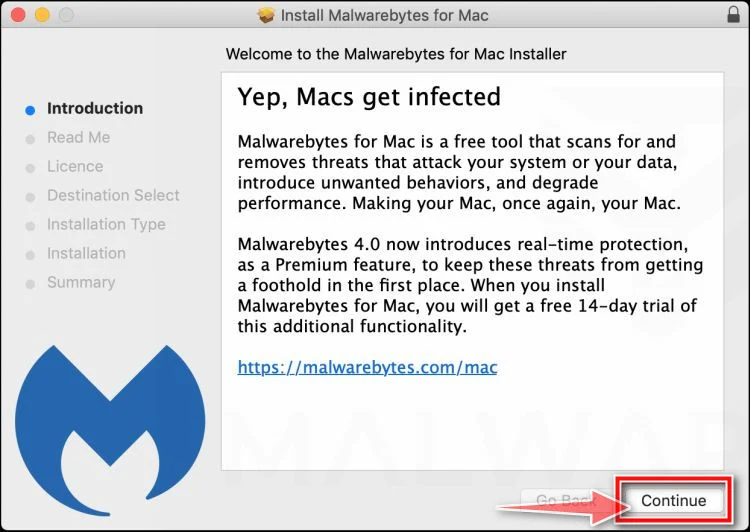
Open the downloaded Mac installer, review its introduction and license information, then choose Continue and Agree where appropriate. Choose Install to begin the installation.
Authenticate the genuine installer locally when macOS requests it, then finish setup. The example shows the Continue control in an older installer.
Open Malwarebytes and select the appropriate device type. Where offered, choose Maybe later for the free version and Continue without email to skip the newsletter.
Follow the app’s legitimate permission setup, including Full Disk Access when requested for scanning. Do not grant access to the recruiter’s meeting page instead.
The Mac installation guide explains the current choices. Seek help if the installer or permissions differ from what you expect.
Step 3: Run a Custom Scan and inspect the result
Update Malwarebytes through its own application before scanning. Its feature comparison lists Custom Scan as free on Windows and Mac, while Threat Scan requires payment.
On Windows, open the Scanner tile’s three-dot menu, choose Advanced Scan, and select Custom Scan. Expand the file finder and select the locations to examine.
Include the Windows system drive and relevant download locations. Review the available options and keep potentially unwanted program detections from being ignored automatically.
Choose Start Custom Scan and let it complete. A scan’s coverage depends on your selected locations and available options, rather than the button’s name alone.
On Mac, open the Scanner tile itself, then Advanced scans and Custom scan. The main Scan button starts a different scan.
Use Finder to select the application, directory, or folders you want examined, then click Open. Wait until the selected scan has finished.
The current Custom Scan instructions cover both platforms. Keep any setup errors or unresolved detections for the person helping investigate.
Step 4: Handle detections, then address anything unresolved
Review the detected names and locations before taking action. Quarantine identified threats when action is required; some settings may already have quarantined them automatically.
Open Detection History and its Quarantined items tab to check the result. Do not restore or allow a detection simply because the recruiter called it necessary.
Malwarebytes’ quarantine guidance explains those controls. Permanent deletion can remove material you may still need for investigation, so preserve relevant findings first.
If a restart is requested to finish removal, save your work and follow the prompt. Reopen the application afterward and check for remaining required actions.
A clean scan cannot establish whether information was copied earlier. Complete account recovery separately, including reviewing exposed sessions and any wallet secrets stored on the device.
If problems persist, ask through the MalwareTips support directory for Windows or Mac removal assistance. Include your operating system, findings, and the actions already taken.
View Optional Paid Malwarebytes Protection for Windows Through Our Partner
View Optional Paid Malwarebytes Protection for Mac Through Our Partner
MalwareTips may earn a commission from purchases through these partner links. Paid prevention remains separate from the free scanning options described above.
Frequently Asked Questions
Is Kraken itself running this recruitment scam?
The warning concerns impostors using the company’s identity. Kraken has published its own advice about fake recruiters and directs applicants to its genuine careers route.
Can a genuine vacancy appear in a fake recruiter’s message?
Kraken warns that impostors can copy real listings. Finding the position online does not establish that the private contact is authorized to recruit for it.
Does receiving an interview link mean my computer is infected?
A received link does not establish an infection. Check whether you entered information, installed software, granted access, or executed instructions before choosing the appropriate response.
What if I copied the command but never ran it?
Close the command window without submitting its contents and replace the clipboard with harmless text. Copying alone is different from executing the supplied instructions.
Should a job applicant pay Kraken a training fee?
Kraken says it does not request payments during hiring. Reject that demand and verify the approach through the company’s independently opened official channels.
Will scanning the computer also recover stolen account access?
Device cleanup does not revoke stolen sessions, restore funds, or protect an exposed wallet secret automatically. Address those problems separately through the affected providers.
The Bottom Line
Do not pay a supposed Kraken recruiter or run unexplained interview commands. Verify the person through the company’s real hiring route before continuing.
If you already responded, preserve the exchange and match recovery to your actual exposure. Contact your payment provider, secure affected accounts, and investigate executed software separately.

Join the discussion
0 commentsShare your experience or ask a question about this article.
Community experiences
Did this happen to you?
Your experience could help someone recognize the same scam. Submit a private report for our team to review.
I experienced this tooReports are reviewed before publication. Sharing publicly is always your choice.
Discussion
Start the conversation
Have a question or something useful to share? Add the first comment.