

It usually starts the same way.
A flashy video. A familiar YETI logo. A confident voice claiming you have been “selected” for a free Yeti cooler, tumbler, or bag.
Sometimes the story is a warehouse clearout. Sometimes it is a new model launch. Sometimes it is a celebrity “giving back,” telling fans to claim a limited gift by paying a small shipping fee.
It feels believable for one reason: it is designed to feel believable.
But behind many of these viral “free Yeti” offers is a well-tested scam pattern that has nothing to do with YETI. The goal is not to send you a premium product. The goal is to get your card details and quietly enroll you into unwanted subscriptions that keep charging month after month.
This article explains the fake Yeti giveaways in plain language, step by step, so you can spot them fast, avoid them confidently, and take action if you already fell for one.
Scam Overview
Fake Yeti giveaways are a fast-moving class of social media scams that use YETI products as bait. They are built around three powerful ingredients: trust in a premium brand, the excitement of a “free” offer, and urgency that pushes you to act before you verify anything.
You might see these scams promoting:
- Yeti Tundra cooler giveaways
- Yeti Rambler tumbler giveaways
- Yeti Hopper cooler bag giveaways
- “Limited holiday gift” Yeti bundles
- “Customer appreciation” rewards featuring Yeti products
- “Product tester” programs for a free cooler
The hook changes constantly. The funnel rarely changes.
Why Yeti products are used so often
YETI is a perfect target for scammers because:
- The products are expensive, which makes “free” feel irresistible.
- The brand is widely recognized, so the logo alone builds credibility.
- Many people already want a Yeti item, so they are primed to click.
- Yeti products photograph well, and photos can be stolen from reviews and listings.
- The audience is broad: campers, parents, tailgaters, anglers, commuters, gift shoppers.
A fake $9.95 shipping fee feels “reasonable” when the item is normally $200 to $450. That price gap is exactly what scammers exploit.
The core promise: “Free, just pay shipping”
The most common fake Yeti giveaway pitch is simple:
- “Congratulations, you are today’s winner.”
- “Answer a few questions to claim your Yeti.”
- “Pay $9.95 for shipping.”
- “Delivery in 2 to 7 days.”
That shipping fee is rarely the real cost. It is the entry point.
Once a victim enters card details, the scam often shifts into one of these outcomes:
- A recurring monthly membership charge, often $50 to $82 every 30 days
- Multiple smaller charges that look like add-ons or “processing fees”
- Trial offers that turn into paid subscriptions after 7 to 21 days
- Billing descriptors that do not mention Yeti, making charges harder to spot
- A cancellation process that is confusing, slow, or intentionally frustrating
In many cases, victims never receive any Yeti product at all.
The celebrity angle: why it is becoming more common
A big trend in recent fake Yeti giveaways is the use of celebrities, influencers, and familiar TV-style formats.
Scammers may use:
- AI-generated videos that appear to show a celebrity endorsing the giveaway
- Manipulated audio that sounds like a recognizable public figure
- Fake “news segment” framing that mimics a morning show
- “Interview” clips with captions claiming Yeti is giving away products to fans
- Deepfake-style endorsements encouraging viewers to click a link fast
The goal is not only to grab attention. It is to borrow credibility.
If the viewer thinks a famous person is involved, skepticism drops. The scam becomes a “hot tip” instead of an unknown link.
Even when the video is obviously exaggerated, the emotional effect works. People remember the claim, not the details.
Where these scams appear
Fake Yeti giveaways spread across multiple platforms, but they thrive on social media feeds where sponsored posts blend in with normal content.
Common placements include:
- Facebook sponsored ads and “community” pages
- Instagram reels and story ads
- TikTok short videos and comment-link traps
- YouTube shorts with link-in-description funnels
- Pinterest promoted pins for “giveaways”
- Emails and text messages claiming “reward confirmation”
In many versions, the link is placed in the comments instead of the main post. This can reduce moderation and also creates a sense of “insider access.”
How scammers make the pages look legitimate
Most people do not evaluate a page like a security analyst. Scammers know that.
So they make the surface look professional:
- High-quality product images of Yeti coolers and tumblers
- Copy-pasted Yeti logos, fonts, and color palettes
- Phrases like “official partner,” “limited promotion,” or “customer rewards”
- Fake review widgets showing 5-star ratings
- “Recent claims” tickers listing names and locations
- Countdown timers and limited stock counters
- Terms pages and privacy policies that look formal but say very little
The site may look real enough to pass a quick glance.
But the details reveal the truth:
- The domain is unrelated to Yeti.
- The contact information is vague or missing.
- The checkout is not hosted on a trusted merchant.
- The fine print quietly describes a membership program.
- You are redirected through multiple domains before payment.
The “survey” step is not harmless
A common feature is a short “survey” that asks questions like:
- What is your age group?
- How often do you camp?
- Do you own a cooler?
- How did you hear about us?
These questions are not meaningful. They do not decide eligibility.
The survey is a psychological device. It creates the feeling that you earned the reward. It also creates momentum, which reduces the chance you will back out at the payment step.
It also gives scammers data they can use later for targeting, especially if they are running large affiliate networks.
What the scam really is: a subscription trap funnel
At its core, the fake Yeti giveaway is a conversion funnel designed to generate recurring billing.
The “product” is not the cooler.
The product is a monthly charge that many victims miss until it appears on their statement.
This is why you will often see:
- Very specific shipping fees like $9.95 or $9.96
- “Free today only” messaging
- Checkout pages that include hidden billing terms
- A trial period that automatically converts unless canceled
- A cancellation process that creates friction
This is not an accident or a misunderstanding.
It is how the scam is engineered.
What victims often experience
People who get caught in fake Yeti giveaways often describe a familiar sequence:
- They click a giveaway ad that looks credible.
- They answer a few questions and “win” instantly.
- They pay a small shipping fee.
- They receive vague confirmation emails, or none.
- They never receive the product, or receive something cheap and unrelated.
- A larger charge appears later, often $50 to $82.
- The charge repeats monthly.
- Canceling is difficult, and support is unhelpful.
- The only reliable fix is blocking charges or replacing the card.
The emotional part is important too. Many victims feel embarrassed, which delays action. Scammers benefit from that delay.
The truth is simple: these scams are designed to trick smart, normal people. They work because they look like a real promotion and because the steps feel low-risk.
Once you know the pattern, you can recognize it quickly.
How The Scam Works
The fastest way to protect yourself is to understand the full step-by-step structure. Fake Yeti giveaways often follow the same sequence, even when the story and product change.
Below is the typical funnel, broken into clear stages with the specific tactics used at each step.
Step 1: The attention grabber ad
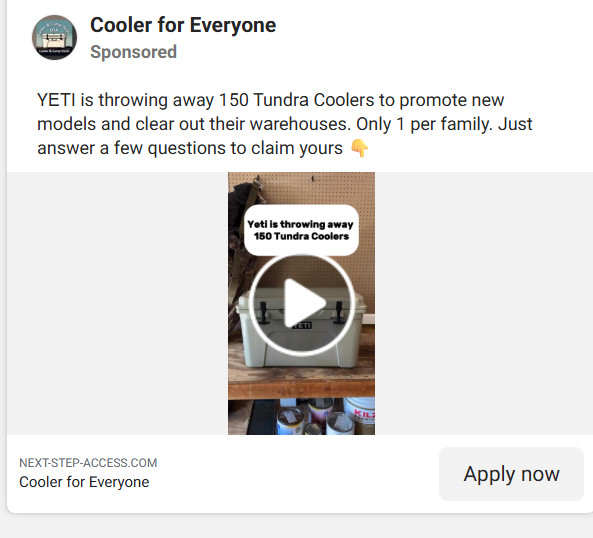
You see a sponsored post or viral clip claiming YETI is giving away products.
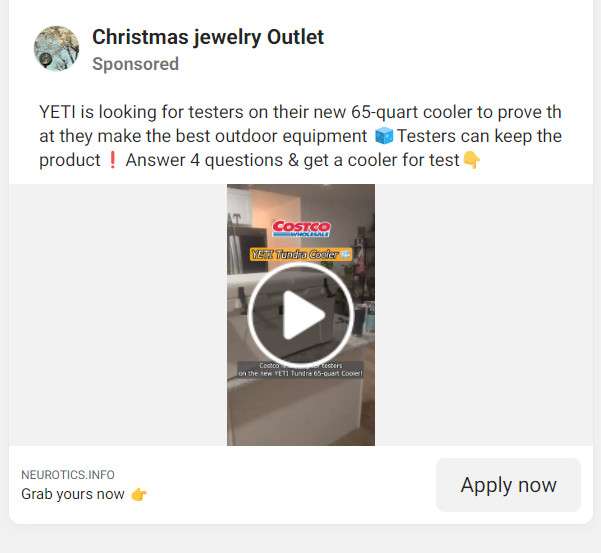
The ad usually includes:
- A limited quantity claim like “Only 150 available”
- A fairness limit like “1 per family”
- A reason that sounds plausible, like clearing warehouse space
- A simple call to action like “Apply now” or “Answer a few questions”
The page name is often generic and friendly, such as:
- “Cooler for Everyone”
- “Outdoor Rewards”
- “Giveaway Center”
- “VIP Access”
- “Adventure Club”
This reduces suspicion. It does not look like a brand impersonation page at first glance.
The button often says “Apply now,” not “Buy now.” That wording is strategic. It frames the action as harmless.
Step 2: A landing page that is not on Yeti’s domain
When you click, you are taken to a site that is not yeti.com.
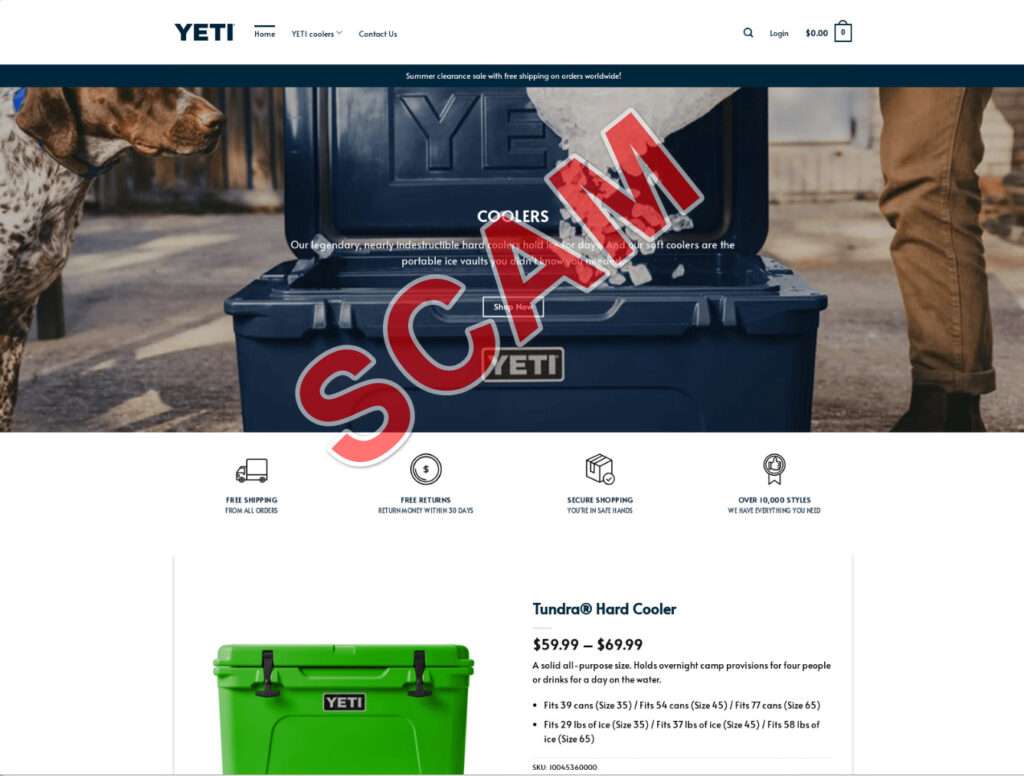
This is a major red flag.
The landing page may still show:
- Yeti product photos
- A Yeti logo
- Copy about the giveaway
- A short explanation of the “promotion”
But it is hosted on a random domain that the scam operators control. These domains often rotate, which makes them harder to shut down.
If a giveaway is real, it is hosted on a real brand domain or a verified partner domain with clear company identification.
Step 3: The “survey” or “eligibility check”
Next, you are asked to answer a few questions.
This step may include:
- A progress bar that says “Checking availability”
- A loading animation that looks like verification
- Questions that feel harmless and quick
Typical questions include:
- Age range
- Outdoor activity type
- Whether you own a cooler already
- Your level of “interest” in Yeti
The outcome is always the same: you qualify.
The survey is not about selecting winners. It is about building commitment.
Once you spend 30 seconds clicking answers, you are more likely to complete the final step because you feel invested.
Step 4: The “you won” screen and fake social proof
After the survey, you see a celebratory message.
Common elements include:
- “Congratulations, you are a winner”
- “You have been selected”
- “You qualify for today’s offer”
- A claim that your spot expires soon
Many pages add social proof, such as:
- Fake comments from “recent winners”
- A list of names and cities claiming rewards
- A 5-star review widget with generic praise
- Popups that say “Amanda from Florida just claimed hers”
These features are designed to replace doubt with momentum.
Step 5: The urgency stack
Now the page applies pressure.
You may see:
- Countdown timer: “Offer expires in 04:26”
- Limited stock counter: “100 left in stock”
- Warning messages: “Do not refresh or you may lose your claim”
- “Only today” claims repeated multiple times
These urgency tactics are critical, because they reduce the chance you will:
- check the domain
- search for “Yeti giveaway scam”
- read fine print carefully
- compare to official Yeti promotions
If you feel rushed, you skim.
Scammers rely on that.
Step 6: The shipping form that collects personal data
Next comes the form.
Even before payment, the scam harvests useful information:
- Full name
- Home address
- Email address
- Phone number
This information can be sold, reused, or used to target you with more scams later.
The form often looks like a normal checkout page, which creates comfort.
Then it asks for payment details to cover shipping.
Step 7: The shipping fee payment request
This is where the scam converts.
You are told:
- The product is free
- You only pay a small shipping fee
- Your item will arrive in 2 to 7 days
The shipping amount is often specific, like $9.95 or $9.96, to feel like a real carrier calculation.
Round numbers feel fake. Specific numbers feel real.
That small fee is the hook that makes people think, “Even if it is not perfect, it is only $9.95.”
But the real cost is not $9.95.
Step 8: The hidden subscription enrollment
Near the payment button, or inside a terms link, you will often find fine print.
This fine print may say you are agreeing to:
- a monthly membership program
- recurring charges every 30 days
- a trial that converts after 7 to 21 days
- ongoing billing until canceled
The amounts are often much higher than the shipping fee.
Many victims report recurring charges in the range of $50 to $82 every 30 days.
Sometimes there are additional charges after a set number of days, such as 14 or 21.
The wording is often vague, using phrases like:
- “benefits”
- “premium access”
- “exclusive deals”
- “membership services”
The fine print is intentionally placed where people do not look.
The page is designed so your eyes stay on the “free Yeti” headline, not the billing terms.
Step 9: Multiple redirects during checkout
Many fake Yeti giveaways bounce you through several domains.
This can happen because:
- the scam uses tracking links to monitor conversions
- different victims are routed to different subscription offers
- the operators rotate processors to reduce shutdown risk
To the average user, it just feels like “the page loading.”
But it is a sign that you are not dealing with a stable, legitimate retailer.
Legitimate promotions do not need a chain of random domains to collect shipping fees.
Step 10: The vague confirmation and missing product
After payment, the confirmation page is often generic.
You might see:
- “Thank you, your claim is confirmed”
- “A confirmation email will be sent”
- “Delivery within 2 to 7 days”
But key details are often missing:
- No real order number from a known seller
- No reliable tracking link
- No clear customer service channel
- No legitimate refund policy
Some victims receive nothing.
Others receive an email that looks like a membership confirmation, not a product shipment.
If any item arrives, it may be:
- a cheap generic tumbler
- an unrelated low-value product
- a knockoff that has nothing to do with Yeti
This is why the scam is profitable. They do not have to ship premium products to make money.
Step 11: The real billing begins later
The most painful part often happens after a delay.
The scam waits until:
- the trial period ends
- the victim forgets about the shipping fee
- the victim assumes the offer was simply “slow shipping”
Then the larger charges appear.
Because these charges often do not say “Yeti” on the statement, victims may not connect them immediately.
That delay increases the chance the charges repeat.
Step 12: Cancellation friction
When victims try to cancel, they often encounter friction such as:
- unclear cancellation steps
- emails that take days to receive a response
- support agents who offer discounts instead of canceling
- confusing policies that require specific wording
- claims that cancellations take time while billing continues
This is a common subscription scam tactic.
The more friction, the more months of billing.
Step 13: The “celebrity follow-up” trick
If you engaged with one fake Yeti giveaway, you may be targeted again.
Scammers often retarget victims with new versions:
- different celebrity videos
- different “limited giveaways”
- “final notice” emails
- “your claim is pending” texts
This is why entering your email and phone number can lead to a wave of follow-up scams.
They already know you click these offers.
A quick way to spot fake Yeti giveaways
If you want a simple filter, use this checklist:
- The giveaway is not hosted on yeti.com.
- The ad is not from Yeti or a verified partner.
- It includes a survey or “apply now” flow.
- It uses a countdown timer or stock counter.
- It asks for a credit card to pay shipping.
- The fine print mentions membership or recurring billing.
If two or more of those are true, treat it as a scam.
What To Do If You Have Fallen Victim to This Scam
If you already entered your details into a fake Yeti giveaway, the most important thing is to act quickly and calmly. You can often stop the damage before it grows.
Use the steps below as a practical checklist.
- Check your bank or card statement immediately
Look for the initial shipping charge and any additional charges.Write down:- Date of the first charge
- Amount
- Merchant name
- Whether it is pending or posted
- Call your bank or card issuer and report a subscription scam
Explain that you believed you were paying a one-time shipping fee for a free giveaway, but you now suspect you were enrolled in recurring billing.Ask the bank to:- block the merchant from charging again
- issue a new card number if needed
- guide you through disputing the charges
- Consider replacing the card
If you provided full card details, replacing the card is often the fastest way to stop ongoing billing.If you use that card for important subscriptions, you can update those after you receive the new card. - Search your email for membership confirmations
Check the email address you entered on the giveaway page.Search for words like:- membership
- subscription
- trial
- billing
- welcome
- support
- order
- Attempt cancellation if you can identify the membership
Some scam memberships include a cancellation link in the email or on a portal page.If you attempt to cancel:- take screenshots of the cancellation steps
- save the final cancellation confirmation
- keep copies of any support requests you send
- Dispute charges you did not knowingly agree to
If you are charged $50, $82, or any recurring amount tied to the giveaway, ask your bank about a chargeback or dispute.Provide:- the giveaway claim, such as “free Yeti cooler, pay shipping only”
- evidence that the membership terms were hidden or unclear
- emails showing subscription enrollment
- screenshots if you have them
- Monitor statements for at least 60 days
Some scams charge quickly. Others wait 14 to 21 days. Keep checking.Watch for:- new merchant names
- repeating monthly charges
- small test charges
- add-on fees
- Protect yourself from follow-up scams
Once scammers have your email and phone number, you may receive new messages claiming:- you need to “verify” shipping
- your giveaway is “on hold”
- you must “confirm” payment to complete delivery
- Report the ad and the pages
Reporting helps reduce the spread.Actions that help:- Report the social media ad as a scam
- Report the page running the ad
- Report the website in your browser’s phishing reporting tool
- Warn friends and family
Fake Yeti giveaways spread because people share them.
If someone close to you is likely to fall for “free cooler” ads, a simple warning can prevent a real loss:
- If it is not on yeti.com, do not trust it.
- Free Yeti offers that require a card are often subscription traps.
- Never rush because of a countdown timer.
The Bottom Line
Fake Yeti giveaways are not harmless “shipping-only” deals. They are carefully designed subscription scams that borrow Yeti’s reputation, use urgency tactics, and increasingly rely on celebrity-style videos to make the offer feel real.
The pattern is consistent: a short survey, an instant “you won” message, a small shipping fee, and then hidden recurring charges that can run $50 to $82 every 30 days, often paired with difficult cancellation.
If you see a viral post claiming YETI is giving away coolers or tumblers to clear warehouses, promote new models, or reward “selected winners,” slow down. Check the domain. Verify through official channels. Do not enter card details on unknown sites.
A real Yeti product is valuable. Your personal data and your card details are even more valuable. Treat them like it.
Is Your Device Infected? Run a Free Malware Scan
Slow performance, constant pop-ups, or strange behavior? These are classic signs of a malware infection. The fastest way to find out is to scan your device with Malwarebytes Free — one of the most trusted malware removal tools available.
The free version detects and removes the most common threats, including:
- Adware — the cause of those annoying pop-ups
- Browser hijackers — unwanted redirects and changed homepages
- Trojans and spyware — hidden programs stealing your data
- Potentially unwanted programs (PUPs) — software you never asked for
👉 Select your device below — Windows, Mac, or Android — then follow the simple steps to download Malwarebytes, scan your system, and remove any threats it finds. The scan usually takes 5 to 20 minutes.
Run a Malware Scan with Malwarebytes for Windows
Malwarebytes is one of the most popular and trusted anti-malware tools for Windows — and it’s completely free for removing infections. It catches threats that many antivirus programs miss, including adware, browser hijackers, and trojans. Follow the steps below to scan and clean your PC in just a few minutes.
Download Malwarebytes
Click the button below to download the latest version of Malwarebytes for Windows from the official source. The free version is all you need — it will scan your computer and remove adware, browser hijackers, and other malicious software at no cost.
Download MalwarebytesOfficial installer for Windows 11 and 10. Your download starts right away.Want real-time protection? See Malwarebytes Premium Malwarebytes Free for WindowsScans and removes malware at no cost
-
Install Malwarebytes
When the download finishes, open your Downloads folder and double-click the MBSetup file. If Windows shows a User Account Control pop-up, click “Yes” to allow the installation.
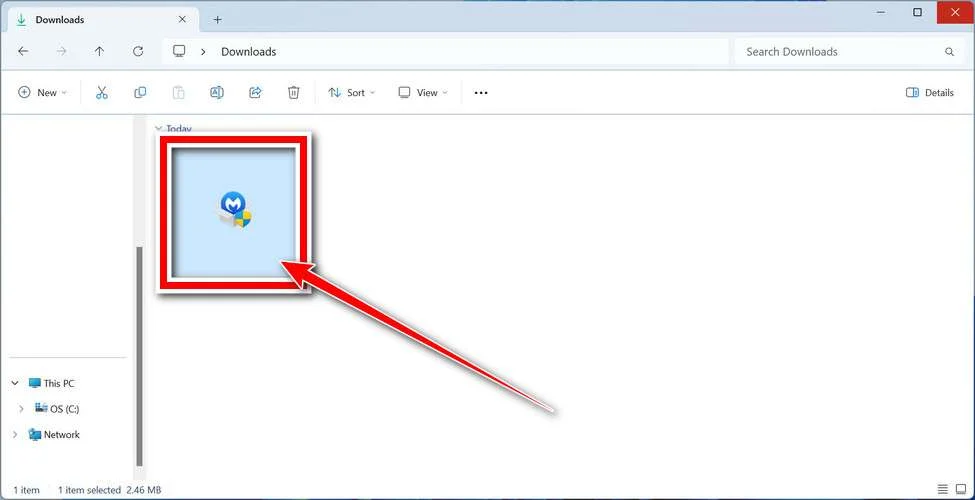
Follow the On-Screen Prompts to Install Malwarebytes
The setup wizard will walk you through a few quick screens:
-
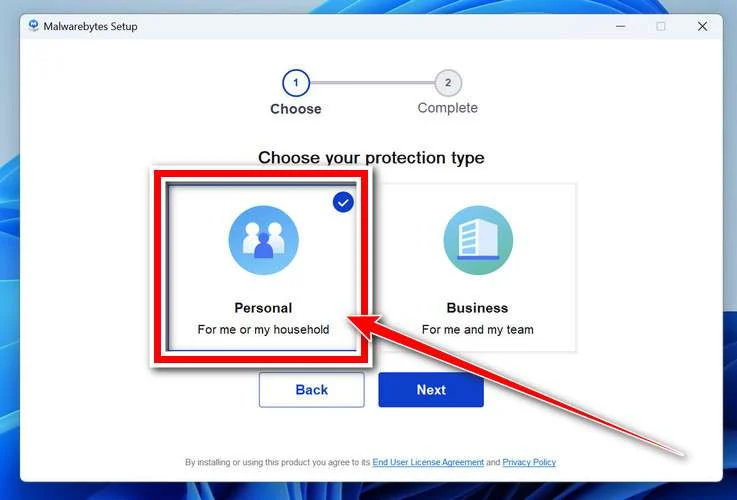
Choose where you’re installing the program — “Personal Computer” or “Work Computer” — then click Next.
-
Malwarebytes will now install on your device. This usually takes under a minute.

-
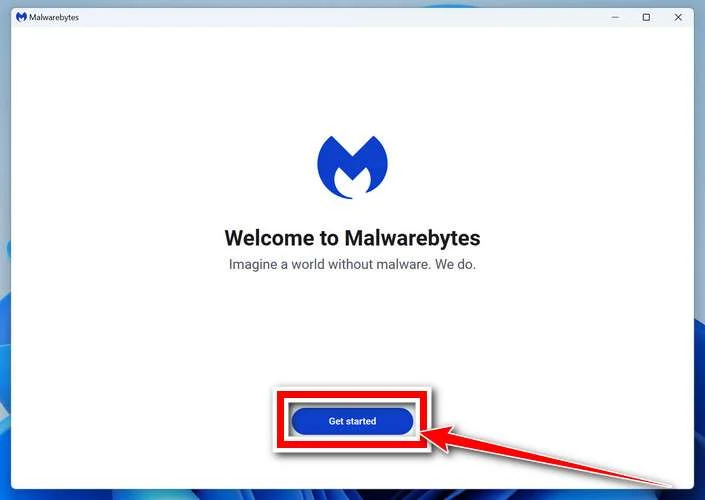
When installation is complete, the “Welcome to Malwarebytes” screen will open automatically.
-
On the final screen, click Open Malwarebytes to launch the program.

-
Enable “Scan for Rootkits”
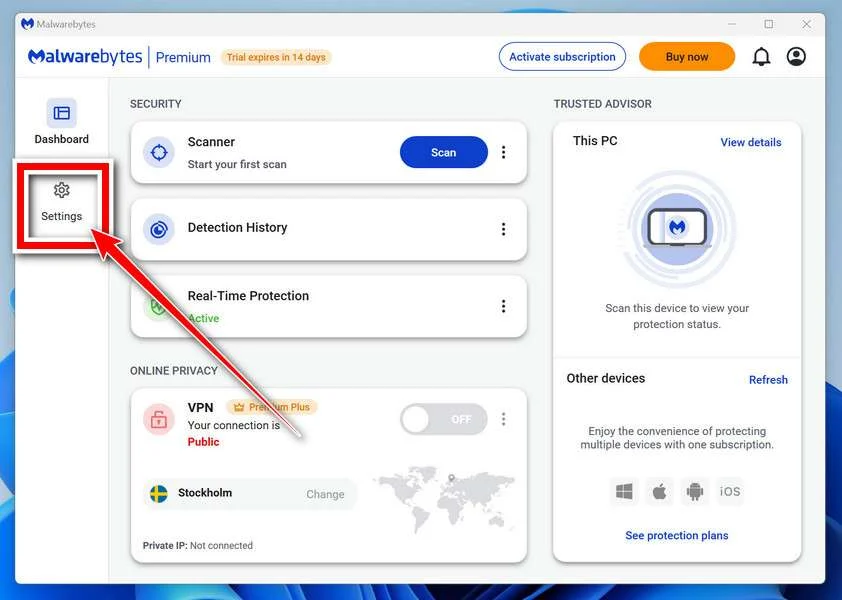
Before scanning, turn on rootkit detection so Malwarebytes can find even the most hidden threats. Click the Settings gear icon on the left side of the screen.
In the settings menu, find “Scan for rootkits” and click the toggle so it turns blue.

Done? Click “Dashboard” in the left pane to return to the main screen.
Start the Scan
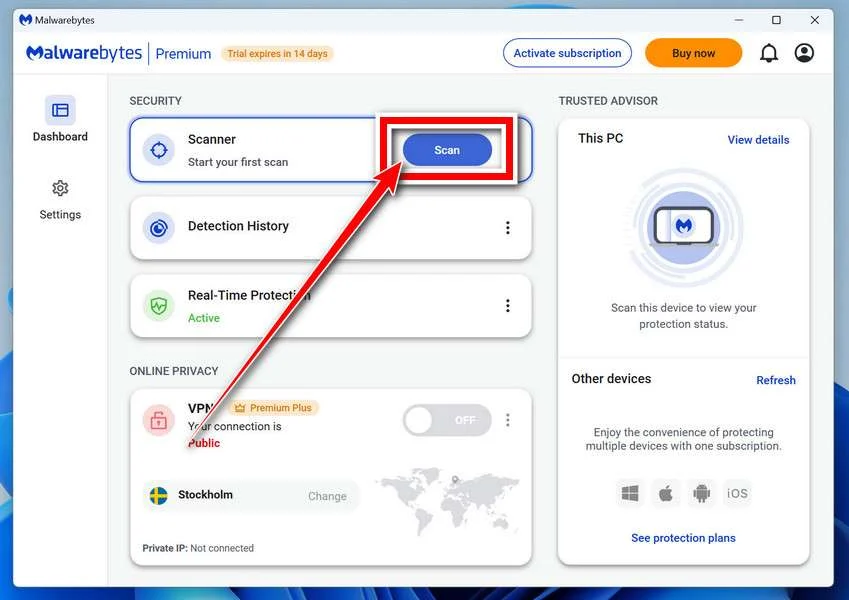
Click the blue Scan button. Malwarebytes will automatically update its virus database and start checking your computer for malware.
-
Wait for the Scan to Finish
The scan checks your entire system for browser hijackers and other malicious programs, so it can take 5 to 20 minutes depending on your computer. Feel free to do something else — just check back occasionally to see the progress.
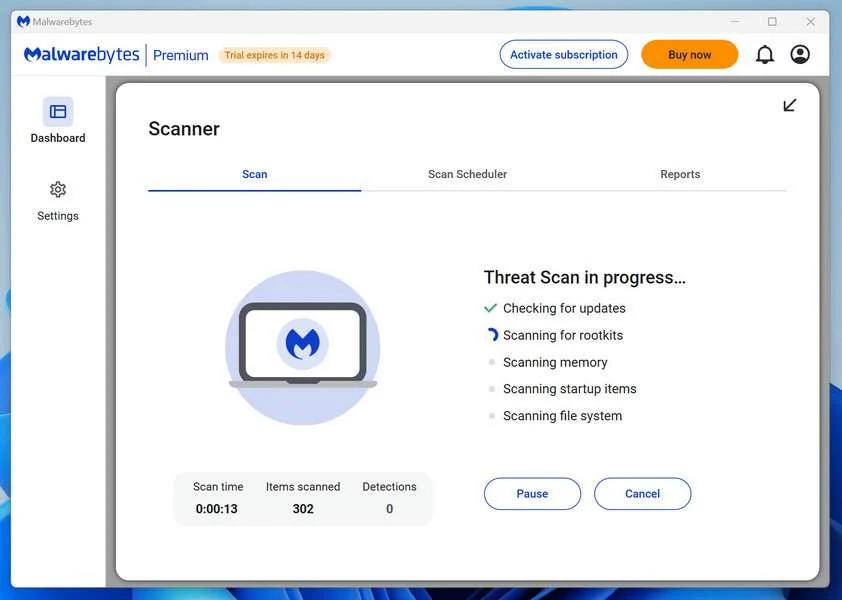
-
Quarantine the Detected Threats
When the scan is done, you’ll see a list of everything Malwarebytes found — malware, adware, and potentially unwanted programs. Click the “Quarantine” button to remove all of them at once.
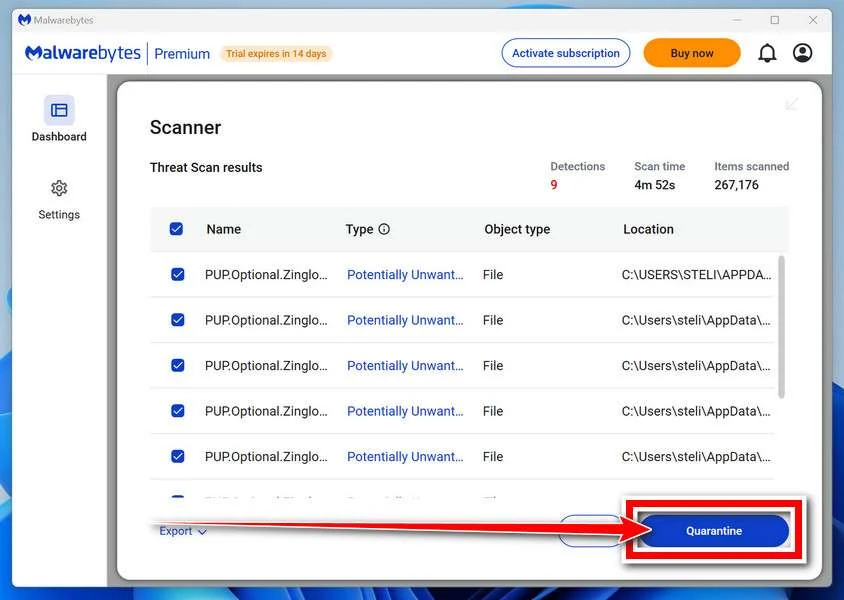
Malwarebytes will now remove the malicious files and registry entries and move them safely into quarantine.
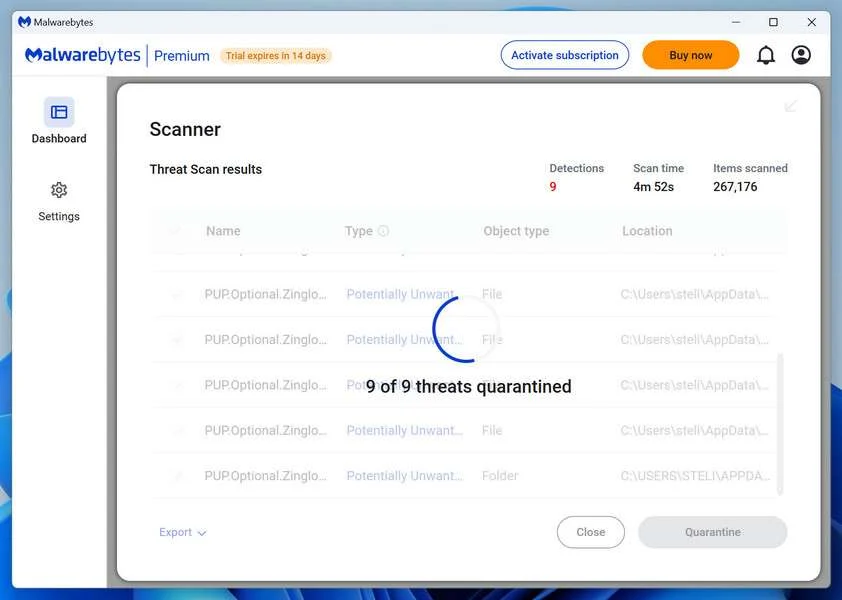
-
Restart Your Computer
Some threats can only be fully removed after a reboot. If Malwarebytes asks you to restart, click Yes. Once you’re logged back in, Malwarebytes has finished removing the threats it found.
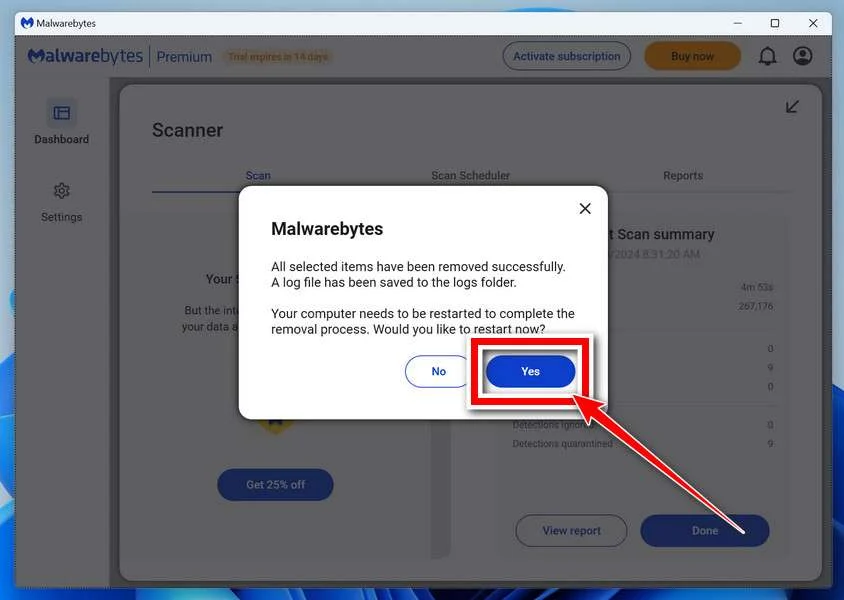
That’s it — your Windows PC is now clean of trojans, adware, and other malware, and should be back to running smoothly.
If you are still having problems with your computer after completing these instructions, then please follow one of the steps:
- Run a computer scan with ESET Online Scanner
- Ask for help in our Windows Malware Removal Help & Support forum.
Run a Malware Scan with Malwarebytes for Mac
Malwarebytes for Mac is a free on-demand scanner that removes the malware other security software tends to miss — adware, browser hijackers, and unwanted programs included. Cleaning an infected Mac with Malwarebytes has always been completely free, and it’s our go-to recommendation. Follow the steps below to scan and clean your Mac in just a few minutes.
-
Download Malwarebytes for Mac
Click the button below to download the latest version of Malwarebytes for Mac.
Download MalwarebytesOfficial installer for macOS. Your download starts right away.Want real-time protection? See Malwarebytes PremiumMalwarebytes Free for MacScans and removes malware at no cost -
Open the Malwarebytes setup file
When the download finishes, open your Downloads folder and double-click the setup file to begin the installation.
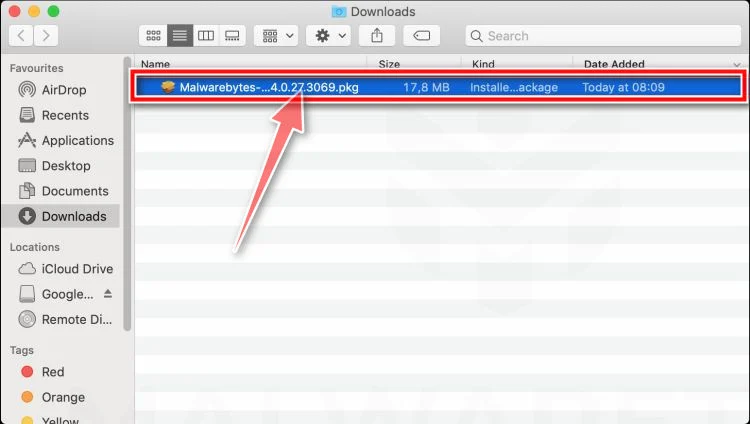
-
Follow the On-Screen Prompts to Install Malwarebytes
The Malwarebytes for Mac Installer will guide you through a few quick screens. Click “Continue” and keep following the prompts until the installation completes.
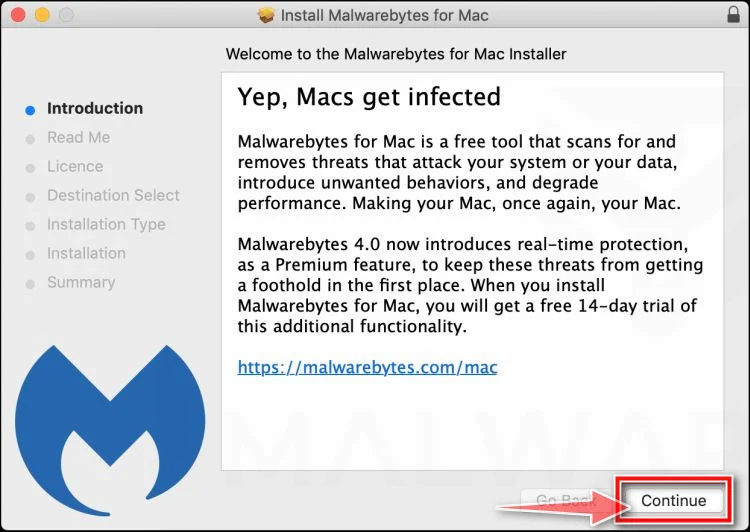
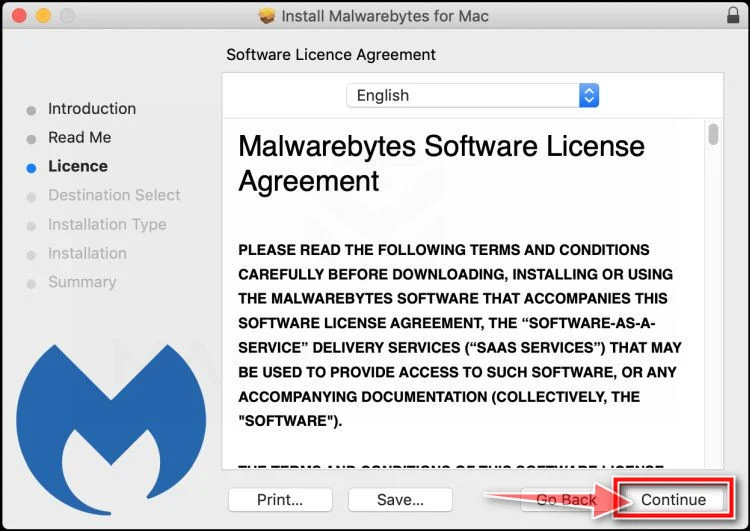
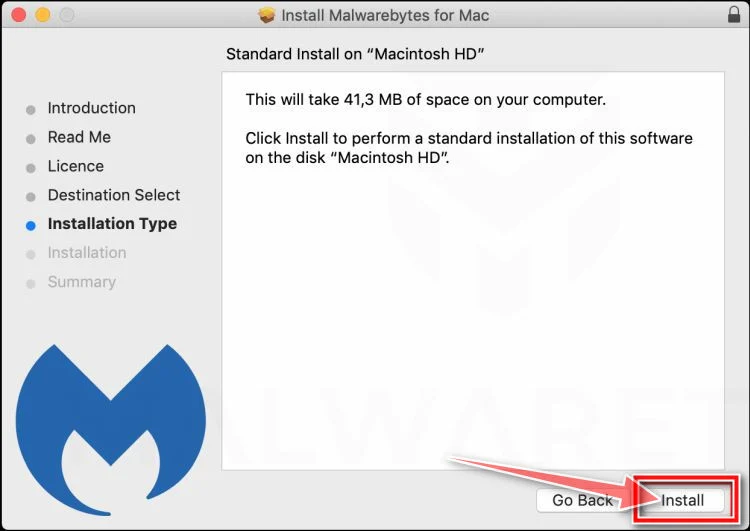
When the installation is complete, Malwarebytes opens to the Welcome to Malwarebytes screen. Click “Get started“.
-
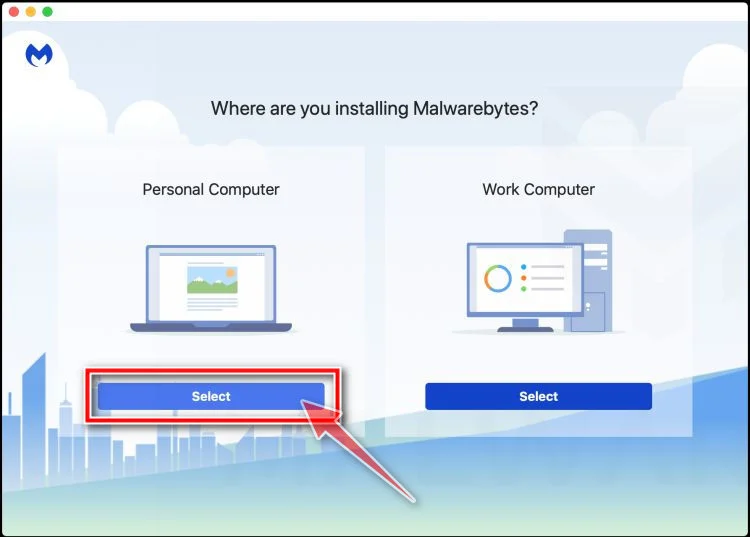
Select “Personal Computer” or “Work Computer”
Malwarebytes will ask what type of computer you’re installing it on. Click either Personal Computer or Work Computer, whichever applies.
-
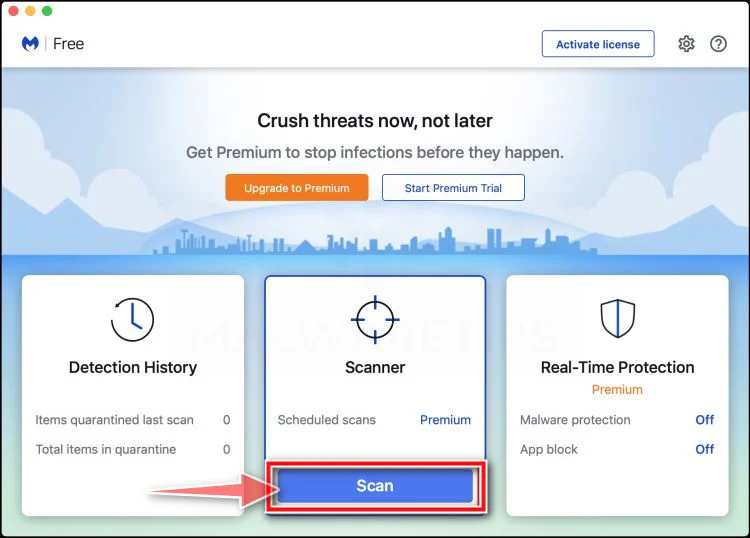
Start the Scan
Click the “Scan” button. Malwarebytes will automatically update its detection database and begin checking your Mac for malware.
-
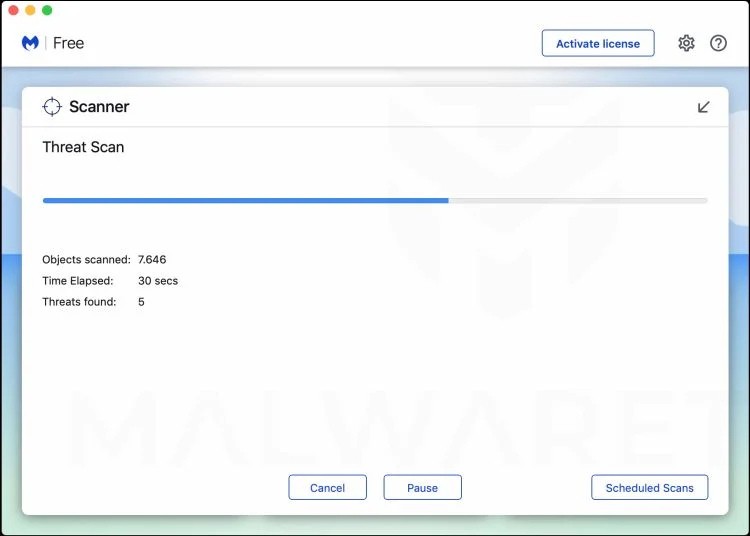
Wait for the Scan to Finish
Malwarebytes will scan your Mac for adware, browser hijackers, and other malicious programs. This can take a few minutes, so feel free to do something else — just check back occasionally to see the progress.
-
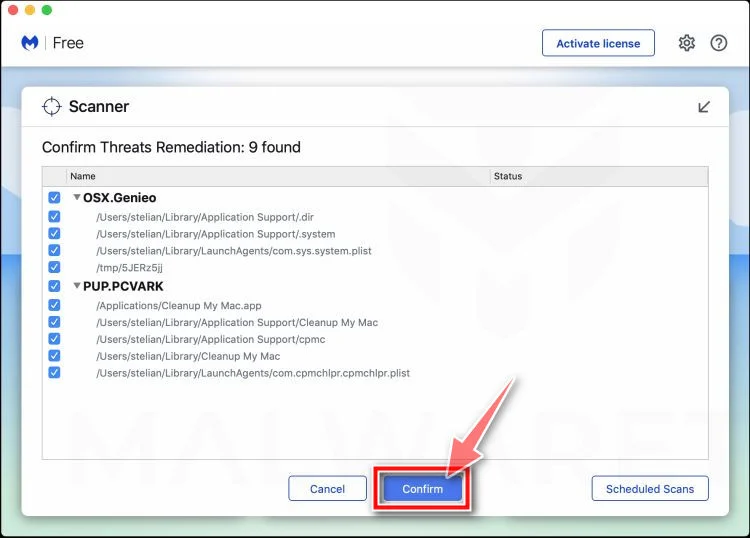
Quarantine the Detected Threats
When the scan is done, you’ll see a list of everything Malwarebytes found. Click the “Quarantine” button to remove all the threats at once.
-
Restart Your Mac
Malwarebytes will now remove all the malicious files it found. Some threats can only be fully removed after a reboot — if Malwarebytes asks you to restart, allow it. Once you’re logged back in, your Mac is clean.
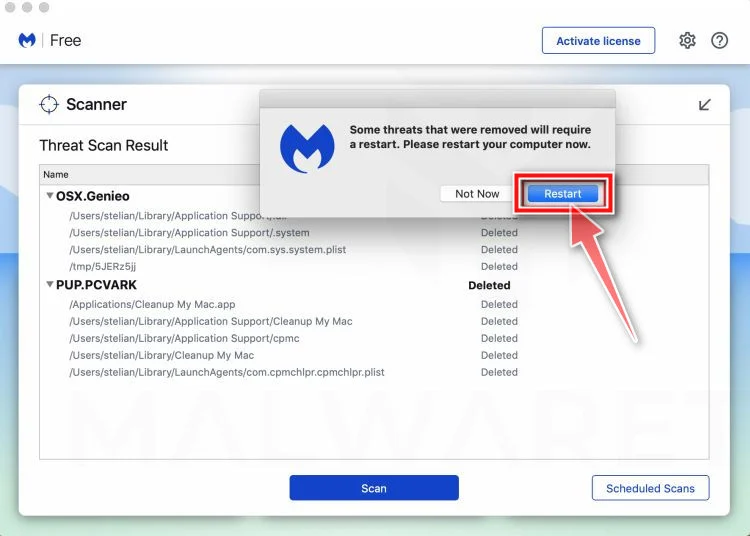
That’s it — your Mac is now free of adware, rogue browser extensions, and other potentially harmful software.
If you are still experiencing problems while trying to remove a malicious program from your computer, please ask for help in our Mac Malware Removal Help & Support forum.
Run a Malware Scan with Malwarebytes for Android
Malwarebytes for Android automatically detects and removes dangerous threats like malware and ransomware so you don’t have to worry about your most-used device being compromised. Aggressive detection of adware and potentially unwanted programs keeps your Android phone or tablet running smooth.
-
Download Malwarebytes for Android.
You can download Malwarebytes for Android by clicking the link below.
Get Malwarebytes for AndroidOpens Google Play in a new tab.Want real-time protection? See Malwarebytes Premium for AndroidMalwarebytes for AndroidScans your phone and removes malware at no cost -
Install Malwarebytes for Android on your phone.
In the Google Play Store, tap “Install” to install Malwarebytes for Android on your device.

When the installation process has finished, tap “Open” to begin using Malwarebytes for Android. You can also open Malwarebytes by tapping on its icon in your phone menu or home screen.

-
Follow the on-screen prompts to complete the setup process
When Malwarebytes will open, you will see the Malwarebytes Setup Wizard which will guide you through a series of permissions and other setup options.
This is the first of two screens that explain the difference between the Premium and Free versions. Swipe this screen to continue.
Tap on “Got it” to proceed to the next step.
Malwarebytes for Android will now ask for a set of permissions that are required to scan your device and protect it from malware. Tap on “Give permission” to continue.
Tap on “Allow” to permit Malwarebytes to access the files on your phone.
-
Update database and run a scan with Malwarebytes for Android
You will now be prompted to update the Malwarebytes database and run a full system scan.

Click on “Update database” to update the Malwarebytes for Android definitions to the latest version, then click on “Run full scan” to perform a system scan.

-
Wait for the Malwarebytes scan to complete.
Malwarebytes will now start scanning your phone for adware and other malicious apps. This process can take a few minutes, so we suggest you do something else and periodically check on the status of the scan to see when it is finished.

-
Click on “Remove Selected”.
When the scan has been completed, you will be presented with a screen showing the malware infections that Malwarebytes for Android has detected. To remove the malicious apps that Malwarebytes has found, tap on the “Remove Selected” button.

-
Restart your phone.
Malwarebytes for Android will now remove all the malicious apps that it has found. To complete the malware removal process, Malwarebytes may ask you to restart your device.
That’s it — your Android phone is now clean — no more malicious apps, adware, or browser redirects.
If you are still having problems with your phone after completing these instructions, then please follow one of the steps:
- Restore your phone to factory settings by going to Settings > General management > Reset > Factory data reset.
- Ask for help in our Mobile Malware Removal Help & Support forum.
Stay Protected: Block Ads and Malicious Sites
Now that your device is clean, keep it that way. Most infections start with a malicious ad or a fake download button — so blocking them at the source is your best defense.
We recommend AdGuard, which blocks malicious ads, phishing pages, and dangerous redirects before they can reach you.
👉 Download AdGuard and browse safely
FAQ
Are any of these “free Yeti giveaway” ads real?
Most viral “free Yeti cooler” or “free Yeti tumbler” ads that ask you to pay shipping on an unknown site are not real. Legitimate Yeti promotions are announced through official Yeti channels or verified retail partners, not random giveaway pages with countdown timers and surveys.
How can I tell if a Yeti giveaway is legitimate?
Use this quick checklist:
- The link should be on an official Yeti domain or a clearly verified partner domain
- The promotion should be mentioned on Yeti’s official site or verified social accounts
- The terms should be clear, with real contact information and eligibility rules
- You should not be routed through multiple strange domains before checkout
If the offer exists only in sponsored posts and leads to a random “winner” site, assume it is a scam.
Why do these scams say “just pay $9.95 shipping”?
Because a small shipping fee feels low risk and gets people to enter card details. The fee is the hook. The real goal is to enroll you into recurring subscription billing that starts after a short trial period.
What kind of charges do victims usually see?
A common pattern is an initial shipping charge followed by recurring monthly charges, often $50 to $82 every 30 days. Some scams also add smaller “processing” fees or surprise charges after 14 to 21 days.
Why does my bank statement not say “Yeti”?
That is intentional. The merchant name is usually unrelated to Yeti so victims do not immediately connect the charge to the giveaway. It delays detection and increases the chance the billing repeats.
What is the purpose of the survey questions?
The survey is a distraction and a commitment trick. It makes you feel like you earned the reward and keeps you moving forward. Your answers usually do not matter, and most people “win” no matter what they select.
Why do these sites use countdown timers and “limited stock” numbers?
To rush you. Fake timers and stock counters create urgency so you do not stop to research the offer or read the fine print. If you refresh the page and the timer resets, that is a strong sign it is manipulation.
What is the celebrity angle about?
Some scammers use AI-generated videos or manipulated audio that appears to feature celebrities or influencers. The goal is to borrow trust and make the giveaway feel verified. Yeti and celebrities rarely, if ever, run giveaways in this way, especially through random landing pages.
I paid shipping but never received anything. Does that mean it is a scam?
It strongly suggests it. Many victims never receive a product at all. Even if something arrives, it is often a cheap generic item or a knockoff. The real scam is the subscription billing tied to your card.
I entered my card details. What should I do right now?
Do these steps quickly:
- Check your recent transactions for unfamiliar charges
- Contact your bank and report a deceptive subscription enrollment
- Ask about blocking the merchant and replacing your card
- Save any emails or screenshots related to the offer
- Monitor your statement for at least 60 days
Can I get my money back?
Often, you have a chance, especially if you act quickly. Many banks will accept disputes or chargebacks when the subscription terms were hidden behind “free gift” or “shipping only” language. Results vary, but it is worth pursuing.
Why do these scams keep coming back even after reports?
Because the operators rotate everything: new domains, new page names, new videos, and new product stories. The funnel stays the same. Learning the pattern is the best long-term protection.
What other scams use the same “pay shipping” subscription trick?
This same structure is used with many products and brands, including:
- Yeti coolers, tumblers, and bags
- “Costco meat box” offers
- Dick’s Sporting Goods “survey rewards”
- Stanley tumblers, tool kits, grills, and electronics giveaways
If you spot the survey + timer + shipping fee combination on an unknown domain, treat it as suspicious.

Join the discussion
0 commentsShare your experience or ask a question about this article.
Discussion
Start the conversation
Have a question or something useful to share? Add the first comment.