

You’re expecting an important package delivery any day now. Then an email arrives claiming to be from FedEx, saying they failed to deliver your parcel. All you need to do is click a link to resolve the issue so you can get your package as soon as possible.
This common scam has duped countless people into giving up valuable personal and financial information to cyber thieves. Don’t let an urgent need for your pending delivery cloud your judgment.
As convenient as services like FedEx may be, they also provide the perfect lure to harvest your private data. Read on to learn how this insidious phishing scam works, how to avoid being fooled, and what to do if you took the bait.
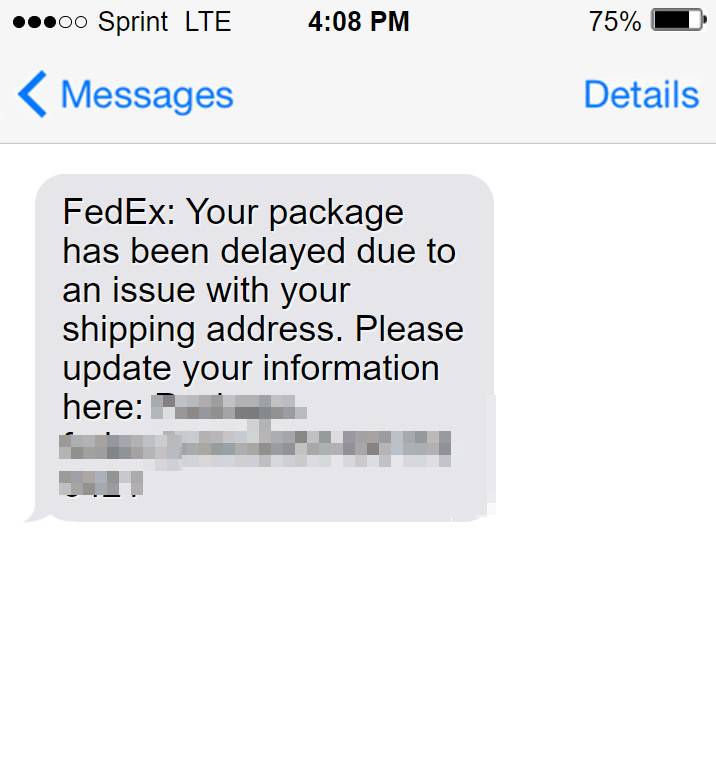
Overview of the FedEx Delivery Scam
This scam starts when potential victims receive an email or text message that appears to come from FedEx. The message claims there is an issue delivering a package, and the recipient must update their personal address or shipping details. Links or phone numbers within the message direct users to realistic-looking but fake FedEx websites.
On these phishing sites, users are prompted to enter a range of personal and financial information to “verify their mailing address” and pay a small redelivery fee. In reality, scammers steal the details for identity theft and financial fraud.
This scam is known as:
- FedEx failed delivery scam
- FedEx unable to deliver scam
- Fake FedEx alert
- FedEx package delivery scam
- FedEx text scam
It exploits the ubiquity of FedEx and likelihood of people expecting real packages. Even savvy internet users can be fooled by the professional design of scam emails and websites.
The Federal Trade Commission received over 37,000 reports of delivery scams in 2021, with estimated losses of $33 million. As more people rely on package deliveries, these scams will likely increase.
How the Scam Emails and Texts Work
The scam messages are designed to appear legitimate on quick glance. The sender name, subject line, logo, and text mimic real FedEx communications.
Here is an example scam email:
From: TrackingUpdates@fedex.com
Subject: FedEx Delivery Exception, expected delivery date is today 0876-5576-3456

Dear xxxxx ,

We would like to inform you that your package could not be delivered due to incomplete information of your physical address.
Please use the button below to update your personal address .

Track and Update Address Here
And a sample text message version:
FedEx Alert: Your package with tracking ID 876-5576-3456 has arrived but we could not deliver today. Please tap link to update delivery: [fake fedex link]
In some cases, the messages include real FedEx tracking numbers, which can be entered on the official FedEx site with no issues. This lends credibility to the scam message.
The most common reasons given for non-delivery are:
- Incomplete or inaccurate address
- Failed delivery attempt
- Problem with payment
- Customs fees due
- Need to reschedule delivery
These triggers urgency to get the package as soon as possible. Phishing links in the message bring users to convincing but fake FedEx domains, like vvv.fedex-delivery.com or track.fedexhomedelivery.co.
Spam filters on email providers like Gmail catch many scam messages. However, plenty still slip through. With text messaging, there are no filters, so FedEx SMS scams can readily reach user inboxes.
Detailed Steps: How the FedEx Scam Works
Here is a step-by-step overview of how scammers leverage the FedEx brand and real package tracking practices to steal user data and money:
1. Scammers send fake shipping notices
Scammers obtain victim email addresses and phone numbers from data breaches and shady online sources. They craft emails and text messages pretending to be official FedEx communications about an incoming or missed delivery.
2. Messages contain links to phishing sites
The scam messages urgently prompt recipients to click included links to resolve delivery issues. These links route to fake FedEx login portals and tracking pages designed to mimic real FedEx sites.
3. Phishing sites request personal and financial information
On the phishing sites, victims are asked to enter details like full name, date of birth, phone number, and home address to “confirm their identity” and “redeliver” the stuck package.
Some sites also request credit card information, claiming the user must pay a small redelivery fee. Users must enter this data before they can access package tracking and delivery options.
4. Scammers steal entered information
When users submit their details, the data is harvested by the scammers who set up the fake sites. They now possess all the personal and financial information entered.
5. Scammers use stolen details for identity theft and fraud
With full names, addresses, dates of birth, and credit card numbers in hand, scammers can easily commit identity theft and financial fraud.
They may siphon money from accounts, open new lines of credit, or sell the data on the dark web. The victims’ stolen details enable endless opportunities for ongoing crimes.
6. Victims have accounts drained and identities stolen
Over the following days, weeks, and months, victims of the scam begin to experience the impacts of identity theft as scammers put their stolen data to use.
They may notice fraudulent charges on their credit card statements or suspicious cash withdrawals from their bank accounts. New credit cards or loans may appear in their name.
Their existing accounts and credit reports become tainted by crimes committed in their name using their swiped details. Significant time and effort is required to close breached accounts, dispute fraudulent charges, and restore identities.
This simple, compelling FedEx scam enables scammers to steal millions from unsuspecting package recipients. Awareness is key to avoid falling victim.
What to Do If You Get a Suspicious Delivery Notice
If you receive an email or text claiming to be from FedEx that a package could not be delivered, here are important steps to take:
- Hover over links – On emails, hover your cursor over any links without clicking. The URL should start with fedex.com if legitimate. Be wary of odd links.
- Check the sender’s address – Ensure the email came from an official FedEx domain like fedex.com. Scam emails come from random addresses.
- Look for spelling and grammar errors – Scams often contain typos, awkward phrasing, and bad grammar. FedEx’s communications are professional.
- Call FedEx – Use the official FedEx phone number to inquire if they really did try delivering a package to you lately.
- Visit fedEx.com directly – Open your web browser and manually type in fedex.com to access your account and tracking. Don’t click email links.
- Report phishing scams – Forward scam emails to the FTC at spam@uce.gov and to reportphishing@fedex.com. Report scam texts to your mobile carrier.
- Beware requests for payment or sensitive data – FedEx will never send an email or text asking for your credit card details or personally identifiable information.
If a message checks out as legitimate, follow FedEx’s instructions through their official website and phone number to resolve any delivery issues.
But messages with odd URLs, grammar mistakes, requests for personal data, or other red flags should be avoided and reported. Do not click any links or provide your information.
Falling Victim to the FedEx Scam
Despite your best caution, sophisticated phishing scams sometimes succeed. If you entered any sensitive information on a fake FedEx domain or suspicious delivery links, here are key steps to take right away:
1. Freeze Credit Reports
Request a credit freeze with Equifax, Experian and TransUnion. This locks your credit reports, preventing scammers from opening fraudulent new accounts. Freezing credit is free and easy to do online or by phone.
2. Monitor Accounts Closely
Watch all your financial accounts closely for any unauthorized activity, including credit cards, bank accounts, retirement funds, and investment accounts. Check your credit card and bank statements daily.
Look for charges you don’t recognize, account balances decreasing, or suspicious withdrawals. Report any fraudulent transactions to your bank right away.
3. Reset Passwords
Change the passwords on all your financial accounts, email accounts, and other sensitive accounts. Make them long and complex. Enable two-factor authentication wherever possible for enhanced security.
4. Watch for New Accounts
Keep an eye out for any new credit cards, loans, or other financial accounts opened in your name without authorization. This may indicate scammers are actively misusing your stolen information.
5. Consider Identity Theft Protection
A good identity theft protection service monitors your accounts, alerts you to suspicious activity, provides insurance, and helps restore your identity after fraud. Consider enrolling for at least one year following identity compromise.
6. File Reports
File a report with your local police station, the FBI at ic3.gov, and the FTC at IdentityTheft.gov. Provide all details of the scam and stolen data. Get a copy of these reports to dispute fraudulent accounts opened in your name.
By taking quick action to protect your data and monitor for misuse, you can limit the damage from a FedEx scam. But scammers may use your stolen details down the road, so stay vigilant.
The Bottom Line
The FedEx failed delivery scam is on the rise as more people rely on package deliveries in our digital economy. Savvy scammers make the phishing links and urgent calls to action compelling. But any request for your personal or financial data via text or email should raise red flags.
Protect yourself by understanding common package delivery scams, double checking suspicious messages, avoiding opening links or entering data, and freezing your credit if compromised. Carefully monitoring all your accounts and reporting fraud at the first sign can help minimize your risk and liability if you do fall prey.
Vigilance and good cyber security practices are now essential to keep our identities and money safe. The convenience of online shopping and banking has a dark underbelly. But staying informed about the latest scams and responding promptly if compromised can help you manage the risks.
Frequently Asked Questions
What is the FedEx delivery scam?
This is a phishing scam where scammers send fake emails and texts pretending to be from FedEx claiming there was an issue delivering your package. The messages contain links to fake FedEx sites asking you to enter personal details to resolve the delivery problem. Scammers steal identities and commit fraud.
How does the scam work?
Scammers send urgent notices about a missed delivery, asking you to click a link to update your address, reschedule, or pay fees. The link goes to a realistic but fake FedEx site that requests your info like name, date of birth, address, and sometimes credit card number. Scammers take this data for identity theft.
What are some red flags?
Suspicious sender address, odd URLs that don’t match FedEx.com, spelling/grammar errors, requests for sensitive personal or financial data, links to non-FedEx sites, threats your package will be returned if you don’t act quickly.
What should I do if I get a suspicious notice?
Do not click any links or provide information. Double check the sender address. Hover over links to inspect URLs. Call FedEx directly to ask about deliveries to your address. Report scam emails as phishing.
I already entered my information in a fake site! What now?
- Freeze your credit reports immediately
- Monitor bank and credit card statements for fraud
- Change passwords on all accounts
- Watch for any new unauthorized accounts opened in your name
- File a report with the FTC and police about the identity theft
How can I avoid delivery scams?
- Never click links in unexpected emails/texts about package deliveries
- Manually navigate to fedex.com or your account to check tracking
- Don’t answer calls claiming to be FedEx asking for personal information
- Use security measures like multi-factor authentication
- Learn to recognize phishing red flags
Who should I report delivery scams to?
Report phishing emails to spam@uce.gov, suspicious texts to your phone carrier, details of your scam experience to the FTC at reportfraud.ftc.gov, and any fake FedEx communications to abuse@fedex.com. Providing details helps shut down scams.








