

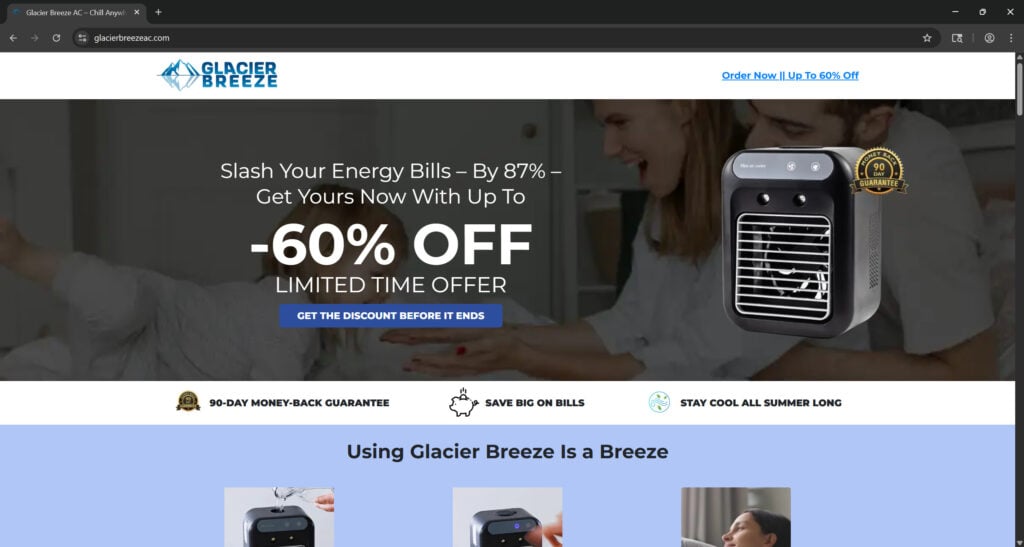
It’s hot, and you’re desperate for a quick, affordable cooling solution. Suddenly, you see an ad for Glacier Breeze — a sleek, mini air cooler promising to slash your energy bills, cool any space in minutes, and ship fast. It seems like a dream come true. But is it really a revolutionary device, or just another drop-shipping scam? In this in-depth investigation, we unpack the Glacier Breeze AC and separate fact from fiction.
Overview of Glacier Breeze AC (Detailed Analysis)
The Glacier Breeze AC is heavily marketed as the “#1 Portable AC of 2025.” Its sales pages boast flashy features: rapid cooling tech, cordless portability, low power consumption, whisper-quiet operation, and up to 10 hours of chill with just water or ice in its 500 mL tank. It claims to work instantly without installation—just plug and go. But what exactly is this device?
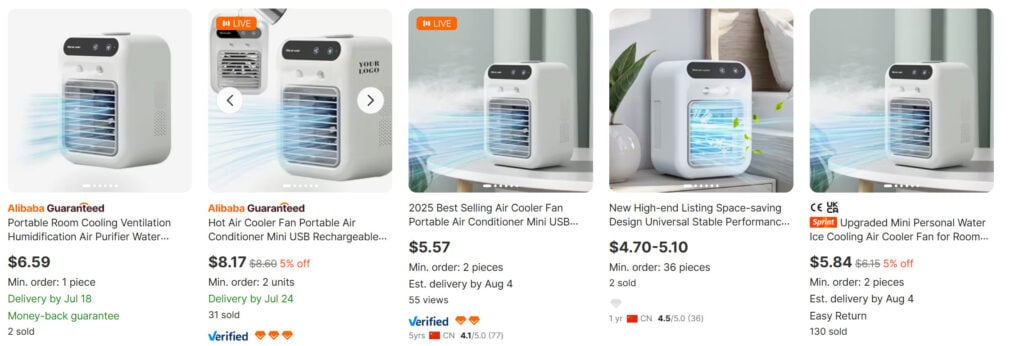
Glacier Breeze is, in truth, a compact fan marketed under various names across dozens of sites. It is a plastic housing unit containing a USB-powered fan, sponge filter, and a water chamber for evaporative cooling. The product is not an actual air conditioner. It lacks a compressor, refrigerant, and any mechanical system to lower room temperature.
What you’re getting is essentially a personal humidifier or desktop fan. It might blow slightly cooler air for a short time if ice is added, but it cannot cool an entire room.
Buyers typically pay between $80 to $150 for this unit through ads running on TikTok, Facebook, and Instagram. The same exact product is available on Alibaba and AliExpress for as little as $5 to $10 under generic labels like “Mini Air Cooler” or “Evaporative Personal Fan.”
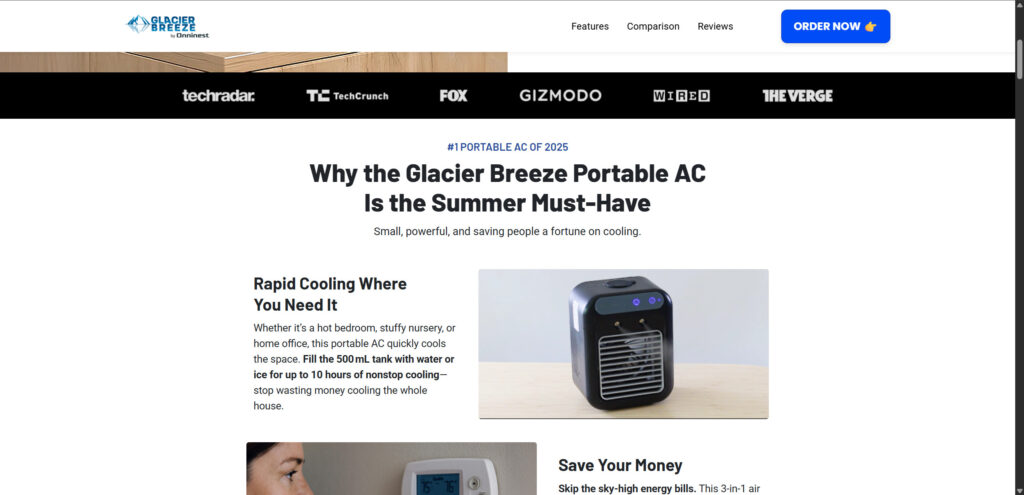
Despite claims of glowing reviews and professional endorsements, most testimonials are fabricated, copied, or presented without attribution. No legitimate publications have endorsed Glacier Breeze, and it does not appear in any reputable HVAC comparison studies. The appearance of media logos (TechCrunch, Gizmodo, etc.) is a common trick used to falsely build trust.
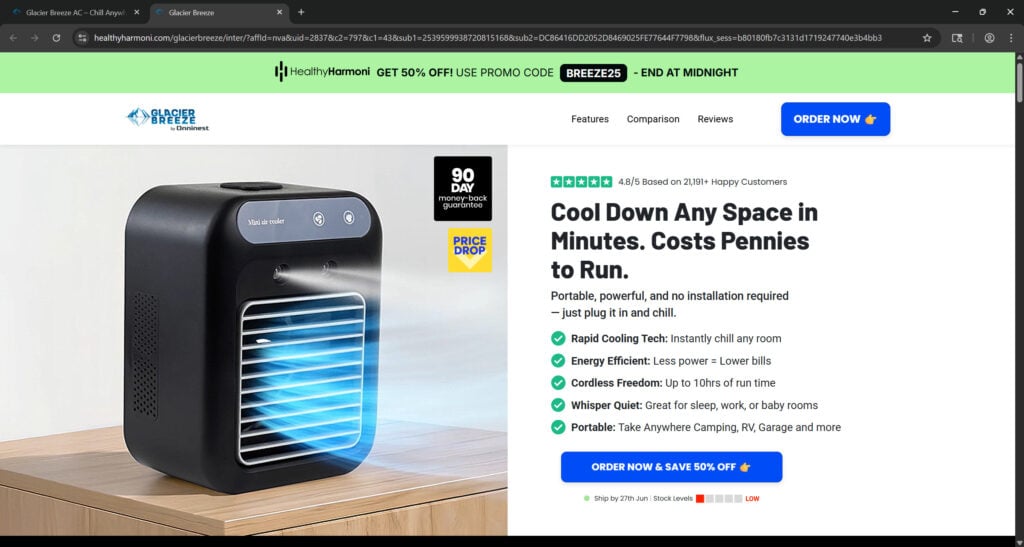
The biggest red flag is the use of urgency. Buyers are told that stock is running low, a 60% discount is ending soon, and orders must be placed immediately to lock in a deal. This kind of pressure-selling is typical in drop-shipping operations aimed at impulse buyers during peak summer months.
How the Glacier Breeze AC Scheme Works
Step 1: Mass Production of a Generic Product
Manufacturers in China produce thousands of identical mini USB-powered fan units. These are generic, unbranded, and available to any buyer or reseller.
Step 2: White Labeling and Rebranding
Marketers buy these fans in bulk and brand them under various names: Glacier Breeze, ChillWell, Polar Air, IceBox, etc. No modifications are made to the product. Only the name, box, and ad copy change.
Step 3: Viral Advertising on Social Media
Ads with dramatic claims—”Cool your room in 60 seconds!”—begin circulating on TikTok, Facebook, and YouTube. Often, they feature actors or staged testimonials to create the illusion of effectiveness.
Step 4: Fake Websites and Countdown Timers
Websites are built to look like tech startups. They use fake logos of major media outlets, manipulated TrustPilot widgets, countdown timers, and fake scarcity warnings to push urgency.
Step 5: Markup and Misleading Specs
The product is sold for 10x its wholesale cost, often between $89 and $149. Product pages list false specs: 10-hour battery life, 500mL water tank, and 3500W cooling power — numbers that are completely fabricated.
Step 6: Difficult Refund Policies
After purchase, buyers often receive no tracking info for weeks. Returns require shipping the product back to China at the buyer’s expense. Many complaints cite unresponsive customer service, invalid tracking numbers, and refunds that never materialize.
Step 7: Rinse and Repeat
Once complaints pile up, the domain and brand are abandoned. The same sellers rebrand the same product under a new name and restart the cycle with fresh ads.
What to Do If You’ve Been Scammed by Glacier Breeze AC
- Gather Documentation: Save your order confirmation, shipping label, product photos, and screenshots of the ad and product page.
- File a Chargeback: Contact your bank or credit card company. File a claim for goods not as described. Use language like “fraudulent advertising” or “unauthorized transaction” if applicable.
- Report to Authorities: File a report with the FTC (reportfraud.ftc.gov), IC3 (www.ic3.gov), and your local consumer protection office. In the UK, use ActionFraud. In Canada, report to the Competition Bureau.
- Leave Reviews: Warn others on TrustPilot, Reddit, Facebook, and forums like r/scams or r/ConsumerProtection. Include factual descriptions and photos.
- Avoid Returning to China: Most returns require international shipping at your expense. In most cases, you will not get a refund even if the product is returned.
- Secure Your Info: If you shared personal details, monitor your email and credit card for suspicious activity. Use a spam blocker and update your passwords if needed.
- Educate Others: Share this article with friends and family who may be vulnerable to similar scams.
Frequently Asked Questions About the Glacier Breeze AC Scam
Is the Glacier Breeze AC a real air conditioner?
No. Despite the marketing claims, Glacier Breeze is not an actual air conditioner. It is a small USB-powered fan with a water tank that produces a mild breeze. It lacks key components like a compressor and refrigerant, which are necessary for true air conditioning.
Does the Glacier Breeze AC really cool a room?
No, it does not. At best, it may blow slightly cooler air for a short time if ice is added. It is incapable of lowering the temperature of an entire room. Most users report no noticeable difference in temperature, even in small spaces.
Why is Glacier Breeze marketed as a powerful AC unit?
The company behind Glacier Breeze uses misleading marketing tactics to inflate the product’s value. They advertise it as a 3-in-1 AC, humidifier, and fan, with exaggerated claims about cooling power, battery life, and energy efficiency—all designed to lure impulse buyers during hot weather.
What is the actual cost of this product on wholesale sites?
The exact same device is available on wholesale platforms like Alibaba for as little as $5 to $10. However, on official Glacier Breeze sites, it is sold for $80 to $150—a markup of over 1000%.
Is Glacier Breeze AC safe to use?
While there are no widespread reports of danger, the device is poorly made and lacks certifications like UL or CE. It may overheat, leak water, or stop working within days. It is not a reliable or safe cooling solution, especially for children or pets.
How does the Glacier Breeze return policy work?
The site claims a 90-day money-back guarantee, but in practice, customers face major hurdles. Most are required to return the item to China at their own expense, often without receiving a refund. Email support is slow or unresponsive, and complaints go unresolved.
Are the Glacier Breeze customer reviews real?
No. Many of the reviews are either fabricated or paid testimonials. Images and names used in reviews are often stock photos. Trusted review sites show overwhelmingly negative feedback, with users citing delays, misleading claims, and poor customer service.
Can I get a refund for the Glacier Breeze AC?
You may be able to get your money back if you act quickly. The best method is to initiate a chargeback through your credit card provider. Do not rely on the seller’s return process—it is often designed to discourage refunds.
Is this the only brand using this scam model?
No. This is part of a larger drop-shipping scheme where the same product is rebranded and sold under different names like ChillWell, IceBox, and ArcticBreeze. If you see similar devices with different names, the scam is likely the same.
What should I do if I bought the Glacier Breeze AC?
- Save your order details and take photos of the product.
- File a chargeback with your credit card provider.
- Report the seller to the FTC and other consumer protection agencies.
- Leave honest reviews online to warn others.
- Avoid any returns that require you to ship the item back to China.
The Bottom Line
The Glacier Breeze AC is not an air conditioner. It’s a cheap plastic fan, falsely marketed through viral ads and deceptive websites to appear as a revolutionary cooling device. This is a textbook drop-shipping scam designed to make quick profits during hot weather and vanish once complaints surface.
If you’ve already purchased one, take action quickly to recover your funds and help others avoid falling into the same trap. Stay skeptical of overhyped gadgets, and always research before you buy.
Let this serve as a reminder: when something claims to cool your entire room in seconds and costs pennies to run, it’s probably too good to be true.

Join the discussion
2 commentsShare your experience or ask a question about this article.
Discussion
Thanks for the Info, I will not purchase
In reply to Frank
That is exactly the outcome we hope for – thanks for letting us know the review reached you in time. If you spotted the ad somewhere, reporting it on that platform helps get it pulled for the next person.