

Airtel texts about data bundles are common, which is exactly why scammers copy them.
The “PaNet MoFaya” messages are designed to look like routine network alerts: a bundle purchase confirmation followed by a sudden “You have used 100%” warning. The goal is to trigger urgency, push you to tap a shortened link, and land you on a fake Airtel page that asks for card details, OTP codes, or personal information.
If you received one of these SMS messages and the link was a short URL like bit.ly, treat it as a serious red flag. This article explains how the scam works, how to verify your real Airtel balance safely, and what to do immediately if you clicked or entered any information.
Scam Overview
Airtel customers in multiple regions have reported a specific pattern of messages that come in pairs.
The first claims you bought a data bundle, often “PaNet MoFaya,” and gives a bundle size and validity date.
The second follows quickly and claims you have used 100% of that bundle, then urges you to click a link to “use My Airtel App” or buy another bundle immediately.
On the surface, it can look like a normal network alert. Airtel and other telecom providers do send real bundle notifications. That familiarity is exactly what scammers exploit.
The exact text being used
Here is an example of the wording that has been reported (redacted to prevent accidental clicks):
“You have bought PaNet MoFaya
9.1GB valid until 07-02-2026
11:41:01 hrs. To check balance Dial
*137# or use MyAirtelApp hxxps://bit[.]ly/20575CG”
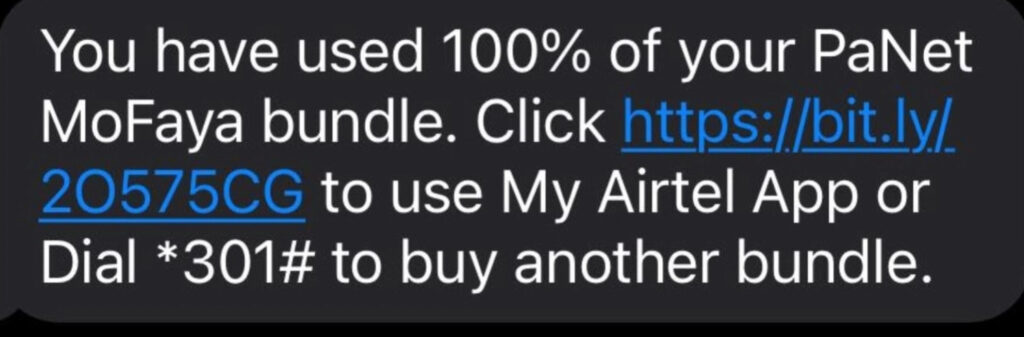
“You have used 100% of your PaNet
MoFaya bundle. Click hxxps://bit[.]ly/20575CG to use My Airtel App or
Dial *301# to buy another bundle.”
Even if the USSD codes look plausible, the inclusion of a shortened link is the red flag that matters most.
Why scammers love shortened links like bit.ly
Short links are dangerous in scams for one main reason: you cannot see where they really go.
A shortened URL can send you to:
- A fake Airtel login page built to steal your credentials
- A fake “bundle renewal” page that asks for card data
- A malware download prompt pretending to be an app update
- A “verification” form that collects personal details for future fraud
Short links also allow the destination to change. The same bit.ly link can route to one site today and a different site tomorrow. That makes it harder for victims to warn others and harder for automated filters to keep up.
Why the “100% used” message is so effective
This scam is built around panic and urgency.
If you see “You have used 100%,” your brain immediately goes to one of these thoughts:
- Someone is stealing my data
- Something is wrong with my phone
- I will be disconnected or charged extra
- I need to fix this now
Scammers know that urgency reduces careful thinking. People click first and evaluate later.
The “100% used” claim also creates a believable story: you have a problem that requires an immediate fix. And conveniently, the fix is one tap away.
What happens after you click
Once you click, the scam typically moves into one of several routes. The details vary, but the destination page almost always imitates Airtel branding, Airtel colors, or Airtel language.
Common page themes include:
- “Log in to My Airtel to check your bundle”
- “Confirm your account to restore data”
- “Recharge now to continue browsing”
- “Your bundle expired, renew in 2 minutes”
- “Verify your number to prevent suspension”
From there, the criminals attempt to capture data that lets them take money directly, or set you up for future theft.
What they are trying to steal
These scams typically aim for one or more of the following:
Credit or debit card details
- Card number
- Expiration date
- CVV
- Cardholder name
- Billing address
One-time passwords and verification codes
- Bank OTP codes
- 3D Secure verification codes
- SMS verification codes sent by Airtel or a payment provider
Airtel account access
- My Airtel username or phone number login
- Password or PIN
- Any recovery details you enter
Personal identity information
- Full name
- Address
- Date of birth
- National ID details (in some regions)
- Email address and phone number
Once criminals have card details and an OTP, they can attempt immediate unauthorized purchases. Once they have your personal data, they can reuse it in other scams, identity fraud, or targeted social engineering.
Why the messages look legitimate
Scammers carefully copy the small details that make telecom alerts feel real.
These texts often include:
- A bundle name that sounds like a real promotion
- A precise data amount like 9.1GB (odd numbers feel more authentic)
- A validity date in a standard telecom format
- A timestamp like “11:41:01 hrs”
- A USSD code (even if it is not correct for your region)
- Mentions of “My Airtel App” to build trust
The goal is to make you think, “This looks like the normal Airtel format.”
Then the scam slides the link in quietly, hoping you treat it as part of the routine message.
Why you might get the text even if you are careful
Many victims assume they did something wrong to “trigger” the message. Usually, they did not.
Scammers can send these messages in large batches using:
- Random number dialing
- Lists of phone numbers leaked in unrelated data breaches
- Numbers collected from social media, classifieds, or public profiles
- Purchased marketing lists from shady brokers
If you are an Airtel customer, your number is more valuable to them, but they often spam broadly because it is cheap and the success rate does not need to be high.
Common variants people report
The wording changes slightly, but the structure stays the same. Here are realistic variants (redacted) that follow the same pattern:
- “You have used 100% of your PaNet bundle. Restore now: hxxps://bit[.]ly/xxxxx”
- “PaNet MoFaya depleted. Reactivate via MyAirtel: hxxps://bit[.]ly/xxxxx”
- “Your data bundle has been exhausted. Click to renew: hxxps://bit[.]ly/xxxxx”
- “Bundle finished. Get extra 9.1GB now. Tap: hxxps://bit[.]ly/xxxxx”
- “Data balance critical. Confirm your account to continue: hxxps://bit[.]ly/xxxxx”
Some versions also add threats like “line will be suspended” or “account will be blocked,” which is meant to spike urgency.
The core truth: Airtel does not need your card details via a random SMS link
If a text pushes you to a shortened link to “fix” your data, treat it as hostile until proven otherwise.
A real telecom provider already has official channels:
- Their official app from your device’s app store
- Their official website (typed manually, not tapped from an SMS)
- Verified USSD codes or SIM toolkit menus
- Customer care lines listed on official materials
A random bit.ly link is not one of those channels.
How The Scam Works
This scam is not complicated, but it is well engineered. It relies on timing, believable language, and a high-pressure prompt that gets people to click before thinking.
Here is a step-by-step breakdown of how the “You have used 100% of your PaNet” scam typically runs, including what happens behind the scenes.
Step 1: The scammers pick a theme that matches your daily life
Telecom messages are perfect for scams because they blend into everyday phone noise.
Most people receive legitimate SMS alerts about:
- Data usage
- Bundle renewals
- Airtime balance
- Payments and receipts
- Network promotions
Scammers use that familiarity to hide in plain sight. If you get a message about a data bundle, it does not feel as suspicious as a message about a lottery win.
They also choose topics that create immediate discomfort. Data depletion is stressful because it can cut you off from work, family, and banking.
Step 2: They send the “purchase” message to create a false baseline
The first SMS sets the stage:
- It claims you bought a bundle
- It gives you a data amount and validity date
- It references Airtel tools like “MyAirtelApp” and a USSD code
This message is designed to feel informational, not threatening.
It also creates confusion. If you did not buy anything, you want to check. If you did buy something recently, you might assume it is connected.
Either way, your mind is now engaged.
Step 3: They quickly follow with the “100% used” message to trigger urgency
The second message is the push.
It compresses your time to think.
You are not calmly verifying a purchase anymore. You are reacting to a sudden problem. That emotional shift is the heart of the scam.
The wording usually includes:
- “used 100%”
- “bundle depleted”
- “click to use My Airtel App”
- “buy another bundle now”
- a short link
This step is often timed to arrive within minutes. The closer the two messages are, the more believable the story feels.
Step 4: The short link redirects you through tracking and filtering
When you click a shortened link, you are rarely sent directly to a simple web page.
Scammers often route you through multiple redirects.
That helps them:
- Track which numbers click
- Identify your device type (Android, iPhone, desktop)
- Show different pages depending on your location
- Hide the final destination from quick inspection
- Swap out the scam page if one gets reported
Some scams also use “cloaking,” where they show a harmless page to security scanners but a phishing page to real human visitors.
You may never see these steps because they happen instantly.
Step 5: You land on a fake Airtel page that looks “close enough”
Most victims who fall for this scam say the page looked convincing at first glance.
Common design tricks include:
- Airtel-like red branding and layout
- A logo at the top of the page
- Headings like “My Airtel” or “Airtel Bundle”
- A clean form and a big “Continue” button
- Language that matches telecom support wording
The page does not need to be perfect. It only needs to look credible long enough for you to type.
On mobile screens, people rarely scrutinize details like domain names or certificate information. Scammers know that.
Step 6: The page asks for “verification” details that are actually the payload
This is where the scam becomes theft.
The site will usually ask for one of these sets of information:
Route A: Credit card harvesting
- “Pay $1 to verify your account” (often framed as refundable)
- “Pay a small fee to reactivate bundle”
- “Confirm payment method for auto-renewal”
Even if the fee is small, the real goal is to capture your card details and security codes.
Route B: My Airtel credential theft
- “Log in to check your balance”
- “Sign in to confirm your bundle”
- “Enter your Airtel number and password”
If you enter credentials, scammers can attempt account takeover, SIM-related fraud, or targeted follow-up scams.
Route C: OTP interception
After you enter card details, the page prompts for an OTP.
It may say:
- “Enter the code sent to your phone”
- “Confirm this transaction”
- “Verify your identity”
That OTP is often the final step criminals need to complete a payment.
Step 7: Your details are transmitted to the scammers immediately
Phishing sites typically send what you type straight to the attacker in real time.
That allows them to:
- Attempt purchases while you are still on the page
- Run quick “card verification” transactions
- Use your OTP before it expires
- Lock you into a loop where the page claims the OTP was wrong and asks again
That last trick is common. It keeps you feeding codes.
Even one successful OTP can be enough for a major fraudulent transaction, depending on your bank’s controls.
Step 8: Fraud happens fast, then the scam shifts into cleanup and repeat attacks
Once scammers have what they need, outcomes vary:
- Unauthorized charges appear within minutes
- The card is used for online purchases or subscriptions
- Your data is sold to other criminals
- You get more scam texts and calls because your number is now “responsive”
- Your identity details are used to craft believable impersonation attempts
Some victims also report follow-up calls from “support” claiming to help reverse the issue. That is a secondary scam designed to extract even more information.
What to look for on the scam page itself
If you did click and want to evaluate what you saw, these are common warning signs:
- The web address is not an official Airtel domain
- The page uses a long random domain name, a free hosting domain, or a misspelled brand name
- The page pressures you to act immediately
- It requests card details to “check balance”
- It asks for OTP codes outside official banking flows
- It asks you to install an app from outside your device’s official app store
- It tries to enable browser notifications and alerts
Airtel does not need your card CVV to show you your data balance. That mismatch is the clearest sign it is a trap.
How to safely check your Airtel data balance instead
If you receive one of these texts, you can verify your real balance safely without clicking anything.
Use one of these safer options:
- Open the official My Airtel app you already have installed (download only from your device’s official app store if you need it)
- Type the official Airtel website address manually into your browser, then log in from there
- Use your SIM toolkit menu if your SIM provides one
- Use official USSD codes that are confirmed for your country or region on Airtel’s official materials
- Contact Airtel customer care using a number you find on an official Airtel site, your SIM packaging, or your account documentation
Important detail: USSD codes can differ by country and product. Do not trust a code just because it appears in a suspicious text.
What To Do If You Have Fallen Victim to This Scam
If you clicked the link, do not panic. What matters now is what information you entered, and how quickly you act.
Below is a calm, practical checklist. Start at the top and follow the steps that match your situation.
- Stop interacting with the message and the websiteClose the browser tab immediately. Do not go back to “check” anything on the page.If you can, take a screenshot of the SMS and the website address you were sent to. Evidence helps later when reporting.
- If you entered card details, contact your bank right awayTell them your card details may have been captured in a phishing scam.Ask for these actions, using your bank’s exact terminology:
- Freeze or block the card immediately
- Block online and card-not-present transactions
- Cancel the card and issue a replacement
- Review pending authorizations and recent transactions
- Start a dispute process for any unauthorized charges
- If you entered an OTP or verification code, treat it as an emergencyAn OTP is often the final step needed to complete a payment.Call your bank immediately and explain that you provided a transaction verification code to a scam site. Ask them to:
- Identify the transaction associated with the OTP
- Reverse or dispute it if possible
- Add extra verification requirements on your account
- Flag your account for fraud monitoring
- If you entered your My Airtel login details, change your password from a safe pathDo not click links in texts to do this.Instead:
- Open the official app you already trust, or type the official Airtel site address manually
- Change your password to a strong, unique one
- Review your profile details for changes
- Check for unfamiliar activity (bundles, top-ups, linked numbers, payment methods)
- If you shared personal information, assume it may be reused in follow-up scamsIf you typed your name, address, date of birth, ID number, or email, scammers may use it to impersonate support or to craft believable messages later.Be extra cautious with any incoming calls or texts that reference those details. Criminals often use stolen data to sound “legitimate.”
- If you installed anything, remove it and check your phone settingsSome versions of telecom scams push fake apps or “updates.”If you installed an app because the site told you to:
- Uninstall it immediately
- Check whether it has special permissions like Accessibility, Device Admin, or SMS access
- Revoke any suspicious permissions
- Run a reputable mobile security scan
- Report the message to Airtel through official channelsAirtel cannot fix what they do not see.When reporting, include:
- The sender number or sender name shown in the SMS
- The exact wording of the message
- The redacted link (for example, hxxps://bit[.]ly/xxxxx)
- The date and time you received it
- Report the short link and the siteShort link services have abuse reporting processes. Reporting helps get the redirect disabled.You can also report the website to:
- Your mobile browser’s phishing report option (Chrome and Safari both provide ways)
- Your country’s cybercrime reporting portal (if available)
- Monitor your accounts for at least 30 daysAfter phishing incidents, fraud can show up immediately or weeks later.Watch:
- Bank and card statements
- Mobile money activity (if applicable)
- Email accounts tied to your Airtel login
- Unrecognized subscriptions and “test charges”
- If you only clicked but did not enter anything, take protective steps anyway
Clicking alone is often not enough for theft, but it can expose you to tracking and future targeting.
Do this:
- Clear your browser history and website data for safety
- Do not click any further messages from the same sender
- Be cautious with follow-up calls or texts that reference the click
- Verify your bundle status through a trusted channel (official app or typed website)
The Bottom Line
Airtel “You have used 100% of your PaNet MoFaya” texts are built to feel routine, then suddenly urgent.
The message is not really about data. It is about getting you to click a shortened link before you slow down and verify. Once you land on the fake page, the scam pivots into what it always wanted: your card details, your OTP, or enough personal information to steal from you now or later.
If you receive one of these texts, treat it like a fire alarm with a simple rule: do not tap the link. Check your balance only through channels you trust, like the official app you installed from your app store or an official Airtel site you type in yourself.
If you already clicked or entered information, act quickly. Blocking a card, changing passwords, and reporting the scam can stop a bad moment from turning into a long mess.
FAQ
Is the “You have used 100% of your PaNet MoFaya” SMS real?
Often, no. Scammers regularly imitate Airtel bundle alerts and insert a shortened link (like bit.ly) that redirects to a fake Airtel page. Treat any unexpected bundle purchase plus “100% used” message as suspicious, especially if you did not buy the bundle.
Why do I get a message saying I bought a bundle I never purchased?
Scammers send these texts in bulk to random numbers or leaked marketing lists. The “bundle purchase” message is a setup that makes the follow-up “100% used” message feel believable and urgent.
Is a bit.ly link automatically a scam?
Not automatically, but in telecom-related SMS messages it is a major warning sign. Short links hide the real destination and can be changed at any time. Airtel has official channels and typically does not need to route critical account actions through a shortened URL in a random SMS.
What is the safest way to check my real Airtel data balance?
Use trusted channels, not SMS links:
- Open the official My Airtel app (installed from your device’s official app store)
- Type Airtel’s official website address manually into your browser
- Use verified USSD codes or SIM toolkit menus for your country
- Contact Airtel support using numbers published on official Airtel materials
The SMS included a USSD code. Does that mean it is legitimate?
No. Scammers include USSD codes to add credibility. Codes can also vary by country, and a real-looking code in a scam text does not make the message authentic. Verify any USSD code through Airtel’s official sources for your region.
I clicked the link but did not enter anything. Am I safe?
Usually, you are in a much better position if you did not submit any information. Still:
- Close the page
- Clear browser site data (optional but helpful)
- Watch for follow-up scam texts or calls
- Verify your balance through the official app or typed website
I entered my card number on the page. What should I do now?
Act immediately:
- Call your bank or card issuer
- Freeze/block the card
- Cancel and replace the card
- Dispute any unauthorized charges
- Enable transaction alerts if available
Speed matters because scammers often attempt charges within minutes.
I entered an OTP code. What does that mean?
That is high risk. OTPs are frequently used to approve transactions. Call your bank immediately and explain that you shared a transaction verification code on a phishing site. Ask them to identify any related transaction, block further attempts, and add extra fraud monitoring.
Can scammers drain my bank account just from my phone number?
Not by the phone number alone. But your phone number helps them target you with follow-up scams, SIM swap attempts, or password reset attacks. The real danger comes from what you enter after clicking: card details, OTPs, passwords, or personal data.
How can I tell the Airtel message is fake without clicking the link?
Common red flags:
- You did not buy the bundle mentioned
- The message pressures you to click quickly
- It uses a shortened link (bit.ly, tinyurl, etc.)
- The sender looks strange or inconsistent
- The wording is slightly off or overly urgent
- It asks you to “verify” or “update” payment info to check balance
What do scam pages usually ask for?
Most commonly:
- Card number, expiry date, CVV
- OTP or verification code
- Airtel login credentials
- Personal details like name, address, email, date of birth
Airtel does not need your CVV to show your data balance.
Can Airtel refund money taken in this scam?
Airtel typically cannot reverse card transactions. Your bank or card issuer is the primary path for chargebacks and fraud disputes. Still, report the SMS to Airtel so they can investigate and warn other users.
Should I reply to the SMS or call the number that texted me?
No. Do not reply, do not call back, and do not engage. Engaging can confirm your number is active and increase future targeting.
What if the SMS says “use MyAirtelApp” but the link goes to a website?
That is a common trick. The text mentions the app to build trust, but the link often leads to a fake site. Only use the official app you already have or download it directly from your device’s official app store.
How do I report the bit.ly link?
Most short-link services have an abuse reporting option. You can also:
- Report it through your browser’s phishing report feature
- Report the SMS to Airtel via official support channels
- Report to your local cybercrime authority if available
When reporting, include the full link and screenshots, but avoid reposting a clickable version publicly.
What should I do to protect myself from similar telecom scams in the future?
Use these habits:
- Never click links in unexpected “account” or “bundle” SMS messages
- Type official websites manually or use bookmarked official pages
- Install apps only from official app stores
- Enable bank transaction alerts
- Use unique passwords for Airtel and email accounts
- Be skeptical of urgency phrases like “100% used,” “suspended,” or “verify now”

Join the discussion
0 commentsShare your experience or ask a question about this article.
Community experiences
Did this happen to you?
Your experience could help someone recognize the same scam. Submit a private report for our team to review.
I experienced this tooReports are reviewed before publication. Sharing publicly is always your choice.
Discussion
Start the conversation
Have a question or something useful to share? Add the first comment.