


The internet has been buzzing with websites claiming to let you play Grand Theft Auto VI directly in your browser. No console, no installation, no expensive gaming PC, just open a website, wait for the game to load, and start exploring Vice City.
It sounds incredible. Unfortunately, it is not what it appears to be.
Some of these websites feature remarkably convincing loading screens, interactive settings, official-looking artwork, and even short clips of GTA 6. Others may use the game’s popularity to generate advertising revenue, promote suspicious downloads, or steal personal information.
We investigated one of these websites ourselves and discovered an elaborate internet prank. However, the next website making the same promise might not have such a harmless ending.
Can You Really Play GTA 6 in Your Browser?
No verified public browser version of Grand Theft Auto VI is currently available. Rockstar Games officially lists GTA VI for PlayStation 5 and Xbox Series X|S, with no standalone browser edition listed on its official GTA VI website.
The confusion is understandable, especially following the appearance of unofficial browser-based versions of GTA 5.
We previously investigated several websites offering GTA V through modern browser technology. In some cases, we were genuinely able to play the game, drive around Los Santos, complete gameplay sequences, and use autosave functionality.
The fact that GTA 5 can run in a browser makes the idea of GTA 6 doing the same sound considerably more believable.
However, a working browser port of GTA 5 does not mean that GTA 6 has also been ported to the web.
GTA VI is a substantially newer and more technically demanding game. Adapting its engine, graphics, physics, audio, assets, and other systems to run directly within a web browser would be an extraordinary technical undertaking.
More importantly, no verified public project has demonstrated that it has successfully accomplished this.
A website displaying GTA 6 artwork, a loading percentage, or a cinematic sequence is not evidence that the game is actually running.
We Tested a Website Claiming to Run GTA 6 in a Browser
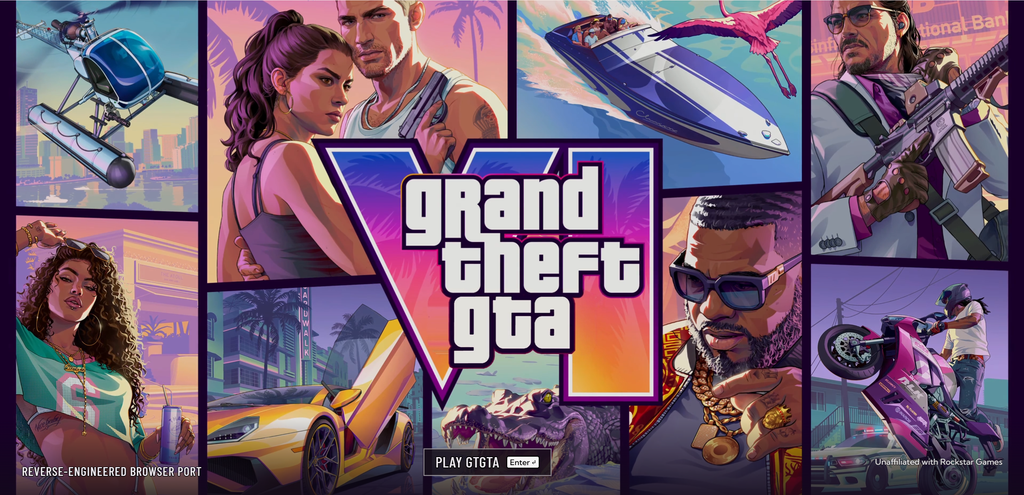
One of the most convincing examples we encountered was GrandTheftGTA.com, a website presenting itself as a reverse-engineered browser port.
At first glance, the website looks surprisingly polished. It features GTA VI-inspired artwork, a large game logo, a Play button, and a full-screen interface resembling the startup screen of a modern video game.
The website even includes a disclaimer stating that it is unaffiliated with Rockstar Games.
Given what we had previously experienced with GTA 5 browser ports, we decided to see what would happen if we continued.
What followed was an elaborate recreation of the process of launching GTA 6 for the first time.
Convincing Loading Screens and Technical Messages
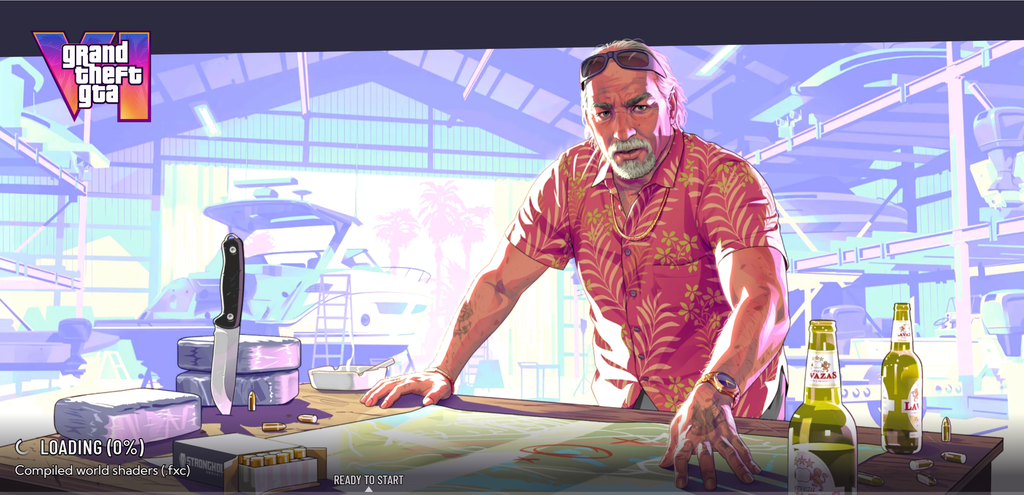
After starting the experience, visitors are presented with a series of loading screens featuring familiar GTA VI artwork.
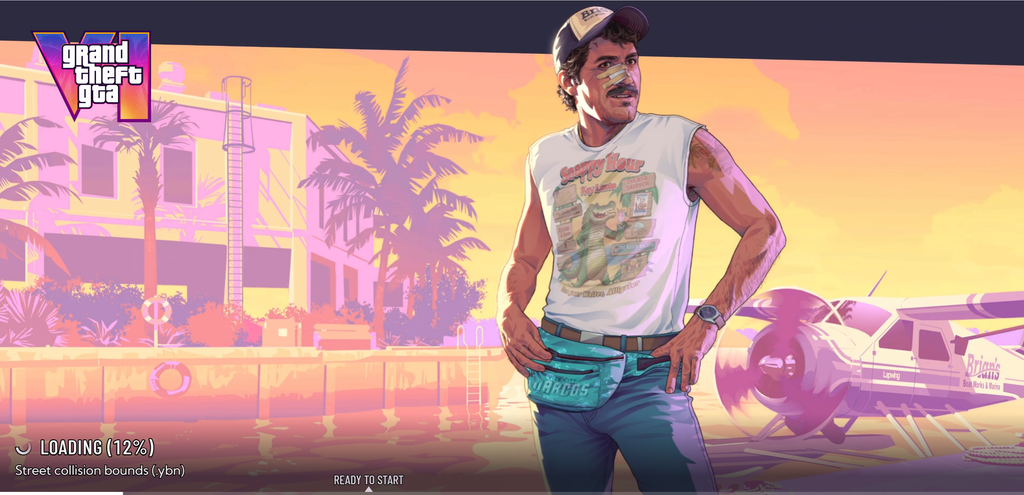
The loading indicator displays percentages alongside technical-looking messages that suggest the game is preparing its graphics and world assets.
Among the messages displayed during our test were:
- Compiled world shaders (.fxc)
- Street collision bounds (.ybn)

To someone unfamiliar with game development, these messages can make the website appear particularly convincing.
Rather than displaying a generic loading animation, the website presents terminology associated with graphics rendering, collision detection, and game assets.
There is one important problem: a webpage can display any loading percentage or technical message its creator wants.
Seeing a progress bar reach 12%, 76%, or even 100% does not establish that hundreds of gigabytes of GTA VI data are being downloaded or that a game engine is preparing a playable world.
Interactive Settings Make the Experience Even More Believable
The website goes beyond simple loading screens.
During the startup process, we were presented with several interactive configuration menus, including brightness calibration, navigation preferences, and interface text size.
The brightness screen even displays the familiar Rockstar logo and asks the player to adjust the brightness until the symbol is barely visible.
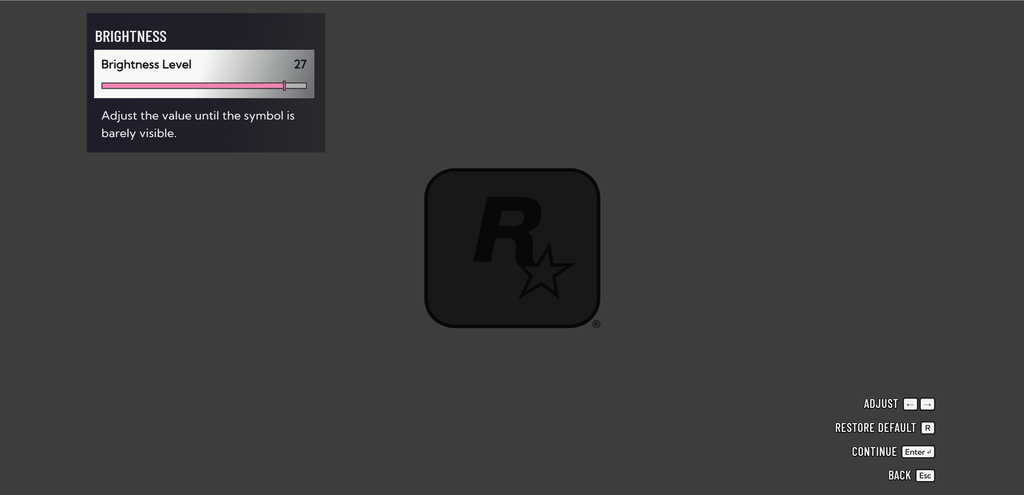
Other screens allow visitors to configure how the minimap should appear and select their preferred interface text size.
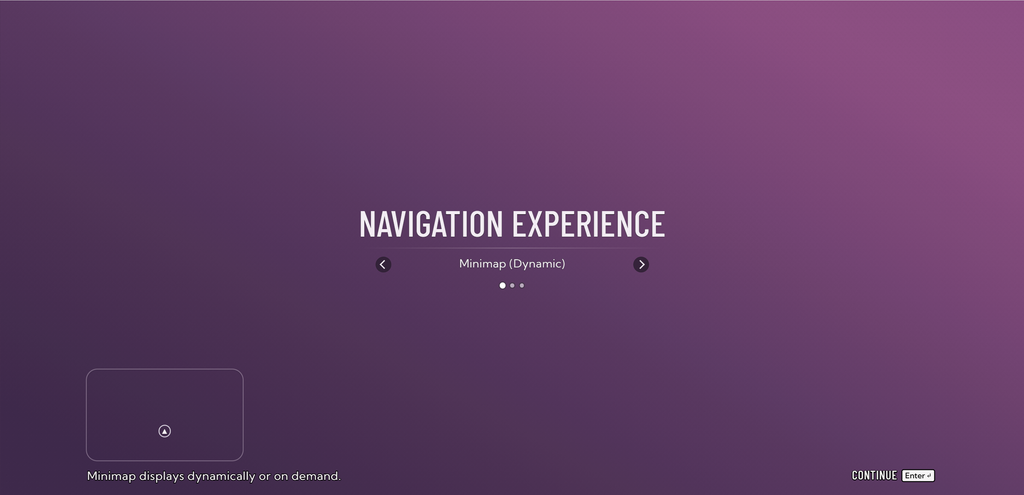
These are precisely the kinds of options players expect to encounter when launching a modern AAA game for the first time.
You can interact with the settings, navigate using your keyboard, and continue through the interface.
The attention to detail is impressive, particularly for what ultimately turns out to be an internet prank.
But there is an important distinction between interacting with a webpage and interacting with a video game.
Functional menus do not prove that GTA 6 is running behind them.
Even the Copyright Notices and Terms Look Convincing
The website also includes legal notices, copyright information, a photosensitivity warning, a privacy policy acknowledgment, and terms of use.
One screen explains that the Grand Theft Auto names, logos, characters, artwork, and game footage belong to Rockstar Games, Take-Two Interactive, or their respective licensors.
It also describes the project as an independent browser port unaffiliated with Rockstar Games and Take-Two Interactive.
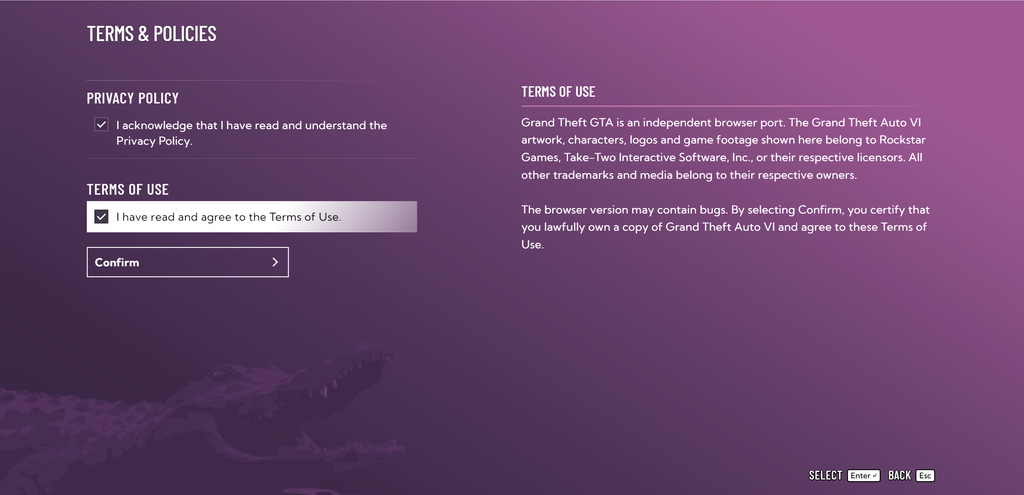
Another screen requires visitors to acknowledge the privacy policy and accept the terms of use. It even asks users to certify that they lawfully own a copy of Grand Theft Auto VI.
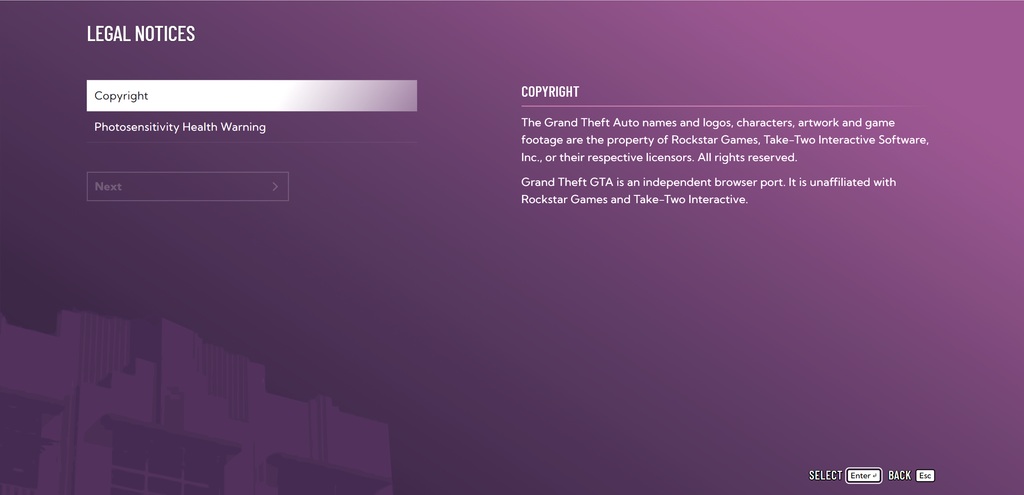
For someone already convinced that the browser version might be genuine, these screens provide another layer of apparent legitimacy.
However, displaying legal notices and copyright disclaimers does not demonstrate that a website has permission to distribute a game.
Nor does asking visitors to confirm that they own GTA VI somehow establish the existence of a working browser port.
Approximately 10 Seconds of GTA 6 Footage
After completing the setup process, the website begins displaying video footage.

For a brief moment, it appears that the game has finally loaded. The presentation includes recognizable GTA VI imagery, cinematic scenes, and dialogue subtitles.
This is probably the most convincing part of the entire experience.
Someone recording a short video of the website could stop at this point, upload the footage to TikTok or YouTube, and create the impression that GTA 6 is genuinely running inside a browser.
However, what visitors are seeing is video playback, not interactive GTA VI gameplay.
In our test, the clip lasted approximately ten seconds, and then came the punchline.
The Entire Website Is an Elaborate Rickroll
Instead of allowing us to control a character or explore Vice City, the website switched to Rick Astley’s famous music video, “Never Gonna Give You Up.”

For anyone unfamiliar with the term, a rickroll is a long-running internet prank in which someone is tricked into opening a link expecting one thing, only to be presented with this particular music video.
The website also displays a counter labeled “Rick’s Count,” an online visitor counter, and options to share the website with other people.
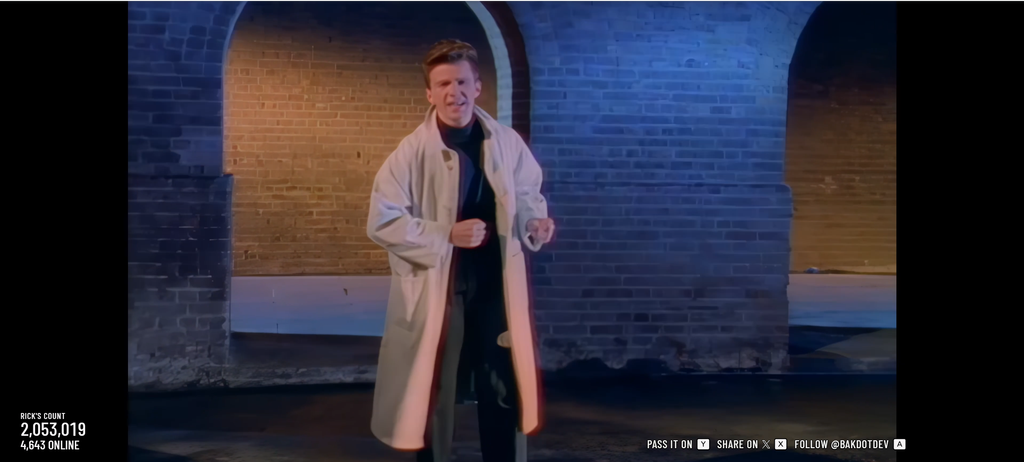
During our visit, the displayed counter had exceeded two million. These figures are supplied by the website itself and have not been independently verified.
There was no GTA 6 game waiting behind the loading screen. The entire experience we tested was a carefully designed prank.
There is no reason to reload the page, change the graphics settings, switch browsers, or wait longer in the hope of getting past the music video.
The rickroll is the intended ending, not a technical error.
Expect More Fake GTA 6 Browser Websites
GrandTheftGTA.com is unlikely to be the last website to use this idea.
The popularity of Grand Theft Auto VI, combined with the attention generated by genuine GTA 5 browser experiments, creates an obvious opportunity for anyone looking to attract visitors.
We expect to see additional websites promoted through claims such as:
- Play GTA 6 online for free.
- GTA 6 unblocked browser game.
- Play GTA VI without downloading.
- GTA 6 for Android and iPhone.
- GTA 6 WebAssembly port.
- GTA 6 online multiplayer in your browser.
- GTA 6 free download for PC.
- GTA 6 cloud gaming without a console.
Some of these websites may be harmless jokes, fan projects, or simple browser games using GTA-inspired artwork.
Others may exist primarily to generate advertising revenue.
And some could be considerably more dangerous.
There is no reliable way to determine what percentage of future websites will be pranks, advertising schemes, or malicious operations. Each website needs to be judged on what it actually does.
Do not assume that every fake GTA 6 website will end with a funny music video.
Cybercriminals have long exploited popular video games, highly anticipated releases, free download searches, and exclusive-access claims to distribute malware and steal account credentials.
GTA 6 provides an exceptionally attractive opportunity for these types of campaigns.
How Fake GTA 6 Browser Websites Could Make Money
Not every misleading gaming website needs to distribute malware to benefit from its visitors.
A website that attracts thousands of people looking for GTA 6 can potentially monetize that traffic through advertising, redirects, affiliate links, surveys, and other promotional offers.
The promise of a free, highly desirable video game gives visitors a powerful reason to remain on the website, even when the experience becomes frustrating.
Embedded Advertising and Redirects
One potential issue is advertising embedded directly into the loading page.
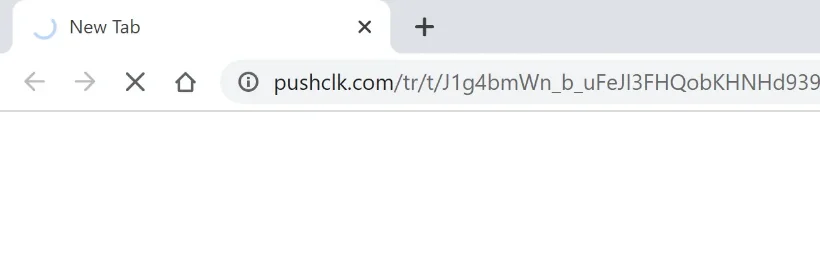
Visitors may encounter pop-ups, new browser tabs, misleading download buttons, or advertisements that resemble game controls.
When a progress bar appears to stop moving, people naturally become impatient. They may click around the page, press unfamiliar buttons, or interact with overlays that have nothing to do with the game.
An accidental click can redirect the visitor to an entirely different website.
We encountered embedded third-party advertising during our previous investigations of GTA 5 browser websites. That experience is a useful reminder that even when a game actually works, the advertising surrounding it deserves caution.
With fake GTA 6 websites, there may not even be a playable game behind the advertisements.
Fake Human Verification
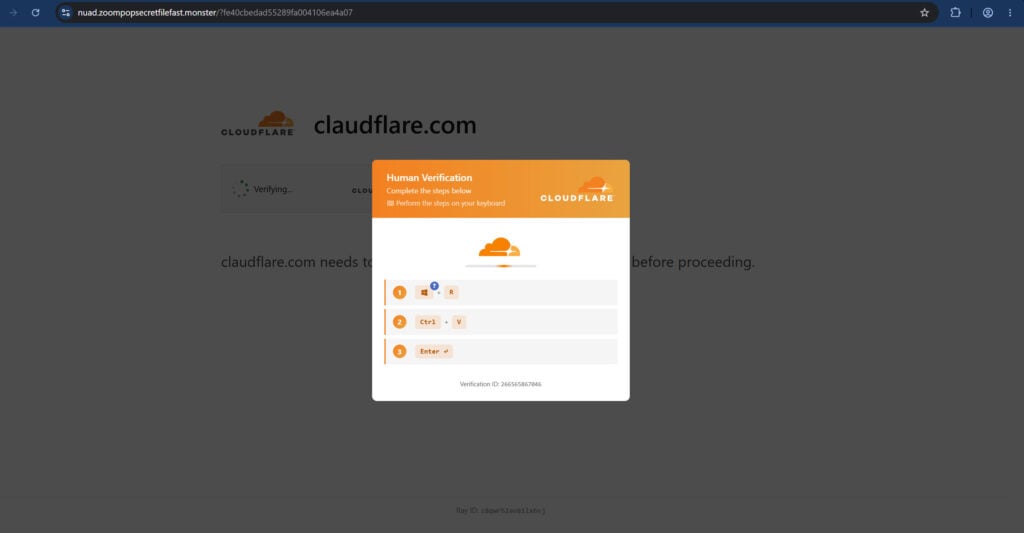
Another potential pattern is a loading screen that reaches a certain percentage before requiring additional verification.
Visitors may be told that they need to complete a survey, install an application, watch advertisements, subscribe to a service, or provide their personal information before accessing the game.
These requirements may be presented as necessary steps to prevent bots or verify that the visitor is a real person.
In reality, completing such tasks may simply generate revenue for the operator or expose visitors to additional advertising and data collection.
There is no reason to complete an unrelated survey or install an unfamiliar mobile application to unlock a browser version of GTA 6 that Rockstar has not announced.
Fake Registration and Login Pages
Some websites may introduce a registration screen claiming that a Rockstar Games account is required to access the browser version.
A professionally designed login form displaying the Rockstar logo could easily be mistaken for an official service.
However, credentials entered into a fraudulent login page may be collected by its operator.
Depending on the account involved, attackers could potentially gain access to purchased games, stored payment methods, personal information, or linked gaming services.
Never enter your Rockstar Games, Steam, Xbox, PlayStation, or Google account credentials into an unfamiliar website promising free GTA 6 access.
Open the legitimate service independently and verify that the offer actually exists.
Fake GTA 6 Downloads Could Be More Dangerous Than Prank Websites
The biggest security concern is not a fake loading screen or a rickroll.
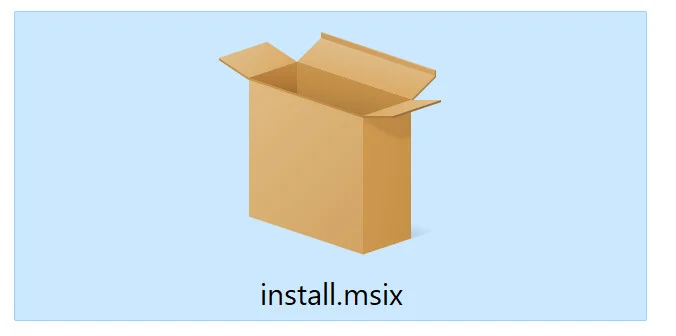
It is what happens when an unfamiliar website asks you to download and execute a file.
A website may initially claim that GTA 6 runs entirely inside the browser, only to later insist that additional software is required.
This software could be presented as a game launcher, graphics accelerator, compatibility update, browser extension, mobile application, or required security component.
Potential downloads include:
| File type | What it could contain |
|---|---|
| .EXE | Windows installers, information stealers, or other malicious programs |
| .MSI | Unwanted or malicious Windows installation packages |
| .APK | Unofficial Android applications, adware, or mobile malware |
| .ZIP or .RAR | Archives containing executables, scripts, or deceptive instructions |
| .BAT, .CMD or .PS1 | Scripts capable of executing commands on Windows |
| Browser extensions | Software capable of requesting access to browsing activity or website data |
| .CER or .CRT | Certificates that could affect which connections your device trusts if installed as trusted certificates |
A file extension does not automatically make a file malicious. Legitimate applications also use these formats.
The problem is that an unfamiliar GTA 6 website has not established that its downloads come from Rockstar Games or another trusted software provider.
A convincing filename, a GTA VI icon, or an assurance that antivirus detections are false positives should not be enough to establish trust.
Fake GTA 6 Installers Have Already Been Used to Distribute Malware
This threat is not merely hypothetical.
In August 2026, we documented a campaign involving fake GTA 6 promotional and demo websites. The sites directed visitors toward a file named gta6_installer.exe.
The file delivered Vidar, an information-stealing malware family capable of targeting sensitive data stored on infected computers.
Information stealers can target data such as browser-stored passwords, authentication cookies, cryptocurrency wallet information, and other sensitive files.
The consequences of running an infected game installer can therefore extend far beyond losing access to a gaming account.
An attacker may gain access to email accounts, social media profiles, financial services, and other important online accounts.
This research concerns a separate malicious campaign. It does not establish that GrandTheftGTA.com distributes malware.
It does, however, demonstrate why people searching for GTA 6 should be especially cautious around unfamiliar downloads.
Is GTA 6 for Android or iPhone Real?
Another claim that visitors are likely to encounter is that GTA 6 has been made available for smartphones through an unofficial APK or browser-based application.
Rockstar’s currently listed GTA VI platforms do not include Android or iOS.
A website offering a downloadable file called GTA6.apk is therefore not providing an official Android edition simply because the filename contains the game’s name.
In November 2026, Malwarebytes investigated GTA 6-related scams and examined an unofficial Android APK that appeared to be primarily designed around advertising rather than delivering the promised game.
Not every fake GTA 6 application necessarily contains sophisticated malware. Some may simply display advertisements, collect information, or provide a completely different game from the one advertised.
However, downloading APK files from unfamiliar websites introduces additional risks, particularly when the installation requires disabling security protections or enabling installation from unknown sources.
A smartphone application displaying GTA VI artwork does not mean that Rockstar’s latest console game has somehow been converted into a legitimate mobile release.
Do not disable Google Play Protect or other security features because a GTA 6 download page tells you to do so.
Why Running the Real GTA 6 in a Browser Is Such an Extraordinary Claim
Modern browser technology has advanced considerably.
WebAssembly, WebGPU, and other technologies allow developers to create applications that would have been difficult to imagine running inside a browser a decade ago.
The emergence of playable GTA 5 browser experiments demonstrates just how far these technologies have progressed.
However, there is an enormous difference between bringing an older game to a browser and adapting a contemporary AAA title like GTA VI.
GTA 6 Is an Enormous Game
According to Sony’s PlayStation preload guidance, PS5 players were advised to have at least 212 GB of available storage.
That puts the scale of the game into perspective.
We are not talking about a lightweight browser game consisting of a few textures, character models, and JavaScript files. GTA VI contains a vast open world, detailed environments, complex animations, audio, vehicles, character models, cinematic sequences, and numerous interconnected systems.
A genuine browser port would need to address significant challenges involving:
- Graphics rendering and GPU compatibility.
- Memory management and browser limitations.
- Game asset delivery and storage.
- Physics, artificial intelligence, and world simulation.
- Audio processing and input handling.
- Performance across different devices and browsers.
Even the GTA 5 browser experiences we previously tested involved noticeable loading times, reduced performance compared with an installed copy, and various technical limitations.
The size of GTA VI does not make browser delivery mathematically impossible. Game assets could theoretically be delivered progressively, and streaming is another technology entirely.
But a website displaying a loading animation for a few minutes is nowhere near sufficient evidence that someone has solved all of these problems.
Rockstar Games and Take-Two Have a Significant Interest in Protecting GTA 6
There is also a major issue unrelated to browser performance: intellectual property.
Grand Theft Auto VI represents an enormous investment by Rockstar Games and Take-Two Interactive.
The companies have a clear commercial interest in protecting the distribution of their game, its copyrighted assets, and its underlying technology.
Take-Two’s legal terms restrict various forms of unauthorized distribution, modification, and reverse engineering, subject to applicable permissions and legal exceptions.
An independent website cannot simply add a copyright disclaimer and assume that it has permission to distribute the complete game for free.
Even if someone eventually develops a technically functional unofficial browser port, its continued public availability would raise significant licensing and legal questions.
There is currently no reason to assume that Rockstar or Take-Two would authorize random third-party websites to distribute the full GTA VI game for free.
What About AI? Could Artificial Intelligence Port GTA 6 to a Browser?
Artificial intelligence is increasingly capable of assisting developers with programming, debugging, code analysis, and software development.
AI-assisted development has also contributed to the excitement surrounding browser-based gaming experiments.
But AI is not a magic button that converts any modern console game into a fully functional browser application.
It does not automatically provide access to proprietary source code, copyrighted game assets, or permission to distribute them.
It also does not eliminate the technical challenges associated with rendering a complex open world, processing game logic, managing memory, and delivering large quantities of data.
AI can make development faster. It can help solve complicated engineering problems. It can also make it easier for people to create convincing websites, fake interfaces, and promotional videos.
That last point is particularly important.
AI-generated or AI-assisted content may make fake GTA 6 websites increasingly convincing without making the underlying claims any more legitimate.
A website claiming that its creators used AI, WebAssembly, or WebGPU to port GTA 6 still needs to demonstrate actual, interactive gameplay.
Technical terminology is not proof.
GTA 6 Browser Ports and Cloud Gaming Are Not the Same Thing
It is important to distinguish between several different ways a video game might appear inside a browser window.
| Technology | How it works |
|---|---|
| Native browser port | Game software is adapted to execute within the browser environment. |
| Cloud gaming | The game runs on a remote system, and the player receives an interactive video stream. |
| Remote Play | A game running on the player’s own console or computer is accessed remotely. |
| Prerecorded video | A video plays on the webpage without providing control of the actual game. |
Cloud gaming is a legitimate technology that allows demanding video games to be played without running the entire game engine on the player’s local device.
PlayStation’s official GTA VI listing also provides information about supported Remote Play and cloud streaming options on eligible PlayStation devices.
It is entirely possible that Rockstar and its authorized partners could support additional streaming options in the future.
However, that is fundamentally different from an anonymous website offering an unofficial, free browser port of the entire game.
If a website claims to offer GTA VI through cloud gaming, verify whether the actual cloud gaming provider supports the title, your region, your device, and your subscription.
Do not assume that a website is a legitimate cloud gaming platform simply because it displays a video of GTA 6.
How to Identify a Fake GTA 6 Browser Website
The domain names and website designs will change over time, but the warning signs are likely to remain similar.
| Warning sign | Why it should concern you |
|---|---|
| An unfamiliar website promises the complete GTA 6 game for free | The offer has not been verified through an official source. |
| Loading repeatedly stops before gameplay begins | You may be looking at a simulated loading process. |
| The website displays only cinematic footage | Video playback is not interactive gameplay. |
| You must complete surveys to continue | The website may be monetizing your attention or personal information. |
| An EXE or APK download is required | You are being asked to trust and install unverified software. |
| Antivirus protection must be disabled | This exposes your device to unnecessary security risks. |
| You must install a browser extension or certificate | The software or configuration change may introduce additional security risks. |
| An unfamiliar page requests gaming account credentials | The page could be attempting to steal your account. |
| The website redirects to unrelated offers | The operator may be monetizing visitors through advertising or affiliate schemes. |
| Social media videos show only menus and loading screens | The videos do not demonstrate that the game is actually playable. |
The most important question is not whether the website looks convincing.
It is whether the website can establish that it provides genuine, authorized access to the game without asking visitors to take unnecessary security risks.
Are All GTA 6 Browser Websites Malicious?
No. It would be inaccurate to classify every unofficial GTA 6-themed website as malicious.
The example we investigated at GrandTheftGTA.com was an elaborate prank. Based on the experience documented in our screenshots, the intended payoff was a rickroll.
We did not establish that this particular website distributed malware, stole credentials, or conducted payment fraud.
However, other websites could reproduce the same general concept while adding malicious advertisements, phishing pages, or unsafe downloads.
A harmless prank and a malicious website can look remarkably similar during the first few minutes of interaction.
The difference may only become apparent when the visitor is asked to install something, provide personal information, or approve a suspicious request.
The fact that one GTA 6 browser website is a joke does not mean the next one will be equally harmless.
What Should You Do If You Visit One of These Websites?
If you encounter an unfamiliar website claiming to offer GTA 6 for free, there is no need to panic.
Simply visiting a website does not automatically mean your device has become infected.
Your next steps should depend on what actually happened during the visit.
If You Only Watched the Loading Screens or Video
Close the website.
If you did not download anything, enter personal information, approve browser permissions, or install software, there is generally no reason to assume that a prank video has infected your computer.
Keep your operating system and browser updated, and avoid returning to websites that repeatedly redirect you to unwanted content.
If You Allowed Browser Notifications
Some websites request permission to send notifications. Once granted, these permissions may be abused to display advertisements, misleading security warnings, or links to additional suspicious websites.
In Google Chrome, navigate to:
Settings → Privacy and security → Site settings → Notifications
Find the unfamiliar website and remove or block its permission to send notifications.
Google provides additional instructions for managing website notifications in Chrome.
Revoking notification permissions can stop unwanted alerts without requiring you to reinstall your browser.
If You Downloaded a GTA 6 File but Did Not Open It
Do not execute the file to see whether it works.
Delete the suspicious download or allow your security software to quarantine it.
Downloading a file and executing it are different actions. An unopened installer does not automatically establish that your device has been infected.
Nevertheless, there is no benefit in taking additional risks to investigate an unverified game download on your personal computer.
If You Ran a Suspicious GTA 6 Installer
If you executed an unfamiliar EXE file, script, or game launcher, treat the situation more seriously.
Stop using the potentially affected device for sensitive activities until it has been checked.
Update your antivirus software and perform a full system scan.
Windows users can also access Microsoft Defender’s scanning options through:
Windows Security → Virus & threat protection → Scan options
Microsoft Defender Offline is another available option that restarts the computer and performs a scan outside the normal Windows environment.
Read Microsoft’s Windows Security scanning guidance.
If an information stealer is suspected, use a separate, trusted device to change important passwords, revoke active account sessions, review recovery information, and enable multifactor authentication.
Removing malware does not necessarily invalidate credentials or authentication cookies that may already have been stolen.
If You Installed an Unofficial GTA 6 APK
Uninstall the suspicious application and review any permissions it requested.
On Android, open the Google Play Store and use Google Play Protect to scan your device for potentially harmful applications.
Google Play Protect can also examine applications installed from outside the Play Store.
Read Google’s Play Protect guidance.
Pay particular attention to unfamiliar applications with accessibility permissions, notification access, device administrator privileges, or permission to install additional applications.
If You Entered Your Gaming Account Password
Visit the legitimate gaming service directly from a trusted device and change your password immediately.
Sign out of other active sessions, review unfamiliar connected devices, and enable multifactor authentication.
If you reused the same password for other websites, change those passwords as well.
If you entered payment information or made a suspicious payment, contact your bank or card issuer through its official customer support channels.
Should You Use an Ad Blocker on Browser Gaming Websites?
We recommend using a reputable ad blocker, such as AdGuard Browser Extension, particularly when visiting advertising-heavy gaming websites.
Ad blockers can help reduce unwanted advertisements, pop-ups, trackers, and certain misleading redirects.
However, an ad blocker should be regarded as an additional security and privacy measure, not a guarantee of safety.
It cannot turn a fake GTA 6 browser game into a real one. It cannot establish that an unfamiliar installer is legitimate, and it should not be used as a reason to ignore browser security warnings.

Join the discussion
0 commentsShare your experience or ask a question about this article.
Community experiences
Did this happen to you?
Your experience could help someone recognize the same scam. Submit a private report for our team to review.
I experienced this tooReports are reviewed before publication. Sharing publicly is always your choice.
Discussion
Start the conversation
Have a question or something useful to share? Add the first comment.