


A text from 2512 says it has something to do with T-Mobile. The number looks official, but that does not explain why a survey suddenly mentions your account.
Start with the action the message wants from you. An ordinary promotion can wait while you verify it, and a genuine account problem will have another way to check.
Overview
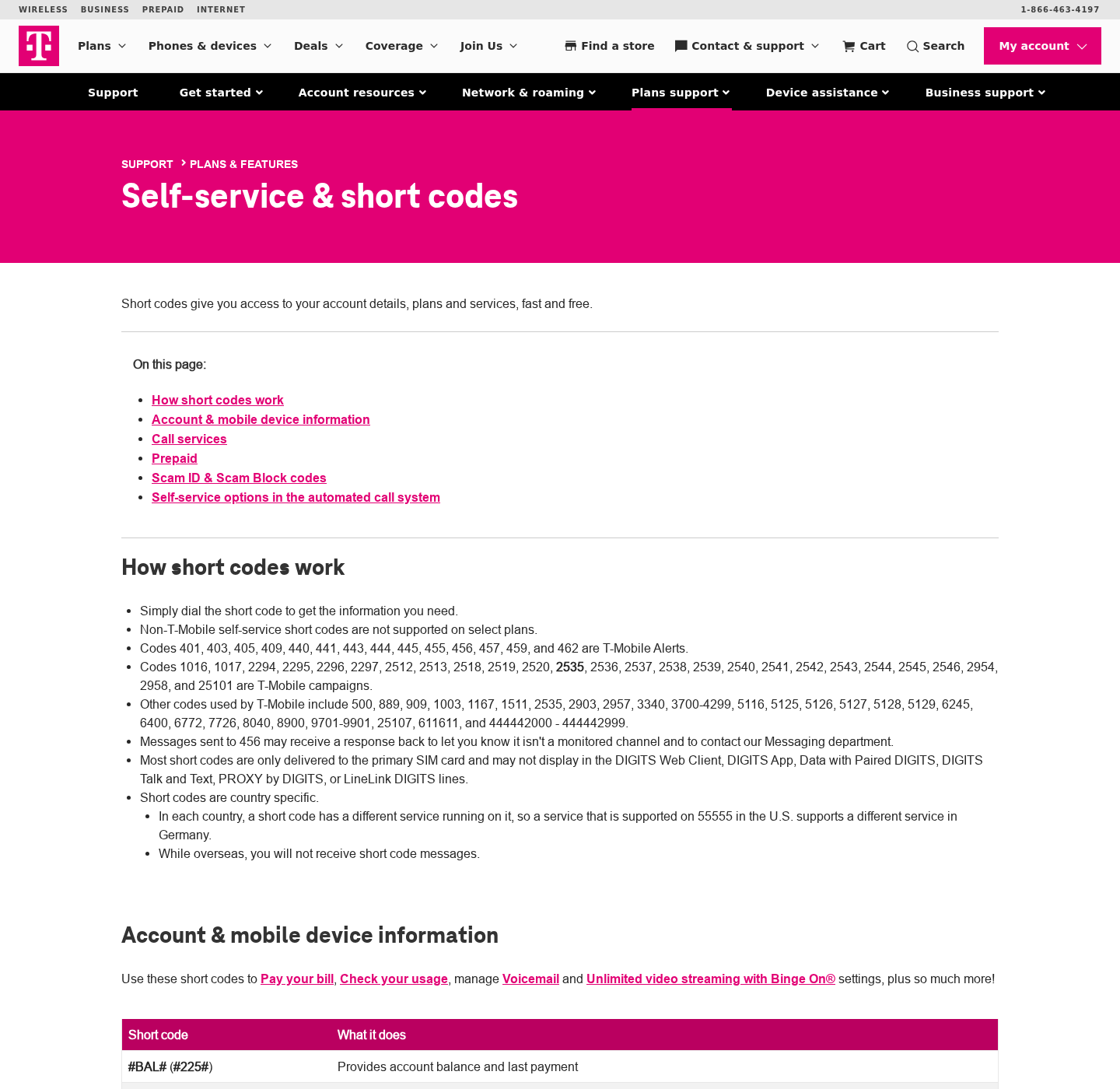
T-Mobile documents 2512 as a campaign short code
- T-Mobile’s US support list places 2512 among its campaign codes.
- Being listed identifies a program, not every message that appears to come from that number.
- Compare the timing and request with your own account instead of approving a change from the message.
Bills and service changes have their own records
- Open T-Life or your T-Mobile account independently before paying for anything.
- For an upgrade, match the affected line, device balance and any recurring change.
- If service suddenly stops or a line transfer appears, contact the actual carrier promptly.
Marketing preferences and account protections are separate settings
- A campaign message is not a reason to turn off SIM or transfer protections.
- Use verified communication preferences when you want fewer promotions.
- If you already handed over an account code, move to account recovery rather than only blocking the sender.
The main question is whether the message is inviting you to look at an offer or claiming that something already happened. Those are different checks with different consequences.
How to Check a 2512 Message Without Using Its Link
Step 1: Identify what the message expects you to do
Read enough of the message to identify the claim without opening the link. A feedback request, an upgrade invitation and a suspension threat are not equivalent.
A survey after an interaction you remember may make sense. You can still ignore it, and you do not need to hand over a password to rate a support experience.
For an offer, note the plan or product name and any deadline. If that information is missing, do not supply personal details merely to find out what is on offer.
For a message about a completed change, write down the affected line and the claimed time. Check the record before you try to cancel something.
Do not treat a notice about a discount as a bill adjustment. If you have a price concern, open your published account balance and current bill first.
If the message insists you must stay on the phone while opening your account, end the conversation. Use a separate account session to make your own decision.
Step 2: Match the claim to the correct part of your account
Open your installed T-Life app or the T-Mobile site directly. Sign in with your usual credentials rather than starting from the unexpected SMS.
For a bill claim, open the Manage tab, then View bill if available. Select the correct account and compare the amount and due date.
A message about a charge might refer to a remaining device balance, a service line or a one-time item. The bill can tell you which figure it actually is.
Do not send the entire bill to anyone who asks for a screenshot. Look up the line yourself and describe only what you need to resolve the issue.
If the text promises an upgrade, choose the line in your account independently. Check whether accepting it would change the plan, financing terms, fees or promotion eligibility.
An offer may be intended for a different line on the same family account. Check the number shown in your own account before you agree to anything.
If the offer is not shown, ask T-Mobile whether it applies to your account rather than relying on a link from the message.
You can decline it while the question remains open.
Step 3: Get help through a channel you choose
Use T-Mobile’s official contact page to find the relevant customer care option. If your T-Mobile line still works, its documented customer care number is 611.
Explain the message rather than repeating credentials from it. Give the claimed offer or account change, identify the affected line securely and ask support to check its records.
If service suddenly stops and you cannot call from that line, use another trusted phone. Tell the carrier what changed and whether notice of a SIM or transfer arrived.
Do not ask for a new SIM just because a campaign text looked suspicious. First establish whether service was transferred, a device changed, or there is an unrelated outage.
If a legitimate offer turns out to be something you want, complete it through the official app or verified representative. Review the final terms before confirming the purchase.
If you cannot establish that an account change occurred, keep the text and your account check separate. That makes it easier to explain what was only claimed.
When a Promotion Changes Into an Account Security Problem
Treat a demand for a private code as a separate request
A person may say they are enrolling you in a discount and need the security code that just arrived. An account code does not belong in that conversation.
If the message includes both an offer and a request for your account PIN, verify the offer through the carrier.
Never send the PIN to the requester as proof of eligibility.
Be wary of a follow-up caller who already knows the last few digits of your line. Familiar details do not tell you who is entitled to change the account.
If you initiated a genuine sign-in, enter its code only in the verified screen you chose. Do not tap a forwarded input field or speak the code to somebody else.
You can report an unexpected code without sharing its value. Give support the time, the service name and the reason you did not request the code.
Check service disruption independently from the promotion
A lost signal can come from many causes. The combination of a sudden loss of calls or texts and an unfamiliar account change is a reason to act promptly.
If Wi-Fi still works, use it to read your account or find the carrier’s real support details. Avoid relying on an incoming request to decide how to reconnect.
Ask the carrier if the affected line was moved to another device or transferred to another provider. Do not assume an ordinary outage proves either scenario.
Write down when you last made a normal call. Put that time next to the account change or notice so support can compare the sequence.
If the affected number protects your email or financial accounts, tell the carrier how urgent the change is. Secure those accounts through independently verified methods once you can.
If a number transfer is confirmed, request the carrier’s recovery procedure and keep its case reference. Whether your other devices still work does not settle what happened to that line.
SIM Protection and Account Takeover Protection are not the same switch
T-Mobile documents SIM Protection to help prevent unauthorized SIM changes. It separately documents Account Takeover Protection to help block unauthorized transfers of numbers to another carrier.
The first concerns what device or SIM gets access to a line. The second concerns moving the number outside the carrier, which is a different event.
To review either protection, open T-Life or your T-Mobile account independently and ask verified support what is active on your lines. Eligibility and user permissions can vary.
Do not disable a protection because someone sends a promotion that claims it is required. If you need a legitimate device or carrier change, verify the procedure before continuing.
A security add-on can reduce risk without guaranteeing you never receive a deceptive survey. Keep contact preferences separate from the controls that protect your line.
How to Adjust Campaign Messages Without Hiding Account Notices
If you want fewer marketing texts, open your carrier account and look for its communication preferences. Ask customer care to help if your role cannot change them.
Confirm what the setting changes before saving. Marketing, billing and account security may be separate categories, so fewer offers need not mean fewer security alerts.
If you do not have a T-Mobile account, an unexpected campaign message can be misdirected. Ask T-Mobile through a verified contact if repeated messages need a number correction.
Avoid using a suspicious message’s unsubscribe link. A legitimate campaign’s enrollment can be addressed separately through the company without confirming the link is safe.
If you block one sender on your device, consider whether that also hides genuine messages from that thread. Blocking is not a fix for an account change.
T-Mobile’s own scam guidance describes forwarding a suspicious text to 7726. Use the phone’s forwarding option without tapping links or sending private material to public forums.
Keep carrier spam reporting separate from the account inquiry. Forwarding a message does not reverse a charge, restore a line or reset the PIN on your account.
If support confirms the text was a survey, decide whether feedback is worth your time. No account benefit should depend on handing a stranger your sign-in details.
How to Compare a T-Mobile Offer With What You Actually Pay
Open T-Life, select Manage and pull up the latest bill. Make a note of your plan, line count, device installment payments and any promotional credits already on the account.
Check the current amount against the last full bill, not just a text that quotes a monthly price. A short billing period or one-time charge can distort the comparison.
T-Mobile’s bill guide helps you locate charges and credits. Start with the affected line before assuming a change applies to everyone on the plan.
When an offer includes a phone, ask how much is due now and which part of the price depends on future bill credits. Those figures describe two different obligations.
If credits require keeping a line active or trading in a particular device, ask what happens if the conditions aren’t met. Write down the answer before you agree to anything.
A genuine offer may not be available to every account. If support can’t confirm it, leave the link alone and ask how to request the offer from inside your account.
When a text promises a refund on a device you already bought, check whether there’s an existing return or credit in your account. Don’t start a second return by text.
For an upgrade you didn’t request, ask about both the order and the line. A device order, SIM change and port-out request affect different parts of the account.
If someone else’s phone still works on the family plan, don’t assume that your line is unaffected. Tell support whose number lost service and whose device still connects.
After the call, keep the reference number with your last bill and the original message. Check the next bill for corrections rather than treating a verbal assurance as proof.
If the offer was genuine but you decided against it, you don’t need to modify your security settings. Save account changes for the separate problem they actually address.
What to Do If a 2512 Message Caused You to Act
- If you only read the text, leave the link alone and check anything important independently. You do not need to reset a phone for a message you did not use.
- If the message claims you owe money, compare your official bill and due date. Pay only through the carrier’s normal channel after confirming the amount.
- If you supplied a password or PIN, contact verified customer care. Change exposed credentials from the real account and ask if any line details changed.
- If you shared a one-time code or lost service unexpectedly, call the carrier from a different phone. Ask it to check recent SIM or transfer activity.
- If you entered payment details, call the issuer from its app or the card. Tell it what you supplied and check for actual charges.
- Save a redacted copy of the message and write down dates and support references. Keep the original privately if the carrier or issuer requests it securely.
When a phone number is part of account recovery elsewhere, prioritize your email and financial providers after contacting the carrier.
Use a recovery method that does not depend on the affected line.
If you cannot restore service quickly, ask the carrier to keep a case open. Do not rely on a second text claiming the problem has been repaired.
Frequently Asked Questions
Does T-Mobile really use the 2512 short code?
T-Mobile includes it in its published US campaign list. That confirms the carrier’s use, but it does not verify an individual message or a specific offer.
Does a text from 2512 mean my T-Mobile bill changed?
Not by itself, because a campaign is not a billing record. Open your bill independently and check the affected line, charge and due date.
Can I ignore a survey that arrived after a support call?
You can skip a feedback survey without using its link. If the text is making a claim about your service, verify that claim through your account.
Does a 2512 message mean someone moved my phone number?
The text alone does not establish a transfer. If calls or texts stopped unexpectedly, use another trusted phone to ask the carrier to check the line.
Will blocking the message protect my account?
Blocking changes what your phone displays but does not reverse an account change. Contact T-Mobile directly if someone knows your credentials or a device change appears.
Is texting a code the right way to claim a promotion?
Do not send a private account code to someone who offers a discount. Verify the campaign in T-Life or through support and use the legitimate offer controls.
The Bottom Line
T-Mobile lists 2512 for campaigns, but don’t use the number alone to trust a link, pay a bill or accept an upgrade. Open the account yourself to verify the request.
If you shared a PIN or code or lost service unexpectedly, contact the carrier right away through its real support channel. Ask it to check the affected line.

Join the discussion
0 commentsShare your experience or ask a question about this article.
Discussion
Start the conversation
Have a question or something useful to share? Add the first comment.