


You are ready to delete your SHEIN account, but a package is still on its way back or the refund has not reached your card.
Closing the account and closing the return are separate tasks. The order in which you handle them can determine which receipts and wallet details you can still reach.
Overview
Check the order before closing the account
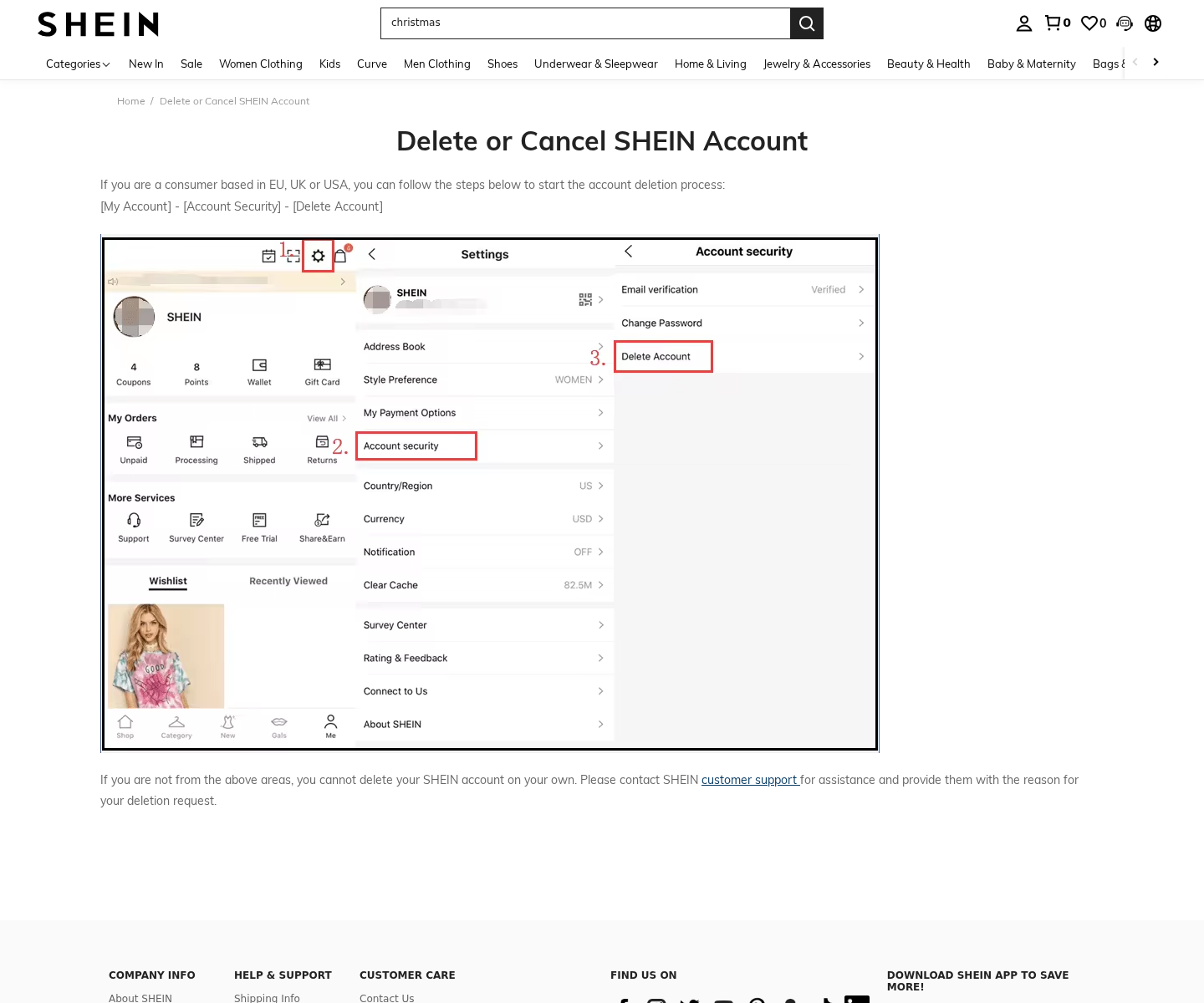
For US shoppers, SHEIN describes a self-service deletion option, but its help pages say it requires verification, no pending orders and no remaining wallet balance.
Even if the button is available, keep your access while a return, refund or dispute is unresolved. You may still need the order number or return label.
Two help pages do not give the same answer
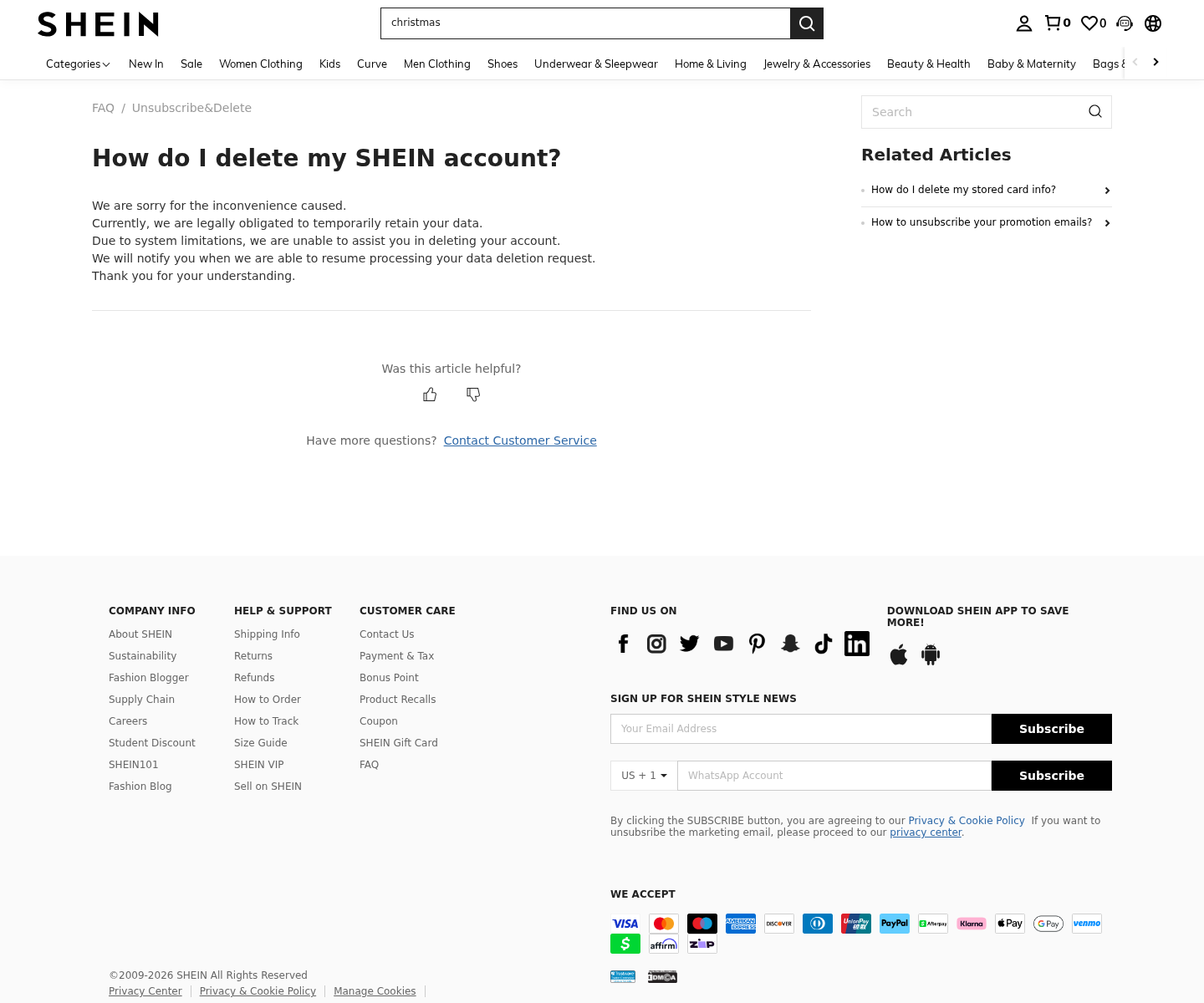
One US page gives a menu path for deleting an account. A separate live US FAQ says SHEIN cannot assist with deletion at present, citing limitations.
The notices do not establish a single outcome for every account. Look for the actual control while signed in and use the privacy request route if it is unavailable.
Account access, wallet credit and record retention are different
- Check the return status and save proof of mailing.
- Confirm where the refund was sent, not just that it was issued.
- Resolve any wallet balance before requesting account closure.
- Read the deletion reply for anything the retailer will retain.
SHEIN’s US privacy notice says some order data can be retained for financial reporting, disputes and other obligations. Losing sign-in does not prove every underlying record was erased.
Start With the Return Receipt, Not the Delete Button
Open My Orders on the US site and select the transaction that is still open. Save the order number, the affected items and the relevant payment confirmation.
When a return already exists, save its number, label or code and the carrier receipt. Keep the last tracking event and the date shown on the return page.
Do that before you lose account access. A card statement shows a charge, but it may not identify which of several items was accepted for return.
For a replacement, keep the correspondence connecting the original order and any replacement shipment. Their tracking numbers can be different even when both appear under the same order.
If the issue is a missing package, save the messages describing the claim and expected next action. Do not assume a missing package is already a refund request.
For a purchase paid in instalments, check the account with the payment provider as well. The retailer’s status does not tell you whether that provider adjusted its schedule.
Store the documents locally or in another place you control. Avoid forwarding return labels with your address or putting unredacted payment evidence into a public complaint.
SHEIN also describes Download Your Information in its self-service tools. That can help with profile records, but still collect the current order and return details individually.
How to Complete a Return Before You Delete Your SHEIN Account
Step 1: Open the order and check which items can be returned
Sign in, choose My Orders and open Order Details. Select Return Item if available. Choose only the items you intend to send back.
Give the return reason shown in the form and select Next Step. Review the actual item deadline and any exclusions rather than extrapolating from another order.
If the item is faulty or the return option is missing, ask customer support about that order before mailing anything. Keep any photos that show the specific problem.
Step 2: Choose how the item goes back and how the money returns
Choose an available return method and read what the order says about its fee, label or code. A second batch of items can have different costs.
In the same request, check the Refund Method before you submit. The US return policy describes wallet credit or the original payment method, depending on your selection.
If you plan to leave the store and both options are offered, choose the original payment method. Wallet value can complicate account closure and is not money in your bank.
Submit only after the return items and refund destination are right. Then keep the confirmation somewhere you can open without signing in to the retailer again.
Use the instructions attached to that return. SHEIN warns against treating the sender address on your original package as the address where you should mail items back.
Step 3: Check where the refund actually arrived
Open the return record and confirm the amount and destination. If it went back to a payment provider, check that provider’s activity rather than only the retailer’s status.
If it went to My Wallet, open your wallet and review the type of balance shown. Do not assume refund credit, vouchers and promotional credit are handled identically.
If the displayed destination is wrong or the money is missing, contact support from the order. Ask for the amount, destination and date before touching the account deletion control.
SHEIN’s US return policy describes order-level return methods and fees. Rely on the choice shown for your current items, not a refund estimate you saw elsewhere.
If you chose the wrong refund method
Return to the order and open the return record. Write down the method you selected and the displayed processing stage before asking customer support to change anything.
SHEIN’s refund-method help says to contact support about returns still marked Processing Return or Arrived To Warehouse if the refund has not yet been processed.
Ask for the new destination in writing and confirm that the order view matches it. Do not treat your request as proof that the destination was changed.
The same help says the destination may already be fixed for a canceled order. Check the transaction type before expecting the return-change process to apply.
If the amount is already in Wallet, check the action available for that balance. Contact official support if a withdrawal option is missing or the balance type is unclear.
Do not make another purchase to get rid of wallet credit without considering the consequences. A new order can become the pending order you have to finish later.
If you returned several items from one order
Open the individual return details, not only the original order. Match each item to the return label or code that covered it and note the items still outstanding.
A single statement credit may settle just part of an order. Compare the amount with the actual returned items, including any fee already disclosed on the return.
Keep your drop-off proof even if tracking says the package arrived. The delivery scan and the retailer’s inspection are separate points in the process.
If a refund is smaller than expected, ask which items were accepted and which deductions apply. Keep access until you can reconcile that answer with the order details.
Where to Look for Account Deletion on the US Site
Once orders, returns, and the wallet are settled, sign in to the account you intend to close. Check the email displayed in the profile before going further.
The delete-account page shows My Account > Account Security > Delete Account. Its supporting self-service guide describes a slightly different way into the same area.
On the website, open the account icon and select My Profile > Manage My Account. In the app, open the profile area and tap the settings gear.
In the app settings, look for Manage My Account or the Account security route shown on the deletion page. Stop if you are in another person’s profile.
Look for Delete Account and read the consequences before you submit. Complete only verification requested within the official account flow, then save any confirmation.
The self-service help page explicitly describes the checks for a verified request, no pending orders and no remaining wallet balance. Those conditions explain why timing matters.
If the button is absent or customer help says deletion is paused
The separate US FAQ says it cannot currently assist with deleting an account. That conflicts with the action described in SHEIN’s other public instructions.
Do not repeatedly try to close the same account or send verification codes to customer support. Record the exact message you saw and keep any previous request number.
Open the US privacy notice, find the deletion section and follow its link to the Privacy Center. Sign in or use Visitor Mode where offered.
Select the request that asks to delete your data and enter only the identifiers the verified form requires. If the route is unavailable, use the email in the notice.
Describe the issue in plain language, provide the account email and ask for written confirmation. Do not send a payment card number, password or reusable verification code.
If you cannot use either path, use SHEIN’s US customer-service page to ask which verified privacy route applies to your account and where to follow up.
A submitted request is not the same as a completed deletion. Wait until you receive a clear answer and keep it with the evidence you already saved.
If the response asks you to verify the request, check that it refers to the case you opened. Go back through the original support channel when in doubt.
A useful follow-up asks whether the retailer received the request, whether anything remains outstanding and how it will notify you when processing is done.
If the reason for waiting is a pending order, record the order number before taking the next step. An open cart is not the same as a placed order.
If you only want marketing to stop, use the opt-out controls instead of asking to close the whole account while a return or refund is still underway.
What to Do If You Cannot See Your Return After Account Closure
-
Find the receipt, order number, return confirmation and shipping proof. Start from the existing transaction so the retailer does not have to search by a former profile.
-
Check the original payment account for the expected credit. Verify the amount, date and any reference before concluding that a refunded order is still unpaid.
-
Use the retailer’s US support page and explain that the order was associated with a closed account. Ask how support can confirm the return without restoring your login.
-
Keep the retailer’s reply and any case number. If a refund was supposedly issued, request the destination and a transaction reference that can help your payment provider.
-
If the retailer cannot resolve the missing payment, contact the provider directly to ask about the transaction and any relevant deadline. Avoid promising yourself an automatic reversal.
-
If you see an account-deletion email you did not initiate, verify it through the retailer’s own site. Do not use an embedded reply link to enter your password.
Sometimes the goal is fewer marketing messages, not account closure. Use the verified preference controls and remove saved addresses or payment options you no longer want, where available.
You can also uninstall the app to remove it from a phone, but that does not send a request to close the web account or delete stored data.
For a deletion request, distinguish what you lose from what SHEIN retains. The US notice lists wallet credits, points and profile data among the benefits or information affected.
The same notice allows some records to be kept for limited purposes, such as resolving disputes. Ask what was retained if that matters to your request.
Closing a profile does not give the retailer control of the bank’s transaction record. Keep your own statement or receipt for any dispute or warranty claim.
If the retailer says it cannot confirm an order without the former login, try the order number from the original receipt rather than creating a new order.
Once the case is closed, review how long you need the evidence. Keep documents private and avoid storing the same address and payment details in several places.
Frequently Asked Questions
Should I delete my account while a refund is still pending?
Wait if you still need order access and there is no urgent account-security reason to act. First confirm the payment reached the destination you chose.
Does a refund always go to SHEIN Wallet?
The US return policy describes wallet credit or the original payment method depending on the selected option. Check what your return record actually shows.
Why is the option to delete missing in my account?
Verification, pending orders, a remaining wallet balance or technical availability may matter. Record what you see and use the verified privacy route if the button is unavailable.
Does closing my account erase my whole purchase history immediately?
The US notice says SHEIN may retain some order records for financial reporting, disputes or other obligations. You may still lose your own access to those details.
Can I request deletion if I cannot log in?
The US privacy notice offers Visitor Mode in its Privacy Center and a separate email route. Use only the contact listed by the retailer itself.
Does uninstalling the app withdraw a refund or close the account?
Uninstalling removes the app from the device, not the retailer account. Check any refund on the website or through your payment provider using verified access.
The Bottom Line
Finish the return, verify the refund and resolve any wallet balance before deleting your SHEIN account. Keep the evidence outside the account so you can still access it.
If self-service deletion is unavailable, make a request through the US privacy route and keep the reply. Do not assume losing sign-in proves every record has been erased.

Join the discussion
0 commentsShare your experience or ask a question about this article.
Discussion
Start the conversation
Have a question or something useful to share? Add the first comment.