


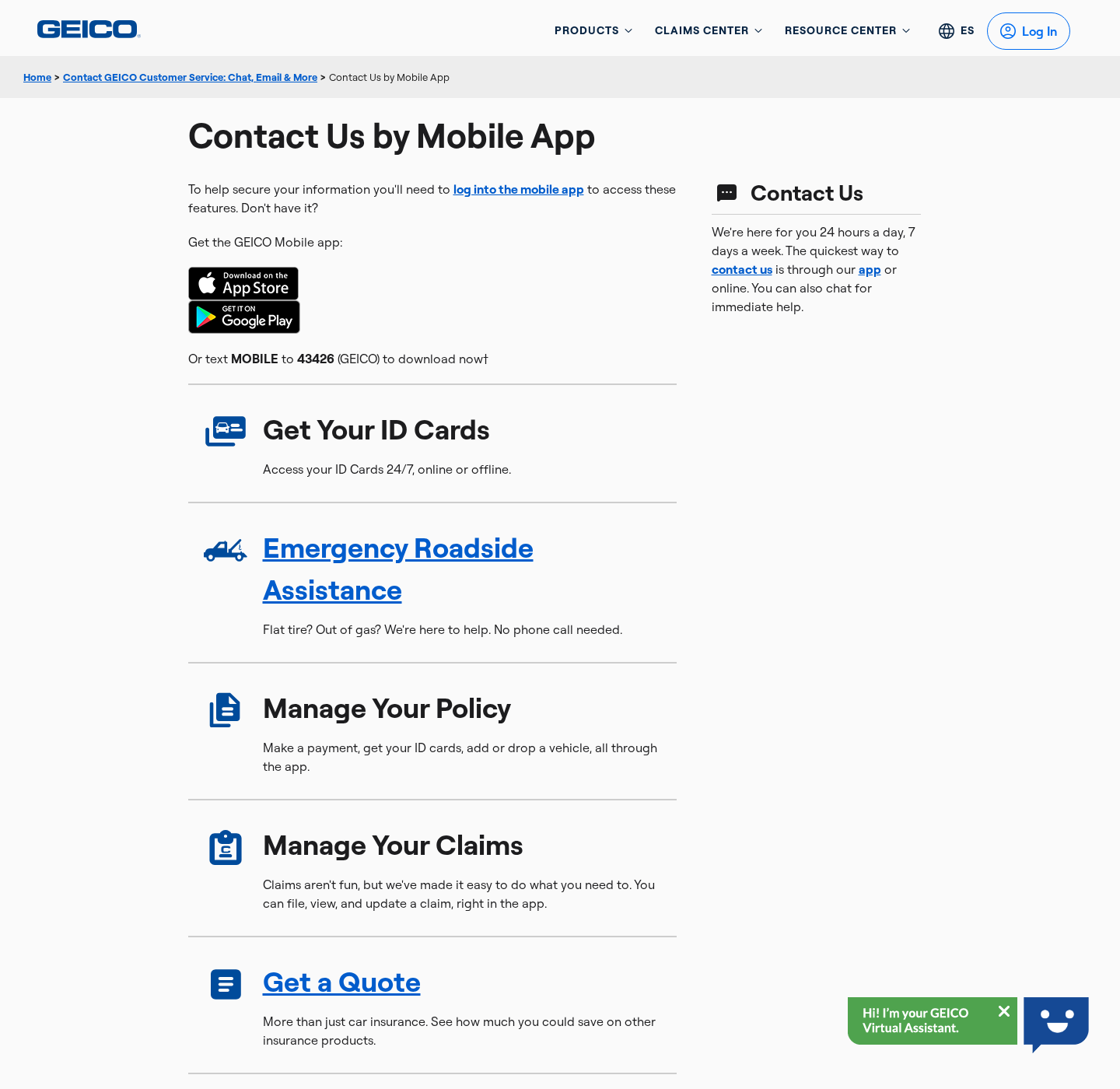
A message from 43426 offers a way to download GEICO Mobile. That can sound helpful when your car will not start and you need assistance quickly.
Before you use it, separate two requests: getting the app and dispatching a tow. Only the second one tells you whether anyone is coming.
Overview
GEICO documents 43426 for an app download text
- GEICO’s mobile page lists 43426 as a way to request its app information.
- Its roadside page also documents texting ROADSIDE to that number to receive an app link.
- The download reply does not establish that a roadside provider was assigned.
You can request and track help without trusting a surprise link
- Start with your installed GEICO app or open GEICO’s roadside page separately.
- Verify your vehicle, location and service before confirming a request.
- Look for the request record or ask the dispatcher which provider is responding.
A genuine coverage limit and a suspicious demand require different checks
- Roadside coverage can have conditions for mileage, service type and additional costs.
- Ask GEICO to confirm any charge or destination change through the original dispatch channel.
- If you paid an unverified party, keep the invoice and contact your payment provider.
The safest place to start is the identifier on your own policy or dispatch record. It tells you more than the logo on a text or tow truck.
How to Get Help Without Depending on a 43426 Text
Step 1: Get to a safe situation and choose a verified route
If people are in immediate danger, call local emergency services. Roadside assistance is not a substitute for help with a crash, injury or unsafe traffic situation.
Once you can use your phone safely, open the GEICO Mobile app you already installed. If you do not have it, go directly to GEICO’s own site.
The official Emergency Roadside Service page offers an online request route as well as app instructions. GEICO also publishes a telephone option.
If you cannot reach the website, use the number on your existing insurance card or policy. Do not depend on an ad result that looks similar to the insurer’s site.
GEICO lists MOBILE and ROADSIDE in separate instructions for requesting an app link. You can avoid a surprise link by getting the app through its official listing instead.
Receiving the requested download text just gives you a way to get the app. It has not told the insurer where you are, which vehicle needs help or what happened.
Step 2: Check the actual roadside request before confirming it
In GEICO Mobile, look for Roadside Assistance or Emergency Roadside Service. You can also begin from the roadside request option on GEICO’s verified web page.
Select the vehicle and describe whether you need a tow, a jump, a tire change, or another available service. Do not guess if you are unsure what is wrong.
Confirm the location shown before submitting it. A highway exit, parking garage level or direction of travel can be more useful than a map pin with no context.
If the map appears to show the wrong side of a divided road, tell the dispatcher from a safe position. Do not move into traffic to match the map.
Check whether the service is available under the policy for that vehicle. If the screen cannot confirm coverage or you cannot sign in, ask GEICO before starting another request.
If the app requires a destination for a tow, identify the facility you actually want and ask whether it falls within your policy.
A nearby branch name may not be enough.
Look for the submitted request and the status shown in the app. GEICO describes a service tracker for checking where things stand after an actual request.
Step 3: Verify who is coming and what they were asked to do
A provider can be a local company working for GEICO, rather than a vehicle with the insurer’s logo. Compare it with the contact or assignment from the verified request.
Ask the dispatcher for the provider details or a case reference when you cannot match the arrival. Do this before accepting a tow or handing over your vehicle.
If someone arrives first and claims the other provider canceled, check the real request. A stranger’s explanation does not update the insurer’s dispatch record.
Confirm whether the service is a tire change, jump, tow or something else. If the response changes after arrival, ask how that affects coverage and who approves it.
Give dispatch the destination’s name and address. The nearest suitable repair facility and your preferred shop may be different, and that can affect extra mileage.
If service is taking longer than expected, check the status with the verified dispatcher. Repeatedly submitting requests can make it harder to tell which one is active.
What the App Link Does Not Tell You About Coverage
Limits depend on the service you need
GEICO lists towing, jump starts, tire changes with a working spare, certain lockout services, some winching and fuel delivery as examples. Your policy determines which services are covered.
A covered delivery service does not necessarily include the price of the fuel. A covered tire change does not necessarily buy you a replacement tire.
The service that gets your vehicle moving is different from the repair a shop performs later. Ask which part is being billed before giving anyone payment information.
A towing limit can depend on distance and the destination. Check the applicable policy and ask what an additional mile or alternative destination would cost.
If you cannot confirm whether the response is covered, ask the verified dispatcher what you would owe before authorizing nonurgent extra work. Do not rely on a text summary.
Questions about money should follow the dispatch record
A text saying you need a deposit does not establish what the policy requires. Open the real request or call GEICO to verify the work and any cost.
If a provider tells you a charge is for an uncovered item, ask for the item and amount in writing. Compare it with what the insurer confirms.
Do not pay by gift card or send money to a person who appeared in a separate message. Use a payment route you can trace to the verified service.
If you arrange your own tow, keep the original invoice and service details. GEICO describes a reimbursement request process, but payment remains subject to coverage limits.
Distinguish a reimbursement decision from a demand for a fee to release it. Use the insurer’s existing claim route to check progress or submit supported receipts.
A genuine driver’s callback does not need to compromise your account
A driver may need directions or a description to find the right vehicle. That does not give them a reason to ask for your app password or financial verification code.
Share the location and vehicle details needed for the assignment after verifying the contact. Do not send a photo of your entire policy or driver’s license through an unsolicited chat.
If your location changes after you submit a request, update it with the dispatcher rather than telling an unverified caller. That keeps the location attached to the correct case.
You can ask whether the provider has an estimated arrival or company name in the dispatch record. It is reasonable to double-check when another truck shows up.
If You Never Requested GEICO Roadside Help
An unexpected app message can be misdirected or part of an imitation. Do not order roadside assistance just to see whether it belongs to you.
If someone else uses the insured vehicle, contact them through your normal number. Verify whether they requested service and whether your number is on the policy.
If the message mentions a disabled vehicle you do not recognize, leave its link unopened. Ask GEICO whether any request exists before sharing the details.
Do not initiate a policy change based on a text about service coverage. Open your policy independently and check what is already active for the vehicle.
If the real app shows nothing and nobody in your household requested help, do not give the sender a location.
A follow-up offer to find your vehicle does not need a response.
If you cannot tell whether a notice relates to an existing request, report it to the verified insurance contact.
Include the time and the claimed service without sharing a live code.
What to Check When a Tow Is Already on the Way
As soon as it’s safe, write down the assistance request number and the pickup location given to dispatch. A landmark can help if a road has more than one entrance.
Ask how you will receive updates and what information will identify the assigned provider. Confirm that you can contact dispatch if a number or business name doesn’t match.
If a driver appears before you receive confirmation, don’t decide from the truck’s markings alone. Check the provider through the dispatch route you used to request assistance.
When an expected driver arrives, agree on the destination before the vehicle is loaded. A breakdown near your home and a crash far from home may involve different arrangements.
Ask whether the tow is being arranged through your insurance or billed directly to you. If any amount is your responsibility, ask what service the amount covers.
Confirm whether a different repair shop would change the cost before asking the driver to take you there. A quote for one location doesn’t automatically apply to another.
If you choose a service yourself because waiting isn’t practical, document why you did so. Don’t assume personal payment will be reimbursed under every policy.
Before paying, ask the provider for an itemized invoice with the service date and destination. Keep that with the insurer’s request number or your notes about calling for help.
If the roadside request was canceled, check with dispatch rather than arranging another driver through a new text. Confirm whether any provider is still assigned before accepting a tow.
After the vehicle has been delivered, verify its location with the facility you selected. If you can’t locate it, contact the verified dispatch service and ask for the provider record.
These checks are for the parts of the request you can control.
If anyone is injured or you are in immediate danger, contact emergency services instead of working through billing questions.
Keep personal documents and details of your insurance policy out of unsolicited text threads. Provide only the information the verified provider needs to identify your authorized request.
What to Do If a GEICO Text or Tow Request Seems Wrong
- Prioritize immediate safety, then use the existing GEICO app, insurance card or official site. Leave an unsolicited download or dispatch link unopened.
- Check whether your vehicle and location match a live roadside request. If you cannot see one, confirm with the verified dispatcher before accepting assistance.
- Ask who sent the provider and what service was assigned. Confirm any destination change or charge with the insurer before authorizing it.
- Keep a dispatch number, itemized invoice and original proof of payment if you hired a provider. Ask the insurer how reimbursement applies to that request.
- If you entered an insurance password on an unverified site, reset it through the official account. Tell GEICO about recent changes or requests you did not make.
- If you sent money or card information to an unverified party, contact your issuer promptly. Preserve the receipt and message with sensitive information hidden in copies.
You do not need to share an account code with someone who offers to move you up in the dispatch queue.
Use the same request record to ask about the actual delay.
If a tow provider appears before you know what the insurer assigned, do not get into an argument at the roadside.
Move the verification to the dispatcher when it is safe.
Frequently Asked Questions
Is 43426 actually used by GEICO?
GEICO documents it for getting a link to GEICO Mobile and related help. That does not make an unsolicited text proof of a particular roadside dispatch.
Does texting ROADSIDE send a tow truck?
The documented reply gives you a link to download the app. You still need to submit and confirm an actual roadside request through a verified route.
How do I know a local tow company was assigned?
Check the service status or ask the dispatcher that received your actual request. Compare the provider and service with what the insurer tells you.
Can a legitimate roadside visit still cost me something?
Coverage can exclude fuel purchases, extra towing distance, repair parts or work beyond the applicable limits. Verify the charge and reason with GEICO rather than paying an unexpected link.
Does a roadside request mean a repair shop will fix the vehicle?
Roadside service can help get the vehicle started or get it to a facility. A shop’s repair authorization and invoice are separate from the insurer’s dispatch.
What if I paid for a tow myself?
Keep the original roadside invoice and proof of payment. Ask GEICO about its documented reimbursement process and the policy conditions for the service you used.
The Bottom Line
Treat 43426 as a documented GEICO app route, not confirmation that a driver is coming. Request help and verify the assigned provider through the insurer’s actual dispatch process.
If a text asks for an unexpected payment, confirm the service and coverage independently before paying. If you already paid an unknown party, contact the issuer and keep the invoice.

Join the discussion
0 commentsShare your experience or ask a question about this article.
Discussion
Start the conversation
Have a question or something useful to share? Add the first comment.